Your public IP: checking...
``` The span shows the visitor's address, or "unavailable" if the call fails. getip suits this client-side job because there's no key to leak; if you send the value to your backend, keep it out of security decisions. For location data in the browser, see [IP geolocation in JavaScript](https://ipgeolocation.io/tutorials/ip-geolocation-in-javascript). * * * ### 4. Go Go 1.18 added `net/netip`, which parses and validates the address in one call. Save this as `main.go`: ```go package main import ( "encoding/json" "fmt" "net/http" "net/netip" "os" "time" ) const getipURL = "https://api.ipgeolocation.io/v3/getip" func getPublicIP() (netip.Addr, error) { client := &http.Client{Timeout: 10 * time.Second} resp, err := client.Get(getipURL) if err != nil { return netip.Addr{}, fmt.Errorf("request failed: %w", err) } defer resp.Body.Close() if resp.StatusCode != http.StatusOK { return netip.Addr{}, fmt.Errorf("unexpected status: %s", resp.Status) } var body struct { IP string `json:"ip"` } if err := json.NewDecoder(resp.Body).Decode(&body); err != nil { return netip.Addr{}, fmt.Errorf("decoding response: %w", err) } addr, err := netip.ParseAddr(body.IP) if err != nil { return netip.Addr{}, fmt.Errorf("getip returned an unexpected value: %q", body.IP) } return addr, nil } func main() { ip, err := getPublicIP() if err != nil { fmt.Fprintln(os.Stderr, "Could not get the public IP:", err) os.Exit(1) } fmt.Println(ip) } ``` `go run main.go` prints the address. An HTTP error prints `Could not get the public IP: unexpected status: ...` and exits with status 1. * * * ### 5. PHP This uses PHP's curl extension (`php -m | grep curl` confirms it's installed). Save it as `get-public-ip.php`: ```php true, CURLOPT_TIMEOUT => $timeoutSeconds, CURLOPT_FAILONERROR => true, // treat HTTP 4xx and 5xx as errors ]); $body = curl_exec($ch); if ($body === false) { throw new RuntimeException('getip request failed: ' . curl_error($ch)); } $data = json_decode($body, true); $ip = is_array($data) ? ($data['ip'] ?? null) : null; if (!is_string($ip) || filter_var($ip, FILTER_VALIDATE_IP) === false) { throw new RuntimeException('getip returned an unexpected value'); } return $ip; } try { echo getPublicIp(), PHP_EOL; } catch (RuntimeException $e) { fwrite(STDERR, 'Could not get the public IP: ' . $e->getMessage() . PHP_EOL); exit(1); } ``` `php get-public-ip.php` prints the address. An HTTP error prints `Could not get the public IP: getip request failed: ...` and exits with status 1. * * * ## Three jobs for getip * * * ### 1. Find your server's outbound IP for an allowlist When a partner asks which IP your requests come from, run the plain-text curl command on the machine that sends them (a server, container, or CI step), not your laptop. Check more than once: NAT gateways without a fixed IP, CI runners, and serverless platforms can switch addresses, which breaks an allowlist built from one sample. For production, the IPGeolocation.io team recommends static outbound IPs where your platform offers them, with getip to confirm which one your traffic uses. * * * ### 2. Detect when your public IP changes For dynamic DNS or a home lab, this script acts only when getip's answer differs from the last saved value: ```bash #!/usr/bin/env bash # Run from cron, for example every 10 minutes: */10 * * * * bash /path/to/check-ip.sh set -euo pipefail STATE_FILE="${HOME}/.last_public_ip" # --retry waits longer between attempts after a timeout or a temporary HTTP error if ! new_ip=$(curl -sS --fail --max-time 10 --retry 3 \ "https://api.ipgeolocation.io/v3/getip?output=text"); then echo "getip failed; keeping the last known IP" >&2 exit 1 fi # Accept only a dotted-quad value, never an error page if [[ ! "$new_ip" =~ ^([0-9]{1,3}\.){3}[0-9]{1,3}$ ]]; then echo "unexpected response from getip" >&2 exit 1 fi old_ip=$(cat "$STATE_FILE" 2>/dev/null || true) if [[ "$new_ip" != "$old_ip" ]]; then echo "Public IP changed from ${old_ip:-unknown} to $new_ip" # Update your DNS record or allowlist here, then save the new value printf '%s' "$new_ip" > "$STATE_FILE" fi ``` We suggest polling every 5 to 15 minutes, depending on how fast you need to react. A failed call never counts as a change: curl retries with growing waits, the script keeps the last known IP, and its non-zero exit lets your monitoring alert you. The first run prints`Public IP changed from unknown to 203.0.113.24`; later runs stay quiet until the address moves. 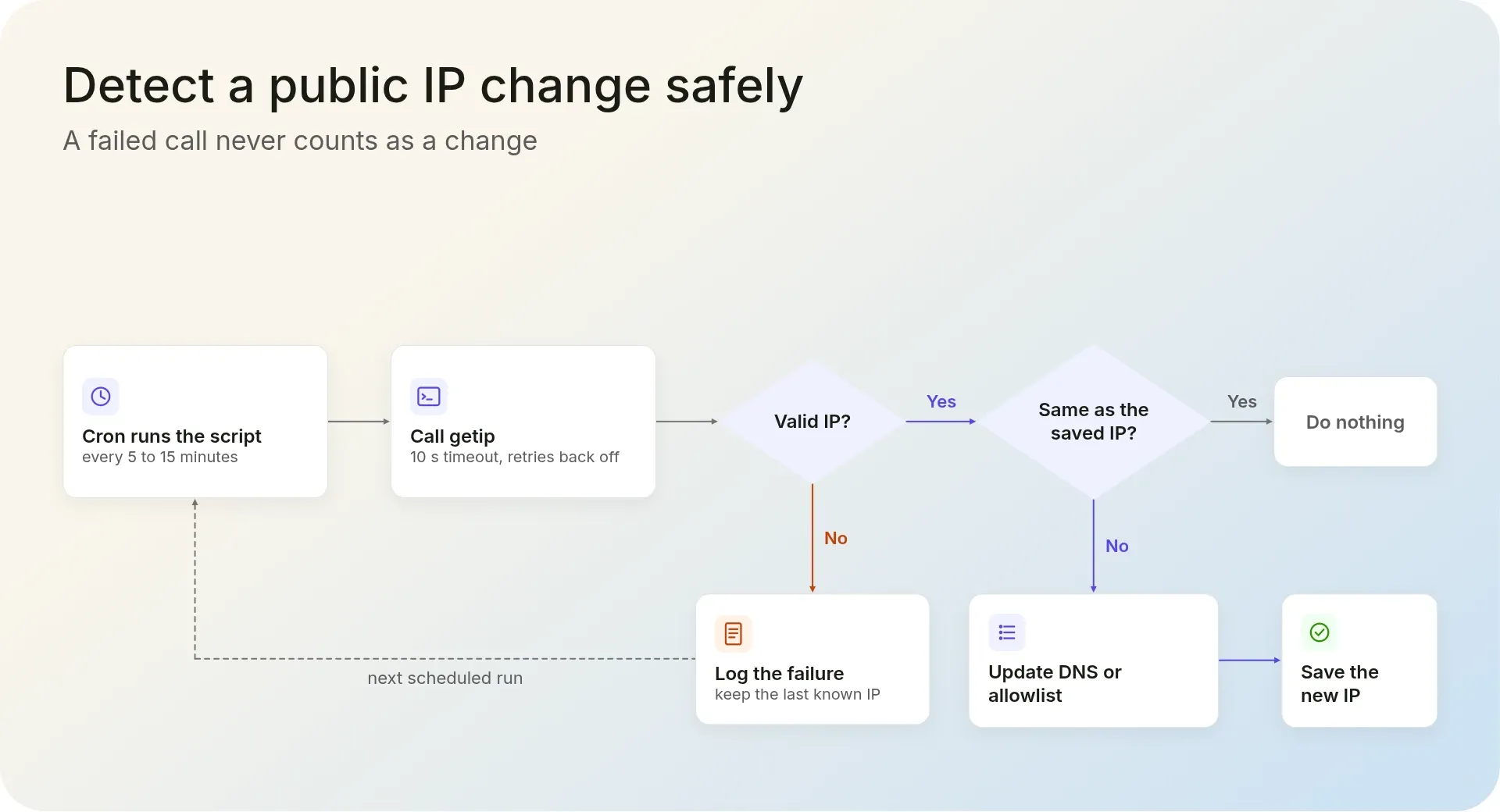 * * * ### 3. Check that a proxy or VPN is working Call getip directly, then through the proxy, and compare. `--proxy-user` Passes the proxy login; reading it from environment variables keeps the password out of your shell history: ```bash # Your address without the proxy curl -sS --fail --max-time 10 "https://api.ipgeolocation.io/v3/getip?output=text"; echo # The same request through the proxy curl -sS --fail --max-time 10 \ --proxy proxy.example.com:8080 \ --proxy-user "$PROXY_USER:$PROXY_PASS" \ "https://api.ipgeolocation.io/v3/getip?output=text"; echo ``` Without a scheme, curl treats the proxy address as an HTTP proxy. For a SOCKS5 proxy, use `--proxy socks5h://proxy.example.com:1080` with the same `--proxy-user` option; the `h` lets the proxy resolve the hostname. A wrong password makes curl stop with an error instead of printing an address. For a VPN, run the first command before and after connecting. An unchanged address usually means the proxy exits through your own public IP, for example because it runs on your network. A new address shows the request went through, though not where that exit is located. The IP Geolocation API answers that, and its [security data](https://ipgeolocation.io/ip-security-api.html) flags VPN, proxy, and Tor exits with a threat score. * * * ## From your IP to what it reveals When you need more than the address, [IPGeolocation.io's IP Geolocation API](https://ipgeolocation.io/ip-location-api.html) returns what it reveals. [Call `/v3/ipgeo` without an `ip` parameter](https://ipgeolocation.io/documentation/ip-location-api.html), with your API key in `IPGEO_API_KEY`, and it looks up the caller's IP: ```bash curl -sS --fail --max-time 10 "https://api.ipgeolocation.io/v3/ipgeo?apiKey=$IPGEO_API_KEY" ``` The response starts with the same `ip` field, followed by objects such as `location`, `asn`, and `time_zone`. A missing or wrong key returns HTTP 401. The same endpoint can return geolocation, security, network and ASN, company, abuse contact, time zone, and user agent data, so one call can show where an address is, what risk signals it carries, and who runs its network. Locations are built from multiple independent signals, including active measurements, that are cross-checked and refreshed continuously. A standard lookup costs 1 credit, and security data adds 2. The free plan's 1,000 credits a day cover location, country metadata, currency, ASN basics, and time zone; security, network, company, abuse contact, and user agent data in this response are on paid plans, as the [pricing page](https://ipgeolocation.io/pricing.html) shows. Our recommendation: use getip when you need only the address, and call `/v3/ipgeo` directly when you need data about it. Keep the API key on your server ([how to secure your API key before production](https://ipgeolocation.io/tutorials/secure-api-key-before-production)); on paid plans, [Request Origin](https://ipgeolocation.io/documentation/api-authentication.html) lets browser code call `/v3/ipgeo` without exposing it. 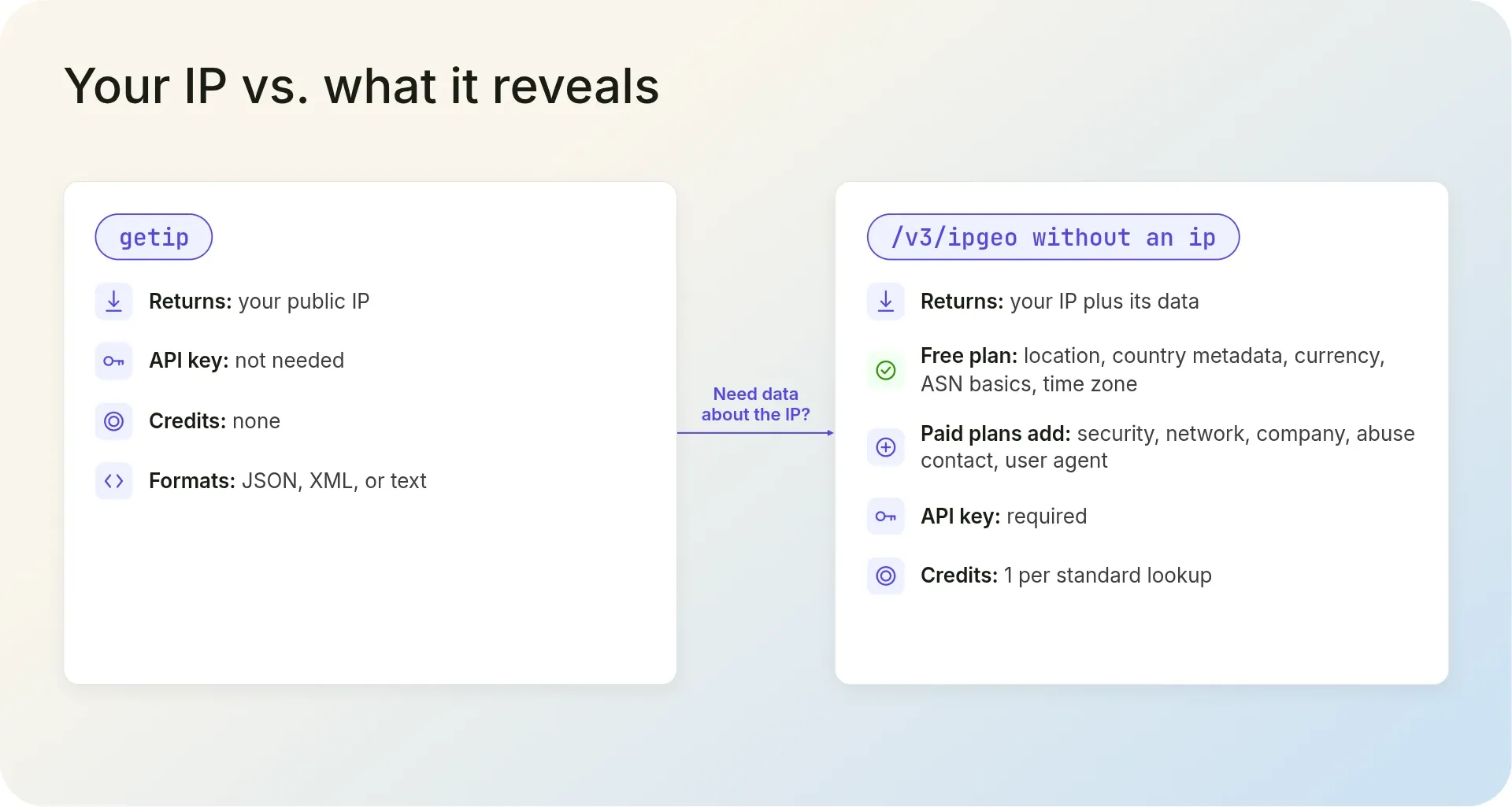 ## Frequently asked questions ### Is the getip API free to use? **Answer:** Yes. IPGeolocation.io's getip endpoint needs no API key or account, uses no credits, and has no rate limit. It runs under the API's 99.99% uptime SLA. ### Why does getip return my server's IP instead of my visitor's? **Answer:** Because your server made the request. IPGeolocation.io's getip returns the public IP of whatever machine calls it, so a backend call gets the backend's outbound IP unless the request carries a forwarding header. Read a visitor's IP from the incoming request instead. ### How do I get my public IP with curl? **Answer:** Run `curl -sS --fail --max-time 10 "https://api.ipgeolocation.io/v3/getip?output=text"`. With `output=text`, IPGeolocation.io's getip returns only your public IP address, ready for a shell variable. Leave the parameter out for JSON, or use `output=xml` for XML. ### Can I call getip from browser JavaScript? **Answer:** Yes. IPGeolocation.io's getip answers `fetch()` calls from web pages on any site without an API key, and in the browser it returns the visitor's public IP. Use it for display or personalization, not security decisions. ### Does getip return location data? **Answer:** No. IPGeolocation.io's getip returns only the IP address. For its location, ASN, and time zone, call the `/v3/ipgeo` endpoint without an `ip` parameter; it looks up the caller for 1 credit per standard lookup. * * * ## Next steps [Get a free IPGeolocation.io API key](https://app.ipgeolocation.io/signup) (1,000 credits a day, no credit card) and run the caller lookup on `/v3/ipgeo`, or start with [Getting Started with the IP Geolocation API](https://ipgeolocation.io/tutorials/getting-started-with-ip-geolocation-api). ### Related Tutorials [](https://ipgeolocation.io/tutorials/check-ip-for-vpn-proxy-tor) [Check if an IP Is a VPN, Proxy, or Tor Exit Node](https://ipgeolocation.io/tutorials/check-ip-for-vpn-proxy-tor) Check any IP for VPN, proxy, residential proxy, Tor, and relay flags with a browser lookup, one IPGeolocation.io API call, or the Tor Project's own exit list, then decide what each kind of match deserves. Posted on October 27, 2026 By Abdul Mateen [Read More](https://ipgeolocation.io/tutorials/check-ip-for-vpn-proxy-tor) [](https://ipgeolocation.io/tutorials/show-prices-in-local-currency-based-on-ip) [Show Prices in Local Currency Based on IP](https://ipgeolocation.io/tutorials/show-prices-in-local-currency-based-on-ip) Detect each visitor's currency with one IPGeolocation.io lookup, convert your base price with daily exchange rates, and format it for their locale. Runnable Node.js and Express code, with a switcher that always wins. Posted on October 22, 2026 By [Daud Ahmad](https://www.linkedin.com/in/daudahmad0303) [Read More](https://ipgeolocation.io/tutorials/show-prices-in-local-currency-based-on-ip) [](https://ipgeolocation.io/tutorials/add-geolocation-to-shopify) [How to Add Geolocation to Your Shopify Store](https://ipgeolocation.io/tutorials/add-geolocation-to-shopify) How to route Shopify visitors to the right market by country, and how to decide whether you need a geolocation app or Shopify's built-in redirect. Posted on July 14, 2026 By [Anwar Ahmed](https://www.linkedin.com/in/anwar-ce/) [Read More](https://ipgeolocation.io/tutorials/add-geolocation-to-shopify) [](https://ipgeolocation.io/tutorials/ip-geolocation-in-javascript) [How to Get IP Geolocation in JavaScript (Node + Browser)](https://ipgeolocation.io/tutorials/ip-geolocation-in-javascript) Get IP geolocation in JavaScript the right way: the official SDK in Node.js, the correct browser pattern without exposing your key, the visitor's real IP via Express and Next.js, and the location, timezone, currency, ASN, VPN, proxy and threat data the API returns. Posted on June 24, 2026 By Mudassar Tariq [Read More](https://ipgeolocation.io/tutorials/ip-geolocation-in-javascript) [](https://ipgeolocation.io/tutorials/ip-geolocation-in-php) [How to Get IP Geolocation in PHP (API Tutorial)](https://ipgeolocation.io/tutorials/ip-geolocation-in-php) Get IP geolocation in PHP with the official IPGeolocation.io library: install with Composer, run your first lookup, and read the real visitor IP in vanilla PHP and Laravel. Links to optional VPN/proxy, abuse contact, and bulk lookups on paid plans. Posted on June 22, 2026 By Mudassar Tariq [Read More](https://ipgeolocation.io/tutorials/ip-geolocation-in-php) [](https://ipgeolocation.io/tutorials/ip-geolocation-in-python) [How to Get IP Geolocation in Python (API Tutorial)](https://ipgeolocation.io/tutorials/ip-geolocation-in-python) Get IP geolocation in Python with the official IPGeolocation.io library: single lookups, async requests, and real visitor IP handling in Flask and FastAPI, plus optional bulk lookup and VPN/proxy detection examples. Posted on June 19, 2026 By Mudassar Tariq [Read More](https://ipgeolocation.io/tutorials/ip-geolocation-in-python)