

The traffic hitting your servers in 2026 looks nothing like it did even two years ago. Residential proxies route fraud through real ISP connections. Apple's iCloud Private Relay and Google's IP Protection mask millions of legitimate users. VPN providers rotate IPs faster than static blocklists can keep up. And the number of API providers claiming to detect all of it keeps growing.
If you're responsible for fraud prevention, content licensing, access control, or compliance, you've probably realized that picking a VPN and proxy detection API is not a simple vendor comparison. The wrong choice means either missed threats or blocked legitimate users, and both cost real money. What follows is a practical evaluation framework: eight criteria to test any provider against, a method for running your own head-to-head comparison, and the red flags worth walking away from.
TL;DR: What to Look for in a VPN and Proxy Detection API
- Do not compare vendors on a single is_proxy flag. A good API should distinguish VPNs, datacenter proxies, residential proxies, Tor, privacy relays, bots, and cloud-hosted IPs separately.
- Look for confidence scores, provider names, threat scoring, and last-seen signals alongside detection flags.
- The most important test is not headline accuracy. It is whether the API can catch residential proxy traffic without falsely blocking legitimate users on privacy services like iCloud Private Relay or Chrome's IP Protection.
- Apple's Private Relay preserves coarse location. Google's IP Protection has a narrower scope than many people assume. Treating all masked IPs the same is a mistake.
- Run your own controlled IP-set test before choosing a vendor. Self-reported accuracy numbers go stale within days as proxy and VPN providers rotate IPs.
In short: the best detection API is the one that gives you granular, confidence-scored signals across every anonymization category, updated frequently enough that the data reflects what's actually happening on the network right now, not what was true last week.
Why 2026 Is a Different Landscape for VPN and Proxy Detection
Three shifts have made this harder than it used to be.
1. The Residential Proxy Problem
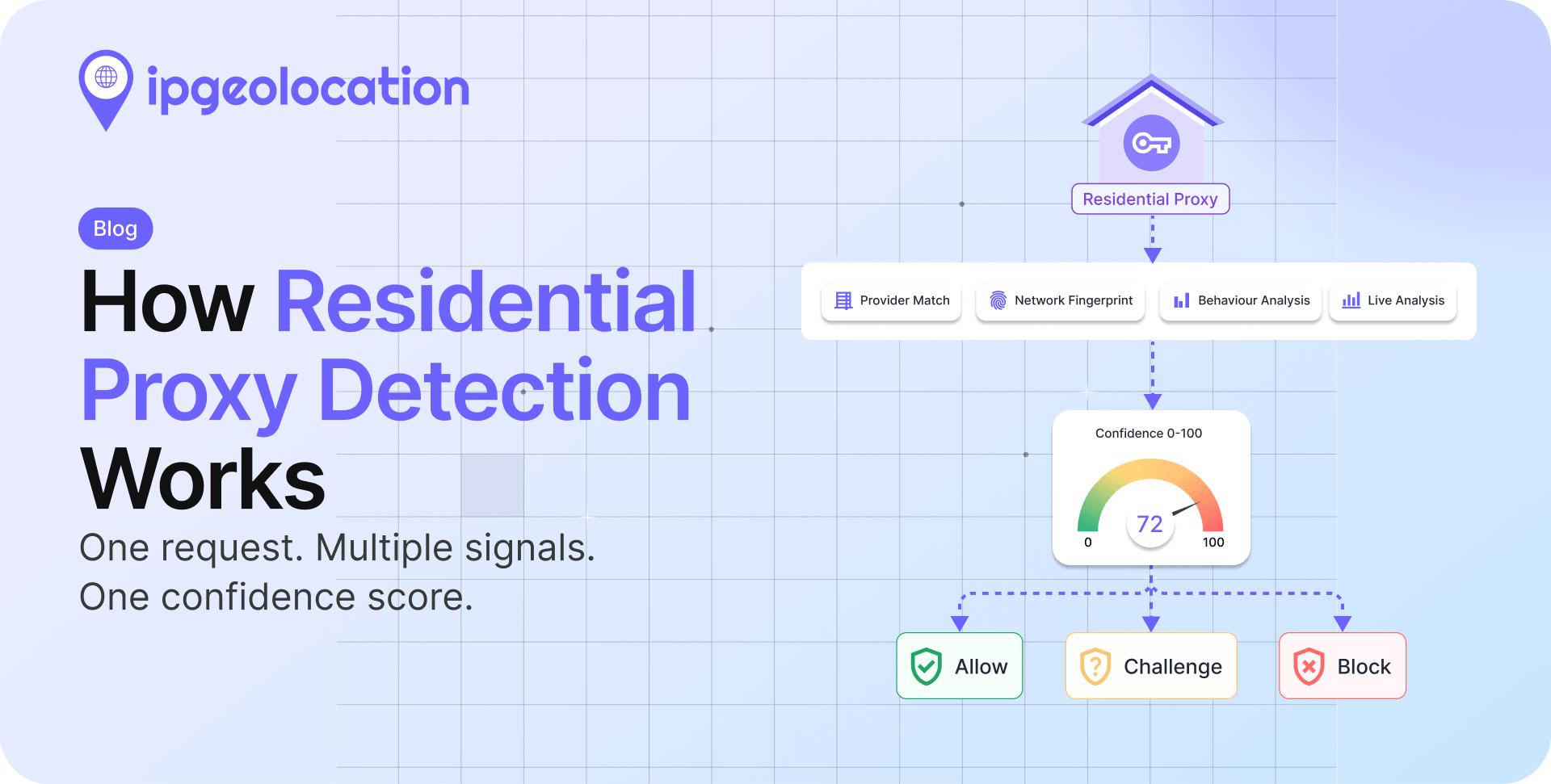
Residential proxies are the single biggest challenge in anonymous traffic detection today. Unlike datacenter proxies that use hosting provider IPs (which are relatively easy to flag), residential proxies route traffic through real consumer ISP connections. The IP address looks like it belongs to a regular home internet user, because it does.
Services like IPRoyal, 922Proxy, and dozens of others now offer millions of residential proxy endpoints globally. For fraud operators, these proxies are the tool of choice because traditional IP reputation databases have no prior record of them being used for anonymization. The IP was clean yesterday. Today, someone is routing anonymous traffic through it. Tomorrow, it might be clean again.
Any detection API that relies only on static IP lists will miss most residential proxy traffic. This is the first thing to test when evaluating providers.
2. Privacy Relays from Apple, Google, and Others
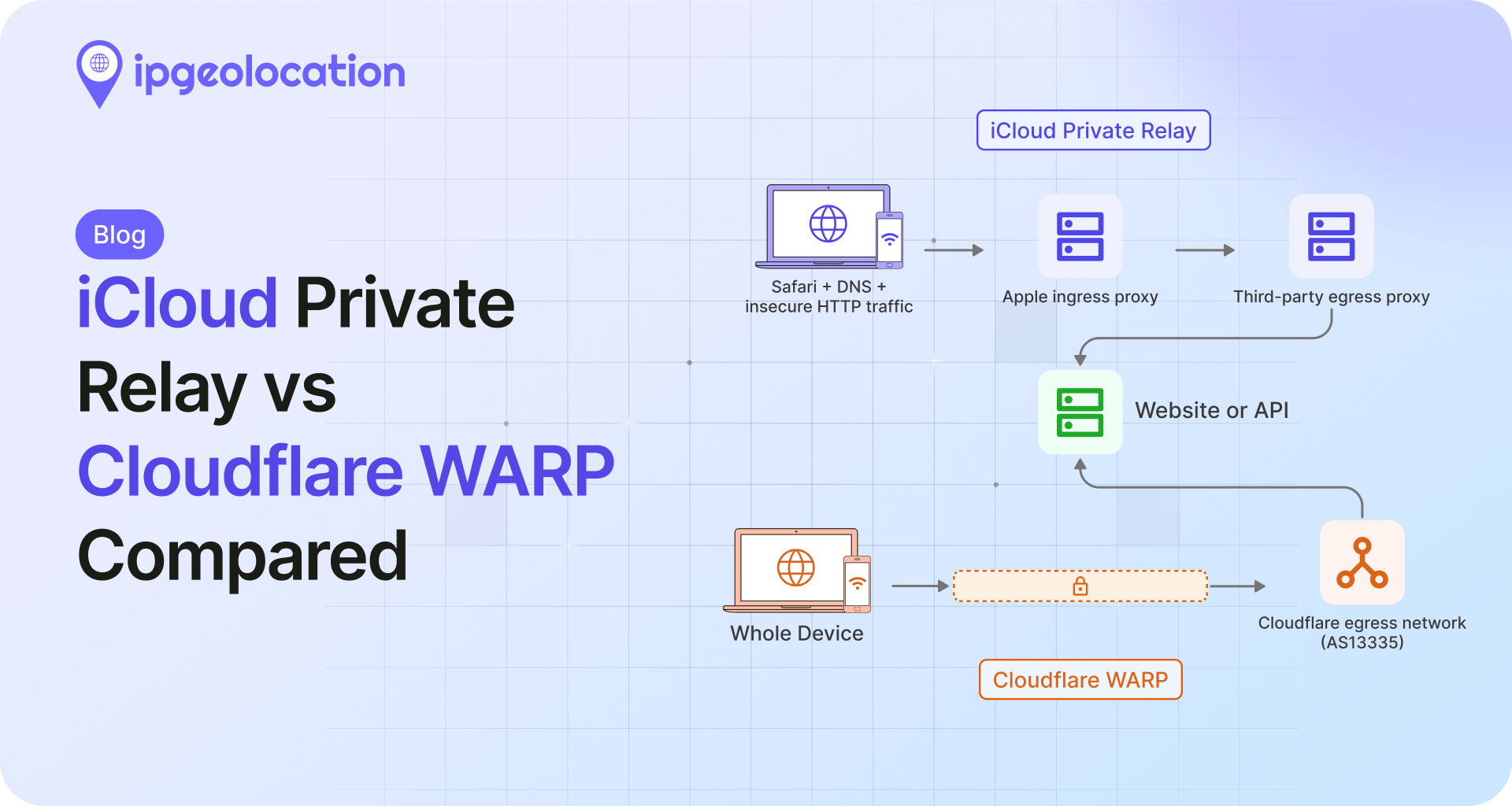
iCloud Private Relay, available to Apple iCloud+ subscribers, encrypts Safari traffic and routes it through two separate relays. The user's real IP is hidden from the destination website, but Apple preserves approximate geographic location, so content localization still works.
Google has been rolling out similar functionality with IP Protection in Chrome.
These relay services create a new category that didn't exist a few years ago: anonymized traffic from legitimate, privacy-conscious users who are not trying to commit fraud. A good detection API needs to identify relay traffic separately from VPN or proxy traffic, so you can apply different policies. Blocking all iCloud Private Relay users as if they're running a VPN would alienate a large chunk of your Apple user base.
3. VPN Obfuscation and Protocol-Level Evasion
VPN providers have gotten better at disguising their traffic. Many now offer obfuscated protocols that make VPN connections look like regular HTTPS traffic, specifically to bypass detection. IP rotation has sped up, with some providers cycling exit IPs every few minutes.
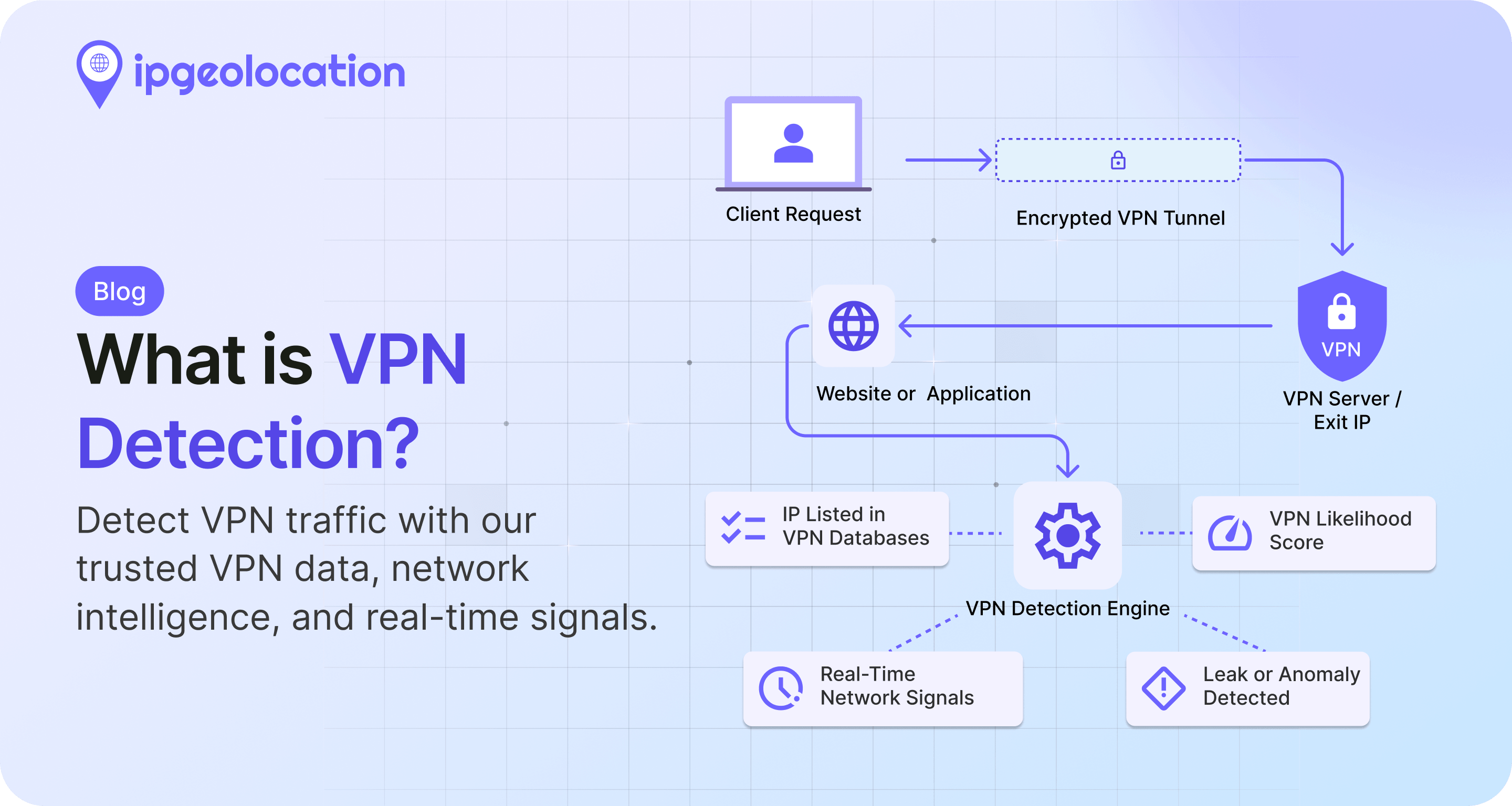
This means detection systems that depend solely on maintaining a list of known VPN server IPs are fighting a losing battle against the fastest-rotating providers. The best detection APIs supplement list-based matching with real-time behavioral analysis of the connection itself.
The Core Evaluation Criteria
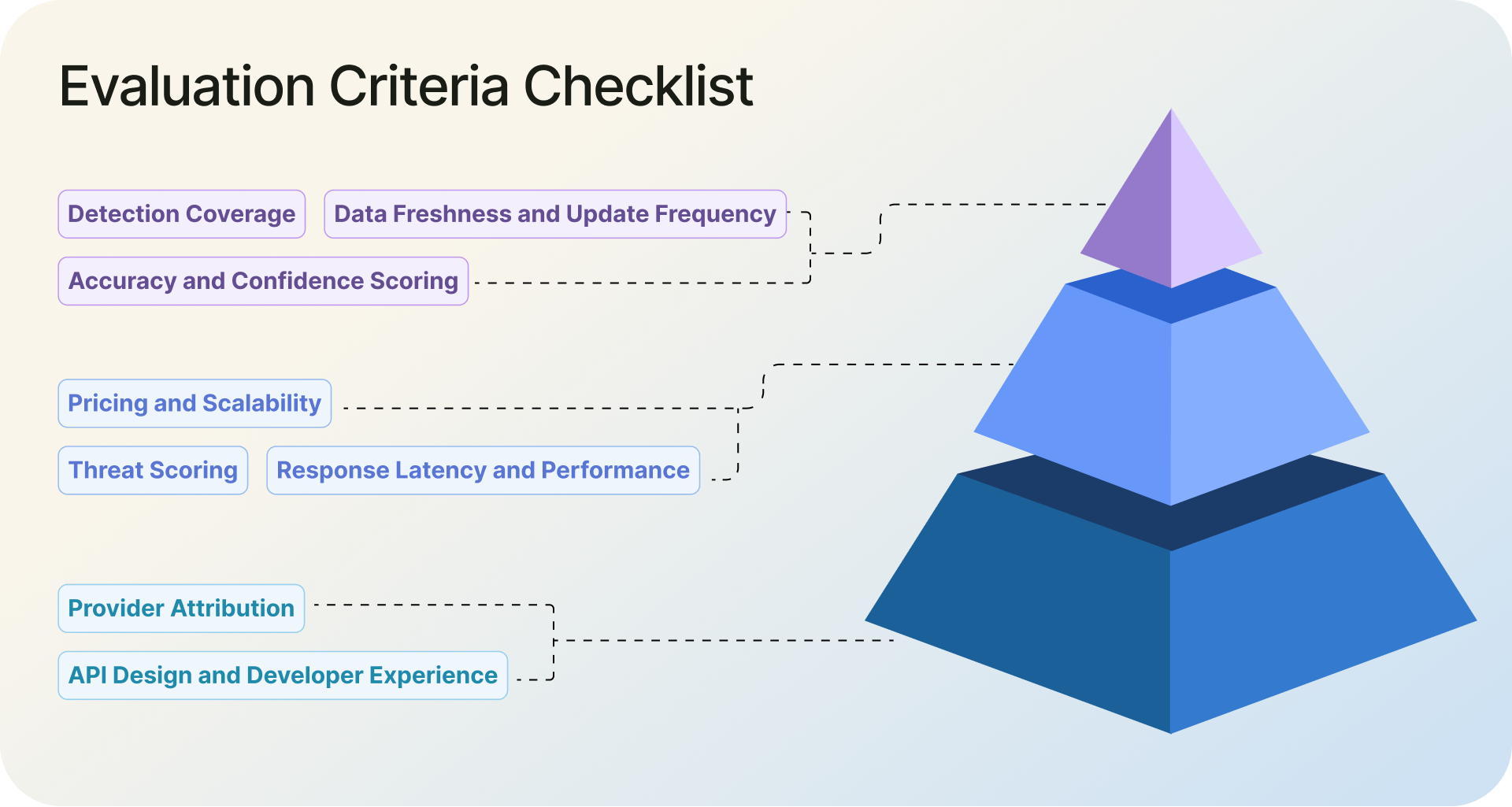
Here are the eight criteria that actually matter when comparing VPN and proxy detection APIs. Test every provider you're considering against each criterion.
1. Detection Coverage: What Types of Traffic Can It Identify?
Start with the most basic question: what can it actually detect?
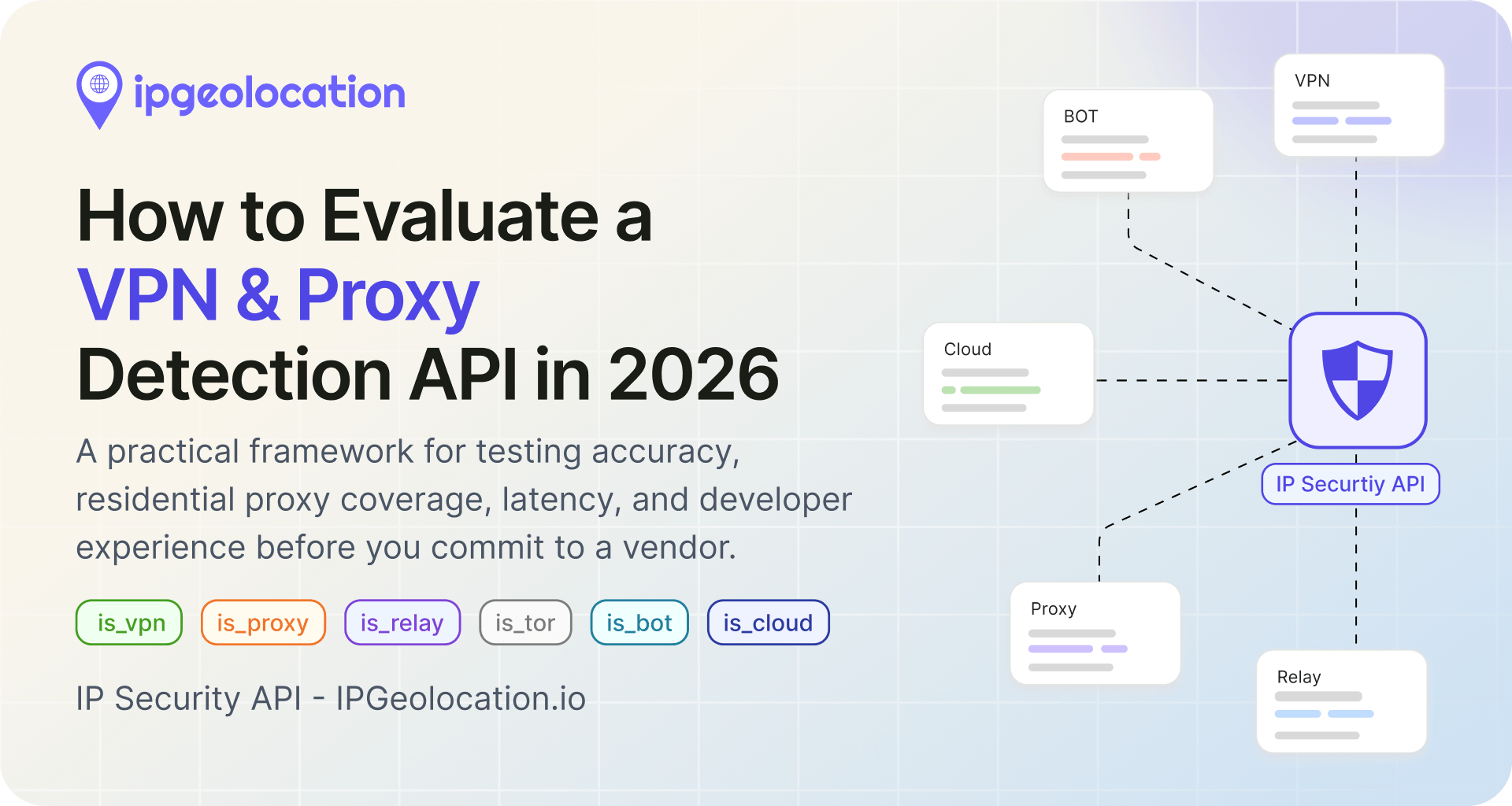
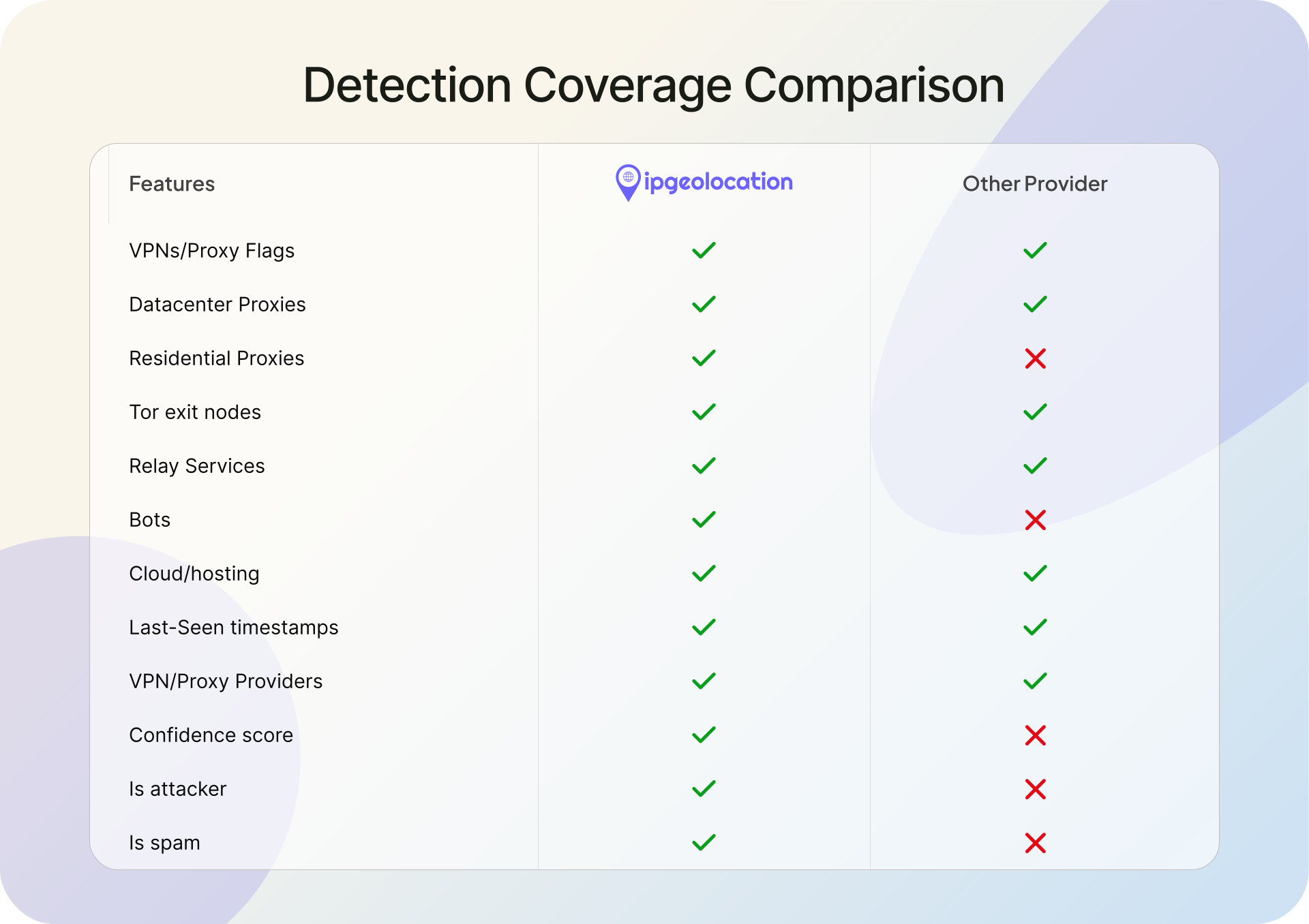
At minimum, a detection API in 2026 should return separate signals for VPNs, datacenter proxies, residential proxies, Tor exit nodes, relay services (like iCloud Private Relay), bots, and cloud/hosting provider IPs. Each of these traffic types carries different risk levels and requires different handling.
Watch out for APIs that return only a single binary flag like is_proxy: true. That tells you nothing about whether the IP is a datacenter proxy (moderate risk), a residential proxy (high risk), or an iCloud Private Relay user (probably low risk). You need granularity to build effective policies.
Residential proxies are the hardest category to get right, because the IPs look identical to normal consumer traffic until you analyze the connection behavior. If a provider can reliably flag those, that tells you their detection goes deeper than database lookups. If they don't even have a residential proxy flag in their response schema, that's a gap you'll feel quickly in production.
2. Accuracy and Confidence Scoring
Every detection API provider will tell you their accuracy is high. The numbers you see on marketing pages are rarely accompanied by methodology disclosures. What dataset was used? How were false positives counted? Were residential proxies included in the test set? And more importantly, when was the test run?
Here's the problem with published accuracy numbers: they decay fast. VPN and proxy providers rotate IPs constantly. An accuracy benchmark run against a set of known VPN IPs today could be outdated within a week as those IPs cycle out and new ones come in. Even if a provider tests rigorously, the ground truth changes underneath them. That's why the most reliable accuracy check is one you run yourself, at the time of evaluation, with IPs you've personally verified. More on that in the evaluation methodology section below.
Beyond running your own test, focus on whether the API returns confidence scores alongside its detection flags. There's a meaningful difference between "this IP is definitely a VPN endpoint with 95% confidence" and "this IP might be a VPN endpoint with 40% confidence." Confidence scores let you set thresholds that match your risk tolerance. A payment gateway might block anything above 70% confidence. A content site might only act on 90%+.
False positives deserve just as much attention as detection rates. Any VPN detection API will have both false positives (flagging clean IPs as anonymous) and false negatives (missing actual VPN or proxy traffic). A provider that catches most threats but regularly misidentifies legitimate users will generate a constant stream of complaints. Ask providers how they handle false positive reduction, and test it yourself with known-clean IPs.
3. Provider Attribution
When an IP is flagged as a VPN or proxy, does the API tell you which provider it belongs to?
It should. A connection through NordVPN and a connection through an unknown botnet proxy both register as "VPN: true," but they carry completely different risk levels. Provider attribution lets your team make proportionate calls instead of treating every flagged IP the same way.
4. Threat Scoring
Static detection flags (VPN: yes/no, proxy: yes/no) are useful but limited. They tell you what something is, but not how risky it is.
A composite threat score, typically on a 0-100 scale, combines multiple signals into a single risk indicator. This lets you build flexible, graduated response policies instead of binary allow/block decisions.
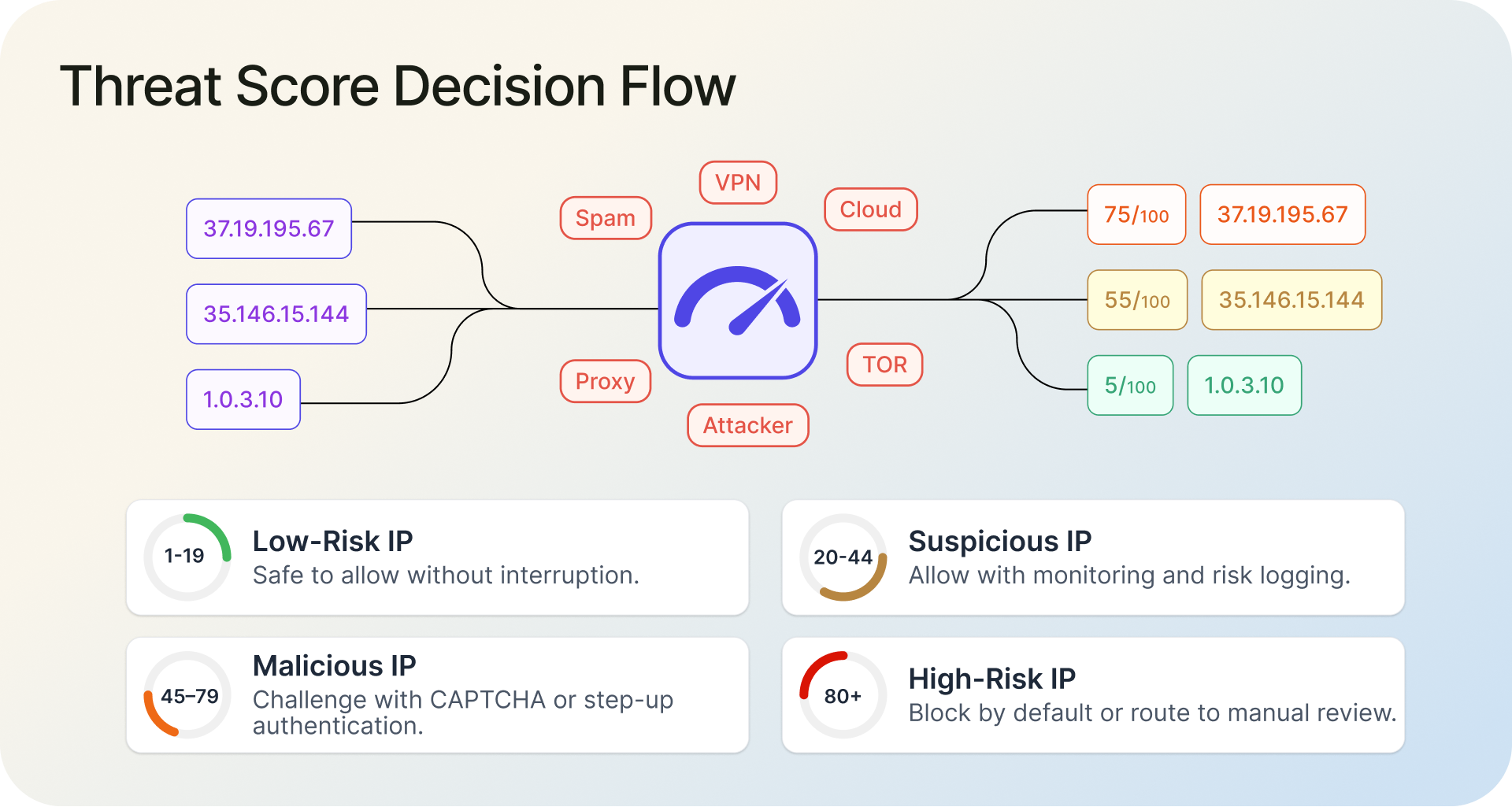
For example, with a 0-100 threat score, you could configure your system to allow traffic scoring 1-19 without friction, add monitoring for 20-44, trigger a CAPTCHA or step-up authentication for 45-79, and hard-block anything above 80. This is far more practical than a flat "this is a VPN, block it" approach, especially when you're dealing with millions of requests where most flagged IPs carry low to moderate risk.
5. Response Latency and Performance
If you're using detection for real-time decisions (login flows, checkout, API gating), latency matters. An API call that takes 300ms adds noticeable delay to user-facing flows.
Most providers in this space advertise sub-50ms response times, and that number has become the practical floor for real-time use cases. Some do better: IPGeolocation.io's public status page, for example, shows a 16ms response time. But advertised and actual are different things. Test latency from your actual infrastructure, not the provider's published numbers. Measure p50 (the median response time, meaning half of requests are faster than this), p95 (the slowest 5% of requests, which shows you the occasional bad experience), and p99 (the slowest 1%, which reveals worst-case spikes). A provider with 20ms median latency but 500ms at the p99 level will cause intermittent slowdowns that are hard to debug.
Also check whether the API supports bulk lookups. If you need to process historical logs, scan signup backlogs, or run batch risk scoring, sending 50,000 individual API calls is impractical. A bulk endpoint that accepts thousands of IPs in a single request is a significant operational advantage.
6. Data Freshness and Update Frequency
One useful field to look for in an API response is a last_seen timestamp that tells you when an IP was last observed acting as a VPN or proxy endpoint. An IP last seen anonymizing traffic one day ago is a much stronger signal than one last seen 30 days ago. If the API doesn't expose this, you have no way to judge whether a flag is current or stale.
That matters because IP intelligence decays fast. VPN providers rotate servers. Proxy networks add and drop endpoints. ISPs reallocate IP blocks. A detection database that was accurate last week can already have blind spots today.
Ask providers directly: how often is the underlying data refreshed? And push for specifics. "Continuously updated" is marketing language. "Hourly crawls of known VPN/proxy sources with daily dataset validation and a 30-day automatic cleanup of unverified IPs" is an answer you can actually evaluate.
7. API Design and Developer Experience
You or your team will be integrating this API into production systems. The developer experience matters.
Look at the response structure. Are the fields clearly named and logically organized? Is there proper documentation with example requests and responses? Are there SDKs or client libraries for your language/framework? How does the API handle errors, rate limits, and edge cases?
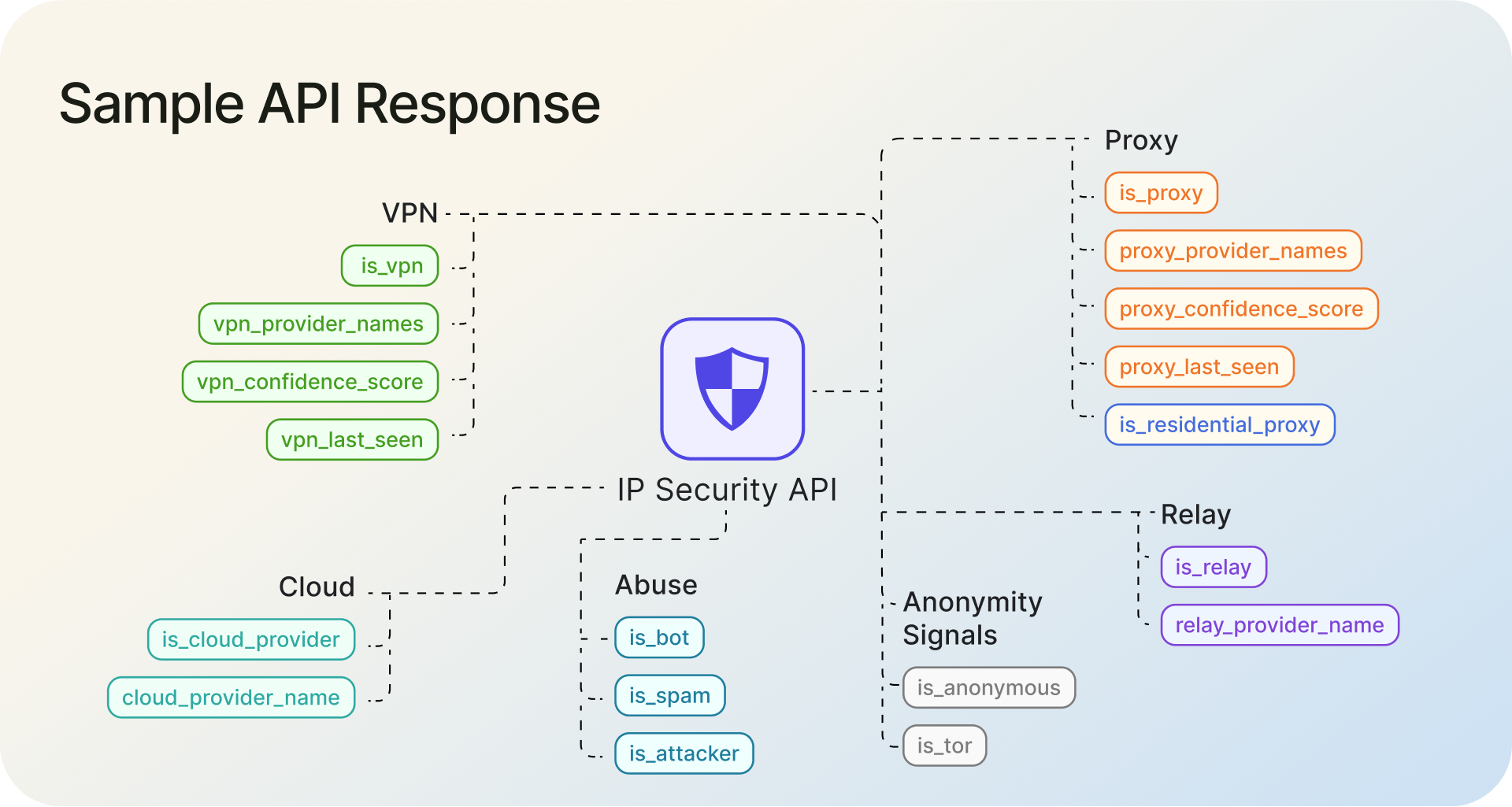
Small things add up. An API that returns flat, clearly named boolean fields (is_vpn, is_proxy, is_residential_proxy, is_tor, is_relay) alongside numeric scores (threat_score, vpn_confidence_score) is faster to integrate and easier to maintain than one that nests everything three levels deep or uses ambiguous field names.
Documentation quality is a surprisingly reliable proxy for overall product quality. If the docs are stale, incomplete, or unclear, the product probably has similar issues.
8. Pricing and Scalability
Detection APIs use several pricing models: per-lookup fees, monthly subscriptions with request caps, and downloadable database licenses. Each has trade-offs.
Per-lookup models are simple but can get expensive at scale. Subscription tiers with defined request volumes work well when your traffic is predictable. Database downloads give you maximum control and zero per-request latency, but you lose real-time freshness and take on the operational burden of hosting and updating the data yourself.
When comparing pricing, look beyond the sticker price of your current volume. Model what happens when traffic doubles or triples. Check overage rates. Check whether premium features like residential proxy detection, threat scoring, or bulk endpoints are included or paywalled behind higher tiers. Some providers include full detection capabilities on all paid plans. Others gate critical features behind enterprise pricing.
How to Run Your Own Evaluation Test
This section matters most in practice because it shows how to test providers for yourself.
1. Step 1: Build a Test IP Set
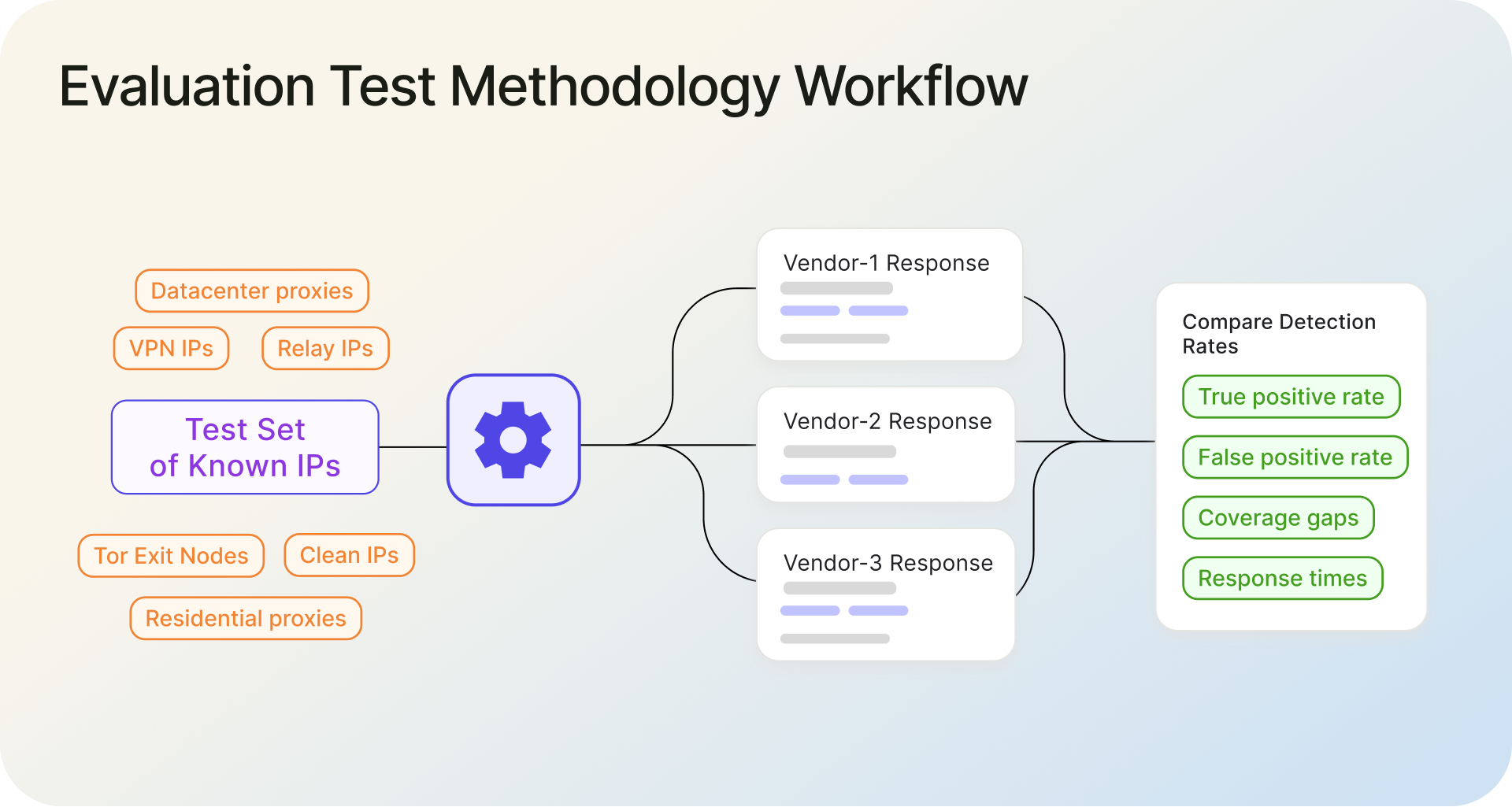
Assemble a set of IPs with known classifications. Include IPs from at least these categories:
- Known VPN IPs: Connect to 5-10 major VPN providers (NordVPN, ExpressVPN, Mullvad, etc.) and record the exit IPs.
- Known datacenter proxies: Use a few commercial proxy services that route through datacenter IPs.
- Known residential proxies: Purchase a small plan from a residential proxy provider (IPRoyal, Bright Data, etc.) and capture the IPs they assign.
- Known Tor exit nodes: The Tor Project publishes its exit node list. Pull a sample.
- Relay IPs: Connect through iCloud Private Relay or Cloudflare WARP and record the IPs.
- Known clean IPs: Use IPs from standard residential ISP connections, mobile networks, and corporate networks that you can verify are not running any anonymization.
A test set of 200-500 IPs across these categories gives you enough data to draw meaningful conclusions.
2. Step 2: Query Each API Candidate
Send the same IP set to every detection API you're evaluating. Record the full response for each IP from each provider. Make sure you're testing during normal operating hours to get representative latency measurements.
3. Step 3: Compare Detection Rates and False Positives
For each provider, calculate:
- True positive rate per category: What percentage of known VPN IPs were correctly identified as VPNs? What percentage of known residential proxies were caught?
- False positive rate: What percentage of known-clean IPs were incorrectly flagged?
- Coverage gaps: Which traffic types did the provider miss entirely?
- Response times: What were the median, p95 (slowest 5%), and p99 (slowest 1%) latencies?
4. Step 4: Score and Decide
Weight the results based on what matters most for your use case. If you're primarily concerned about residential proxy fraud, weigh that detection rate heavily. If latency is critical for your checkout flow, give it extra weight. Map each provider's results against the eight evaluation criteria and make your decision based on data, not marketing pages.
Red Flags When Evaluating a Detection API
Walk away, or at least dig much deeper, if you see any of these during your evaluation:
Accuracy claims with no methodology. A provider claiming "99.9% accuracy" without disclosing their test methodology, dataset, or how they define accuracy is giving you a marketing number, not a technical specification.
No residential proxy detection. If the API has no mechanism for detecting residential proxies in 2026, it's missing the fastest-growing anonymization category. This is a deal-breaker for fraud prevention use cases.
Binary-only detection with no scoring. An API that returns only yes/no flags with no confidence scores or threat scoring forces you into all-or-nothing decisions. That's not practical at scale.
No relay or privacy service identification. If the API can't distinguish between iCloud Private Relay and a commercial VPN, you'll either over-block legitimate Apple users or under-block actual threats.
Stale documentation or no sandbox environment. If you can't test the API before committing, that's a red flag. Good providers offer free tiers, sandboxes, or trial periods specifically because they want you to test.
No bulk or batch endpoint. If you ever need to process IPs in bulk, whether for log analysis, backfill scoring, or batch fraud reviews, you'll need a bulk endpoint. Its absence suggests the product is built for small-scale use only.
Where IPGeolocation.io's IP Security API Fits
To put the framework into practice, here's how IPGeolocation.io's IP Security API stacks up on the criteria that matter most.
Detection coverage. The API returns separate flags for is_vpn, is_proxy, is_residential_proxy, is_tor, is_relay, is_anonymous, is_bot, is_spam, is_known_attacker, and is_cloud_provider, with provider attribution and confidence scores alongside each. That covers every major anonymized traffic category, including residential proxies and relay services that many competitors skip entirely.
How the data pipeline works. The IP Security API serves from an offline IP intelligence database that's refreshed daily. That database is built from multiple sources: proprietary blocklists, continuous VPN and proxy endpoint enumeration, self-hosted honeypots, and a separate real-time VPN and proxy detection tool that analyzes live connection behavior around the clock. The real-time tool catches anonymized traffic that static lists miss, including residential proxies on freshly rotated IPs, and feeds those detections back into the database. The result is that the API's data reflects what's actually happening on the network, not just what was cataloged weeks ago. Public examples on the site demonstrate real-time detection of IPRoyal and 922Proxy residential proxies, IVPN tunnels, Microsoft Edge VPN, and Cloudflare WARP.
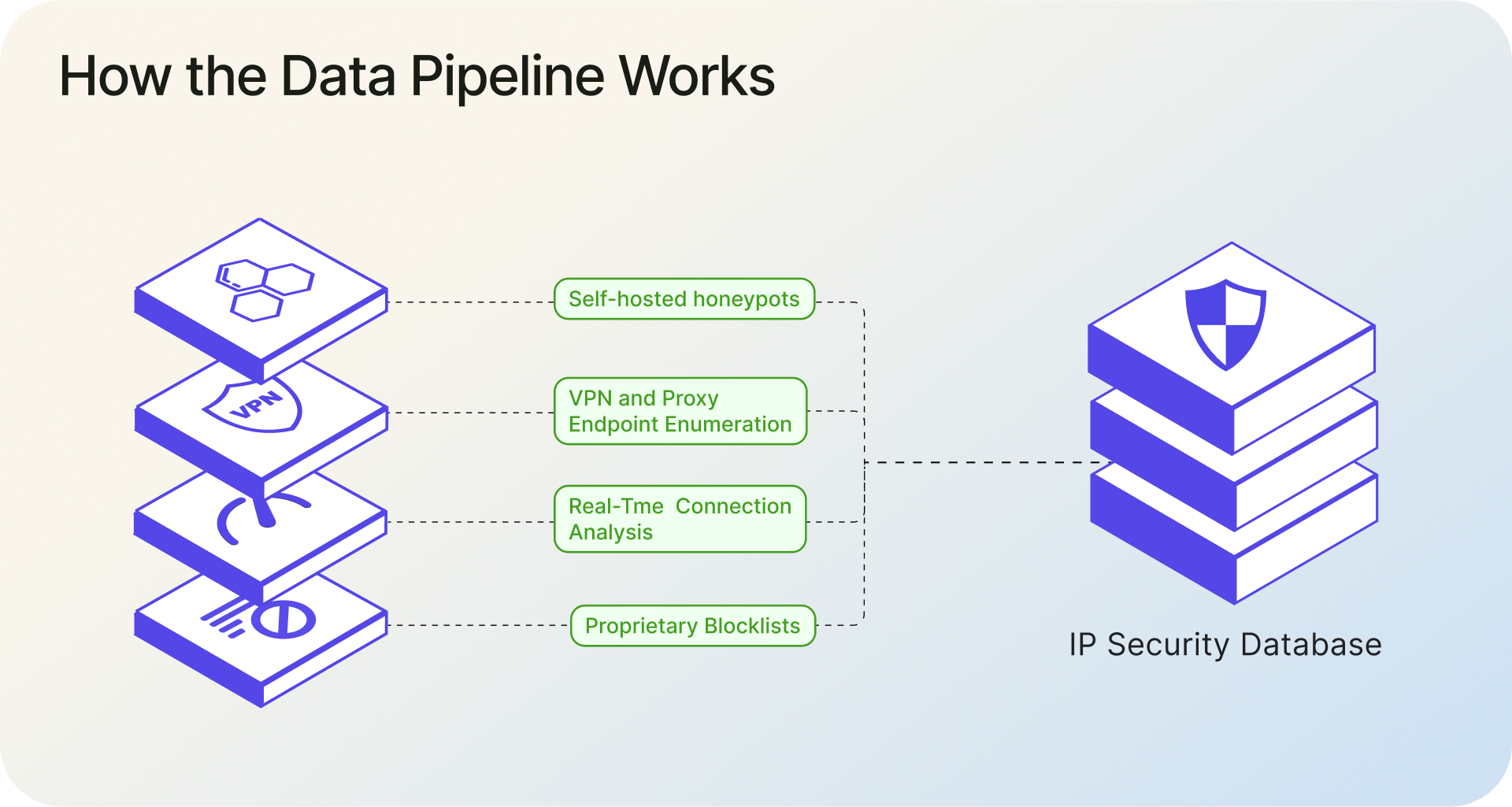
The real-time detection tool also works as a standalone service. IPGeolocation.io is rolling out a lightweight client-side script that lets website owners check visitor connections in real time directly from their site, with results returned in JSON. This is useful for fraud-sensitive flows like signups, logins, and checkout, where you need a live behavioral signal, not just a database lookup.
Pricing model. Plans start at $19/month with the full IP Security API included on every paid tier. There's no feature gating where you need an enterprise plan to access residential proxy detection or threat scoring. A premium free trial is available if you want to evaluate the IP Security API before committing. Full pricing details here.
For everything else covered in the framework above (threat scoring, latency, data freshness, bulk lookups, and developer experience), the IP Security API documentation covers it in detail.
1. What's Coming Next from IPGeolocation.io
Three additions are in active development that are worth watching if you're evaluating detection APIs right now.
Abuse IP database. IPGeolocation.io has deployed honeypots to capture attacker IPs in the wild. These signals are already being fed into the IP Security API and its underlying database. A standalone Abuse IP database is coming soon, which will give teams a dedicated feed of IPs observed conducting brute force attacks, vulnerability scanning, credential stuffing, and other forms of network abuse. That means attacker reputation signals and anonymization signals will be available in a single lookup instead of requiring separate vendors.
Bot detection and classification database. This goes beyond the existing is_bot flag. The upcoming bot database will classify detected bots into categories and distinguish between good bots (search engine crawlers, monitoring services, SEO tools) and bad bots (scrapers, credential stuffers, inventory hoarders). For good bots, the database will also return the owner organization, so you can tell the difference between Googlebot and an unidentified crawler claiming to be Googlebot. Bot classification is becoming more important as AI crawlers multiply and businesses need to decide which automated traffic to allow, rate-limit, or block entirely.
Real-time VPN and proxy detection via client-side script. IPGeolocation.io is releasing a lightweight JavaScript snippet that website owners can embed directly on their pages. The script triggers server-side network analysis and returns a JSON response with is_anonymous, vpn_score, proxy_score, and confidence fields. This is designed for high-value pages like signup forms, login screens, checkout flows, and promotion redemption, where you need a live behavioral signal at the moment of interaction rather than a database lookup of the visitor's IP. The detection engine analyzes the connection in real time, which means it can catch anonymized sessions even on freshly rotated residential proxy IPs that haven't appeared in any database yet. Details are on the real-time detection page.
Wrapping Up
Build a test IP set. Query every provider with the same data. Compare results. That kind of hands-on testing will tell you more than any marketing page, including ours.
The eight criteria above give you the scorecard. The DIY test gives you the numbers to fill in. If you want a starting point, IPGeolocation.io's IP Security API offers a premium free trial so that you can evaluate it with no commitment.
FAQ
A residential proxy routes internet traffic through a real consumer ISP connection, making the IP address look like a regular home user. Traditional detection methods rely on identifying IPs belonging to datacenters or known VPN servers, which doesn't work when the IP legitimately belongs to a residential ISP. Detecting residential proxies requires real-time, or at least very recent, behavioral analysis of the connection, not just static IP lookups.
Some can, but not all. APIs that return a specific relay flag (like is_relay) can distinguish iCloud Private Relay and similar services from traditional VPNs and proxies. This distinction matters because relay users are typically legitimate, privacy-conscious users, not fraud operators. APIs that lack this flag will either miss relay traffic entirely or incorrectly classify it as VPN/proxy traffic.
Reported accuracy varies from 95% to 99.9% depending on the provider, but these numbers are rarely comparable because providers use different test methodologies, datasets, and definitions of accuracy. The most reliable approach is to run your own test with a controlled IP set that includes known VPN, proxy, residential proxy, Tor, relay, and clean IPs, then measure each provider's detection rate and false positive rate against your specific data.
The faster, the better. VPN providers rotate server IPs, proxy networks expand and contract, and ISPs reallocate IP blocks regularly. Look for providers that refresh their data at a minimum of daily, with hourly or real-time updates for the fastest-changing sources. Stale data directly translates to missed detections and false positives from IPs that have been reassigned.
It depends on your use case. An API gives you the refreshed data on every request and requires no infrastructure on your end, which makes it a better choice for real-time decisions like login checks or payment fraud screening. A downloadable database gives you zero per-request latency and full control, but you take on the responsibility of hosting, updating, and maintaining it yourself. The database also only reflects the data available at the time of the last download. Most teams start with an API for real-time flows and add a database only if they have specific latency or offline-processing requirements.
Yes. While the standalone IP Security API is not included in the free tier, a premium free trial is available for evaluation. That lets you test the IP Security API against your own controlled set of IPs before moving to a paid plan. Paid plans start at $19/month and include the same core detection features across tiers, with the main difference being request volume. See full pricing here.