
The IPGeolocation.io Astronomy API is a sunrise sunset API that returns sunrise, sunset, moonrise, moonset, moon phase, solar noon, day length, twilight periods, golden hour, blue hour, and live sun and moon position data for any location in a single request. You can query it by IP address, geographic coordinates, or location name, making it useful for web apps, mobile apps, smart devices, photography tools, and scheduling systems.
This guide walks through the v3 API with working code in Python, JavaScript, and PHP. Every example includes error handling and uses environment variables for API keys, so you can drop the code into a production project without rewriting it.
TL;DR
- The v3 endpoint is
https://api.ipgeolocation.io/v3/astronomy - One API call returns sunrise, sunset, moonrise, moonset, moon phase, sun/moon altitude and azimuth, three twilight phases, golden hour, and blue hour
- Query by IP address, latitude/longitude, or location name
- The time series endpoint
/v3/astronomy/timeSeriesreturns multi-day astronomy data in one request - The API is free to use with an API key from ipgeolocation.io
- Moon illumination percentage uses negative values for waning phases (e.g., "-84.72" for waning gibbous)
For a quick summary: if you need sunrise, sunset, or moon data for any location on Earth, the Astronomy API handles it in one call instead of requiring separate APIs for sun and moon data.
What the API Returns
The IPGeolocation.io Astronomy API returns a broader response than a basic sunrise/sunset endpoint. For the complete field-by-field response reference, including every nested location, morning, evening, sun, and moon field, visit Astronomy API docs. It returns over 50 fields grouped into four categories:
Sun fields:
sunrise and sunset mark when the upper limb of the sun first appears on (or disappears below) the horizon. solar_noon is when the sun reaches its maximum altitude, aligned with the local meridian. day_length is the total time between sunrise and sunset.
sun_altitude is the angle of the sun above the horizon in degrees. Negative values mean the sun is below the horizon. sun_azimuth is the compass direction of the sun, measured in degrees clockwise from true north. sun_distance is the distance from the center of the Earth to the sun in kilometers.
sun_status indicates whether the sun follows a normal rise/set cycle ("-"), stays above the twilight angle all day ("Always above the twilight angle" in polar regions during summer), or stays below it ("Always below the twilight angle" during polar winter).
Useful for: solar tracking, daylight scheduling, outdoor planning, and sun-position UI logic.
Moon fields:
moonrise and moonset mark when the upper edge of the moon appears above or sinks below the horizon. When moonrise or moonset doesn't occur on a given day, the API returns "-:-" for that field.
moon_phase returns one of eight uppercase string constants: NEW_MOON, WAXING_CRESCENT, FIRST_QUARTER, WAXING_GIBBOUS, FULL_MOON, WANING_GIBBOUS, LAST_QUARTER, or WANING_CRESCENT. moon_illumination_percentage is the fraction of the moon's surface illuminated by the sun. Negative values indicate a waning phase (more on this below).
moon_altitude is the angle of the moon above the horizon in degrees (negative means below the horizon). moon_azimuth is the compass direction, same convention as sun azimuth. moon_distance is the Earth-to-moon distance in kilometers, which varies due to the moon's elliptical orbit.
moon_parallactic_angle is the angle between the moon's celestial north pole and the zenith direction above the observer. moon_angle describes the illuminated portion of the moon relative to the sun-Earth line. moon_status works like sun_status: "-" for a normal cycle, "Always above the horizon" if the moon never sets, "Always below the horizon" if it never rises.
Useful for: moon phase widgets, astrophotography planning, and night-sky applications.
Twilight and night fields:
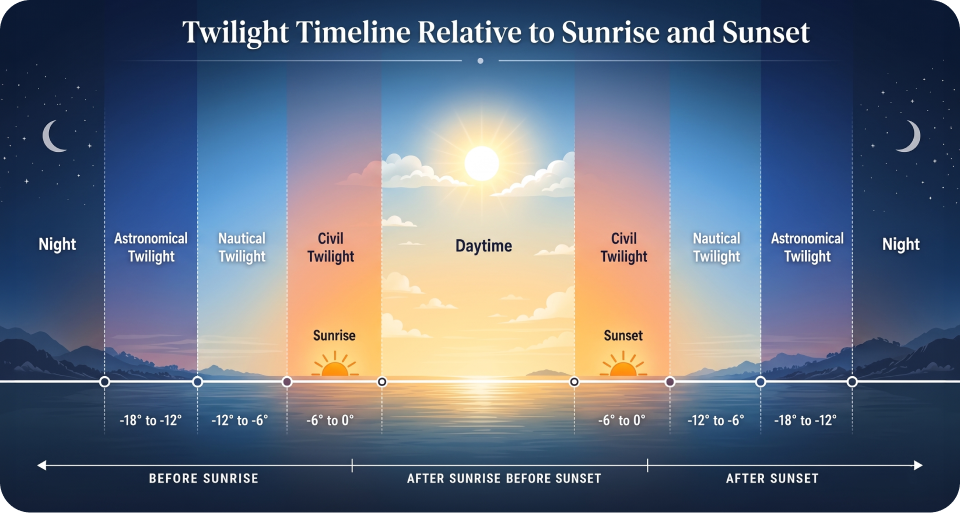
Civil, nautical, and astronomical twilight each have separate morning and evening begin/end times, nested under morning and evening objects. Civil twilight occurs when the sun is 0 to 6 degrees below the horizon. Nautical twilight spans 6 to 12 degrees below. Astronomical twilight spans 12 to 18 degrees below.
night_begin is when astronomical twilight ends in the evening and the sky becomes fully dark. night_end is when astronomical twilight starts in the morning and faint light first appears. mid_night is the midpoint between sunset and sunrise, which often differs from clock midnight.
Around sunrise and sunset, these boundaries can sit close together, and near the poles they can stretch far beyond a typical day-night cycle.
Useful for: smart lighting, event timing, dark-sky calculations, and theme changes based on ambient light.
Golden hour and blue hour:
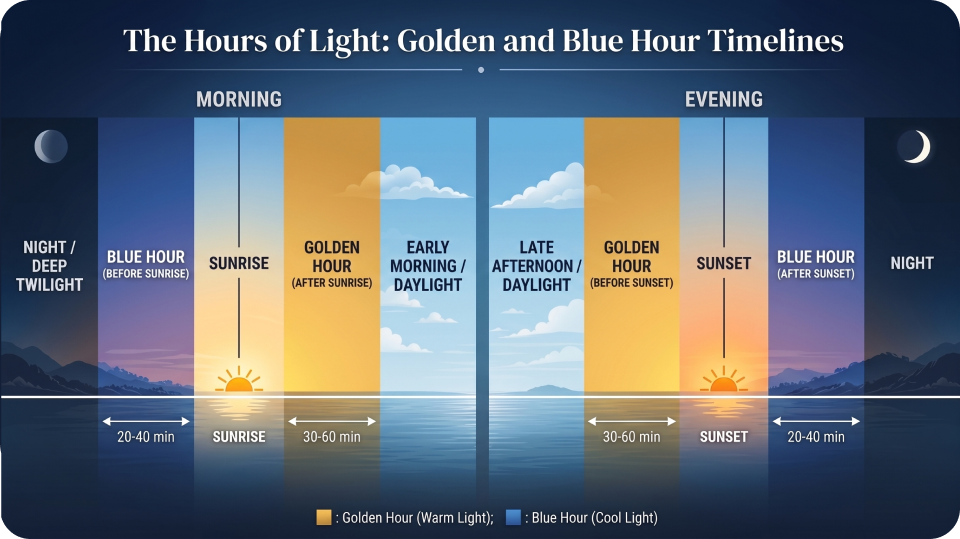
Both have morning and evening windows with begin/end times, nested inside the morning and evening objects. Blue hour spans roughly 4 to 6 degrees below the horizon, producing cool, blue-toned light. Golden hour spans roughly -4 degrees below to 6 degrees above the horizon, producing warm, golden light.
Useful for: photography apps, shoot scheduling, videography planning, and outdoor content workflows.
Authentication and Setup
Sign up at ipgeolocation.io to get a free API key. The Astronomy API is free to use with an API key. English responses are available without a paid subscription. If you want localized response values using the lang parameter, such as German, French, Spanish, Japanese, Chinese, Persian, or Portuguese, you need a paid plan.
The API key goes in the query string as the apiKey parameter. For server-side code, store the key in an environment variable. Every example in this guide follows that pattern.
The base URL for all astronomy requests is:
https://api.ipgeolocation.io/v3/astronomy?apiKey=YOUR_API_KEYResponses come back as JSON by default. Add &output=xml to get XML instead. The API accepts only GET requests. Refer to the full API documentation for the complete parameter reference.
Query Methods
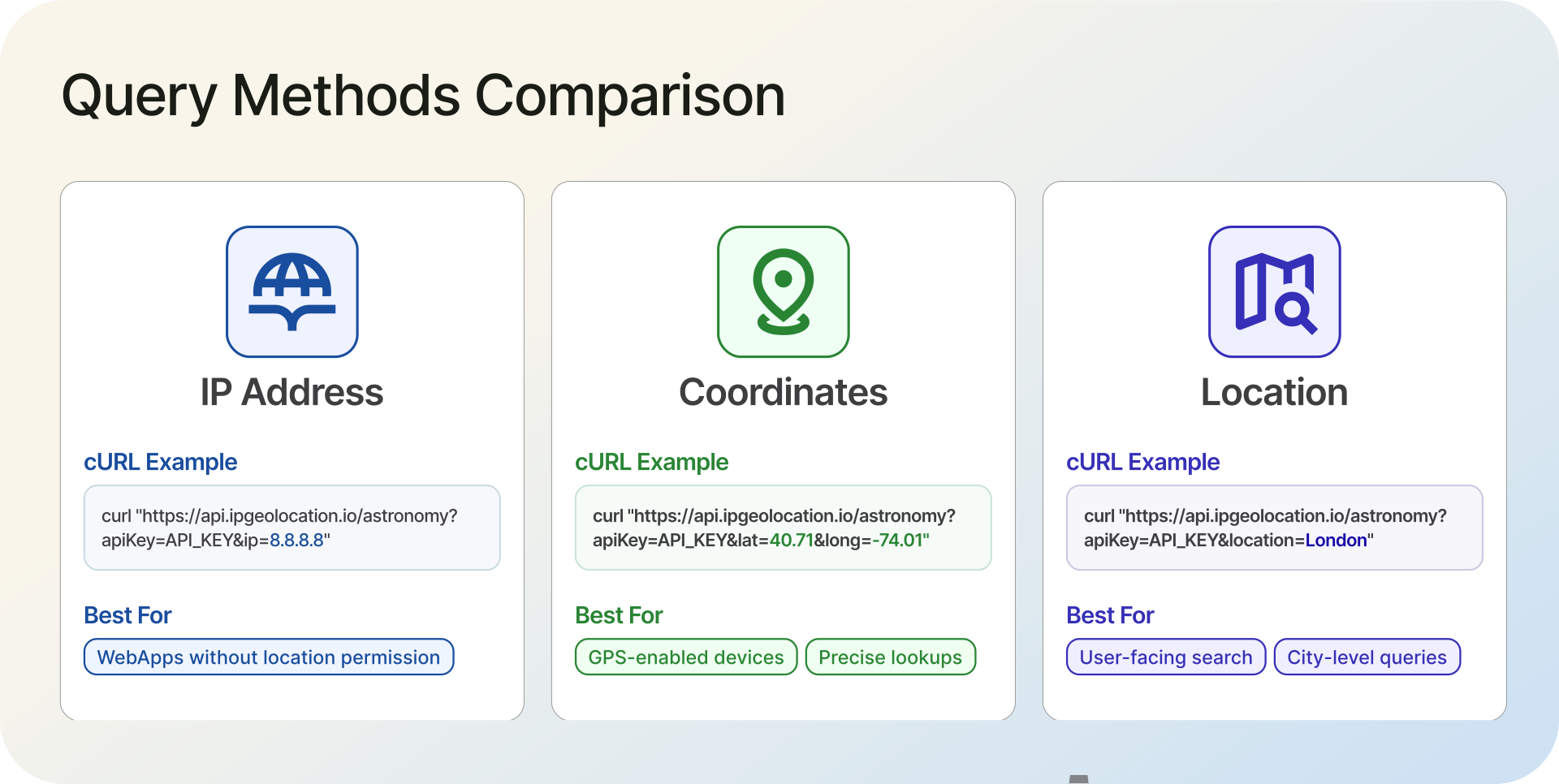
The API determines location through three approaches, applied in this order of priority: lat/long coordinates first, then location name, then IP address. If you send no location parameter at all, it falls back to the requesting client's IP.
1. By IP Address
Pass an IPv4 or IPv6 address to get astronomy data for the location associated with that IP. This is useful when your application already knows the user's IP but not their coordinates.
curl -X GET 'https://api.ipgeolocation.io/v3/astronomy?apiKey=API_KEY&ip=8.8.8.8'If you're building a web app where the user hasn't granted location permissions, you can still serve localized sunrise and sunset times based on their IP. The API resolves the IP to coordinates internally, so there's no extra geocoding step on your side.
2. By Coordinates
For precision, pass latitude and longitude directly. The elevation parameter (in meters) is optional and defaults to 0.
curl -X GET 'https://api.ipgeolocation.io/v3/astronomy?apiKey=API_KEY&lat=40.76473&long=-74.00084&elevation=10'3. By Location Name
Pass a city name, address, or place name as a string. The API geocodes it internally.
curl -X GET 'https://api.ipgeolocation.io/v3/astronomy?apiKey=API_KEY&location=New York, USA&elevation=10'4. With Date and Timezone
By default, the API returns data for the current date and the timezone of the queried location. Override either with the date and time_zone parameters.
curl -X GET 'https://api.ipgeolocation.io/v3/astronomy?apiKey=API_KEY&lat=-27.4748&long=153.017&date=2025-01-01'
The date format is yyyy-MM-dd. The time_zone parameter accepts IANA timezone identifiers like Europe/London or America/New_York. When you pass a timezone, the response times shift to that zone and include a time_zone field.
The API also supports a lang parameter for localized country and city names. Available languages include English, German, Russian, Japanese, French, Chinese, Spanish, Czech, Italian, Korean, Persian, and Portuguese. Non-English responses require a paid plan subscription.
Understanding the Response
Here's a trimmed sample response for a coordinates-based query (lat=40.7648&long=-73.9808), showing the key fields across all categories:
{
  "location": {
    "country_name": "United States",
    "state_prov": "New York",
    "city": "New York",
    "latitude": "40.76480",
    "longitude": "-73.98080",
    "elevation": "0"
  },
  "astronomy": {
    "date": "2026-03-07",
    "current_time": "04:37:40.181",
    "sunrise": "06:18",
    "sunset": "17:53",
    "solar_noon": "12:05",
    "day_length": "11:35",
    "sun_altitude": -21.33,
    "sun_distance": 148352130.93,
    "sun_azimuth": 76.59,
    "sun_status": "-",
    "morning": {
      "astronomical_twilight_begin": "04:44",
      "astronomical_twilight_end": "05:17",
      "nautical_twilight_begin": "05:17",
      "nautical_twilight_end": "05:50",
      "civil_twilight_begin": "05:50",
      "civil_twilight_end": "06:18",
      "blue_hour_begin": "05:39",
      "blue_hour_end": "06:01",
      "golden_hour_begin": "06:01",
      "golden_hour_end": "06:56"
    },
    "evening": {
      "golden_hour_begin": "17:23",
      "golden_hour_end": "18:19",
      "blue_hour_begin": "18:19",
      "blue_hour_end": "18:40",
      "civil_twilight_begin": "17:53",
      "civil_twilight_end": "18:22",
      "nautical_twilight_begin": "18:22",
      "nautical_twilight_end": "18:54",
      "astronomical_twilight_begin": "18:54",
      "astronomical_twilight_end": "19:25"
    },
    "night_begin": "19:25",
    "mid_night": "00:05",
    "night_end": "04:44",
    "moon_phase": "WANING_GIBBOUS",
    "moonrise": "22:53",
    "moonset": "07:59",
    "moon_altitude": 26.47,
    "moon_distance": 398834.70,
    "moon_azimuth": 206.09,
    "moon_parallactic_angle": 19.58,
    "moon_illumination_percentage": "-84.72",
    "moon_angle": 226.01,
    "moon_status": "-"
  }
}
A few implementation details worth calling out:
The moon_illumination_percentage field is a string, not a number. It uses negative values for waning phases. In the example above, "-84.72" means the moon is 84.72% illuminated and waning. A positive "84.72" would mean the same illumination during a waxing phase. If you're parsing this in code, cast it to a float and use the sign to determine phase direction.
All time fields use HH:mm format. The current_time field includes milliseconds (HH:mm:ss.SSS). Twilight, golden hour, and blue hour times are nested under morning and evening objects rather than sitting at the top level of the astronomy object.
1. Twilight Phases Explained
The three phases differ in practical visibility. During civil twilight (sun 0-6 degrees below the horizon), there's enough ambient light to see without artificial lighting, and most outdoor activities are still possible. Nautical twilight (6-12 degrees below) is when the horizon at sea becomes hard to distinguish. Astronomical twilight (12-18 degrees below) is when only the faintest traces of sunlight remain; this is the boundary that matters for telescope observations and astrophotography.
For most app developers, civil twilight is the one to use. Smart lighting systems typically trigger at evening.civil_twilight_begin, not at sunset.
2. Golden Hour and Blue Hour
Golden hour is the period of warm, diffused light shortly after sunrise and before sunset. Blue hour produces cooler, more saturated light and occurs just before sunrise and just after sunset. Both are valuable for photography apps, outdoor event planning, and any feature that adapts UI themes to ambient light conditions.
The API provides separate morning and evening windows for both. In the sample response above, the evening golden hour runs from 17:23 to 18:19 (56 minutes), while the evening blue hour runs from 18:19 to 18:40 (21 minutes).
Time Series Queries
The /v3/astronomy/timeSeries endpoint returns astronomy data for a date range in a single request, instead of requiring one call per day. A single time series request supports a maximum 90-day lookup period for past or future dates.
curl -X GET 'https://api.ipgeolocation.io/v3/astronomy/timeSeries?apiKey=API_KEY&lat=40.76473&long=-74.00084&dateStart=2025-06-16&dateEnd=2025-06-18'
The response uses the same structure as a standard request, except the astronomy field is an array with one entry per date:
{
  "location": { ... },
  "astronomy": [
    { "date": "2025-06-16", "sunrise": "05:23", "sunset": "20:30", ... },
    { "date": "2025-06-17", "sunrise": "05:23", "sunset": "20:31", ... },
    { "date": "2025-06-18", "sunrise": "05:23", "sunset": "20:31", ... }
  ]
}
Use cases include weekly forecast displays, day length trend charts, and outdoor scheduling across multiple days.
Code Examples
1. Python
import os
import requests

API_KEY = os.environ.get("IPGEOLOCATION_API_KEY")

if not API_KEY:
    raise ValueError("Set the IPGEOLOCATION_API_KEY environment variable")

def get_astronomy(lat=None, lon=None, ip=None, location=None, date=None):
    """Fetch astronomy data from IPGeolocation.io v3 API."""
    url = "https://api.ipgeolocation.io/v3/astronomy"
    params = {"apiKey": API_KEY}

    if lat is not None and lon is not None:
        params["lat"] = lat
        params["long"] = lon
    elif ip:
        params["ip"] = ip
    elif location:
        params["location"] = location
    # If none provided, the API uses the requesting client's IP

    if date:
        params["date"] = date

    try:
        response = requests.get(url, params=params, timeout=10)
        response.raise_for_status()
        data = response.json()

        if "error_message" in data:
            print(f"API error: {data['error_message']}")
            return None

        return data
    except requests.exceptions.Timeout:
        print("Request timed out")
        return None
    except requests.exceptions.RequestException as e:
        print(f"Request failed: {e}")
        return None

# Example: get astronomy data for New York by coordinates
result = get_astronomy(lat=40.7648, lon=-73.9808)

if result:
    astro = result.get("astronomy", {})
    print(f"Sunrise: {astro.get('sunrise')}")
    print(f"Sunset: {astro.get('sunset')}")
    print(f"Moon phase: {astro.get('moon_phase')}")

    morning = astro.get("morning", {})
    print(f"Golden hour ends: {morning.get('golden_hour_end')}")
2. JavaScript (Node.js)
const API_KEY = process.env.IPGEOLOCATION_API_KEY;

if (!API_KEY) {
  throw new Error("Set the IPGEOLOCATION_API_KEY environment variable");
}

async function getAstronomy({ lat, lon, ip, location, date } = {}) {
  const params = new URLSearchParams({ apiKey: API_KEY });

  if (lat != null && lon != null) {
    params.set("lat", lat);
    params.set("long", lon);
  } else if (ip) {
    params.set("ip", ip);
  } else if (location) {
    params.set("location", location);
  }

  if (date) {
    params.set("date", date);
  }

  const url = `https://api.ipgeolocation.io/v3/astronomy?${params}`;

  try {
    const response = await fetch(url, { signal: AbortSignal.timeout(10000) });

    if (!response.ok) {
      const errorBody = await response.json().catch(() => ({}));
      console.error(`API returned ${response.status}: ${errorBody.error_message || "Unknown error"}`);
      return null;
    }

    const data = await response.json();

    if (data.error_message) {
      console.error(`API error: ${data.error_message}`);
      return null;
    }

    return data;
  } catch (err) {
    if (err.name === "TimeoutError") {
      console.error("Request timed out");
    } else {
      console.error(`Request failed: ${err.message}`);
    }
    return null;
  }
}

// Example: get astronomy data for London by location name
getAstronomy({ location: "London, UK" }).then((result) => {
  if (!result) return;

  const astro = result.astronomy;
  console.log(`Sunrise: ${astro?.sunrise}`);
  console.log(`Sunset: ${astro?.sunset}`);
  console.log(`Moon phase: ${astro?.moon_phase}`);
  console.log(`Moon illumination: ${astro?.moon_illumination_percentage}%`);
});
3. PHP
<?php

$apiKey = getenv('IPGEOLOCATION_API_KEY');

if (!$apiKey) {
    throw new RuntimeException('Set the IPGEOLOCATION_API_KEY environment variable');
}

function getAstronomy(string $apiKey, array $options = []): ?array
{
    $params = ['apiKey' => $apiKey];

    if (isset($options['lat'], $options['long'])) {
        $params['lat'] = $options['lat'];
        $params['long'] = $options['long'];
    } elseif (isset($options['ip'])) {
        $params['ip'] = $options['ip'];
    } elseif (isset($options['location'])) {
        $params['location'] = $options['location'];
    }

    if (isset($options['date'])) {
        $params['date'] = $options['date'];
    }

    $url = 'https://api.ipgeolocation.io/v3/astronomy?' . http_build_query($params);

    $ch = curl_init($url);
    curl_setopt_array($ch, [
        CURLOPT_RETURNTRANSFER => true,
        CURLOPT_TIMEOUT => 10,
        CURLOPT_HTTPHEADER => ['Accept: application/json'],
    ]);

    $response = curl_exec($ch);
    $httpCode = curl_getinfo($ch, CURLINFO_HTTP_CODE);
    $curlError = curl_error($ch);
    curl_close($ch);

    if ($curlError) {
        error_log("Astronomy API request failed: $curlError");
        return null;
    }

    $data = json_decode($response, true);

    if ($httpCode !== 200 || isset($data['error_message'])) {
        error_log("Astronomy API error: " . ($data['error_message'] ?? "HTTP $httpCode"));
        return null;
    }

    return $data;
}

// Example: get astronomy data by IP address
$result = getAstronomy($apiKey, ['ip' => '8.8.8.8']);

if ($result) {
    $astro = $result['astronomy'] ?? [];
    echo "Sunrise: " . ($astro['sunrise'] ?? 'N/A') . "\\\\n";
    echo "Sunset: " . ($astro['sunset'] ?? 'N/A') . "\\\\n";
    echo "Moon phase: " . ($astro['moon_phase'] ?? 'N/A') . "\\\\n";

    $evening = $astro['evening'] ?? [];
    echo "Blue hour starts: " . ($evening['blue_hour_begin'] ?? 'N/A') . "\\\\n";
}
Use Cases
1. Smart Home and IoT Automation
Most smart home platforms use a sunset API to schedule lighting changes, but triggering at civil twilight end instead of sunset itself produces a more natural transition. The morning.civil_twilight_begin and evening.civil_twilight_end fields give you the exact times. Pair this with the time series endpoint to pre-fetch a week of data and avoid making API calls on the device itself.
Irrigation systems benefit from knowing day length and sunrise time. Watering just before dawn reduces evaporation. The day_length field helps agricultural IoT devices adapt to seasonal shifts automatically.
2. Photography and Outdoor Planning
Golden hour and blue hour data solve a common problem in photography apps: telling users exactly when the light will be best. A basic sunrise API gives you one timestamp. This endpoint gives you morning.golden_hour_begin through morning.golden_hour_end as a precise window, plus the blue hour bracket on either side.
The moon phase API data is equally useful for astrophotography planning. A NEW_MOON phase with low moon_illumination_percentage means darker skies for star photography. The moon_altitude field tells you whether the moon will be above the horizon during your planned shoot.
3. Solar Energy and Agriculture
Solar panel optimization depends on knowing the sun's position throughout the day. The sun_altitude and sun_azimuth fields describe where the sun sits in the sky at the time of the request. Combined with the time series endpoint, you can map the sun's path across multiple days and calculate optimal panel angles for any location.
Day length tracking matters for agriculture. The day_length field changes gradually through the seasons, and the time series endpoint lets you chart those changes over weeks or months without batching individual requests.
Error Handling
The API returns errors as JSON with error_status and error_message fields:
{
  "error_status": 400,
  "error_message": "'latitude' (-127.4748) or 'longitude' (53.017) is not valid. 'latitude' must be between -90.0 and +90.0 and 'longitude' must be between -180.0 and +180.0."
}
Common status codes: 400 for invalid parameters (bad IP format, out-of-range coordinates, invalid date), 401 for missing or invalid API key, 404 when a location can't be resolved, 423 for bogon or private IP addresses, and 429 when you've used up your request quota.
All the code examples in this guide check for error_message in the response body and handle non-200 status codes. If you're building a production integration, add retry logic for 429 and 5xx responses, and cache results for locations you query frequently. Astronomy data for a given location and date doesn't change, so caching is safe.
FAQ
Yes. The Astronomy API is completely free to use. Sign up at ipgeolocation.io to get an API key, and you can start making requests right away. There is no paid tier required for astronomy data.
Yes. The moon phase API data is included in every Astronomy API response, regardless of how you specify location. Pass an ip parameter and the response includes moon_phase, moon_illumination_percentage, moonrise, moonset, and all other moon fields alongside the sun data.
Civil twilight occurs when the sun is 0 to 6 degrees below the horizon. There's enough ambient light to see without artificial lighting. Nautical twilight (6 to 12 degrees below) is when the sea horizon becomes indistinguishable. Astronomical twilight (12 to 18 degrees below) is when only the faintest traces of sunlight remain. For most applications, civil twilight is the threshold that matters.
Yes. Pass a date parameter in yyyy-MM-dd format to get astronomy data for any past or future date. The time series endpoint (/v3/astronomy/timeSeries) accepts dateStart and dateEnd parameters to retrieve up to 90 days of astronomy data in a single request.
A negative moon_illumination_percentage value indicates a waning phase. For example, "-84.72" means the moon is 84.72% illuminated and decreasing. A positive "84.72" would mean the same illumination during a waxing phase. The sign tells you the direction of the lunar cycle without needing to parse the moon_phase string separately.
Next Steps
The Astronomy API documentation covers every parameter and response field in detail, including language support and the full list of error codes. If you prefer working with an SDK instead of raw HTTP requests, check the SDK documentation for client libraries in Python, JavaScript, PHP, Java, Go, and other languages.
Get your free API key at ipgeolocation.io and try the examples above. The fastest way to see the API in action is the cURL command with your key and an IP address. The response comes back in under 200ms for most locations.