

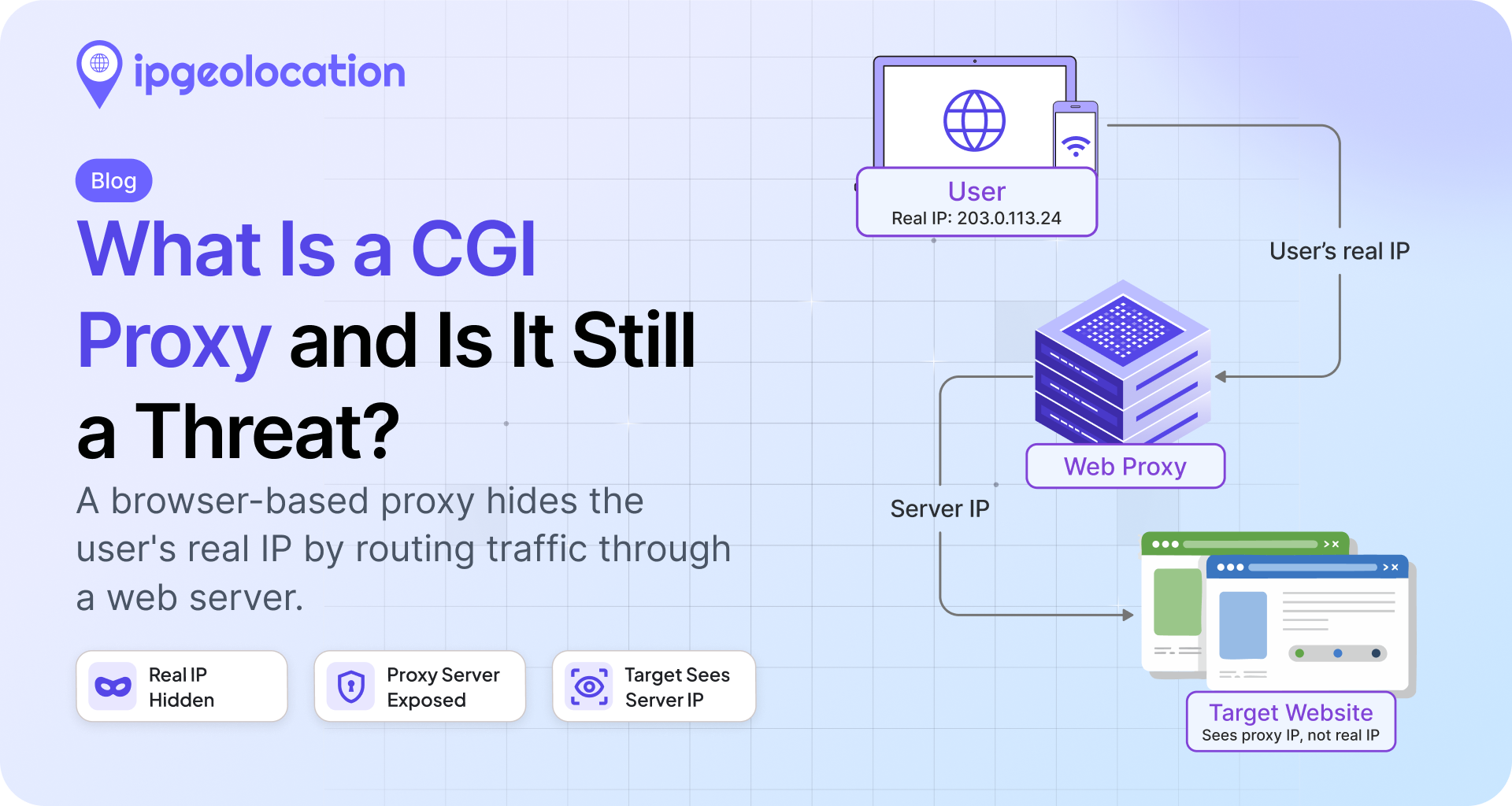
A CGI proxy is a web-based proxy you use through a web page. You open the proxy site, type in a target URL, and the server fetches that page for you. The destination sees the proxy server's IP, never yours. It is one of the oldest ways to browse anonymously, and it still turns up in traffic today.
TL;DR
- A CGI proxy is a proxy built as a web script (think CGIProxy, Glype, or PHProxy) that fetches pages on your behalf through a form on a web page. CGI stands for Common Gateway Interface.
- Because the proxy runs on a server, the destination only ever sees the proxy's hosting or datacenter IP, not the visitor's real address.
- It is neither a VPN (no full-device tunnel) nor a residential proxy (no real consumer ISP address). It is browser-based and usually limited to HTTP and HTTPS.
- CGI proxies are mostly legacy. The classic scripts are barely maintained, but public web proxies still appear for casual filter-bypass, light scraping, and form spam.
- They are among the easier proxy types to flag because a server IP cannot pass as a home connection. An IP reputation or hosting lookup, such as the is_proxy and is_cloud_provider flags in the IP Security API, catches most of them.
If you found "CGI proxy" in a log or a vendor's IP list and want to know whether to care, the short answer is usually a little, rarely a lot. The rest of this article explains how it works and how to flag it.
What Is a CGI Proxy?
A CGI proxy is a proxy that lives inside a web page. Instead of changing any settings on your device, you visit the proxy's site, enter the address you want to reach, and the server retrieves it and shows it back to you. As you click links, the proxy rewrites them so you keep moving through it. It is sometimes called a web proxy or an anonymous proxy, and the name comes from CGI, the Common Gateway Interface, a long-standing standard for letting a web server run an external script and return its output as a page. CGI is documented in RFC 3875.
Here is where a lot of the writing online gets it wrong. A CGI proxy is not a reverse proxy, and it is not a load balancer. The most-read explainer on this topic calls it a server-side load-balancing component, which mixes up CGI, the script interface, with the thing people actually mean: a web-form anonymizer that fetches pages for a user. If you have read that definition and come away confused, the definition was the problem, not you.
How a CGI Proxy Works
The mechanics are simple. Your browser connects to the CGI proxy server. That server makes the outbound request to the target site, pulls the response, rewrites the links and resources to point back through itself, and hands the page to you. The reference implementation is CGIProxy, a Perl script first written for a 1996 magazine article and still maintained at a trickle, with its last release in 2019. Glype and PHProxy are the other two names you will see, both PHP-era tools that have gone quiet.
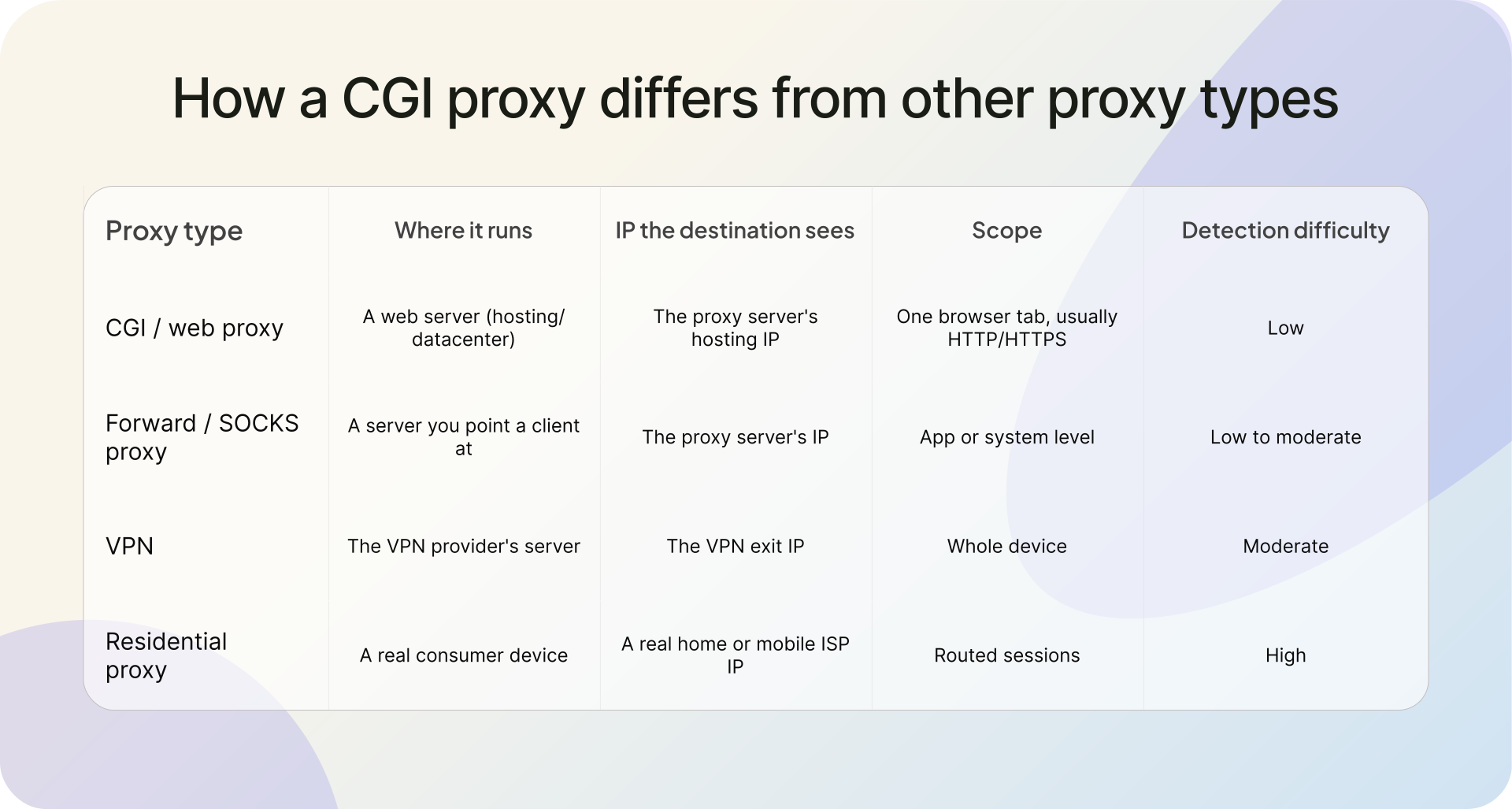
Where a CGI proxy differs from the proxies people know better comes down to where it runs and what the destination sees. A CGI proxy runs on a web server and works through a browser page, usually for HTTP and HTTPS only (CGIProxy also handled FTP). A VPN tunnels your whole device through the provider's network. A residential proxy routes traffic through a real consumer device, so the destination sees a home ISP address. A CGI proxy sits closest to a datacenter proxy. The destination sees the web server's IP, with no consumer ISP attribution and no peer-to-peer residential exit.
How CGI Proxy Traffic Shows Up in Your Logs
From the receiving end, a CGI proxy has a tell. Every request arrives from the proxy server, so the source IP in your logs belongs to a hosting provider or datacenter, not a home or mobile network. You never see the real visitor. That single fact is the heart of the detection story.
Headers can add detail, but do not count on them. A cooperative proxy may attach a Forwarded or X-Forwarded-For header naming the original client, behavior described in RFC 7239, which is a gift when it happens. A proxy set up to hide its users strips those headers, leaving a bare request from a server IP. Either way, the server IP is the signal that matters.
Compare that to a residential proxy, where the request comes from a genuine ISP address and blends in with real users. A CGI proxy cannot do that. It is a server pretending to browse, and servers are easy to spot.
Is a CGI Proxy Still a Threat in 2026?
Mostly, no, not a serious one. CGI proxies are legacy technology. The classic scripts are barely maintained, the public sites that run them have thinned out, and anyone serious about evading detection has moved to VPNs, datacenter proxies, or residential proxy networks. If you came here worried about a sophisticated attack tunneled through a CGI proxy, you can relax a little.
They have not vanished, though. A public web proxy is still used for casual tasks such as getting around a school or office filter, light scraping, budget geo-shifting, and low-effort comment or signup spam. On a login, signup, or checkout flow, that is still traffic worth flagging, because none of it comes from a real local user.
The bigger problem for most platforms is the proxy types that hide better. If you are fighting account takeover or organized fraud, residential proxies and commercial proxy networks deserve more attention than CGI proxies do. The useful part is that the same IP intelligence handles both, so closing the CGI gap costs you almost nothing extra.
How to Detect and Flag CGI / Web Proxy Traffic
Because a CGI proxy always exits from a server, IP intelligence catches it without any clever fingerprinting. Two signals do most of the work: whether the IP is a known proxy, and whether it belongs to hosting or datacenter infrastructure.
The IP Security API returns both. Its is_proxy flag covers any proxy service, including the open proxy category that a public CGI proxy falls under, and is_cloud_provider flags hosting and datacenter IPs, which is exactly where these proxies live. A threat_score from 0 to 100 lets you decide how hard to react. For batch or offline screening, the same hosting signal is available in the IP to Hosting Database.
A single request is enough to check an IP:
curl -X GET 'https://api.ipgeolocation.io/v3/security?apiKey=YOUR_API_KEY&ip=192.0.2.10'
A server-hosted proxy IP makes the decision easy: is_proxy or is_cloud_provider comes back true, often with a raised threat_score. Here is a small, production-ready check that turns that response into an allow, challenge, or block decision:
import os
import requests

IPGEO_SECURITY_URL = "https://api.ipgeolocation.io/v3/security"

def screen_ip(ip_address: str) -> dict:
    """
    Look up an IP with the ipgeolocation.io IP Security API and return a
    simple allow / challenge / block decision.

    A CGI or web proxy runs on a server, so its IP usually trips is_proxy
    (open proxies are included) or is_cloud_provider.
    """
    api_key = os.environ.get("IPGEO_API_KEY")
    if not api_key:
        raise ValueError("Set the IPGEO_API_KEY environment variable")

    try:
        response = requests.get(
            IPGEO_SECURITY_URL,
            params={"apiKey": api_key, "ip": ip_address},
            timeout=5,
        )
        response.raise_for_status()
        security = response.json().get("security", {})
    except requests.exceptions.Timeout:
        # Fail open on a timeout so a slow lookup never blocks a real user
        print(f"IP security lookup timed out for {ip_address}")
        return {"ip": ip_address, "decision": "allow", "reason": "lookup_timeout"}
    except requests.exceptions.RequestException as exc:
        print(f"IP security lookup failed for {ip_address}: {exc}")
        return {"ip": ip_address, "decision": "allow", "reason": "lookup_error"}

    # Null-safe reads: any field can be absent depending on the IP
    is_proxy = security.get("is_proxy", False)
    is_hosting = security.get("is_cloud_provider", False)
    threat_score = security.get("threat_score", 0) or 0

    if is_proxy and threat_score >= 80:
        decision = "block"
    elif is_proxy or is_hosting:
        decision = "challenge"  # e.g. CAPTCHA or step-up auth
    else:
        decision = "allow"

    return {
        "ip": ip_address,
        "decision": decision,
        "is_proxy": is_proxy,
        "is_cloud_provider": is_hosting,
        "threat_score": threat_score,
        "providers": security.get("proxy_provider_names", []),
    }
For traffic where the IP has no history yet, real-time proxy and VPN detection evaluates the live connection instead of relying on a stored list. Teams that need offline lookups can pull the IP Security Database or the broader Security Pro tier. Plans are on the API pricing page, and the full field list is in the IP Security API documentation. If you are comparing tools first, the guide on how to evaluate a VPN and proxy detection API covers what to look for.
One caution. Not every hosting IP is hostile. Corporate web gateways, security scanners, and legitimate cloud services also operate within data center ranges. That is why a threat score plus context beats a blanket block. Challenge the ambiguous cases, block the high-confidence ones, and log the rest.
FAQ
A CGI proxy is a website that browses the web for you. You enter a URL, the proxy's server loads that page, and it sends the page back to your browser. Because the server makes the request, the site you visit sees the server's IP address instead of yours.
No. A VPN tunnels all traffic from your device through the provider's network at the system level. A CGI proxy works inside a single browser page and usually only handles HTTP and HTTPS. A VPN hides your IP for everything on the device; a CGI proxy hides it only for pages you load through it.
Yes, but far less than before. The classic scripts like CGIProxy, Glype, and PHProxy are old and barely maintained, and public web proxy sites have dwindled. They still appear for casual filter-bypass, light scraping, and low-effort spam, so they stay worth flagging even though they are no longer the main threat.
Using a proxy is legal in most places. What matters is what you do through it. Bypassing a network policy, scraping against a site's terms, or committing fraud can break rules or laws regardless of the tool. A CGI proxy is a method, not a crime in itself.
Check the source IP against IP intelligence. A CGI proxy exits from a server, so an is_proxy or is_cloud_provider flag paired with a threat score identifies it. Block high-confidence proxy IPs, challenge borderline ones with a CAPTCHA or step-up auth, and log the rest for review.
CGI stands for Common Gateway Interface, a standard way for a web server to run an external program and return its output as a web page. It dates to the early web and is documented in RFC 3875. A CGI proxy is simply a proxy built as one of those scripts.