

Residential proxy detection is the work of catching traffic that borrows a real home's IP address. The address belongs to a paying ISP subscriber. The session behind it can belong to anyone: a scraper, a credential-stuffing bot, or a fraud ring renting that connection by the gigabyte.
That one fact breaks most of the tooling the industry spent two decades building. Datacenter blocklists, ASN filters, and IP reputation scores all assume bad traffic comes from bad infrastructure. Residential proxies route it through good infrastructure instead, and the standard checks wave it through.
TL;DR
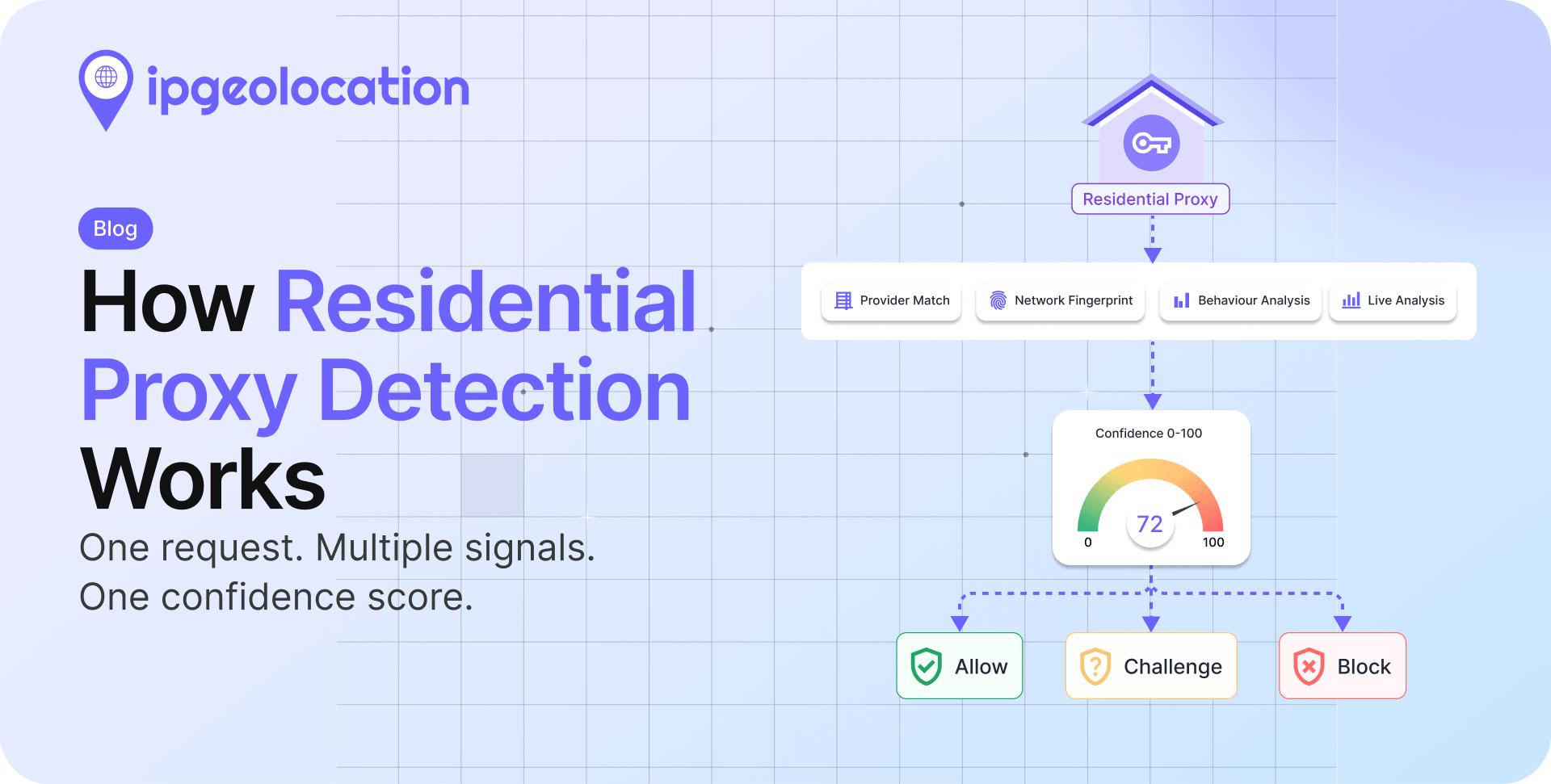
Residential proxy detection works by combining these signal classes:
- Provider and network intelligence: Identifying known residential proxy networks and tagging their exit IPs with provider names and last-seen dates.
- Network-level signals: Examining routing behavior, ASN information, and connection fingerprints.
- Session behavior: Correlating how the user behaves during the session, including navigation patterns, request frequency, and account activity.
- Live connection analysis: Inspecting the connection at request time to detect proxy traffic from IPs that have not yet appeared in existing datasets.
- The core difficulty is shared identity: Cloudflare's measurements found 4 out of 5 requests from residential proxy IPs are legitimate direct traffic from the household, so blocking by IP punishes real people.
- Exit nodes churn as apps open and close, providers resell the same devices, and ISPs reassign addresses, so any static list starts decaying the day it ships.
- In practice, teams combine a local dataset (20M tracked residential proxy ranges with provider names and last-seen dates) to detect residential proxy traffic in batch, a per-request API that returns is_residential_proxy with a confidence score, and live connection analysis for IPs no list has met yet.
What Residential Proxy Detection Is Up Against
A residential proxy routes someone else's traffic through an IP address that an ISP assigned to a household device: a phone, a router, a smart TV. Unlike a datacenter proxy or an old-school CGI proxy, the exit point is indistinguishable from a customer, because at the network level it is one.
The supply side is industrial. The FBI's March 2026 public service announcement documented five ways devices end up in a residential proxy network: SDKs embedded in free apps, free VPNs with buried terms, compromised IoT hardware, malware in pirated content, and bandwidth-sharing schemes that pay users for their connection. The same PSA lists eleven criminal uses, from credential stuffing to account takeover with geo-matched IPs.
This is not a hypothetical market. In May 2025, the US Department of Justice dismantled the Anyproxy and 5socks services, which advertised more than 7,000 proxies for sale, at $9.95 to $110 per month. The operation had run since 2004 and took in more than $46 million.
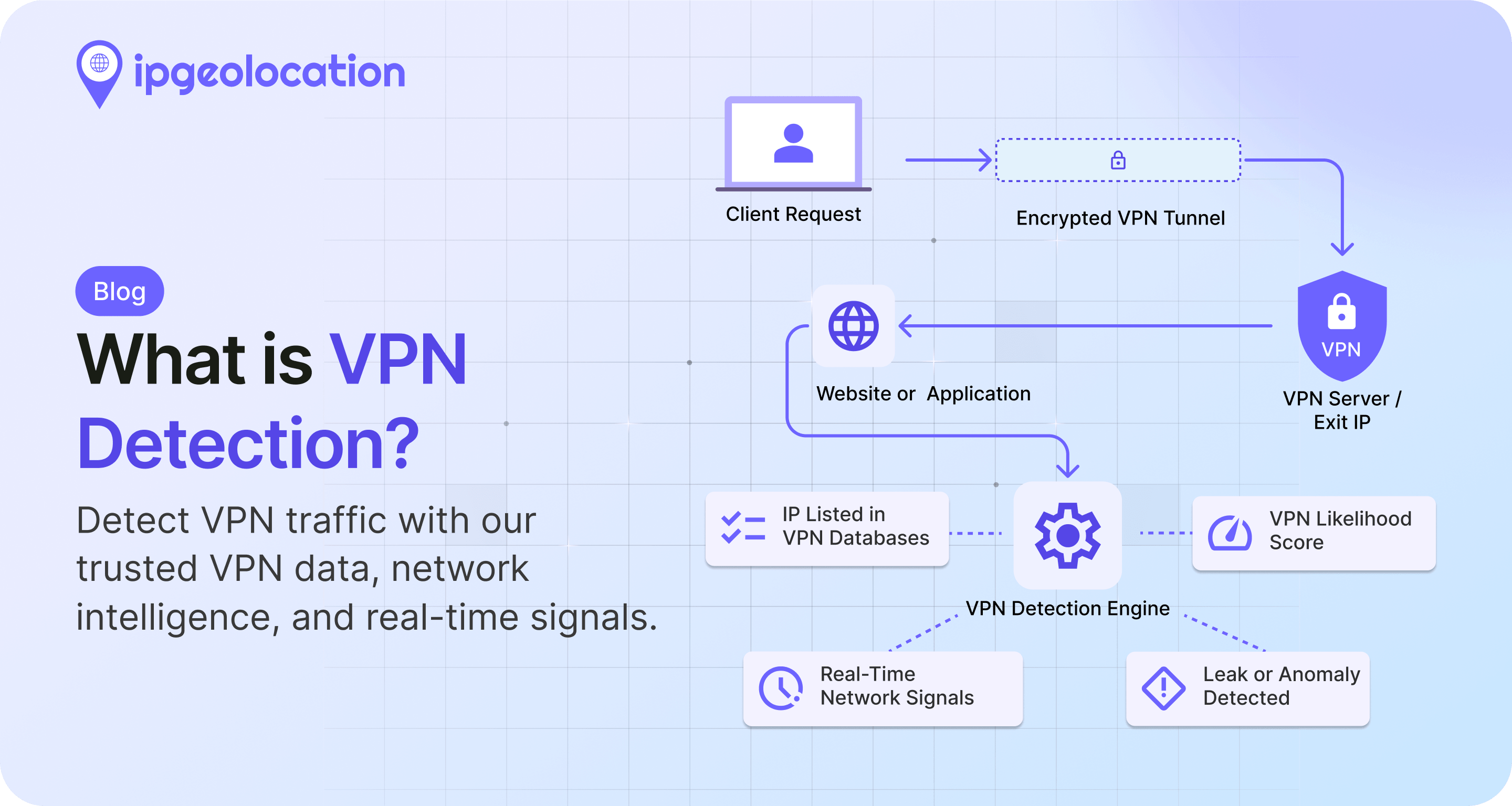
VPNs at least exit through infrastructure a defender can enumerate, which is why VPN detection is a more settled problem. Residential proxies exit through living rooms. That is the constraint every detection method below has to live with.
Why Residential Proxies Are Hard to Detect
Residential proxies are hard to detect because they use IP addresses that belong to real ISP customers, so the traffic inherits the reputation of a legitimate household. The same address often carries genuine user activity and proxied sessions in the same day, which means naive IP blocking punishes real people along with the bots.
1. The same IP serves real people and proxy traffic
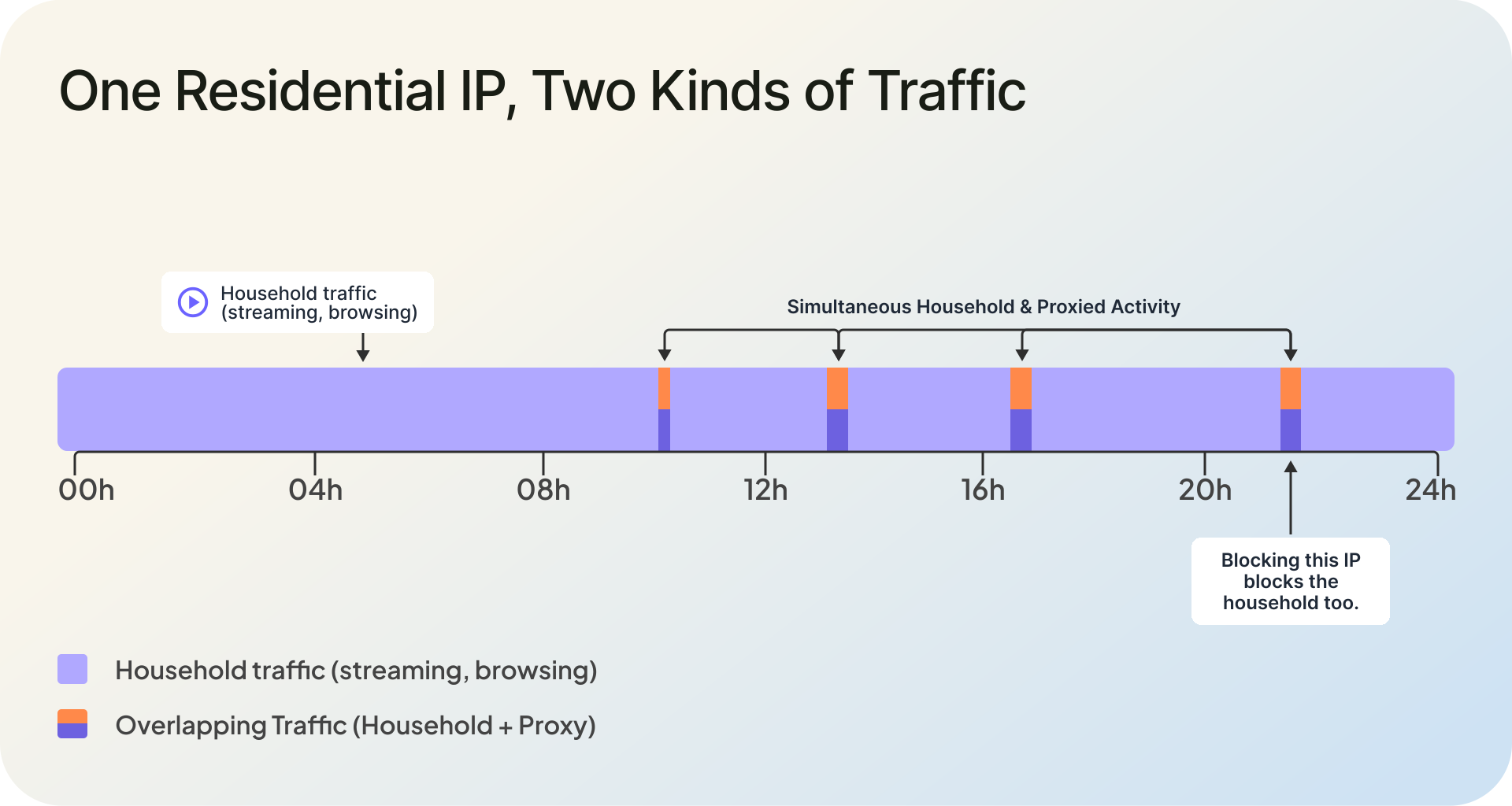
The device hosting a proxy exit node keeps being someone's actual device. The SDK routes third-party traffic in the background while the owner streams, shops, and reads the news on the same connection. From the target website's side, both kinds of traffic arrive from one address with one clean history.
Cloudflare put a number on this while training its detection models: 4 out of 5 requests from residential proxy IPs came from legitimate, direct connections, not proxied ones. A reputation system that flags the IP and blocks everything from it gets exactly one decision right in five.
2. Exit nodes churn faster than lists update
A node exists while the app hosting the proxy SDK is running. Close the app and the exit vanishes; open it tomorrow and it returns, or the provider backfills the slot with a different device in another city. Providers advertise pools they claim reach 30 to 100 million residential and mobile IPs, rotated continuously.
Rate limiting collapses against that pool size. A credential-stuffing run can spread thousands of login attempts across thousands of addresses, each of which appears once, politely, and never again. Per-IP thresholds see nothing worth flagging.
3. CGNAT puts a crowd behind one address
Mobile networks and many fixed-line ISPs use carrier-grade NAT, which parks hundreds or thousands of subscribers behind a single public IP. If one phone behind that address runs a proxy SDK, the address earns a proxy history that every other subscriber inherits. Blocking it is collective punishment, and attackers know defenders hesitate.
4. Sold twice, reassigned tomorrow
The provider ecosystem itself muddies attribution. The same residential IP can appear in more than one provider's pool, which means one real device or connection may be sold, resold, or exposed through multiple proxy networks at the same time.
In our residential proxy data across major providers, shared IPs are a common pattern, not an edge case. On average, 44.1% of IPs across these providers are shared, meaning the same residential IP appears in more than one provider's pool.
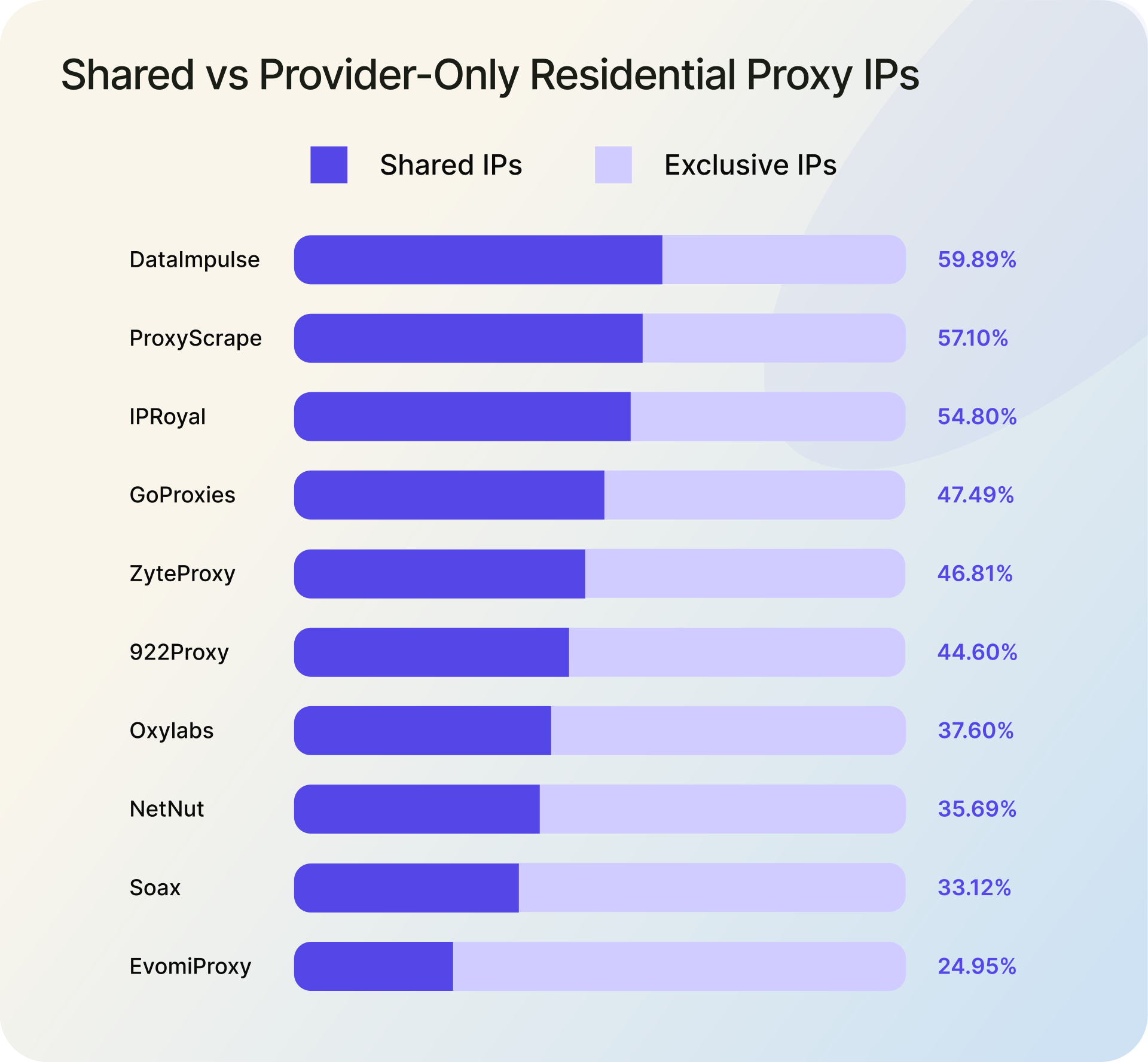
In practical terms, this makes provider attribution, blocking, and risk scoring harder. If a security team blocks one provider's known pool, the same device may still reach the platform through another provider. If traffic spikes from multiple provider names but overlaps on the same IPs, the issue may not be several independent abuse sources; it may be the same underlying residential infrastructure being monetized through multiple networks.
Then the ground shifts again. ISPs reassign addresses as subscribers come and go, so yesterday's proxy exit node can become today's clean subscriber with a stale reputation attached. Detection data has to expire. An entry without a last-seen date is a false positive waiting to happen.
This is why freshness is not a nice-to-have in this field. A residential proxy list is a photograph of a crowd, and the crowd moves.
How Residential Proxy Detection Works
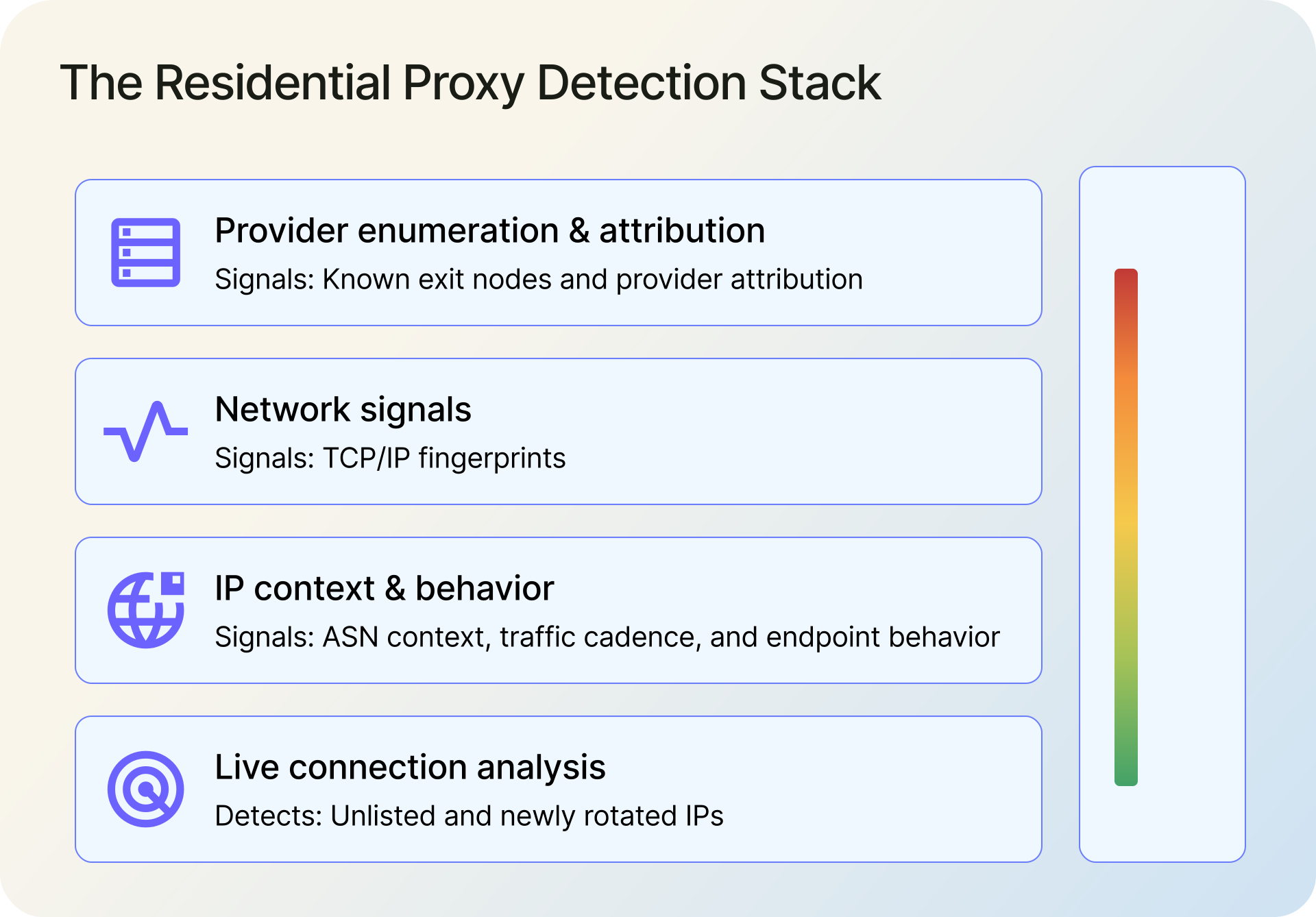
Detection systems attack the problem from four directions: they join proxy networks to map exit IPs (enumeration and provider attribution), inspect the connection itself (fingerprints), weigh what the session does (behavior), and analyze traffic live at request time. Every signal fails somewhere on its own. Combined, they produce a confidence score you can act on.
1. Provider enumeration and attribution
The most direct method is to do what attackers do: subscribe to residential proxy services, route traffic through them, and record which exit IPs the requests emerge from. Done continuously across many providers, this builds a map of who is selling which addresses, refreshed as pools rotate.
Attribution is the point, not just a yes/no flag. Knowing an IP surfaced through a specific provider three days ago supports targeted policy: throttle ranges tied to the network currently hammering your signup flow while leaving the rest alone. Our residential proxy dataset tracks 20 million entries this way, each carrying a provider name (GoProxies, Evomi Proxy, NetNut, anyIP, DataImpulse, and dozens more) and a last-seen date, updated daily.
2. Network-level signals
Connection fingerprints provide a deeper view of whether traffic has been relayed through a proxy. The TCP handshake exposes characteristics such as packet sizes, window values, and option ordering, which vary by operating system and network configuration.
When a session claims to come from a phone on home Wi-Fi but its handshake resembles a Linux server operating several networks away, that mismatch becomes a useful indicator. Connection fingerprints work best as a corroborating signal rather than standalone proof, since proxy architectures that terminate connections directly on the exit device can obscure or alter the original fingerprint.
3. IP context signals
Before any advanced analysis, cheap context filters a lot of noise. The ASN an address belongs to tells you whether it sits in consumer ISP space or hosting space, and the residential proxy vs datacenter proxy gap starts exactly there: datacenter ranges announce themselves in network registrations, residential proxy ranges do not. Checking whether an IP is residential or datacenter is the first cut every triage makes.
Geographic consistency adds another layer. An IP that geolocates to one country while the session's language, timezone, and billing address point somewhere else is not proof of proxying, but it stacks neatly with other signals.
4. What the session does
Behavior is the tiebreaker for addresses that look clean. Automated sessions tend toward metronomic request timing, narrow endpoint focus (login, checkout, signup), and geography that jumps cities mid-session. None of this is decisive alone, because power users and shared devices produce weird patterns too; behavioral signals modulate a score rather than set it.
5. Live connection analysis
Everything above leans on history, and history has a blind spot: the IP that joined a proxy pool an hour ago, or the clean household address that started relaying traffic this afternoon. Live analysis closes it by evaluating the connection in front of you, at request time, instead of asking what the address did last month.
Our Real-Time Proxy & VPN Detection runs network-level tests against the active session and returns a proxy score, VPN score, and confidence rating even when the IP has no recorded reputation at all. It also clears reassigned addresses that static tags would keep punishing, which cuts false positives from the reallocation problem above.
Running Detection in Practice
Everything above is how to detect residential proxies in principle. Here is what it looks like in code, in the two shapes most teams actually deploy. One prerequisite: score the right address. Behind a CDN or load balancer, resolve the visitor's real IP before scoring it, or everything downstream is noise.
1. Batch scoring with a local database
For log analysis, traffic studies, and network-level screening, a local lookup beats an API call: no latency, no per-query cost. The Residential Proxy Database ships as CSV and MMDB (20M entries, updated daily), and the MMDB format answers lookups in microseconds. Field details are in the database documentation.
# Install the official reader first: pip install ipgeolocation-mmdb-reader
import os
from ipgeo_mmdb_reader.reader import IPGeolocationMMDBReader


def check_residential_proxy(ip_address: str) -> dict:
    """
    Check if an IP is a known residential proxy using
    ipgeolocation.io's Residential Proxy Database (MMDB format).
    """
    db_path = os.environ.get("RESIDENTIAL_PROXY_DB_PATH")
    if not db_path:
        raise ValueError("Set RESIDENTIAL_PROXY_DB_PATH environment variable")

    try:
        with IPGeolocationMMDBReader(db_path) as reader:
            result = reader.lookup(ip_address)

            if result is None:
                return {
                    "ip": ip_address,
                    "is_residential_proxy": False,
                    "provider": None,
                    "last_seen": None,
                }

            return {
                "ip": ip_address,
                "is_residential_proxy": True,
                "provider": result.get("proxy_provider", "Unknown"),
                "last_seen": result.get("last_seen"),
            }

    except FileNotFoundError:
        raise FileNotFoundError(f"Database file not found at {db_path}")
    except Exception as e:
        # Log the error; don't expose internal details to callers
        print(f"Residential proxy DB lookup failed for {ip_address}: {e}")
        return {
            "ip": ip_address,
            "is_residential_proxy": False,
            "provider": None,
            "last_seen": None,
            "error": "Lookup failed, treating as non-proxy",
        }
The provider field earns its keep in rules. If one network's ranges suddenly dominate your signup traffic, you can rate-limit that provider specifically instead of swinging at every residential IP in the region.
2. Per-request checks with the detection API
Login, checkout, and signup flows want richer signals at decision time. The Proxy & VPN Detection API returns proxy, VPN, Tor, and relay flags with provider names, confidence scores, and an overall threat score in a single v3 call; residential proxy detection is a core capability of it, not an add-on. A flagged response comes back like this (full security object):
{
    "ip": "100.0.12.2",
    "security": {
        "threat_score": 45,
        "is_tor": false,
        "is_proxy": true,
        "proxy_provider_names": [
            "Oxy Labs"
        ],
        "proxy_confidence_score": 99,
        "proxy_last_seen": "2026-07-17",
        "is_residential_proxy": true,
        "is_vpn": false,
        "vpn_provider_names": [],
        "vpn_confidence_score": 0,
        "vpn_last_seen": "",
        "is_relay": false,
        "relay_provider_name": "",
        "is_anonymous": true,
        "is_known_attacker": false,
        "is_bot": false,
        "is_spam": false,
        "is_cloud_provider": false,
        "cloud_provider_name": ""
    }
}
import logging
import os

import requests

logger = logging.getLogger(__name__)

API_URL = "https://api.ipgeolocation.io/v3/security"


def score_request_ip(ip_address: str) -> dict:
    """Check one IP against the Proxy & VPN Detection API and map it to a decision."""
    api_key = os.environ.get("IPGEO_API_KEY")
    if not api_key:
        raise ValueError("Set IPGEO_API_KEY; never hard-code API keys")

    try:
        response = requests.get(
            API_URL,
            params={"apiKey": api_key, "ip": ip_address},
            timeout=5,
        )
        response.raise_for_status()
        security = response.json().get("security") or {}
    except requests.exceptions.RequestException as exc:
        # Fail toward a challenge, not an outage: log it and let the
        # caller add friction while the lookup is unavailable. Never log or return
        # str(exc): it contains the request URL, including your API key.
        status = exc.response.status_code if exc.response is not None else None
        logger.error("Security lookup failed: type=%s status=%s", type(exc).__name__, status)
        return {"ip": ip_address, "decision": "challenge", "error": "Security lookup unavailable"}

    threat = security.get("threat_score") or 0
    confidence = security.get("proxy_confidence_score") or 0
    is_res_proxy = bool(security.get("is_residential_proxy"))

    # Residential proxy IPs also carry real household traffic, so a high
    # confidence score alone is not grounds for a block. Require corroborating
    # threat signals, and prefer friction over denial on shared address space.
    if is_res_proxy and confidence >= 90 and threat >= 80:
        decision = "block"
    elif is_res_proxy and confidence >= 50:
        decision = "challenge"
    elif threat >= 45:
        decision = "challenge"
    else:
        decision = "allow"

    return {
        "ip": ip_address,
        "decision": decision,
        "is_residential_proxy": is_res_proxy,
        "confidence": confidence,
        "threat_score": security.get("threat_score") or 0,
        "providers": security.get("proxy_provider_names") or [],
        "last_seen": security.get("proxy_last_seen"),
    }
For backfills and audits, the same data is available in bulk: the v3 bulk endpoint accepts up to 50,000 IPs per request on paid plans, which start at $19/month.
3. Decision bands, not binary blocks
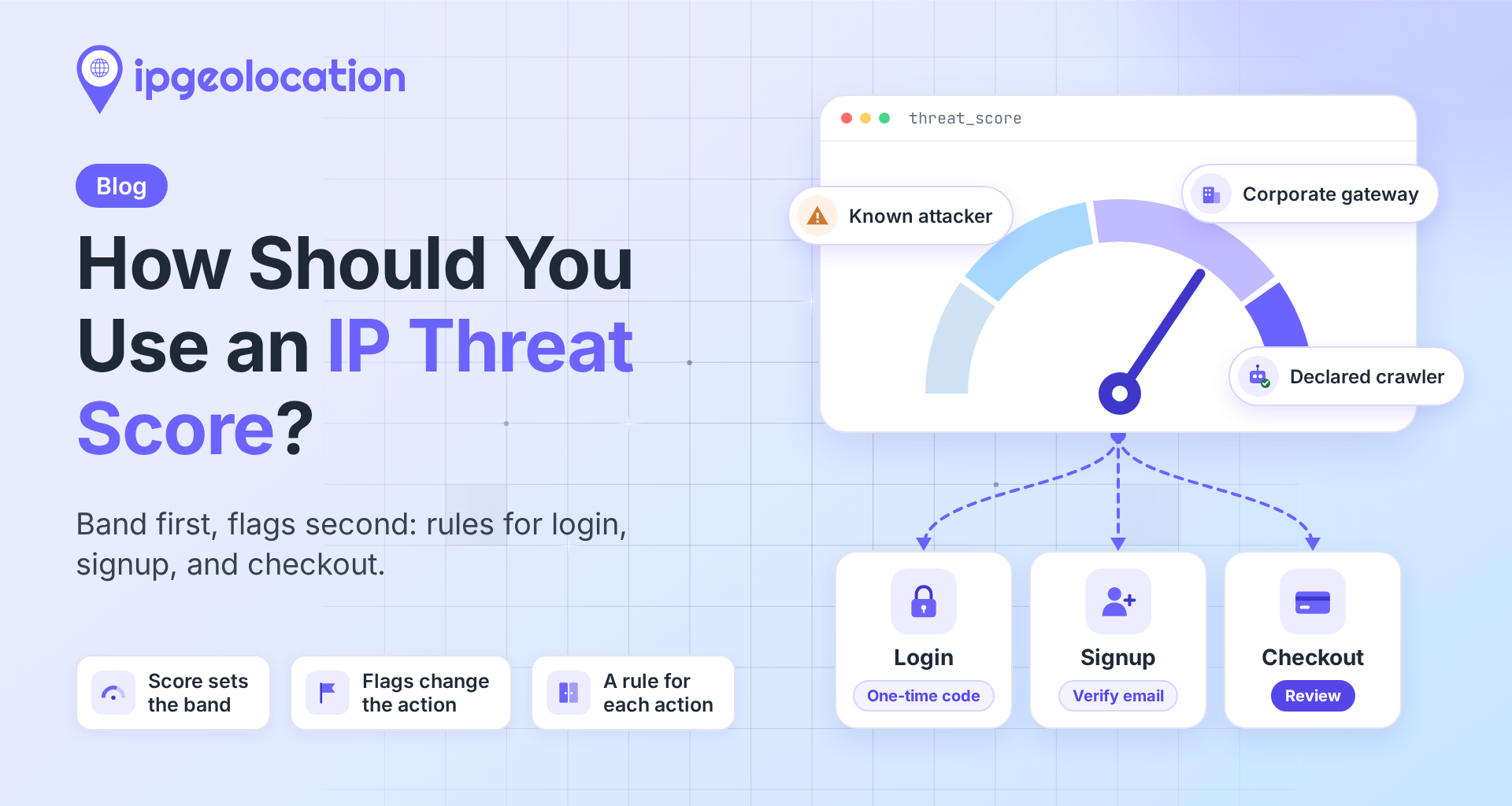
The API's documented threat-score bands are a sane default: 1-19 allow with standard controls, 20-44 combine with other context, 45-79 add friction, 80-100 block or route to review. Layer the proxy confidence score on top: a 99 justifies a hard response on sensitive endpoints, while a 55 earns a CAPTCHA or step-up auth, not a ban.
Two cautions. On CGNAT and mobile ranges, prefer challenges over blocks even at high confidence, because one address is many people. And most residential proxy detection software will not tell you how it reaches a verdict; treat opacity as a smell. A vendor handing you a bare true/false has quietly chosen a false-positive rate on your behalf, and you should insist on the score instead.
Where Each Approach Fits
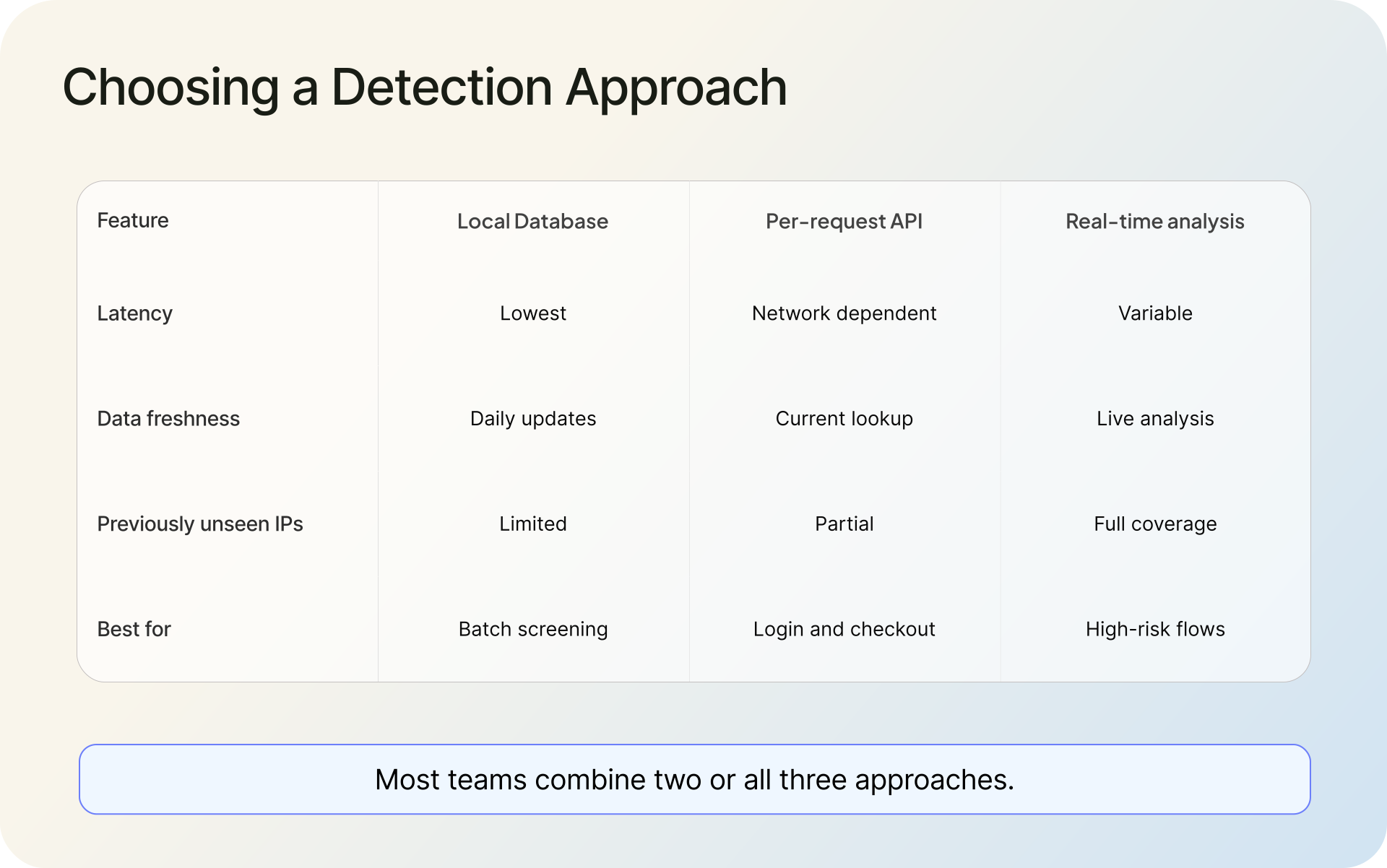
The local database fits batch work: scoring millions of log lines, pre-screening ranges at the network edge, enriching analytics offline. It is the fastest and cheapest per lookup, and daily updates keep the decay problem manageable.
The API fits the moment of decision. Per-request lookups return attribution, confidence, and threat context that a four-field local dataset cannot carry, which is what block-or-challenge logic actually needs at login and checkout.
Live connection analysis covers what neither list can: addresses nobody has cataloged and residential IPs that flipped from clean to proxied since the last update. Teams that need the full stack offline can get the Security Pro databases, which bundle the 28.7M-entry IP security dataset with the residential proxy and hosting data.
FAQ
Yes, with layered signals rather than any single check. Provider enumeration catches known exit nodes, network fingerprints expose relayed connections, behavioral analysis flags automation, and live connection analysis catches IPs no list has recorded. Each method alone misses too much; combined, they produce confidence scores accurate enough to act on.
Detection systems map proxy networks by routing traffic through them and tagging exit IPs with provider names, then corroborate with network signals (TCP fingerprints), IP context (ASN, geography), and session behavior. Real-time analysis evaluates the live connection for anything historical data missed. Results arrive as confidence scores, not simple booleans.
Because the IP addresses are genuinely residential. They belong to real ISP subscribers whose devices also carry normal household traffic, so reputation checks see a clean consumer address. Add constant node churn, providers reselling the same devices, CGNAT crowds behind single IPs, and ISP reassignment, and static blocklists decay almost immediately.
Look it up against a residential proxy dataset or a security API. The response should give you an is_residential_proxy flag plus the provider name and last-seen date, which tell you how current the evidence is. For one-off checks, the lookup box on our detection API page answers a few queries free in the browser.
Devices join a residential proxy network through SDKs bundled into free apps, bandwidth-sharing programs that pay users, or malware on compromised routers and IoT hardware. The provider then routes paying customers' traffic through those devices, so each request exits from a genuine household IP. The FBI documented five recruitment methods in its 2026 advisory.
In the residential proxy vs VPN comparison, the difference is who owns the exit. A VPN exits through servers the provider operates, in ranges defenders can enumerate. A residential proxy exits through someone's home device on an ISP-assigned address, which is why it evades the reputation checks that catch VPNs.
Using one is not inherently illegal, and legitimate uses exist: ad verification, localization testing, market research. The legal trouble sits in how networks recruit devices (malware and buried consent) and what customers do through them. Fraud, credential stuffing, and purchase-limit evasion are illegal regardless of what kind of proxy carries them.
It expresses how certain the system is that an IP is currently operating as a proxy, on a 0-100 scale. A 99 means strong, recent evidence; a 40 means weak or stale signals. Map bands to actions: block at high confidence on sensitive flows, challenge in the middle, log and watch below that.
If you are comparing residential proxy detection API options side by side, our guide on how to evaluate a VPN and proxy detection API covers the criteria that separate marketing from measurement. For dataset access or a walkthrough of the detection stack against your traffic, talk to the team.