
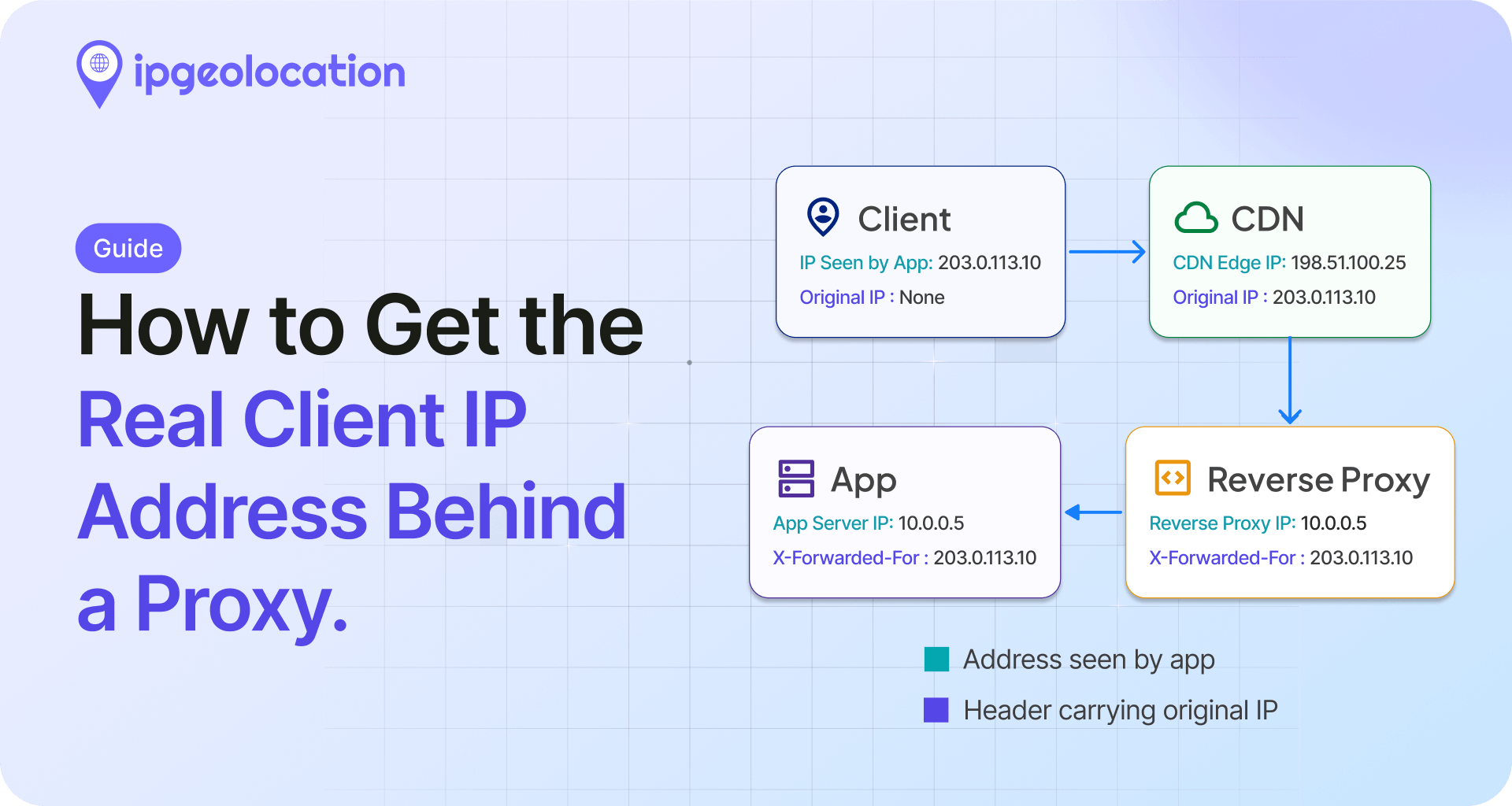
The real client IP address is the public IP of the visitor who made the request. The moment a proxy, load balancer, or CDN sits in front of your server, that address stops showing up where most code looks for it, and you start logging the intermediary instead.
Get this wrong and your rate limiting, geolocation, fraud checks, and access rules all key off the wrong address. Get it right and it comes down to two questions: who set the header carrying the IP, and can you trust that hop?
TL;DR
- The rule: use a forwarding header only when it was added by infrastructure you control. The address to trust is the first one from the right that is not one of your trusted proxy IPs, which is the closest to the client you can verify.
- No proxy: use the socket source address, and ignore forwarding headers, since a direct client can fake them.
- Reverse proxy (Nginx, Apache, HAProxy): have the proxy set X-Forwarded-For or X-Real-IP, then allow only that proxy to supply the client IP.
- CDN (Cloudflare): read CF-Connecting-IP, and restore it at your origin using Cloudflare's current IP ranges.
- Security uses (rate limits, blocklists): only use the address your own proxy or CDN added. The leftmost value is spoofable.
Why your backend sees the proxy's IP
When a client connects straight to your server, the source address of the TCP connection is the visitor. That is what most frameworks expose as the remote address. Put a reverse proxy, load balancer, or CDN in the path, and your app's connection now originates from that intermediary, so the remote address is the proxy, not the person.
To carry the original address forward, proxies add a request header, almost always X-Forwarded-For. The standardized replacement, the Forwarded header, was published in June 2014 as RFC 7239, but X-Forwarded-For is still far more widely deployed, so most of this guide centers on it.
The trust model: who set the header?
A forwarding header is plain text in the request, which means anyone can put anything in it. This is the single idea that decides whether you get the real client IP or a spoofed one.
MDN states the rule plainly: if your server can be reached directly from the internet, even when it usually sits behind a trusted reverse proxy, no part of the X-Forwarded-For list can be trusted for anything security related. A client can connect to the origin and send a header that says whatever it likes.
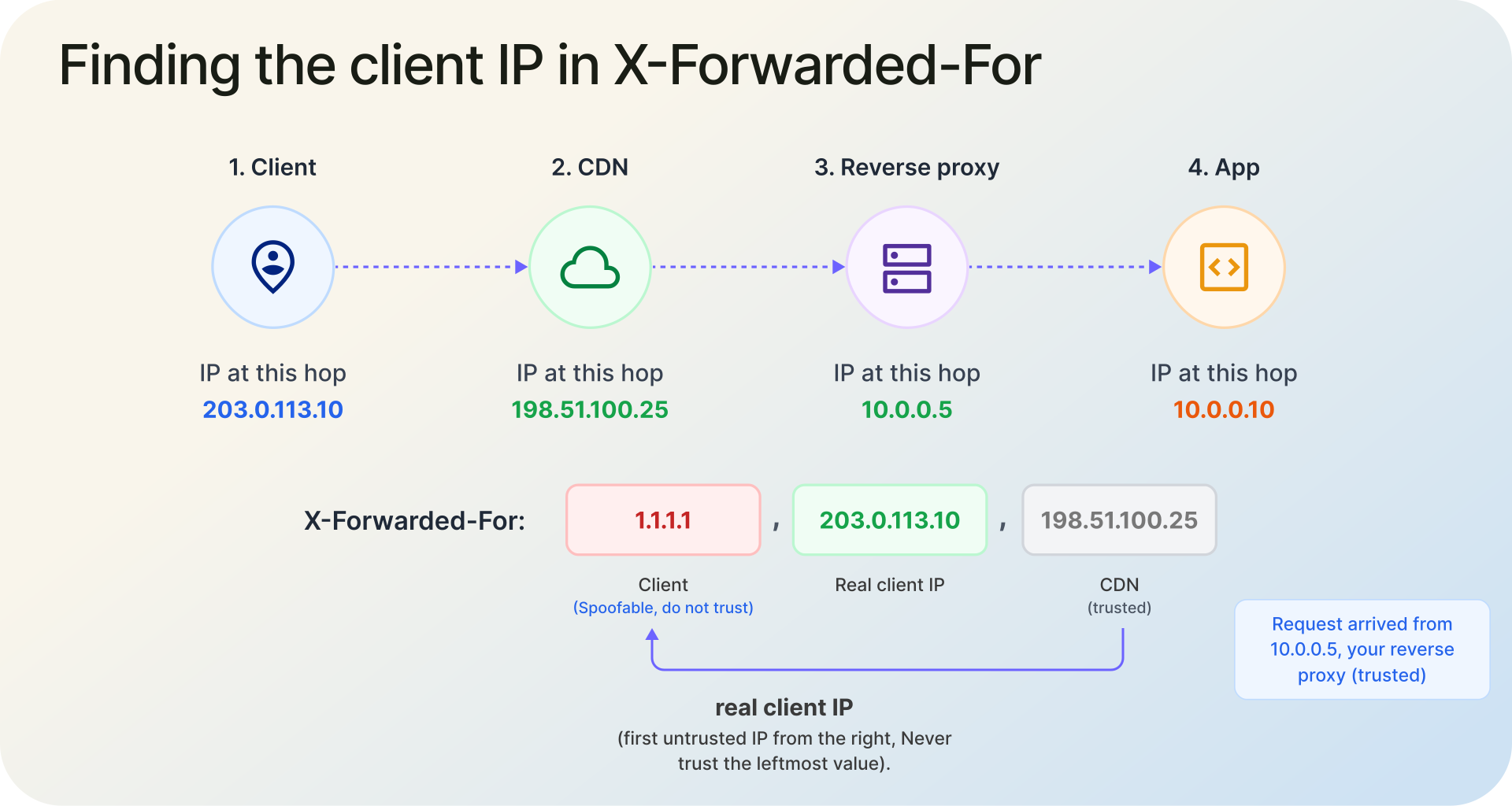
The safe way to pick the address is to read the list from right to left and take the first IP that is not one of your own proxies. That is the first address you can trust as the client. It may belong to an intermediate proxy rather than the visitor's own device, but it is the closest you can verify, and it is the only entry safe to use for security. You identify your proxies one of two ways: by pinning their IP ranges, or by setting a trusted-proxy count (the number of hops between the internet and your app). The leftmost IP is the one most tutorials grab, and it is the one you should trust least.
X-Forwarded-For, X-Real-IP, and Forwarded
Three headers come up constantly, and they are not interchangeable.
X-Forwarded-For is a comma-separated list. In a well-behaved chain, the leftmost entry is the original client and each entry to the right is a later proxy, with the rightmost being the most recent hop. A request can even arrive with more than one X-Forwarded-For header, and per MDN those must be treated as a single combined list.
X-Real-IP is a single value, commonly set by Nginx to one address. Its exact meaning depends on how the proxy in front was configured, so it is only as reliable as that config.
Forwarded (RFC 7239) is the standardized header and packs everything into one field, for example Forwarded: for=192.0.2.43;proto=https;by=203.0.113.43. It is cleaner than the X-Forwarded family but less widely supported, so adoption is still partial.
No proxy: read the connection's source
If nothing sits in front of your app, the work is already done: the source address of the incoming connection is the visitor. Read the remote address your server or framework exposes, and ignore X-Forwarded-For completely. With no trusted proxy to set that header, any value in it was put there by the caller and cannot be believed.
Behind Nginx: getting the real client IP
Two pieces have to line up: the internet-facing proxy forwards the address, and the server reading requests restores it.
At the proxy that faces the internet, forward the client address:
# inside the location block that proxies to your app
proxy_set_header X-Real-IP        $remote_addr;
proxy_set_header X-Forwarded-For  $proxy_add_x_forwarded_for;
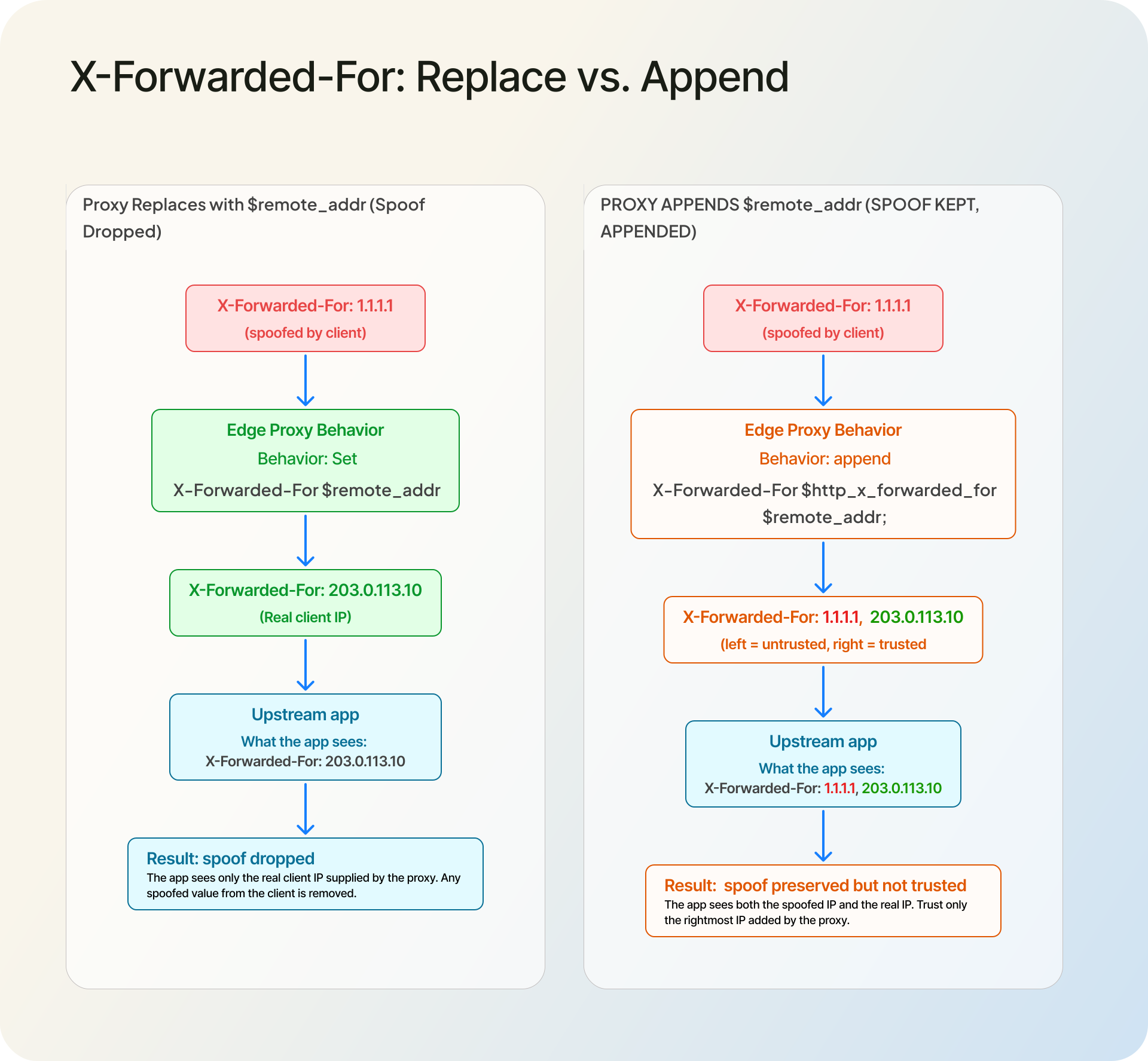
$proxy_add_x_forwarded_for appends the connection's address to whatever arrived in the request. If you would rather drop anything the client sent and trust only what Nginx itself saw, replace the value instead of appending:
proxy_set_header X-Forwarded-For $remote_addr;
On the server that reads requests behind the proxy, restore the real address with the ngx_http_realip_module:
set_real_ip_from 10.0.0.0/8;      # trust your proxy network only
real_ip_header   X-Forwarded-For;
real_ip_recursive on;
After this, $remote_addr holds the real client IP, so your logs and access rules use the visitor rather than the proxy. Keep set_real_ip_from scoped to the proxies you actually run; trusting a wider range hands the decision back to the caller.
Behind Cloudflare: use CF-Connecting-IP
When a site is proxied through Cloudflare, the genuine visitor address arrives in a single header, CF-Connecting-IP. Cloudflare's guide to restoring original visitor IPs recommends reading that header rather than X-Forwarded-For, which it appends to and which can hold several addresses.
In Nginx, restore it the same way as before, but trust Cloudflare and read its header:
real_ip_header CF-Connecting-IP;
set_real_ip_from 173.245.48.0/20;
set_real_ip_from 103.21.244.0/22;
# add every current range from https://www.cloudflare.com/ips/
real_ip_recursive on;
Two things matter here. Keep the trusted ranges in sync with Cloudflare's published IP ranges, because they change. And lock your origin so it only accepts connections from Cloudflare; if an attacker can reach the origin directly, they can send a forged CF-Connecting-IP and you are back to trusting a header anyone can write. Enterprise plans can use True-Client-IP, which carries the same value under a different name.
Other reverse proxies, CDNs, and platforms
The principle does not change across stacks: have the layer in front set a forwarding header, then trust that header only from hops you control. The configuration is what differs.
Apache uses mod_remoteip, which rewrites the connection's client IP from a header you name and processes the list right to left, stopping at the first untrusted hop:
RemoteIPHeader X-Forwarded-For
RemoteIPInternalProxy 10.0.0.0/8
For Cloudflare in front of Apache, set RemoteIPHeader CF-Connecting-IP and list Cloudflare's ranges with RemoteIPTrustedProxy. After that, %a in your logs and Require ip rules use the real client IP.
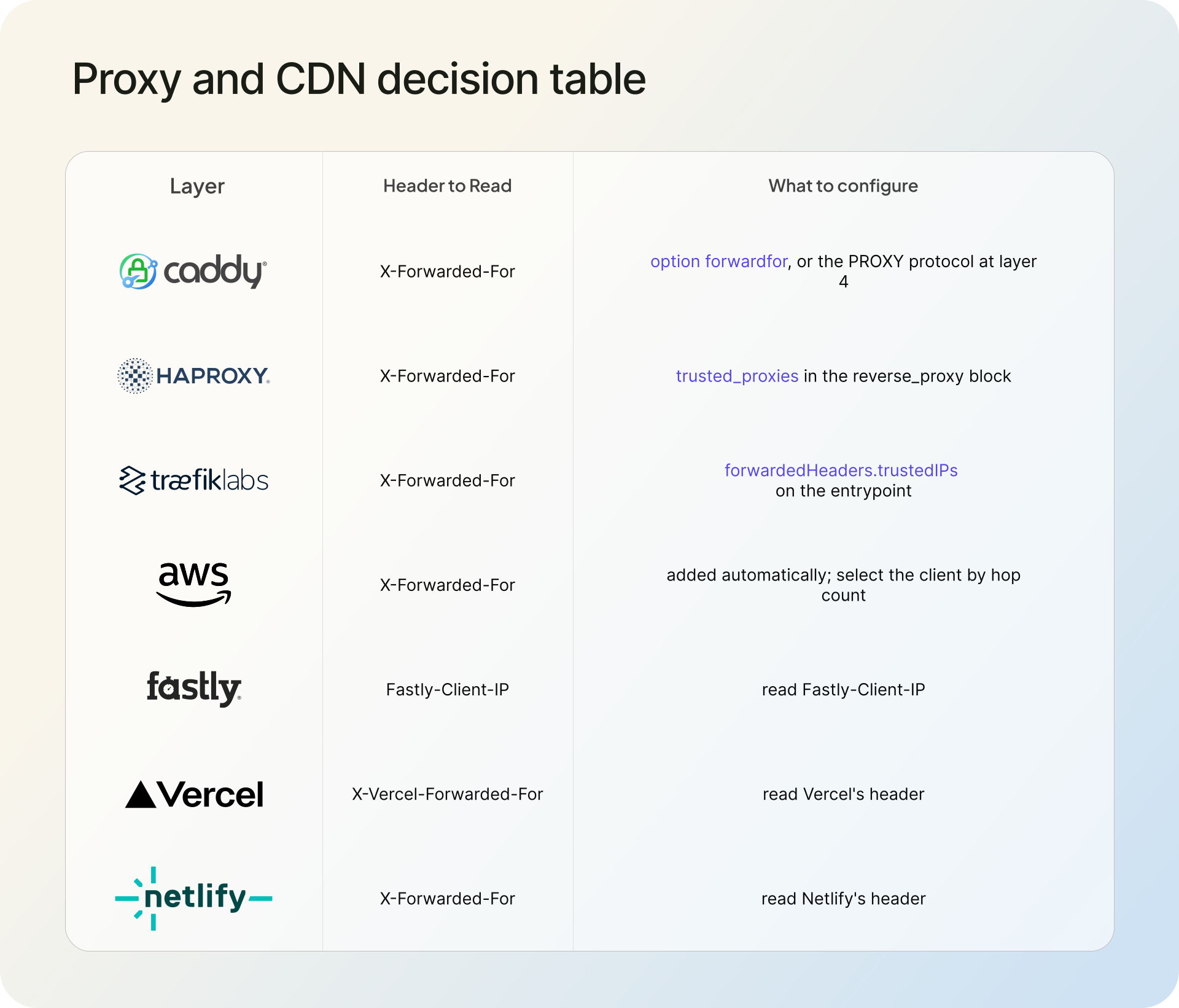
For everything else, where the client IP lives and the setting that matters:
| Layer | Where the client IP is | How to configure (and watch out for) |
|---|---|---|
| HAProxy | X-Forwarded-For | option forwardfor, or the PROXY protocol at layer 4 |
| Caddy | X-Forwarded-For | global servers { trusted_proxies static <ranges> }; add trusted_proxies_strict, because Caddy parses the header left to right by default |
| Traefik | X-Forwarded-For | set forwardedHeaders.trustedIPs on the entrypoint |
| AWS ELB | X-Forwarded-For | ALB appends by default and can preserve or remove it via routing.http.xff_header_processing.mode; Classic ELB (HTTP/HTTPS) also adds XFF; NLB is layer 4, so use the PROXY protocol there |
| Fastly | client.ip in VCL |
Fastly-Client-IP mirrors it but is spoofable unless you set req.http.Fastly-Client-IP = client.ip in VCL |
| Vercel | x-forwarded-for |
x-vercel-forwarded-for is identical and survives if an upstream proxy overwrites x-forwarded-for |
| Netlify | context.ip (Functions and Edge Functions) |
provided by the platform; context.geo carries location too |
Then geolocate the real IP
Getting the correct client IP is usually the first step, not the goal. Once your infrastructure hands your app the right address, you can act on it: localize content, screen sign-ups and logins for risk, route by region, or log where traffic actually comes from.
That is where the IPGeolocation API fits. Pass it the real IP and it returns the location, network and ASN, currency, and security signals such as VPN and proxy detection, so the address becomes data you can use.
FAQ
With no proxy, use the connection's source address. Behind your own reverse proxy, use the IP it adds to X-Forwarded-For or X-Real-IP. Behind Cloudflare, use CF-Connecting-IP.
Not by itself. Clients can send fake X-Forwarded-For values, so only use the part your own infrastructure added. Avoid it for rate limits or blocking if your origin is reachable directly from the internet.
Because your app is seeing the proxy's connection, not the visitor. Configure the proxy to pass the visitor IP, then tell your server which proxy addresses are allowed to rewrite the client IP.
Cloudflare uses CF-Connecting-IP for the visitor's address. In Nginx or Apache, read it from Cloudflare's IP ranges only. Enterprise plans can also use True-Client-IP.
For security, work from the right. Skip the proxy IPs you control, then take the first address that is not yours. Do not rely on the leftmost value for access control.
X-Forwarded-For is a list that can hold the whole proxy chain; X-Real-IP holds a single address, usually set by Nginx to one IP. Use X-Forwarded-For when you need the full chain to pick the client from the right; X-Real-IP is simpler when one trusted proxy sets it.
Forwarded is the standardized header from RFC 7239 and combines for, by, proto, and host in one field, like Forwarded: for=192.0.2.43;proto=https. X-Forwarded-For is older and non-standard, but far more widely supported, so most stacks still default to it.
Each proxy in the path appends the address it received the request from, so the list grows by one per hop. In a clean chain, the leftmost entry is the original client and the rightmost is the closest proxy to your server.
Count the proxies between the internet and your app, then read that many entries from the right of X-Forwarded-For. Or pin each proxy's IP range and take the first address that is not one of yours. Do not assume the leftmost is the client.
Yes. X-Forwarded-For and CF-Connecting-IP both carry IPv4 and IPv6. In the Forwarded header, IPv6 values are quoted and bracketed, like for="[2001:db8::1]". Nginx and Apache handle both in their real-IP modules.
What to do next
Find your setup above, set the forwarding header at the proxy, and pin the one proxy you trust. Then send the resulting address to the IPGeolocation API to turn the real client IP into location, network, and risk data.