

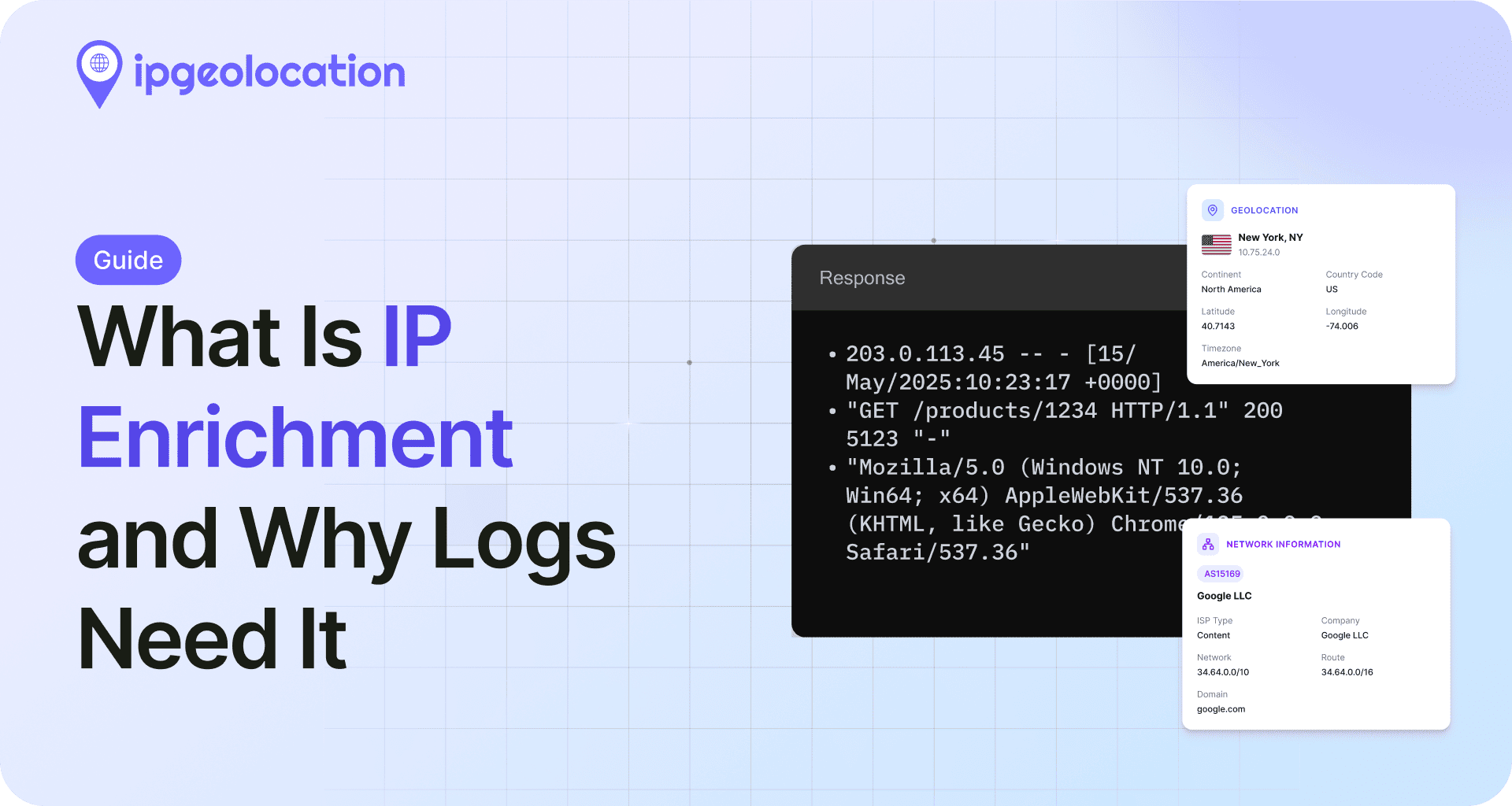
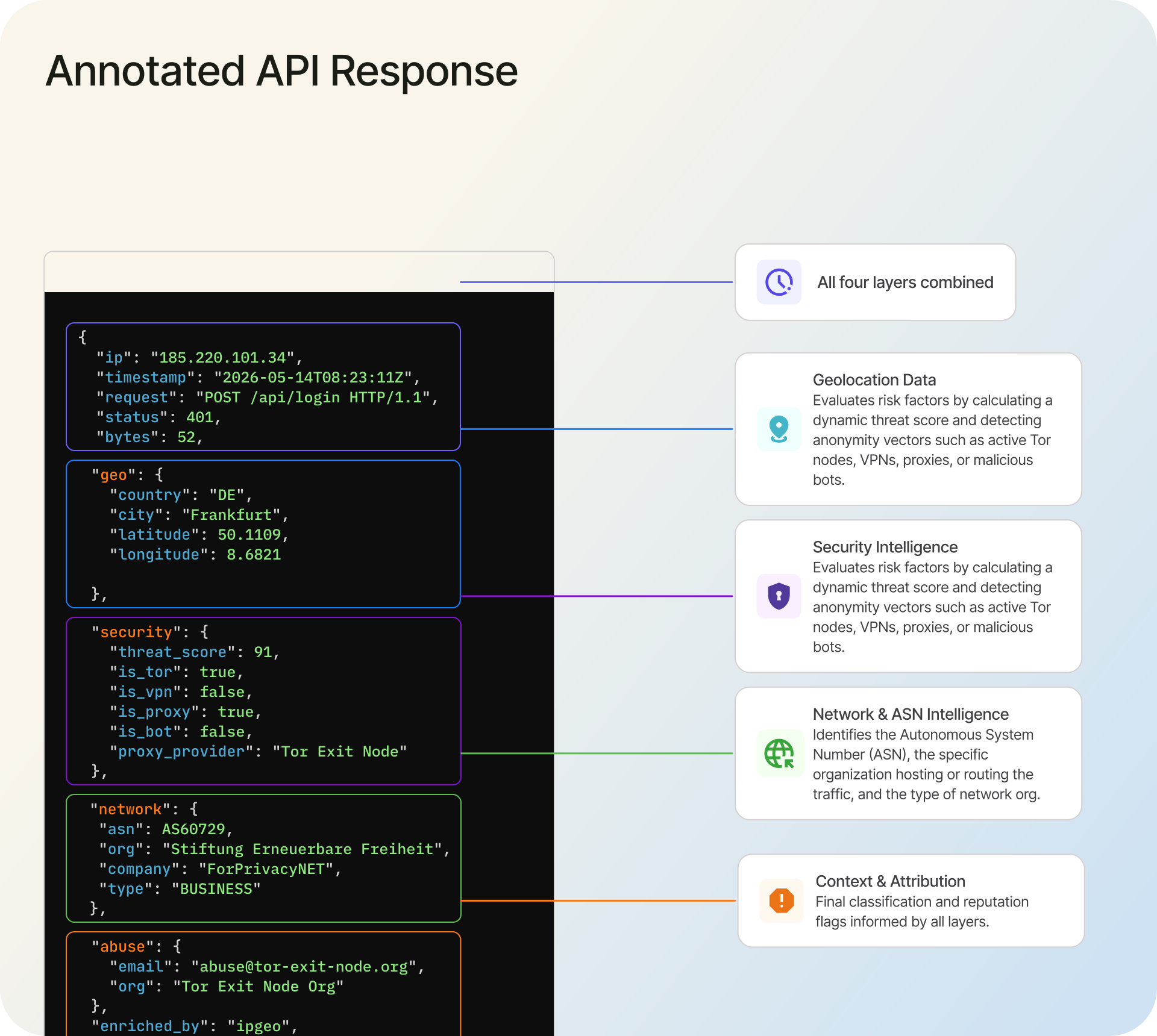
IP enrichment is the process of appending contextual data -- geolocation, network ownership, company information, and threat intelligence -- to raw IP addresses. Every server log, firewall event, and application trace contains IP addresses, but those addresses are just numbers until you add context. A login attempt from 185.220.101.34 means nothing on its own. Enriched, it becomes a connection from a known Tor exit node in Germany with a threat score of 91 -- and that changes how you respond.
This guide covers IP enrichment for log data from end to end: what types of data you can append, how to choose between API-based and local database enrichment, and how to implement both approaches with production-ready code.
TL;DR
- IP enrichment appends geolocation, ASN, company, and threat data to raw IP addresses in log files
- Enrichment runs via real-time API calls or local MMDB database lookups
- Key fields include country/city coordinates, AS number and organization, connection type, threat score, and VPN/proxy/Tor detection flags
- API-based enrichment suits lower-volume real-time pipelines; local databases suit high-volume or air-gapped environments
- Security enrichment (threat scores, proxy detection) turns basic log analysis into active threat detection
IP enrichment transforms flat log files into queryable, context-rich datasets. Instead of grepping for IP addresses and manually checking each one, enriched logs let you filter by country, flag traffic from hosting providers, and surface threats automatically. This guide walks through the full process with working code examples you can drop into your pipeline.
What Is IP Enrichment?
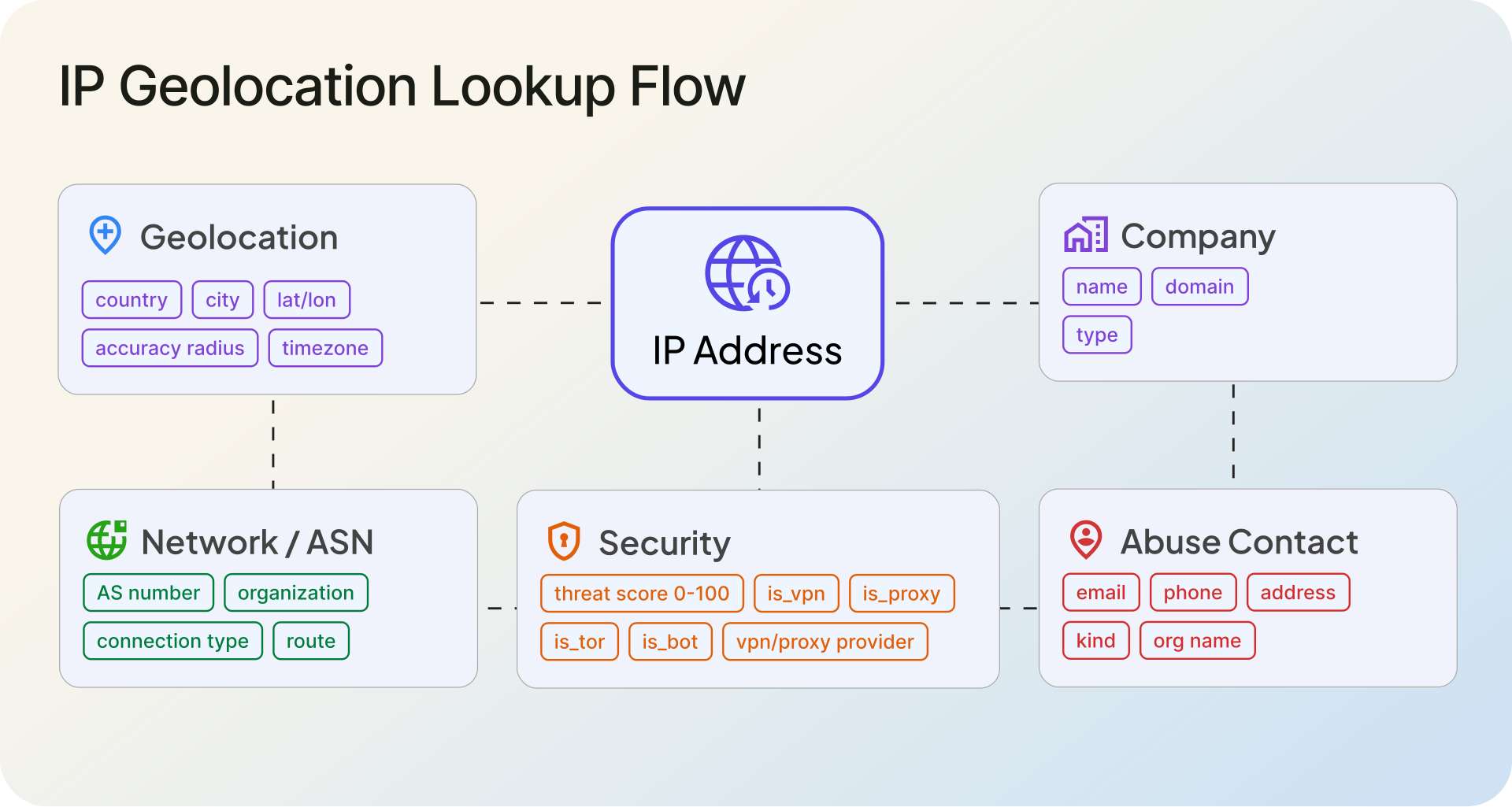
IP enrichment takes a raw IP address and attaches structured metadata to it. That metadata typically falls into five categories: geolocation (where the IP is), network identity (which autonomous system owns it), company information (which organization operates it), security intelligence (whether it is associated with threats), and abuse contacts (who to notify about misuse).
The enrichment itself happens one of two ways. You can query an API like the ipgeolocation.io IP Geolocation API in real time, sending each IP and getting structured JSON back. Or you can download a local database in MMDB format and run lookups without any network calls. Both approaches return the same categories of data, but they differ in latency, cost structure, and freshness -- a tradeoff covered in detail later in this guide.
The NIST SP 800-92 Guide to Computer Security Log Management recommends enriching log data with contextual information as part of effective log analysis. IP enrichment is one of the most practical ways to follow that guidance, because IP addresses appear in virtually every log source your infrastructure generates.
Why Enrich IP Addresses in Logs?
Raw IP addresses are the most common identifier in server logs, but they are also the least informative on their own. Enrichment turns them into dimensions you can actually filter, aggregate, and alert on.
1. Faster Incident Investigation
When a security alert fires, the first question is usually "where is this traffic coming from?" Without enrichment, an analyst has to copy-paste each IP into a lookup tool manually. With enriched logs, the answer is already in the record. You can see the country, the hosting provider, whether the IP is a known VPN endpoint, and its threat score -- all without leaving your log viewer. For a SOC team handling hundreds of alerts per day, that difference adds up to hours.
2. Geographic Traffic Analysis
Enriched logs let you build geographic breakdowns of your traffic without any additional analytics tooling. You can answer questions like "what percentage of our 4xx errors come from countries we do not serve?" or "which regions generate the most API traffic?" directly from log queries. For businesses with regional pricing, CDN optimization needs, or geographic compliance requirements, this data is immediately actionable.
3. Fraud and Threat Detection
An IP address connecting from a residential ISP in the same country as the user's billing address looks different from one connecting through a datacenter proxy in a country 6,000 miles away. IP enrichment gives you the fields to distinguish between these scenarios programmatically. Threat scores, VPN/proxy flags, and hosting provider identification let you build automated rules -- flag logins where is_vpn is true and the country does not match the account's registered region, for example.
4. Compliance and Audit Trails
Regulations like GDPR require knowing where data is being accessed from. IETF RFC 6302 recommends logging source IP addresses and ports for internet-facing servers. Enriching those logged IPs with country-level geolocation creates audit trails that answer "was this data accessed from an authorized jurisdiction?" -- a question auditors actually ask.
Types of IP Enrichment Data
Not every IP lookup returns the same fields. What you get depends on the data source and the tier of service you use. Here is what each category includes and why it matters in a log analysis context.
1. Geolocation
The most common enrichment type. A geolocation lookup returns the country, region/state, city, latitude/longitude coordinates, postal code, and timezone associated with an IP address. Country-level accuracy typically sits above 99% for well-maintained databases. State/region-level accuracy is typically 90%+, and city/locality-level accuracy is 85%+, depending on the region and whether the IP belongs to a fixed broadband connection or a mobile carrier.
In logs, geolocation data lets you segment traffic geographically without relying on application-layer signals like Accept-Language headers, which users can spoof. It is the foundation of geo-based dashboards, regional traffic anomaly detection, and compliance filtering.
2. Network and ASN Data
Every IP address belongs to an autonomous system (AS) -- a network operated by a specific organization. ASN enrichment returns the AS number, the organization name, the route prefix, and often the connection type (broadband, mobile, corporate, hosting/datacenter).
The connection type field is particularly useful for log analysis. Traffic from hosting/datacenter IPs behaves differently from residential broadband traffic. If 80% of your failed login attempts come from IPs classified as datacenter or hosting, that is a pattern worth alerting on. The Geo Advance databases from ipgeolocation.io include ASN, organization, and connection type data alongside geolocation.
3. Company Data
Company enrichment maps an IP address to the organization that operates it. This goes beyond the ASN organization name -- it includes the company's domain, industry vertical, and type classification (ISP, business, education, government).
For B2B SaaS products, company enrichment on application logs can reveal which organizations are actively using your product, even before they identify themselves. For security, it helps distinguish traffic from legitimate corporate networks versus hosting infrastructure commonly used for scanning and scraping.
4. Security and Threat Intelligence
Security enrichment is where log analysis turns into threat detection. A security lookup returns a threat score (typically 0-100), proxy/VPN/Tor detection flags, residential proxy identification, bot detection indicators, and often the specific proxy or VPN provider name with a confidence score.
These fields transform how you triage alerts. An IP with is_tor: true and threat_score: 85 hitting your login endpoint warrants immediate attention. The same request from a residential IP with threat_score: 3 probably does not. The Security Pro databases provide this data for local lookups, and the API includes it via the include=security parameter.
5. Abuse Contact Information
When you identify malicious traffic in your logs, the next step is often reporting it. Abuse contact enrichment returns the email address, phone number, and organization name responsible for handling abuse reports for a given IP range. This is especially useful for automated abuse reporting pipelines -- enrich the offending IP, extract the abuse contact, and generate the report programmatically.
API-Based vs. Database-Based Enrichment
The first architectural decision in any IP enrichment pipeline is whether to call an API or query a local database. Both work. The right choice depends on your volume, latency requirements, and operational constraints.
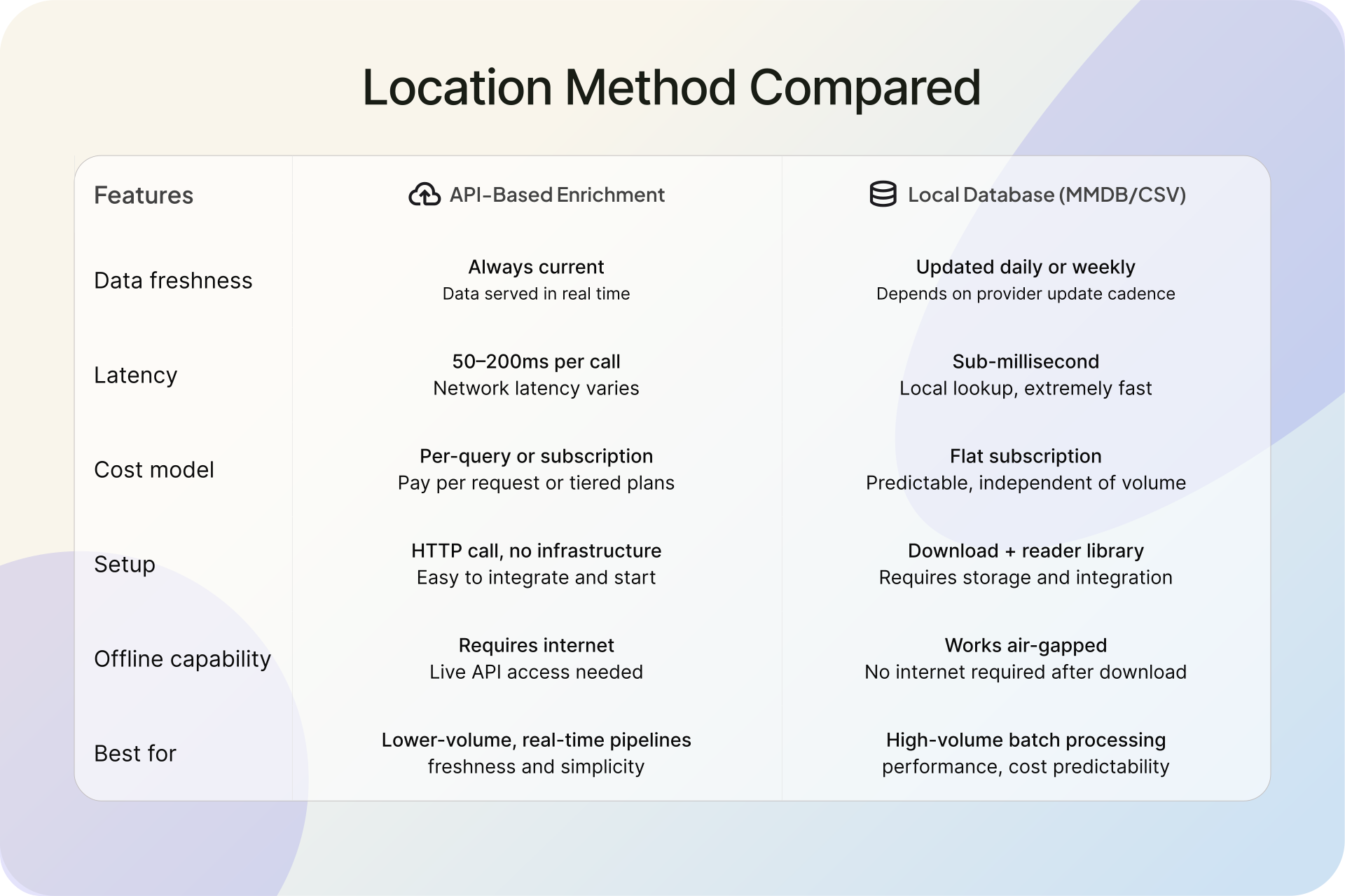
API-based enrichment sends each IP (or a batch of up to 50,000 IPs) to an endpoint and gets structured JSON back. The data is always current -- no update cycles to manage. Setup is minimal: an HTTP call from any language. The tradeoff is latency (50-200ms per call depending on network conditions) and cost (each query consumes API credits). For pipelines processing fewer than 100,000 IPs per day, or for real-time enrichment where you need the freshest data, API-based enrichment is the simpler path. Check ipgeolocation.io pricing for volume tiers.
Local database enrichment uses downloadable MMDB files -- the industry-standard binary format supported by nginx, Apache, and most log processing tools. Lookups are sub-millisecond with zero network overhead. There is no per-query cost; you pay a flat subscription for database access. The tradeoff is that you need to download updates (typically daily) and manage the file on disk. For high-volume pipelines processing millions of log lines, air-gapped environments, or latency-sensitive systems where even 50ms matters, local databases are the right choice. The database documentation covers setup and update schedules.
Most production setups use both: a local database for the high-volume enrichment pass, and API calls for the subset of IPs that need real-time security intelligence or deeper investigation.
How to Enrich Logs with an IP Geolocation API
Here is a practical IP enrichment example using the ipgeolocation.io API. The script reads IP addresses from a log file, enriches them via the bulk endpoint, and outputs structured results.
1. Python Example
import os
import re
import json
import requests


API_KEY = os.environ.get("IPGEO_API_KEY")
BULK_ENDPOINT = "https://api.ipgeolocation.io/v3/ipgeo-bulk"


def extract_ips(log_path):
    """Pull unique public IPv4 addresses from any log format."""
    ip_pattern = re.compile(r"\b(?:\d{1,3}\.){3}\d{1,3}\b")
    unique_ips = set()

    with open(log_path, "r") as f:
        for line in f:
            matches = ip_pattern.findall(line)

            for ip in matches:
                # Basic filtering only; for production, use Python's ipaddress module.
                if not ip.startswith(("10.", "192.168.", "127.", "0.")):
                    unique_ips.add(ip)

    return list(unique_ips)


def enrich_batch(ip_list):
    """Enrich up to 50,000 IPs in a single API call."""
    if not API_KEY:
        raise ValueError("IPGEO_API_KEY environment variable is not set")

    if not ip_list:
        return []

    if len(ip_list) > 50000:
        raise ValueError("ipgeo-bulk supports a maximum of 50,000 IPs per request")

    headers = {
        "Content-Type": "application/json",
    }

    params = {
        "apiKey": API_KEY,
        "include": "security",
    }

    payload = {
        "ips": ip_list,
    }

    try:
        response = requests.post(
            BULK_ENDPOINT,
            headers=headers,
            params=params,
            json=payload,
            timeout=30,
        )
        response.raise_for_status()
        return response.json()

    except requests.exceptions.Timeout:
        print("API request timed out after 30 seconds")
        return None

    except requests.exceptions.HTTPError as e:
        print(f"API returned HTTP {e.response.status_code}: {e.response.text}")
        return None

    except requests.exceptions.RequestException as e:
        print(f"Request failed: {e}")
        return None


def format_enriched(result):
    """Extract key fields from an enrichment result."""
    ip = result.get("ip", "unknown")
    location = result.get("location", {})
    network = result.get("network", {})
    asn = result.get("asn", {})
    security = result.get("security", {})

    return {
        "ip": ip,
        "country": location.get("country_code2", ""),
        "city": location.get("city", ""),
        "latitude": location.get("latitude", ""),
        "longitude": location.get("longitude", ""),
        "asn": asn.get("as_number", ""),
        "org": asn.get("organization", ""),
        "connection_type": network.get("connection_type", "") or "unknown",
        "threat_score": security.get("threat_score", None),
        "is_vpn": security.get("is_vpn", False),
        "is_proxy": security.get("is_proxy", False),
        "is_tor": security.get("is_tor", False),
        "is_bot": security.get("is_bot", False),
    }


if __name__ == "__main__":
    log_file = "/var/log/nginx/access.log"
    ips = extract_ips(log_file)

    print(f"Found {len(ips)} unique IPs to enrich")

    if not ips:
        print("No public IPs found in log file")
        exit(0)

    results = enrich_batch(ips)

    if results:
        enriched = [format_enriched(r) for r in results]

        with open("enriched_ips.json", "w") as out:
            json.dump(enriched, out, indent=2)

        print(f"Enriched {len(enriched)} IPs -> enriched_ips.json")
2. Node.js Example
const fs = require("fs");

const API_KEY = process.env.IPGEO_API_KEY;
const BULK_ENDPOINT = "https://api.ipgeolocation.io/v3/ipgeo-bulk";

function extractIps(logPath) {
  const content = fs.readFileSync(logPath, "utf-8");
  const ipPattern = /\b(?:\d{1,3}\.){3}\d{1,3}\b/g;
  const allIps = content.match(ipPattern) || [];

  // Basic filtering only. For production, use a real IP validation library.
  const unique = [...new Set(allIps)].filter(
    (ip) =>
      !ip.startsWith("10.") &&
      !ip.startsWith("192.168.") &&
      !ip.startsWith("127.") &&
      !ip.startsWith("0.")
  );

  return unique;
}

async function enrichBatch(ipList) {
  if (!API_KEY) {
    throw new Error("IPGEO_API_KEY environment variable is not set");
  }

  if (!ipList.length) {
    return [];
  }

  if (ipList.length > 50000) {
    throw new Error("ipgeo-bulk supports a maximum of 50,000 IPs per request");
  }

  const url = new URL(BULK_ENDPOINT);
  url.searchParams.set("apiKey", API_KEY);
  url.searchParams.set("include", "security");

  try {
    const response = await fetch(url, {
      method: "POST",
      headers: {
        "Content-Type": "application/json",
      },
      body: JSON.stringify({ ips: ipList }),
      signal: AbortSignal.timeout(30000),
    });

    if (!response.ok) {
      const body = await response.text();
      console.error(`API returned HTTP ${response.status}: ${body}`);
      return null;
    }

    return await response.json();
  } catch (err) {
    if (err.name === "TimeoutError" || err.name === "AbortError") {
      console.error("API request timed out after 30 seconds");
    } else {
      console.error(`Request failed: ${err.message}`);
    }

    return null;
  }
}

function formatEnriched(result) {
  const location = result?.location ?? {};
  const network = result?.network ?? {};
  const asn = result?.asn ?? {};
  const security = result?.security ?? {};

  return {
    ip: result?.ip ?? "unknown",
    country: location?.country_code2 ?? "",
    city: location?.city ?? "",
    latitude: location?.latitude ?? "",
    longitude: location?.longitude ?? "",
    asn: asn?.as_number ?? "",
    org: asn?.organization ?? "",
    connectionType: network?.connection_type || "unknown",
    threatScore: security?.threat_score ?? null,
    isVpn: security?.is_vpn ?? false,
    isProxy: security?.is_proxy ?? false,
    isTor: security?.is_tor ?? false,
    isBot: security?.is_bot ?? false,
  };
}

async function main() {
  const logFile = "/var/log/nginx/access.log";
  const ips = extractIps(logFile);

  console.log(`Found ${ips.length} unique IPs to enrich`);

  if (ips.length === 0) {
    console.log("No public IPs found in log file");
    return;
  }

  const results = await enrichBatch(ips);

  if (results) {
    const enriched = results.map(formatEnriched);

    fs.writeFileSync("enriched_ips.json", JSON.stringify(enriched, null, 2));

    console.log(`Enriched ${enriched.length} IPs -> enriched_ips.json`);
  }
}

main();
Both scripts follow the same flow: extract IPs from a log file, send them to the bulk endpoint in a single request, and write structured output. The bulk endpoint accepts up to 50,000 IPs per call, so even large log files can be processed without batching logic. Refer to the IP Geolocation API documentation for the full list of available response fields.
How to Enrich Logs with a Local IP Database
For pipelines processing millions of log lines per hour, API latency becomes a bottleneck. Local MMDB databases solve this by putting the enrichment data on disk, directly accessible to your code with sub-millisecond lookup times.
MMDB is the standard binary format used by geolocation databases. It is supported natively by nginx (ngx_http_geoip2_module), Apache (mod_maxminddb), and every major log processing framework. ipgeolocation.io offers MMDB databases across three tiers: Geo Standard for basic geolocation and ISP data, Geo Advance for ASN, company, and connection type data, and Security Pro for threat intelligence.
The key difference from the API approach: no network calls, no rate limits, and no per-query costs. The tradeoff is that MMDB files need periodic updates. Most providers release daily updates, and automating the download with a cron job keeps the data fresh without manual intervention.
Enriching Security Logs with Threat Data
Geolocation tells you where an IP is. Security log enrichment tells you what it is doing and whether you should trust it.
The security module available through the ipgeolocation.io API (via the include=security parameter) and the Security Pro databases returns fields that directly support threat detection in log analysis:
Threat score (0-100) is a composite risk rating. An IP with a score above 70 has been associated with malicious activity across multiple intelligence sources. In a log pipeline, you can use this as a first-pass filter: route events from high-threat IPs to a priority alert queue, and let low-threat events follow the standard flow.
Proxy and VPN flags (is_vpn, is_proxy, is_tor, is_residential_proxy) identify the type of anonymization in use. A Tor exit node hitting your authentication endpoint is a different signal than a corporate VPN. Residential proxies are particularly worth tracking -- they are harder to detect than datacenter proxies and increasingly used in credential stuffing attacks.
Bot detection (is_bot) flags IPs associated with automated traffic. Combined with request rate from your logs, this field helps separate legitimate crawlers from scraping infrastructure.
Here is how you might use these fields in a simple threat scoring function:
def assess_threat(enriched_record):
    """Classify an enriched IP as high, medium, or low threat.

    Expects a raw IPGeolocation.io v3 response with include=security.
    Thresholds are example policy values, not official IPGeolocation.io cutoffs.
    """
    security = enriched_record.get("security", {})

    threat_score = security.get("threat_score") or 0
    is_tor = security.get("is_tor", False)
    is_proxy = security.get("is_proxy", False)
    is_residential_proxy = security.get("is_residential_proxy", False)
    is_vpn = security.get("is_vpn", False)
    is_relay = security.get("is_relay", False)
    is_anonymous = security.get("is_anonymous", False)
    is_known_attacker = security.get("is_known_attacker", False)
    is_bot = security.get("is_bot", False)
    is_spam = security.get("is_spam", False)
    is_cloud_provider = security.get("is_cloud_provider", False)

    vpn_confidence_score = security.get("vpn_confidence_score") or 0
    proxy_confidence_score = security.get("proxy_confidence_score") or 0

    if is_known_attacker:
        return "high"

    if is_tor and threat_score > 60:
        return "high"

    if is_residential_proxy and threat_score > 40:
        return "high"

    if threat_score > 70:
        return "high"

    if is_vpn and vpn_confidence_score >= 70 and threat_score >= 50:
        return "medium"

    if is_proxy and proxy_confidence_score >= 70 and threat_score >= 50:
        return "medium"

    if (
        is_bot
        or is_spam
        or is_relay
        or is_anonymous
        or is_cloud_provider
        or threat_score > 30
    ):
        return "medium"

    return "low"
This function is intentionally simple. In production, you would combine these signals with request-level data from your logs (endpoint hit, HTTP method, response code, request rate) to build a more complete picture. The point is that security enrichment gives you structured fields to write rules against, instead of relying on static IP blocklists that go stale within hours.
FAQ
IP enrichment is the process of appending contextual metadata to a raw IP address. That metadata typically includes geolocation (country, city, coordinates), network identity (ASN, organization, connection type), and security intelligence (threat scores, proxy/VPN detection). The goal is to turn an opaque identifier into something you can filter, query, and act on in your logs and analytics systems.
The five main categories are geolocation (country, city, latitude/longitude, timezone), network and ASN data (autonomous system number, organization, route prefix, connection type), company information (organization name, domain, industry), security intelligence (threat score, VPN/proxy/Tor/bot flags), and abuse contacts (email and organization for reporting). The exact fields depend on your data provider and subscription tier.
Use an API if you process fewer than 100,000 IPs per day, need always-current data, or want security intelligence fields without managing local files. Use a local MMDB database if you process millions of IPs, need sub-millisecond lookups, operate in air-gapped environments, or want predictable costs without per-query billing. Many teams use both: local databases for the bulk pass and API calls for deeper investigation on flagged IPs.
Country-level accuracy is typically above 99% for established providers. State/region-level accuracy is typically 90%+, and city/locality-level accuracy is 85%+ and depends on the IP type – fixed broadband IPs map more accurately than mobile carrier IPs. Accuracy also varies by region; densely connected areas with detailed routing data are more precise than regions with less infrastructure. No geolocation database is 100% accurate at the city level, and latitude/longitude coordinates represent approximate locations, not exact addresses.
Yes. Security enrichment adds threat scores, proxy/VPN/Tor detection, residential proxy identification, and bot flags to each IP in your logs. These fields let SOC teams write detection rules that go beyond static blocklists. For example, you can flag login attempts from IPs with threat scores above 70, alert on traffic from known Tor exit nodes, or identify credential stuffing patterns from residential proxy networks. Without enrichment, security analysts spend time manually investigating IPs that automated enrichment could classify in milliseconds.
What to Do Next
The fastest way to start enriching your logs is to grab a free API key from ipgeolocation.io and run the Python or Node.js example above against a sample log file. The free tier includes 1,000 requests per day -- enough to test the pipeline end to end before committing to a plan. For high-volume production use, evaluate whether the API or database approach fits your pipeline better, and scale from there.