

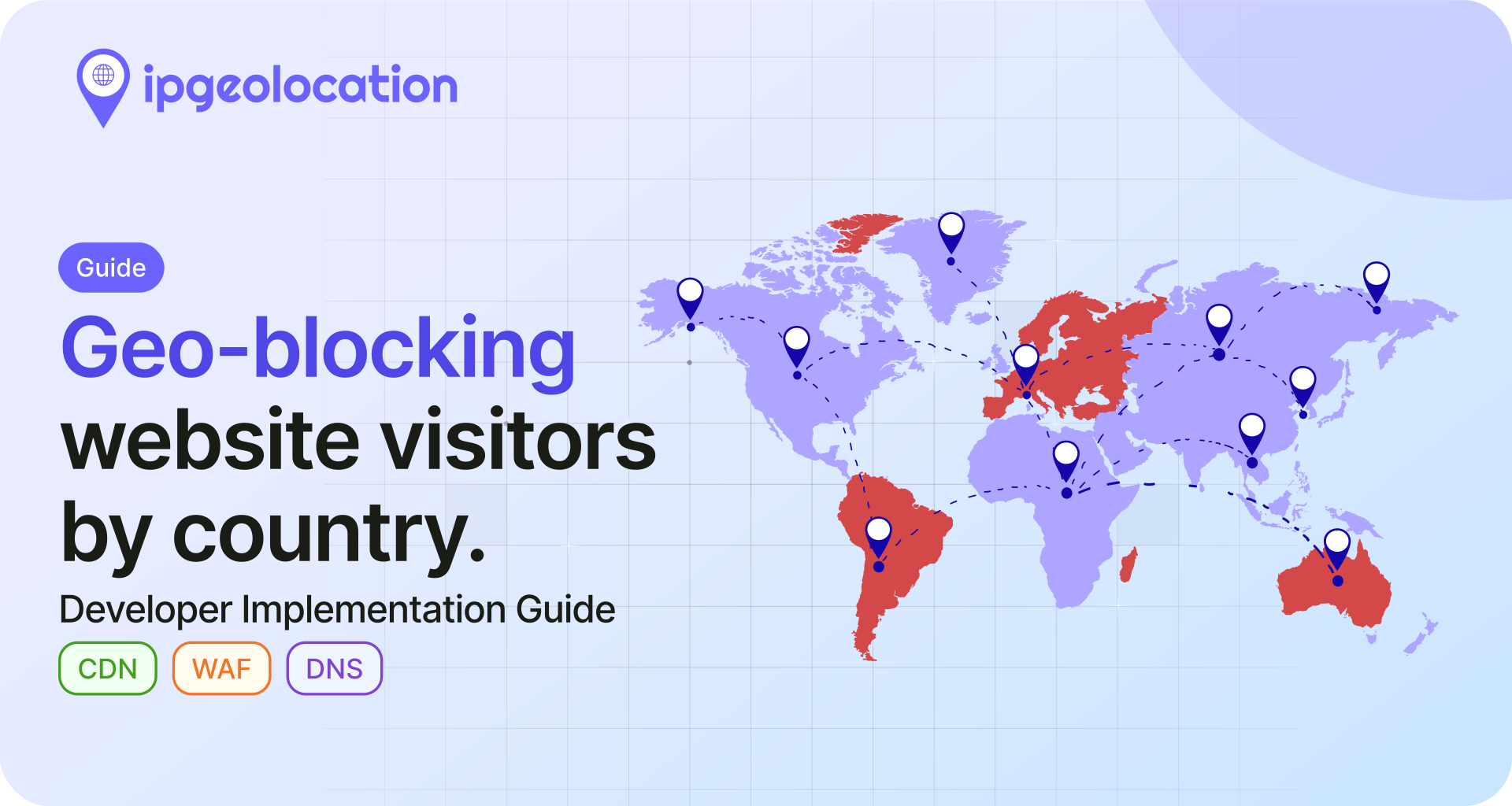
You need to block IPs by country. Maybe compliance flagged a sanctioned jurisdiction. Maybe the fraud team wants a few high-abuse countries off the login endpoint after the last abuse spike. Maybe regional licensing forces your hand. Geo-blocking solves it, but only if you pick the right enforcement layer and write code that cannot be skipped from the browser.
This guide covers the four places you can block IPs by country (CDN, WAF, DNS, and application code), gives you working examples in Node.js, Python, and PHP using the IPGeolocation.io API, and is honest about VPN and proxy bypass so you know where to layer additional controls.
TL;DR
- Geo-blocking restricts access based on the country assigned to a visitor's IP address. It is enforced at one of four layers: CDN, WAF, DNS, or your application.
- Application-level blocking (this guide's focus) gives you the most control: per-endpoint rules, audit logs, and portability across hosting setups.
- Use
country_code2from an IP geolocation API to check the visitor's country on each request. Node.js, Python, and PHP examples below. - Cache lookups in Redis or Memcached to cut API cost on repeat visitors.
- Geo-blocking alone is bypassable with a consumer VPN or residential proxy. Pair it with VPN and proxy detection for anything security-sensitive.
- Do not do the block in client-side JavaScript. A user with DevTools can skip it in seconds.
For most teams doing compliance or fraud prevention, application-level blocking plus VPN detection is the reliable combination. If your stack already sits behind Cloudflare or AWS WAF and you only need a coarse country rule, the CDN path is cheaper. The sections below explain when each fits.
What is geo-blocking?
Geo-blocking is the practice of restricting access to a service based on the country associated with a visitor's IP address. The country comes from IP-to-country mapping built by commercial geolocation providers using registry data, routing data, geofeeds, and other network signals. On a given request, your code (or your CDN, or your WAF) resolves the visitor's IP to a country code, then compares it to an allow list or deny list before serving content.
Some vendor docs call this "geo restriction" (AWS CloudFront, for example). The terms are used interchangeably in practice. It is not the same as geofencing, which uses device GPS and typically acts on mobile apps. It is also not the same as IP allow-listing, which targets specific IP addresses or ranges directly. Geo-blocking operates at the country level and is the right tool when the rule you are enforcing is itself country-scoped: EU-only licensing, sanctions compliance, regional rollouts, regional pricing gating.
Geo-blocking is usually allowed when there is a valid reason for it, such as licensing rules or sanctions laws. In the EU, the Geo-Blocking Regulation 2018/302 means businesses generally cannot block customers just because they live in a different EU country when selling normal goods or services. But there are exceptions, including copyrighted streaming and media content and some regulated services. Blocking is still allowed for things like sanctions compliance and fraud prevention.
Geo-blocking vs geo-fencing
Both terms involve location, but they work differently and solve different problems. Geo-blocking checks the country assigned to an IP address and restricts access at the server or network level. It runs on web servers, CDNs, WAFs, or DNS infrastructure and requires no cooperation from the visitor's device. The input is an IP-to-country lookup; the output is allow or deny.
Geo-fencing draws a virtual perimeter around a physical area (a city, a radius around a store, a campus) and triggers actions when a device enters or leaves that zone. It relies on GPS, Wi-Fi positioning, or Bluetooth beacons and runs primarily in mobile apps. The input is real-time device coordinates; the output is typically a push notification, an in-app offer, or an analytics event.
In practice, if the rule you need to enforce is country-scoped (sanctions, licensing, regional pricing), geo-blocking is the right tool. If the rule is tied to a physical location within a city or region (retail promotions, campus access, fleet tracking), that is geo-fencing territory. The two rarely overlap in implementation.
When developers actually need geo-blocking
A compliance or security ask usually lands in one of a handful of categories. Knowing which type you are dealing with helps you choose the right place to enforce geo-blocking.
Regulatory compliance. Sanctions regimes require you not to transact with entities in listed jurisdictions. A country-level block on signup and checkout endpoints is a standard first-layer control. Regional licensing (streaming rights, gambling, financial services) also lands here.
Fraud and abuse reduction. If 90% of your credential-stuffing attempts come from countries where you have no customers, blocking those countries at the login endpoint is a cheap reduction in attack surface. The Australian Cyber Security Centre recommends treating geo-blocking as one layer in a broader hardening strategy, not a primary security control (see ACSC: Geo-blocking in context).
Regional content and pricing. Publishers, streaming services, and SaaS companies use geo-blocking to enforce pricing tiers or to hide products that are not licensed in a given country.
Cost control. High-bandwidth APIs sometimes block regions that generate disproportionate costs without corresponding revenue.
What geo-blocking is rarely good at: stopping determined attackers. A targeted attacker will route through a VPN or residential proxy and bypass a country check in minutes. If that is your threat model, treat geo-blocking as signal, not enforcement.
Where to enforce geo-blocking
There are four places you can put the check. Picking the wrong one wastes time or leaves gaps.
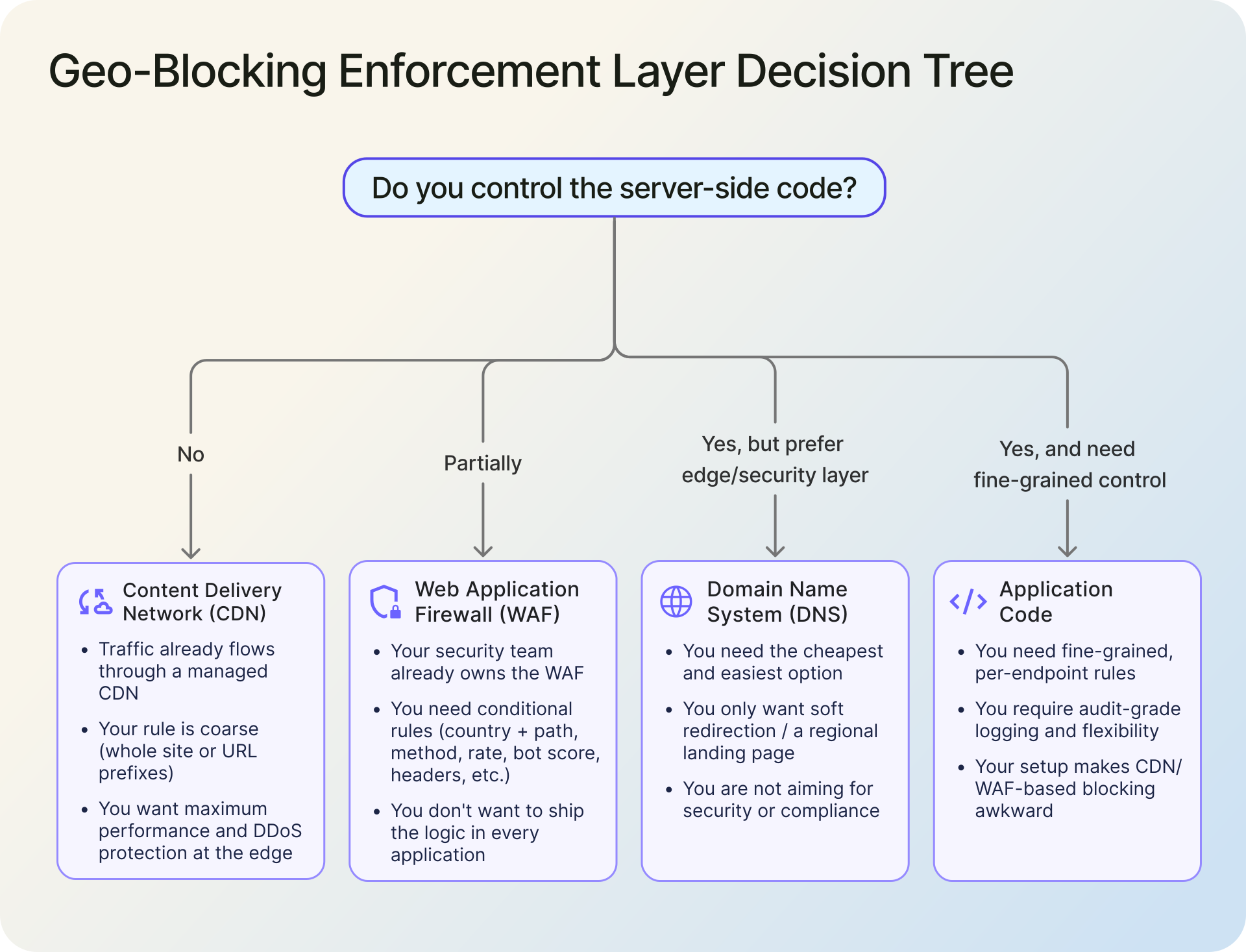
1. CDN-level blocking
Cloudflare, Amazon CloudFront, and Fastly all support country-based rules at the edge. CloudFront exposes this as a GeoRestriction API on the distribution. Cloudflare uses country-based fields in WAF rules to match visitor origin country.
The win is performance: the block happens at the edge, so blocked requests never touch your origin. That matters under DDoS conditions, and for static-asset-heavy sites it can be the cheapest option.
The loss is granularity. Most CDN country rules apply to the whole distribution or to URL-prefix patterns. Finer rules (block this country only on /signup, allow on /blog) usually require WAF or application logic.
Pick this when your traffic already flows through a managed CDN, your rule is coarse (block entirely, or block URL prefixes), and you want DDoS-era performance for free.
2. WAF-level blocking
AWS WAF, Cloudflare WAF, ModSecurity (often via its GeoIP blocking rule modules), and Azure WAF all support country-based rules. The advantage over plain CDN rules is conditional logic: you can combine country with path, header, request method, rate, and bot score in a single rule.
This is the right layer if you need to block certain countries on /admin and /signup, rate-limit on /api, and you do not want to ship that logic in every application in your estate. The downside is that WAF rule languages are platform-specific. A rule you wrote for AWS WAF does not port to Cloudflare, and teams managing multiple WAFs often end up duplicating logic.
Pick this when your security team already owns the WAF and your rules are conditional, not coarse.
3. DNS-level blocking
GeoDNS routes blocked countries to a dead address (127.0.0.1, or a "not available in your region" page). It is the cheapest option and the easiest to deploy. It is also the easiest to bypass: a visitor with a custom DNS resolver, or any caching layer along the way, can reach your origin IP directly.
DNS-level geo-blocking is a UX tool at best. Use it for soft redirection to a regional landing page, never for security or compliance.
4. Application-level blocking
You resolve the country inside your own code and decide what to do: return 403, redirect, show a licensing message, or silently log and allow. This gives you the most control (per-endpoint rules, audit logging, dynamic allow lists per customer) and the least platform lock-in.
The cost is an extra API call per request if you do not cache. The benefit is that the rule lives in code you own, version, and unit-test. For regulated use cases, keeping the rule and the audit log in your application is often a compliance requirement.
Pick this when you need fine-grained rules, when you want audit-grade logging, or when your hosting setup makes CDN/WAF-based blocking awkward.
5. Comparison at a glance
| Layer | Granularity | Latency cost | Setup effort | Bypass difficulty | Best for |
|---|---|---|---|---|---|
| CDN | Coarse | Near zero | Low | Moderate (VPN still works) | Static-heavy sites, DDoS resilience |
| WAF | Conditional | Low | Medium | Moderate | Security-team-owned stacks |
| DNS | Coarse | None | Low | Easy to bypass | Soft UX redirection only |
| Application code | Per-endpoint, fully conditional | Depends on cache | Medium | Moderate | Compliance, fraud, fine-grained rules |
The rest of this guide focuses on application-level blocking because that is where most developer readers land, and because it is the layer with the fewest existing walkthroughs.
Implementing geo-blocking with the IPGeolocation.io API
1. How it works in 30 seconds
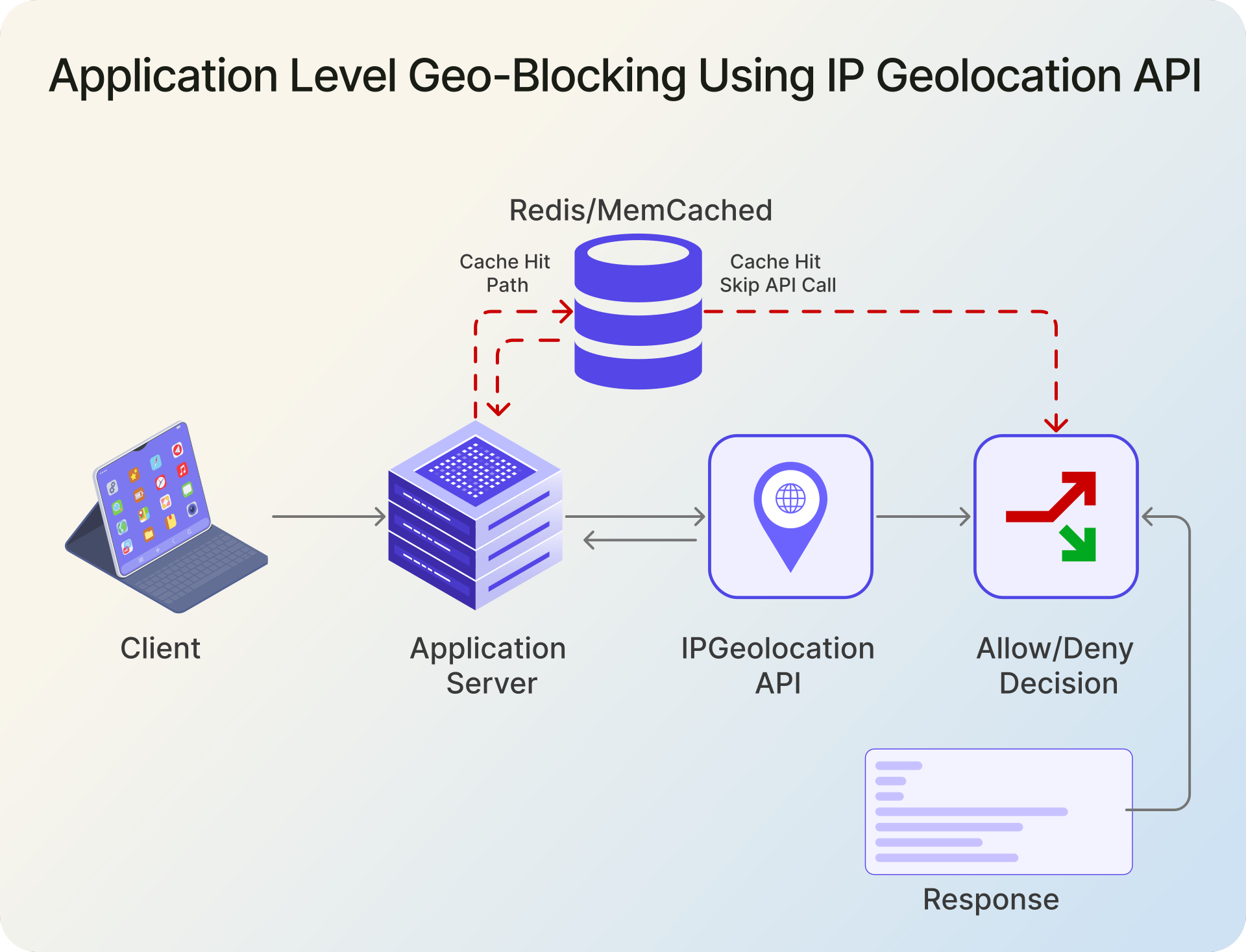
The application intercepts each request, extracts the client IP from request headers or socket address, calls the IP geolocation API to get a country code, compares it against your allow or deny list, and either processes the request or returns a 403 response.
The IPGeolocation.io v3 endpoint is https://api.ipgeolocation.io/v3/ipgeo. You authenticate with an apiKey query parameter and pass the target IP as ip. The response includes location.country_code2 (ISO 3166-1 alpha-2, e.g. SE for Sweden). That field is what you check against your block list. Full documentation is on the IP geolocation API reference page, and background on how IP-to-country mapping actually works is in the what is IP geolocation guide.
A free tier is available for development. Production use at scale requires a paid plan.
2. Node.js (Express middleware)
// geo-block.js
const API_KEY = process.env.IPGEO_API_KEY;

const BLOCKED_COUNTRIES = new Set(['RU', 'KP', 'IR', 'SY']);

export async function geoBlock(req, res, next) {
  const ip = req.ip; // relies on correct Express trust proxy config

  try {
    const url = new URL('https://api.ipgeolocation.io/v3/ipgeo');
    url.searchParams.set('apiKey', API_KEY);
    url.searchParams.set('ip', ip);

    const response = await fetch(url, {
      signal: AbortSignal.timeout(1500),
    });

    if (!response.ok) {
      console.warn(`Geo lookup failed (${response.status}) for ${ip}`);
      return next();  // fail open
    }

    const data = await response.json();
    const country = data.location?.country_code2;

    if (country && BLOCKED_COUNTRIES.has(country)) {
      return res.status(403).json({ error: 'Access restricted in your region.' });
    }

    return next();
  } catch (err) {
    console.warn(`Geo lookup error for ${ip}: ${err.message}`);
    return next(); // fail open
  }
}

// app.js
import express from 'express';
import { geoBlock } from './geo-block.js';

const app = express();

// Example only. Set this to match your real proxy/CDN topology.
app.set('trust proxy', 1);

app.use('/signup', geoBlock);
app.use('/login', geoBlock);
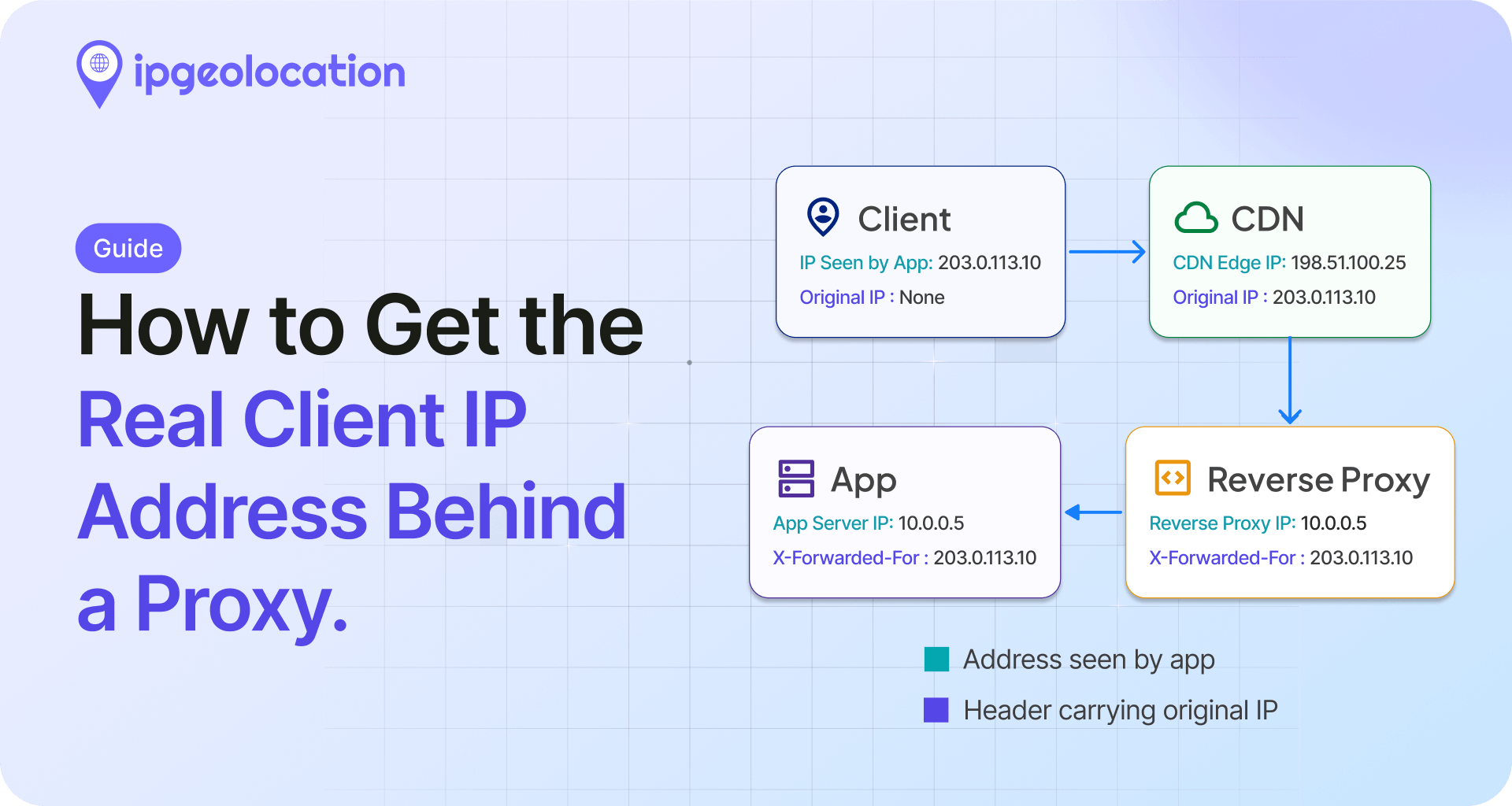
This example uses req.ip, not a manually parsed X-Forwarded-For header. If your app runs behind Nginx, Cloudflare, a load balancer, or another reverse proxy, configure Express trust proxy correctly. Otherwise the client IP may be wrong, and in some setups forwarded headers can be spoofed.
Apply the middleware only on the endpoints that need it. A common mistake is mounting it globally, which forces an API lookup on every static asset request and burns quota.
Fail-open vs. fail-closed is a decision worth making consciously. Failing open (this example) prioritizes availability: if the geolocation API is down, requests go through. Failing closed rejects requests on lookup failure, which is safer for compliance but can take your site offline during a provider outage. Pick based on whether the block is a legal requirement (fail closed) or a security hardening step (fail open is usually fine).
3. Python (Flask)
# geo_block.py
import os
from functools import wraps

import requests
from flask import request

API_KEY = os.environ["IPGEO_API_KEY"]
BLOCKED_COUNTRIES = {"RU", "KP", "IR", "SY"}
IPGEO_URL = "https://api.ipgeolocation.io/v3/ipgeo"

session = requests.Session()

def geo_block(view):
    @wraps(view)
    def wrapper(*args, **kwargs):
        # request.remote_addr is set correctly when ProxyFix is configured
        ip = request.remote_addr
        if not ip:
            return view(*args, **kwargs)

        try:
            r = session.get(
                IPGEO_URL,
                params={"apiKey": API_KEY, "ip": ip},
                timeout=(1.0, 1.5),  # connect timeout, read timeout
            )
            r.raise_for_status()

            country = r.json().get("location", {}).get("country_code2")
            if country in BLOCKED_COUNTRIES:
                return {"error": "Access restricted in your region."}, 403

        except requests.RequestException:
            pass  # fail open; log in production

        return view(*args, **kwargs)

    return wrapper

# app.py
from flask import Flask
from werkzeug.middleware.proxy_fix import ProxyFix

from geo_block import geo_block

app = Flask(__name__)

# Example only. Set this to the exact number of trusted proxies in front of Flask.
app.wsgi_app = ProxyFix(app.wsgi_app, x_for=1)

@app.route("/signup", methods=["POST"])
@geo_block
def signup():
    return {"ok": True}
The decorator pattern lets you pick which routes get the check. For Django, the equivalent is a middleware class with a process_request method, or a view decorator using user_passes_test.
4. PHP (plain PHP, adaptable to Laravel)
<?php
// signup.php

declare(strict_types=1);

require __DIR__ . '/geo_block.php';

// Example deny list only.
// Replace with countries from your own compliance, fraud, or legal rules.
$blockedCountries = ['RU', 'KP', 'IR', 'SY'];

// Example only.
// If your app is behind Nginx, Cloudflare, or a load balancer,
// replace these with the actual proxy IPs that connect to PHP.
// If you are not behind a proxy, leave this empty.
$trustedProxies = [
    '127.0.0.1',
    '::1',
];

if (!geo_block($blockedCountries, $trustedProxies)) {
    exit;
}

// Normal handler logic continues here.
header('Content-Type: application/json');
echo json_encode([
    'ok' => true,
    'message' => 'Signup request allowed.',
]);
In Laravel, wrap the same logic in route middleware and register it against the route group that needs it. Make sure trusted proxies are configured correctly before relying on the client IP. Once you move past a prototype, keep the block list in configuration rather than hard-coding it.
5. A note on frontend JavaScript (UX only, not enforcement)
It is reasonable to call an IP geolocation API from the browser when you want to show a regional banner, route the visitor to a localized page, or pre-select their country in a form. None of that is security enforcement. Any user with DevTools can intercept the response, disable JavaScript, or rewrite the redirect, and the block disappears.
Use frontend JS for localization and UX. Use server-side code (one of the three examples above) for any rule that actually has to hold.
6. Caching country lookups to control cost
A production service of any size does not want to hit the geolocation API on every request. IPs repeat, and the country behind an IP is stable enough to cache for hours.
The pattern is: key the cache by IP, store {country_code, cached_at}, check the cache before calling the API, and set a TTL of a few hours (or a day, depending on your tolerance for staleness).
# Python example with Redis
import redis

cache = redis.Redis()
TTL_SECONDS = 6 * 60 * 60  # 6 hours

def lookup_country(ip: str) -> str | None:
    cached = cache.get(f'geo:{ip}')
    if cached:
        return cached.decode()

    # ... call API as before ...
    country = response.json().get('location', {}).get('country_code2')
    if country:
        cache.setex(f'geo:{ip}', TTL_SECONDS, country)
    return country
For a public site with millions of requests, a cache hit rate above 90% is typical. At that rate you pay for geolocation roughly once per unique visitor per TTL window, not once per request.
The limits of geo-blocking (and what to do about them)
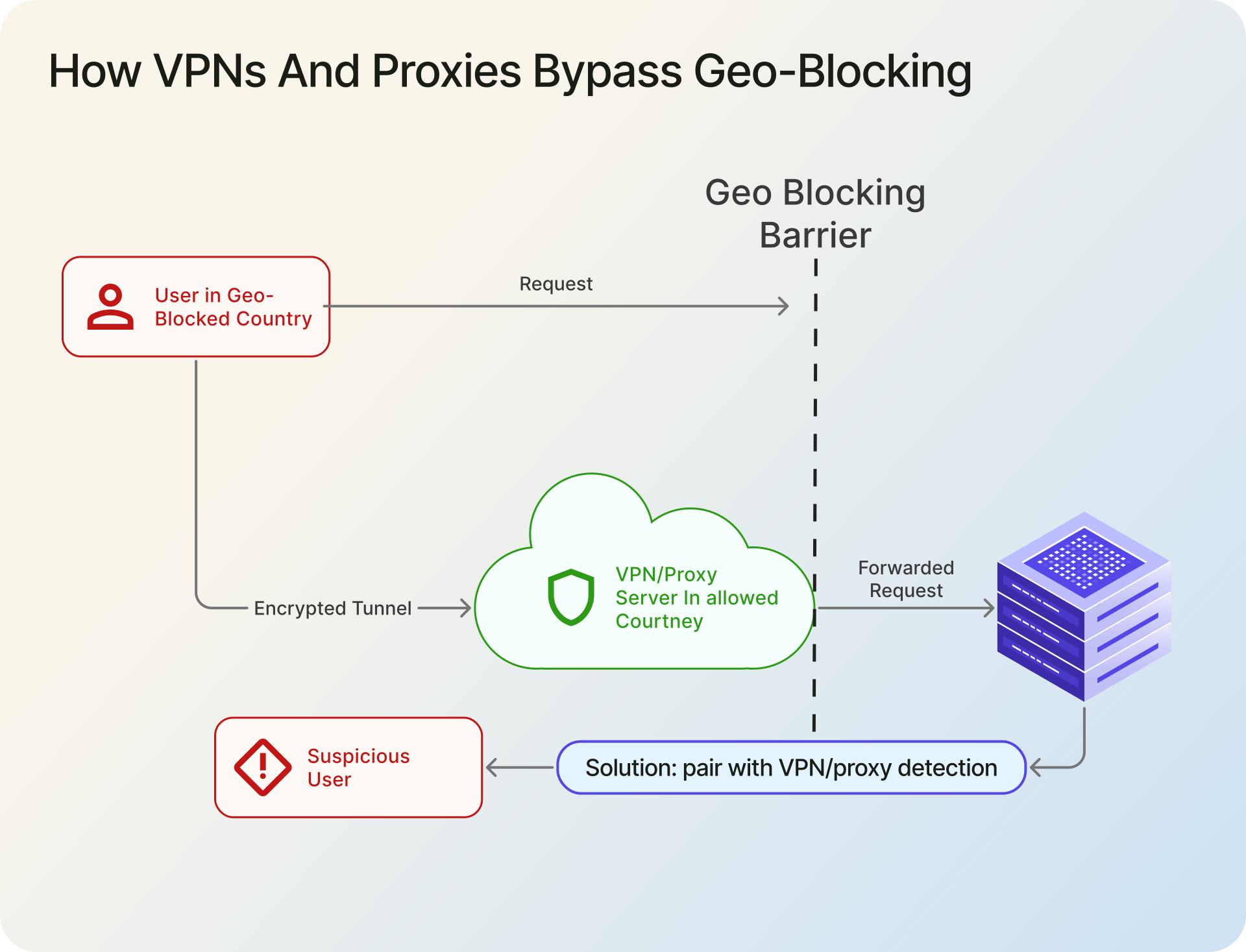
A country check on the IP is the easiest control to bypass. Anyone with a free VPN can appear to originate from a different country in under a minute. That is not a flaw in the implementation, it is the nature of IP-based attribution.
Known bypass patterns:
- Consumer VPNs. The visitor picks an exit node in an allowed country. Commodity VPNs have thousands of exit IPs and rotate them.
- Residential proxies. Paid proxy networks route traffic through real consumer connections, which look like organic IPs to any IP database.
- Tor exit nodes. Free and well-documented. Most Tor exit IPs are known and can be detected, but not by a country check alone.
- Mobile carrier gateway misattribution. A mobile user on a multi-country carrier can appear to come from the carrier's registration country, not their actual location.
- Legitimate travelers and enterprise VPNs. The mirror problem. Your own users will be falsely blocked when they travel or use a work VPN.
The response to these is layered defense. Use geo-blocking for the rule (what countries are in scope) and a VPN/proxy detection signal for the trust check (is this IP likely to be hiding something). The best VPN and proxy detection APIs guide compares detection providers, and the Security Pro database bundles anonymizer detection with geolocation for teams that want one data source.
Common geo-blocking mistakes
Geo-blocking is simple in theory, but the implementation details are where teams usually get it wrong.
- Blocking in frontend JavaScript only. Frontend checks are easy to bypass and should only be used for UX, not enforcement.
- Trusting
X-Forwarded-Forblindly. Only trust forwarded headers from known proxies or load balancers, otherwise the client IP can be spoofed. - Applying geo checks to every request. Protect sensitive routes like signup, login, checkout, or restricted content, not every static asset.
- Using DNS as a compliance control. DNS geo-routing is useful for redirects and UX, but it is too easy to bypass for real enforcement.
- Treating country as a full fraud control. Geo-blocking can reduce noise, but it does not stop VPNs, residential proxies, or other anonymized traffic.
- Forgetting a support path for false positives. Legitimate users do get blocked, especially when traveling or using enterprise VPNs, so there should be a review or exception process.
Testing your geo-blocking implementation
You can validate in development by sending a test request through a local reverse proxy that you trust and that sets X-Forwarded-For to a known IP on your deny list.
curl -H "X-Forwarded-For: 95.173.136.70" https://localhost:3000/signup
# 95.173.136.70 geolocates to Russia. Swap in any IP on your deny list.
Only use this kind of test when your app is configured to trust the proxy that sent the header. In production, forwarded headers should be accepted only from known proxies or load balancers.
End-to-end verification still needs a real VPN. Connect to an exit node in a blocked country, visit the protected endpoint, and confirm the 403. Then connect from an allowed country and confirm the request passes. Keep a short test script in your deploy pipeline that fires both requests against a synthetic account so a future change cannot silently remove the rule.
Legal and compliance notes
This is not legal advice. Three things worth flagging:
OFAC and similar sanctions regimes. Blocking sanctioned jurisdictions is typically a legal requirement for US-facing services, not a choice. The rule usually lives in your terms of service and is enforced on signup and transaction endpoints.
EU Geo-Blocking Regulation 2018/302. Within the EU single market, you cannot discriminate against customers based on their member state of residence for general-interest goods and services. Copyrighted audiovisual content and certain regulated services are carved out. If you sell to EU consumers and you are using geo-blocking to enforce pricing or access based on country of residence within the EU, a lawyer should look at the rule before it ships.
Logging IP and country is personal data processing under GDPR. Your privacy policy and your data retention schedule have to cover it. Treat geo-blocking decisions the same way you treat any other processing of visitor identifiers.
FAQ
In most jurisdictions, yes. Blocking for sanctions compliance, fraud prevention, or licensing is a standard practice. Within the EU, Regulation 2018/302 restricts unjustified blocking of EU residents for certain goods and services, but sanctions and copyright-licensed content remain lawful reasons to block.
Yes. A consumer VPN switches the visitor's apparent exit-country to an allowed one in under a minute, and a geo-check alone cannot tell the difference. The fix is layered defense: pair geo-blocking with VPN and proxy detection so you can flag or deny traffic that is hiding its origin.
It depends on the rule behind the country blocking. For sanctions compliance, the list comes from the applicable sanctions program. For fraud reduction, start from your own abuse logs and block countries that generate abuse disproportionate to legitimate traffic. Blind lists from blog posts age fast and tend to block legitimate users.
Country-level accuracy is above 99% for most commercial providers on assigned IPv4 space. Accuracy drops on mobile carrier ranges, in small or recently reallocated blocks, and for IPv6 where databases are still catching up. For a deeper look, see the what is IP geolocation guide.
Use application-level blocking with an IP geolocation API. Intercept the request, resolve the visitor's country from the IP, compare it against your deny list, and return 403 on a match. The Node.js, Python, and PHP examples above show the full pattern.
No. Geo-blocking restricts access based on a visitor's IP-derived country and runs on servers or network infrastructure. Geo-fencing draws a perimeter around a physical area and triggers actions via device GPS in mobile apps. See the full comparison above.
If you block crawlers from countries where search engines operate, you lose indexing from those regions. Most teams allow an allow-list bypass for known search-engine bot IPs, or exempt /robots.txt and crawler-relevant URL patterns from the country check entirely.
If you are implementing this today, start with a free IPGeolocation.io API key, drop one of the three middleware examples into the endpoint that needs the block, and add caching once traffic justifies it. For fraud or security use cases, add VPN and proxy detection on top before the rule ships.