


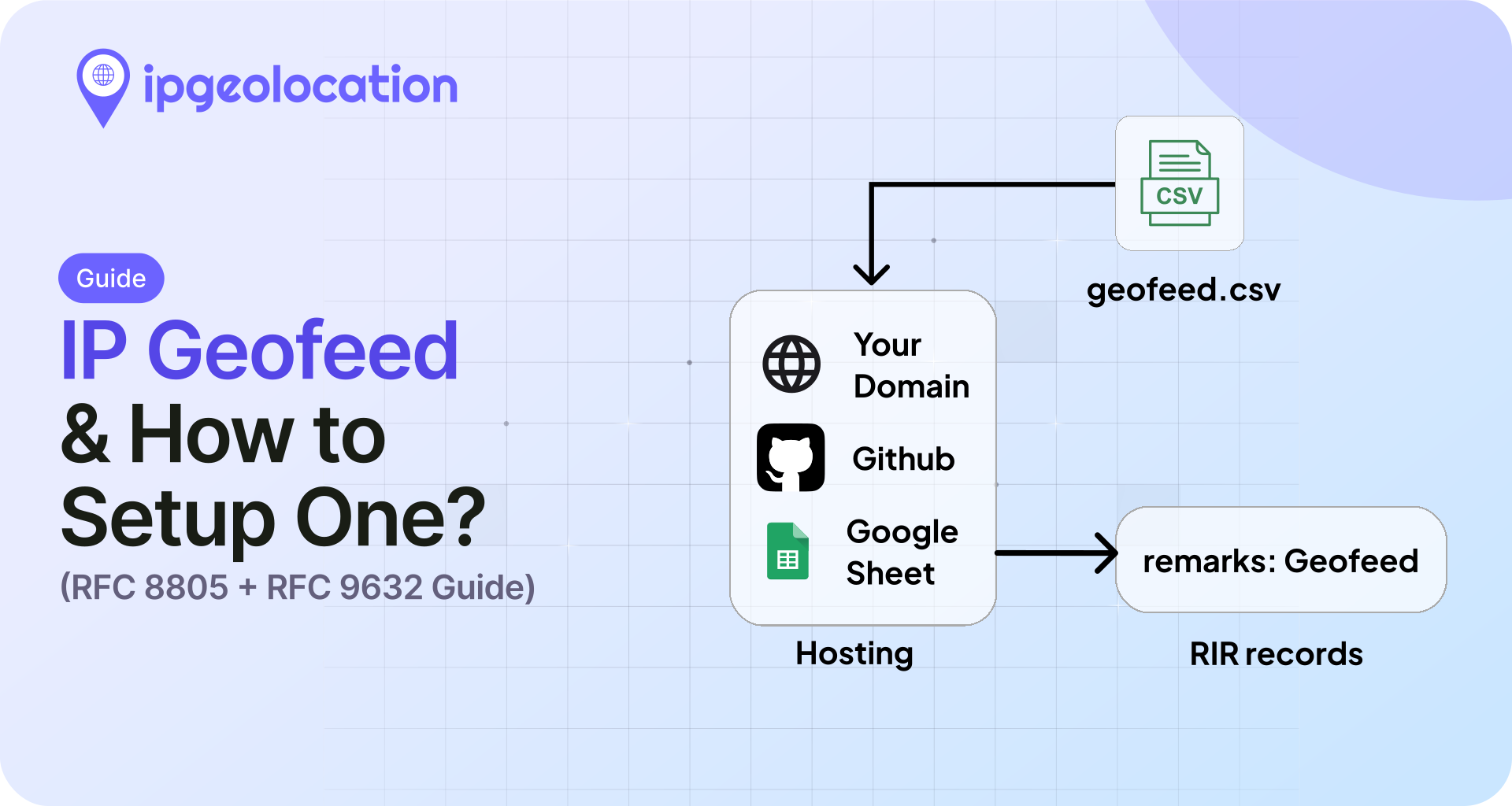
A geofeed is a self-published CSV file that maps IP ranges to their actual country, region, and city. IP geolocation providers read it and correct their databases, so users see the right content, pricing, and access rules. The format is defined by RFC 8805, and discovery is defined by RFC 9632 (published August 2024, which obsoletes the older RFC 9092).
If you own an AS, a hosting pool, or any block of IPv4 or IPv6 space that gets mislocated, publishing a geofeed is the most reliable way to fix it at the source. This guide walks through the format, where to host the file, how to publish it to all five RIRs, and how to submit it directly to IP geolocation providers like ipgeolocation.io.
TL;DR
- A geofeed is a CSV file listing IP prefixes and their locations, published at a stable HTTPS URL.
- The file format is RFC 8805. Discovery through WHOIS is RFC 9632, which obsoletes RFC 9092 as of August 2024.
- You host the CSV, then point to it from your RIR records. RIPE and APNIC support a dedicated
geofeed:attribute. ARIN and AFRINIC use aremarks:or Public Comments workaround. LACNIC runs a separate Geofeeds Service. - Most major geolocation providers auto-discover geofeeds through RIR WHOIS, but you can also submit the URL directly. ipgeolocation.io accepts submissions on its corrections page.
- Propagation varies by provider. Some pick up changes within a few days, but it can take a week or longer.
A geofeed is the cleanest way to push authoritative location data to every major geolocation provider at once without filing a dozen correction forms. Publish once, update in place, and the rest of the supply chain can track it automatically.
What is a geofeed?
A geofeed is a public CSV file that an IP resource holder publishes to declare where each of their prefixes is actually being used. One row per prefix, with country, region, and city. The format still includes a postal code field for backward compatibility, but it is deprecated and new feeds should generally not include it. IP geolocation providers fetch the file on a schedule and apply the data to their own records.
The concept started at Google in 2013 as a draft for fixing content localization on Google-owned ranges. It became an IETF standard in August 2020 as RFC 8805, titled "A Format for Self-Published IP Geolocation Feeds." Four years later, in August 2024, RFC 9632 replaced RFC 9092 as the current standard for how consumers find geofeeds through RIR WHOIS data.
Two parties sit on either side of a geofeed. The publisher is whoever owns the IP space: an ISP, a cloud provider, a CDN, an enterprise AS holder. The consumer is the IP geolocation provider: MaxMind, IPinfo, ipgeolocation.io, IP2Location, and the rest. The publisher says where the prefixes are. The consumer uses that to correct its database so downstream products stop misrouting and mis-pricing users.
Why geofeeds exist (and who publishes them)
Traditional IP geolocation data goes stale fast. Providers build their databases from BGP, WHOIS, latency measurements, and ground truth sources, and then rely on manual correction forms for anything that changes. A network operator who just re-homed a /22 from Frankfurt to Singapore might wait weeks for that to propagate across every major provider. In the meantime, their users get the wrong Netflix catalog, the wrong tax rules, and the wrong fraud score.
Geofeeds shortcut the correction form. The publisher updates a single CSV, and every provider that crawls it picks up the change on its next cycle. That is normally within a few days, sometimes within hours for the larger consumers.
The organizations actively publishing public feeds include Google (cloud_geofeed on gstatic.com), F5 Networks, Telia, Telstra, several tier-1 carriers, and a growing number of hosting providers. You will find hundreds more linked from RIPE's inetnum records once you start looking. If you run an AS or a hosting block big enough that mislocation costs you real money, you belong on that list.
The geofeed format (RFC 8805)
RFC 8805 defines the format as a plain text CSV file with five columns and optional comments.
# This is a comment line. Blank lines are ignored.
192.0.2.0/24,US,US-CA,San Francisco,
198.51.100.0/24,DE,DE-BE,Berlin,
2001:db8::/32,JP,JP-13,Tokyo,
203.0.113.0/24,,,,
The columns, in order:
| Column | Meaning | Required | Notes |
|---|---|---|---|
| 1. IP prefix | CIDR, IPv4 or IPv6 | Yes | Must be a prefix you hold. |
| 2. Country | ISO 3166-1 alpha-2 | Optional | Blank means unknown or anycast. |
| 3. Region | ISO 3166-2 | Optional | Country-prefixed, like US-CA. |
| 4. City | Plain text | Optional | Use commas with care. Wrap in quotes if the city name contains a comma. |
| 5. Postal code | Plain text | Optional, deprecated | Present for backward compatibility. New feeds should generally leave it blank. |
All fields after the prefix are optional, but leaving them all blank is what you do when a prefix is anycast or in flight between deployments. A row like 203.0.113.0/24,,,, tells consumers "this prefix exists but has no fixed single location."
A few rules that are easy to miss: the file must be UTF-8, lines starting with # are comments, trailing whitespace on any field is a parse error for some validators, and several consumers apply a soft limit around 1,000 prefixes per file before they complain. If you are publishing more than that, split it across multiple feeds or talk to the consumer first.
How to set up a geofeed
There are three steps: write the CSV, host it at a stable HTTPS URL, and tell the RIRs where to find it. Every consumer downstream follows the same discovery chain, so if you get the RIR pointer right once, you do not have to submit anything else to most providers.
1. Step 1. Create the file
Start with a text editor or a script that outputs CSV. Save it as UTF-8, use comma separators, and keep one prefix per line. Validate it before publishing: any free CSV linter catches malformed CIDR, missing ISO codes are your responsibility, and tools like geofeed-finder will check the RIR discovery path once the record is live.
Name it whatever you want. Common choices are geofeed.csv, geofeed.txt, or something like ip-ranges-geofeed.csv. The extension does not matter to consumers; they read whatever the RIR record points at.
If you already publish an internal source of truth for your prefixes, generate the CSV from that. The worst thing you can do is maintain the geofeed by hand on a separate document and watch it drift.
2. Step 2. Host it over HTTPS
The file should be hosted at a stable HTTPS URL that the geolocation providers can fetch without needing any authentication. You can host your ip geofeed in three ways:
Your own domain. This is the recommended path. Upload the CSV to a well-known location like https://yourcompany.com/geofeed.csv or https://noc.yourcompany.com/geofeed.csv, serve it with a valid TLS certificate, and set sane cache headers. Roughly one hour of cache is a safe default. Consumers prefer this because the URL stability comes from your own DNS and ownership rather than a third party.
A public GitHub repo. Host the CSV in a public repository and use the raw file URL. This gives you free version history, which matters for audit trails. The downside is that raw.githubusercontent.com has its own rate limits and occasional outages, so you are trusting GitHub's infrastructure for a file that your users' location accuracy depends on. Fine for smaller publishers. Not great for carriers.
A Google Sheets CSV export. It can work, but it is operationally fragile. Google can change the export URL format, and the URLs themselves are long and awkward. For anything important, a stable file hosted on your own domain or a reliable public file host is the safer choice.
Whichever option you pick, the URL has to be stable. If you have to move the file later, update the RIR record first and give providers a few days of overlap before taking the old URL down.
3. Step 3. Reference it in your RIR records
Hosting the file is not enough. Consumers discover geofeeds by looking at WHOIS records for the inetnum (or equivalent) object that holds the prefix. You need to add a pointer in that record.
RFC 9632 describes two valid pointer formats that consumers are expected to parse. The first is a dedicated geofeed: attribute on the inetnum object. The second is a remarks: line formatted as remarks: Geofeed <https://yourdomain.com/geofeed.csv>. The capital G in "Geofeed" is case-sensitive, and consumers ignore remarks: lines that do not match the exact pattern.
Which one you use depends on your RIR, because only some of them support the dedicated attribute. The next section walks through all five.
Submitting your geofeed to each RIR
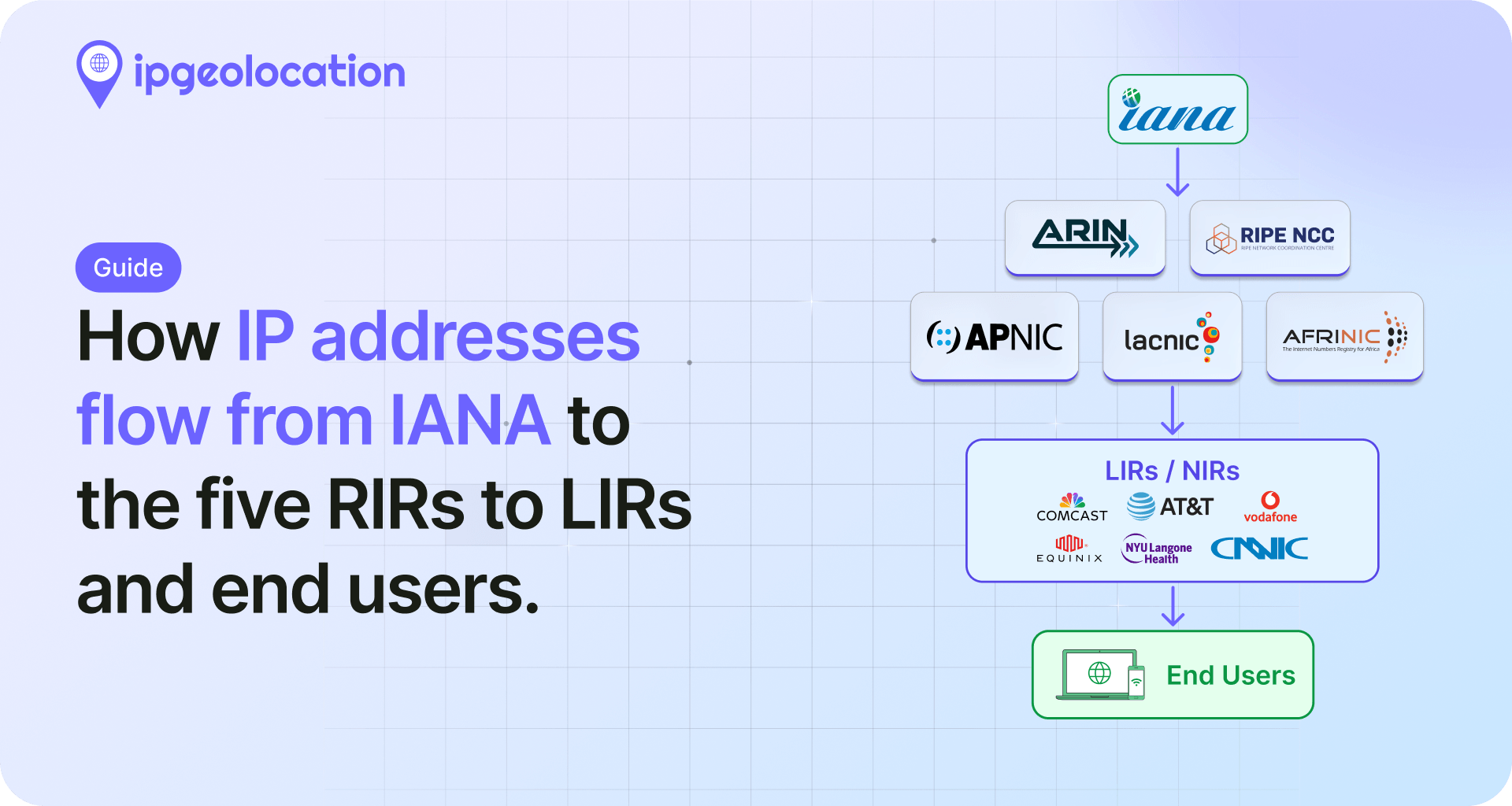
The five RIRs have taken different paths to supporting geofeeds. RIPE and APNIC are furthest ahead. LACNIC built a dedicated service. ARIN and AFRINIC still rely on comment or remarks fields while the global RDAP extension gets finalized.
1. RIPE
RIPE NCC added the dedicated geofeed: attribute to inetnum and inet6num objects in whois release 1.102, which went live on December 7, 2021 as part of NWI-13. If you manage RIPE resources, this is the cleanest path.
The attribute looks like this in an inetnum object:
inetnum:        192.0.2.0 - 192.0.2.255
netname:        EXAMPLE-NET
country:        NL
...
geofeed:        <https://example.com/geofeed.csv>
...
You can add it through the RIPE Database web interface, through the REST API, or through sync updates. Only one geofeed: attribute per inetnum is allowed. If you need to publish different feeds for different sub-prefixes, split the inetnum first.
2. APNIC
APNIC implemented the dedicated geofeed: attribute on its inetnum and inet6num objects shortly after RIPE. The cleanest way to add it is through MyAPNIC: edit the resource, choose geofeed from the attribute dropdown, and paste the URL. The published record then looks like:
inetnum:        203.0.113.0 - 203.0.113.255
netname:        EXAMPLE-APNIC
country:        AU
...
geofeed:        <https://example.com.au/geofeed.csv>
APNIC also still accepts the remarks: Geofeed <URL> fallback for tooling that has not been updated yet. If you are running an older automation path that writes remarks lines, there is no rush to migrate as long as both formats end up at the same URL. APNIC's December 2024 blog post on geofeed adoption walks through the current process in more detail.
3. LACNIC
LACNIC built a dedicated Geofeeds Service that lives in the LACNIC web portal rather than on the inetnum object. Members log in, upload or link their CSV, and LACNIC exposes it to consumers through its own channels. It is a different workflow from the RIPE and APNIC attribute path, so you do not edit the inetnum directly.
Refer to the LACNIC Geofeeds Service documentation for the current submission flow. If you hold resources in more than one region, treat the LACNIC side as a separate step from your RIPE or APNIC submission.
4. ARIN
ARIN does not yet have a dedicated geofeed field on its Network records as of April 2026. The workaround: add a single line to the Public Comments field on the NetRange through ARIN Online. The exact format:
Geofeed <https://yourdomain.com/geofeed.csv>
That comment is visible in ARIN's WHOIS output, and every major consumer parses it using the same regex they would use for a remarks: line on RIPE or APNIC. Capitalization matters: capital G, single space, HTTPS URL, no trailing punctuation.
ACSP Suggestion 2024.10 proposes a dedicated field for ARIN, and the status is still open. The longer-term plan across all five RIRs is a common RDAP extension for geofeed data, so this workaround is a temporary state. If you manage ARIN resources today, use Public Comments and plan to migrate the day a native field ships.
5. AFRINIC
AFRINIC has not implemented the dedicated geofeed: attribute. The supported path is remarks: Geofeed <URL> on the inetnum object, updated through the normal AFRINIC WHOIS update workflow. Keep the capitalization exact: "Geofeed" with a capital G, then a single space, then the HTTPS URL.
Documentation on the AFRINIC side is thinner than on RIPE or APNIC, so if you run into ambiguity, contacting AFRINIC hostmaster directly is faster than trial and error through the web forms.
6. Summary: geofeed submission across the five RIRs
| RIR | Dedicated geofeed: attribute |
Fallback | Primary submission method |
|---|---|---|---|
| RIPE | Yes (since Dec 7, 2021) | n/a | RIPE Database web UI, REST API, syncupdates |
| APNIC | Yes | remarks: Geofeed <URL> |
MyAPNIC portal |
| LACNIC | n/a (separate service) | n/a | LACNIC Geofeeds Service in member portal |
| ARIN | Not yet (ACSP 2024.10 open) | Geofeed <URL> in Public Comments |
ARIN Online |
| AFRINIC | No | remarks: Geofeed <URL> |
AFRINIC WHOIS update |
Publishing your geofeed to IP geolocation providers
Submitting to your RIR covers the discovery side of things. Any geolocation provider that follows RFC 9632 and crawls RIR WHOIS will find your feed without you having to do anything else. That is the whole point of the RIR approach, and it is the path most operators should rely on as the default.
But WHOIS crawling is not instant, and not every provider crawls on the same cadence. If you want your data to land faster, or if your prefixes are in a registry with thinner support, most providers also accept direct submissions.
1. Submitting to ipgeolocation.io
ipgeolocation.io accepts geofeed URL submissions through the corrections page. Share the public URL of your CSV, and the ingestion pipeline will pick it up on the next cycle. The page also supports individual IP or prefix corrections, but for anything larger than a handful of ranges, the geofeed route is cleaner because it gives you a single source of truth that updates automatically.
If the form is not the right fit for your situation, you can also email support@ipgeolocation.io with the URL directly. That path is useful when you want to explain context, like a freshly acquired block that is not yet reflected in WHOIS, or a planned move that will take effect on a known date.
2. Submitting to other providers
Most of the other major providers have their own submission or correction paths. MaxMind accepts geofeed URLs through its GeoIP correction form. IPinfo picks up geofeeds through WHOIS automatically but also takes manual submissions through its support channel. DB-IP, IP2Location, Ipregistry, and IPLocate similarly accept direct submissions or rely on WHOIS crawling. The exact mechanisms change; check each provider's current docs.
How providers actually consume your geofeed
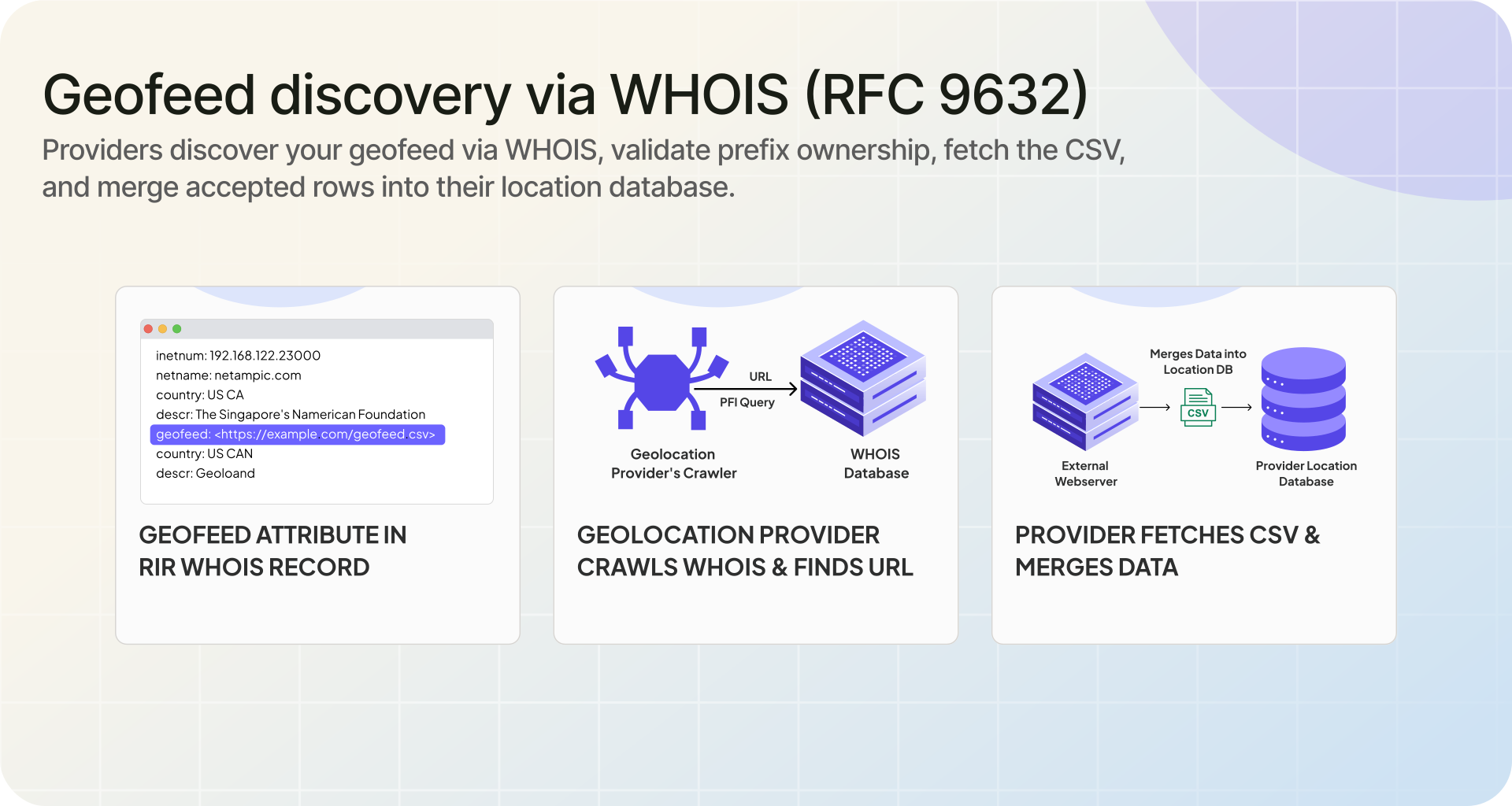
Once the file is hosted and the RIR pointer is in place, consumers do the rest. Most reputable geolocation providers re-check every feed on a daily to weekly cadence. The process looks roughly like this.
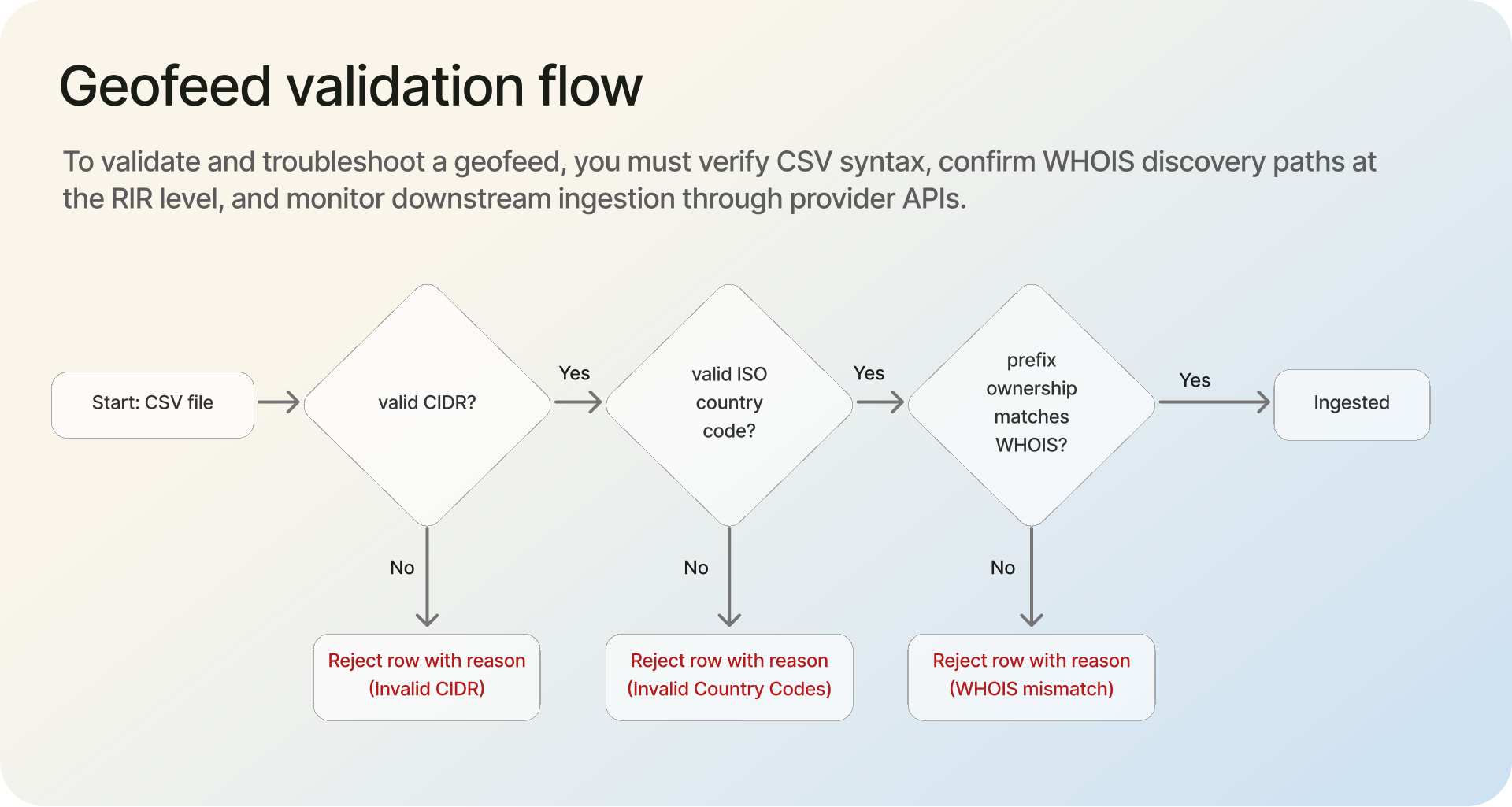
A provider's crawler reads the RIR WHOIS for a block, finds the geofeed: attribute or the remarks: line, and fetches the URL over HTTPS. It parses the CSV, validates each row, and checks that the publisher actually holds the listed prefix. Prefix ownership verification is the key step. If the CSV claims a prefix that WHOIS says belongs to someone else, the row gets rejected. This is what stops random publishers from overwriting a victim's location data.
The provider then merges the validated rows into its own database alongside BGP data, latency measurements, and whatever other signals it uses. Your row does not automatically win. It is weighted against the other evidence, and strong providers will flag conflicts rather than blindly accept either source.
If a row is rejected, good providers either email the contact address in the inetnum or log the rejection internally. Common rejection reasons include an expired TLS certificate on the hosting URL, malformed CIDR, ISO codes that do not exist, comma characters inside an unquoted city field, or prefix ownership mismatches. A clean feed with valid HTTPS almost always gets ingested without issues.
How do you know it worked? The honest answer is: check in a week. Query your own IPs against the provider's lookup API or web tool. If the location updated, you are in. If it did not, check the CSV with a validator, check the RIR record, and if both look right, contact the provider's support team with a specific prefix and ask them to check their crawler logs.
How often to update your geofeed
There is no universal answer, because it depends entirely on how often your network changes. Three rough scenarios cover most operators.
A stable enterprise AS with fixed deployments can update quarterly. If nothing about your network topology has moved, there is nothing to publish. Do not update the file for the sake of updating it.
A hosting provider or colocation operator with regular customer churn should update weekly. That is the cadence at which new customer deployments, moves, and decommissions start to accumulate enough drift to matter.
A CDN or cloud provider with frequent IP reallocation should update daily, or in extreme cases continuously through automation. At that scale, manual updates are not realistic anyway.
What counts as a change worth publishing? Any prefix moving between countries, major regional moves within a country, and additions or removals of entire blocks. Minor adjustments like changing a city name spelling can wait for the next scheduled update.
Validating and troubleshooting your geofeed
Validation is the part most guides skip, and it is where new publishers waste the most time. There are three things to check: the CSV itself, the RIR discovery path, and downstream ingestion.
For the CSV, the community tool geofeed-finder built by Massimo Candela at NTT is the most reliable option. It parses the file the same way real consumers do, flags ISO code issues, and reports prefix ownership conflicts by cross-checking against RIR data. Run it every time you change the file, not just the first time.
For the WHOIS discovery path, query your inetnum object directly through the RIR's WHOIS server after you push the change and confirm the geofeed: or remarks: line is visible. For RIPE, that is whois -h whois.ripe.net <your prefix>. For ARIN, the same command with whois.arin.net. If the line is missing, your update did not commit.
For downstream ingestion, the CAIDA datasets publish periodic geofeed snapshots that are a good "did anyone fetch me" signal. Large providers also expose their own lookup APIs, so querying your own IPs against those APIs is the most direct confirmation.
Common errors and their causes:
- Rows silently dropped. Usually invalid ISO codes. Check every region code against ISO 3166-2.
US-CAis valid,US-Californiais not. - Entire file rejected. Almost always a hosting problem. Expired TLS certificate, HTTP 404, or a 301 redirect that the consumer does not follow.
- Prefix ownership rejection. The WHOIS owner of the prefix does not match the entity publishing the geofeed. This hits recent acquisitions and reallocations most often, and the fix is usually to update the RIR records first, then republish.
- Encoding issues on city names. Save the file as UTF-8, not Windows-1252. Any city with non-ASCII characters will round-trip incorrectly otherwise.
Common mistakes when publishing a geofeed
Most geofeed problems are not format problems. They are operational mistakes. These are the ones that cause the most failed ingestions and false confidence:
- Using the wrong WHOIS pointer format. A valid CSV is not enough if the RIR record does not point to it in the exact format consumers expect.
- Hosting the file at an unstable URL. If the file moves, redirects break, or TLS expires, providers may stop fetching it without any obvious warning.
- Assuming the WHOIS
countryfield is enough. The WHOIS country field is not a substitute for a geofeed and often does not reflect where the prefix is actually being used. - Publishing location data for prefixes you do not clearly control. If prefix ownership does not line up with RIR data, consumers may reject the row entirely.
- Expecting every provider to update immediately. Even with a correct feed, ingestion depends on each provider's crawl schedule and validation flow.
- Maintaining the file manually without a source of truth. A geofeed that drifts from your actual network allocations becomes another stale data source instead of a fix.
Real-world examples
Three public geofeeds are worth looking at before you publish your own, because they cover different publisher profiles.
Google Cloud publishes at https://www.gstatic.com/ipranges/cloud_geofeed. It is one of the largest public feeds and a useful reference for how a hyperscaler structures entries for anycast ranges (lots of blank location fields) and for how they handle IPv6. The file is updated frequently and serves as a de facto reference implementation.
F5 Networks publishes an enterprise-scale feed that is easier to read than the Google one because the prefix count is smaller. If you want a template for a mid-size AS, this is a cleaner example to learn from.
Telia (AS1299) is a good example of a tier-1 carrier publishing geofeed data across multiple continents. You can find it by querying RIPE for a Telia inetnum and following the geofeed: attribute.
Do not copy any of these verbatim. Copy the structure. Your own data belongs in your own file at your own URL.
Frequently asked questions
A geofeed is a list, in CSV format, that tells IP geolocation services where your IP addresses are physically being used. You publish it at a public URL, add a pointer to it in your WHOIS records, and geolocation providers fetch it to update their databases.
Write a CSV file following RFC 8805 with your prefixes and their locations. Host it at a stable HTTPS URL. Add a geofeed: attribute (RIPE, APNIC) or a remarks: Geofeed <URL> line to your inetnum object, or use the comments field for ARIN. Providers discover and ingest it automatically on their next crawl cycle.
No. A geofeed is a source that feeds geolocation data. The geolocation data itself is what providers produce after merging geofeeds with BGP, latency measurements, and other signals. Your geofeed is an input, not the final answer users see.
Propagation varies by provider. Some pick up changes within a few days, while others can take a week or longer depending on their crawl schedule and validation flow. If you still do not see changes after two weeks, the feed has probably failed validation somewhere in the chain and is worth checking with a validator tool.
Both. RFC 8805 defines the file format: the CSV columns, the required encoding, the comment syntax. RFC 9632 defines how consumers find your file through RIR WHOIS. You follow RFC 8805 when you write the file, and you rely on RFC 9632 when you reference the file from your inetnum object.
If you only have one or two IP ranges and they rarely change, manual corrections are fine. If you have more than a handful of prefixes or they move regularly, a geofeed saves the ongoing work of submitting new correction forms to every provider every time.
Technically yes, if the spreadsheet exports as CSV at a stable URL. In practice, Google Sheets or similar are fragile because the export URL format can change. For anything you care about, use a real HTTPS file host on your own domain or a public repo instead.
Match it to your network change rate. A stable enterprise AS can update quarterly. Hosting providers with customer churn should update weekly. CDNs and cloud providers with frequent reallocation update daily or continuously through automation. Do not update for the sake of updating, because consumers deduplicate and it only adds noise.
What to do next
Write the CSV, host it at HTTPS, add the pointer to your RIR record, and submit to ipgeolocation.io if you want faster ingestion on our side. Once those four steps are done, check again after several days, and if needed after a week, then query your own IPs to confirm the update. If you run into a prefix ownership conflict or a discovery failure, the validator tools linked above will tell you exactly which check failed and why.