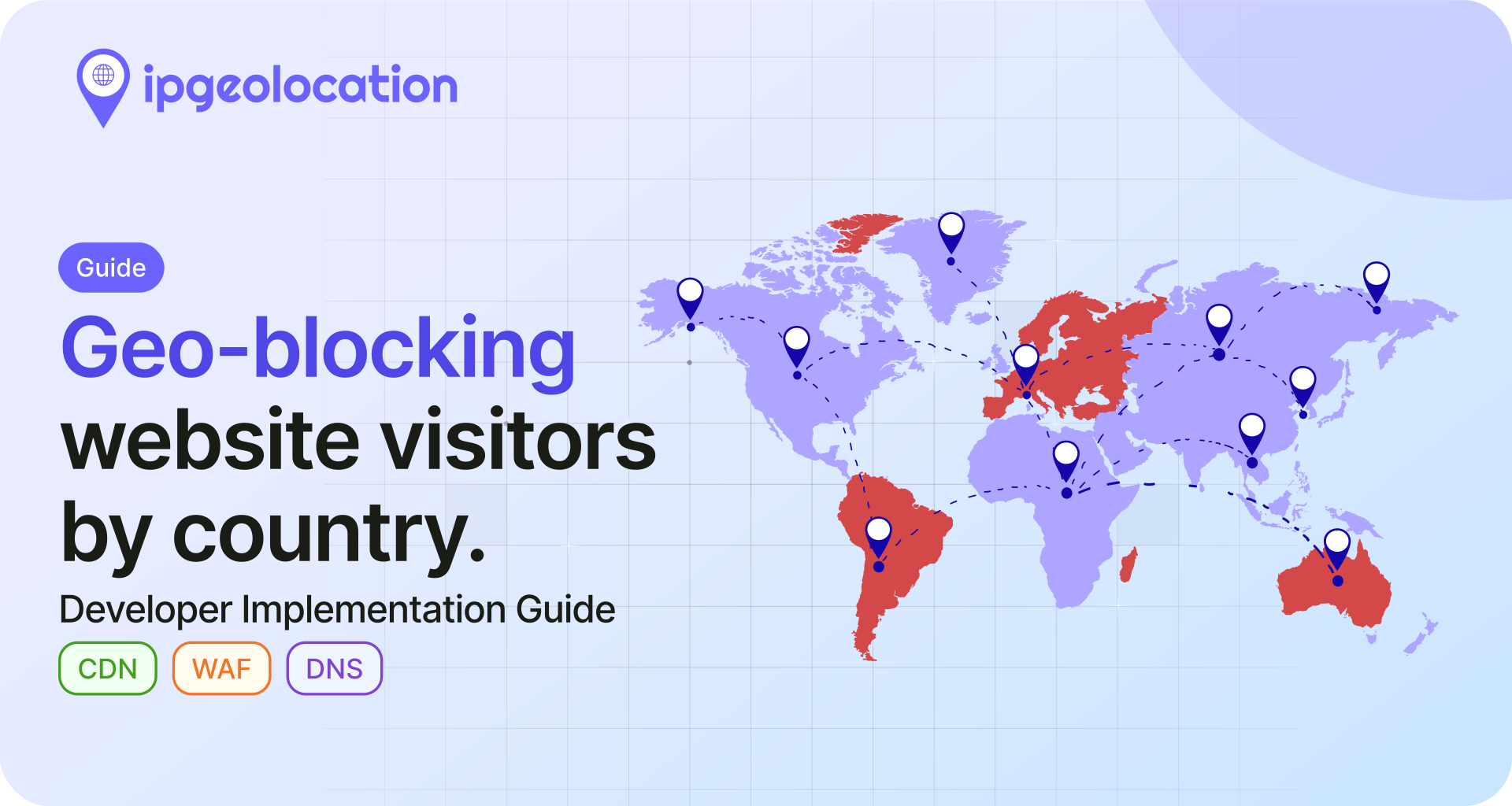



A geo redirect detects where your website visitors are located and sends them to a country-specific or language-specific version of your site. If you run us.store.com for American customers and uk.store.com for British ones, a geo redirect makes sure each visitor lands on the right version without picking it manually.
This guide covers how geo redirects work, when they make sense (and when they do not), how to implement them with ipgeolocation.io using JavaScript and PHP, and what to watch out for on the SEO side. If your site serves users across multiple countries or languages, getting this right matters.
TL;DR
- A geo redirect uses IP geolocation to detect a visitor's country and sends them to a localized URL automatically.
- Server-side redirects (PHP, Python, Node.js) are generally safer for SEO because HTTP redirects are more predictable for crawlers and avoid client-side rendering issues. Client-side JavaScript redirects are less reliable for discovery and indexing.
- Always use 302 (temporary) redirects for geo-based routing, not 301 (permanent).
- Add hreflang tags alongside geo redirects so Google can discover and index all regional versions of your site.
- Do not geo-redirect search crawlers. In simple setups, you can detect known crawler user-agents and serve the default page instead. In production, verify major crawlers more carefully rather than relying only on user-agent matching.
For readers who just want working code: skip to the implementation section.
What Is a Geo Redirect?
A geo redirect is an automatic URL redirection triggered by a visitor's geographic location. When someone loads your site, the server (or a client-side script) looks up their IP address, determines which country they're in, and redirects them to the appropriate regional page.
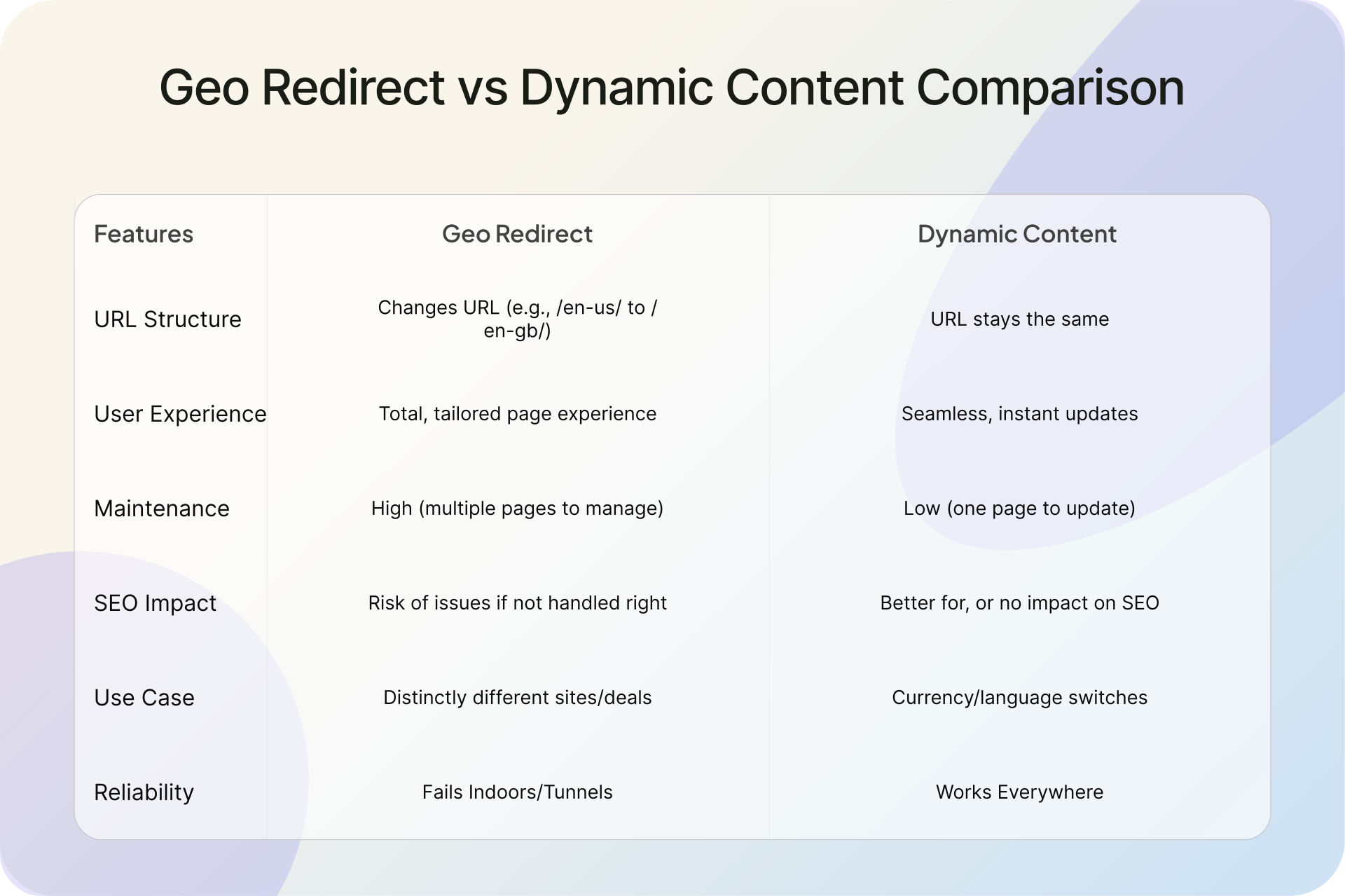
This is different from geo-targeted content, where the URL stays the same but the page content changes dynamically. With a geo redirect, the visitor physically moves to a different URL. A user in Germany hitting example.com gets sent to de.example.com. A user in Brazil gets sent to br.example.com.
The distinction matters for SEO. A geolocation redirect creates separate indexable URLs per region. Dynamic content personalization keeps one URL with varying content, which can confuse search engines about what the page is actually about.
When to Use Geo Redirects (and When Not To)
1. Good Use Cases
Geo redirects work well when your regional sites are genuinely separate. Multi-regional e-commerce stores with different product catalogs, pricing in local currencies, and country-specific shipping rules are the most common case. If your US store sells products that aren't available in Europe, or your pricing varies by 30% or more between regions, separate regional sites with geo redirects make sense.
Legal and compliance requirements are another strong trigger. GDPR consent flows differ from US privacy requirements. Some financial products can only be marketed in specific jurisdictions. Gambling sites must restrict access by country entirely. In these cases, geo redirects aren't just a convenience; they're a legal requirement.
Language-specific sites where the content is fully translated (not just machine-translated UI elements) also benefit. If you maintain a complete German-language site and a complete English-language site, a geo redirect ensures German visitors see the German version by default.
2. One Important Warning
Country and language are not the same thing. A visitor in Belgium may prefer Dutch, French, or German. A visitor in Canada may prefer English or French. Use country-based redirects for regional site selection, but do not assume country alone tells you which language a user wants. Always provide a visible language or region switcher.
3. When Alternatives Work Better
If your regional content differences are minor (a phone number, a currency symbol, a support email), dynamic content on a single URL is simpler and avoids the SEO complexity of managing multiple regional URLs.
Sites that depend heavily on organic search traffic should be cautious with geo redirects. Google's own documentation is direct about this: "Don't use IP analysis to adapt your content. IP location analysis is difficult and generally not reliable." When geo redirects interfere with how Googlebot crawls your site, the SEO cost can outweigh the UX benefit. If your regional content differences are only about language, hreflang tags alone (without redirects) are the safer choice. A visible language or region switcher in your site header is often the better UX anyway. Some users travel, use VPNs, or prefer a different language than their location suggests. Forcing them to a page they didn't choose creates friction. The best approach for many sites: use hreflang to signal regional versions to search engines, display a gentle suggestion banner ("It looks like you're in Germany. Visit our German site?"), and let the user decide.
For most SEO-sensitive sites, the safer default is hreflang plus a visible country or language suggestion rather than a forced redirect.
How Geo Redirects Work
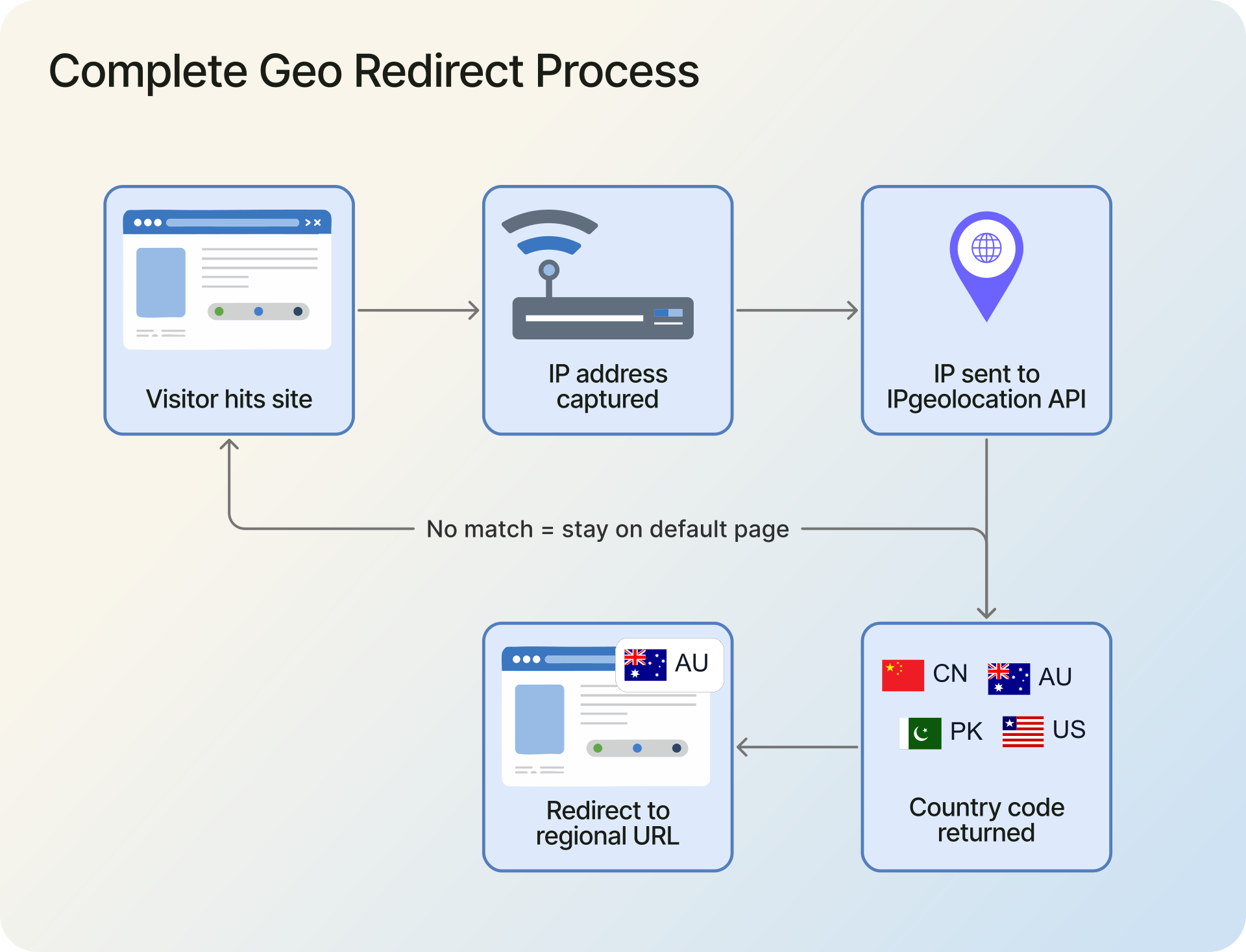
The technical flow has four steps:
- A visitor hits your website. Your server (or a client-side script) captures their IP address.
- That IP is sent to an IP geolocation API, like the IP Location API from ipgeolocation.io, which returns location data including the country code.
- Your code checks the country code against a mapping of countries to regional URLs.
- If a match is found, the visitor is redirected (HTTP 302 or JavaScript
window.location) to the regional URL. If no match exists, they stay on the default page.
To avoid calling the API on every page load, the geolocation result should be cached in a session cookie or browser session storage. One API call per session is enough.
Implementing Geo Redirects with IPGeolocation.io
1. Prerequisites
You need two things:
- An API key from ipgeolocation.io. The free plan includes 1,000 requests per day, which is enough for testing. For production traffic, check the pricing plans.
- A country-to-URL mapping for your regional sites. For example: US visitors go to
us.example.com, UK visitors go touk.example.com, and everyone else stays onexample.com.
2. Client-Side: JavaScript Plugin
The ipgeolocation.io JavaScript Client Side Plugin handles the API call and supports session storage caching out of the box. Add this to the <head> of your default landing page:
<script src="https://static.ipgeolocation.io/ipgeolocation-api-plugin.v3.0.0.js"></script>
<script>
  (async () => {
    if (sessionStorage.getItem("geo_redirected")) return;

    try {
      const ipGeoAPI = new IPGeolocationAPI({
        apiKey: "YOUR_API_KEY",
        saveToSessionStorage: true,
        fields: "location.country_code2"
      });

      const resp = await ipGeoAPI.getGeolocation();

      if (resp.error_message) {
        console.error("Geolocation lookup failed:", resp.error_message);
        return;
      }

      const countryCode = resp.location.country_code2;

      const redirectMap = {
        US: "https://us.example.com",
        GB: "https://uk.example.com",
        DE: "https://de.example.com",
        AU: "https://au.example.com"
      };

      if (redirectMap[countryCode]) {
        sessionStorage.setItem("geo_redirected", "true");
        window.location.href = redirectMap[countryCode];
      }
    } catch (error) {
      console.error("Geolocation lookup failed:", error);
    }
  })();
</script>
A few things to note about the client-side approach. The redirect happens after the page starts loading, so visitors may briefly see the default page before being sent elsewhere. The API key is visible in the page source; on paid ipgeolocation.io plans, you can whitelist your domain origins so the key only works from your site. Most importantly, search engine crawlers may not execute JavaScript, which means Googlebot might never follow a client-side redirect. From an SEO perspective, client-side redirects are less predictable for discovery and indexing than HTTP redirects. If SEO matters for your regional pages, use the server-side approach below.
3. Server-Side: PHP SDK
Server-side geo redirects are usually the better option for production sites. The redirect happens at the HTTP level (a 302 response), so the visitor never sees the default page, and the behavior is more predictable for crawlers than a JavaScript redirect. The API key stays on your server, out of the page source.
Install the official PHP SDK via Composer:
composer require ipgeolocation/ipgeolocation-php-sdk
Then, at the top of your landing page (before any HTML output):
<?php
require_once 'vendor/autoload.php';

use Ipgeolocation\Sdk\IpGeolocationClient;

session_start();

$userAgent = $_SERVER['HTTP_USER_AGENT'] ?? '';
$isCrawler = preg_match('/Googlebot|Bingbot|Slurp|DuckDuckBot/i', $userAgent);

if (!$isCrawler && !isset($_SESSION['geo_redirected'])) {
    $client = new IpGeolocationClient([
        'api_key' => getenv('IPGEO_API_KEY'),
    ]);

    $response = $client->lookupIpGeolocation([
        'ip' => $_SERVER['REMOTE_ADDR'],
        'fields' => 'location.country_code2',
    ]);

    $countryCode = $response->data->location->country_code2 ?? null;

    $redirectMap = [
        'US' => 'https://us.example.com',
        'GB' => 'https://uk.example.com',
        'DE' => 'https://de.example.com',
        'AU' => 'https://au.example.com',
    ];

    if ($countryCode && isset($redirectMap[$countryCode])) {
        $_SESSION['geo_redirected'] = true;
        header('Location: ' . $redirectMap[$countryCode], true, 302);
        exit;
    }
}
?>
Two details worth noting. The fields parameter limits the API response to only the country code, which reduces payload size and speeds up the lookup. And the exit after header() is not optional in PHP; without it, the script continues executing and may output HTML before the redirect takes effect.
4. Other Backend Languages
The redirect logic is the same in any language: initialize the API client, look up the visitor's IP, read the country code, and redirect if there's a match. IPGeolocation.io provides official backend SDKs for Python, Java, Node.js, Go, C#, Ruby, Rust, and Kotlin. See the SDK documentation hub for language-specific setup instructions and code examples.
Geo Redirects and SEO: What You Need to Know
Geo redirect SEO is the concern most site owners eventually raise: will redirecting by location hurt my search rankings? The short answer is that it depends on how you implement it. Done poorly, geo redirects can prevent Google from indexing your regional pages. Done correctly, they work alongside hreflang to deliver a good user experience without sacrificing search visibility.
1. How Search Engines Handle Geo Redirects
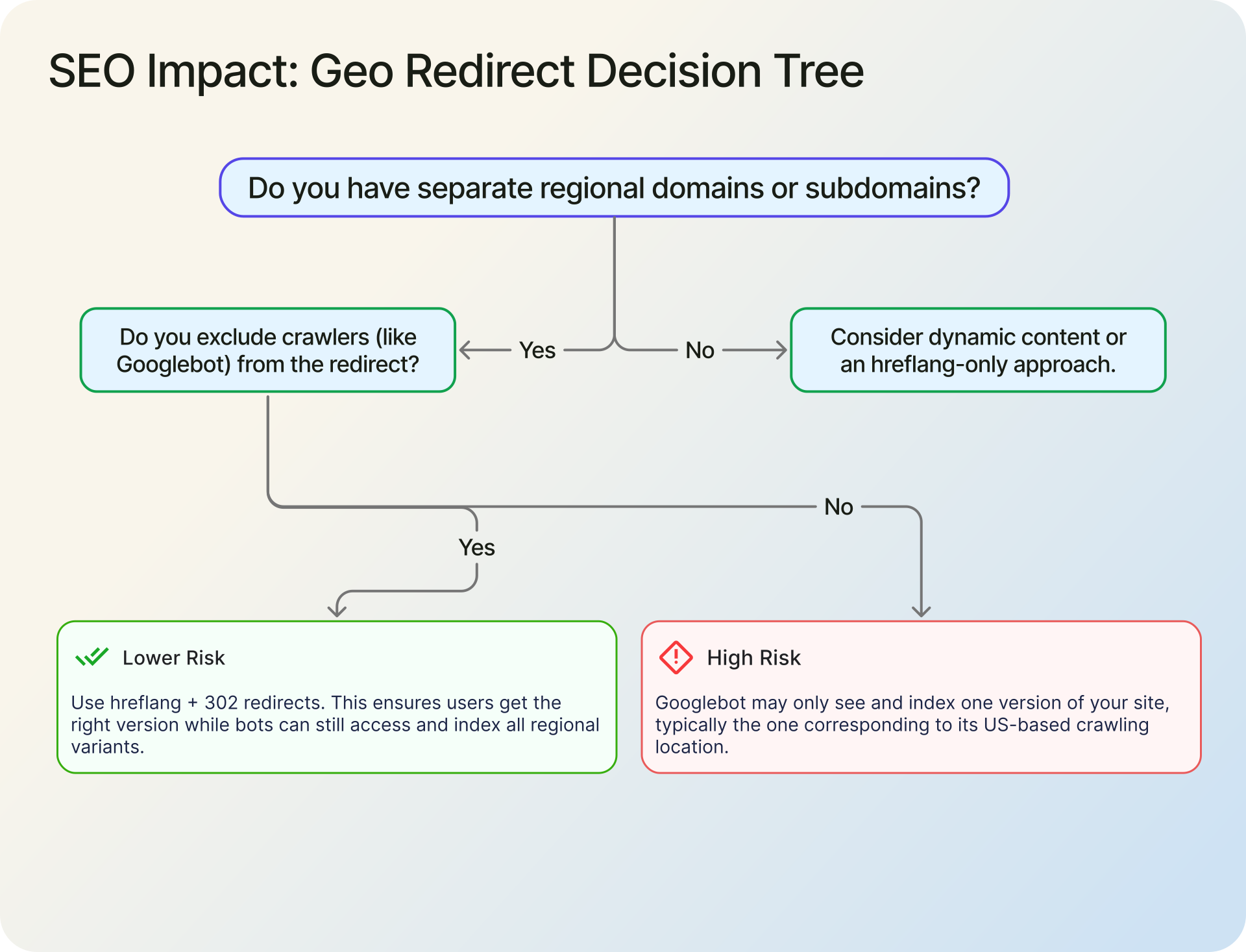
Googlebot crawls primarily from US-based IP addresses. Google has confirmed this in their developer documentation: "most, but not all, Google crawls originate from the US." If your geo redirect sends US IP addresses to us.example.com, Googlebot will only ever see that version. Your German, UK, and Australian pages may never get crawled or indexed.
Google's multi-regional sites documentation is direct: "Don't use IP analysis to adapt your content." Their recommended alternative is hreflang annotations, which explicitly tell Google about all regional versions without relying on redirect behavior.
This does not mean you should never use geo redirects. It means you need to handle crawlers separately from human visitors and make sure search engines can still discover every regional version through hreflang, internal linking, and direct crawlable URLs.
2. Using hreflang with Geo Redirects
hreflang tags tell search engines which URL corresponds to which language and region. Add them to the <head> of every regional page:
<link rel="alternate" hreflang="en-us" href="https://us.example.com" />
<link rel="alternate" hreflang="en-gb" href="https://uk.example.com" />
<link rel="alternate" hreflang="de" href="https://de.example.com" />
<link rel="alternate" hreflang="x-default" href="https://example.com" />
The x-default value tells Google which page to show when no regional match exists. This is typically your main/default site.
Even if you use geo redirects for human visitors, hreflang ensures that Google discovers and indexes every version. The two approaches are complementary, not mutually exclusive. Google uses hreflang to understand your site structure; the geo redirect handles the user experience for visitors who land on the wrong version.
3. 301 vs 302 for Geo Redirects
Use 302 (temporary) redirects for geo-based routing. A 301 tells search engines that the original URL has permanently moved to the target URL, which is incorrect for geo redirects. Your default page hasn't moved; it's just routing visitors conditionally.
A 301 can cause search engines to consolidate your regional URLs, potentially deindexing the default version. With a 302, search engines treat the original URL as the canonical source and understand that the redirect is situational, not permanent. This preserves indexing for all versions of your site.
Best Practices and Common Mistakes
1. What to Get Right
Use 302, not 301. This is the single most common mistake. A 301 tells search engines the redirect is permanent, which consolidates your regional pages into one indexed URL. A 302 preserves both URLs in the index.
Exclude bots from the redirect. In simple setups, you can check the User-Agent header for known crawlers (Googlebot, Bingbot, etc.) and serve them the default page. For production systems, treat user-agent matching as a basic filter, not perfect verification. The goal is to make sure search engines can still crawl and index all versions of your site.
$userAgent = $_SERVER['HTTP_USER_AGENT'] ?? '';
if (preg_match('/Googlebot|Bingbot|Slurp|DuckDuckBot/i', $userAgent)) {
    return; // Basic crawler exclusion for simple setups
}
If your site is behind Cloudflare, Nginx, a load balancer, or another reverse proxy, make sure your server receives the real visitor IP before using $_SERVER['REMOTE_ADDR']. Do not trust forwarded IP headers blindly unless your proxy is configured to set them safely.
Let users override the redirect. Add a language or region switcher to your site header. Store the user's manual choice in a cookie that takes priority over the geo redirect. Some visitors use VPNs, travel frequently, or simply prefer a different regional version. Forcing them back on every visit is a fast way to lose them.
Cache the geolocation result. One API call per session is enough. Store the country code in a server-side session variable or a browser cookie. The ipgeolocation.io JavaScript plugin supports this natively through its saveToSessionStorage option.
2. What to Avoid
Redirecting in a loop. If us.example.com redirects non-US visitors back to example.com, and example.com redirects US visitors to us.example.com, a US visitor hitting us.example.com directly triggers an infinite loop. Make sure regional pages only redirect visitors who should not be there, and always check whether the visitor is already on their correct regional page before redirecting.
Assuming the IP is always accurate. IP geolocation is reliable at the country level (typically 99%+ accurate), but it is not perfect. Users behind corporate VPNs, mobile carriers with centralized IP pools, or proxy services may show a different country than their actual location. Build your redirect as a helpful default, not an enforced gate. The override mechanism mentioned above handles this.
Forgetting the fallback. If the geolocation API returns an error or the visitor's country isn't in your redirect map, the visitor should stay on the default page. Never redirect to a blank or error page. Wrap your redirect logic in proper error handling and always have a default path.
Skipping hreflang. Geo redirects without hreflang tags leave search engines guessing about your site structure. Even a perfectly implemented geo redirect can't replace what hreflang does for indexing. Use both.
How to Test Geo Redirects Safely
Before rolling out a geo redirect site-wide, test it from multiple countries and user scenarios.
- Check the redirect from VPN or proxy endpoints in your target countries.
- Confirm that users can still access the default site directly.
- Test the manual country or language override and make sure it persists.
- Make sure regional pages do not create redirect loops.
- Verify that a failed geolocation lookup leaves the visitor on the default page.
- Confirm that all regional URLs are still discoverable through hreflang and internal links.
A geo redirect should improve the user journey, not make the site harder to crawl, debug, or navigate.
Frequently Asked Questions
It can, if search engine crawlers get redirected. IP-based redirection SEO risk is real: Googlebot primarily crawls from US IP addresses, so if your redirect sends it to a regional page, other versions may not get indexed. The fix is to exclude crawlers from the redirect logic and use hreflang tags so Google discovers all versions. Done correctly, geo redirects and SEO coexist without conflict.
Always 302 (temporary). A geo redirect is conditional, not permanent. The default URL hasn't moved; it's routing visitors based on location. A 301 tells search engines to stop indexing the original URL and consolidate link equity to the target, which is not what you want for regional routing.
In simple setups, check the request's User-Agent header for known crawler identifiers (Googlebot, Bingbot, etc.) before running the redirect logic. If the user agent matches a crawler, skip the redirect and serve the default page. For production systems, do not rely only on user-agent matching if crawler access is business-critical. The goal is to keep every regional page crawlable and indexable.
Yes. The ipgeolocation.io API returns city, state/province, and even latitude/longitude data. You can build redirect rules at any geographic level. State-level redirects are common for businesses with different regulatory requirements across US states, or for directing visitors to the nearest physical store location.
The visitor stays on the default page. Always wrap your API call in error handling (try/catch in JavaScript, exception handling in PHP) and treat failures silently. A failed lookup should never break the page or show an error to the visitor. This is a progressive enhancement, not a critical path.
Server-side is better for most production use cases. The redirect happens at the HTTP level (302 response) before any page content loads, so there's no flash of the wrong page. The API key stays on the server. And search engine crawlers can follow HTTP redirects reliably, while JavaScript redirects may not be executed during crawling. Client-side works for static sites or situations where backend code isn't an option.