

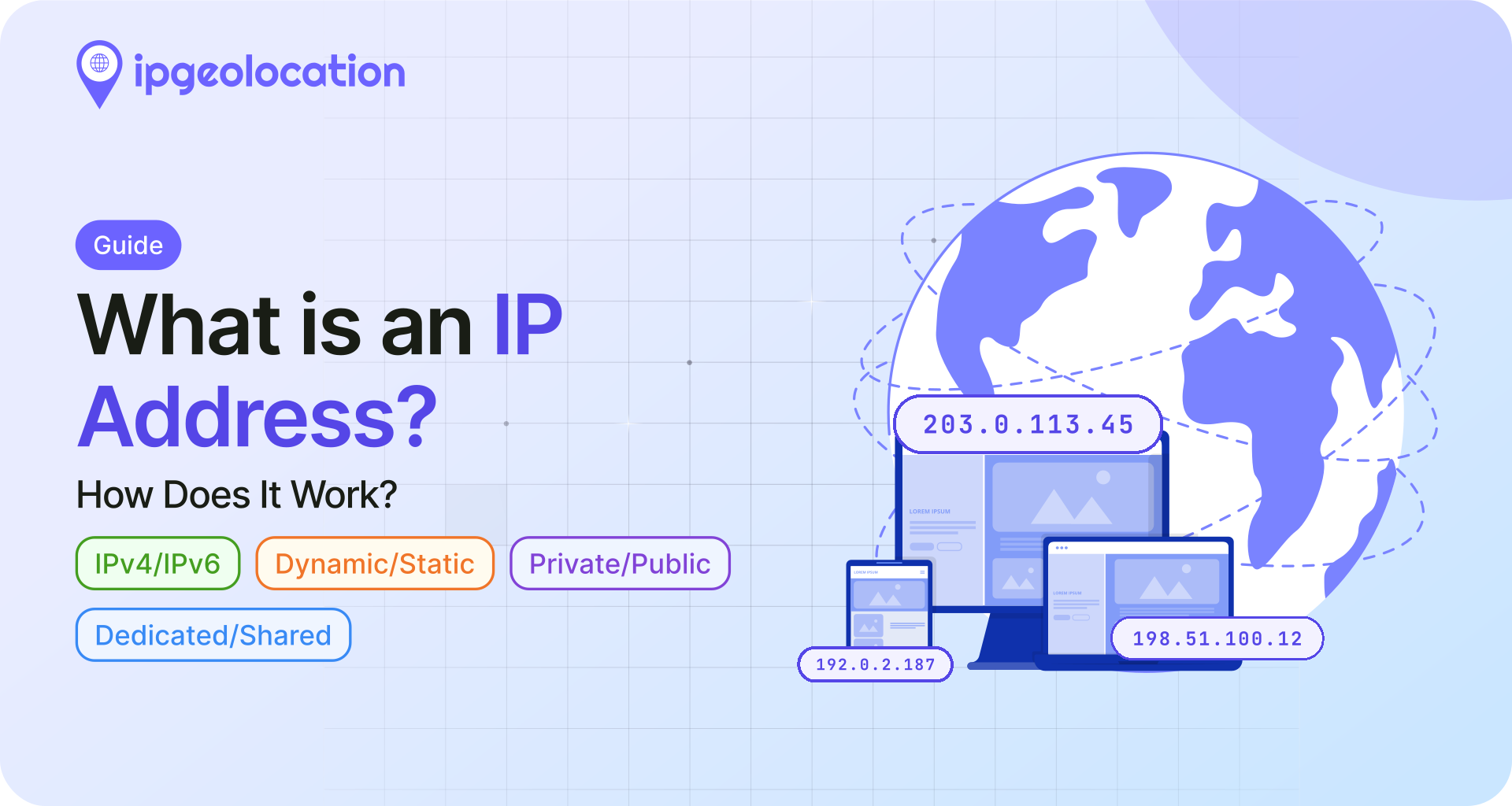
An IP address is a unique numerical label assigned to every device that connects to a network using the Internet Protocol. It works like a mailing address for data, telling routers where to send information so it reaches the right device on the right network.
Every time you load a website, send an email, or stream a video, IP addresses are doing the routing work behind the scenes. Your device has one. The server you're connecting to has one. The routers between you and that server use both addresses to move packets of data back and forth across the internet.
The IPv4 standard has a total address space of about 4.3 billion, and the newer IPv6 standard expands that to a practically unlimited supply. This guide walks through how IP addresses work at a technical level, the different types, how they get assigned, what they can reveal about you, and what you can do to protect yours.
TL;DR
- An IP address identifies a device on a network and tells routers where to deliver data.
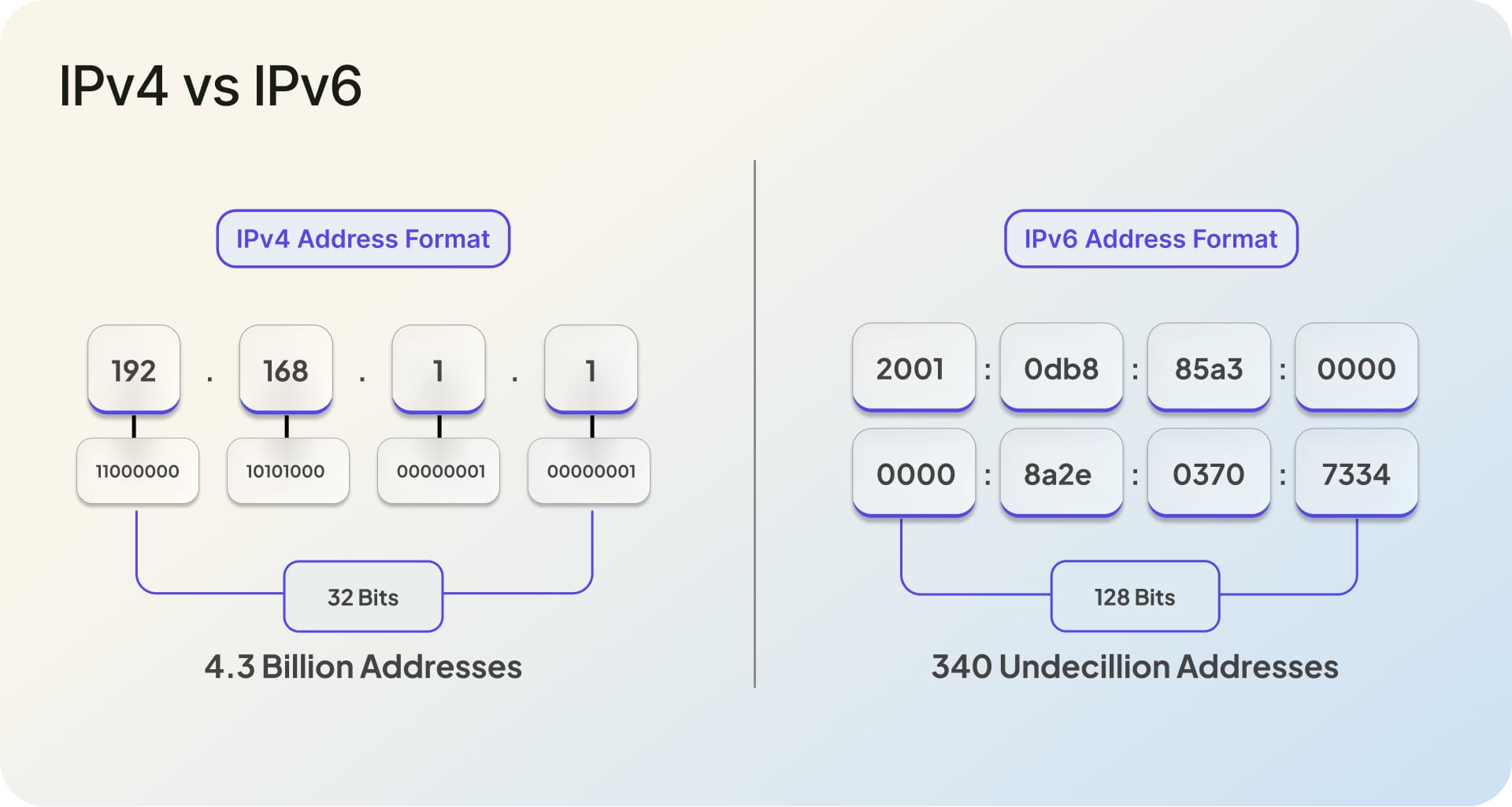
- IPv4 uses 32-bit addresses (4.3 billion total address space). IPv6 uses 128-bit addresses (340 undecillion total).
- IANA's free IPv4 pool was fully depleted in February 2011. Most regional registries have since exhausted or heavily restricted their remaining allocations.
- Your public IP address can reveal your approximate location, ISP, and connection type through IP geolocation.
- Protect your IP with a VPN, proxy server, or properly configured firewall.
In short, your IP address is both a routing mechanism and a data point. Understanding it helps you make better decisions about privacy, security, and how internet infrastructure actually works.
What Is an IP Address?
IP stands for Internet Protocol, the set of rules that governs how data travels across networks. An IP address is the identifier that makes this routing possible. Without it, a data packet leaving your device would have no destination label and no return address.
The format is simple for IPv4: four groups of numbers separated by dots, like 192.168.1.1. Each group (called an octet) ranges from 0 to 255, giving the address a total of 32 bits. IPv6 uses a longer format with eight groups of hexadecimal characters, like 2001:0db8:85a3:0000:0000:8a2e:0370:7334, bringing the total to 128 bits.
Every IP address serves two functions. First, it identifies the host or network interface. Second, it provides location addressing, which routers use to determine where to forward each packet. Think of it as both a name tag and a delivery label at the same time.
How Do IP Addresses Work?
When you type a URL into your browser, your device doesn't actually know where that website lives. It sends a query to a DNS (Domain Name System) server, which translates the human-readable domain name into a numeric IP address. For example, google.com resolves to an IP like 142.250.80.46.
Once your device has the destination IP, it wraps your request in a data packet. That packet carries two addresses: the source IP (your device) and the destination IP (the server). Routers along the path read the destination IP, consult their routing tables, and forward the packet one hop closer to its target. The server processes the request and sends a response back using your source IP as the new destination.
This entire round trip typically happens in milliseconds, though actual latency depends on physical distance, network congestion, and the number of hops between source and destination.
1. The Role of Your ISP
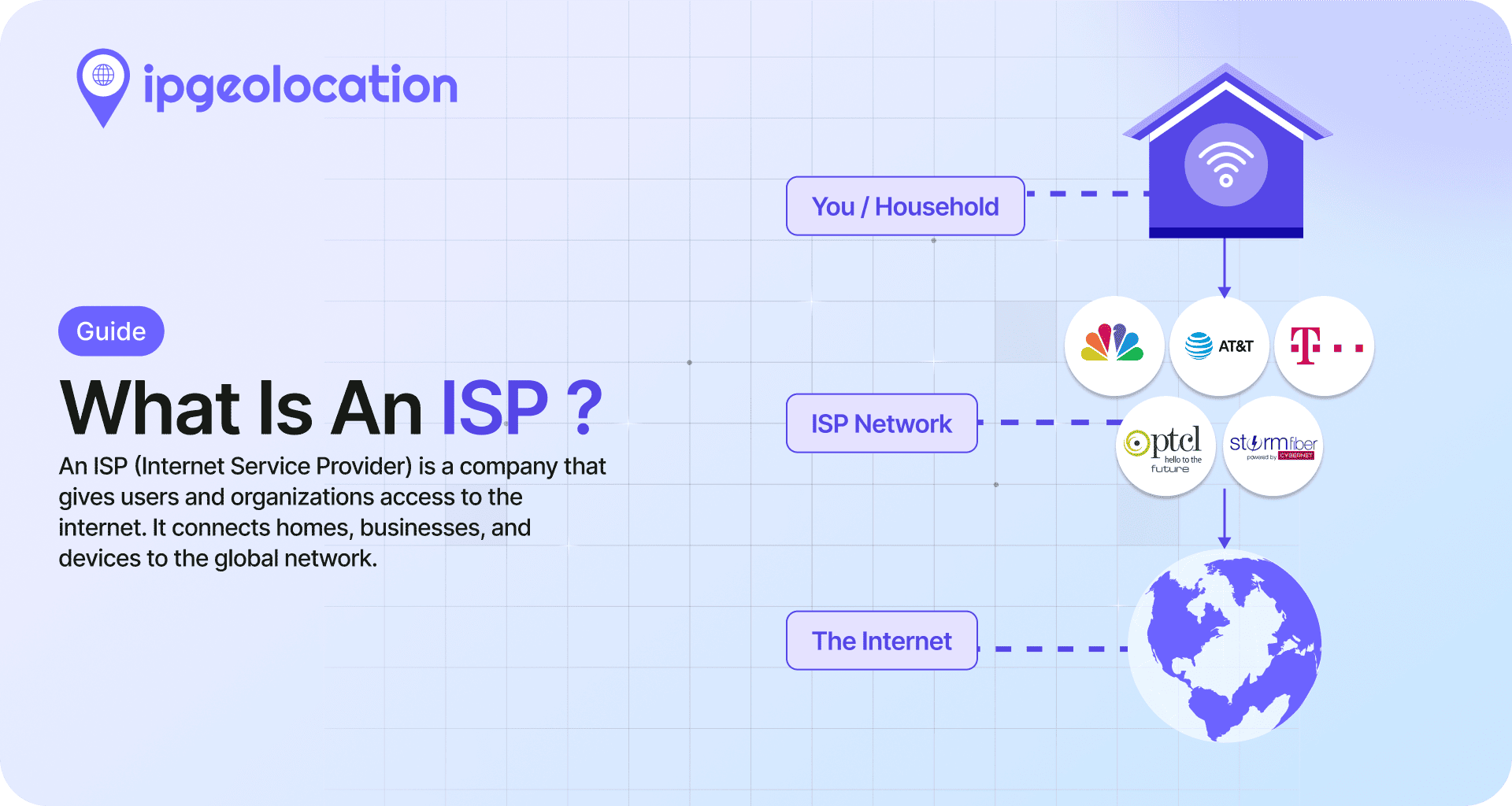
Your Internet Service Provider assigns your public IP address. When your router connects to your ISP's network, it receives a public IP through a protocol called DHCP (Dynamic Host Configuration Protocol). This is the address the rest of the internet sees when you browse, stream, or send data.
Most residential connections use dynamic IP assignment, meaning your public IP can change periodically. Businesses that run servers or need consistent remote access typically pay for a static IP that stays the same.
2. NAT: Why Your Local IP Differs from Your Public IP
Inside your home or office network, your devices use private IP addresses (like 192.168.1.x). These private addresses only work within your local network. Your router uses a process called Network Address Translation (NAT) to map all of those private addresses to a single public IP when communicating with the outside internet.
This is why running a "what is my IP" search shows a different address than the one listed in your device's network settings. The search shows your public IP. Your device settings show your private, local IP.
IPv4 vs IPv6
1. IPv4
IPv4 (Internet Protocol version 4) has been the backbone of internet addressing since 1981. Its 32-bit format creates a total address space of approximately 4.3 billion unique addresses. That sounded like more than enough in the early 1980s, but the explosion of connected devices made it insufficient decades ago.
The IANA (Internet Assigned Numbers Authority) free pool was formally depleted on February 3, 2011, when the last five /8 blocks were distributed equally to the five Regional Internet Registries. Since then, most RIRs have exhausted or severely restricted their own allocations. APNIC (Asia-Pacific) hit its limit in April 2011, LACNIC (Latin America) in June 2014, ARIN (North America) in September 2015, and RIPE NCC (Europe, Middle East) in November 2019. AFRINIC (Africa) still holds a small remaining pool under a managed soft-landing policy, with roughly 765,000 addresses marked as available at the start of 2026.
Of the total 3.687 billion allocated IPv4 addresses globally, about 45% are held in ARIN's registry, 24% in APNIC, 23% in RIPE NCC, 5% in LACNIC, and 3% in AFRINIC. New addresses are primarily available through transfers and reclamation of unused blocks, which has created a secondary market where individual IPv4 addresses carry real monetary value.
2. IPv6
IPv6 was designed as the long-term replacement for IPv4. Its 128-bit address space provides approximately 340 undecillion unique addresses (that's 340 followed by 36 zeros). Even accounting for generous allocation policies, this supply is effectively inexhaustible for any foreseeable future.
An IPv6 address looks different from IPv4. Instead of four decimal-separated octets, it uses eight groups of four hexadecimal digits separated by colons: 2001:0db8:85a3:0000:0000:8a2e:0370:7334. Leading zeros within each group can be omitted, and consecutive groups of all zeros can be replaced with :: to shorten the address.
3. Why Both Still Coexist
Google's live IPv6 adoption statistics show global adoption close to half, with leading countries running far higher. But full global transition remains years away. The primary barriers are cost and compatibility. Millions of older devices, network appliances, and software systems only support IPv4. Upgrading requires hardware replacement, configuration changes, and staff training that many organizations have been slow to prioritize.
Most networks today run "dual-stack" configurations, supporting both IPv4 and IPv6 simultaneously. This works, but it adds operational overhead and means IPv4 addresses will remain relevant (and valuable) for years to come.
Types of IP Addresses
1. Public vs Private IP Addresses
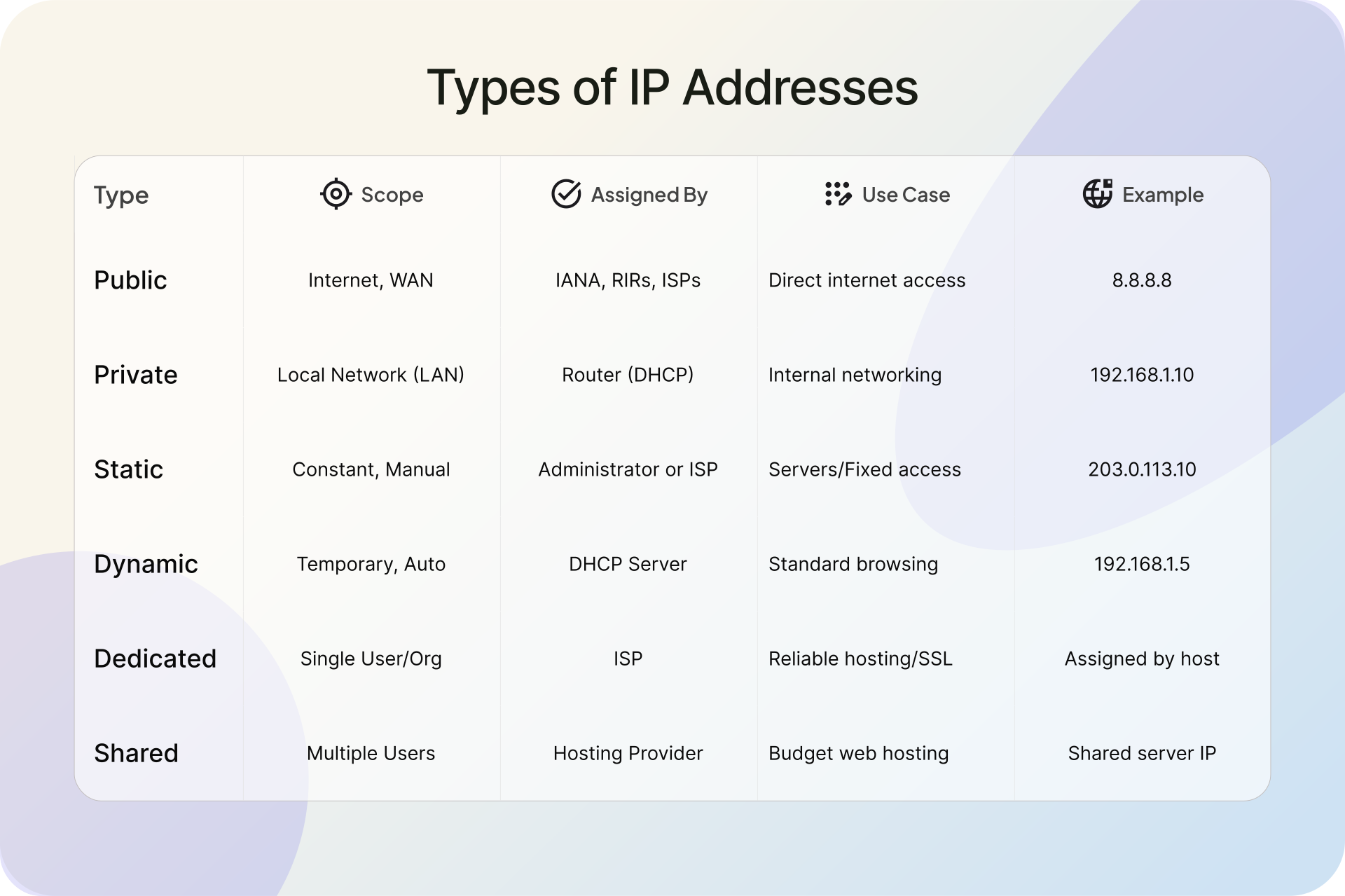
A public IP address is routable on the open internet. It's assigned by your ISP and is the address websites and services see when you connect. Every device that communicates directly with the internet needs a public IP, though NAT means many devices can share one.
Private IP addresses are reserved for internal networks only. They fall within three specific ranges defined by RFC 1918: 10.0.0.0 to 10.255.255.255, 172.16.0.0 to 172.31.255.255, and 192.168.0.0 to 192.168.255.255. Your home router, laptop, phone, and smart TV all likely have private IPs in the 192.168.x.x range. These addresses can be reused across millions of separate networks without conflict because they never appear on the public internet.
2. Static vs Dynamic IP Addresses
Dynamic IP addresses are the default for most internet connections. Your ISP's DHCP server assigns an available address each time your router connects, and it may change after a lease period expires or when the connection resets. For typical browsing, email, and streaming, this works fine and helps ISPs manage their limited address pools efficiently.
Static IPs stay fixed. They're necessary when you're running a web server, mail server, or VPN endpoint, because other systems need a consistent address to reach you. DNS records, firewall rules, and SSL certificates often depend on a stable IP.
Static addresses usually cost extra from your ISP, and pricing varies widely by provider and region. Most hosting providers include at least one static IP with dedicated server plans. If you only need a static IP for occasional remote access, dynamic DNS services offer a workaround by mapping a fixed hostname to your changing IP.
3. Dedicated vs Shared IP Addresses
In web hosting, a dedicated IP means your server or website is the only one using that address. A shared IP means multiple websites or services share the same address, with the server using HTTP headers to route requests to the correct site.
Dedicated IPs matter most for email deliverability. If another site on your shared IP sends spam, it can damage the IP's reputation and affect your email delivery rates. They also simplify SSL certificate management and give you direct IP access to your server without needing a domain name. The tradeoff is cost: shared hosting plans include a shared IP by default, while dedicated IPs come at an additional monthly fee that varies by provider.
IP Address Structure and Classes
IPv4 addresses aren't just random numbers. Every address is divided into two parts: a network portion that identifies the network and a host portion that identifies the specific device on that network. Where the split happens depends on the address class or the subnet mask applied to it.
1. The Five IPv4 Classes
The original IPv4 addressing system used five classes:
Class A (1.0.0.0 to 126.0.0.0) reserves the first 8 bits for the network portion, leaving 24 bits for hosts. That allows each Class A network to contain over 16 million devices. These were assigned to very large organizations and governments.
Class B (128.0.0.0 to 191.255.0.0) uses 16 bits each for network and host. Each Class B network supports up to 65,534 hosts, making them common for universities and large enterprises.
Class C (192.0.0.0 to 223.255.255.0) dedicates 24 bits to the network and only 8 to hosts, allowing 254 devices per network. Most small businesses and home networks operate at this scale.
Class D (224.0.0.0 to 239.255.255.255) is reserved for multicast traffic.
Class E (240.0.0.0 to 255.255.255.255) is reserved for experimental use.
2. CIDR: Why Classful Addressing Was Replaced
The class system was wasteful. An organization that needed 300 IP addresses had to request a full Class B block of 65,534, leaving thousands unused. CIDR (Classless Inter-Domain Routing), introduced in 1993, replaced this rigid structure with variable-length subnet masks.
With CIDR, a network can be any size. The notation 192.168.1.0/24 means the first 24 bits are the network prefix and the remaining 8 bits are for hosts, giving exactly 254 usable addresses. A /22 prefix would give 1,022 hosts. This flexibility dramatically slowed IPv4 exhaustion and remains the standard way IP blocks are allocated and advertised today.
How IP Addresses Are Assigned
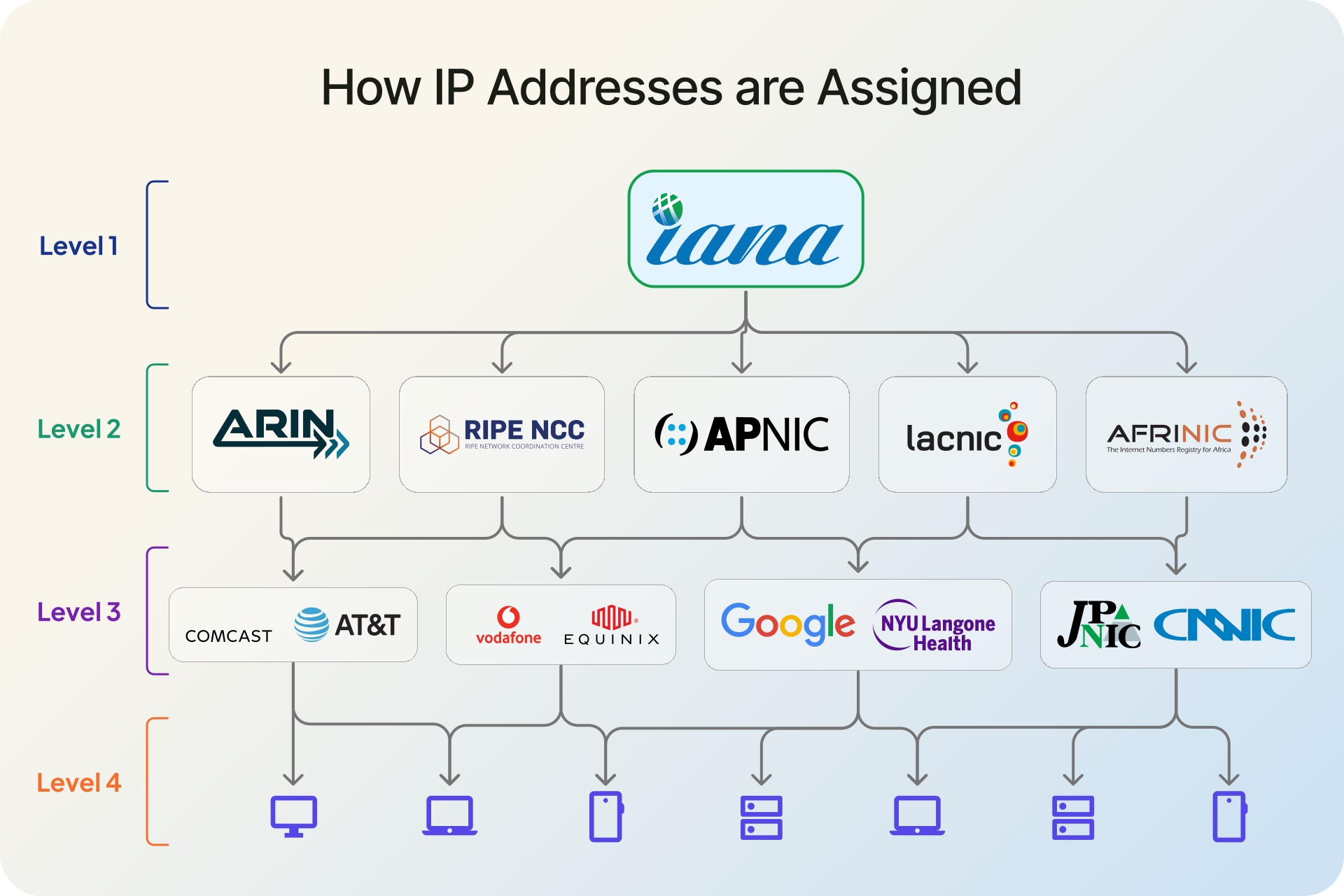
The allocation chain runs from the top of the internet's governance structure down to your individual device.
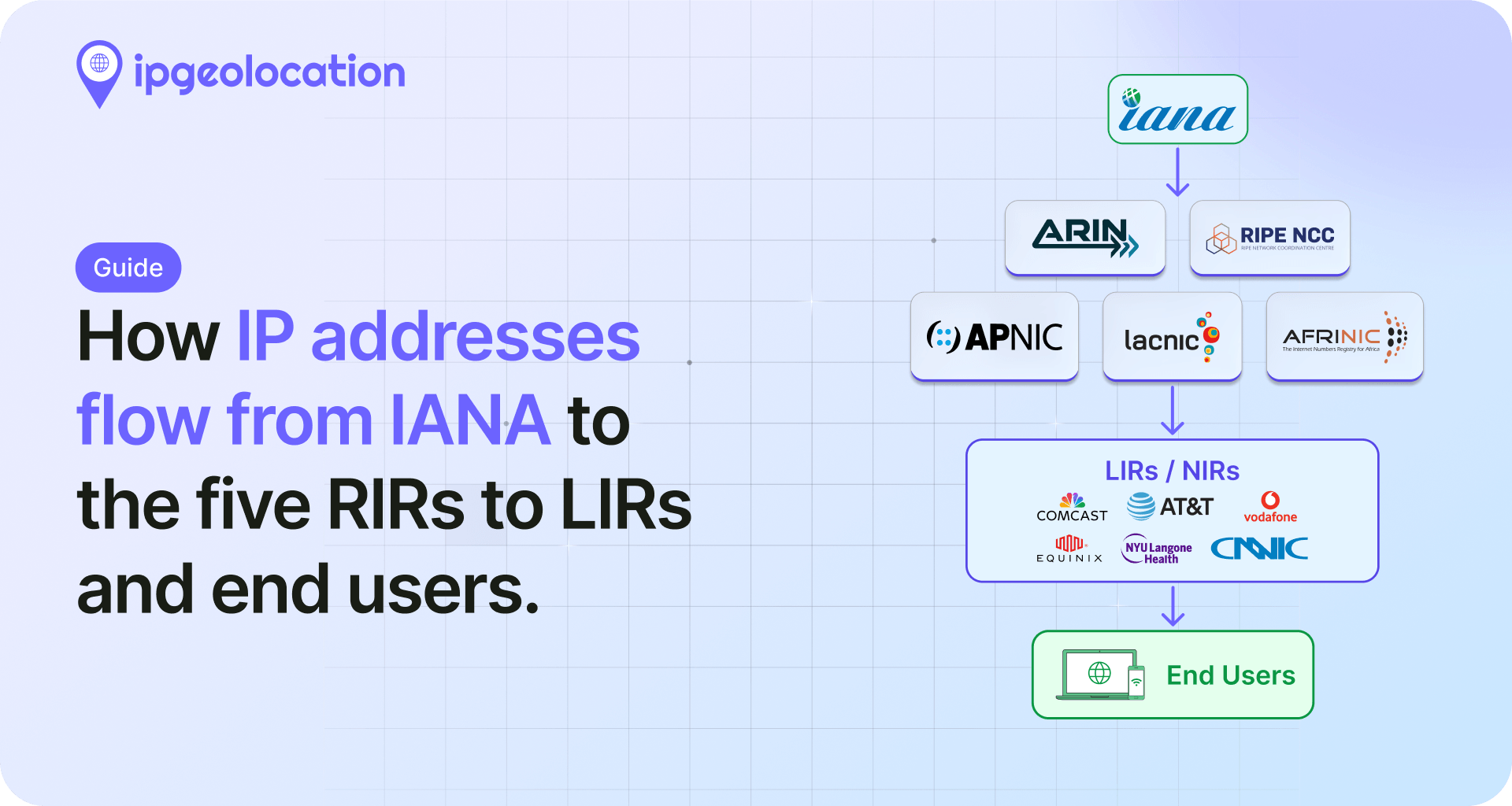
IANA, operating under ICANN (the Internet Corporation for Assigned Names and Numbers), manages the global pool of IP address space. IANA allocates large blocks to five Regional Internet Registries, each responsible for a specific geographic area. ARIN covers the United States, Canada, and several Caribbean and North Atlantic islands. RIPE NCC covers Europe, the Middle East, and Central Asia. APNIC serves the Asia-Pacific region. LACNIC manages Latin America and parts of the Caribbean. AFRINIC handles Africa.
These RIRs distribute smaller blocks to ISPs, hosting providers, and large organizations within their regions. Your ISP then assigns individual addresses to customers through DHCP for dynamic allocation or manual configuration for static IPs.
On your local network, your router acts as its own mini DHCP server, assigning private IP addresses to each connected device. This is why your laptop might get 192.168.1.5 while your phone gets 192.168.1.8, even though both appear as the same public IP to the outside world.
What Can an IP Address Reveal?
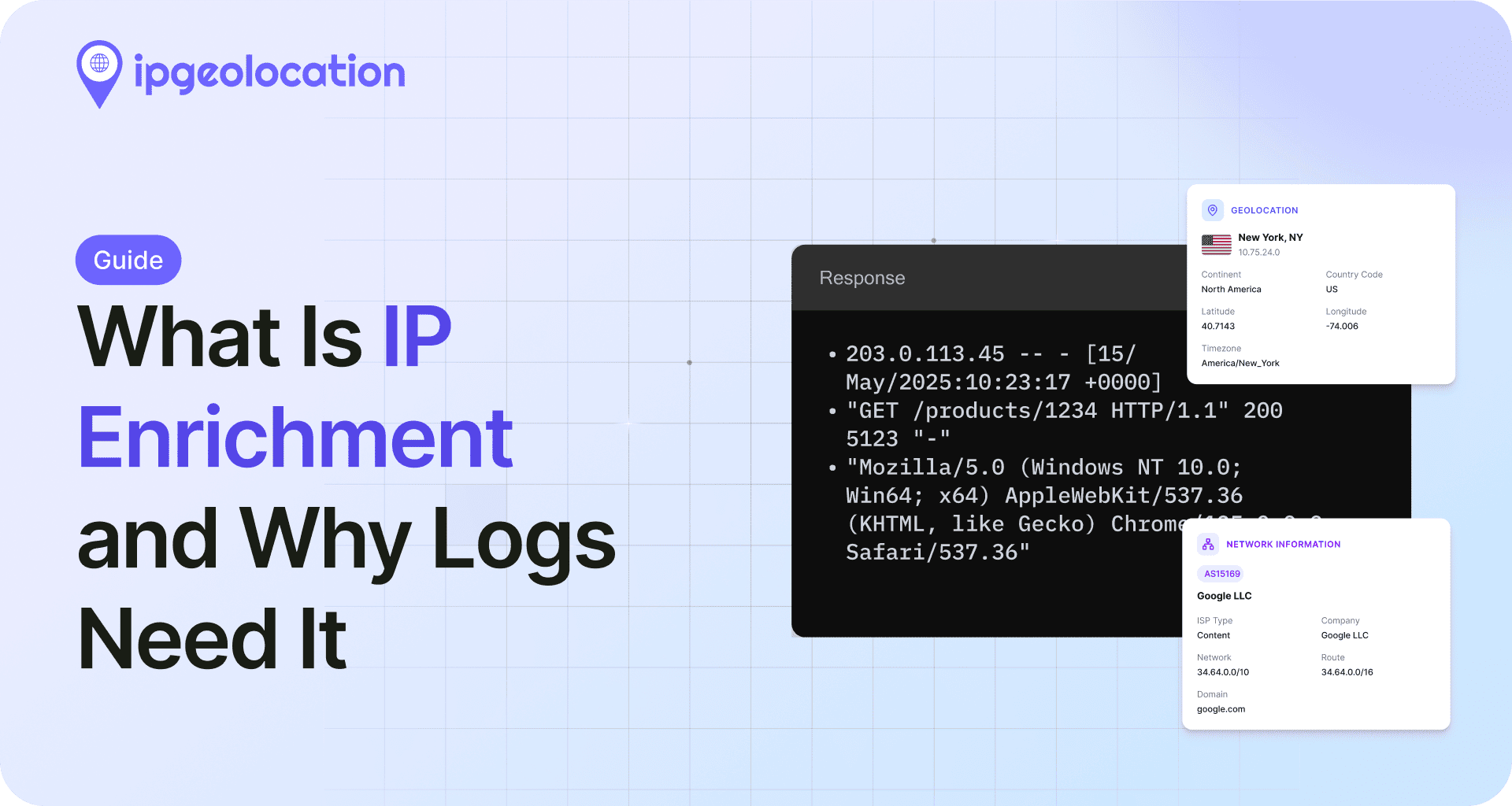
This is where IP addresses become more than just routing labels. Through a process called IP geolocation, a single IP address can reveal a surprising amount of information about the device and network behind it.
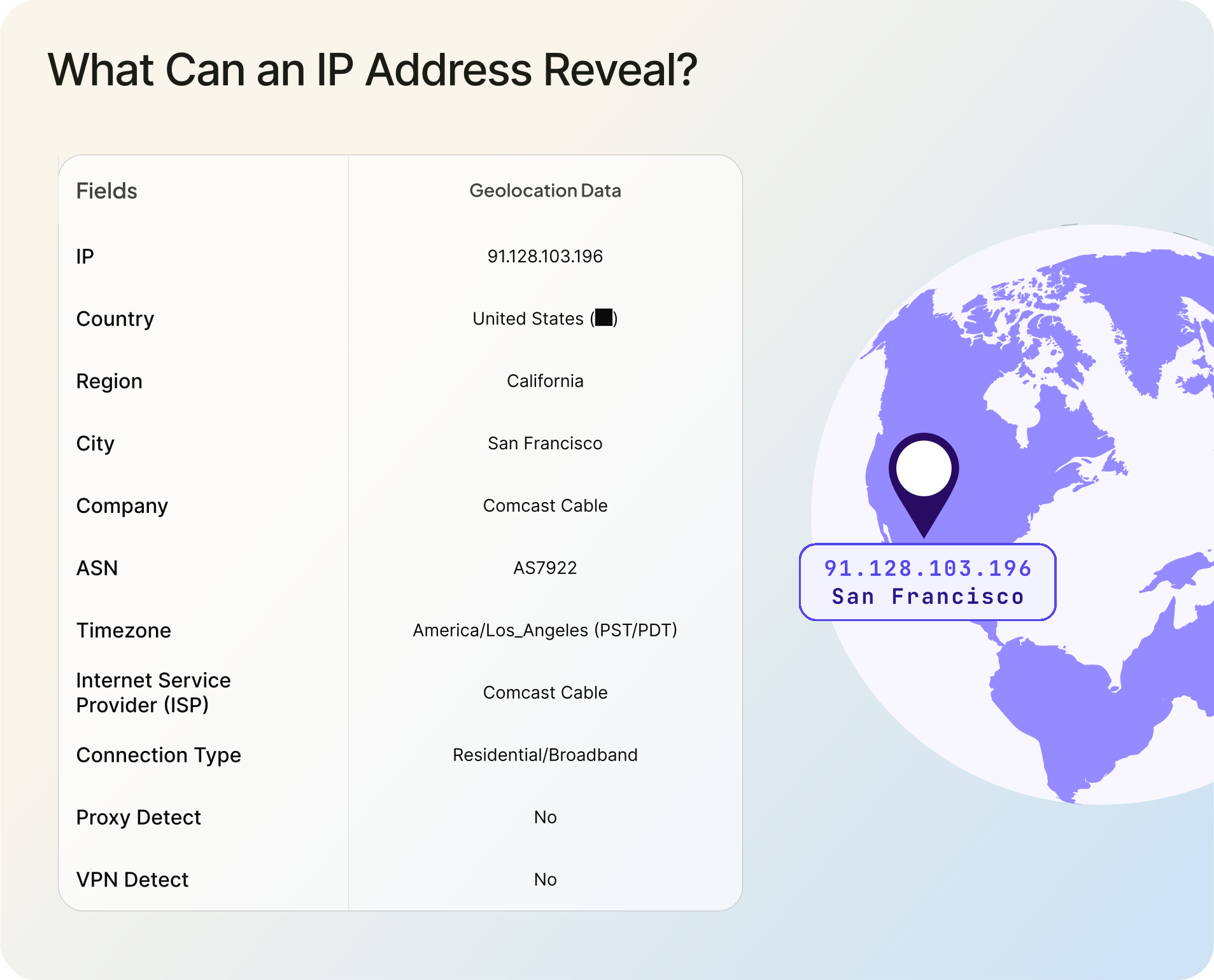
A standard IP geolocation lookup returns:
- Geographic location: country, region/state, city, and approximate latitude/longitude coordinates. Broadband IP geolocation is often useful at the city or metro-area level, but accuracy varies by provider, country, and network type. It will not pinpoint a street address.
- ISP and organization: the name of the Internet Service Provider and, in many cases, the organization operating the network.
- Connection type: whether the connection is broadband, mobile, satellite, or something else.
- Security flags: whether the IP is associated with a VPN, proxy server, Tor exit node, or known botnet activity.
- ASN data: the Autonomous System Number, which identifies the network operator and its routing policies.
Services like ipgeolocation.io provide this data through API calls. A request to the IP Geolocation API returns core modules by default: location, country metadata, currency, ASN, and timezone. Optional modules for security threat intelligence, abuse contacts, hostname resolution, and user-agent parsing can be added via the include parameter. The v3 endpoint (api.ipgeolocation.io/v3/ipgeo) supports both individual and bulk lookups of up to 50,000 IPs per request.
For organizations that need offline access or handle high volumes, downloadable IP geolocation databases are also available, with daily and weekly updates depending on your subscription plan and use case.
Here's what a simplified API response looks like for a single IP:
{
  "ip": "91.128.103.196",
  "location": {
    "continent_code": "EU",
    "continent_name": "Europe",
    "country_code2": "SE",
    "country_code3": "SWE",
    "country_name": "Sweden",
    "country_name_official": "Kingdom of Sweden",
    "country_capital": "Stockholm",
    "state_prov": "Stockholms län",
    "state_code": "SE-AB",
    "district": "Stockholm",
    "city": "Stockholm",
    "locality": "Stockholm",
    "accuracy_radius": "14.051",
    "confidence": "high",
    "zipcode": "164 40",
    "latitude": "59.40510",
    "longitude": "17.95510",
    "is_eu": true,
    "country_flag": "https://ipgeolocation.io/static/flags/se_64.png",
    "geoname_id": "9972319",
    "country_emoji": "🇸🇪"
  },
  "country_metadata": {
    "calling_code": "+46",
    "tld": ".se",
    "languages": [
      "sv-SE",
      "se",
      "sma",
      "fi-SE"
    ]
  },
  "network": {
    "asn": {
      "as_number": "AS1257",
      "organization": "Tele2 Sverige AB",
      "country": "SE",
      "asn_name": "SWIPNET",
      "type": "ISP",
      "domain": "tele2.com",
      "date_allocated": "2002-09-19",
      "allocation_status": "LEGACY",
      "num_of_ipv4_routes": "401",
      "num_of_ipv6_routes": "41",
      "rir": "RIPE"
    },
    "connection_type": "DSL",
    "company": {
      "name": "Tele2 Sverige AB",
      "type": "ISP",
      "domain": "tele2.com"
    }
  },
  "currency": {
    "code": "SEK",
    "name": "Swedish Krona",
    "symbol": "kr"
  }
}
This kind of data powers everything from content localization and ad targeting to fraud detection and compliance enforcement. If you want to see what your own IP reveals, here are three ways to find your IP address.
IP Address Security Risks
Your IP address is not a secret. Every website you visit, every email you send, and every online service you connect to can see it. That's how the internet works. The question is what someone can do with it.
1. Location Tracking
An IP address reveals your approximate geographic location, usually accurate to the city level. Someone with your IP can determine roughly where you are, which ISP you use, and what type of connection you're on. This is enough to narrow your location significantly, though it won't reveal your exact street address or apartment number.
2. DDoS Attacks
If an attacker knows your IP address, they can direct a flood of junk traffic at it. This is a Distributed Denial of Service (DDoS) attack, and it can knock your connection offline for minutes or hours. Gamers and streamers are frequent targets because their IPs can be exposed through peer-to-peer connections in voice chat or game lobbies.
Most residential routers have no built-in DDoS mitigation, which means even a modest attack can saturate your connection. Restarting your router may help if your ISP assigns a new dynamic IP, but that's not a reliable defense.
3. Network Probing
A known IP can be scanned for open ports and vulnerable services. If your router or any exposed device has unpatched firmware or misconfigured services, an attacker can use the IP as an entry point. Automated scanners constantly sweep entire IP ranges looking for common vulnerabilities, so this is not a targeted-only risk. It increases significantly on networks with static IPs or port forwarding rules.
4. Social Engineering
IP-derived location data can be combined with other publicly available information to build a profile for social engineering attacks. Knowing someone's city, ISP, and general network setup adds credibility to phishing attempts or pretexting calls.
5. How to Protect Your IP Address
The simplest protection is a VPN (Virtual Private Network). A VPN routes your traffic through a server in another location, replacing your real IP with the VPN server's IP. This hides both your IP address and your approximate location from websites and services you connect to.
Other options include proxy servers, which serve a similar masking function but typically without encryption, and the Tor network, which routes traffic through multiple volunteer-operated nodes for strong anonymity at the cost of speed.
Basic firewall configuration also helps. Disabling UPnP on your router, closing unnecessary ports, and keeping firmware updated reduces the surface area available to anyone scanning your IP. For more on detecting VPN and proxy traffic from the other side, see our guide on how to evaluate a VPN and proxy detection API.
Frequently Asked Questions
An IP address is a number that identifies your device on the internet. It works like a return address on a letter, telling other computers where to send data back to you. Every device that goes online, from phones to servers, needs one to send and receive information.
The quickest way is to search "what is my IP" on Google. The result shows your public IP address. To find your local (private) IP, check your device's network settings: on Windows, run ipconfig in the command prompt; on Mac or Linux, run ifconfig or ip addr in the terminal. We also have a full walkthrough on finding your IP address.
No. An IP address typically reveals your city and ISP, not your street address or building. IP geolocation is accurate to the city level for most broadband connections and even less precise for mobile networks. Law enforcement can request exact subscriber details from your ISP with a court order, but that's not something an ordinary person or website can do.
No. Your Wi-Fi network has a name (SSID) and your device has a MAC address that identifies its network hardware. An IP address is a separate identifier assigned by the network for routing data. Your device gets a private IP from your router and your router gets a public IP from your ISP. These are all different things.
IPv4 uses 32-bit addresses written in decimal (like 192.168.1.1), with a total address space of about 4.3 billion. IPv6 uses 128-bit addresses written in hexadecimal (like 2001:0db8::7334), supporting 340 undecillion. IPv6 was created because IPv4's address space became fully allocated. Global IPv6 adoption continues to grow, with current stats tracked on Google's IPv6 statistics page.
Two devices can share the same private IP address if they're on different local networks, since private addresses are only unique within their own network. With NAT, multiple devices in a household routinely share a single public IP address. The router tracks which internal device made each request and routes responses back accordingly. What should not happen is two devices on the same local network being assigned the same private IP, which causes address conflicts and breaks connectivity for both.
With just your IP, someone can determine your approximate city, ISP, and connection type. They can attempt a DDoS attack to disrupt your connection or scan for open ports on your network. They cannot directly access your files, see your browsing history, or find your exact home address. Using a VPN is the simplest way to prevent IP-based tracking.