

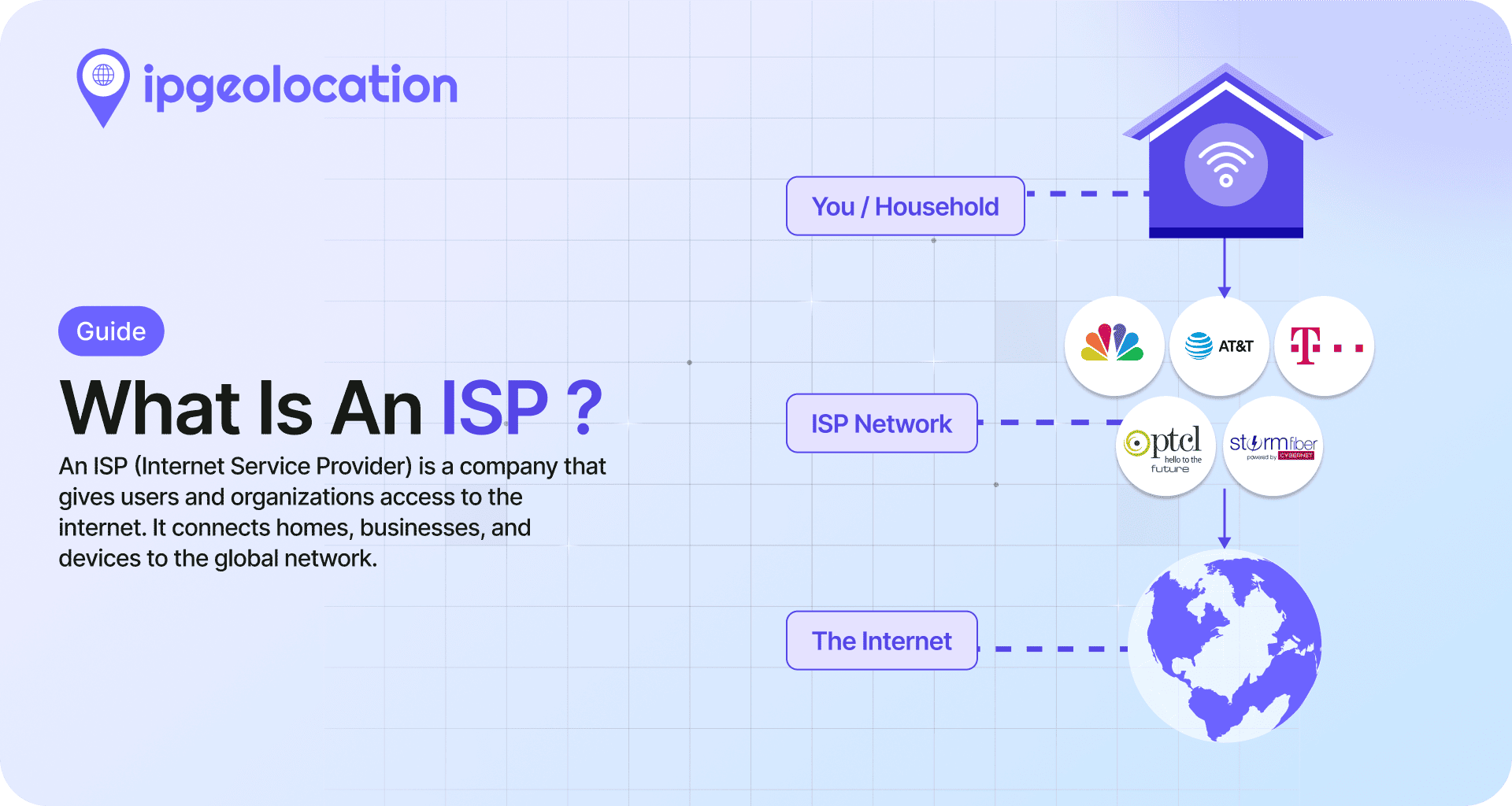
An ISP, or Internet Service Provider, is the company that gives you access to the internet, usually over a wired, wireless, or satellite connection. That definition is the easy part. The harder question, and the one most explainers skip, is how an ISP relates to an ASN, because the two terms sit side by side in IP intelligence data and describe genuinely different things. This guide covers both.
TL;DR
- An ISP is the company or organization that provides internet access to end users or other networks.
- ISPs are commonly grouped into three tiers (1, 2, 3) and several connection types (DSL, cable, fiber, fixed wireless, cellular, satellite).
- An ASN (Autonomous System Number) is a number that identifies one of the networks an ISP (or any other operator) runs on the internet.
- One ISP can operate multiple ASNs. Comcast alone runs AS7922, AS7016, AS22909, and others.
- IP intelligence APIs return a
companyobject and anasnobject as separate parts of the response. Ifcompany.typeis"ISP", the company behind the IP is an Internet Service Provider. If the type is something else (like"HOSTING"or"BUSINESS"), it is not.
In practice, when you look up an IP address, the company object tells you who is behind the connection and whether they are an ISP. The asn object tells you which of that operator's networks is carrying the traffic.
What Is an ISP (Internet Service Provider)?
An ISP, which stands for Internet Service Provider, is an organization that sells or provides connectivity to the internet. The ISP definition in practice covers a lot of different businesses: a national cable operator selling home broadband, a mobile carrier offering cellular data, a fiber provider serving a single city, a satellite operator covering rural areas, and a wholesale backbone network that only sells to other ISPs. What unites them is the same core function: they deliver packets between their customers and the rest of the global internet.
The term came into common use in the late 1980s and early 1990s as commercial internet access spread beyond universities and research institutions. The ISP meaning has broadened since then to include satellite operators and 5G home internet providers, but the core role has not changed. Today there are thousands of ISPs worldwide. A small number are household names with tens of millions of customers. Most are regional or local operators that very few people outside their service area have ever heard of.
The reason this matters for anyone working with IP data: every public IP address can be mapped to an organization, and in many cases that organization is an ISP. Identifying the company behind an IP, and whether it is an ISP, a hosting provider, or something else, is the first step in understanding what the IP represents.
How an ISP Works
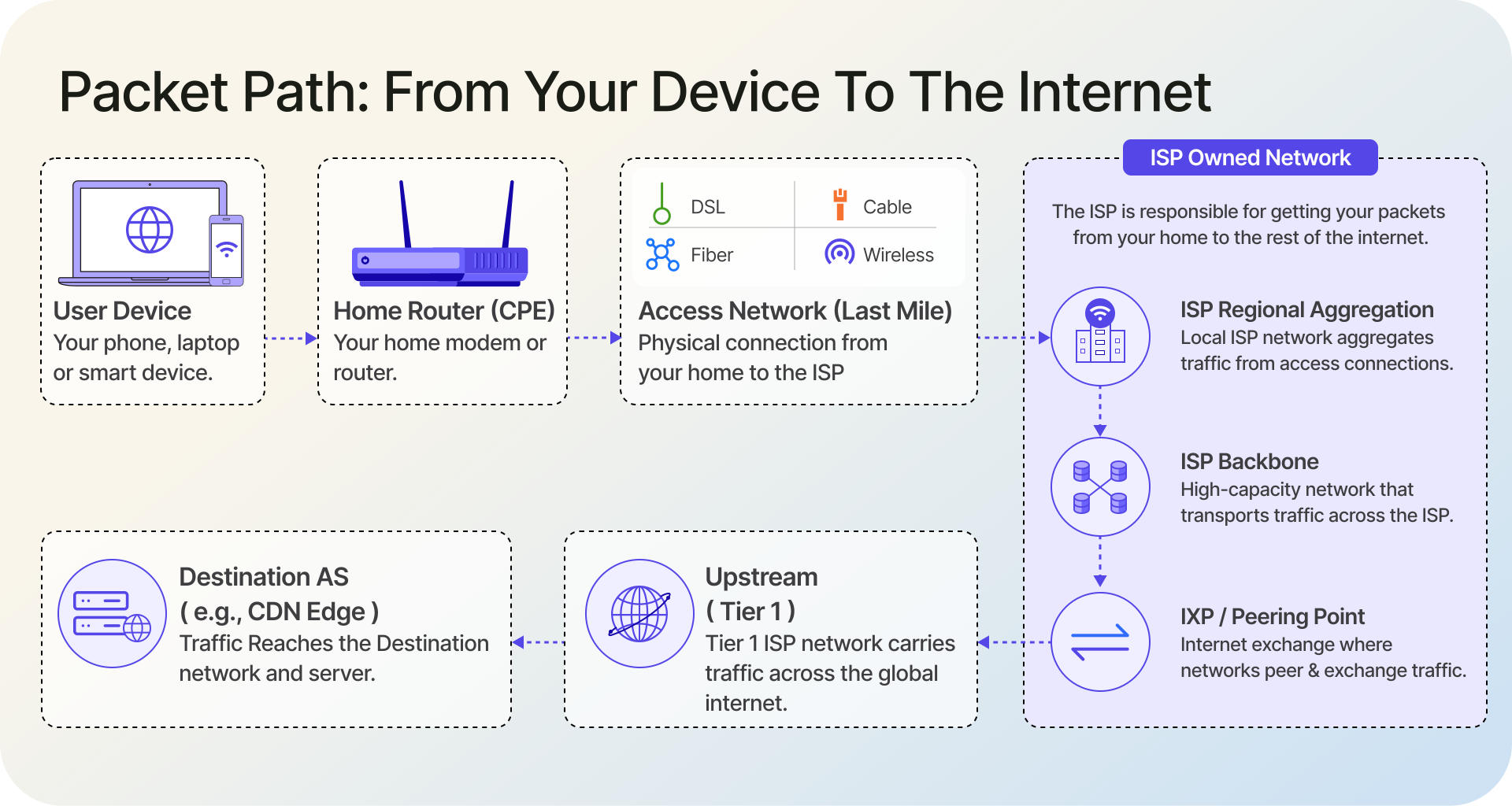
A lot of what makes the internet feel fast or slow is decided inside the ISP network. Your packets go through its access network, across its backbone, and then out to the rest of the internet through peering or transit relationships.
1. The Last Mile
The last mile is the connection between your premises and the ISP's nearest aggregation point. It is typically the most expensive part of the network to build and maintain, even though some access technologies (cable and wireless in particular) share capacity on a segment level. Every house, apartment, and office still needs its own physical or wireless drop to the network.
Which technology an ISP uses for the last mile depends on what infrastructure already exists in the area. DSL uses the legacy copper telephone network. Cable uses the hybrid fiber-coax plant originally built for television. Fiber-to-the-home runs glass all the way to a box on the side of the building. Fixed wireless uses radios on towers to reach rooftops, and cellular uses the mobile network. Satellite covers the places none of those can reach.
2. Backbone, Peering, and Transit
Once your traffic leaves the access network, it enters the ISP's backbone: the high-capacity core that connects cities and regions. From there it has to reach networks operated by someone else. ISPs do this in two ways.
Peering is when two networks exchange traffic directly, often on a settlement-free basis, though paid peering arrangements also exist. Peering typically happens at an Internet Exchange Point (IXP), a shared switching fabric where dozens or hundreds of networks meet in the same building (Internet Society on IXPs). Transit is when an ISP pays a larger provider to carry its traffic to destinations it cannot reach directly. Most ISPs use a mix of both. Peering is cheaper; transit is a safety net. The operational and security practices behind all of this are documented in RFC 7454, BGP Operations and Security.
3. Where Your IP Address Comes From
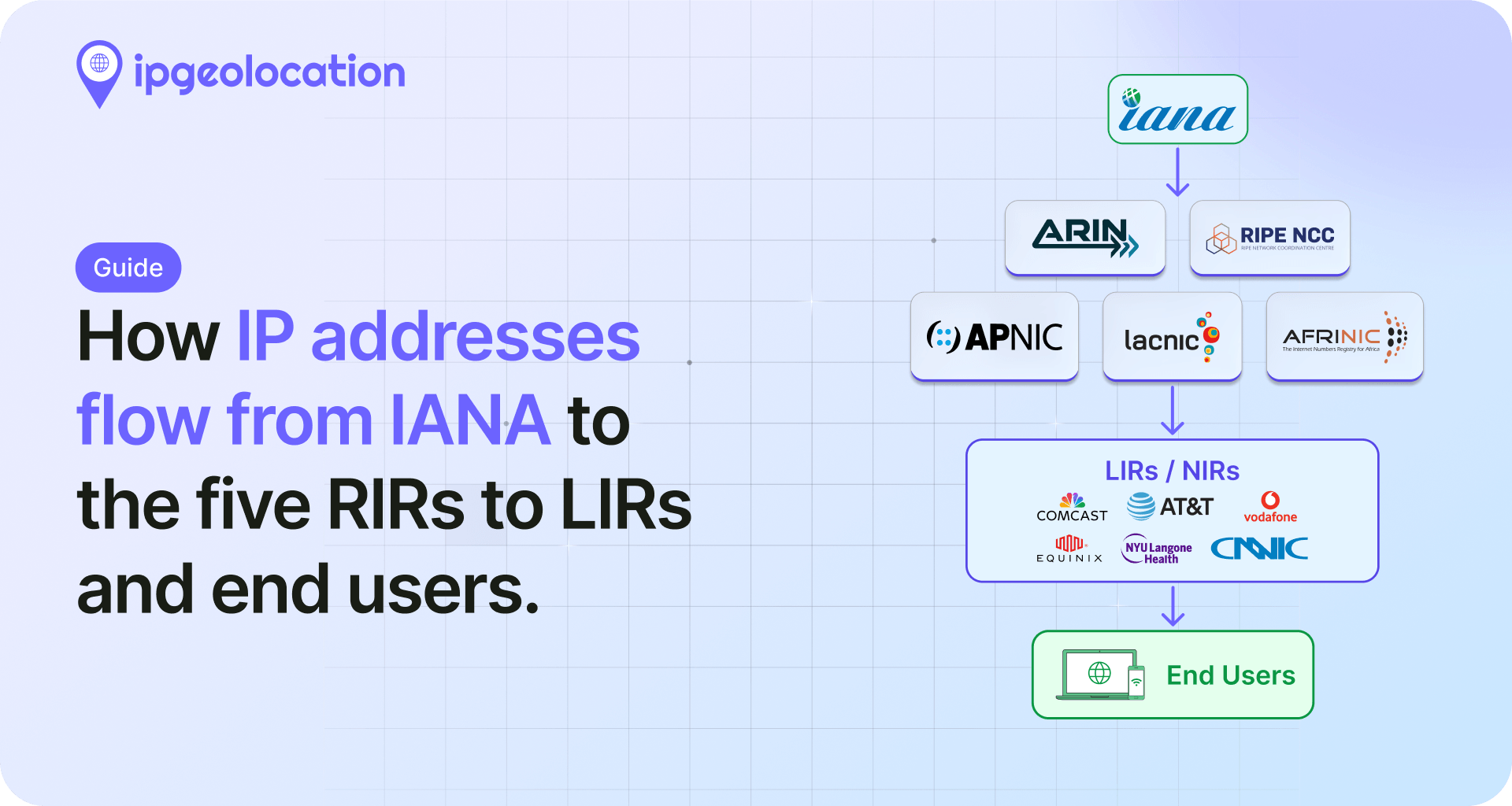
Large ISPs get their IP addresses directly from a Regional Internet Registry (ARIN, RIPE NCC, APNIC, AFRINIC, or LACNIC). Smaller operators often receive address space from an upstream provider rather than going to the RIR directly. Either way, the ISP hands addresses out to customers, either statically or via DHCP. This allocation chain is why a public IP address can be traced back to a specific network operator.
Types of ISPs
Not all ISPs do the same thing. It is useful to see the three overlapping ways they get categorized: tier, connection type, and function.
1. By Tier (1, 2, and 3)
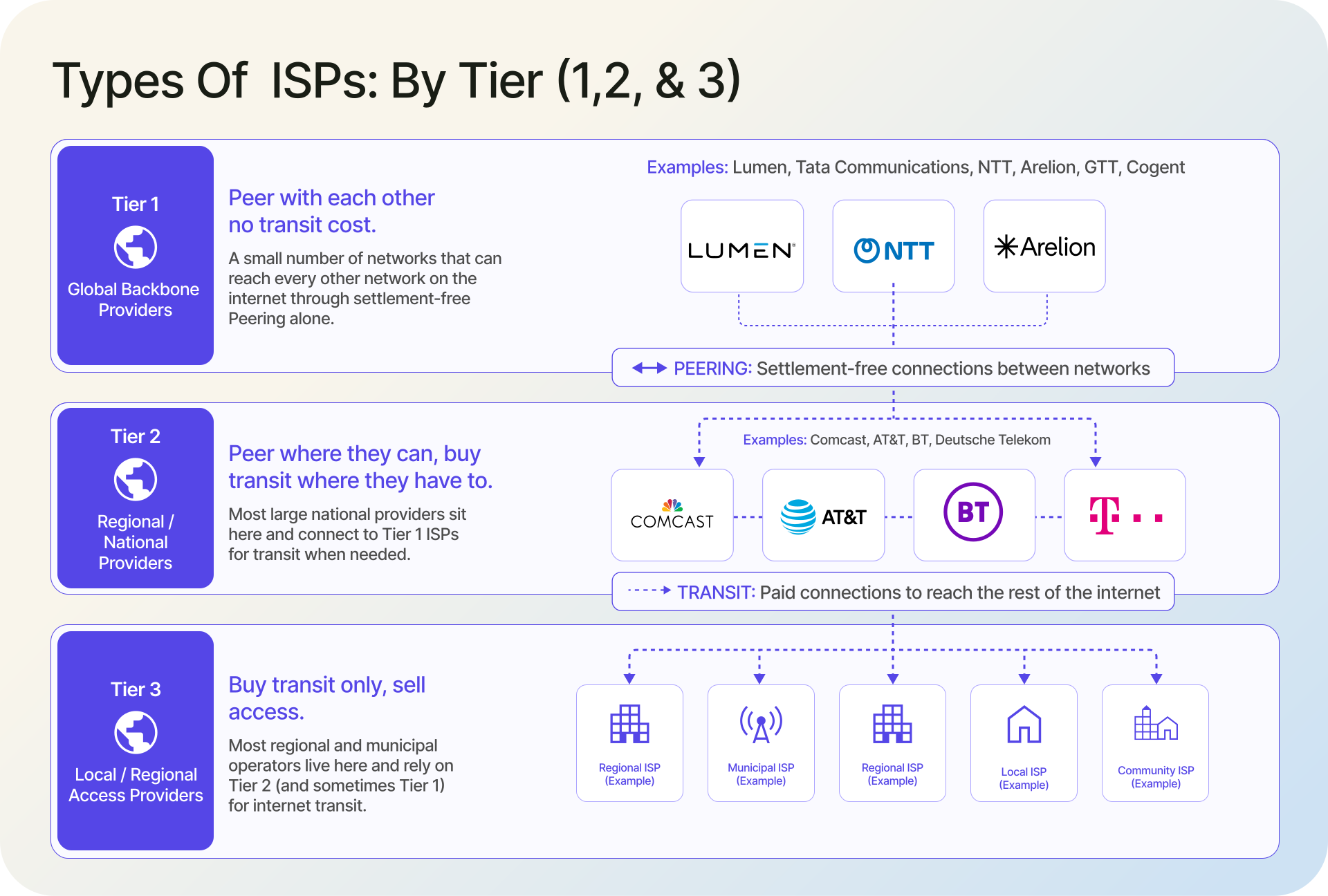
Tier 1 ISPs are the small number of networks that can reach every other network on the internet through settlement-free peering alone. They do not pay anyone for transit. Estimates of the total count vary, but the list is short and includes names like Lumen, Tata Communications, NTT, Arelion, GTT, and Cogent. Tier 2 ISPs peer where they can and buy transit where they have to. Most large national providers sit here, including Comcast, AT&T, BT, and Deutsche Telekom. Tier 3 ISPs buy transit only and sell access; this is where most regional and municipal operators live.
The tier model is more of a rough economic description than a strict technical standard. Academic rankings like CAIDA AS Rank use topology (customer cone size) instead of tier labels to compare networks, and the results line up roughly with the Tier 1/2/3 hierarchy most of the time.
2. By Connection Type
The connection type is what most consumers actually shop for. DSL is in long-term decline. Cable (DOCSIS) still dominates in much of North America. Fiber is the fastest and is growing share almost everywhere. Fixed wireless has become real competition, especially with 5G home internet. Cellular is the default for mobile access and, in many countries, for home access too. Satellite, and particularly low-earth-orbit constellations like Starlink, is closing the rural gap.
For IP intelligence purposes, connection type is a useful signal on its own. A residential cable IP and a cellular IP look different and tend to behave differently.
3. By Function
Not every ISP sells to end users. Access ISPs do. Transit providers sell connectivity to other ISPs and operate in the background. Hosting providers assign IPs to servers and sell compute or rack space, which is why IP intelligence data usually classifies them as a distinct company type, not as ISPs. Virtual ISPs (VISPs) resell another network's capacity under their own brand, and in email contexts mailbox providers are sometimes distinguished from access ISPs as well.
ISP vs ASN: What's the Difference?
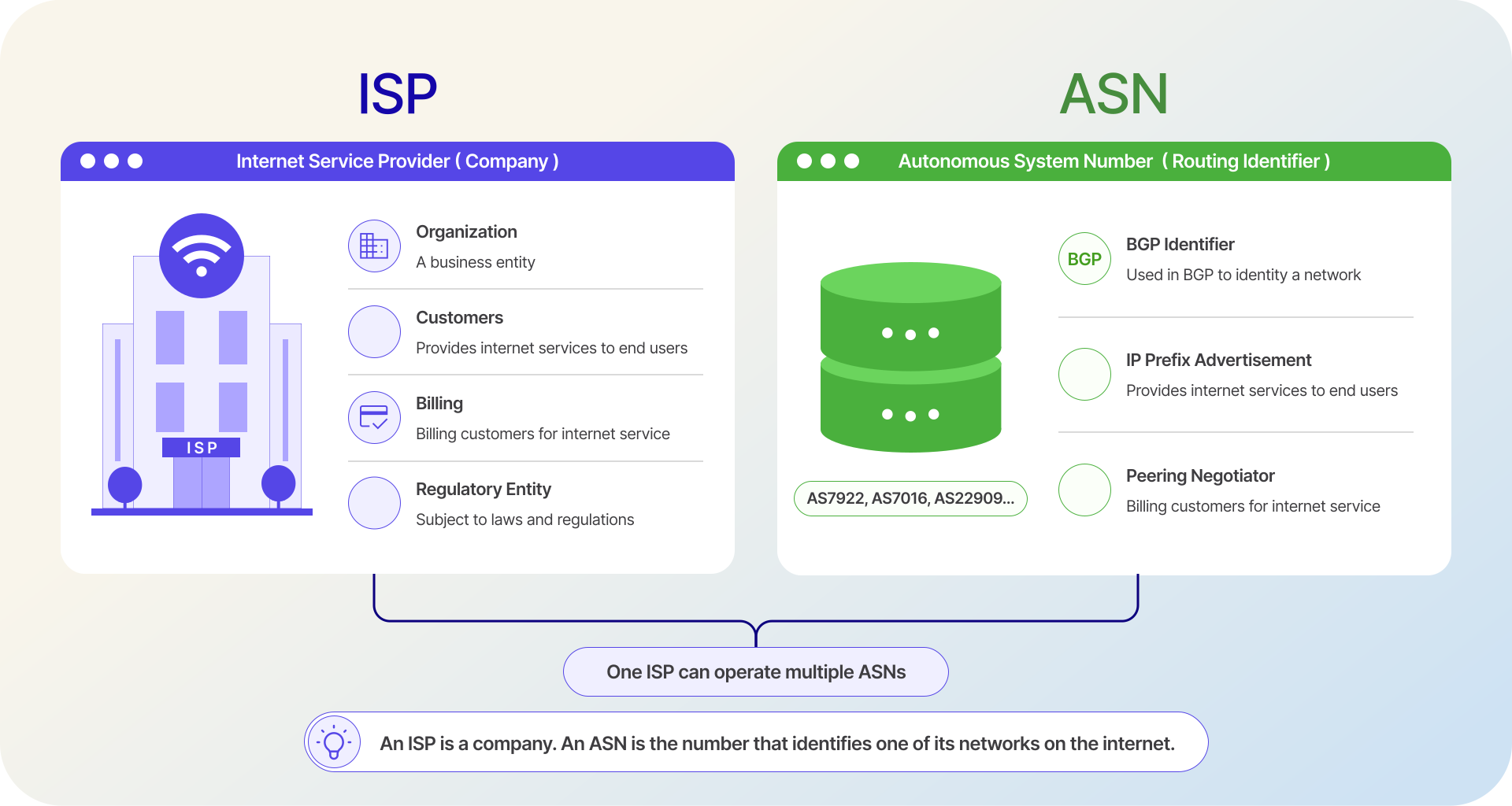
An ISP is a company. An ASN is a number that identifies one of the networks the ISP runs on the internet. The ISP is the who. The ASN is the which network. An ISP can operate several ASNs. An ASN always belongs to exactly one organization.
1. ISP Is the Organization, ASN Is the Routing Identifier
An ISP is a legal and commercial entity. It has a name, an address, customers, and a billing relationship. An ASN (Autonomous System Number) is a 16-bit or 32-bit number assigned through IANA and the Regional Internet Registries. The formal definition in RFC 1930 describes an Autonomous System as "a connected group of one or more IP prefixes run by one or more network operators which has a SINGLE and CLEARLY DEFINED routing policy." The number exists to make that routing policy addressable in BGP, which is the protocol networks use to tell each other which IP ranges they can reach.
IANA allocates AS numbers to the five RIRs, and the RIRs allocate them to operators. An ASN is therefore tied to a registered network, not to a company. When a company acquires another company's network, the ASN moves; when a company restructures, the ASN might be transferred to a subsidiary.
2. One ISP, Multiple ASNs
Large ISPs almost always run more than one ASN. Comcast operates AS7922 for its consumer cable network, plus AS7016, AS22909, and several others picked up through acquisitions. AT&T runs AS7018 as its main backbone and keeps other ASNs for specific business units. Verizon Business operates AS701, which is the old UUNET network it acquired.
This happens for a few practical reasons: acquisitions bring their own ASNs along, different parts of the business want their own routing policies, and separating consumer from enterprise traffic often makes peering negotiations cleaner.
3. How IP Intelligence Treats ISP and ASN
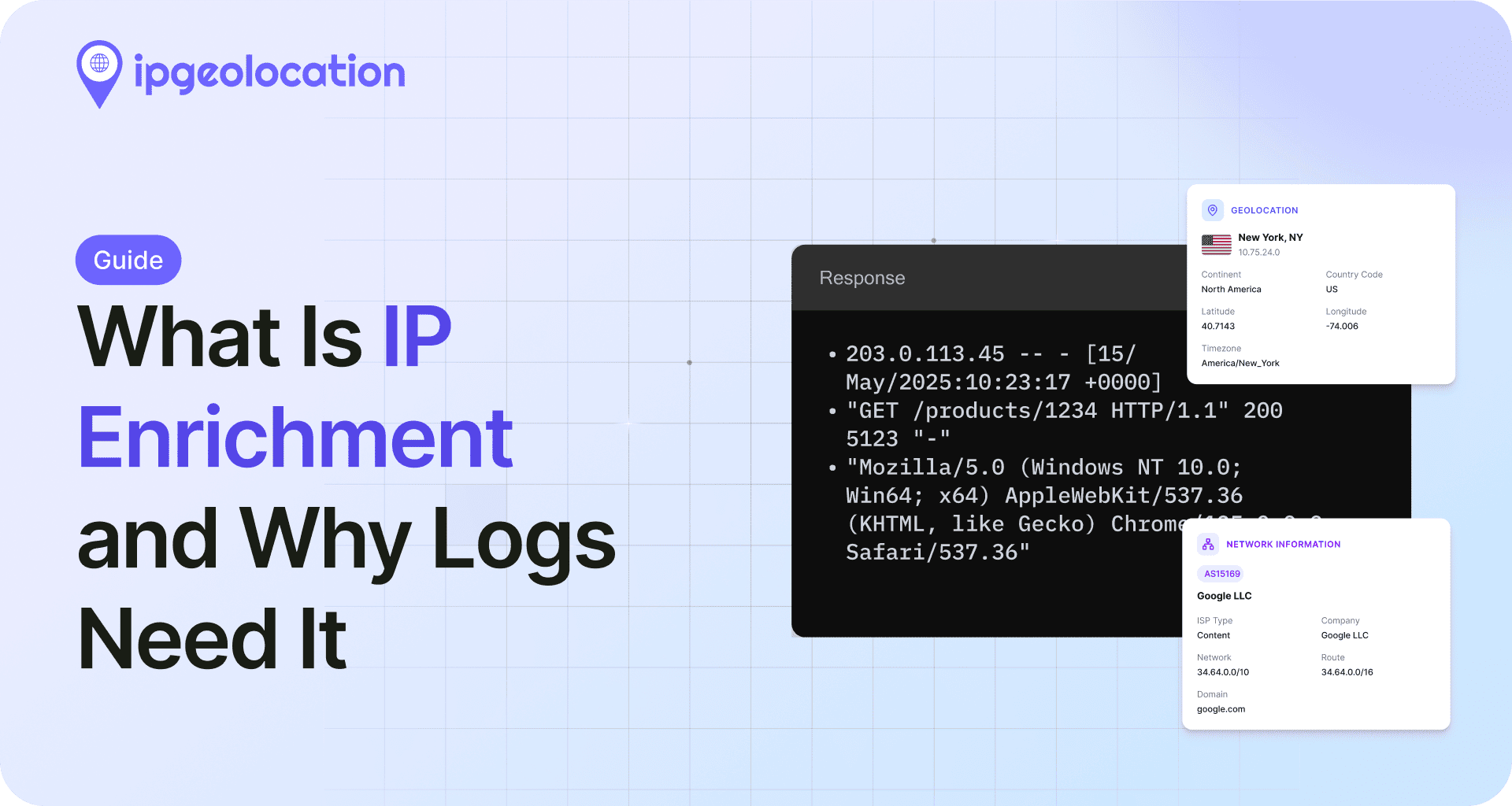
In ipgeolocation.io's IP Location API, the response contains a company object and an asn object as separate parts of the same response. The company object has three fields: name, domain, and type. The type classifies the company as ISP, HOSTING, BUSINESS, EDUCATION, or GOVERNMENT. If company.type is "ISP", that company is the Internet Service Provider for the IP. If the type is something else, it is not an ISP, even if the entity technically provides network connectivity.
The asn object is entirely separate. It carries the as_number, the organization name, the country, its own type classification, the allocating rir, and (on the dedicated ASN API) the full set of upstreams, peers, downstreams, and routes. The ASN's type field classifies the network, not the company. Google's AS15169 has type: "BUSINESS" because Google runs the network for its own services. Comcast's AS7922 has type: "ISP" because the network delivers connectivity to consumers.
This two-object model is the reason IP data treats ISP and ASN as distinct concepts. The company object answers "who is behind this IP, and are they an ISP?" The asn object answers "which specific network is this IP on, and what kind of network is it?"
Real-World ISP Examples (with ASNs)
A short list of well-known ISPs and their main ASNs helps make the earlier abstract points concrete.
Each of these companies runs several more ASNs besides the primary one shown. The point is not to be exhaustive; it is to show that "who owns this IP" and "which network is this IP on" are two different lookups, and both of them are useful.
Why ISP Data Matters
Knowing the ISP behind an IP is not trivia. It is signal, and it shows up in a handful of very different workflows.
1. Fraud Detection and Risk Scoring
Risk engines care a lot about where traffic comes from. A payment attempt from a company classified as "ISP" with a residential cable connection behaves very differently from one coming out of a "HOSTING" range or a rotating anonymous proxy. The company.type field is often the first feature that separates them, and company.name adds context when the type alone is ambiguous.
This is why the IP Security API returns both the network identity and a set of risk signals on top of it, and why patterns like proxy and VPN fraud can usually be detected first at the network layer.
2. Cybersecurity and Threat Intelligence
Incident response teams trace malicious traffic back to the source network all the time. Pinpointing the ISP and its ASN tells you who to contact for takedown, whether the source is a compromised residential line or a bulletproof hosting provider, and whether a threat actor is rotating across one network or many.
ISP and ASN reputation both become inputs into scoring engines. Some ASNs have abuse histories that follow them around for years, and having the network identifier on hand makes it easier to match a live incident against historical signals.
3. Personalization and Localization
On the consumer side, ISP data feeds into quieter decisions. A page can serve lighter assets to a cellular ISP, show connection-speed-aware UI hints, or route a user to the closest regional edge. None of these are visible to the user, but they can shape experience noticeably.
4. Network Operations and Analytics
B2B analytics platforms use IP-to-company data to work out which organizations are visiting a site, which is only possible because the ISP and company type fields separate business IPs from residential ones. Network engineering teams watch ISP-level metrics to catch performance regressions that show up on specific upstream paths.
How to Look Up the ISP Behind Any IP Address
There are two practical ways to get from an IP to an ISP: real-time API lookups for per-request decisions, and bulk database downloads for scale.
1. Real-Time API Lookup
For a single IP, the IP Location API returns the company object (with name, type, and domain) alongside the asn object (with as_number, organization, country, type, and rir) in one call. The dedicated ASN API adds upstreams, peers, downstreams, and routes on top of the core ASN fields. A minimal lookup with curl:
bash
curl "https://api.ipgeolocation.io/v3/ipgeo?apiKey=YOUR_API_KEY&ip=8.8.8.8"In Python, the same request looks like this:
python
import requests

resp = requests.get(
    "https://api.ipgeolocation.io/v3/ipgeo",
    params={
        "apiKey": "YOUR_API_KEY",
        "ip": "8.8.8.8",
    },
    timeout=5,
)
data = resp.json()

company = data.get("company", {})
asn = data.get("asn", {})

company_name = company.get("name")
company_type = company.get("type")       # "ISP", "HOSTING", "BUSINESS", etc.
as_number = asn.get("as_number")
asn_type = asn.get("type")

is_isp = company_type == "ISP"

print(company_name, company_type, as_number, asn_type, "is_isp:", is_isp)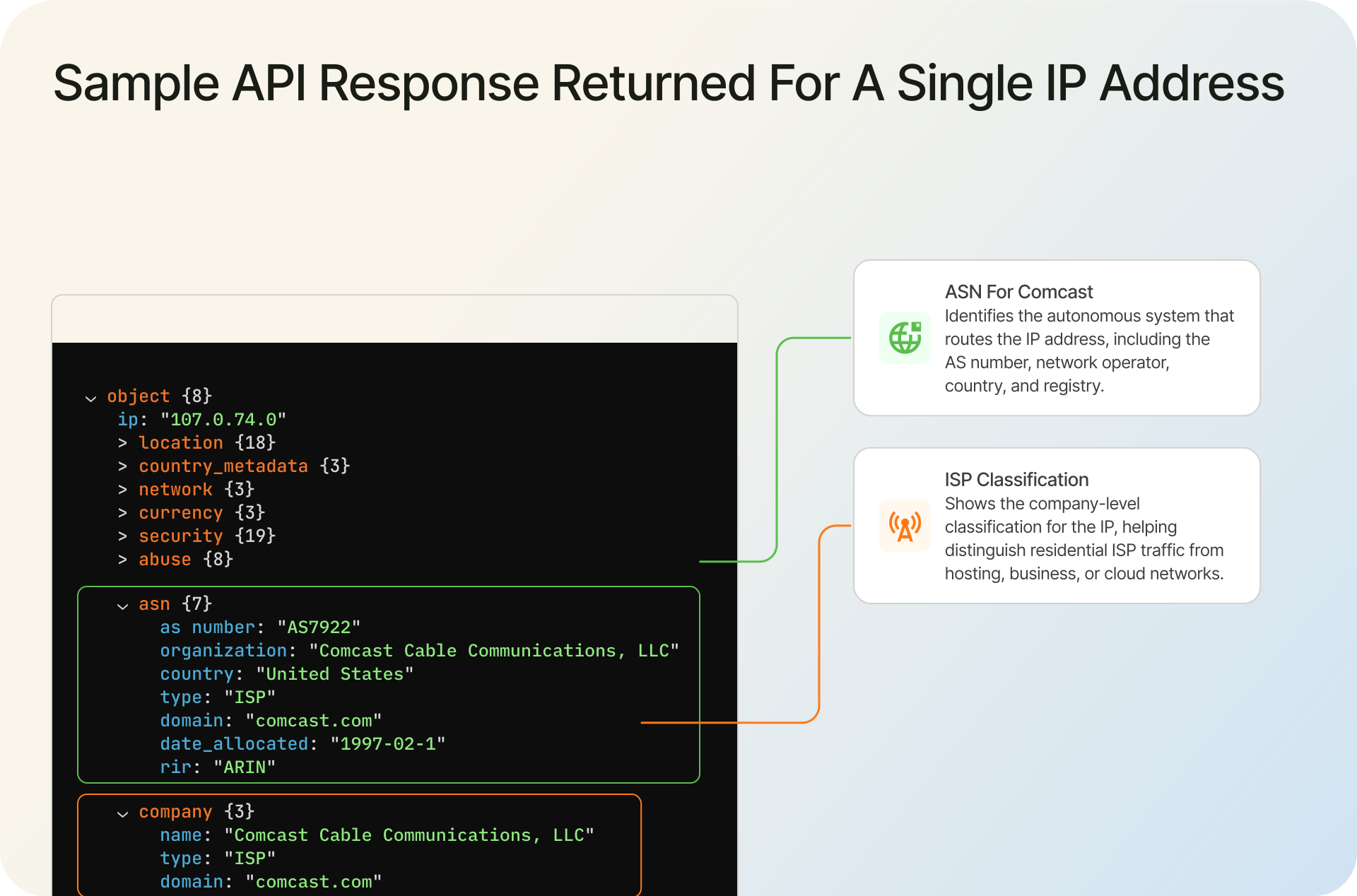
The two objects to watch are company (the organization and its type) and asn (the network identifier). If company.type is "ISP", you know the IP belongs to an Internet Service Provider. If it is "HOSTING" or "BUSINESS", it does not. The asn object tells you which specific network the traffic is on. Together they answer both halves of the question this guide started with.
2. Bulk Lookups via Database
If you need to resolve millions of IPs at a time, or run lookups inside a data pipeline without hitting an external API, databases are the better fit. The Geo Standard tier includes an IP-to-ISP database with eight fields per record, including the start and end IPs, the country, the ISP name, the ASN, the AS country, the AS organization, and the connection type. It is updated daily.
The IP-to-Company database is a sibling dataset that focuses on the company behind an IP range, with the type classified as ISP, HOSTING, BUSINESS, or EDUCATION. It is 30 million entries and is also updated daily. Most teams use the two together: the IP-to-ISP database for the network view, and the IP-to-Company database for the organizational view.
Choosing between API and database comes down to volume and latency. If you make a per-request decision for each user, use the API. If you enrich log data in batch, use the database.
FAQ
ISP stands for Internet Service Provider. It is the company or organization that gives you access to the internet, usually by selling a home, business, or mobile connection. The term covers everything from national cable and fiber operators to small regional wireless providers.
An ISP is a company that provides internet access. An ASN (Autonomous System Number) is a number that identifies one of the networks the ISP operates on the internet. One ISP often runs several ASNs. In IP intelligence data, the company object tells you who is behind the IP (and whether they are an ISP based on company.type), while the asn object identifies the specific network carrying the traffic.
Yes. Large ISPs almost always operate more than one ASN. Comcast runs AS7922 for its consumer cable network plus AS7016, AS22909, and several others. ASNs come into an ISP's portfolio through acquisitions, different routing policies for different business lines, or separation of consumer and enterprise traffic.
A Tier 1 ISP is a network that can reach every other network on the internet through settlement-free peering alone, without paying any other network for transit. The global list is short, with names like Lumen, Tata Communications, NTT, Arelion, GTT, and Cogent. Tier 1 networks sit at the top of the ISP hierarchy.
The fastest way is to look up your public IP against an IP intelligence service. An API call returns the company name, company type, ASN, and connection type in one response. If company.type is "ISP", you have your answer. If you only have the IP and want a quick look in a browser, ipgeolocation.io's ASN browse pages surface the same information for any public ASN.
No. Hosting providers sell compute, storage, or rack space and assign IPs to servers. ISPs sell internet access to end users or to other networks. Most IP intelligence datasets classify hosting providers and ISPs as separate company types, which matters for fraud detection because traffic patterns from the two categories look very different.
What to Do Next
Try an IP you know against the IP Location API and look at the company and asn objects side by side. That is the one thing that makes the distinction click. If you are working at volume, the IP-to-ISP database and the IP-to-Company database are the faster path.