

Residential Proxy Database
Overview
Need to identify whether an IP address belongs to a residential proxy network? Our Residential Proxy Database helps you map IPv4 and IPv6 address ranges to known residential proxy providers, along with the most recent date the proxy activity was observed.
Residential proxies are harder to classify than hosting or datacenter IPs because they often appear on consumer ISP networks. This database gives you a focused dataset for detecting IP ranges associated with residential proxy services, including the proxy provider name and last-seen date.
The database is available in CSV and MMDB, with JSON, Parquet, or any custom format on request at no extra cost and backed by stable schemas and changelogs, making it easy to use in bulk imports, local lookup systems, fraud workflows, traffic analysis pipelines, and high-volume applications where local IP intelligence is preferred.
Available Database Formats
CSV Database Documentation
1. Overview
This Gzip-compressed file includes a CSV file that contains IP addresses and residential proxy information, including proxy service name and last-seen date.
2. Archive Content
After downloading and extracting the Residential Proxy CSV database archive, you'll find the following files (with their types noted):

 db-residential-proxy.csv.gz
IP range links to the residential proxy provider and the last seen date.
- File Size: 551.80 MB
- Entries: 50.4M
- Fields: 4

 README.md
Documentation for dataset contents, schema, usage, and support.
- File Size: 3.43 KB

 checksum.txt
SHA-256 checksums for verifying file integrity.
- File Size: 170 Bytes
Schema
This section describes the schema of each file included in the Residential Proxy Database archive. For every file, you'll find its purpose, field definitions, and examples to help with integration.
1. db-residential-proxy.csv.gz
This file contains data on residential proxy IP address ranges. It maps each IP block to a specific proxy_provider and includes a last_seen last_seen timestamp.
| Field | Type | Description | Can be empty? | Example |
|---|---|---|---|---|
| start_ip | string | The starting IP address of the range in IPv4 or IPv6 format. | No | 192.168.0.1 |
| end_ip | string | The ending IP address of the range in IPv4 or IPv6 format. | No | 192.168.0.255 |
| proxy_provider | string | The name of proxy provider | No | Evomi Proxy |
| last_seen | string | The last_seen field indicates the last time the IP range was observed. | Yes | 2023-10-01T12:00:00Z |
I. Example Records
start_ip,end_ip,proxy_provider,last_seen
1.0.140.181,1.0.140.181,AProxy,2026-10-10
1.0.146.246,1.0.146.246,NaProxy,2026-09-20
1.0.149.5,1.0.149.5,ProxyShare,2026-08-19
1.0.210.56,1.0.210.56,AProxy,2026-10-04
1.0.210.188,1.0.210.188,Proxy-Seller,2026-09-29
1.0.226.101,1.0.226.101,BestProxy,2026-09-02
1.0.232.230,1.0.232.230,Kocerroxy,2026-10-06
1.1.189.140,1.1.189.140,Kocerroxy,2026-10-16
1.1.191.46,1.1.191.46,BestProxy,2026-10-01
1.1.225.28,1.1.225.28,Kocerroxy,2026-10-07
1.1.231.218,1.1.231.218,ProxyShare,2026-08-14
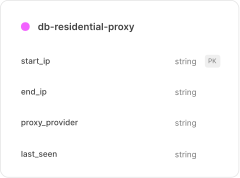
2. File Relationship Diagram
The diagram below illustrates the relationships between the various files included in the CSV database package. It shows how the main CSV file connects to reference tables through key fields, helping you understand the data structure and relationships at a glance.
File Format & Encoding
All Residential Proxy CSV datasets are provided in UTF-8 encoding, comma-separated, and compressed with Gzip (.csv.gz). Each file includes a header row listing the field names for clarity and consistency.
Field values are unquoted by default, with quotes applied only in the following cases:
- Line breaks within text fields.
- Commas inside a value (e.g., addresses).
- Lists of values (e.g., languages).
- Spaces that may be auto-quoted by export tools.
MMDB Database Documentation
1. Overview
MMDB version of the database consists of three files: one MMDB file containing IP security data, a README file, and a checksum file, all compressed together in a ZIP file for easy delivery.
2. Archive Content
After downloading and extracting the Residential Proxy MMDB database archive, you'll find the following files (with their types noted):

 db-residential-proxy.mmdb
Contains a list of residential proxy IPs, their providers, and last seen timestamps.
- File Size: 7.89 GB
- Entries: 50.4M
README.mdDocumentation for dataset contents, schema, usage, and support.
- File Size: 3.80 KB
checksum.txtSHA-256 checksums for verifying file integrity.
- File Size: 168 Bytes
Response Schema
This section describes the structure of the data returned from the Residential Proxy MMDB file. Each field is detailed with its type, meaning, and example values to help you interpret responses and integrate them into your applications.
1. db-residential-proxy.mmdb
This file contains a comprehensive list of residential proxy IP addresses. It includes their proxy_provider and the last_seen timestamp.
2. Field Reference
The following reference lists all fields available in the MMDB response. Each entry includes the field path, its description, data type, and example value to help you understand how to parse and integrate the data.
| Field | Type | Description | Example |
|---|---|---|---|
proxy_provider | string | The name of proxy provider | Evomi Proxy |
last_seen | string | The last_seen field indicates the last time the IP range was observed. | 2023-10-01T12:00:00Z |
2. Example Records
{
  "last_seen": "2026-10-10",
  "proxy_provider": "AProxy"
}
Database Integrity & Authenticity Verification
There are two methods of verifying the integrity and authenticity of our Database:
1. Using the Signature File (Recommended)
IPGeolocation.io signs every database release to ensure its authenticity and integrity. This allows customers to verify that a downloaded Residential Proxy database file originates directly from IPGeolocation.io and has not been altered, corrupted, or tampered with during transfer or storage.
Each database update includes a corresponding signature file, generated using our private signing key. Customers can validate the database using the provided public verification key. To verify a database file, you need:
- Database file (the downloaded archive)
- Signature file (the matching signature for that archive)
- Public key (public-key.pem)
These files are available via official IPGeolocation.io download endpoints and are also shared in database update notifications.
2. Using the Checksum File (Legacy)
Each database archive includes a checksum.txt file containing the SHA-256 checksums for the files packaged in the archive. You can use this file to validate that the extracted contents are complete and unchanged.
Data Format & Constraints
- All fields defined in the schema are always present in the Residential Proxy MMDB response.
- Fields may contain empty strings (""), but never null, so null checks are not required.
- Place names such as countries, states, districts, and cities are available in multiple translations.
- All text values are encoded in UTF-8.
- Field names and response structure remain stable across updates for backward compatibility.
Database Updates & Delivery
When you subscribe to our Residential Proxy database, we'll send you static download links. These links never change, so you can use them both for your initial download and for all future updates. You will receive:
- Database Archive URL : downloads the latest release of your subscribed database (CSV, MMDB or requested formats).
- Signature File URL : downloads the matching signature file for the latest release (used for authenticity verification).
- Public Key URL : downloads the public verification key (used with the signature file).
- Status Endpoint URL : returns the database's most recent update timestamp.
Our databases are updated continuously and shipped on a daily or weekly cycle depending on your plan, ensuring you always have access to the most current data. Each time your subscribed dataset is updated, you'll also receive an email notification so you don't miss a release.
For automated workflows, you can check our status endpoint to see the last update timestamp. When the date changes, simply re-fetch the archive using your static download URL to pull the latest version into your system.
