

WordPress Geo Redirect Plugin: IPGeolocation.io Geo Redirects & Content Control
Overview
IPGeolocation.io Geo Redirects & Content Control is a free WordPress plugin that redirects visitors by country, blocks countries and IP addresses, and shows geo-targeted content based on each visitor's IP address. Location data comes from the IPGeolocation.io IP geolocation API. The plugin works with page caching plugins and CDNs such as WP Rocket, LiteSpeed Cache and Cloudflare, and everything is set up from one settings screen, with no code.
Features at a glance
| What you want to do | Feature | Requires API key |
|---|---|---|
| Send visitors from one country to another page or another domain | Country redirect rules |  |
| Redirect on every visit, or once per session, hour or day | Redirect frequency settings | |
| Ask visitors before sending them to their local store | Redirect popup | |
| Close the site to some countries, or open it to only a few | Country access control | |
| Block a scraper, a spammer or a whole IP range | IP address blocking |  |
| Lock your login page to your own IP addresses | Login page protection by IP address | |
| Change a banner, price or notice by location | Conditional content shortcodes | |
| Print the visitor's city, country or currency | Location display shortcodes | |
| Keep redirects and blocking correct with WP Rocket, LiteSpeed or Cloudflare | Page caching support | |
| Check what a visitor from any country would see | Test a visitor tool | |
- IP rules are a local check. They cost no API credits and work before you have a key.
- Each visitor's location is cached for 24 hours per IP address, so repeat visitors cost nothing. See how location lookups use API credits.
- Logged-in users and search engine crawlers are never redirected, so geo redirects stay safe for SEO.
- New here? Start with installing and setting up the plugin, then pick a recipe from the common use cases.
What's new in version 1.4.0
Choose how often visitors are redirected. Redirect the same visitor on every visit, once per browser session, once per hour or once per day. Set it once for the whole site and override it for any rule. New installs redirect on every visit, while sites updating from an earlier version keep redirecting once per hour until they change it. Read more about how often visitors are redirected.
Popups remember the answer. "Yes" sends the visitor to their local site automatically on later visits, and "No" keeps them on yours, both for 30 days. See popup confirmation.
Cleaner addresses after a redirect. The plugin's own parameters, such as ?ipgeo_from=1 , are removed from the address bar on any site running the plugin, and a new setting stops adding the marker for destinations that do not run it. See redirect loop protection between your sites.
No bouncing between sites. A visitor sent to your site by another site running this plugin stays for the rest of their browser session.
What's new in version 1.3.0
Redirects to another domain. A redirect URL can be a full address such as https://gr.example.com/ , not only a path on your site. One rule can also cover several countries, for example GR, CY .
Page caching support. Country redirects, popups, conditional content and blocking work correctly with page caching plugins and CDNs. See page caching, CDNs and performance.
Test a visitor. Check what a visitor from any country or IP address would see, straight from the settings page. See how to test a visitor from any country.
Safer crawler handling. A browser that only claims to be a search engine no longer gets past country blocking. See search engine crawlers and link previews.
Every change is listed in the changelog.
Requirements
- WordPress 5.8 or newer, tested up to WordPress 7.1
- PHP 7.4 or newer
- An IPGeolocation.io API key for anything country based. Blocking visitors by IP address works without one.
Install and set up the plugin
1. Get a free IPGeolocation.io API key
Sign up at ipgeolocation.io, then copy the API key from your account dashboard. The free Developer plan is enough to get started.
2. Install the plugin from WordPress.org
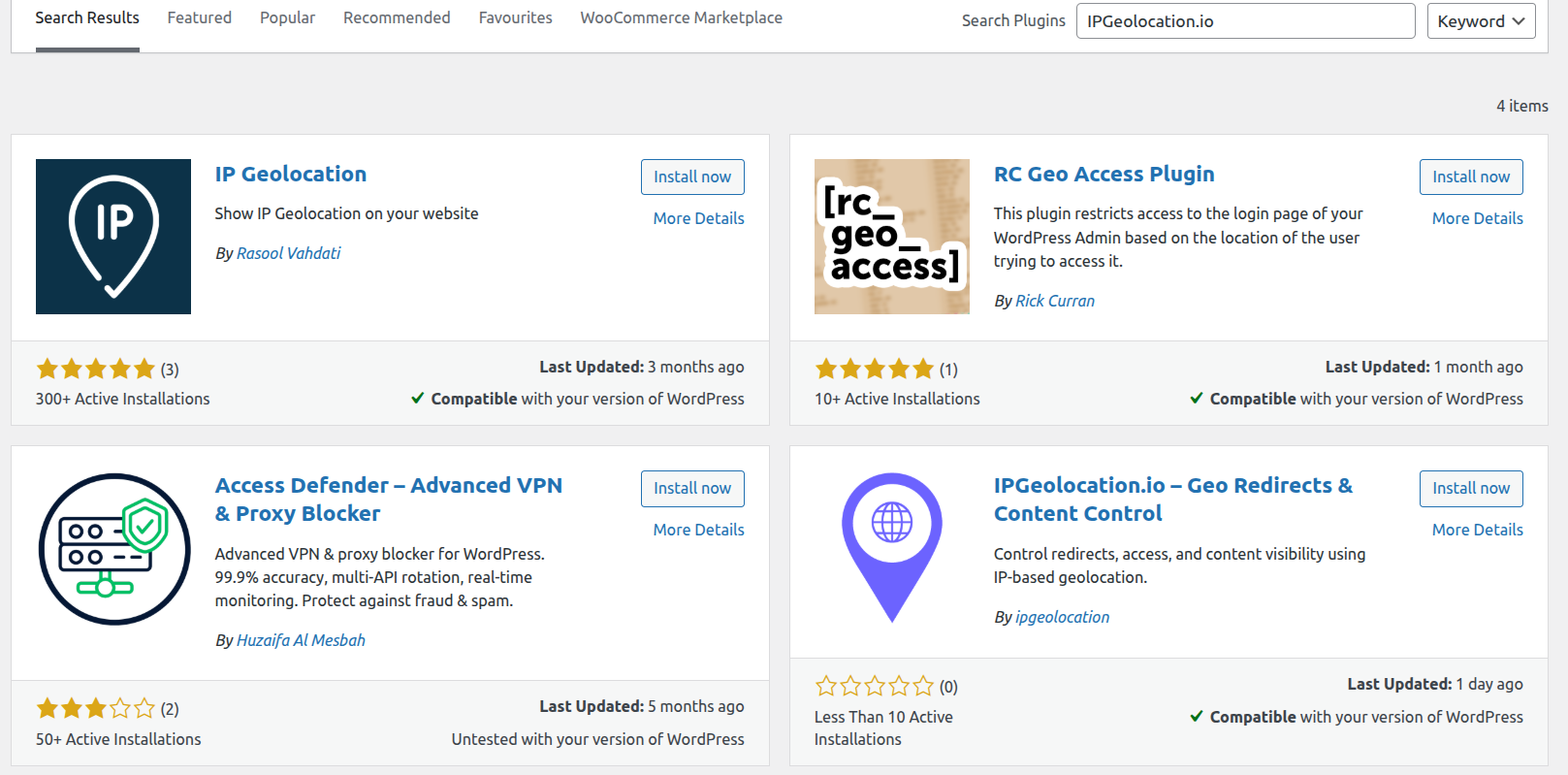
In your WordPress dashboard go to Plugins → Add New, search for IPGeolocation.io Geo Redirects & Content Control, then click Install Now and Activate.
3. Enter your API key and plan
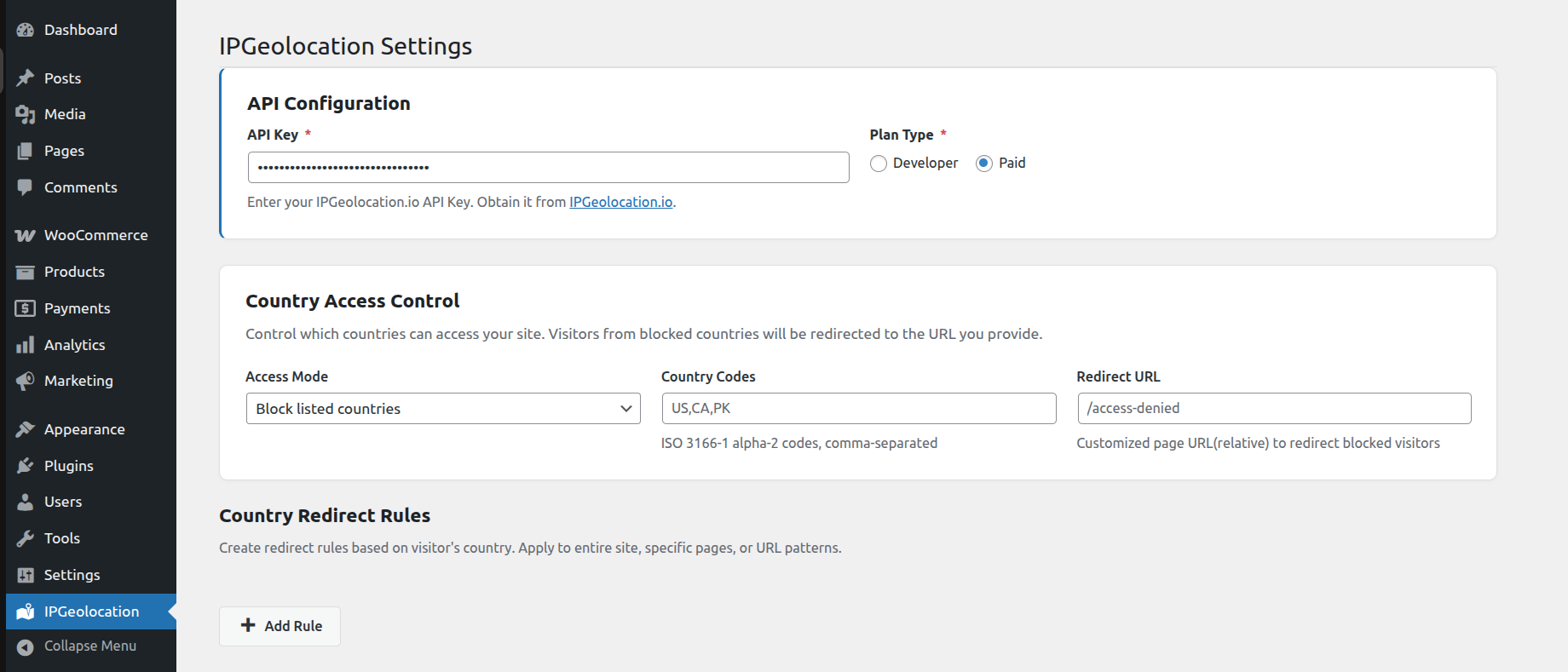
Paste the key into the plugin settings and select your plan type: Developer (free) or Paid.
4. Check the API status
Below the API key, the settings page shows whether location lookups are working and when the last one succeeded. If the key is invalid or your plan's limit is reached, it shows the error instead, and the plugin pauses lookups for five minutes rather than failing on every page view. Saving a new key resumes them straight away.
Common use cases
Each of these takes about a minute once your API key is in place.
1. Redirect visitors to a country store on another domain
Create a country redirect rule with Country code set to GR, CY , Apply to set to Entire site, Redirect URL set to your local store, for example https://gr.example.com/ , Redirect type set to 302 and Redirect method set to Automatic. Keep how often visitors are redirected on every visit, so returning visitors land on their local store each time. Then add a "Visit our international store" link on the local store that points to your main site with ?geo_bypass=1, so visitors can choose to stay.
2. Send shoppers to a regional page on the same site
Set Country code to CA , Apply to to Entire site and Redirect URL to a path such as /ca/ . The destination page itself is never redirected, so there is no loop, and WooCommerce cart, checkout and account pages are never redirected, so nobody is bounced mid-purchase.
3. Ask visitors before redirecting them
Set Redirect method to Popup when a visitor might reasonably want to stay, such as a currency or storefront switch. The redirect popup remembers the visitor's answer for 30 days.
4. Stop brute force login attempts
Under question 2, choose Only the addresses I list and enter your office or home IP address. Password guessing bots never reach the login form, and your public pages stay open to everyone. If your IP address changes often, use Anyone except the addresses I list and block the offenders instead.
5. Block a scraper or a spam source
Under question 1, choose Anyone except the addresses I list and paste the offending IP address or range, one per line. Blocked requests stop before any location lookup, so a hostile crawler costs you nothing in API credits.
6. Keep a staging or unfinished site private
Under question 1, choose Only the addresses I list and add your team's IP addresses. Everyone else lands on the page you nominate, or gets a 403.
7. Restrict a product or service by country
Use country access control in Block mode, list the country codes, and point the redirect URL at a page that explains why, on your site or on another one. This is the usual choice for licensing and regulatory restrictions, because it covers the whole site in one rule. On a cached site, make sure you keep country and IP blocking effective on cached pages.
8. Show a shipping notice only where it applies
Drop [ipgeo_if country_code="US"]Free shipping across the US.[/ipgeo_if] into a header or widget. There is no redirect and no duplicate page, so search engines still crawl one version of your content. See geo-targeted content with shortcodes.
How the plugin decides what each visitor sees
Each request runs through these checks in order, and the first one that applies decides.
| Order | Check | Notes |
|---|---|---|
| 1 | Exempt requests | WP-CLI, cron, installs and the recovery constant are never touched |
| 2 | Safe list | Skips every rule, both IP and country |
| 3 | IP rules | Local check, no API call |
| 4 | Country access control | Allow or block by country. Administrators and verified crawlers pass |
| 5 | Visitor choices | A visitor who chose to stay on your site is not redirected |
| 6 | Page exclusions and protected pages | Excluded pages and pages that are never redirected skip the redirect rules |
| 7 | Country redirect rules | The first matching rule wins, with its redirect frequency and any remembered popup answer |
Logged-in users and search engine crawlers are excluded from country redirects. IP rules apply to everyone, including crawlers. On a cached page, the same decision is made by a quick request from the visitor's browser, as explained in how cached page support works.
Country redirect rules
Send visitors from one or more countries to another page on your site, or to another website such as a local store.
1. Redirect rule settings
| Field | Description |
|---|---|
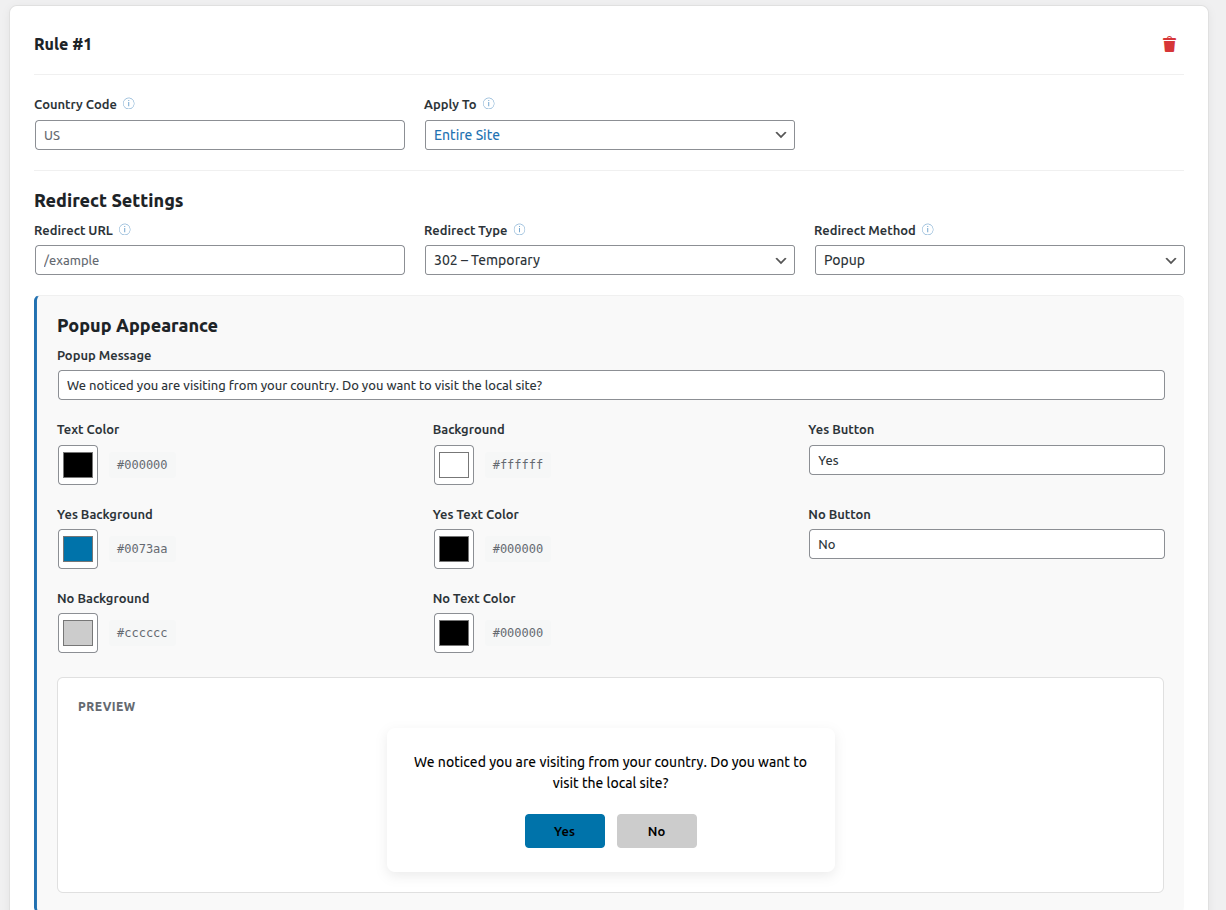
| Country code | One or more two-letter ISO codes separated by commas, for example US or GR, CY |
| Apply to | Entire site, one specific page, or a URL pattern such as /shop/* , which also covers /shop itself |
| Redirect URL | A path on your site ( /uk-store ) or a full address on another site ( https://uk.example.com/ ) |
| Redirect type | 302 temporary, recommended for country redirects, or 301 permanent |
| Redirect method | Automatic, or a popup that asks first |
| How often | Site default, or this rule's own redirect frequency |
Rules are checked from top to bottom, and the first rule that matches the visitor's country and page wins, so put rules for specific pages above rules for the entire site. Page addresses match whatever their case and with or without a trailing slash, and pages with non-English addresses, such as Greek or Cyrillic slugs, match too. The visitor's query string, for example ?utm_source=newsletter , is passed on to the destination.
2. How often visitors are redirected
Above the redirect rules, choose how often the same visitor is redirected:
| Setting | What happens |
|---|---|
| Every visit (recommended) | Visitors are sent to their local site each time they open yours. This is what most stores want |
| Once per browser session | After a redirect, the visitor can come back and stay until they close the browser |
| Once per hour | After a redirect, the visitor is left alone for an hour. This was the only behavior before version 1.4.0 |
| Once per day | After a redirect, the visitor is left alone for a day |
Each rule can override the site-wide choice with its own How often setting, for example every visit for your local store and once per day for a promotion page. Rules do not affect each other: a visitor sent on by a once per day rule is still redirected by an every visit rule elsewhere on your site.
New installs start with every visit. Sites that update from an earlier version keep once per hour until they choose otherwise, so an automatic update never changes who gets redirected. A change takes effect immediately, including for visitors who were redirected before it. For popups, the setting counts from when the visitor answers "Yes".
3. Popup confirmation
A popup asks before redirecting. You can edit the message, both button labels, and the text and background colors, with a live preview beside the fields. Use {{country}} in the message to insert the visitor's country code.
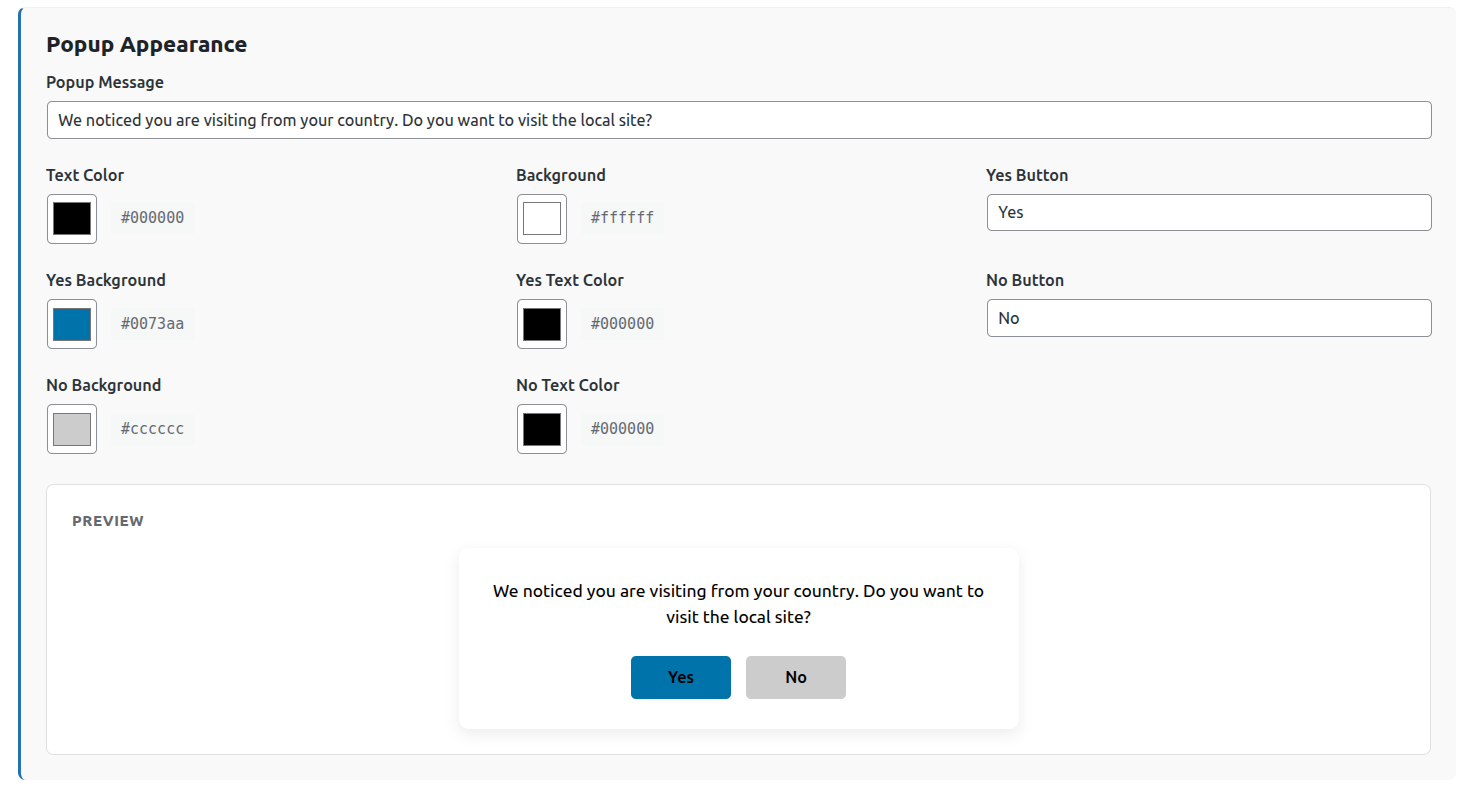
The popup remembers the visitor's answer for 30 days:
| The visitor | Result |
|---|---|
| Clicks "Yes" | They go to the other site now, and automatically on later visits, without being asked again |
| Clicks "No" | They stay on your site and are not asked or redirected again |
| Presses Escape or clicks outside the popup | The popup closes, and asks again in their next browser session |
If you change the destination of a rule, its visitors are asked again. The popup is an accessible dialog: keyboard focus starts on the first button and stays inside the popup, and Escape closes it.
Use a popup when a visitor might reasonably want to decline, such as a currency or storefront switch. Use automatic for country specific pages where staying makes no sense.
4. Let visitors choose to stay on your site
Add ?geo_bypass=1 to any link to your site, and visitors who follow it are not redirected for 30 days. The usual place is a "Visit our international store" link on your local store. Answering "No" to a popup has the same effect.
To forget everything the plugin remembers about a visitor, including earlier redirects, popup answers and choices to stay, add ?geo_reset=1 to the address. Both parameters are removed from the address bar once they have been read, so they never end up in shared links.
5. Redirect loop protection between your sites
When a rule sends a visitor to another site, the plugin adds ?ipgeo_from=1 to the address, for example https://gr.example.com/?ipgeo_from=1 . If that site also runs this plugin, the marker stops it from sending the visitor straight back, and the visitor stays there for the rest of their browser session. The plugin on the receiving site then removes the marker from the address bar, even when that site has no redirect rules of its own.
If the other site does not run this plugin, the marker has no use there and nothing can remove it. Untick Add ?ipgeo_from=1 when sending visitors to another site above the redirect rules to keep its addresses clean. Keep it ticked when both sites run the plugin, because without it two sites with conflicting rules can send a visitor back and forth until the browser gives up.
Redirects to a page on your own site never carry the marker.
6. Pages that are never redirected
Some requests are never redirected, whatever the rules say:
- Logged-in users, and IP addresses on the safe list
- Search engine crawlers such as Googlebot and Bingbot
- WooCommerce cart, checkout and account pages, and every page below them
- Form submissions, RSS feeds,
robots.txt, the REST API and AJAX requests - Page previews and the Customizer
- The destination page of the rule itself
- Pages listed under page exclusions
Country access control
Block visitors from some countries, or allow visitors from only a few, across your whole site.

- Block mode: visitors from the listed countries are blocked
- Allow mode: only visitors from the listed countries get in
Country codes are two-letters and case-insensitive. Blocked visitors see a 403 page, or you can send them to a page on your site, for example /not-available , or to a full address on another site.
Country access control runs on front end pages only. The admin area, the REST API and AJAX requests are skipped, and administrators are never blocked. If a visitor's country cannot be determined, for example during an API outage, the visitor is let in rather than your site going offline.
On a site with page caching, also keep country and IP blocking effective on cached pages.
1. Search engine crawlers and link previews
Blocking a country does not stop search engines from indexing your site. A crawler is let through only after a reverse DNS check confirms it really belongs to the search engine it claims, so a browser that pretends to be Googlebot is blocked like anyone else. The check covers Googlebot, Bingbot, Yahoo, Baidu, Yandex, Applebot, and the Facebook and X link preview crawlers, and each result is remembered for a day. DuckDuckBot cannot be verified this way, so it is treated as an ordinary visitor.
If a crawler or link preview service you rely on is still blocked, add its IP ranges to the safe list.
Block visitors by IP address
This section is a purely local check. No API key, no credits, no lookup.

1. Your IP address
The top of the section shows the IP address your server currently sees for you, with a button that adds it to your safe list. If that IP address is not yours, your site is behind a proxy or CDN. Fix that under advanced settings before writing any rules.
2. Safe list
IP addresses listed here are never blocked, whatever the rules below say. They skip your country rules too. Add your own IP address first.
3. The two questions
1. Who can visit your website? Covers your public pages.
2. Who can reach your login page? Covers wp-login.php and the WordPress dashboard. This is separate from question 1, so you can lock the login page while your site stays open to visitors.
Each question has the same three answers:
| Answer | Result |
|---|---|
| Anyone | No restriction. This is the default. |
| Anyone except the addresses I list | Every IP address on the list is blocked. |
| Only the addresses I list | Every IP address not on the list is blocked. |
An empty list blocks nobody, in either mode. That stops a half-finished allow list from taking your site down.
Locking the login page to your office IP address is the strongest option here. Password guessing bots never reach the form, and ordinary visitors are unaffected.
4. IP address formats
Every IP address box accepts one entry per line, in any of these formats:
| Format | Meaning |
|---|---|
203.0.113.9 | One single IP address |
203.0.113.0/24 | A whole block, 203.0.113.0 up to 203.0.113.255 |
192.0.2.* | Anything starting with 192.0.2. |
198.51.100.10-198.51.100.50 | Everything between those two IP addresses |
2001:db8::1 | IPv6 works the same way, including ranges such as 2001:db8::/32 |
# our office | A note for you, ignored by the plugin |
Lines that cannot be read are skipped and reported back to you when you save.
5. What a blocked visitor sees
Set Send blocked people to this page to a path on your site, for example /access-denied , or to a full address on another site. Leave it empty and they get a plain 403 page instead. The page you choose always stays reachable, so there is no redirect loop.
Requests to the REST API, admin-ajax.php and xmlrpc.php always receive a 403 status rather than a redirect, so scripts get a clear answer.
6. Lockout protection
The plugin refuses to save a login rule that would block your own IP address, and tells you what that IP address is so you can add it and save again. To save the rule anyway, tick the confirmation box.
If you do get locked out, add this line to wp-config.php , log in, fix the rule, then remove the line:
define( 'IPGEO_DISABLE_IP_ACCESS', true );7. Advanced settings
How your visitor's IP address is read
Automatic suits most sites. The other options are direct (no proxy), Cloudflare, and a custom proxy whose ranges you supply. Only change this if the detected IP address is wrong, and check it again after saving.
Cloudflare headers are trusted only when the request genuinely came from a Cloudflare server. The plugin refreshes Cloudflare's IP address ranges once a day and falls back to a bundled copy if that request fails.
Should logged-in users be blocked?
Choose from: never block administrators (default, and your safety net), never block anyone who is logged in, or block by IP address regardless.
Also apply the login rule to
Two optional extras. Leave admin-ajax.php off unless you are sure, because many contact forms and shop features use it. The plugin's own requests from cached pages are never blocked by the login rule. xmlrpc.php is safe to turn on unless you use the WordPress mobile app or Jetpack.
If an IP address cannot be read at all, block the request
Off by default, so an unusual request is let through rather than turning a real visitor away.
Page exclusions
Excluded pages skip the country redirect rules. Use them for pages that must always stay on your site, such as a contact page or a campaign landing page.
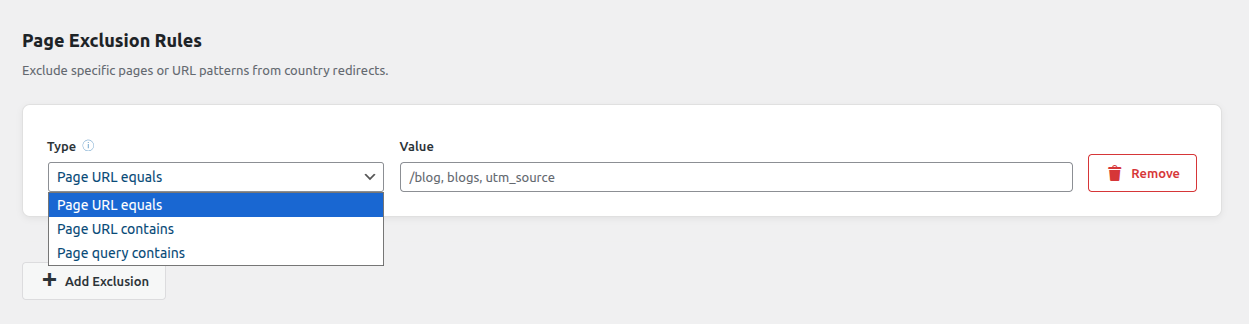
| Type | Example value | Matches |
|---|---|---|
| Page URL Equals | /checkout | /checkout only, not /checkout/cart |
| Page URL Contains | /blog | /blog and /blog/post-name , but not /blogger |
| Page Query Contains | ref=google | /shop?ref=google |
One match is enough to exclude a page. Matching ignores case and trailing slashes, and works with non-English page addresses and search terms.
Geo-targeted content with shortcodes
1. Show a single value
[ipgeo field] prints one piece of information about the current visitor. Values are escaped, so they are always safe to print.
[ipgeo country]       United States
[ipgeo city]          New York
[ipgeo state]         California
[ipgeo country_code]  US
[ipgeo currency]      USD
[ipgeo calling_code]  +1
Available fields: ip , city , state , country , country_code , zipcode , continent , latitude , longitude , currency , currency_name , currency_symbol , calling_code , languages .
Paid plans add: is_proxy , is_tor , is_anonymous , is_cloud_provider , cloud_provider , threat_score .
2. Show or hide content
[ipgeo_if] shows the content when the conditions match. [ipgeo_if_not] hides it when they match. Both accept the same attributes, and shortcodes can be nested.
[ipgeo_if country_code="US,CA" logic="OR"]
Free shipping across the US and Canada.
[/ipgeo_if]

[ipgeo_if_not country="Germany"]
Hidden from visitors in Germany.
[/ipgeo_if_not]

[ipgeo_if country_code="US" state="California" logic="AND"]
Welcome, California visitors. Check out our local deals.
[/ipgeo_if]
Attributes: country , country_code , state , city , continent , is_proxy , is_tor , is_cloud_provider , is_anonymous .
Use logic="AND" (the default) to require every condition, or logic="OR" to accept any one of them. Within a single attribute, comma separated values always mean "any of these". For yes or no attributes such as is_tor , the values yes , true and 1 mean yes, and no , false and 0 mean no. Without location data, neither [ipgeo_if] nor [ipgeo_if_not] content is shown.
3. Shortcodes on cached pages
A page cache stores one copy of a page for everyone, so location shortcodes need a choice. Under Conditional content shortcodes in the page caching settings, pick one of two modes:
| Mode | How it works | Best for |
|---|---|---|
| Decide on the server (default) | Each visitor gets exactly their own content, and pages that use the shortcodes are not cached | Anything that must stay hidden from some countries |
| Decide in the browser | Pages stay cached, and a small script shows the right content | Banners, notices and prices on busy sites |
In browser mode every variant is in the page source and revealed only where it applies, so never use it for content that must stay hidden. Override the mode for a single shortcode with render="server" or render="browser" .
Page caching, CDNs and performance
A page cache serves a stored copy of a page without running WordPress, so anything decided per visitor has to happen somewhere else. The plugin takes care of this with WP Rocket, LiteSpeed Cache, W3 Total Cache, WP Super Cache, WP Fastest Cache, Cache Enabler, SiteGround, Breeze, Hummingbird, Nginx Helper, WP Engine, Pantheon, Cloudflare and other CDNs. The settings are under Page caching on the settings page, which also shows which cache plugin was detected on your site.
1. How cached page support works
With Cached page support turned on, which is the default, every page carries a small script. On a cached page it asks your site what to do for this visitor, then redirects them, shows the popup, or does nothing. The answer is remembered, so a visitor that no rule applies to is not checked again on every page. Visitors on uncached pages are still redirected instantly by the server. Popups and country specific content are never stored in the cache, so one visitor's popup is never shown to another.
2. Hide cached pages until the location is checked
Optional. It keeps the page hidden while the script checks the visitor's location, so visitors who are about to be redirected do not glimpse your site first. Only the first page of a visit is affected, and never for longer than the time you set, from 200 to 3000 milliseconds (1000 by default).
3. Keep country and IP blocking effective on cached sites
A blocked visitor who is served a cached copy of a page is not blocked. While country or IP blocking rules are active, this setting stops public pages from being cached, so there is never a copy to serve. It is on by default. Turn it off only if you enforce blocking at your CDN instead, for example with a Cloudflare WAF rule.
Sites that already had blocking rules when they updated to version 1.3.0 keep their caching as it was, and see a notice with a one-click button to turn the protection on.
4. Clear the page cache when settings change
When you save the settings, the plugin clears the cache of the supported cache plugins, so pages cached before the change do not keep the old behavior. Clear any CDN cache yourself.
5. Script optimization plugins
The cached page script is marked so that optimization features leave it alone, including WP Rocket's delayed JavaScript, Cloudflare Rocket Loader, LiteSpeed Cache, Jetpack Boost and WP Meteor. If you use another optimization plugin, exclude ipgeo-gate.js from its delay, defer and combine settings.
6. Location lookups and API credits
- Each visitor's location is looked up once and cached for 24 hours per IP address.
- Private and local IP addresses are never sent to the API.
- A failed lookup is retried after five minutes, so an outage is never stored as a real result.
- If the API key is invalid or your limit is reached, lookups pause for five minutes instead of failing on every page view, and the API status shows the error.
- IP rules are a local check and use no credits.
Geo redirects and SEO
Location based redirects can hurt search rankings when they are set up badly. These practices keep your country pages visible, and match Google's advice for sites with country versions:
- Crawlers are never redirected. Search engines crawl mostly from the United States, so redirecting them would hide your country pages. The plugin leaves known crawlers on the page they asked for, so every version of your site can be indexed.
- Use 302 redirects. A country redirect is temporary by nature, because the same address serves different visitors. A 301 tells browsers and search engines that the move is permanent.
- Let visitors choose. Offer a way to switch, such as a redirect popup or a link that lets visitors choose to stay on your site, rather than trapping them in one version.
- Add hreflang tags. Tell search engines which country or language each version is for with
hreflangtags, usually through your SEO plugin. - Prefer shortcodes for small changes. If only a banner, a price or a notice changes, geo-targeted content shortcodes keep one address and one indexed version of the page.
Test and troubleshoot
1. Test a visitor from any country
At the bottom of the settings page, Test a visitor shows what a visitor from any country or IP address would see on any page of your site: redirected, shown a popup, or not redirected, with the rule that matched and the reason. It also shows whether country or IP access control would block them.
2. Test with a VPN
Log out first, because logged-in users are never redirected. Then use a private browser window, and open a new one each time you change location, because the plugin remembers visitors. You can also add ?geo_reset=1 to the address to clear everything the plugin remembers about you.
3. See why a visitor was or was not redirected
Add this line to wp-config.php :
define( 'IPGEO_DEBUG', true );Every page then carries an X-IPGeo-Decision response header with the decision, the reason, the country and the matching rule, for example redirect; reason=match; country=GR; rule=1 . Remove the line when you are done.
| Reason | Meaning |
|---|---|
match | A rule matched and the visitor was redirected or shown a popup |
popup_accepted | The visitor said "Yes" to this rule's popup before, so they were redirected straight away |
no_rule_for_country | No rule covers the visitor's country |
no_path_match | Rules exist for the country, but not for this page |
already_redirected | The visitor was redirected recently, and the rule's redirect frequency leaves them alone |
bypass_cookie | The visitor chose to stay on your site |
popup_dismissed | The visitor closed the popup without answering during this browser session |
loop_guard | The visitor was sent here by another site running this plugin |
excluded | The page matches a page exclusion |
protected | The page is one of the pages that are never redirected |
self_target | The visitor is already on the destination page |
logged_in | Logged-in users are never redirected |
bot | Search engine crawlers are never redirected |
no_country | The location lookup failed, so nothing was changed |
invalid_target | The rule's redirect URL is not usable |
4. Nothing is being redirected
Work through these in order, or use Test a visitor to see the reason directly:
- You are logged in. Logged-in users are never redirected, so test in a private window.
- You were redirected recently, and the rule's redirect frequency leaves you alone for now. Add
?geo_reset=1to the address. - Your API key is missing or invalid, or the plan type does not match your account. Check the API status.
- The page is covered by a page exclusion, or is one of the pages that are never redirected.
- Your site uses page caching and an optimization plugin delays the plugin's script. See script optimization plugins.
5. Visitors are redirected only once
Before version 1.4.0, the plugin always left a redirected visitor alone for an hour, and sites that update keep that behavior. Set how often visitors are redirected to every visit.
6. A marker appears in the address after a redirect
That is ?ipgeo_from=1 , the redirect loop protection between your sites. Install this plugin on the other site to have it removed automatically, or switch the marker off if the other site does not use the plugin.
7. Visitors see the site briefly before the redirect
On a cached page the redirect happens as the page starts to load. Turn on hide cached pages until the location is checked.
8. The page keeps reloading
The plugin never redirects a page to itself, and the loop protection marker stops two sites from sending a visitor back and forth. If a page still reloads, check that no other rule sends visitors from the destination back again, and that the marker is switched on when both sites run the plugin.
9. Everyone is blocked after I saved an IP rule
Check that the IP address shown at the top of the IP section is really yours. If it is not, your site is behind a proxy or CDN and every visitor looks like the same IP address, so one rule catches all of them. Fix the detection mode under advanced settings. To get back in meanwhile, add define( 'IPGEO_DISABLE_IP_ACCESS', true ); to wp-config.php .
10. My contact form or checkout stopped working
Turn off admin-ajax.php under Also apply the login rule to. Many forms, shop features and page builders use that file, so applying a login rule to it blocks ordinary visitors.
11. Search engine crawlers are being blocked
Verified crawlers pass country access control, but IP rules apply to everyone, because any browser can claim to be a crawler. If an IP rule is catching a crawler you want, add its IP ranges to the safe list.
12. A shortcode prints nothing
[ipgeo ...] returns an empty string when no location data is available: a missing or invalid key, or a field your plan does not include. Check the API status. is_proxy , is_tor , is_anonymous , is_cloud_provider , cloud_provider and threat_score need a paid plan.
For developers
| Hook | Type | Use |
|---|---|---|
ipgeo_country_rules | filter | Change the redirect rules before they are applied |
ipgeo_redirect_decision | filter | Adjust a redirect or popup decision before it is acted on |
ipgeo_protected_paths | filter | Add paths that are never redirected, such as a custom checkout |
ipgeo_is_protected_page | filter | Exempt the current page from country redirects |
ipgeo_allowed_redirect_hosts | filter | Allow extra destination hosts, for rules built in code |
ipgeo_redirect_query_string | filter | Change or drop the query string passed to a destination |
ipgeo_add_loop_guard | filter | Decide per destination whether ?ipgeo_from=1 is added |
ipgeo_honour_loop_guard | filter | Ignore the marker on arriving visitors |
ipgeo_gate_enabled | filter | Turn cached page support on or off in code |
ipgeo_gate_config | filter | Change the configuration printed for the cached page script. It must be the same for every visitor |
ipgeo_access_control_prevents_caching | filter | Return false when blocking is enforced at your CDN |
ipgeo_detected_caches | filter | Change the list of detected page caches |
ipgeo_page_marked_uncacheable | action | Fires when a response is marked uncacheable, to notify a cache the plugin does not know |
ipgeo_purge_page_cache | action | Fires when the plugin clears page caches, to clear a cache the plugin does not know |
ipgeo_verify_bot | filter | Replace the reverse DNS check for crawlers |
ipgeo_resolved_ip | filter | Change the visitor IP address the plugin uses |
ipgeo_api_timeout | filter | Location API timeout, in seconds |
ipgeo_cache_ttl | filter | How long a location lookup is cached, 24 hours by default |
ipgeo_ip_access_bypass | filter | Skip the IP gate entirely for a request |
ipgeo_ip_access_blocked | filter | Override the IP block decision |
ipgeo_ip_access_denied | action | Fires before a request is denied, useful for logging |
IPGEO_DEBUG | constant | Adds the X-IPGeo-Decision debug header to every response |
IPGEO_DISABLE_IP_ACCESS | constant | Turns off IP rules, for lockout recovery |
Changelog
1. 1.4.0
- New: choose how often the same visitor is redirected (every visit, once per browser session, once per hour or once per day), site-wide and for each rule. New installs redirect on every visit, and existing sites keep once per hour until they change it
- New: popups remember the answer for 30 days. "Yes" redirects automatically on later visits and "No" keeps the visitor on your site. Closing the popup asks again in the next browser session
- New: a visitor sent here by another site running this plugin stays for the rest of the browser session, so two sites can never bounce a visitor between them
- New: a setting to stop adding
?ipgeo_from=1to redirects, for destinations that do not run this plugin - Improved:
?ipgeo_from,?geo_bypassand?geo_resetare removed from the address bar once read, on any site running this plugin, including one with no rules of its own - Improved:
?geo_reset=1also forgets popup answers - Improved: the popup keeps keyboard focus inside itself and closes on a click outside it
- Improved: spacing on the settings screen
2. 1.3.0
- Fixed: country redirects to another domain, for example
https://gr.example.com/, sent visitors to wp-admin instead, then stopped redirecting them for an hour - Fixed: redirects, popups, conditional content and blocking are now correct on sites with page caching. Cached pages ask the site for each new visitor's decision, popups and country specific content are no longer stored in the cache, and page caches are cleared when settings change
- Fixed: rules never matched pages with non-English addresses such as Greek slugs, and non-English search terms were erased from forwarded query strings
- Fixed: 301 redirects were always sent as 302
- Fixed: an error from the location API, such as an invalid key or a rate limit, was cached for 24 hours as if it were a real result. Errors are now retried after five minutes, and the settings page shows the API status
- Security: a user agent claiming to be a search engine no longer bypasses country blocking. Crawlers must pass a reverse DNS check
- Security: an IP block destination on another site could let blocked visitors read the page with the same path on this site
- Fixed:
?geo_reset=1did not undo an earlier redirect - Fixed: form submissions, feeds and robots.txt were redirected. Checkout, cart and account pages are now never redirected
- Fixed: subdirectory installs matched rules against the wrong path
- Fixed: the popup "Yes" button text color was lost on save
- Fixed: the admin screen could keep running an outdated script after an update
- New: one rule can target several countries, for example
GR, CY - New:
/products/*also matches/productsitself - New: the "Test a visitor" tool, and an
X-IPGeo-Decisiondebug header withIPGEO_DEBUG - New:
[ipgeo_if]accepts true and false or 1 and 0 as well as yes and no, andrender="browser"orrender="server" - Accessibility: the redirect popup is a proper dialog, keyboard focusable and closable with Escape
3. 1.2.0
- Added IP access control: block or allow visitors by IP address, with separate rules for your website and your login page
- IP address lists accept single IP addresses, ranges such as
203.0.113.0/24, wildcards such as192.0.2.*, and IPv6 - Added a safe list of IP addresses that are never blocked by any rule
- The settings screen now shows your own IP address and how it was detected
- The plugin refuses to save a login rule that would lock you out, with a
wp-config.phprecovery option - Security: visitor IP addresses can no longer be faked using request headers
- Fixed an empty redirect URL in Country Access Control causing an endless redirect loop
- Fixed blocked visitors being redirected twice
- Fixed cached location data not being reused within the same page load
4. 1.1.0
- Upgraded internal API from v2 to v3
- Simplified plan types to Developer and Paid only, with Standard, Advanced and Security automatically migrated to Paid
- Renamed the plugin
5. 1.0.0
- Initial public release with country redirects, popup support, country allow and block rules, conditional shortcodes, bot detection and caching
Frequently asked questions
https://gr.example.com/ , as well as a path on your own site. See redirect rule settings.?geo_bypass=1 , for example from a "Visit our international store" link, or let them answer "No" to a popup. Either way they stay for 30 days. See letting visitors choose to stay.GR, CY .?geo_reset=1 to the address. The Test a visitor tool shows the result for any country without a VPN.define( 'IPGEO_DISABLE_IP_ACCESS', true ); to your wp-config.php , log in, fix the rule, then remove the line.is_proxy , is_tor , is_anonymous , is_cloud_provider or cloud_provider in the display or the conditional shortcodes.