

IPGeolocation.io Splunk App
Overview
The IPGeolocation.io App for Splunk enriches your Splunk events with real-time IP intelligence directly inside the Search Processing Language (SPL). Instead of sending raw IP addresses to an external dashboard and cross-referencing results manually, you pipe events through custom Splunk commands and get geolocation, ISP, ASN, security, abuse, and timezone data joined back to each record in a single search.
The app ships with four custom SPL commands ( ipgeolocation , ipgeolocationbatch , ipsecurity , ipsecuritybatch ) and supports two complementary lookup methods:
- API mode -- queries the ipgeolocation.io REST API over HTTPS in real time, batching up to 750 IPs per request automatically.
- MMDB mode -- reads from locally downloaded MaxMind-format
.mmdbdatabase files, which means zero external network calls per search and sub-millisecond per-IP latency. Databases are refreshed on a configurable schedule.
Both modes are configured from a single setup UI inside Splunk. No Python scripting is required after installation.
Supported Splunk Version
| Splunk |
|---|
| Splunk 10.4 |
| Splunk 10.3 |
| Splunk 10.2 |
| Splunk 10.1 |
| Splunk 10.0 |
| Splunk 9.4 |
| Splunk 9.3 |
| Splunk 9.2 |
| Splunk 9.1 |
| Splunk 9.0 |
Prerequisites
Before installing the app, make sure you have the following:
- A running Splunk Enterprise or Splunk Cloud instance (version 8.x or later recommended).
- Python 3.13 or later available in your Splunk environment (Splunk 9.x ships with Python 3.9 -- verify your version with
splunk cmd python3 --version). - An active ipgeolocation.io account. Sign up free -- no credit card required for the Free plan.
- Your API key from the ipgeolocation.io dashboard.
- If using MMDB mode, a Bearer token (database access key) available from your ipgeolocation.io account under the Databases section.
Installation
There are multiple ways of deploying apps to Splunk environment and in this document, we’ll be referring installation via CLI (Command Line Interface).
1. Single Stand Alone Splunk Installation (CLI)
Single standalone Splunk Enterprise Installation on Windows/*NIX
- Unzip ipgeolocation_app.tar.gz
- Copy the unzipped directory ipgeolocation_app to $SPLUNK_HOME/etc/apps/
- Open CLI and restart Splunk using ./splunk restart --run-as-root
2. Distributed Architecture
Single Indexer Single Search Head and Single Forwarder (Heavy or Universal) and Deployment server
$SPLUNK_HOME/etc/deployment-apps/
[serverClass:<SEARCHHEAD_SERVERCLASS>:app:< ipgeolocation_app >]
stateOnClient=enabled
restartSplunkd=true3. Distributed Architecture
Multiple non-clustered Indexers, Multiple non-clustered Search Heads, Forwarder (Heavy or Universal) and Deployment server
[serverClass:<SEARCHHEAD_SERVERCLASS>:app:< ipgeolocation_app >]
stateOnClient=enabled
restartSplunkd=true
4. Distributed Architecture
Single Site Clustered Indexer, Clustered Search Heads and Forwarder (Heavy or Universal).
./splunk apply shcluster-bundle -target <URI>:<management_port> -auth <username>:<password>5. Standalone Installation (WEB)
- On the Splunk Home Page, Click on “Manage”

- On the Manage Apps page, Click on “Install app from file”

- Select path for ipgeolocation.io Splunk app .tar.gz file and Click “Upload”
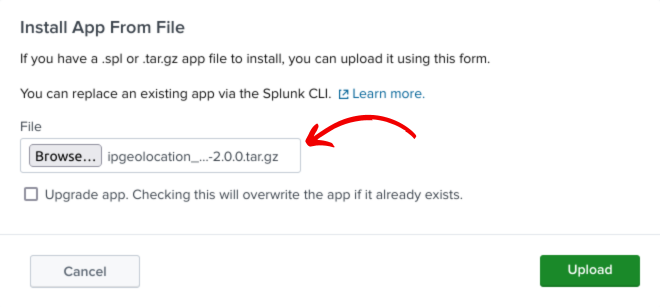
- It is a good practice to restart the Splunk, please restart
Configuration
- After installation and restart, login to the Splunk web.
- Go to 'Manage' under Apps in the left bar.
- It will list out all the installed applications and the options to configure these apps.
- Look for 'ipgeolocation.io' and click on the 'Set up' link to configure the app.
- Make Sure to restart Splunk Instance after setting up the app. In case of a Search Head Cluster, each search head needs to be restarted or a rolling restart must be initiated to make all changes work properly.

1. API Configuration
Select Fetch Details via Rest API in the Lookup Method to use your API subscription in the ipgeolocation.io App for Splunk, provide the API Key for your API subscription in the Key for API Subscription, and select the plan for your API subscription. These are only 3 inputs required to use ipgeolocation.io API with Splunk.

Rest of the fields are optional in case of using the API. However, to access ipgeolocation.io API through a proxy, you can select Yes against Enable Proxy and provide proxy settings.
Here are the required proxy configuration details:

Finally, click Submit.
2. MMDB Configuration
Select Use MMDB option in the Lookup Method to use your database subscription on ipgeolocation.io with Splunk.
You have the following choices to set up the app for ipgeolocation.io databases:
I. Download MMDB on each Search Head (Used for Search Head Cluster Only)
If you have a search head cluster deployed:
- select "No" if you want to download MMDB from ipgeolocation.io on only one Search Head and sync on other search heads.
- select "Yes" (default one) to let each Search Head download it's MMDB copy from ipgeolocation.io.
Syncing will be a bit slow as compared to separate download as it has to copy MMDBs to all search heads.
II. Replicate MMDB on Indexers
Select Yes against Replicate MMDB on Indexers to enable replication on MMDB bundle. This will also make a bunch of changes in the code that will enable ipgeolocation & ipsecurity to work in streaming mode. This is expected to cause performance boost on the query at the expense of increase in bundle size. This setting is applicable if you're using ipgeolocation.io app on splunk search head cluster and you have indexer cluster.
III. MMDB Subscription Credentials
Following ipgeolocation.io databases are supported in the ipgeolocation.io App for Splunk:
| Database Tier | Name |
|---|---|
| Standard | IP to Country |
| Standard | IP to City |
| Standard | IP to ISP |
| Standard | IP to City & ISP |
| Advance | IP to City |
| Advance | IP Abuse Contact |
| Advance | IP to ASN |
| Advance | IP to ASN (Extended) |
| Advance | IP to Company |
| Advance | IP WHOIS |
| Advance | IP to City, Company & ASN |
| Advance | IP to ASN & Company |
| Advance | IP to City, ASN, Company & Abuse |
| Advance | IP to City, Company, ASN, Abuse & Security |
| Security Pro | IP Security |
| Security Pro | IP Residential Proxy |
| Security Pro | IP Hosting Provider |
| Security Pro | IP to Security & Location |
| Security Pro | IP to Security, City & ISP |
For your subscribed database plan on ipgeolocation.io, provide the following configuration to enable the ipgeolocation.io app for MMDB lookup.
i. Enable
Select Yes against Enable buttons to enable MMDB lookup from it.
ii. Key
Provide the database subscription's API key in the Key box to authenticate database downloads.
iii. Update Interval
Also select Weekly or Daily button update interval so that the app can correctly download database updates at right interval.
That's all you need to configure MMDB lookups.
Proxy Setting
All the proxy related fields are optional as explained above.
Usage
Here are the detailed information on using these commands:
1. ipgeolocation Command
Type: Streaming (operates row by row on search results)Supported Methods: API (Free and Paid), MMDBMin. Plan: FREE (API), any MMDB database
The ipgeolocation command is the primary lookup command. You pipe your search results through it and specify one or more fields that contain IP addresses. The command enriches each record with geolocation and optional extended data.
Syntax:
... | ipgeolocation <field> [field2 ...] [options]Options:
| Option | Type | Default | Description |
|---|---|---|---|
liveHostname | bool |  | Perform a live reverse DNS lookup for the IP. PAID API only. |
hostnameFallbackLive | bool | | Try hostname from database first; fall back to live DNS if not found. PAID API only. |
abuseContact | bool | | Include abuse contact details (name, email, address). PAID API only. |
dma | bool | | Include the DMA (Designated Market Area) code. US-centric. PAID API only. |
geoAccuracy | bool | | Include accuracy radius and confidence level for the geolocation. PAID API only. |
security | bool | | Include security flags (VPN, proxy, Tor, bot, spam, known attacker). PAID API or security-capable MMDB. |
allinfo | bool | | Shortcut that enables liveHostname , abuseContact , dma , geoAccuracy , and security simultaneously. |
prefix | bool | | Prefix all output field names with the source field name. Automatically set to true when multiple IP fields are specified. |
language | string | en | Response language for place names. Supported: en , de , ru , ja , fr , cn , es , cs , it , ko , fa , pt . |
Examples:
Basic geolocation lookup on a field named src_ip :
index=firewall action=blocked
| ipgeolocation src_ip
| table _time, src_ip, location.city, location.country_name, isp, location.latitude, location.longitude
Lookup two IP fields simultaneously (auto-prefixes output fields):
index=web_proxy
| ipgeolocation src_ip dst_ip
| table src_ip_location.country_name, dst_ip_location.country_name
Full enrichment for a threat-hunting search:
index=sysmon EventCode=3
| rename SourceIp as src_ip
| ipgeolocation src_ip allinfo=true
| where security.is_tor=true OR security.is_known_attacker=true
| table _time, src_ip, location.country_name, security.is_tor, security.is_known_attacker, security.threat_score, abuse.email
Localized response in French:
index=access_combined
| rex field=_raw "(?<client_ip>\d{1,3}\.\d{1,3}\.\d{1,3}\.\d{1,3})"
| ipgeolocation client_ip language=fr
| table client_ip, location.country_name, location.city
Enrich with DMA code for US ad-targeting analysis:
index=cdn_logs country_code=US
| ipgeolocation ip dma=true
| stats count by location.dma_code, location.city
| sort -count
2. ipgeolocationbatch Command
Type: Generating (produces its own results, does not require piped input)Supported Methods: API (Free and Paid), MMDBMin. Plan: FREE (API)
The ipgeolocationbatch command is used when you have a static list of IPs and want to enrich them without a preceding search that generates records. Start your SPL with a | (pipe) to invoke a generating command.
Syntax:
| ipgeolocationbatch ips="<ip1>,<ip2>,..." [options]Options: Identical to ipgeolocation ( liveHostname , hostnameFallbackLive , abuseContact , dma , geoAccuracy , security , allinfo , language ).
The ips parameter is required. Pass a comma-separated list of IP addresses.
Examples:
Quick ad-hoc lookup for a known list of suspicious IPs from a threat intel report:
| ipgeolocationbatch ips="185.220.101.1, 162.247.72.199, 198.98.54.11, 45.142.212.100"
| table ip, location.country_name, location.city, isp, security.is_tor, security.is_proxy
Combine with a lookup table of IOCs:
| inputlookup threat_iocs.csv
| fields ip_address
| map search="| ipgeolocationbatch ips=\"$ip_address$\" security=true"
| table ip, location.country_name, security.is_known_attacker, security.threat_score
Generate a geolocation report for IP ranges from a CIDR list:
| ipgeolocationbatch ips="8.8.8.8, 8.8.4.4, 1.1.1.1, 208.67.222.222" language=de
| table ip, location.country_name, location.city, asn.as_number, asn.organization
3. ipsecurity Command
Type: StreamingSupported Methods: API (PAID only)Min. Plan: PAID
The ipsecurity command is a focused security lookup. It returns only IP security intelligence fields: VPN, proxy, Tor, bot, spam, cloud provider flags, and a composite threat score. Use it when you specifically want security signals without pulling the full geolocation payload.
Syntax:
... | ipsecurity <field> [field2 ...] [prefix=true]Options:
| Option | Type | Default | Description |
|---|---|---|---|
prefix | bool | | Prefix output field names with the source field name. Auto-enabled when multiple IP fields are provided. |
Examples:
Identify VPN/proxy users in your authentication logs:
index=auth sourcetype=okta action=success
| ipsecurity src_ip
| where security.is_vpn=true OR security.is_proxy=true
| stats count by user, src_ip, security.is_vpn, security.is_proxy, location.country_name
| sort -count
Alert on logins from Tor exit nodes:
index=auth action=login
| ipsecurity client_ip
| where security.is_tor=true
| eval alert_message="Tor login attempt from " . client_ip
| table _time, user, client_ip, alert_message
Score incoming webhook requests by threat level:
index=api_gateway path="/webhook/payment"
| rex field=_raw "\"x-forwarded-for\":\"(?<req_ip>[^\"]+)\""
| ipsecurity req_ip
| where security.threat_score > 70
| table _time, req_ip, security.threat_score, security.is_bot, security.is_spam
4. ipsecuritybatch Command
Type: GeneratingSupported Methods: API (PAID only)Min. Plan: PAID
The ipsecuritybatch command lets you look up security information for a static list of IPs. Like ipgeolocationbatch , it is a generating command (starts with | ).
Syntax:
| ipsecuritybatch ips="<ip1>,<ip2>,..."Examples:
Check a batch of IPs from a threat intelligence feed:
| ipsecuritybatch ips="91.108.4.1, 185.220.101.45, 176.10.99.200, 194.165.16.87"
| table ip, security.is_vpn, security.is_proxy, security.is_tor, security.is_bot, security.threat_score
| sort -security.threat_score
Weekly automated threat scoring of your top talkers:
index=firewall earliest=-7d@d
| top limit=50 src_ip
| rename src_ip as ip
| table ip
| map search="| ipsecuritybatch ips=\"$ip$\""
| where security.threat_score > 50
| outputlookup high_risk_ips.csv
Practical SPL Examples
1. Use Case 1: Geo-Enrich Firewall Blocked Traffic for a Map Dashboard
index=firewall action=blocked earliest=-1h
| stats count by src_ip
| ipgeolocation src_ip
| geostats latfield=location.latitude longfield=location.longitude count by location.country_name
This feeds directly into Splunk's Cluster Map visualization. The result shows blocked connection volume by geographic origin.
2. Use Case 2: Detect Impossible Travel (Auth Log Analysis)
index=auth action=success
| sort 0 _time
| ipgeolocation src_ip
| streamstats window=2 current=true by user values(location.country_name) as countries, values(src_ip) as ips, range(_time) as time_diff_secs
| where mvcount(countries) > 1 AND time_diff_secs < 3600
| eval alert="Impossible travel: " . mvjoin(countries, " -> ") . " within " . round(time_diff_secs/60, 0) . " minutes"
| table _time, user, ips, countries, time_diff_secs, alert
3. Use Case 3: Identify High-Risk API Consumers
index=api_gateway method=POST uri="/api/v1/checkout" status=200 earliest=-24h
| stats count as requests, sum(response_bytes) as bytes_transferred by src_ip
| ipsecurity src_ip
| where security.threat_score > 60 OR security.is_proxy=true OR security.is_vpn=true
| table src_ip, requests, bytes_transferred, security.threat_score, security.is_vpn, security.is_proxy, security.is_tor
| sort -security.threat_score
4. Use Case 4: Country-Based Access Control Audit
index=web_access
| ipgeolocation clientip
| search NOT location.country_code2 IN ("US", "CA", "GB", "AU", "DE")
| stats count by location.country_code2, location.country_name, clientip
| sort -count
| head 50
5. Use Case 5: ISP-Aware Rate Limit Breach Detection
index=nginx status=429 earliest=-15m
| ipgeolocation client_ip
| stats count as rate_limit_hits by client_ip, isp, asn.as_number, location.country_name
| where rate_limit_hits > 100
| table client_ip, isp, asn.as_number, location.country_name, rate_limit_hits
6. Use Case 6: Enrich Threat Intel IOC List with Full Profile
| inputlookup threat_intel_ips.csv where is_active=true
| rename ip_indicator as ip
| ipgeolocationbatch ips=ip allinfo=true
| eval risk_label=case(
    security.is_known_attacker=="true", "High - Known Attacker",
    security.is_tor=="true", "High - Tor",
    security.threat_score > 70, "High - Threat Score",
    security.is_vpn=="true" OR security.is_proxy=="true", "Medium - Anonymizer",
    true(), "Low"
  )
| table ip, location.country_name, isp, asn.as_number, security.threat_score, risk_label, abuse.email
| sort risk_label
7. Use Case 7: Timezone-Aware Business Hours Alerting
index=auth action=success earliest=-1h
| ipgeolocation src_ip
| eval local_hour=strftime(now() + (time_zone.offset_with_dst * 3600), "%H")
| where local_hour < 6 OR local_hour > 22
| eval after_hours_login="Login at local time " . local_hour . ":00 in " . time_zone.name
| table _time, user, src_ip, location.city, location.country_name, time_zone.name, after_hours_login
MMDB Database Reference
The following databases are available for MMDB mode. Each database requires a separate Bearer token key and has its own download URL managed automatically by the app.
1. Standard Databases
| Database ID | Content | MMDB File |
|---|---|---|
db_std_ip_country | Country-level geolocation | db-ip-country.mmdb |
db_std_ip_city | City-level geolocation | db-ip-location.mmdb |
db_std_ip_isp | ISP data | db-ip-isp.mmdb |
db_std_ip_city_isp | City + ISP combined | db-ip-city-isp.mmdb |
2. Advanced Databases
| Database ID | Content | MMDB File |
|---|---|---|
db_advanced_ip_city | Detailed city geolocation | db-ip-location.mmdb |
db_advanced_ip_abuse | Abuse contact data | db-ip-abuse.mmdb |
db_advanced_ip_asn | ASN data | db-ip-asn.mmdb |
db_advanced_ip_asn_ext | Extended ASN data | db-ip-asn.mmdb |
db_advanced_ip_company | Company data | db-ip-company.mmdb |
db_advanced_ip_whois | WHOIS data | db-ip-whois.mmdb |
db_advanced_ip_city_company_asn | City + Company + ASN bundle | db-ip-city-company-asn.mmdb |
db_advanced_ip_city_company_asn_abuse | City + Company + ASN + Abuse bundle | db-ip-city-company-asn-abuse.mmdb |
db_advanced_ip_company_asn | Company + ASN combined | db-ip-company-asn.mmdb |
db_advanced_ip_city_company_asn_abuse_security | Full bundle including security | db-ip-city-company-asn-abuse.mmdb + db-ip-security.mmdb |
3. Security Pro Databases
| Database ID | Content | MMDB File |
|---|---|---|
db_sec_pro_ip_security | Core security flags | db-ip-security.mmdb |
db_sec_pro_ip_residential_proxy | Residential proxy detection | db-residential-proxy.mmdb |
db_sec_pro_ip_hosting | Hosting/datacenter detection | db-ip-hosting.mmdb |
db_sec_pro_ip_city_security | City geolocation + security | db-ip-city.mmdb + db-ip-security.mmdb |
db_sec_pro_ip_city_isp_security | City + ISP + security | db-ip-city-isp.mmdb + db-ip-security.mmdb |
Scheduled MMDB Refresh
The app ships with pre-configured disabled saved searches for each supported database. Each search uses the refreshsinglemmdb command to download a fresh copy of the database file.
The default cron schedule for all databases is:
1 1 * * 1This means every Monday at 01:01 AM. To change the refresh schedule for a specific database:
- Go to Settings > Searches, Reports, and Alerts.
- Find the saved search named, for example, MMDB db_advanced_ip_city_company_asn Update.
- Edit the cron schedule to your preferred value (e.g.,
0 3 * * *for daily at 3 AM). - Enable the saved search (it is disabled by default).
To trigger a manual refresh of a single database immediately:
| refreshsinglemmdb MMDB="db_advanced_ip_city_company_asn"Replace db_advanced_ip_city_company_asn with the database ID you want to refresh. Run this from the Splunk Search bar.
To refresh all enabled databases in one go:
| refreshmmdbTroubleshooting
1. Check the App Log
The app writes detailed logs to:
$SPLUNK_HOME/var/log/splunk/ipgeolocation.logYou can search this log from Splunk itself:
index=_internal source=*ipgeolocation.log
| table _time, log_level, message
| sort -_time
Common log entries include API request counts, MMDB file paths opened, errors during parsing, and API usage stats tracked before and after each command run.
2. "Your subscription plan must be..." Warning
You see a warning like:
Your subscription plan must be 'PAID' to search IP details through `ipsecurity` command.Cause: The ipsecurity and ipsecuritybatch commands require a Paid subscription. The ipgeolocation command requires Free or Paid. The allinfo , security , abuseContact , geoAccuracy , dma , and liveHostname options require Paid.
Fix: Verify your subscription plan is correctly set in the app configuration. Log into app.ipgeolocation.io and confirm your plan tier, then update the Subscription Plan field in the Splunk app setup.
3. ipsecurity command doesn't support MMDB lookup method
Cause: You have Method set to MMDB but are running the ipsecurity command.
Fix: Switch to ipgeolocation with security=true and a security-capable MMDB (e.g., db_sec_pro_ip_security ), or switch Method to API for the ipsecurity command.
4. No Fields Returned / All Fields Empty
Cause: Common causes include an invalid or expired API key, the IP field value being empty or whitespace, or a network error reaching the API endpoint.
Fix:
- Confirm your API key is valid by testing it directly:
curl "https://api.ipgeolocation.io/v3/ipgeo?apiKey=YOUR_KEY&ip=8.8.8.8" - Inspect
ipgeolocation.logforError during fetching datamessages. - Ensure the search field actually contains a valid IP string. Run
| table <your_ip_field>before theipgeolocationcommand to verify.
5. MMDB File Not Found
Cause: The database has not been downloaded yet, or the download failed.
Fix: Manually trigger a refresh:
| refreshsinglemmdb MMDB="<database_id>"Check ipgeolocation.log for download errors. Verify your Bearer token is correct and that database.ipgeolocation.io is reachable from the Splunk server.
Support and Resources
| Resource | Link |
|---|---|
| ipgeolocation.io Homepage | https://ipgeolocation.io |
| API Documentation | https://ipgeolocation.io/documentation/ip-location-api.html |
| IP Security API Docs | https://ipgeolocation.io/documentation/ip-security-api.html |
| Database Pricing | https://ipgeolocation.io/db-pricing.html |
| API Pricing | https://ipgeolocation.io/pricing.html |
| Account Dashboard | https://app.ipgeolocation.io |
| All Integrations | https://ipgeolocation.io/integrations.html |
| Contact Support | https://ipgeolocation.io/contact.html |
