

IP to Hosting Database
Overview
Need to know which hosting provider or data center an IP address belongs to? Our IP to Hosting Database, which is a part of our Security Pro, lets you map any IPv4 or IPv6 address to its hosting infrastructure. It helps you pinpoint hosting providers and data centers so you can better understand who’s really behind the traffic hitting your systems.
The database is kept fresh with daily updates, so you’re always working with the latest IP-to-hosting mappings as networks, ranges, and infrastructure change. The files are lightweight and easy to work with, making it simple to plug them into your existing workflows, tools, or pipelines without adding overhead.
In this documentation, you’ll find everything you need: what’s included in the archives, the file structure, how to verify your downloads before importing them, and a few practical examples to help you get started quickly and confidently.
Available Database Formats

CSV Database Documentation
1. Overview
The CSV version is delivered as a ZIP archive that includes Gzip-compressed files with IP ranges, location details, and multilingual place names. It’s well-suited for bulk imports and easy integration into relational databases.
2. Archive Content
After downloading and extracting the IP to Hosting CSV database archive, you'll find the following files (with their types noted):

 db-ip-hosting.csv.gz
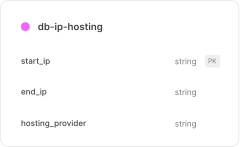
Each start_ip–end_ip link to a hosting_provider name.
- File Size: 3.26 MB
- Entries: 346.1K
- Fields: 3

 README.md
Documentation for dataset contents, schema, usage, and support.
- File Size: 3.09 KB

 checksum.txt
SHA-256 checksums for verifying file integrity.
- File Size: 163 Bytes
Schema
This section describes the schema of each file included in the IP to Hosting Database archive. For every file, you'll find its purpose, field definitions, and examples to help with integration.
1. db-ip-hosting.csv.gz
This file contains IP address ranges associated with hosting providers. It maps each IP block to a specific hosting provider.
| Field | Type | Description | Can be empty? | Example |
|---|---|---|---|---|
| start_ip | string | The starting IP address of the range in IPv4 or IPv6 format. | No | 192.168.0.1 |
| end_ip | string | The ending IP address of the range in IPv4 or IPv6 format. | No | 192.168.0.255 |
| hosting_provider | string | The name of the hosting service provider associated with the IP range. | Yes | DigitalOcean |
I. Example Records
start_ip,end_ip,hosting_provider
1.116.0.0,1.117.255.255,"Tencent cloud computing Beijing Co., Ltd."
1.178.64.0,1.178.65.255,"Amazon.com, Inc."
1.178.80.0,1.178.80.255,iseek Communications Pty Ltd
1.178.100.0,1.178.111.255,"Amazon.com, Inc."
1.227.196.0,1.227.196.255,GSNeotek
1.232.5.0,1.232.5.255,HANVIT BANK
2.26.8.0,2.26.11.255,SERV.HOST GROUP LTD
2.26.144.0,2.26.144.255,Lagom Products LLC
2.26.154.0,2.26.154.255,XTT Ltd Co. LLC
2.26.155.0,2.26.155.255,"Ace Data Centers II, LLC"
2.26.164.0,2.26.164.255,Datacamp Limited
2. File Relationship Diagram
The diagram below illustrates the relationships between the various files included in the CSV database package and what kind of data file contains.
File Format & Encoding
All IP to Hosting CSV datasets are provided in UTF-8 encoding, comma-separated, and compressed with Gzip (.csv.gz). Each file includes a header row listing the field names for clarity and consistency.
Field values are unquoted by default, with quotes applied only in the following cases:
- Line breaks within text fields.
- Commas inside a value (e.g., addresses).
- Lists of values (e.g., languages).
- Spaces that may be auto-quoted by export tools.
MMDB Database Documentation
1. Overview
MMDB version of the database consists of three files: one MMDB file containing IP Hosting data, a README file, and a checksum file, all compressed together in a ZIP file for easy delivery.
2. Archive Content
After downloading and extracting the IP to Hosting MMDB database archive, you'll find the following files (with their types noted):

 db-ip-hosting.mmdb
Contains a list of hosting provider IP addresses. It includes their hosting provider.
- File Size: 9.85 MB
- Entries: 346.1K
README.mdDocumentation for dataset contents, schema, usage, and support.
- File Size: 3.41 KB
checksum.txtSHA-256 checksums for verifying file integrity.
- File Size: 161 Bytes
Response Schema
This section describes the structure of the data returned from the IP to Hosting MMDB file. Each field is detailed with its type, meaning, and example values to help you interpret responses and integrate them into your applications.
1. db-ip-hosting.mmdb
This file contains a comprehensive list of cloud provider IP addresses. It includes their hosting provider names.
2. Field Reference
The following reference lists all fields available in the MMDB response. Each entry includes the field path, its description, data type, and example value to help you understand how to parse and integrate the data.
| Field | Type | Description | Example |
|---|---|---|---|
hosting_provider | string | The name of the hosting service provider associated with the IP range. | DigitalOcean |
I. Example Records
{
  "hosting_provider": "Tencent cloud computing Beijing Co., Ltd."
}
Database Integrity & Authenticity Verification
There are two methods of verifying the integrity and authenticity of our Database:
1. Using the Signature File (Recommended)
IPGeolocation.io signs every database release to ensure its authenticity and integrity. This allows customers to verify that a downloaded IP to Hosting database file originates directly from IPGeolocation.io and has not been altered, corrupted, or tampered with during transfer or storage.
Each database update includes a corresponding signature file, generated using our private signing key. Customers can validate the database using the provided public verification key. To verify a database file, you need:
- Database file (the downloaded archive)
- Signature file (the matching signature for that archive)
- Public key (public-key.pem)
These files are available via official IPGeolocation.io download endpoints and are also shared in database update notifications.
2. Using the Checksum File (Legacy)
Each database archive includes a checksum.txt file containing the SHA-256 checksums for the files packaged in the archive. You can use this file to validate that the extracted contents are complete and unchanged.
Data Format & Constraints
- All fields defined in the schema are always present in the IP to Hosting MMDB response.
- Fields may contain empty strings (""), but never null, so null checks are not required.
- Place names such as countries, states, districts, and cities are available in multiple translations.
- All text values are encoded in UTF-8.
- Field names and response structure remain stable across updates for backward compatibility.
Database Updates & Delivery
When you subscribe to our IP to Hosting database, we'll send you static download links. These links never change, so you can use them both for your initial download and for all future updates. You will receive:
- Database Archive URL : downloads the latest release of your subscribed database (CSV, MMDB or requested formats).
- Signature File URL : downloads the matching signature file for the latest release (used for authenticity verification).
- Public Key URL : downloads the public verification key (used with the signature file).
- Status Endpoint URL : returns the database's most recent update timestamp.
Our databases are updated continuously and shipped on a daily or weekly cycle depending on your plan, ensuring you always have access to the most current data. Each time your subscribed dataset is updated, you'll also receive an email notification so you don't miss a release.
For automated workflows, you can check our status endpoint to see the last update timestamp. When the date changes, simply re-fetch the archive using your static download URL to pull the latest version into your system.
