
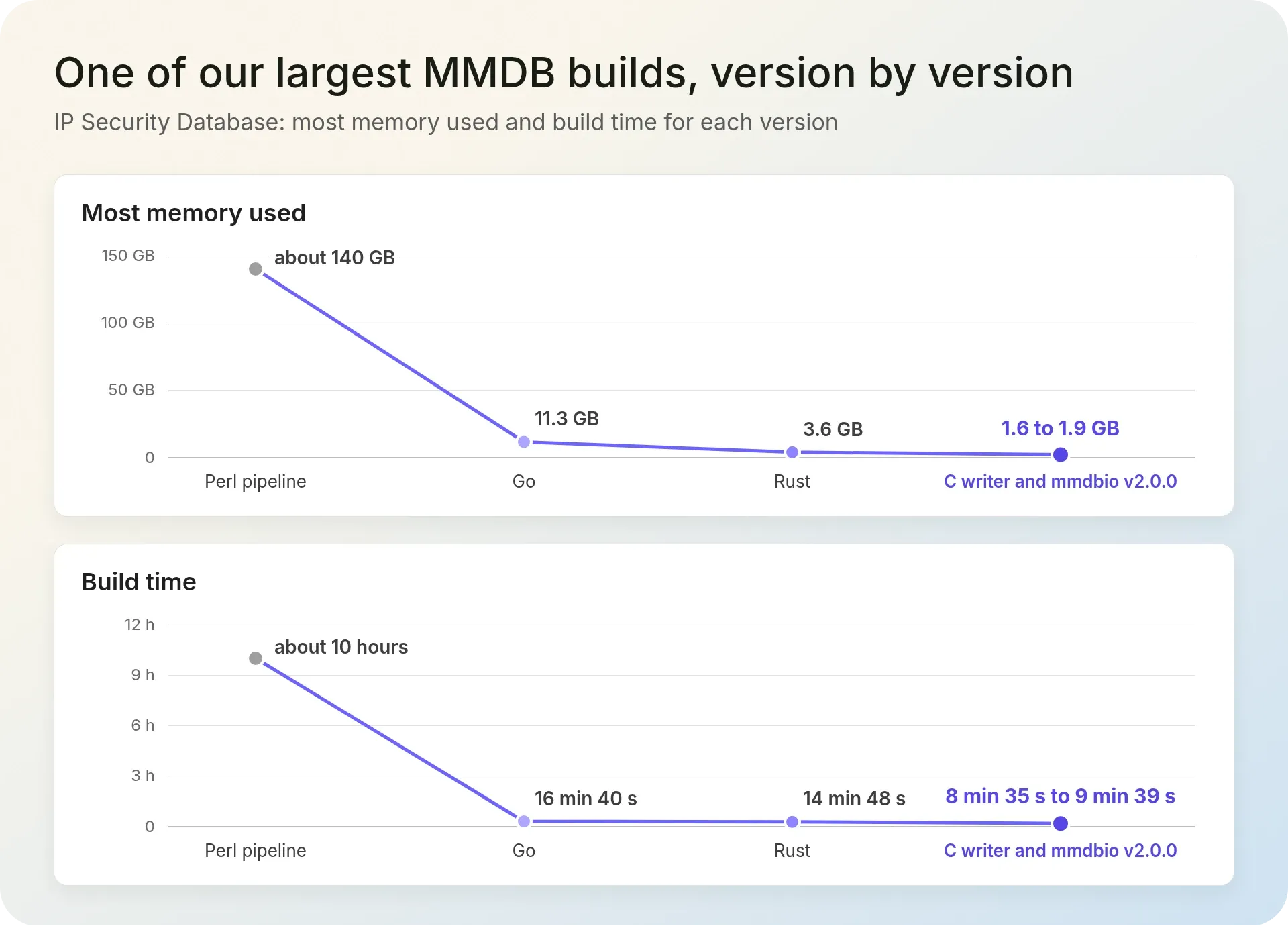
Building one of our largest MMDB files used to take about 10 hours and 140 GB of RAM. In November 2026, mmdbio v2.0.0, IPGeolocation.io's open-source MMDB tool, built the same file in 9 min 39 s with 1.6 GB of RAM. The new file gave the same answer as the old one for all 81,634,547 networks in it.
Our largest database, which holds city, company, ASN, and abuse contact data, needed more than 300 GB of RAM and about 10 hours with our old Perl system. On November 11, 2026, mmdbio built it in 20 min 9 s with 5.2 GB.
mmdbio is free. Version 2.0.0 came out on November 11, 2026, and it builds MMDB files from CSV, TSV, JSON, or NDJSON files. We already build all our MMDB files with this same mmdbio command-line tool.
TL;DR
Building an MMDB file uses most of its memory on the search tree, not on the data. A faster programming language can't fix that alone. IPGeolocation.io's mmdbio saves each part of the tree to the file as soon as that part is done. It sorts the input within a fixed 512 MB of memory, keeps records on disk, and stores repeated records only once. Because of this, the memory it needs no longer grows with the size of the tree.
- Rewriting our Perl code in Go, with a popular Go MMDB library, made builds 1.4x to 11.4x faster in an October 2026 test. It never used less memory.
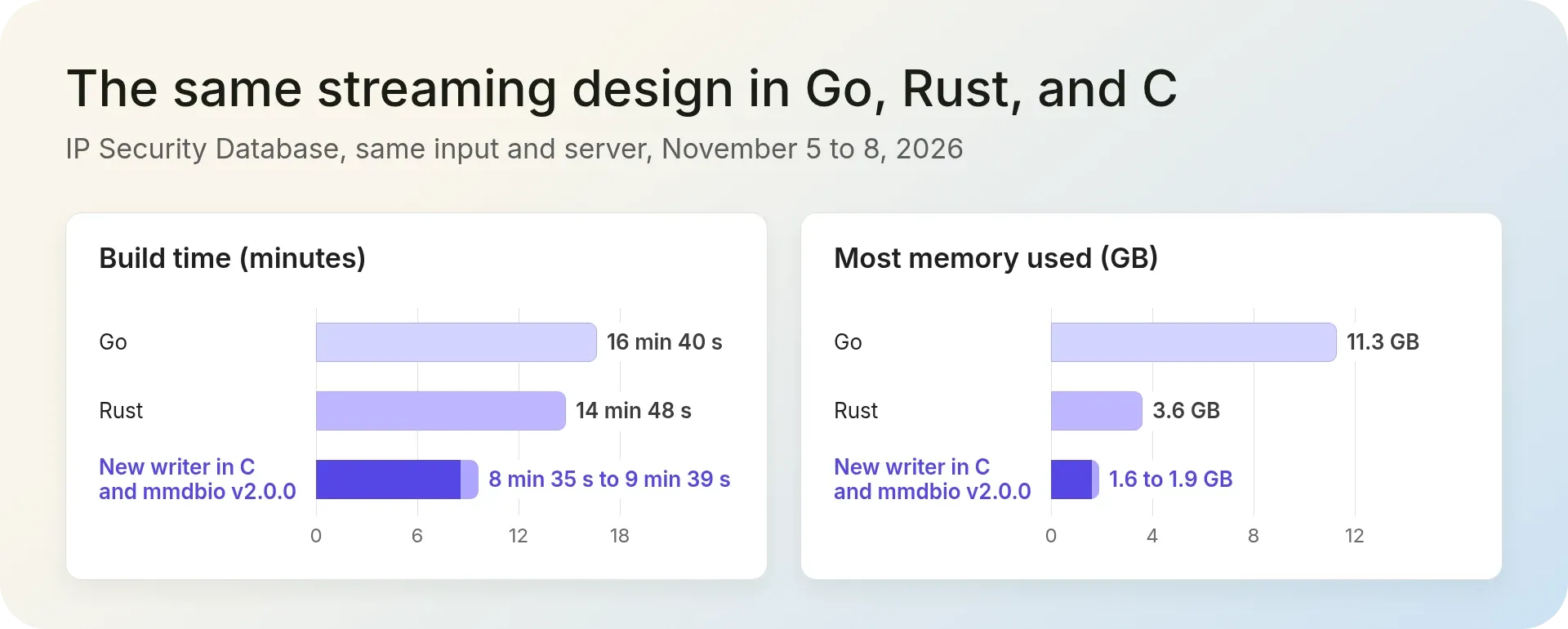
- We wrote the new design in Go, Rust, and C, and all three made exactly the same file. Of the three, C was the fastest and used the least memory: 8 min 35 s to 9 min 39 s and 1.6 to 1.9 GB for the IP Security Database.
- We already build all our MMDB files with mmdbio, and it's free under the Apache 2.0 license.
One of our largest MMDB builds, before and after
One of our largest MMDB builds is the IP Security Database. For each IP range, it shows whether the addresses are VPN, proxy, or Tor addresses, known attackers, bots, or spam sources, and assigns a threat score based on these signals.
In November 2026, the build read 71 million rows of input. It made 16.0 million unique records, 1,394,771,861 search-tree nodes, and 81,634,547 networks. The finished file was about 13 GB before compression. The database grows every day, so the old system needed more memory every day too.
| Old Perl System | Mmdbio V2.0.0 | |
|---|---|---|
| Build time | about 10 hours | 9 min 39 s |
| Most memory used (RAM) | about 140 GB | 1.6 GB |
| Result | the file we compared against | the same answer for all 81,634,547 networks |
In exact numbers, 600 minutes against 9.65 minutes is 62 times faster, and 140 GB against 1.6 GB is 87.5 times less memory. Rounded, that's about 60x faster with about 85x less memory. The 10 hours comes from our team's own runs of the old Perl system before November, when the database was a little smaller. We measured the 140 GB on our build server. We measured mmdbio on the same server on November 8, 2026, three days before v2.0.0 came out.
Why does an MMDB build need so much memory?
Most of the memory goes to the search tree. In a large IP database, the tree is almost the whole file.
An MMDB file is a binary file made for IP lookups, and it's one of the two default formats our databases ship in. It links IP ranges to records and stores them in a search tree. To find the record for an address, a program walks down the tree one bit of the address at a time. That way, it never has to read the whole file. Each point where the tree splits in two is called a node.
Our IP Security Database has 1.39 billion nodes but only 16.0 million unique records. IPv6 ranges need many more nodes than IPv4 ranges. In an earlier check of a smaller security database with 2.3 million rows, each IPv6 range needed about 80 nodes, and each IPv4 range about 6.6.
The tools we started with build the whole tree in memory and only write the file at the end. In the versions we used, the Perl library and a popular Go MMDB library each use 48 to 64 bytes of memory per node. We took these numbers from their code. With 1.39 billion nodes, that's about 67 to 89 GB of memory before a single byte is written. And the data grows every day.
Our rule of thumb: an MMDB writer that keeps the whole tree in memory is fine as long as the tree fits in your RAM with room to spare. Once a tree reaches hundreds of millions of nodes, or your build machine is short on memory, write the tree to disk as you go.
We rewrote everything in Go: faster, but no less memory
Our MMDB files were built by Perl scripts, one for each file. They ran every day and every week, for city, country, ISP, ASN, company, abuse contact, IP security, and more. In early October 2026, we rewrote all of them in Go, using a popular Go MMDB library. We had two goals: stop depending on the Perl library, and get faster builds.
On October 3, 2026, we tested the two libraries side by side. Both got the same test CSV file, the same kind of record (10 text fields and one number), and the same tree settings. Both wrote files of the same size and shape:
| Test | Perl Time | Go Time | Go Was Faster By | Perl Memory | Go Memory |
|---|---|---|---|---|---|
| 1 million rows, 10,000 different records | 29.7 s | 18.7 s | 1.6x | 103 MB | 150 MB |
| 4 million rows, 10,000 different records | 86.5 s | 61.2 s | 1.4x | 238 MB | 517 MB |
| 1 million rows, every record different | 417.6 s | 36.7 s | 11.4x | 2,073 MB | 2,184 MB |
Go was faster in every test, by 1.4x to 11.4x. But it never used less memory. With 4 million rows, it used 517 MB, while Perl used 238 MB, more than twice as much.
On November 5, we measured the real IP Security build and found where the memory went: the search tree, with all 1.39 billion nodes. Both libraries keep every node in memory until the end. A faster language alone couldn't fix that.
Writing the search tree to disk as we go
First, we looked at three other fixes and said no to each one:
- More RAM: the build already needed about 140 GB, and the data grows every day.
- A different library: the Go library kept every node in memory, the same way the Perl one did.
- Storing IPv6 ranges in bigger /64 blocks: this makes the tree about 40% smaller, but it changes the data. We're keeping it as an option for later.
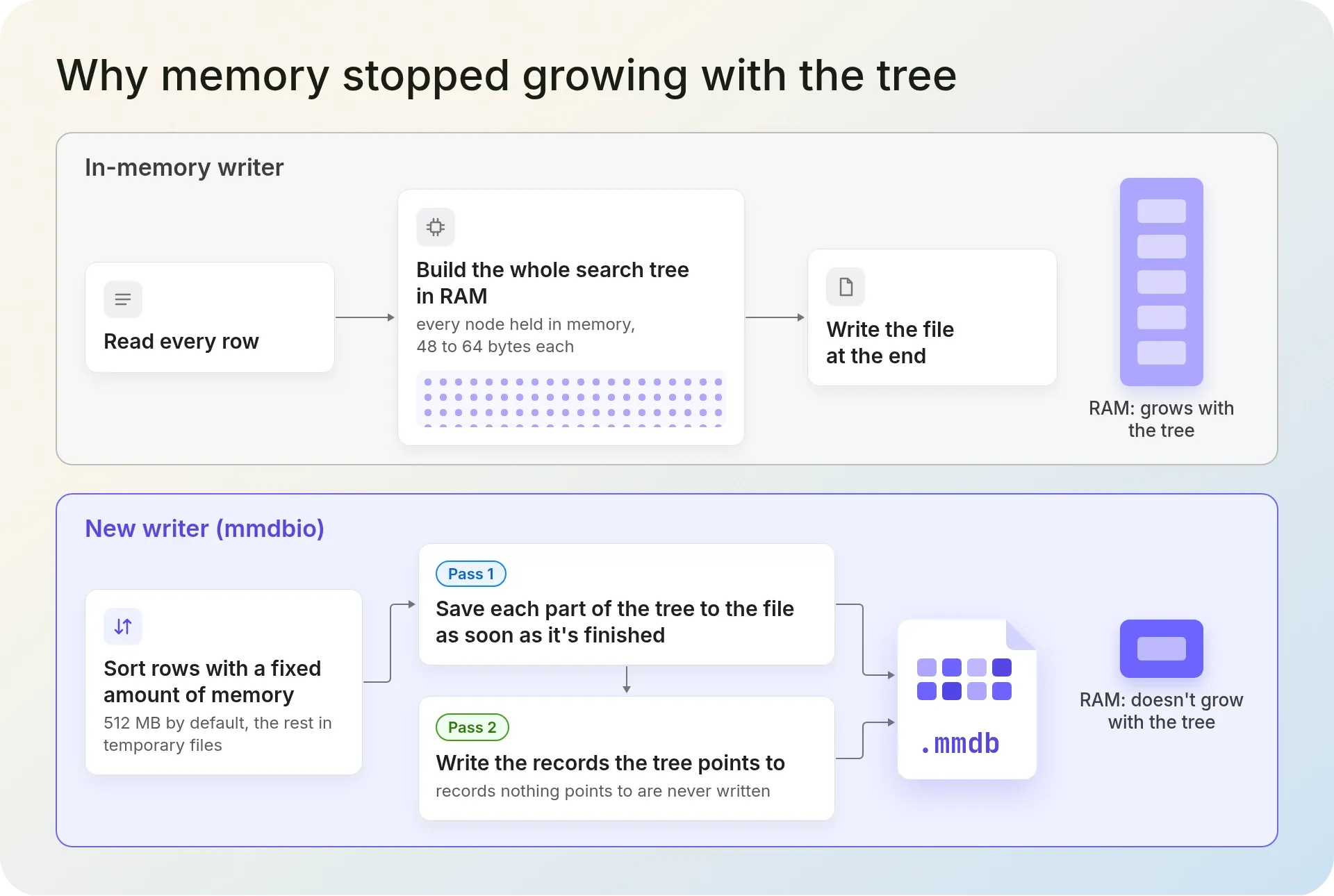
So we changed when the tree gets written. The old tools build the whole tree in memory and save it at the end. Our new writer saves each part of the tree to the file as soon as that part is finished, in the same order the file stores it.
Before that, the writer sorts the input rows. The sort uses a fixed amount of memory, 512 MB by default, and puts the rest in temporary files. A bigger input makes the sort take longer, but it doesn't make it use more memory.
The writer then reads the input twice. The first pass builds the tree on disk. The second pass writes the records the tree points to, so data that nothing points to is never written. Records that are exactly the same are stored only once. To spot them, the writer gives each record a 128-bit fingerprint, called a hash, that includes the type of every value. That way, "5" saved as text and 5 saved as a number never count as the same record.
The first version of this writer, written in Go, built the IP Security Database on November 5 in 16 min 40 s with 11.3 GB. The memory no longer grew with the tree.
mmdbio goes further and saves the record data to disk as well as the tree. The only thing that still grows in memory is a small index entry for each unique record. A build that adds an extra table to its records, such as a list of companies, also needs one entry per row of that table. The records and table rows themselves stay on disk.
That's why the IP Security Database, with 16.0 million unique records and no extra tables, needs only 1.6 GB. Our largest database, the one with city, company, ASN, and abuse contact data, has 38.5 million unique records and adds tables of 3.7 million companies and 15.1 million abuse contacts. It needs 5.2 GB, even though its tree is much smaller.
Go, Rust, and C: the same design three times
On November 6, we wrote the new writer again in Rust and in C. The C version went one step further: it also saved the record data to disk instead of keeping it in memory. All three versions made exactly the same file, byte for byte, from the same input on the same server.
| Version | Build Time | Most Memory Used | Faster Than Perl | Less Memory Than Perl |
|---|---|---|---|---|
| Old Perl system | about 10 h | about 140 GB | 1x | 1x |
| New writer in Go | 16 min 40 s | 11.3 GB | 36x | 12x |
| New writer in Rust | 14 min 48 s | 3.6 GB | 41x | 39x |
| New writer in C and mmdbio v2.0.0 | 8 min 35 s to 9 min 39 s | 1.6 to 1.9 GB | 62x to 70x | 74x to 87.5x |
All the new versions built the IP Security Database from the same input, on our build server, between November 5 and 8, 2026.
Our C builds were 1.5x to 1.7x faster than our Rust version and used 1.9x to 2.25x less memory. Most of that memory difference comes from C saving the record data to disk.
The C row covers two programs. The C writer only accepts rows that are already sorted and don't overlap, and it was about a minute faster; mmdbio, which grew out of it and accepts rows in any order, used 0.3 GB less memory.
We also wrote two smaller C writers for two lookup files that our API uses: one for ASN details and one for abuse contacts. Here's how long each file took with the old Perl scripts and with the new C writers:
| Lookup File | Old Perl Script (November 10, 2026) | New C Writer (November 7, 2026) | Faster By |
|---|---|---|---|
| ASN details | 12 min 28 s | 23 s, 34 MB of memory | about 32x |
| Abuse contacts | 1 h 36 min 31 s | 1 min 34 s, 825 MB of memory | about 62x |
The new ASN file matched the Perl output exactly. The abuse contact writer reads a contact file of 15.3 million rows and 2.57 GB without loading all of it into memory.
From one writer to mmdbio v2.0.0
Three writers meant three programs to look after. So we merged them into one program that reads a settings file, called a config file, for each database. Adding a database now means editing settings, not writing new code. The merged program made exactly the same files as the three separate writers.
mmdbio was already our free command-line tool for reading, exporting, and comparing MMDB files. Versions 1.x were written in Go. Between November 7 and 11, we rewrote it in C, on top of the new writer. Version 2.0.0 can:
- read CSV, TSV, JSON, and NDJSON files, whether or not they're compressed with gzip;
- take its settings from a config file;
- combine data from several CSV files into one nested record, using record templates.
We now build every MMDB file we make with it: our product files and bundles, files for our API, and custom builds for customers.
We also built our city databases with mmdbio on our production server. The largest one holds city, company, ASN, and abuse contact data, and it's our largest MMDB database overall. It read 41.4 million rows and wrote a 5.05 GB file with 38.5 million unique records and 177.8 million tree nodes. All three city databases gave the same answers as the old Perl-built files:
| Database | Build Date | Build Time | Most Memory Used | Compared With The Old Perl File |
|---|---|---|---|---|
| Our largest database (city, company, ASN, and abuse contact data) | November 11, 2026 | 20 min 9 s | 5.2 GB | the same: 0 added, 0 removed, 0 changed |
| City database, larger edition | November 8, 2026 | 17 min 22 s | 3.3 GB | the same |
| City database, smaller edition | November 8, 2026 | 2 min 10 s | 1.3 GB | the same |
How we proved the new files give the same answers
A faster build is no use if the answers change. So we compared every new file with the file it was replacing, one network at a time.
We used mmdbio diff for this. It goes through both files in address order. For each network, such as 192.0.2.0/24, it finds the same network in the other file and compares every field. Every IP address belongs to exactly one network. So if the result is "0 added, 0 removed, 0 changed", every IP address gets the same answer from both files.
Most of these checks ran on November 8 and 9, 2026, and our largest database's on November 11. Here's what we found, plus the tests that run every time mmdbio changes:
- IP Security Database: the new file has the same 1,394,771,861 tree nodes and the same 81,634,547 networks as the Perl file, and every lookup gives the same answer. Three separate comparison tools agreed.
- Files with an old Perl copy to compare against: each one was the same, or it differed for a reason we already knew. Three security files differ by 313 networks added and 36 removed, because we changed two settings on purpose. The new files keep reserved IP ranges, and an IPv4 address looked up in its IPv6 form now gets the IPv4 answer.
- Files with no old copy to compare against: we ran the old Perl scripts on samples of real data and compared the results. Seven matched exactly. The eighth, IP to ASN (Extended), differed in 7 ranges. Each of them was a record the Perl library had written wrong, because of a size bug in that library.
mmdbio verifymarked the Perl file as invalid and the new one as valid. - Every change to mmdbio: about 1,800 automatic checks run. 1,380 of them give broken or cut-off files to every command, to make sure each one fails safely. We also run memory-safety checks and make sure the output is the same on Linux and Windows.
What surprised us along the way
1. 1.26 TB of temporary files
One of our bundles combines city, company, and ASN data. Each of its 37 million different records carries the full ASN data, up to 434 KB of it. An early build saved every record in full. After 9.5 hours, with 83% of the input done, it had written 1.26 TB of temporary files, so we stopped it.
Now mmdbio stores a large shared part only once, and each record points to it. On November 9, the same build wrote 53 GB to disk in total. It finished in 17 min 26 s and used 4.2 GB of RAM.
2. A 95-minute step that became 6 seconds
In IP to ASN (Extended), one ASN covers 540,000 of the first 3 million ranges, and its data is up to 434 KB. Our first version rebuilt that same record for every one of those ranges, which took over 95 minutes for the first 3 million rows alone.
We added a cache, so a record built from the same input values is reused instead of built again. On November 8, the same step took 5.9 seconds, and the output was exactly the same, byte for byte.
3. A size bug in the Perl library we used
An MMDB file stores each value with its size in front of it. A size under 29 fits in the value's first byte. From 29 bytes, the size needs one extra byte. From 285 bytes it needs two, and from 65,821 bytes it needs three. (285 is 29 + 256, and 65,821 is 285 + 65,536.)
The Perl library we used writes exactly those two sizes wrong. So a value that is exactly 285 or 65,821 bytes long breaks the record it's in. mmdbio doesn't have this bug, and mmdbio verify reports a file with such records as invalid.
4. A limit no tool can get around
The MMDB format uses 32-bit numbers to point to its data, so the data part of the file can't be bigger than 4 GiB. With 32-bit tree records, the number of tree nodes plus the size of the data part must also stay under 2^32, which is about 4.3 billion. The file itself can be bigger: our IP Security Database file is about 13 GB. mmdbio checks this limit. If a build goes over it, mmdbio stops with an error instead of writing a broken file.
Our IP Security Database grows every day, so the room it has left under this limit shrinks every day too. When a build hits the limit, there are three options: store IPv6 ranges in bigger /64 blocks, split IPv4 and IPv6 into two files, or drop some fields. To see how close a file is to the limit, run mmdbio metadata --db file.mmdb --layout. It shows the number of nodes and the size of the tree and the data part.
Try mmdbio v2.0.0
mmdbio is a single program, with nothing else to install. Version 2.0.0 has ready-made builds for 12 platforms: Linux (amd64, 386, arm64, and armv7), macOS (Intel and Apple Silicon), Windows (64-bit and 32-bit), FreeBSD, OpenBSD, NetBSD, and DragonFly BSD. There are also .deb and .rpm packages. The Linux builds carry everything they need inside them (they're statically linked), so they work on any Linux system, Alpine included.
- Install it:
# Linux and macOS
curl -fsSL https://raw.githubusercontent.com/IPGeolocation/mmdbio/main/install.sh | sh
# Windows (PowerShell
irm https://raw.githubusercontent.com/IPGeolocation/mmdbio/main/install.ps1 | iexBoth scripts download the right file for your computer. Before they install anything, they check it against the SHA-256 checksums published with the release. The .deb and .rpm packages are on the v2.0.0 release page. Then check that it worked:
mmdbio --versionmmdbio version 2.0.0If you see mmdbio: command not found, the script put mmdbio in ~/.local/bin, a folder your system doesn't search for programs (it isn't on your PATH). The script prints a note when this happens.
- Save this as
ips.csv. The addresses come from ranges set aside for examples, and the values are made up:
network,country,city,asn,is_vpn,score
192.0.2.0/24,US,Chicago,64496,false,5
198.51.100.0/24,DE,Berlin,64497,true,80
203.0.113.0/24,JP,Tokyo,64498,false,10
2001:db8::/32,NL,Amsterdam,64499,true,90- Build an MMDB file from it. The
--typeoptions store three columns as numbers and true or false values instead of text:
mmdbio import --in ips.csv --type asn=uint32 --type is_vpn=boolean --type score=uint16input: CSV (comma-delimited, with a header); network column "network"; 5 fields
rows: 4 read, 4 inserted, 0 skipped
tree: 4 unique records, 186 search-tree nodes, record size 24, 1,481 bytes
✅ Successfully wrote 4 entries to ips.mmdbmmdbio found the column with the IP ranges by its name, network. It also knows names like cidr, ip, or a start_ip and end_ip pair. Even these four networks need 186 tree nodes. That's because the file keeps IPv4 inside an IPv6 tree, 96 steps down, and each bit of a range adds one more step. In a large file, ranges share most of those steps, so the average drops to a few nodes per range.
- Look up an address:
mmdbio read --db ips.mmdb --ip 198.51.100.7{
"asn": 64497,
"city": "Berlin",
"country": "DE",
"is_vpn": true,
"score": 80
}If an address isn't in any range, mmdbio prints No data found for that IP.
- Export the VPN ranges as a list of IP blocks that a firewall can load:
mmdbio export --db ips.mmdb --where is_vpn=true -f cidr198.51.100.0/24
2001:db8::/32mmdbio also prints a summary line, Exported 2 networks as 2 CIDRs to stdout. It goes to the error output (stderr), so if you save the output to a file, the file gets only the IP blocks.
Here are all the commands:
| Command | What It Does |
|---|---|
import | Builds an MMDB file from CSV, TSV, JSON, or NDJSON, compressed with gzip or not |
read | Looks up IP addresses, CIDR blocks, ranges, or a file of addresses |
export | Writes the data out as JSON, JSON Lines, CSV, or TSV, or as a list of IP blocks |
diff | Compares two files and lists the networks added, removed, or changed |
verify | Checks that a file is valid, and exits with status 1 if it isn't |
shrink | Makes a file smaller and checks that every answer stays the same |
metadata, stats, inspect | Show what a file holds and how it's laid out |
completion | Sets up Tab completion for bash, zsh, fish, or PowerShell |
The same code also comes as a C library, libmmdbio, for programs that need to read or build MMDB files. The Linux download includes libmmdbio.a and mmdbio.h. Every command and option from the Go version (1.x) still works, and the 1.x releases stay on GitHub. mmdbio is free and open source under the Apache License 2.0. The code and downloads are on GitHub, and the mmdbio documentation explains every command and option, including config files and record templates.
MMDB databases from IPGeolocation.io
IPGeolocation.io ships its location, security, ASN, company, and abuse contact databases as MMDB and CSV files. Its IP WHOIS and ASN WHOIS databases come as NDJSON. Location records include the time zone of each place, and we build them from registry data, geofeeds, corrections, and active measurement. The security data adds its risk flags and a threat score. The ASN, company, and abuse contact databases tell you who routes each range, who holds it, and where to report abuse. You can also get the same kinds of data, plus user agent details, one lookup at a time through our APIs.
Every database has a free sample in CSV and MMDB on the Geo Standard, Geo Advanced, and Security Pro pages. You can open one with mmdbio read or mmdbio stats before you talk to us. Our database documentation lists every field.
Frequently asked questions
Use mmdbio, IPGeolocation.io's free command-line tool for MMDB files, and run mmdbio import --in yourfile.csv. It finds the column with the IP ranges by its name (such as network, cidr, ip, or start_ip and end_ip), turns every other column into a field, and writes yourfile.mmdb. To store numbers and true or false values as real types instead of text, add --type options such as --type asn=uint32.
The file itself has no size limit, but the data inside it does. The MMDB format uses 32-bit numbers to point to its data, so the data part can't be bigger than 4 GiB. With 32-bit tree records, the number of tree nodes plus the size of the data part must also stay under 2^32, about 4.3 billion. IPGeolocation.io's IP Security Database file was about 13 GB in November 2026 and fits.
It depends on the MMDB writer. A writer that keeps every node of the search tree in memory needs about 48 to 64 bytes per node. So a tree with a billion nodes needs tens of gigabytes. mmdbio writes the tree to disk as it goes. In November 2026, it built IPGeolocation.io's IP Security Database, which has 1.39 billion nodes, using 1.6 GB of RAM.
Yes. With IPGeolocation.io's mmdbio, run mmdbio export --db file.mmdb --out file.csv to write every network and its record to a CSV file. The file ending sets the format, so .json, .jsonl, and .tsv work too. To get only the IP blocks, add -f cidr, and neighboring blocks are joined together.