


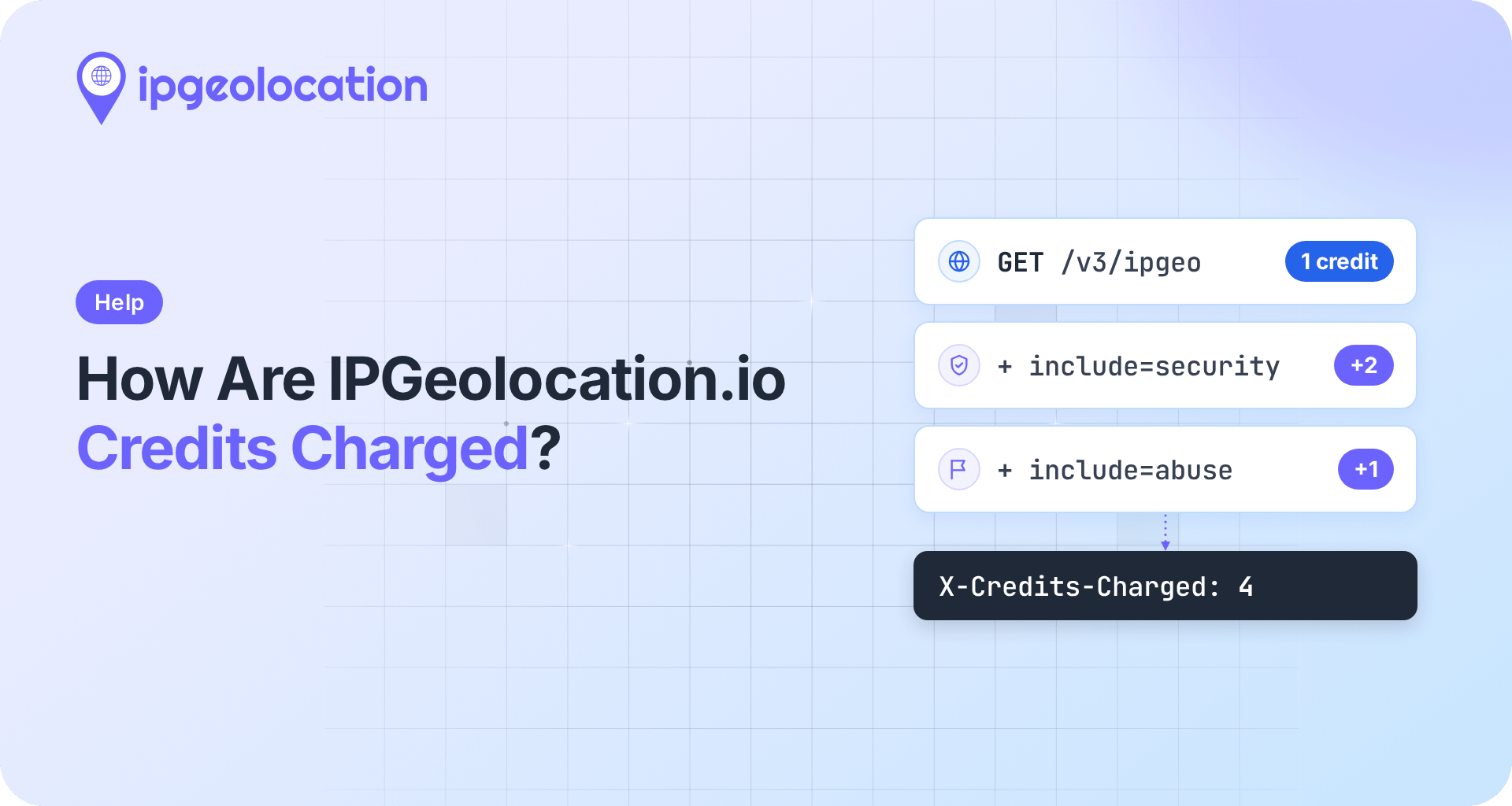
IPGeolocation.io charges API credits for successful requests. A standard IP lookup costs 1 credit. Adding security data costs 2 extra credits, while adding abuse contact data costs 1 extra credit. A lookup that includes both costs 4 credits.
Every successful response includes an X-Credits-Charged header showing the number of credits deducted. Use it to check the actual cost of a request.
Security data includes VPN, proxy, Tor, and bot detection signals, along with a threat score. The credits usage documentation lists the cost of each endpoint and supported combination of fields.
TL;DR
IPGeolocation.io credits are allocated daily on the free plan and monthly or yearly on paid plans. The free plan includes 1,000 credits per day, which reset at 12:00 AM UTC; once they're used up, the API returns a 429 response; paid plans keep serving past their allowance through overage, which is on by default and capped per plan.
- User agent parsing, time zone, DMA code, accuracy fields, and hostname add no credits to an IP lookup.
- Bulk requests charge each valid IP according to the single-IP rules and skip private, bogon, and malformed entries.
- Unused credits don't roll over: monthly plans reset every month, annual plans every year.
What counts as a billable request
A request uses credits only when the API answers with HTTP 200. Every other status costs nothing, including:
- 401, when the API key is missing, or a free-plan key calls a paid-only endpoint
- 423, for a private or bogon IP
- 429, when your credits are used up
- any 5xx error on our side
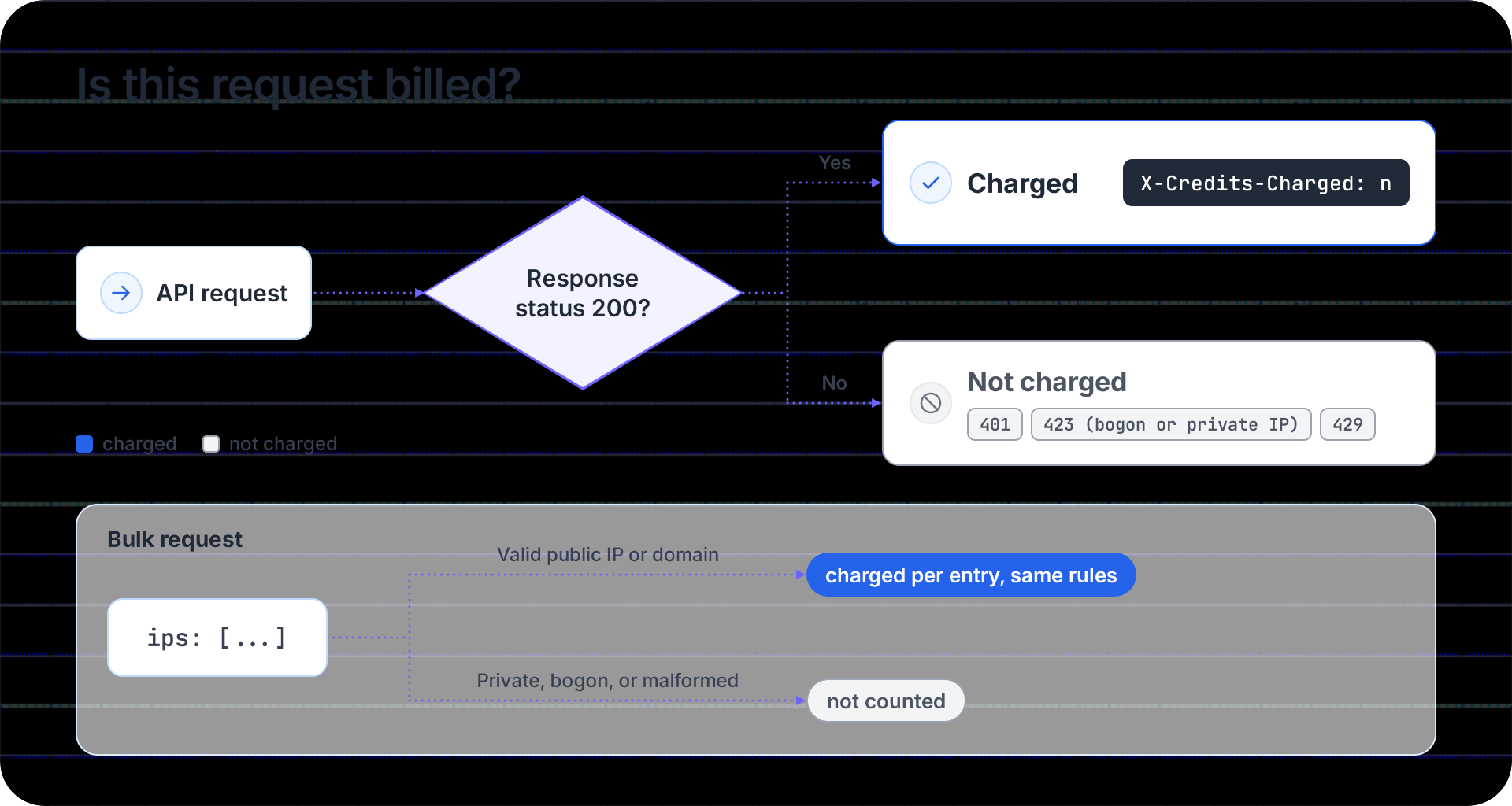
Every billed response includes the X-Credits-Charged header, and that header is the billing source of truth.
One endpoint never touches your balance: the Get IP utility at /v3/getip needs no API key and uses no credits.
What a call to the IP Geolocation API costs
A lookup using the unified IP Geolocation API endpoint costs one credit. Only two optional modules incur additional credits; security data costs 2 more, and abuse contact data costs 1 more. Bulk lookups through /v3/ipgeo-bulk follow the same table for each valid IP.
| What you request | Parameters | Credits per successful lookup |
|---|---|---|
| Default lookup | ip=... or no ip (caller's IP) |
1 |
| Plus security data | include=security |
3 |
| Plus abuse contact data | include=abuse |
2 |
| Plus security and abuse contact data | include=security,abuse |
4 |
| Plus user agent, DMA code, accuracy fields, and hostname | include=user_agent,dma_code,geo_accuracy,hostname |
1 |
| Everything | include=* |
4 |
| Security data only | include=security&fields=security |
2 |
| Abuse contact data only | include=abuse&fields=abuse |
1 |
| Security and abuse contact data only | include=security,abuse&fields=security,abuse |
3 |
The last three rows are the ones that save credits when you need a single object. When fields limits the response to the security or abuse object, the API returns no base location data, so it doesn't charge the base credit either. Security alone costs 2 credits instead of 3. If your code reads only the security fields and discards the location data, this route saves 1 credit on every call.
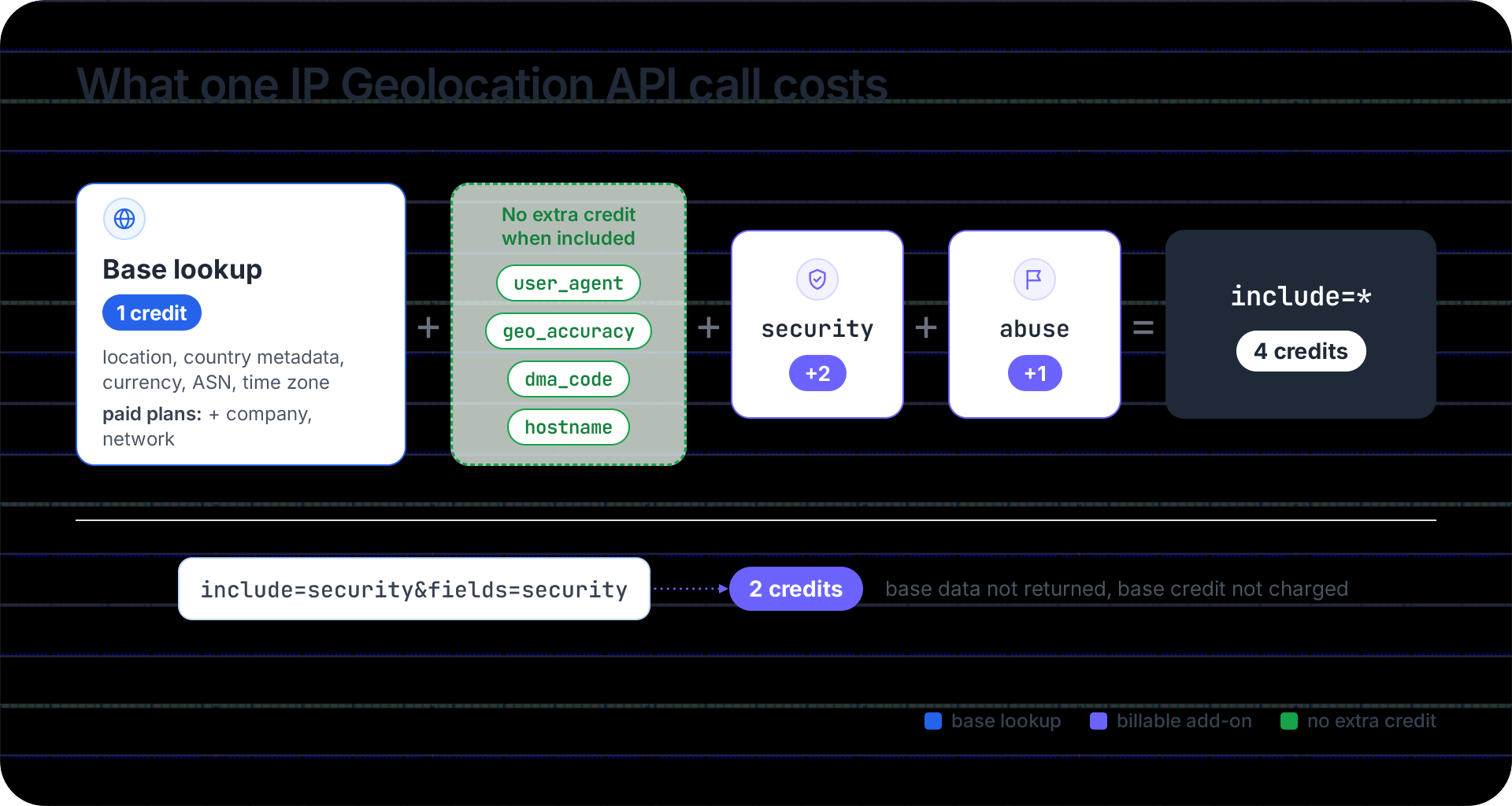
The include parameter is available on paid plans, so on the free plan every successful lookup costs 1 credit. fields and excludes work on every plan. Their full behavior, including how they combine, is in the IP Geolocation API documentation on include, fields, and excludes.
Dedicated APIs charge a fixed number of credits per call
Each dedicated API returns one kind of data and charges a fixed number of credits per request, as long as the request succeeds.
| Dedicated API | Endpoint | Credits per success |
|---|---|---|
| IP Security API | /v3/security, /v3/security-bulk | 2 |
| ASN API | /v3/asn | 1 |
| IP Abuse Contact API | /v3/abuse | 1 |
| Time Zone API | /v3/timezone, /v3/timezone/convert | 1 |
| User Agent API | /v3/user-agent, /v3/user-agent-bulk | 1 |
| Astronomy API | /v3/astronomy, /v3/astronomy/timeSeries | 1 |
Bulk endpoints charge the per-call credits for each valid entry: a bulk security request with 1,000 valid IPs costs 2,000 credits. The User Agent API charges 1 credit per parsed user-agent string. Which dedicated APIs each plan includes is listed on the pricing page.
Real-Time VPN and Proxy Detection credits
Each Real-Time VPN and Proxy Detection check costs 3 credits, deducted from the same credits pool as your API requests.
Optional modules that reveal additional information about the visitor's public IP cost extra credits. You pass them in the include string to startMonitoring(). Security data adds 2, for 5 credits per call. Location, ASN, and company data share a single extra credit, so adding one of them or all three costs 4 per call. Asking for everything with all costs 6, and so does security,location.
Setup runs in the browser and is authorized by request origin instead of an API key. The Real-Time VPN and Proxy Detection docs walk through it.
How bulk lookups are charged
A bulk request costs the per-lookup credits multiplied by the number of valid IPs in it. Private, bogon, and malformed entries don't count as valid, so they use no credits. The API returns a short message for each of them alongside the results for the valid ones.
Take a 50,000-entry bulk request with include=security in which 1,200 entries turn out to be private addresses from your internal logs. It costs 3 credits per valid IP, for 48,800 valid IPs, or 146,400 credits. Fifty thousand entries is also the most one bulk request can hold on the IP Geolocation, IP Security, and User Agent bulk endpoints.
When a bulk request contains at least one invalid entry, the response also carries an X-Successful-Record header with the number of entries that returned data. Multiply that number by the per-lookup credits, and the result should match X-Credits-Charged.
Unified endpoint or a dedicated API: which one costs less?
If you need location plus anything else, one unified call costs the same as separate calls or less. If you need a single data type, the dedicated API or a fields-limited call is cheaper.
| You need | Cheapest call | Credits | The alternative |
|---|---|---|---|
| Location and the parsed user agent | /v3/ipgeo?include=user_agent | 1 | /v3/ipgeo plus /v3/user-agent: 2 |
| Location and security data | /v3/ipgeo?include=security | 3 | /v3/ipgeo plus /v3/security: 3, in two calls |
| Security data only | /v3/security, or /v3/ipgeo?include=security&fields=security | 2 | /v3/ipgeo?include=security : 3 |
| Abuse contact data only | /v3/abuse, or /v3/ipgeo?include=abuse&fields=abuse | 1 | /v3/ipgeo?include=abuse: 2 |
| An AS's peers, upstreams, downstreams, routes, or WHOIS record | /v3/asn with include | 1 | not available on the unified endpoint |
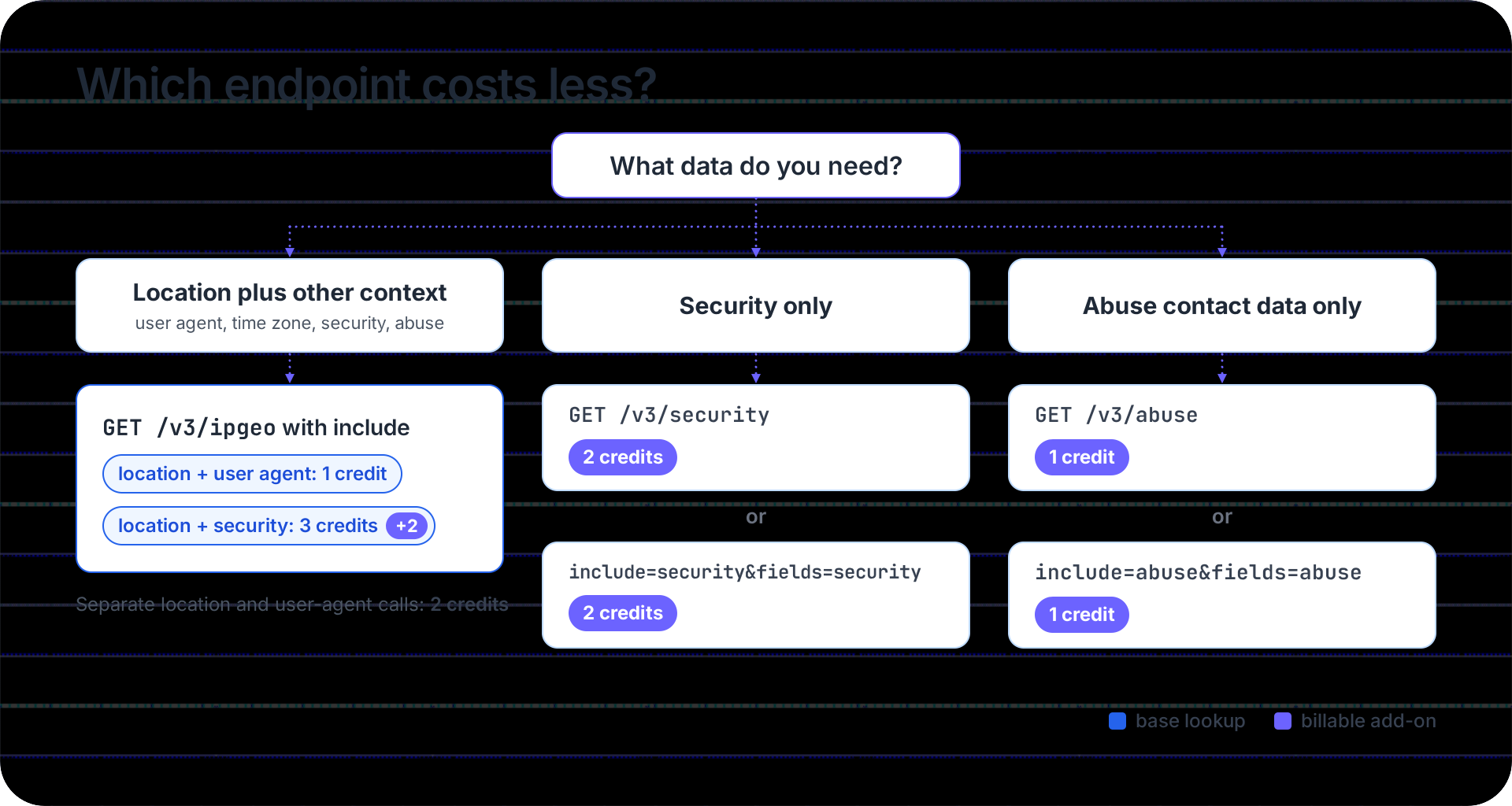
Send one unified call wherever you'd otherwise make two. On every plan, the base credit already covers location, country metadata, currency, basic ASN, and time zone. Paid plans include company and network details, and the parsed user agent is provided at no extra charge.
When a service only ever needs one answer, such as a fraud worker that reads the threat score and nothing else, use the dedicated API. It costs the same as the fields route, and its credits consumption can't change by accident. If someone removes fields from a unified call, the same request starts costing 3 credits instead of 2.
How to estimate your monthly credits
Start from the events that trigger a lookup, multiply each by its per-call credits, and count lookups after caching rather than raw traffic. Here is the arithmetic for an example app with three triggers.
| Trigger (example app) | Lookups per month | Call | Credits each | Credits per month |
|---|---|---|---|---|
| Signup risk check | 40,000 signups | include=security | 3 | 120,000 |
| Login location check, cached per IP for 24 hours | 300,000 logins, about 90,000 lookups after caching | default | 1 | 90,000 |
| Page personalization, cached per IP for 24 hours | 1,000,000 page views, about 150,000 lookups after caching | default | 1 | 150,000 |
| Total | 360,000 |
The signups aren't cached because each one is a fresh risk decision, usually from an IP you haven't seen. Without the cache on the other two lines, the same app would spend 1,420,000 credits a month, nearly four times as much, because every login and page view would trigger its own lookup. Note also where the credits go: signups have the smallest volume but account for a third of the total because the security check triples their credits.
To get your own post-cache number, count distinct IPs per cache window in your access logs (per day, for a 24-hour cache) and add up the windows in a month.
To finish the estimate, add headroom for growth and retries (we'd plan for about a fifth on top) and compare the total with the plan allowances on the pricing page. The pricing calculator does the same sum if you enter requests per module.
What happens when you run out of credits
When credits run out, the free plan stops serving requests, and paid plans keep serving through overage unless you've turned it off or reached its cap.
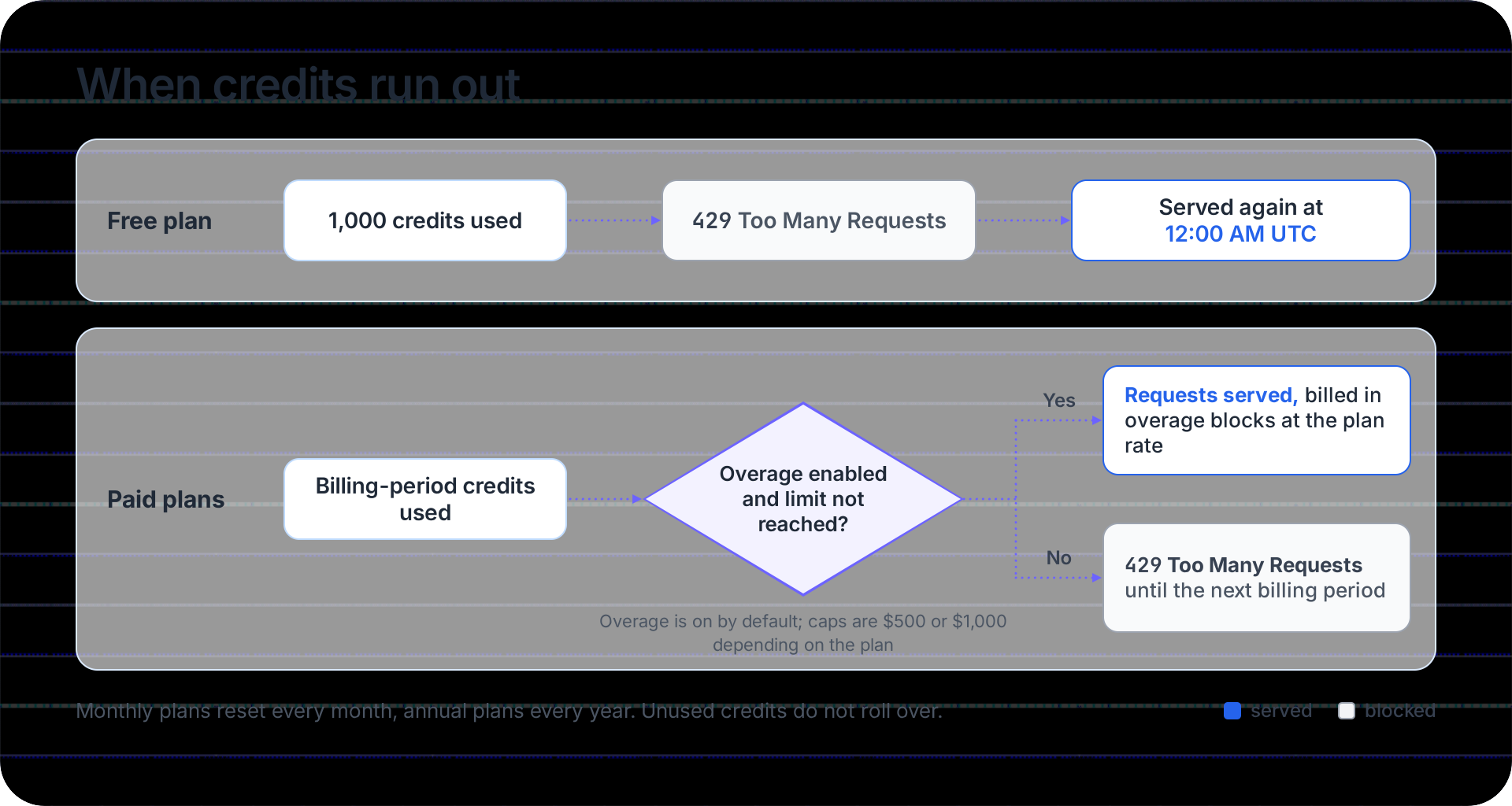
The free plan includes 1,000 credits a day with no overage. Once they're used, the API returns 429 Too Many Requests until the allowance resets at 12:00 AM UTC.
On paid plans, overage is on by default. When a billing period's credits run out, requests keep being served, and the extra usage is billed in fixed blocks of credits at your plan's rate (on the Starter plan, for example, $5 buys 25,000 extra credits), up to the plan's maximum surcharge amount ($500 or $1,000, depending on the plan). If you've turned overage off or reach the cap, the API returns 429 until the next billing period starts. Block sizes and rates for each plan are on the pricing page.
Credits don't roll over. Monthly plans reset monthly, and annual plans reset yearly; an annual plan's yearly allowance can be spent unevenly across months, which suits seasonal traffic.
How to check what each request cost
Read the X-Credits-Charged header on every successful response. With curl, the -i flag prints response headers above the body:
curl -i 'https://api.ipgeolocation.io/v3/ipgeo?apiKey=YOUR_API_KEY&ip=165.227.0.0&include=security,abuse'
For this request, the response headers include the charge (trimmed):
HTTP/2 200
X-Credits-Charged: 4
In application code, log the header next to the request so you can match spend to the feature that caused it. This Python version reads the key from an environment variable and handles both network errors and non-200 responses:
import os
import sys

import requests

API_KEY = os.environ.get("IPGEO_API_KEY")
if not API_KEY:
    sys.exit("Set IPGEO_API_KEY before running this script.")

params = {
    "apiKey": API_KEY,
    "ip": "165.227.0.0",
    "include": "security,abuse",  # paid-plan modules: +2 and +1 on top of the base credit
}

try:
    response = requests.get(
        "https://api.ipgeolocation.io/v3/ipgeo", params=params, timeout=10
    )
except requests.RequestException as exc:
    sys.exit(f"Request failed before a response arrived: {exc}")

if response.status_code == 200:
    # The header is the billing source of truth, so record it with the call.
    charged = response.headers.get("X-Credits-Charged", "missing")
    print(f"Credits charged: {charged}")
else:
    # Non-200 responses aren't billed; the body says why the call failed.
    print(f"HTTP {response.status_code}, no credits charged: {response.text[:200]}")
With a paid key, it prints Credits charged: 4. On a free key, delete the include line first, because include is a paid-plan feature. The same lookup then prints Credits charged: 1.
For totals rather than single calls, the dashboard shows credits used, credits remaining, and usage history. Paid plans also come with extra API keys and request origins. Giving each service its own key shows you which one spends the most. The tutorial on securing and monitoring your API key covers the rest of that setup.
Ways to use fewer credits
Two habits save the most: don't look up the same IP twice, and don't pay for data you throw away.
- Cache results per IP for a period that fits your use, such as 24 hours for personalization.
- Leave
securityandabuseout ofincludeon calls that never read them. - Use
fieldsor a dedicated API when you need a single answer. Security alone costs 2 credits, not 3. - Get combined data in one call instead of chaining calls. Location plus the parsed user agent costs 1 credit in one call and 2 in two.
- Drop private and reserved IPs before you call. They aren't billed, but each one is a wasted round trip on a single-lookup endpoint.
- Use bulk for throughput, not discounts. A bulk request costs the same credits per IP and replaces up to 50,000 single calls with one.
At very high volume, such as enriching years of logs in one pass, per-call billing stops making sense, and a downloadable database fits better. The guide on when a database beats per-call billing walks through that choice.
One call, the full IP picture
One IPGeolocation.io call returns the most complete IP profile we know of: location, security data, ASN, company, abuse contact data, time zone, and the parsed user agent. The base credit covers everything except security data (2 more) and abuse contact data (1 more). You pay for those two only on calls that request them.
We build the data in-house. Our crawlers run around the clock, and we build each result from independent signals, cross-checking for consistency before it reaches your response. The same endpoints and response shape apply on every plan, so moving up a tier changes your allowance, not your code. When you need browser detection, Real-Time VPN and Proxy Detection draw from the same balance.
To see which data each plan includes and what extra credits cost, compare plans on the pricing page.
FAQ
The IPGeolocation.io free plan gives you 1,000 credits per day. On the free plan, every successful lookup costs 1 credit, so that works out to 1,000 successful lookups a day. Failed requests don't count against it.
The free plan allows 1,000 credits a day, resets at 12:00 AM UTC, and has no overage. Once you use your credits, requests return 429 until the reset. It has no per-second or per-minute limit, and paid-only modules, such as security and abuse data, aren't available.
No. IPGeolocation.io charges credits only for responses with HTTP status 200, so 401, 423, 429, and 5xx responses cost nothing. In bulk requests, private, bogon, and malformed entries are skipped and not charged.
A security lookup costs 2 credits on the IP Security API, or 2 on the unified endpoint with include=security&fields=security. Adding security data to a full IP Geolocation API lookup with include=security costs 3 credits: 1 for the lookup and 2 for security.
Not on the unified IP Geolocation API endpoint. Time zone data is included in every response, and user agent parsing is added with include=user_agent, both within the 1-credit base lookup. Called on their own, the Time Zone API and User Agent API cost 1 credit each.
No. IPGeolocation.io monthly plans reset credits monthly, and annual plans reset them annually; unused credits expire at the reset. The free plan's 1,000 daily credits reset at 00:00 UTC.
On IPGeolocation.io paid plans, requests continue through overage, which is on by default and billed in blocks up to a cap of $500 or $1,000, depending on the plan. Once you reach the cap, or if overage is off, the API returns 429. The free plan returns 429 until 00:00 UTC.
IPGeolocation.io has no per-second or per-minute rate limits on any plan, as our rate limit FAQ states. Usage is limited by available credits; a 429 response indicates you've exhausted your credits or reached the overage limit.
Get your API key
The free plan gives you 1,000 credits a day with no credit card, enough to measure what your own traffic costs before you choose a plan. Create a free account and make your first request, then check X-Credits-Charged on the response.