
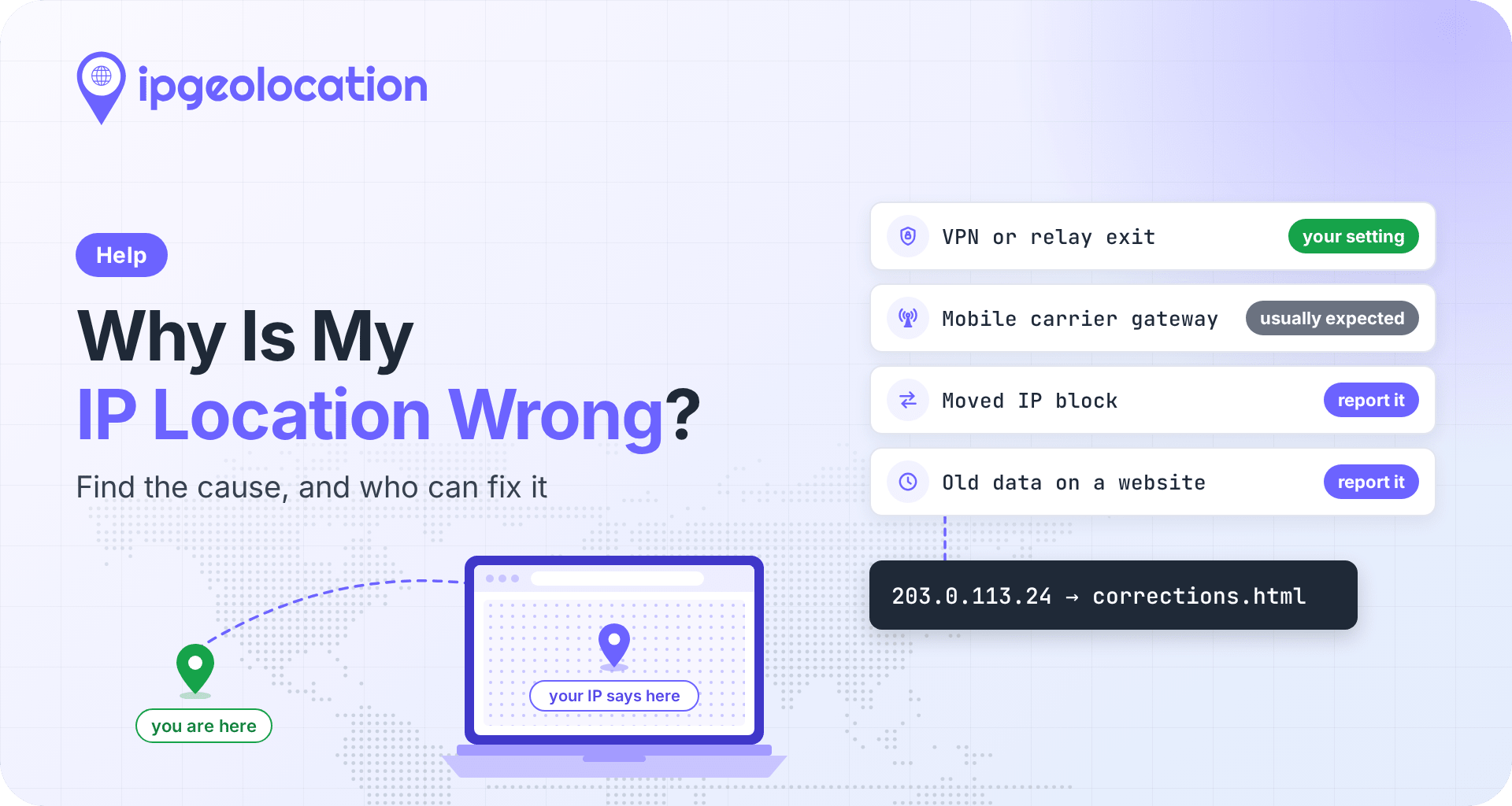
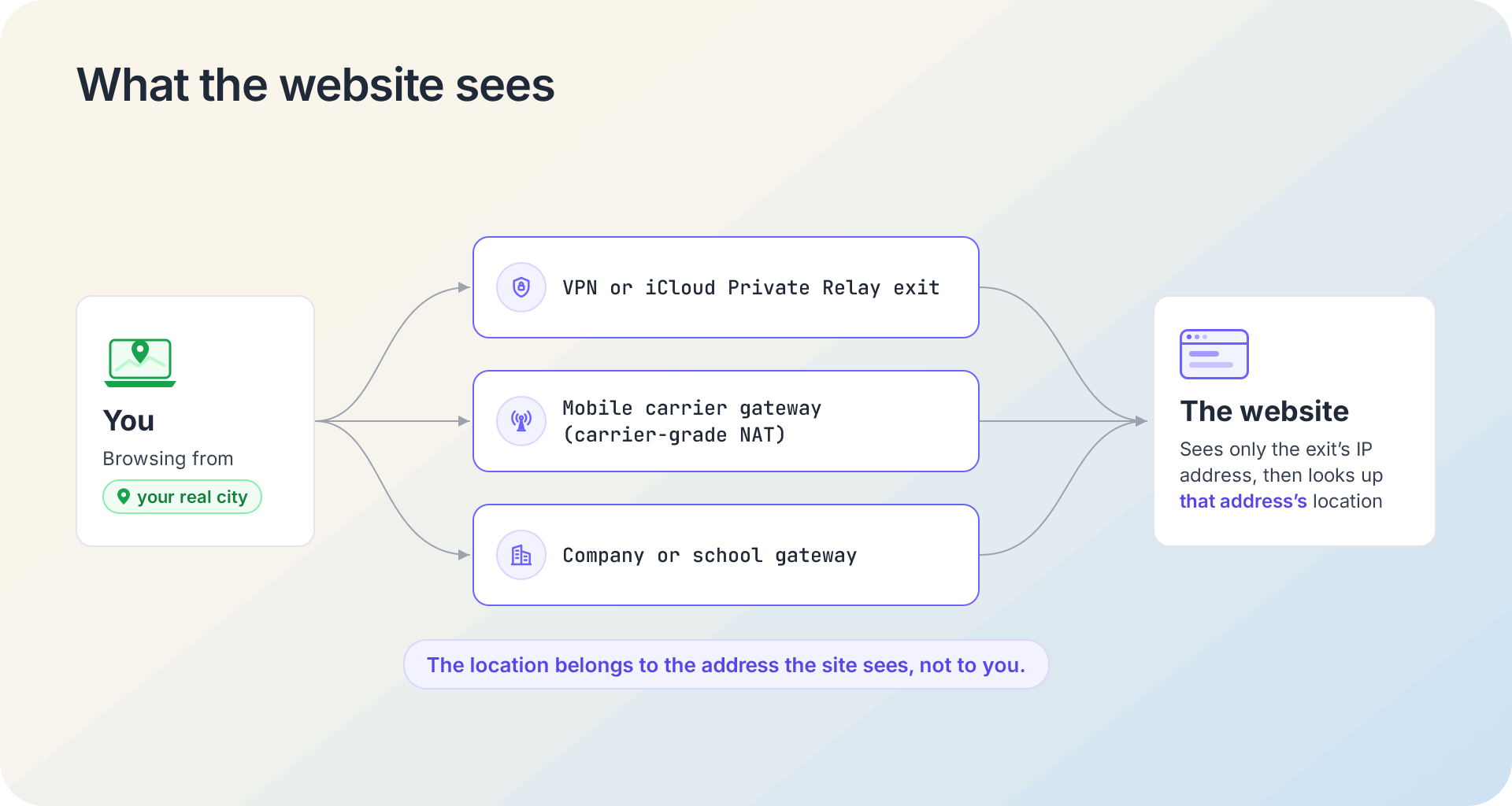
Why is my IP location wrong? From your IP address alone, a website can't see where you are. It sees the IP address your traffic leaves from, then looks up where that address appears in an IP data provider's records. When the exit is a VPN or iCloud Private Relay server, a mobile carrier's gateway, or a block of addresses your internet provider moved, the location points somewhere else.
Some of these you change via a setting, some reflect where the network actually is, and the rest you report. A correction sent to IPGeolocation.io normally goes live in our API and databases within 24 to 48 hours. If you manage the network, a geofeed lets you publish the correct location for your whole range in one file.
TL;DR
IP location goes wrong for six common reasons, and each one has a different fix. Find the cause before you report anything: a correction can't move a VPN exit or a carrier gateway, but it does fix an address block that moved or a wrong record.
- A site that asked permission to use your location is reading your device (GPS, Wi-Fi, cell towers), not your IP address.
- What is my IP shows whether your address is a relay, VPN, or company gateway exit before you file anything.
- Corrections go through the IPGeolocation.io corrections form: the IP address or range, plus the country, region, city, and postal code where it's used.
- Network operators can send a geofeed URL on the same form's geofeed tab, or email it to support@ipgeolocation.io.
- Google's own Report IP problems form covers Google products at the country level, and Google says updates may take more than a month.
Is it your IP location or your device location?
Check this first, because the two have different fixes. Device location comes from your phone or computer itself: GPS, nearby Wi-Fi networks, and cell towers. A website only gets it after you allow it, since the W3C Geolocation standard requires "express permission from an end-user" before a page receives location data. So if a site showed you a location prompt, or your phone's map puts you in the wrong place, the fix is in your device or browser location settings. No IP correction will change it.
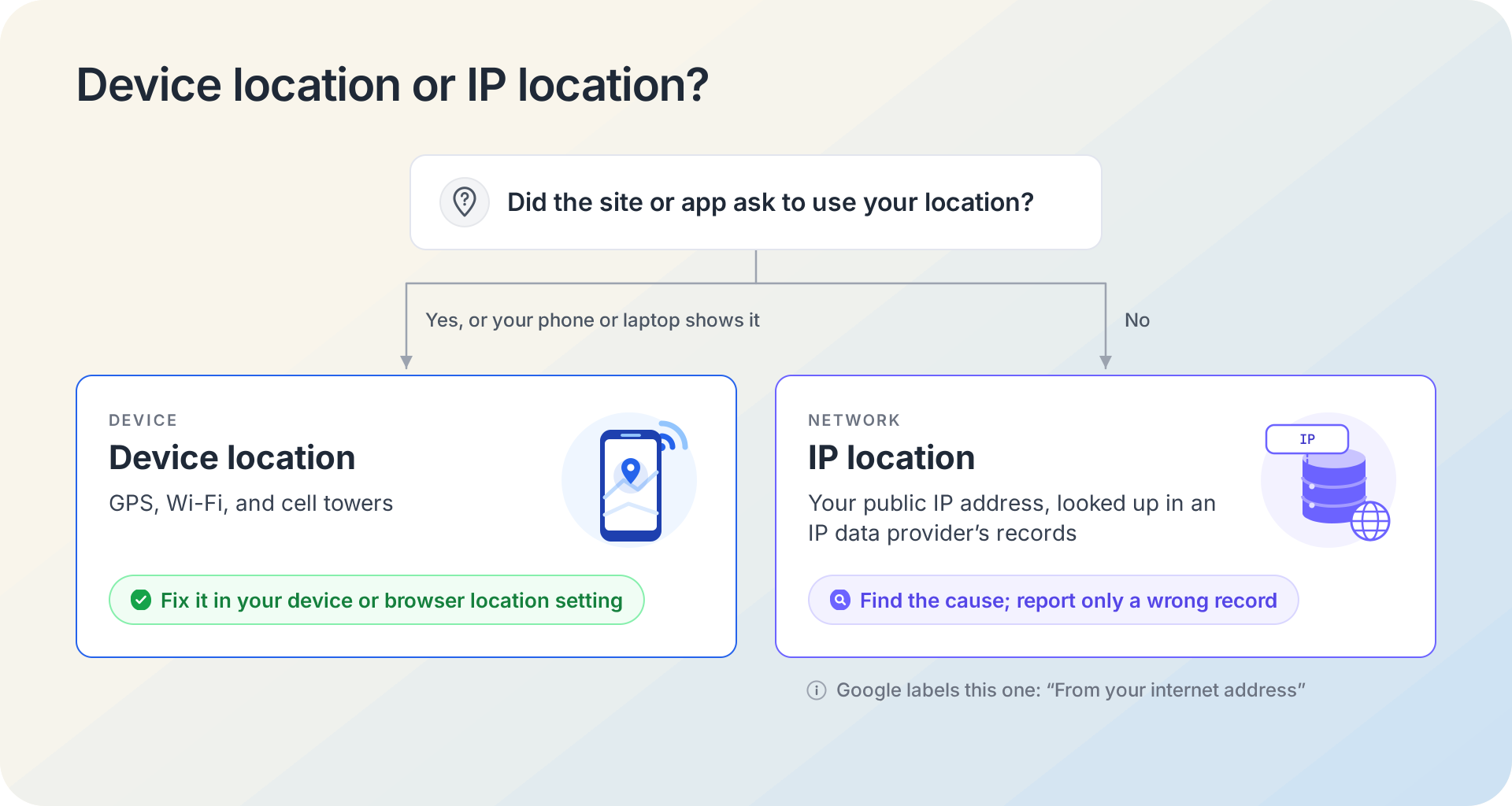
IP-based location is what a site estimates from your public IP address when it has no more direct signal, such as a location you've shared. Google uses both kinds. Its help page on search location lists four sources (your device location, the home or work address in your Google Account, your previous activity, and the IP address of your internet connection), and a results page that relies on the IP says "From your internet address" at the bottom. If you see that label next to the wrong town, the rest of this page applies to you.
Check which IP address the site sees
Before you try to fix your IP address location, confirm the address itself.
- On the device and network that shows the wrong place, open IPGeolocation.io's What is my IP page. It shows your public IP address, the location we have for it, and a set of security checks for that address.
- Write down the IP address and the city, and look at three of the checks: Relay ("This IP is a relay exit, such as iCloud Private Relay."), VPN, and Corporate Gateway ("A shared egress gateway used by a company's network.").
- Some connections have both an IPv4 and an IPv6 address, and each has its own location record. If one site disagrees with this page, it may be reaching you through the other, so report the address that site shows you, if it shows one.
If Relay, VPN, or Corporate Gateway is on, that check most likely explains why the location differs from yours, and the next section covers each case. The exit's own record can still be wrong, though: if the city is nowhere near the VPN server you picked or the gateway your company uses, that's worth reporting.
If none of the checks are on, they haven't explained the mismatch yet. Answer two more questions: does the wrong place show up on cellular data only, or on home Wi-Fi and wired connections too? Is it one site or several? The table in the next section turns those answers into a likely cause.
Why an IP address shows the wrong location
Find your symptom in the middle column; the last column tells you whether to change a setting, leave it as is, or report it. Each cause has its own section after the table, and our guide to how IP geolocation works explains how these records are built.
| Cause | How You Can Tell | What Fixes It |
|---|---|---|
| VPN, proxy, or Tor | The VPN check is on, or the location matches the server you picked | Turn it off, or choose a server near you |
| iCloud Private Relay | The Relay check is on, usually in Safari on an Apple device | Change Apple's IP Address Location setting |
| Mobile network | Wrong only on cellular data; home Wi-Fi shows the right place | Usually nothing to report; it's the carrier's gateway |
| Company or school network | The Corporate Gateway check is on, or it's wrong only on that network | Usually nothing to report; ask IT if it matters |
| Your ISP moved the address block | No checks on, wrong on home Wi-Fi or wired too, and the location changed suddenly or was never right | Report it, and ask your ISP to update its geofeed |
| One site uses old or other data | What is my IP shows the right place, but one site doesn't | Report it to that site or its data provider |
1. You're on a VPN, proxy, or Tor
A VPN changes your exit point. Every site you visit sees the VPN server's address, and a location record that places it where that server runs is correct, even if it's nowhere near you. Disconnect, or pick a server in your own region if the service lets you. Reporting a VPN exit as your home city would make the record inaccurate for everyone else who uses that server. If the location doesn't match the server you chose, report that instead.
2. iCloud Private Relay is on
iCloud Private Relay, part of an iCloud+ subscription, sends your Safari browsing through two relays, and sites see the second relay's temporary address instead of yours. You control how close that address gets to you with one setting, IP Address Location, which has two options according to Apple's Mac guide: "Maintain general location" and "Use country and time zone". The first is the default, and Apple's Private Relay overview says it picks addresses that map to "a roughly city-level area" near where you connect from. The second keeps only your country and time zone, so a city-level lookup can land anywhere in it.
Here is what a relay address looks like in IPGeolocation.io's data. Apple publishes its relay exit addresses and their locations in a public egress address list, which lists 172.224.236.2 in Knoxville, Tennessee. A lookup of that address on October 22, 2026 returned (trimmed to the relevant fields):
json
{
  "ip": "172.224.236.2",
  "location": {
    "country_name": "United States",
    "state_prov": "Tennessee",
    "city": "Knoxville"
  },
  "security": {
    "is_relay": true,
    "relay_provider_name": "Apple Relay",
    "is_anonymous": true
  }
}
The city matches Apple's own list, and is_relay tells any site that reads it why the location may not be the user's own. The lookup places the relay exit, not the person. With Apple's default setting, relay addresses map to a roughly city-level area near the user's connection, so the Knoxville listing provides useful context but doesn't pinpoint any one user. With "Use country and time zone", the user could be anywhere in the United States.
To change the location sites see, open Settings, tap your name, then iCloud, then Private Relay, and set IP Address Location on iPhone or iPad, as Apple's iCloud guide describes. On a Mac, the same setting is under System Settings > your name > iCloud > Private Relay. There's more on how Private Relay and WARP addresses geolocate on our blog.
3. You're on a mobile network
This is the common reason a phone shows a different city from the laptop next to it. Mobile carriers send traffic from many phones out through a small number of gateways, and many subscribers share one public address through carrier-grade NAT (CGNAT), a setup in which the carrier's equipment, not your phone, holds the public address. Home internet that runs over a carrier's cellular network often works the same way. The IETF's RFC 6598 states it plainly: geolocation systems "identify the location of the CGN server, not the end host", meaning the carrier's equipment rather than your device. So the city you see is often where your carrier's gateway sits, which can be a different city from yours.
Every IP data provider runs into this, and our own FAQ says accuracy for mobile networks is lower than for wired networks. When the gateway explains the city, the address isn't mislabeled, so a correction won't help. If a site needs your real city, switch to Wi-Fi or enter your location on the site.
4. Your traffic goes through a company or school gateway
Many organizations route everyone's web traffic through a security gateway in one city, so someone working from home in Denver can appear to be at the gateway in Chicago. If the record places the gateway's address where the gateway is, the location is correct for that address, even if it isn't right for you. If it causes real problems (a wrong store, a wrong tax region), your IT team is the one to ask; they may be able to route that site differently.
5. Your ISP moved or reassigned the address block
Stale records after a block moves are a main cause of genuine errors, and that's what corrections are for. Internet providers move address blocks between regions and hand them off from one customer to another. Until every data provider re-checks the block, the old location sticks, and a household in Ohio can inherit the record of the city that block served before. Even the country a network lists in its registry record isn't a reliable guide: the RIPE Database documentation says a network's registered country "cannot be used in any reliable way to map IP addresses to countries."
Report the address to us (the next section shows how), and ask your ISP whether it publishes a geofeed for your range. A geofeed is the ISP's own list of where its addresses are used. Providers that read geofeeds, including us, use them to update their records after their own checks, so one file can fix the location well beyond our data.
6. One site uses old or different data
If What is my IP shows the right city and one site still gets it wrong, the problem is that site's data. Sites buy IP data from different providers and refresh it on their own schedule, so an old copy can keep the old location until they update it. Ask the site's support team which IP data provider it uses, then report the address through that provider's correction route. Submitting a correction to IPGeolocation.io fixes our data, and sites that use it get the fix when they pick up the update; other providers keep their own records.
How to report a wrong IP location to IPGeolocation.io
To update your IP address location in our data, use the IPGeolocation.io corrections form. It's the right step when the cause is a moved block or a record that's wrong for your address. You can report several addresses or ranges in one submission.
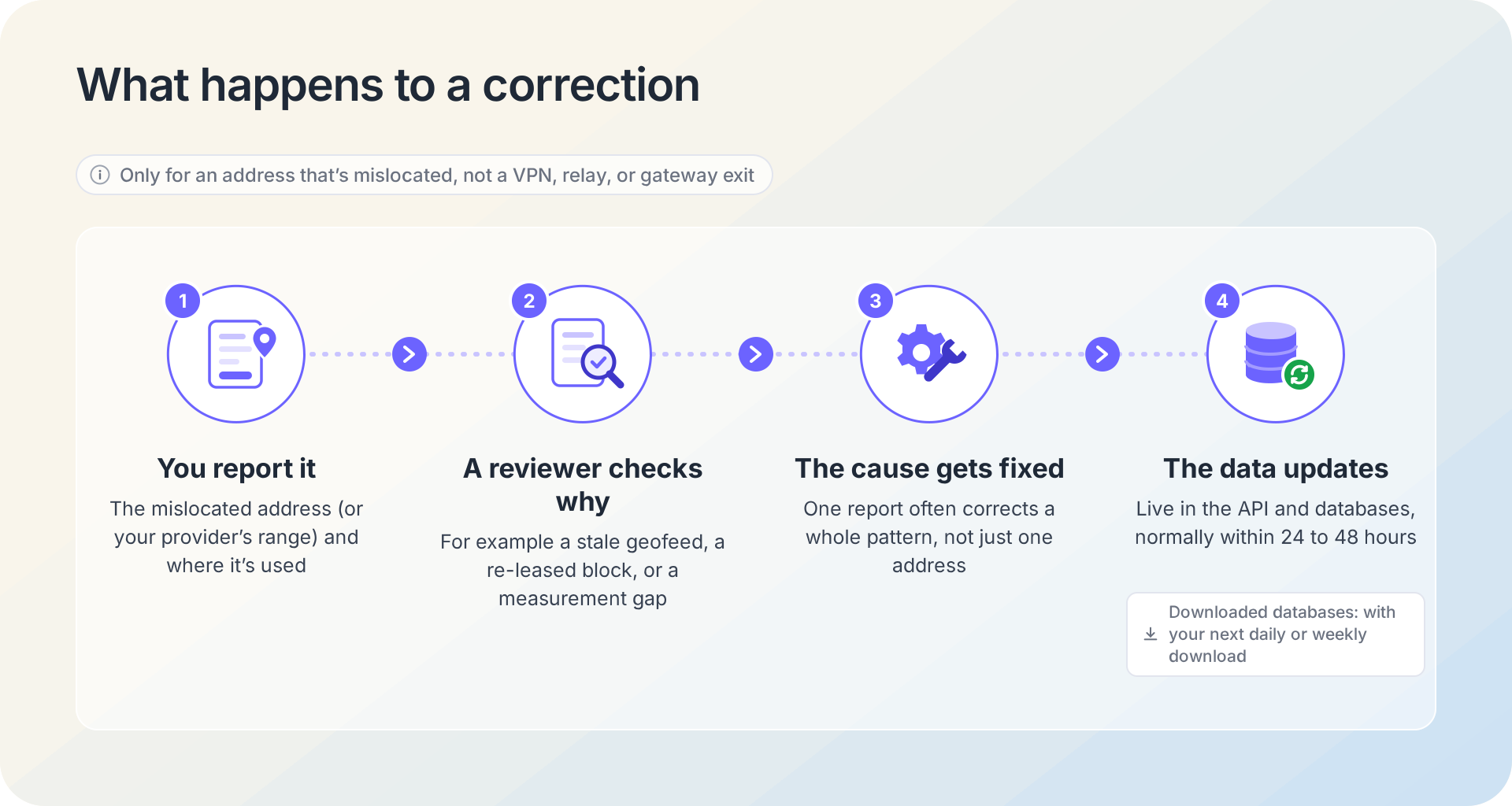
Report only an address that's mislocated. A correction changes the record for everyone who uses that address, so don't submit your home location for a VPN exit, an iCloud Private Relay address, a mobile carrier gateway, or a company gateway. If you're not sure the address is used only for your connection, ask your ISP before you submit.
- Open the IPGeolocation.io corrections form and stay on the Individual IP Corrections tab.
- Enter your full name, and your own email address in Company Email. If you're reporting your own home connection, leave Company Name empty; it's for organizations.
- In IP Address Range, enter the single address from What is my IP. Enter a range in CIDR notation (such as 203.0.113.0/24) only if your provider told you which range you're on.
- Enter the Country, State/Region/Province, City, and Postal/Zip Code (optional) where that connection is actually used, such as the town your home internet service is in.
- To report another address or range, click Add another correction, then submit the form.
If your case needs explaining (addresses that change often, or a business moving offices), email the details to support@ipgeolocation.io instead.
After you submit, a person reviews it. Our post on how we build and correct our location data describes the step: "A reviewer looks at why the address was wrong in the first place." The cause might be a stale geofeed, a re-leased block, or a gap in our measurements, and the reviewer fixes that cause, which is why, in the same post's words, "One report about one IP often corrects a pattern affecting thousands." It's also why a report won't move a VPN exit or a carrier gateway to your town: our measurements show where those addresses really are.
A correction normally goes live in our API and databases within 24 to 48 hours. If you use a downloaded copy of our database, the change arrives with your next daily or weekly download, depending on your plan.
After two days, open What is my IP from the same connection to check. If it hasn't changed, email support@ipgeolocation.io with the address. A correction belongs to the address or range, not to you, so if your ISP later gives you a new address, check that one too.
Report it to the website, Google, or your ISP
Submitting a correction to IPGeolocation.io fixes our data, but three other places may be holding the wrong location.
- The website. If one site is wrong while What is my IP is right, write to that site's support, give them your IP address and the correct city, and ask which IP data provider they use. Most providers have their own correction form.
- Google. For Google Search, Maps, and other Google products, use Google's Report IP problems form. You'll need to sign in, and the form covers content shown "for the wrong country". Google says updates "may take more than a month" and that it won't follow up with you individually.
- Your ISP. Give your provider the IP address and the location it should have, and ask whether it publishes a geofeed for that range. If it does, providers that read geofeeds can pick up the fix; if it doesn't, the next section is the page to send them.
The last two sections are for the people on the other side of the problem: network operators who manage IP ranges, and developers whose users report a wrong location.
If you manage the IP range: send us your geofeed
If you run a network, whether it's an ISP, a hosting company, or a company with its own address space, the lasting fix is a geofeed rather than a stack of one-off corrections. You maintain one file, and providers that read geofeeds pick up each change after their own checks; RFC 8805 lets every provider treat a feed as a hint. For more than a handful of ranges, IPGeolocation.io recommends this approach.
RFC 8805 defines a geofeed as a way for a network operator to "publish a mapping of IP address prefixes to simplified geolocation information". It's a plain CSV file served over HTTPS, one line per prefix: the prefix, the two-letter country code, the ISO 3166-2 region code, and the city. A fifth field for postal code exists, but the RFC deprecates it and says new feeds should not include it. Two lines for documentation ranges look like this:
192.0.2.0/24,US,US-TN,Knoxville,
2001:db8:cafe::/48,US,US-WA,Seattle,
Each line indicates where that range's users are; the last field is empty because the RFC asks for the postal code, which is left blank.
Providers find a geofeed through your registry records, as RFC 9632 sets out. In a registry that supports it, such as RIPE NCC, you add a geofeed: attribute with the file's URL to your inetnum or inet6num object. Where there's no such attribute, the fallback is a remarks line in this exact form, with "Geofeed" spelled with a capital G and no angle brackets around the URL:
remarks: Geofeed https://example.com/geofeed.csvARIN has no dedicated field yet, so on ARIN networks the RFC treats the Comment field as remarks, and you put the same line there.
Whether or not your registry record points to the feed, send us the URL so our pipeline has it. There are two ways to send your feed to IPGeolocation.io:
- On the form. Open the IPGeolocation.io corrections form, choose the Bulk Correction via Geofeed tab, and enter your name, company name, company email, and the geofeed URL. This is the preferred method.
- By email. Send the URL to support@ipgeolocation.io. Email is better when you need to explain context, such as a block you just acquired that isn't in WHOIS yet, or a move planned for a known date.
Our ingestion pipeline picks up a new feed on its next cycle. We don't take a feed's word on its own: we verify each claimed location against our own active measurements before serving it, so keep every row true to where those addresses are used. Keep the URL stable and update the file in place when ranges move. Our guide on setting up a geofeed covers the file format, each registry's steps, and validation.
When your users say their location is wrong
If you build on IP data, these reports reach your support queue, and most of them trace to the causes in this article.
Start by checking that you're geolocating the visitor's address and not your own load balancer's or CDN's; our guide on getting a visitor's real IP address shows how.
Then read the fields that explain the report. With include=security, the IPGeolocation.io API returns security.is_relay, security.is_vpn, security.is_anonymous, and security.is_corporate_gateway, and the network.connection_type field can show Mobile. See the IP Geolocation API documentation for field references.
And let people correct you. A location can be right for the network and still too coarse for a store choice, a tax rate, or an access decision, so pre-fill the city from the IP, show it, and let the user change it. Keep hard blocks at the country level, as in our guide to country-level geo-blocking.
IPGeolocation.io builds every location from registry data, geofeeds, reviewed corrections, and our own active measurements, as our post on how the data is built explains. Every plan gets the same locations; paid plans add the accuracy radius and confidence fields.
One call returns geolocation, security data, ASN, company, abuse contact, time zone, and user agent data, so the location comes with the context that explains it. The security data comes from the IP Security API: VPN, proxy, residential proxy, and Tor flags with a threat score from 0 to 100, as risk signals rather than a verdict on the person. Compare plans to see which fields each plan includes.
FAQ
An IPGeolocation.io correction normally goes live in our API and databases within 24 to 48 hours. A downloaded copy of the database picks it up with your next daily or weekly update.
On cellular data, your phone usually shares a public address with many other subscribers behind the carrier's gateway, so sites see the gateway's city. On an iPhone, iCloud Private Relay can also replace your address with a relay address that Apple maps to a roughly city-level area, or only to your country and time zone.
Google estimates location from four sources: your device location, your saved home or work address, your past activity, and your IP address. When the IP decides it, results say "From your internet address" at the bottom. Turn on device location for Google, or report a wrong country through Google's Report IP problems form.
You can change the address sites see, but not the location on record. A VPN or iCloud Private Relay gives you a different exit address, and restarting your router may get a new address from your ISP, though that isn't guaranteed and the new one may carry the same location. If the record itself is wrong for your home connection, send a correction.
Each site uses its own IP data provider, and providers build and refresh their records in different ways. One may already have the new location for a block that moved while another still shows the old city. Check the site that has the problem, then report the address to the provider that site uses.
Because IP location is an estimate for the whole range your address belongs to, worked out from where that range is used, not from your home. Even when it's right, it points to an area: IPGeolocation.io only claims accuracy down to the city or locality, not a street or a building.
IPGeolocation.io builds every location in its own multi-step pipeline, including active measurement. No IP lookup is a promise for a single address, and mobile networks are harder to place than wired ones because carrier gateways hide each phone's location.
Check your IP and fix the record
If your own location looks wrong, start on What is my IP, and if the record is mislocated, send it through the IPGeolocation.io corrections form.
Running the network? Send us your geofeed URL on the same form or by email.
Building with IP data? IPGeolocation.io's free plan includes 1,000 credits a day for core location lookups; security data and the accuracy radius and confidence fields come with paid plans.