




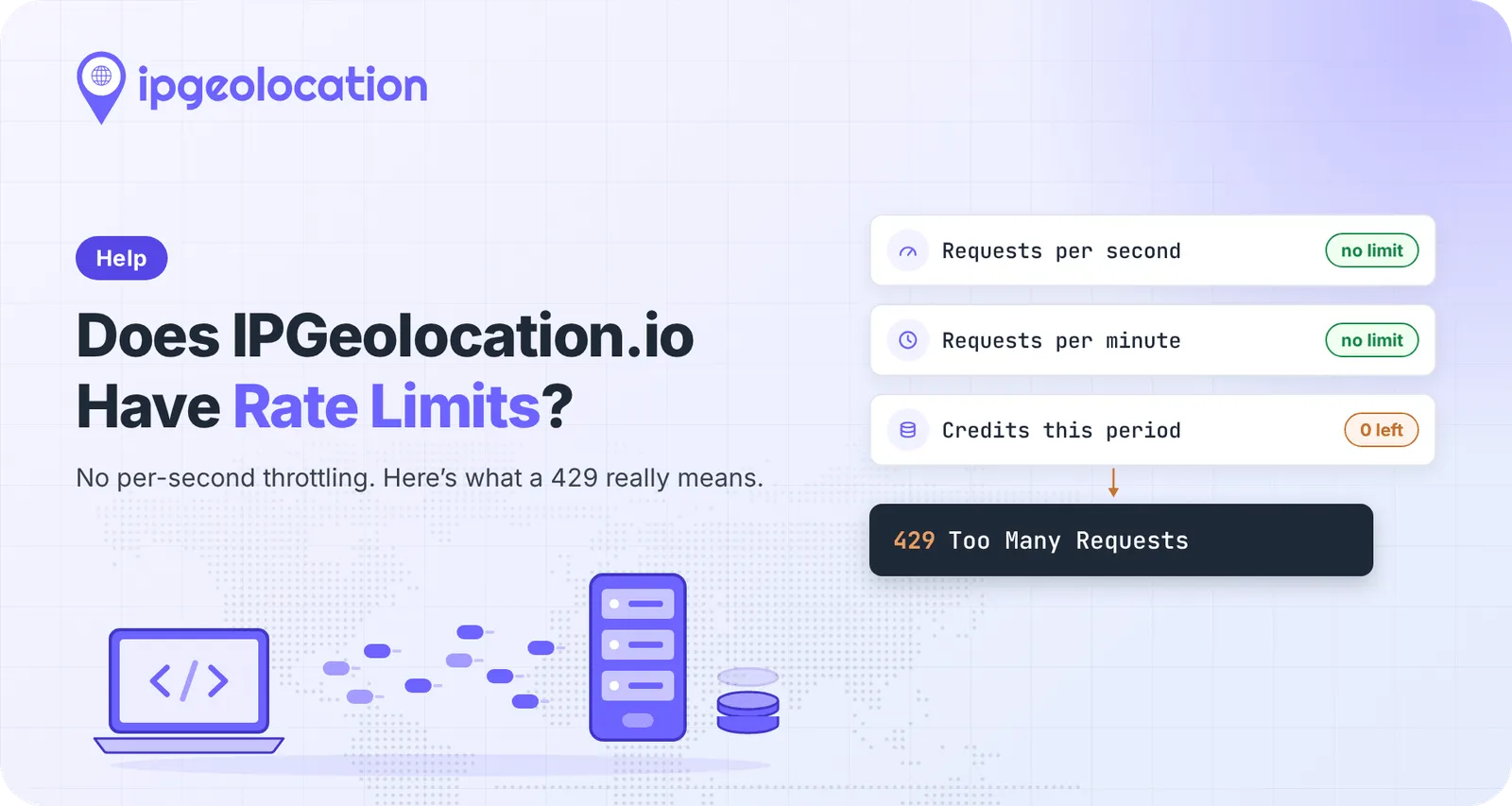
IPGeolocation.io has no per-second or per-minute rate limits on any plan, and no limit on how many requests you send at once. Usage is limited by credits instead. The API returns 429 Too Many Requests only when credits, an overage limit, or the subscription status blocks a request, never because requests arrive too fast.
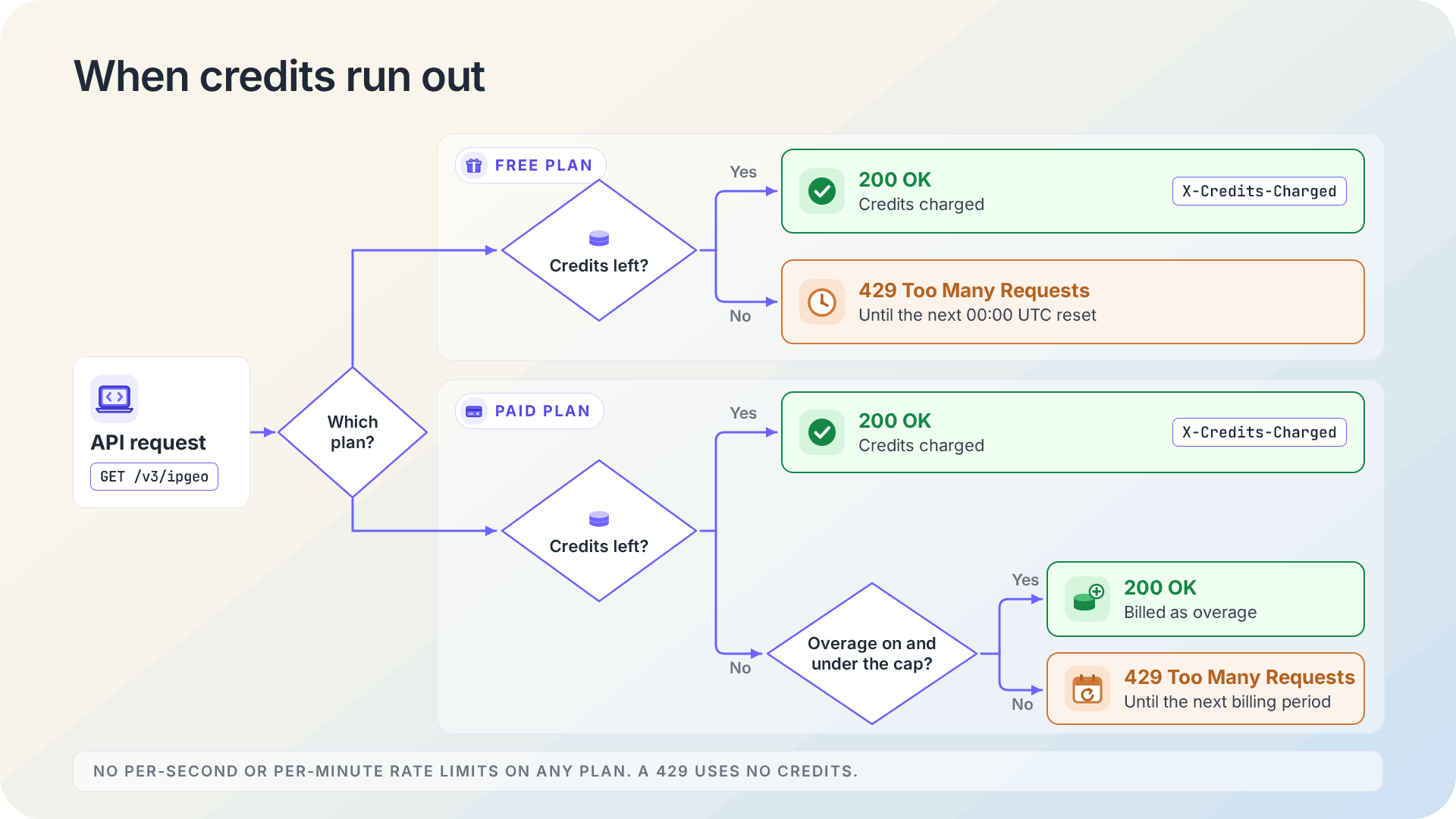
On the IPGeolocation.io free plan, the limit is 1,000 credits a day; once they're used, lookups receive a 429 status code until the credits reset at 00:00 UTC. Paid plans keep serving past their monthly or yearly allowance through overage, which is on by default, so a paid plan gets a 429 only when overage is off or capped, or when the subscription has been deleted. Requests resume when you fix the cause or the next billing period starts. The pages on what the free plan includes and how credits are charged cover the allowances in detail.
Why an IPGeolocation.io 429 means credits, not speed
Elsewhere, a 429 Too Many Requests usually means you're being throttled: back off, and a request a few seconds later goes through. IPGeolocation.io uses the same status code for account conditions instead: the credits are used up, overage has reached its limit, or the subscription has been deleted. The API doesn't count requests per second. Our team confirms that nothing else returns a 429 or blocks traffic: no burst rule, no edge throttling, and no cap on concurrent connections or parallel bulk requests.
That changes what a retry does. A request sent five seconds later meets the same empty allowance or the same overage limit, and so does the next one. Our engineers' advice is not to retry a 429 automatically. Stop the requests and resolve the usage or account issue instead.
What triggers a 429, and what ends it
These are the common 429 cases on the free Developer plan and standard paid plans. Find yours in the first column:
| Situation | When It Starts | What Ends It |
|---|---|---|
| Free plan, daily credits used | After 1,000 credits in one day | The reset at 00:00 UTC, or moving to a paid plan |
| Paid plan, overage turned off | When the billing period's credits run out | Turning overage on, a larger plan, or the next billing period |
| Paid plan, surcharge limit reached | When overage spending reaches your surcharge limit, a dollar cap of at most $500 or $1,000, depending on the plan | A larger plan, or the next billing period |
Trials and some subscription states follow separate rules. See the 429 entry in the API Error Codes reference.
How overage works on paid plans
On IPGeolocation.io paid plans, overage is on by default. When a billing period's credits run out, lookups keep working, and the extra usage is counted in fixed blocks of credits at $5 a block, up to the plan's maximum surcharge amount: $500 on Starter and Plus, $1,000 on Pro, Business, and Premium, per billing period. Nothing is charged as each block is used: the blocks add up over the billing period and are charged together with your subscription renewal. Once that limit is reached, the API returns 429 until the next billing period begins. If you've turned overage off in the dashboard, requests get a 429 as soon as the plan's own credits run out, until you turn it back on or the next period starts.
Block sizes differ by plan, so plans with the same cap get different amounts of overage from it: $500 covers 2,500,000 extra credits on Starter and 4,000,000 on Plus.
| Plan | Credits A Month (Monthly Billing) | One Overage Block | Maximum Surcharge Per Billing Period | Most Extra Credits Before A 429 |
|---|---|---|---|---|
| Starter | 150,000 | 25,000 credits for $5 | $500 | 2,500,000 |
| Plus | 500,000 | 40,000 credits for $5 | $500 | 4,000,000 |
| Pro | 1,000,000 | 50,000 credits for $5 | $1,000 | 10,000,000 |
| Business | 2,000,000 | 65,000 credits for $5 | $1,000 | 13,000,000 |
| Premium | 5,000,000 | 85,000 credits for $5 | $1,000 | 17,000,000 |
The last column is the cap divided by $5, times the block size. Enterprise plans have custom overage pricing. Current rates for every plan are on the pricing page, and the caps are listed in the credits usage documentation.
Take a monthly Starter plan that uses 200,000 credits in a month. The plan covers the first 150,000. The other 50,000 are two overage blocks of 25,000 credits, so the month's surcharge is $10, and the renewal at the end of that month charges $29: the $19 plan plus the $10 of overage. A partial block is billed as a full one: at 160,000 credits, the 10,000 over the allowance still costs one $5 block.
Annual plans count all of this over the year instead of the month. The yearly allowance is 12 times the monthly one, the surcharge cap covers the whole year rather than each month, and overage is billed when the plan renews. That also means a 429 after the cap can last until renewal, which may be months away. Our article on how annual billing handles overage works through an example.
Should you leave overage on? For anything customers touch, such as signup checks, checkout, or page personalization, we would. The most it can add in a billing period is the cap, while a run of 429s means your app works without IP data until someone fixes the account. Turn it off when a fixed bill matters more than uninterrupted lookups, for example, a batch job that can wait for the next billing period.
How to get lookups running again
Read the status code and the message field of the IPGeolocation.io response first: together they tell you which of these five cases you're in. None of these error responses cost credits.
- Free plan, daily credits used (429). Wait for the allowance to reset at 00:00 UTC. If you need more than 1,000 credits a day, upgrade to any paid plan. Endpoints and response format stay the same, so your code does not change.
- Paid plan with overage turned off (429). Turn overage back on in the dashboard. Requests are served again as long as the plan's surcharge limit hasn't been reached; otherwise they resume when the next billing period begins.
- Paid plan at its surcharge limit (429). The billing period has used everything the plan allows, overage included, so requests resume when the next period begins. To keep going before then, move to a larger plan. If you need more than the Premium plan's volume, Enterprise plans come with custom volume and overage pricing: talk to our sales team.
- A failed payment. If a charge fails, our payment processor retries it automatically, and the payment's due date moves three days later. Lookups keep working during those three days, while our sales team contacts the account owner to update the payment method. If it isn't updated, we pause the subscription, and its key returns 401. Update the payment method, then ask our support team at support@ipgeolocation.io to resume the subscription.
- A 401 on a key that used to work. A 401 isn't a credits problem. On an account that was working, it can mean the subscription behind the key is paused, the account's active-until date has passed, and the subscription needs renewing or upgrading, or the account has been disabled or locked because of abuse. If you paused the subscription yourself, resume it from the dashboard. If we paused it, or you can't see why the key stopped working, contact our support team. Missing or mistyped keys return 401 too; the full list of 401 causes is in the API documentation.
How to handle a 429 in your code
A 429 needs someone to act on the account, so your application should stop making further requests and keep working without the data:
- Stop calling the API. Every further lookup gets the same 429 until the cause is fixed.
- Serve the request without the IP data, or from a cached result, so your users don't get an error page.
- Log the
messageand alert whoever manages the IPGeolocation.io account. - Fix the cause. How to get lookups running again lists the fix for each case.
- Resume lookups once the cause is fixed.
Keep this apart from your retry policy for other errors. A 5xx can be temporary, so a retry with backoff makes sense there; a 429 won't clear until step 4 is done.
The official IPGeolocation.io Python SDK (pip install ipgeolocationio, Python 3.10 or later; the example is tested with version 3.0.0) raises RateLimitException for a 429 and never retries on its own. The class below is a minimal example: it caches results in memory and keeps its stop flag inside one process. In production, keep both in a shared store such as Redis, and give cached entries an expiry that fits how fresh the data has to be (the credits page suggests 24 hours for personalization).
import logging
import os

from ipgeolocation import (
    IpGeolocationClient,
    IpGeolocationClientConfig,
    IpGeolocationException,
    LookupIpGeolocationRequest,
    RateLimitException,
)

logger = logging.getLogger(__name__)


class IpLookup:
    def __init__(self, client):
        self.client = client
        self.cache = {}  # in production, a shared cache with a TTL (Redis, for example)
        self.limit_reached = False

    def country(self, ip):
        if ip in self.cache:
            return self.cache[ip]  # a repeat visitor costs no credits
        if self.limit_reached:
            return None  # serve the page without location data until the limit is fixed
        try:
            response = self.client.lookup_ip_geolocation(
                LookupIpGeolocationRequest(ip=ip)
            )
        except RateLimitException as exc:
            # A 429 means a usage or account limit was reached. Retrying can't clear it,
            # so stop calling and tell someone who can fix the account.
            self.limit_reached = True
            logger.error("IPGeolocation.io usage limit reached: %s", exc.api_message)
            return None
        except IpGeolocationException as exc:
            # Leave the IP address out of the log line; the error is enough to debug.
            logger.warning("IP lookup failed: %s", exc)
            return None

        location = response.data.location
        country = location.country_name if location is not None else None
        self.cache[ip] = country
        return country


if __name__ == "__main__":
    logging.basicConfig(level=logging.INFO)
    config = IpGeolocationClientConfig(api_key=os.environ["IPGEOLOCATION_API_KEY"])
    with IpGeolocationClient(config) as client:
        lookup = IpLookup(client)
        print(lookup.country("165.227.0.0"))
With your key in the IPGEOLOCATION_API_KEY environment variable, the script prints United States. After a 429, country() returns None without calling the API, and the log line carries the message that names the limit. The RateLimitException branch has to come before IpGeolocationException, because it's a subclass of it. An invalid key takes the second branch: the 401 is logged and the page still loads. A missing environment variable stops the script at startup with a KeyError, before any call is made.
Restarting the process doesn't fix an account-level limit. It only clears the flag, and the next lookup gets the same 429. Clear the flag once the cause is fixed: on the free plan, a scheduled job just after 00:00 UTC fits the reset; on a paid plan, check credits and billing in your dashboard first. With several workers, keep the flag in the shared store so one 429 pauses all of them.
Without the SDK, check the status code yourself. curl -i prints it on the first line, and the body's message field says which limit you reached:
curl -i 'https://api.ipgeolocation.io/v3/ipgeo?apiKey=YOUR_API_KEY&ip=165.227.0.0'Limits that do apply
Apart from credits, a few request-level limits return other status codes:
- Bulk size: a bulk request takes up to 50,000 IP addresses or domains, and more than that returns 400. Bulk lookups need a paid plan.
- Request body size: a POST body larger than the API accepts returns 413.
- Client timeouts: The edge logs 499 when the client closes the connection before the server can respond. A short client timeout can cause this. Check your client's timeout settings.
- Server errors: a 5xx is a problem on our side, so a retry with backoff is reasonable, as "How to handle a 429 in your code" explains. The API status page shows current uptime; you can also contact support@ipgeolocation.io.
- Terms of use: the Terms of Service ask customers not to use the API "in a manner that constitutes excessive or abusive usage." That's a term of the agreement, separate from the credit limits.
How to avoid running out
Every successful response carries an X-Credits-Charged header with what that call cost, and your dashboard shows credits used and remaining, so a shortfall is visible before it turns into a 429. Cache results per IP address, so a returning visitor doesn't cost a credit each time. Filter private and reserved (bogon) addresses before calling: the API answers them with 423 and charges nothing, but each one still costs a round trip. Request only the modules you read; security data (VPN, proxy, and Tor detection with a threat score) adds 2 credits to a lookup, and abuse contact data adds 1.
We email you when your usage reaches 80%, 90%, and 100% of a paid plan’s credits, and when the free plan's daily credits are used up; you can turn these emails off in the dashboard. Past 100% on a paid plan, overage keeps lookups running up to the plan's cap, as How overage works on paid plans explains. The credits page lists more ways to use fewer credits, with the cost of each call.
FAQ
Not per second or per minute. On the IPGeolocation.io free plan, the limit is 1,000 credits a day: once they're used, lookups return 429 until the allowance resets at 00:00 UTC. The free plan has no overage, so nothing extends that day's allowance.
IPGeolocation.io sets no per-second limit on any plan, and no limit on concurrent connections or parallel bulk requests. Credits are the only limit on volume: a standard IP lookup costs 1 credit, so your allowance sets how many you can make.
No. IPGeolocation.io charges credits only for successful responses (HTTP 200), so a 429 costs nothing, and neither do 401, 423, or 5xx responses.
A 429 from IPGeolocation.io lasts until its cause is fixed. On the free plan, that's the reset at 00:00 UTC. On a paid plan, it's the start of the next billing period, or sooner if you turn overage on or upgrade.
No. An IPGeolocation.io bulk request charges each valid IP address the same credits as a single lookup, so 50,000 addresses in one request cost the same as 50,000 separate calls. Bulk saves round trips, not credits, and it needs a paid plan.
At most, your plan's maximum surcharge amount per billing period: $500 on Starter and Plus, and $1,000 on Pro, Business, and Premium. IPGeolocation.io bills overage in $5 blocks (25,000 credits per block on Starter, for example), and a partial block is billed as a full one. The blocks are charged together with your subscription renewal, not as you use them. Once the cap is reached, the API returns 429 until the next billing period begins.
Choosing a plan for your volume
One paid IPGeolocation.io lookup returns the whole picture of an address in a single call: geolocation, security, ASN, company, abuse contact, time zone, and user agent data together. The free plan covers location, basic ASN, and time zone data with 1,000 credits a day. Compare paid plans and overage on the pricing page, and if you're enriching millions of addresses in one pass, the API vs database guide shows when a downloadable database fits better.