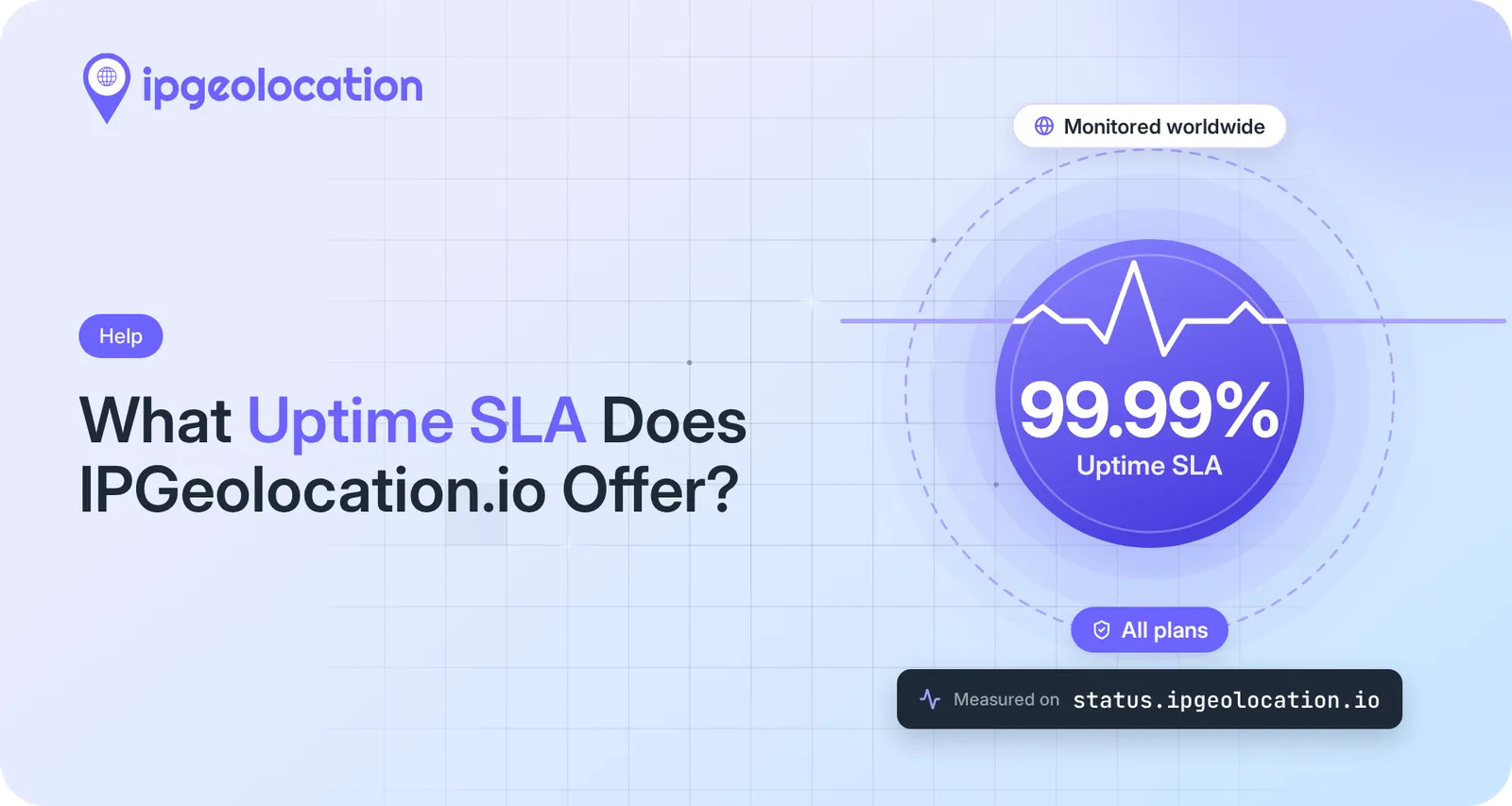
IPGeolocation.io offers a 99.99% uptime service level agreement (SLA) on every plan, the Free plan included. Assessed month by month, that allows about 4 minutes 19 seconds of downtime in a 30-day month. We measure it on a public status page that checks the API from locations in the US, Europe, Asia, and Australia, and scheduled maintenance counts against it like any other downtime. Our standard terms don't include service credits if a month falls short, and Enterprise and database customers can negotiate custom terms.
Even at 99.99%, a few minutes a month remain. If your signup, login, or checkout calls the API, what your app does during those minutes decides whether a user ever notices them. A timeout, one retry, a per-IP cache, and a fallback keep them out of sight.
What 99.99% uptime means in minutes
We assess the 99.99% month by month, so the allowance depends on the month's length: about 4 minutes 2 seconds in a 28-day February, 4 minutes 19 seconds in a 30-day month, and 4 minutes 28 seconds in a 31-day month. Over other periods, 0.01% comes to:
| Period | Downtime At 99.99% Uptime |
|---|---|
| One day | 8.6 seconds |
| One week | About 1 minute |
| 28-day month (February) | 4 minutes 2 seconds |
| 29-day month (leap-year February) | 4 minutes 11 seconds |
| 30-day month | 4 minutes 19 seconds |
| 31-day month | 4 minutes 28 seconds |
| 365-day year | 52 minutes 34 seconds |
The yearly figure is only an equivalent: each month is assessed on its own, so a month without downtime doesn't leave spare minutes for the next one. Uptime calculators often show 4 minutes 23 seconds for a month because they use an average month of 30.44 days; only the length of the month differs.
Which plans and products the SLA covers
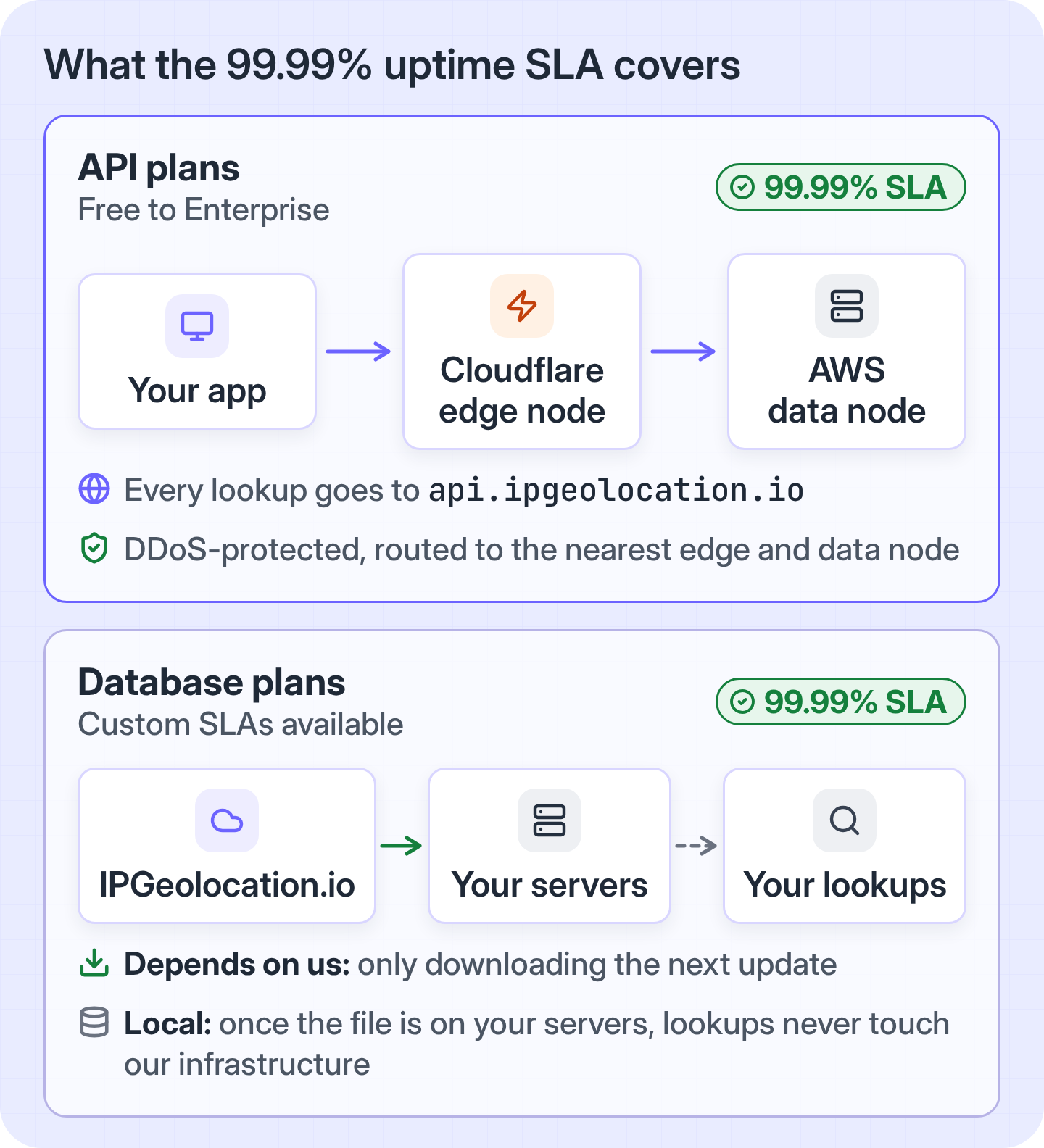
The 99.99% uptime SLA covers every IPGeolocation.io plan, from Free to Enterprise. Our Terms of Service put it in one line: "We provide a 99.99% uptime SLA on all of our plans, including the Free Plan." The plans differ in credit allowance (the Free plan, called the Developer plan on our pricing page, has 1,000 credits a day) and in the data you can request, not in uptime.
On the API side, the commitment applies to api, the host your requests go to and the host our status page checks. It applies whichever data you ask for: on paid plans, one request to that host can return geolocation, security data (a 0 to 100 threat score with VPN, proxy, residential proxy, and Tor flags), ASN, company, abuse contact, time zone, and user agent data.
Our database plans list the same 99.99% uptime SLA, with custom service level agreements available. A downloaded database works differently from the API, though: once the file is on your servers, your lookups never touch our infrastructure. Only downloading the next update does.
Redundancy is what lets us offer the same 99.99% on every plan. Our infrastructure runs multiple data nodes on AWS and edge nodes on Cloudflare, and Cloudflare's DDoS-protected load balancer routes each request to the nearest edge and data node.
How IPGeolocation.io measures uptime
IPGeolocation.io measures its uptime on the public IPGeolocation.io API status page. It checks api over HTTPS from several monitoring locations. The checks run on updown.io, a third-party monitoring service. The page shows the result of the last check, uptime over a rolling month, uptime for each recent month (the figure the 99.99% is assessed against), and a month-by-month history of response times and downtime that goes back to August 2018.
The monitor requests the API's base URL, https:/, every 60 seconds. That shows whether the API host is answering; it doesn't run a lookup, so a passing check doesn't prove that every lookup succeeds. A check fails if it can't connect, times out, or gets an HTTP error status. updown.io records downtime only after two more checks, from at least one other location, confirm a failure, and dates it from the first failed check. Recovery needs three successful checks from at least two locations. An outage shorter than the 60-second interval between checks may not be recorded.
On November 17, 2026, the status page listed seven monitoring locations (Los Angeles, Miami, Roubaix, Frankfurt, Helsinki, Singapore, and Sydney) and showed 100% uptime for the rolling month since October 17. In the 24 months from November 2024 to October 2026, it records downtime in one month only: 2 minutes in June 2026. That is under June's allowance of 4 minutes 19 seconds, and the page shows June at 99.99%.
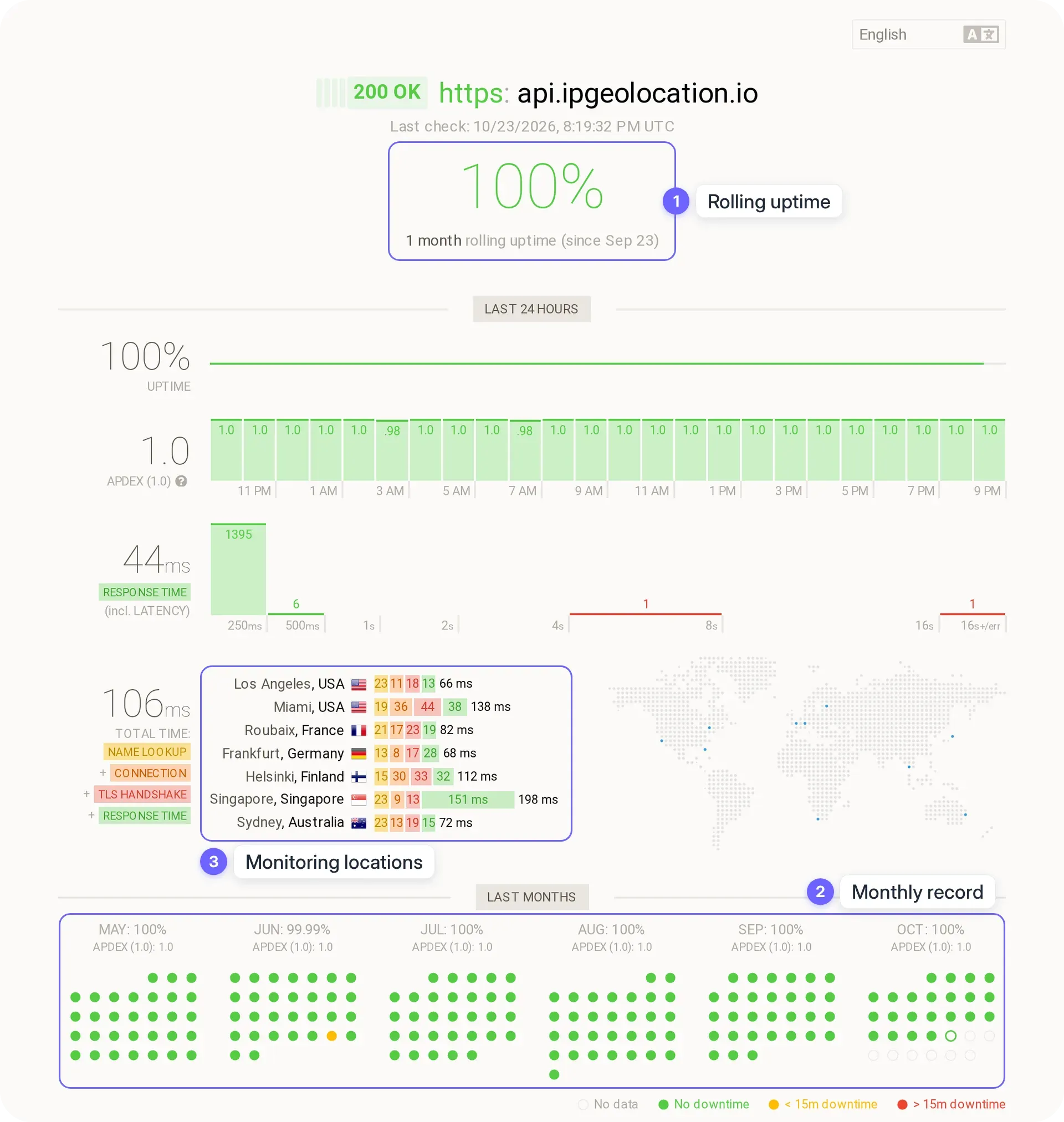
Scheduled maintenance counts against the 99.99% like any other downtime.
What happens if a month falls below 99.99%
Our standard terms don't include service credits on any self-serve plan, the Free plan included: the 99.99% is a commitment we measure in public, not a refund schedule. If your business needs a financial remedy, you can negotiate one as part of a custom SLA on an Enterprise or database plan.
How to tell whether the IPGeolocation.io API is down
When requests start failing, check the status page first and the status code second. A 5xx points to our side. A 4xx points to yours: the key, the input, your plan, or your quota. The exception is 404, which can also mean the IP isn't in our database. A timeout can be either. The status page shows whether our monitors see a problem, but a passing check doesn't rule out trouble on the route between your servers and ours, so test the call from your own infrastructure too.
- Open the IPGeolocation.io API status page. It shows whether
apianswered the last check and when that check ran..ipgeolocation .io - Read the HTTP status code your request returned. The error codes in the IP Location API docs list every code; these are the ones you're most likely to see when a working integration starts failing:
| What You Got | What It Means | What To Do |
|---|---|---|
| 401 Unauthorized | The API key is missing or invalid, the subscription is paused, the trial has expired, or a Free plan key asked for a paid module such as include=security |
Check the key and the plan; a retry fails the same way |
| 402 Payment Required | A paid subscription's active-until date has passed (one day after it for an active or trialing subscription); paused subscriptions and expired trials get a 401 instead | Renew or upgrade the subscription; a retry fails the same way |
| 403 Forbidden | The API key has an IP allow-list, and the request came from an address that isn't on it | Add your servers' outbound IPs to the key's allow-list. Check this first after moving to new servers |
| 404 Not Found | The IP isn't in our database, or the IP was sent in the URL path instead of the ip= parameter |
Treat the IP as unknown; a retry returns the same answer. If every request gets a 404, check the request URL |
| 423 Locked | The IP is a bogon or private address | Don't send private or bogon addresses to the API |
| 429 Too Many Requests | A credit limit is reached: the Free plan's daily credits, an active trial's 100,000 credits, a paid plan's credits with overage turned off, the overage limit itself, or the credits of a past-due or deleted subscription | Retrying won't help: there are no per-second or per-minute rate limits on any plan, so a 429 means a credit limit is used up; a past-due subscription needs payment before it can use more. See what happens when you run out of credits |
| A timeout or no response | Your client stopped waiting before an answer arrived. A timeout set too short is what our docs call 499 Client Closed Request; you won't receive that status yourself, because your client has already closed the connection | If the status page shows a problem, fall back until it recovers. If it shows the API up, test the call from your own servers and check that your timeout isn't too short |
| 5xx (500, 502, 503, 504, 505) | An issue on our side | Retry once, check the status page, and contact support if it continues |
If the status page shows the API as up and your requests still get 5xx responses, email support@ipgeolocation.io with the request you sent (with your API key removed), the status code, and the time in UTC.
How to keep the remaining minutes away from your users
Build the call so a slow or failed lookup never holds up the user's request. A lookup that hangs on a signup form can cost you a real signup, and this is how we'd prevent it:
- Set a timeout. Give the lookup a fixed share of your own response-time budget; the Node.js example later in this section gives each attempt 1.5 seconds and the whole lookup 2.5. Too short a timeout cuts off requests that would have succeeded.
- Retry once, and only on a 5xx, a timeout, or a network error. A 4xx from our API fails the same way the second time. Credits are charged only when the request succeeds with HTTP 200, so retrying after a 5xx costs nothing unless the retry works.
- Cache results per IP, for less than a day. Every IP attribute the API returns from our database, security data included, comes from one daily build, so a result cached for a few hours is at most one build behind, and a returning visitor doesn't need a second call. The exceptions are the time zone's current time and DST status, and live hostname lookups (
liveHostnameandhostnameFallbackLive), which are calculated when you make the request, so don't reuse them from a cached result. For high-risk moments such as a payment or a password reset, look the IP up again instead of trusting a cached answer, and add a real-time check of the session. - Decide what happens when there's no answer, per action. A missing answer means unknown, never safe. For personalization and other enrichment, carry on without the data and log the failed lookup. On signup, we'd let the user through and flag the account for review, because a lookup that didn't come back is not evidence of fraud. On login and other security checks, fall back to the verification you already have, such as a one-time code, instead of skipping the check. Block only where one wrong approval costs more than turning away a real customer, such as a large payout or a geo-restriction the law requires.
- Remove the network dependency where you have to. If a lookup can't depend on any outside service, run it against a downloadable database on your own servers. The IP geolocation API vs database guide covers when that trade-off pays off.
- Monitor the call from your own servers. Our status page checks the API from a fixed set of locations; your own monitor sees the route from your servers to the API, which is the one your users depend on.
Here is that pattern in Node.js 22 or later, which has fetch and AbortSignal.timeout built in. Save it as ip-lookup.mjs. It requests only the location fields (fields=location), which works with a key on any plan and keeps time-sensitive values out of the cache:
// Node.js 22 or later: fetch and AbortSignal.timeout are built in.
const API_URL = 'https://api.ipgeolocation.io/v3/ipgeo';
const API_KEY = process.env.IPGEOLOCATION_API_KEY; // read from the environment, never hardcoded
const ATTEMPT_TIMEOUT_MS = 1500; // room for DNS and TLS on a fresh connection
const TOTAL_BUDGET_MS = 2500; // cap for the whole lookup, retry included
const CACHE_TTL_MS = 6 * 60 * 60 * 1000; // fresh for 6 hours; the data changes once a day
const MAX_STALE_MS = 24 * 60 * 60 * 1000; // during an outage, fall back to results up to a day old

if (!API_KEY) throw new Error('Set IPGEOLOCATION_API_KEY before starting the app');

// One Node.js process only, and entries are never evicted: at higher traffic, move this to a bounded cache such as Redis.
const cache = new Map(); // ip -> { data, fetchedAt }
const inFlight = new Map(); // ip -> pending lookup, so simultaneous calls for one IP share a single request

async function callApi(ip, timeoutMs) {
  // Request only what you cache: time zone fields such as current_time would go stale.
  const url = `${API_URL}?apiKey=${encodeURIComponent(API_KEY)}&ip=${encodeURIComponent(ip)}&fields=location`;
  const res = await fetch(url, { signal: AbortSignal.timeout(timeoutMs) });
  if (res.ok) return { ok: true, data: await res.json() };
  await res.body?.cancel(); // discard the error body so the connection can be reused
  // Only server-side errors are worth retrying: a 4xx from this API fails the same way again.
  return { ok: false, retryable: res.status >= 500, status: res.status };
}

export function lookupIp(ip) {
  if (!inFlight.has(ip)) {
    inFlight.set(ip, runLookup(ip).finally(() => inFlight.delete(ip)));
  }
  return inFlight.get(ip);
}

async function runLookup(ip) {
  const cached = cache.get(ip);
  const age = cached ? Date.now() - cached.fetchedAt : Infinity;
  if (age < CACHE_TTL_MS) return { data: cached.data, source: 'cache' };

  const deadline = Date.now() + TOTAL_BUDGET_MS;
  for (let attempt = 1; attempt <= 2; attempt++) {
    const timeLeft = deadline - Date.now();
    if (timeLeft <= 0) break;
    try {
      const result = await callApi(ip, Math.min(ATTEMPT_TIMEOUT_MS, timeLeft));
      if (result.ok) {
        cache.set(ip, { data: result.data, fetchedAt: Date.now() });
        return { data: result.data, source: 'api' };
      }
      if (!result.retryable) {
        console.error(`IP lookup returned ${result.status}; retrying won't help`);
        break;
      }
      console.error(`IP lookup attempt ${attempt} returned ${result.status}`);
    } catch (err) {
      // Retry only timeouts (TimeoutError) and network failures (TypeError from fetch).
      console.error(`IP lookup attempt ${attempt} failed: ${err.name}`);
      if (err.name !== 'TimeoutError' && err.name !== 'TypeError') break;
    }
    // A random 200 to 400 ms pause keeps many clients from retrying at the same instant.
    if (attempt === 1) await new Promise((resolve) => setTimeout(resolve, 200 + Math.random() * 200));
  }

  // Fall back to a result under a day old; null means "unknown", never "safe".
  if (age < MAX_STALE_MS) return { data: cached.data, source: 'stale cache' };
  return { data: null, source: 'none' };
}
lookupIp returns the data together with where it came from: api, cache (under 6 hours old), stale cache (under a day old, used only when the API can't answer), or none. Two timeouts in a row stop at the 2.5-second budget, so lower TOTAL_BUDGET_MS if your form can't wait that long. A missing key stops the app at startup, and an invalid key (401) or a response that isn't valid JSON fails without a retry. Simultaneous lookups for the same IP share one request, so a burst of signups from one address makes one API call instead of one per request. This pattern suits one Node.js process; at higher traffic, move the cache to Redis and add a circuit breaker, so a long outage doesn't send every request through two attempts first.
To try it, save the following as test.mjs next to ip-lookup.mjs and run node test.mjs. It calls the function twice for the same address:
import { lookupIp } from './ip-lookup.mjs';

for (let i = 0; i < 2; i++) {
  const { data, source } = await lookupIp('8.8.8.8');
  if (data === null) {
    // No fresh or cached data: let the signup through and flag it for review.
    console.log('no data: allow and flag for review');
  } else {
    console.log(source, data.location?.country_name ?? 'unknown country');
  }
}
With a valid key, it prints:
api United States
cache United States
The second line comes from the cache, so the second lookup made no API call. If you see no data: allow and flag for review instead, the error logged just before it shows the status code; a 401 there means the key in IPGEOLOCATION_API_KEY is wrong.
Custom SLAs for Enterprise and database customers
Enterprise and database customers can negotiate a custom SLA with IPGeolocation.io. Every database plan lists custom service level agreements as available, and the Enterprise API plan includes custom volume pricing, onboarding, invoicing, and contract terms tailored to your deployment. To discuss terms, talk to sales, book a meeting, or request a database quote.
FAQ
Yes. IPGeolocation.io's 99.99% uptime SLA covers every plan, the Free plan included, as its Terms of Service state. The Free plan differs from paid plans in its allowance of 1,000 credits a day and in the data it can request, not in its uptime commitment.
IPGeolocation.io assesses its 99.99% uptime SLA month by month, which allows about 4 minutes 19 seconds of downtime in a 30-day month. Over other periods, the allowance works out to 8.6 seconds a day and about 52 minutes 34 seconds a year.
IPGeolocation.io measures downtime with updown.io, which checks the API's base URL every 60 seconds, using seven monitoring locations. A failed check becomes downtime once two more checks, from at least one other location, confirm it, and scheduled maintenance counts like any other downtime.
IPGeolocation.io's standard terms don't include service credits on any self-serve plan, the Free plan included, if a month falls below 99.99%. Enterprise and database customers can negotiate a remedy as part of a custom SLA.
Yes. Scheduled maintenance counts against IPGeolocation.io's 99.99% uptime SLA like any other downtime on the public status page at status.
Open the IPGeolocation.io API status page, which checks api from locations in the US, Europe, Asia, and Australia and shows the result of the last check. If the API shows as up, read your request's status code: a 4xx points to the key, the input, your plan, or your quota (a 404 can also mean the IP isn't in our database), while a 5xx is an issue on our side to report to support@ipgeolocation.io.
Yes, on Enterprise and database plans. IPGeolocation.io's database plans list custom service level agreements as available, and the Enterprise API plan offers contract terms tailored to your deployment. Contact sales or request a database quote to discuss terms.