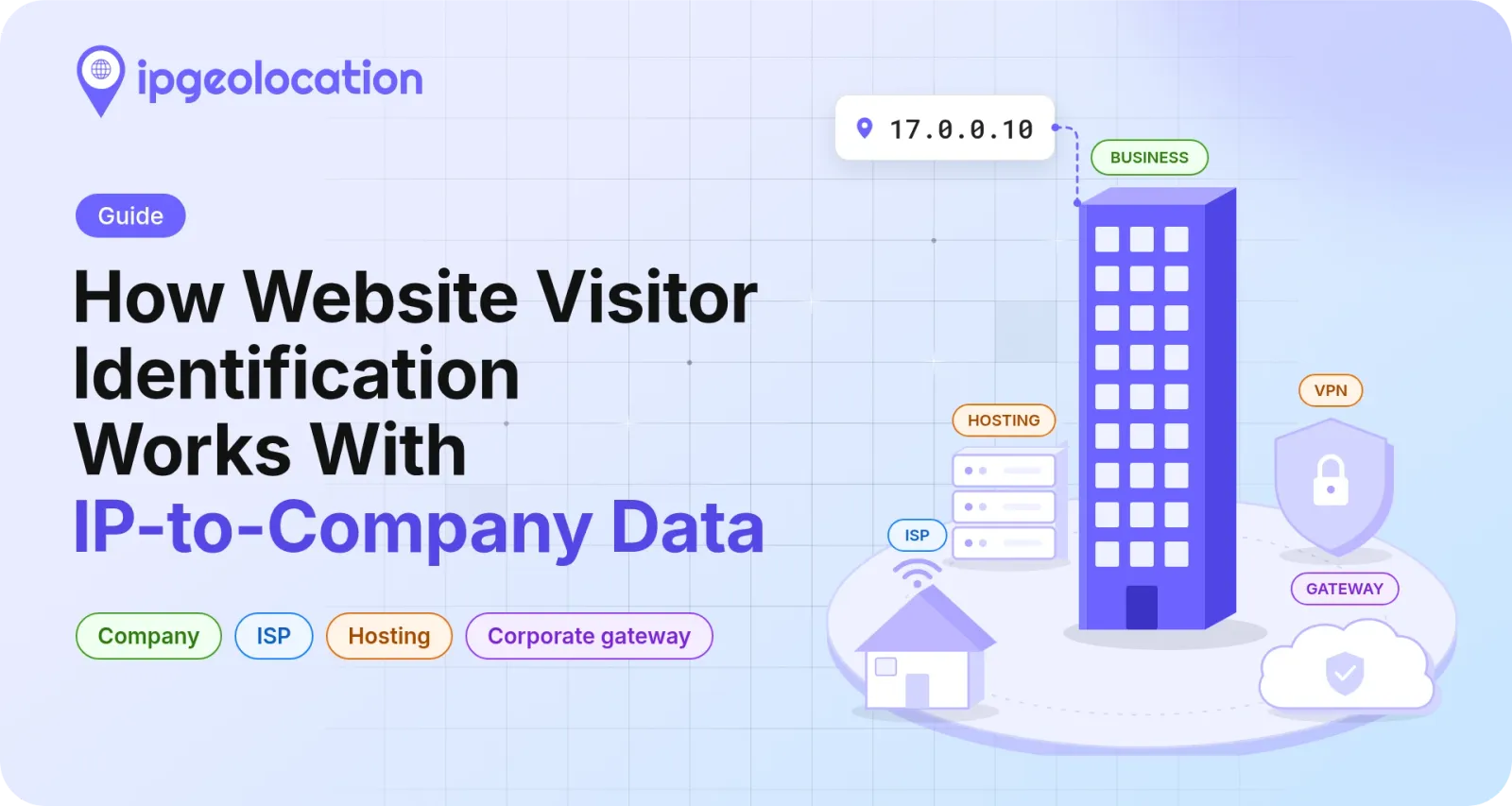
Website visitor identification matches a visitor's IP address to the organization whose network it came from, so a visit from Apple's network shows up as Apple Inc. in your records. It names a company only when the visitor is on that company's own network. A visit from home broadband, a phone, a cloud server, a VPN, or a corporate security gateway names someone else, and the same lookup returns the signals that tell you which case you have.
Each lookup returns three company fields: the name, a type (BUSINESS, EDUCATION, GOVERNMENT, ISP, or HOSTING), and a domain. Read together with the security flags in the same response, they tell you which visits belong on the list you send to sales and which don't.
TL;DR
For website visitor identification, look up each visit's IP address on your server with company and security data, then decide in this order: drop bots, record gateway visits without a company, set aside VPN, proxy, ISP, and HOSTING results, and count BUSINESS, EDUCATION, and GOVERNMENT companies that carry a domain.
- The IPGeolocation.io API returns the company's name, type, and domain in its
companyobject, andinclude=securityadds the bot, VPN, proxy, and corporate gateway flags to the same call. - A corporate gateway address, such as one of Zscaler's, names the security vendor. The
is_corporate_gatewayflag marks it; the visitor works at an organization that routes its traffic through that gateway, and the address doesn't say which one. - Run the lookup on your server, cache it for a day per address, and store the company you act on rather than the raw IP address.
- An IP address can be personal data under the GDPR and the CCPA, even when your report shows only company names.
What IP data can and can't tell you about a visitor
An IP lookup tells you which organization the visitor's network belongs to. It never tells you which person sent the request.
Say someone at Apple reads your pricing page from the office. Their request comes from an address in 17.0.0.0/8, a block ARIN's registry record lists as registered to Apple Inc., and a lookup returns Apple Inc. If the same person reads the page that evening from home, the request comes from their internet provider's address, and the lookup names the provider. Neither lookup says who they are, and the second one isn't wrong: the address really does belong to the provider.
Tools that promise to name individual visitors rely on other identifiers, such as a cookie left by an earlier form fill, a login, or a match against a third-party identity database. None of that comes from the IP address, and each carries its own consent questions. Company level is what IP data supports, so that's the level to build on.
How an IP address leads to a company
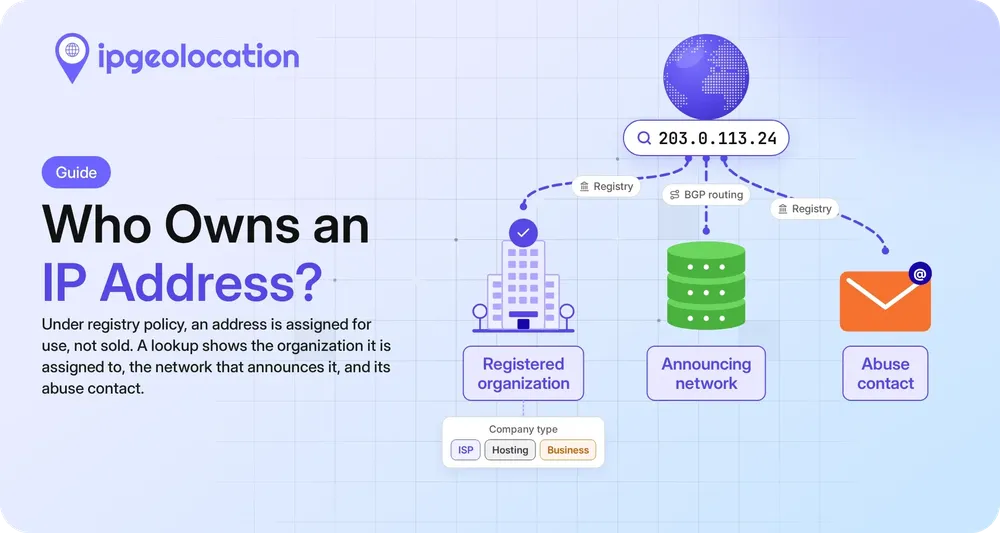
Every public IP address sits in a block that a regional internet registry, such as ARIN or RIPE NCC, has handed to an organization. The holder can use the block itself or reassign part of it to a customer, and the registry's WHOIS record names whoever holds or was assigned each range.
IPGeolocation.io turns those records into a company field for every range. The company name comes from registry records, and a domain-matching and type-classification process, rebuilt every 24 hours, adds the company's domain and type. When a domain or type can't be confirmed, the field stays empty rather than guessed.
Here are two lookups from November 3, 2026, trimmed to the company object:
[
  {
    "ip": "17.0.0.10",
    "company": { "name": "Apple Inc.", "type": "BUSINESS", "domain": "apple.com" }
  },
  {
    "ip": "171.64.64.64",
    "company": { "name": "Stanford University", "type": "EDUCATION", "domain": "stanford.edu" }
  }
]
Both match the registry: ARIN lists Apple Inc. as the registrant of 17.0.0.0/8 and Stanford University for 171.64.0.0/14. A company can also hold addresses that another company's network carries; our guide explains why a company and its network's ASN can differ.
1. What reverse IP lookup means for B2B
Marketing tools often call this a reverse IP lookup, a name that covers two other jobs as well. A reverse DNS lookup returns the hostname an address's operator published for it, and a "sites on this server" lookup lists the domains hosted at one address. Neither returns the company behind a visit.
Why most visits don't name a company
On most websites, most visits come from networks whose holder isn't the visitor's employer: home broadband, mobile carriers, cloud servers, VPN exits, and corporate gateways. Across the web, phones carried 59.9% of page views worldwide in October 2026, according to StatCounter's platform data, which counts tablets separately, and a phone on a carrier network reaches you from the carrier's address. Address space isn't traffic, but it shows where company names can come from: in IPGeolocation.io's company data on November 3, 2026, 50.8% of IPv4 addresses sit in ranges typed ISP, 8.4% in ranges typed HOSTING, and 38.3% in ranges typed BUSINESS, EDUCATION, or GOVERNMENT.
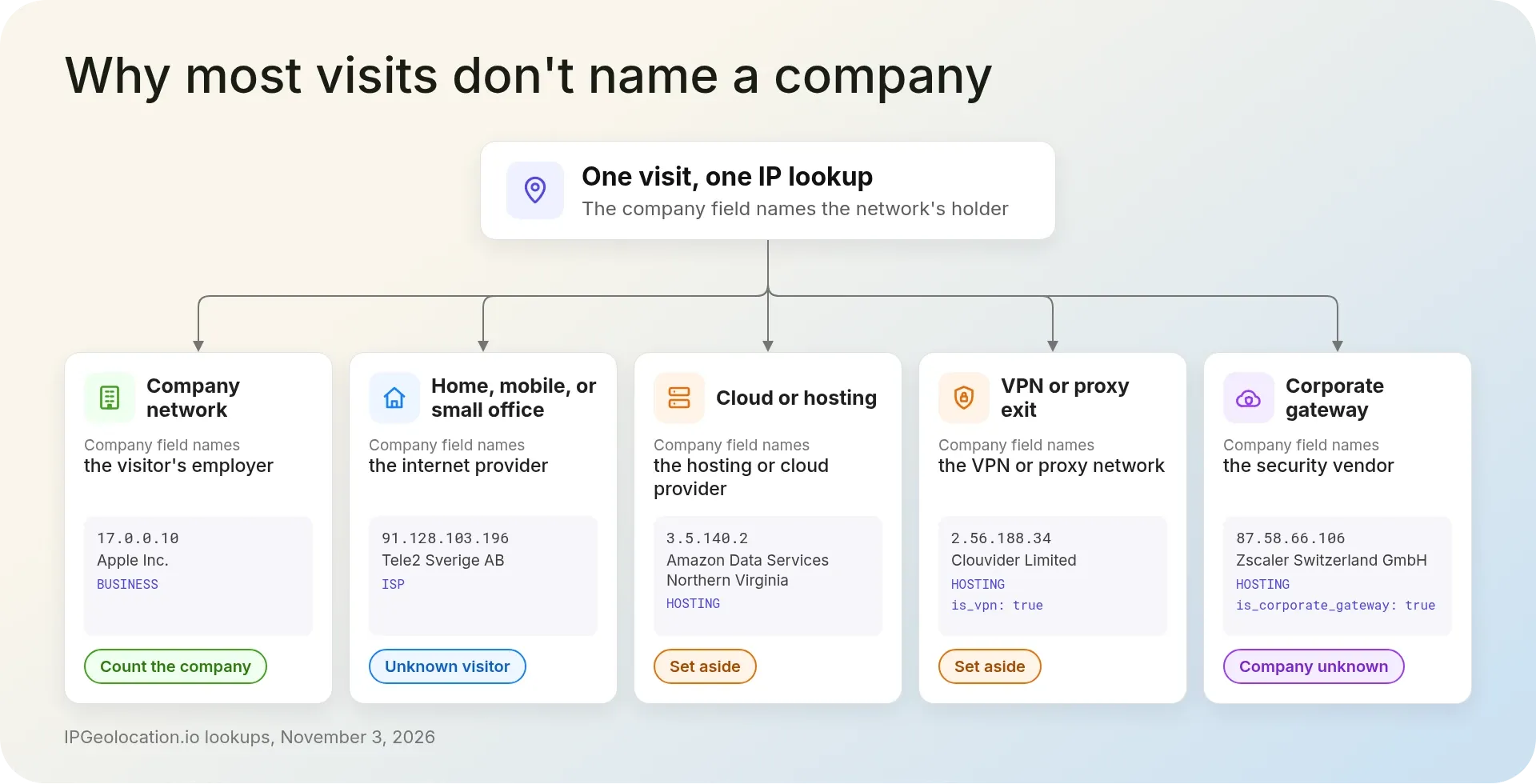
Every IP data provider reads the same registry records, so these cases come up whichever lookup you use; what helps is a field that flags each one.
1. Home broadband and mobile connections
A visitor working from home reaches you from their internet provider's address, so the lookup names the provider. Our documentation sample 91.128.103.196 returns Tele2 Sverige AB, type ISP. Remote work adds to these visits: in the US, 22.6% of workers teleworked or worked at home for pay in March 2026, according to the Bureau of Labor Statistics. Small offices on business broadband lines show up the same way, under their provider's name.
These are real people, sometimes from accounts you care about, but the address can't tell you who employs them. Record them as unknown visitors, not as visits from Tele2.
2. Cloud and hosting networks
An address in a cloud or hosting network belongs to a server, and the request usually came from software running on it: a crawler, an uptime monitor, a scraper, an AI agent fetching pages, or a script. 3.5.140.2 returns Amazon Data Services Northern Virginia, type HOSTING, the same registrant ARIN lists for 3.5.0.0/16. Amazon didn't read your pricing page; something running on Amazon's servers did.
Our security data flags known bots with is_bot, and the HOSTING type alone keeps these addresses off a company list.
3. VPN and proxy exits
2.56.188.34 returns Clouvider Limited, type HOSTING, with is_vpn set to true: a commercial VPN's exit server, so the company field names the network that server runs on and the VPN hides the visitor's employer by design. The HOSTING type would set this one aside anyway; checking is_vpn and is_proxy first catches VPN and proxy exits whatever type their range carries, and your records say why a visit was set aside.
4. Corporate gateways
Many large companies send their staff's web traffic through a cloud security service, a secure web gateway, which inspects each request and forwards it from the vendor's own addresses. An IPGeolocation.io lookup for 87.58.66.106 returns Zscaler Switzerland GmbH, type HOSTING, and in the same response is_corporate_gateway is true, corporate_gateway_type is secure_web_gateway, and corporate_gateway_provider_name is Zscaler.
Without that flag, Zscaler would show up as one of your busiest visitors, because one gateway address can front a whole workforce. With it, the visit counts as someone at an organization that uses Zscaler, with the company unknown. That's still worth keeping: the page was read from inside a managed corporate network, and Zscaler stays off your company list. On November 3, 2026, our security data flagged 4,320 ranges, about 0.68 million IPv4 addresses, as corporate gateways, covering secure web gateway and browser isolation services.
Which visits to count as a company
Count a visit as a company when its security flags are clear and its company type is BUSINESS, EDUCATION, or GOVERNMENT with a domain; set everything else aside. Check the flags first, because they tell you when the company field names someone other than the visitor's employer. The rule runs in this order:
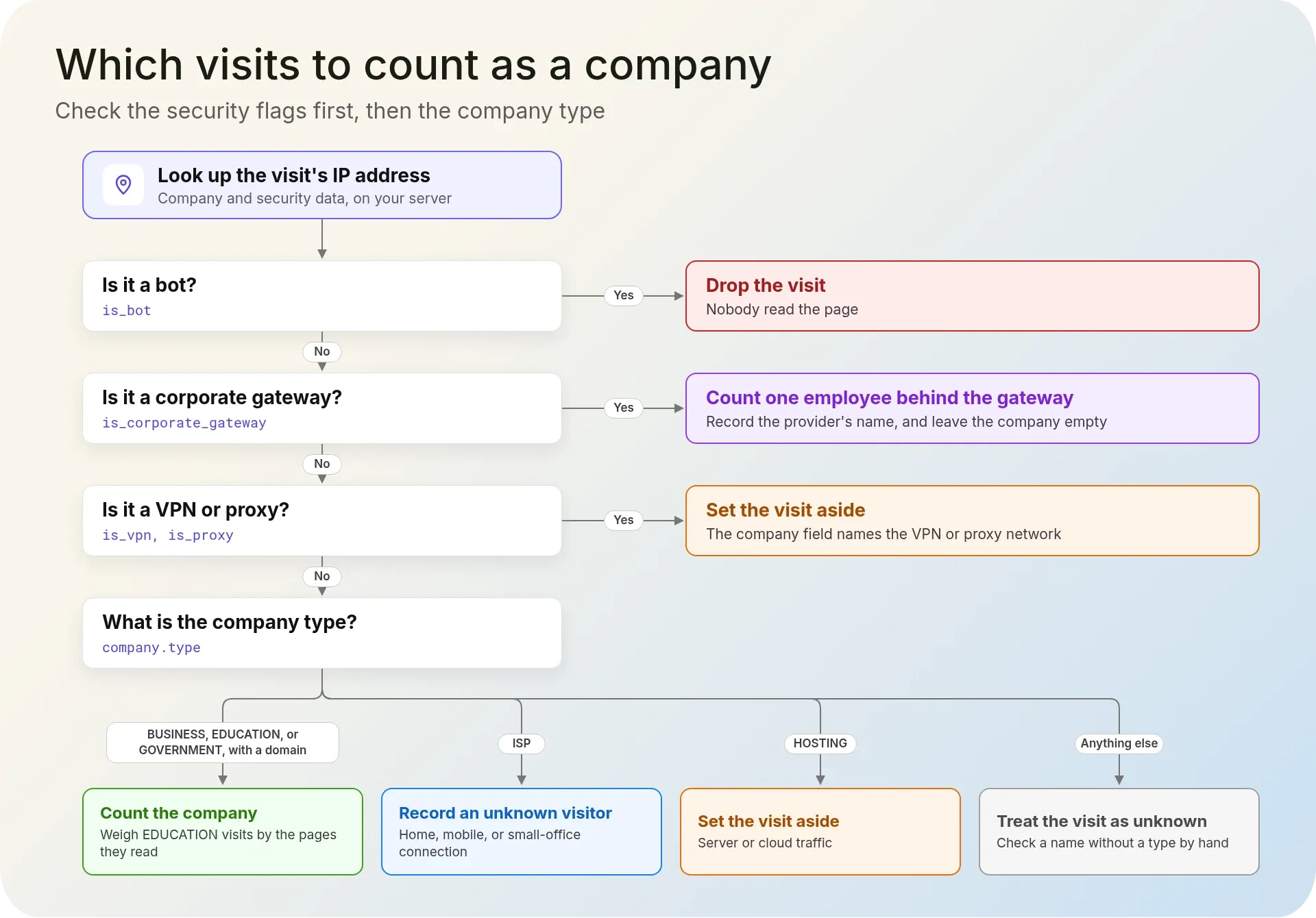
- Bot (
is_botis true): drop the visit. Nobody read the page. - Corporate gateway (
is_corporate_gatewayis true): count one employee behind the gateway, record the provider's name, and leave the company empty. - VPN or proxy (
is_vpnoris_proxyis true): set the visit aside. The company field names the VPN or proxy network. - BUSINESS, EDUCATION, or GOVERNMENT with a domain: count the company. A university network carries students as well as staff, so weigh an EDUCATION visit by the pages it read.
- ISP: record an unknown visitor on a home, mobile, or small-office connection.
- HOSTING: set the visit aside as server or cloud traffic.
- No type: treat the visit as unknown. A name without a type deserves a manual check before anyone treats it as a lead.
We'd rather hand sales a short list of companies that really visited than a long one padded with internet providers, cloud hosts, and a security vendor. The domain matters because it's what your CRM matches on; a name without one is harder to tie to an account.
How to build company-level visitor identification
To identify website visitors by company, run the work on your server, in the same five steps whether the address is IPv4 or IPv6.
1. 1. Read the visitor's real IP address
The remote address your framework reports is the visitor's only when nothing sits in front of your application. Behind a CDN or a load balancer, every request arrives from the proxy, and every lookup would name your CDN. Read the forwarded client address instead, and trust that header only when the request came from your own proxy, since anyone can send a fake one. The IPGeolocation.io guide to reading the visitor's real IP address behind a proxy or CDN covers which header to trust in each setup.
2. 2. Look up each address once a day
Send one request per address with include=security and fields trimmed to the company object and the flags the rule reads; the API reference lists the company and security fields. Cache each result for 24 hours. Our company data is rebuilt every 24 hours, so a day's cache keeps you in step with the data, and a visitor who loads ten pages costs one lookup. Skip addresses you already know, such as your own office and your uptime monitor.
The IP to Company database and the IP Security database do the same job on your own servers; the security files carry the bot, VPN, proxy, and corporate gateway flags this rule reads. Both routes work; the right one depends on your company's policies and your infrastructure, and our guide to choosing between the API and a database sets out the trade-offs. For batch jobs over server logs, see enriching web logs in bulk.
3. 3. Classify each visit
This Python function looks an address up with our SDK and runs the checks in the order the rule sets out. Install the SDK with pip install ipgeolocationio; it needs Python 3.10 or later.
import json
import logging
import os
import sys
import time

from ipgeolocation import (
    IpGeolocationClient,
    IpGeolocationClientConfig,
    IpGeolocationException,
    LookupIpGeolocationRequest,
)

log = logging.getLogger("visitor_id")

# Company and security data need a paid plan. With include=security,
# each lookup costs 3 credits: 1 for the base lookup and 2 for security.
FIELDS = [
    "company.name", "company.type", "company.domain",
    "security.is_bot", "security.is_vpn", "security.is_proxy",
    "security.is_corporate_gateway", "security.corporate_gateway_provider_name",
]
COUNTED_TYPES = {"BUSINESS", "EDUCATION", "GOVERNMENT"}
CACHE_SECONDS = 24 * 60 * 60  # company data is rebuilt every 24 hours
_cache = {}  # ip -> (expires_at, result); use a shared cache across processes


def classify(data):
    """Turn one lookup into a verdict, checking the flags before the company type."""
    company = data.get("company") or {}
    security = data.get("security") or {}

    if security.get("is_bot"):
        return {"verdict": "drop", "reason": "bot"}
    if security.get("is_corporate_gateway"):
        # The company field names the gateway vendor, not the visitor's employer.
        provider = security.get("corporate_gateway_provider_name") or None
        return {"verdict": "gateway", "provider": provider}
    if security.get("is_vpn") or security.get("is_proxy"):
        return {"verdict": "set_aside", "reason": "vpn_or_proxy"}

    company_type = company.get("type") or ""
    if company_type in COUNTED_TYPES and company.get("domain"):
        return {"verdict": "company", "name": company.get("name"),
                "domain": company["domain"], "type": company_type}
    if company_type == "ISP":
        return {"verdict": "unknown", "reason": "home_or_mobile"}
    if company_type == "HOSTING":
        return {"verdict": "set_aside", "reason": "server_or_cloud"}
    return {"verdict": "unknown", "reason": "no_company_type"}


def identify_visit(client, ip):
    """Look up a visitor's IP once a day and return a verdict that holds no IP."""
    cached = _cache.get(ip)
    if cached and cached[0] > time.time():
        return cached[1]
    try:
        # The raw method returns every field the API sends, gateway flags included.
        response = client.lookup_ip_geolocation_raw(
            LookupIpGeolocationRequest(ip=ip, include=["security"], fields=FIELDS)
        )
        result = classify(json.loads(response.data))
    except IpGeolocationException as exc:
        # A failed lookup shouldn't break the page; count the visit as unknown.
        log.warning("IP lookup failed: %s", type(exc).__name__)
        return {"verdict": "unknown", "reason": "lookup_failed"}
    except (ValueError, AttributeError):
        log.warning("Unexpected lookup response")
        return {"verdict": "unknown", "reason": "bad_response"}
    _cache[ip] = (time.time() + CACHE_SECONDS, result)
    return result


if __name__ == "__main__":
    api_key = os.environ.get("IPGEOLOCATION_API_KEY")
    if not api_key:
        sys.exit("Set IPGEOLOCATION_API_KEY first.")
    config = IpGeolocationClientConfig(api_key=api_key, connect_timeout=2, read_timeout=3)
    with IpGeolocationClient(config) as client:
        for ip in ["17.0.0.10", "87.58.66.106"]:
            print(ip, identify_visit(client, ip))
identify_visit returns a verdict with no IP address in it, so you can store it without keeping the address. The code calls the SDK's raw method and parses the JSON itself, because the raw response carries every field the API returns, the corporate gateway flags included. A failed lookup returns an unknown visit instead of an error, and the timeouts cap each lookup at a few seconds; run it in a background job if visitors shouldn't wait at all. Run the script with your key in IPGEOLOCATION_API_KEY, and the two addresses print:
17.0.0.10 {'verdict': 'company', 'name': 'Apple Inc.', 'domain': 'apple.com', 'type': 'BUSINESS'}
87.58.66.106 {'verdict': 'gateway', 'provider': 'Zscaler'}
If every visit comes back as lookup_failed, check the key first: a rejected key raises UnauthorizedException, which the function logs by name. The in-memory cache keys on the address for up to 24 hours, the same short-lived use your server logs make of it. If you move it to a shared cache, key it on a keyed hash of the address and let entries expire on the same schedule.
4. 4. Store the company, not the IP address
Write the verdict, the page, and the time to your analytics store or CRM, and let the raw address expire with your server logs, which already keep it for debugging and security. Sales works from company names and domains; once you have them, a copy of the address in your analytics store only adds privacy risk. Group the visits by domain to see which companies came back and which pages they read.
5. 5. Measure the share on your own traffic
Before you promise sales a number, run a day of real visits through the function and count the verdicts. An enterprise audience browsing from the office returns more companies than readers who work from home or browse on their phones, so a figure from someone else's traffic tells you little about yours.
Is website visitor identification legal?
It can be, at company level, but it still processes IP addresses, which privacy laws can treat as personal data, so it needs a lawful basis, a clear notice, and short retention. What follows is general information, not legal advice.
The GDPR names internet protocol addresses among the online identifiers that can identify a person (Recital 30), and its definition of personal data includes an online identifier (Article 4(1)). In the Breyer judgment of 2016, decided under the directive the GDPR later replaced, the EU's Court of Justice held that a dynamic IP address a website operator records is personal data for that operator when it has the legal means to identify the visitor with the extra data the internet provider holds. In California, the CCPA's definition of personal information lists an Internet Protocol address among its identifiers when it can reasonably be linked to a consumer or a household.
A separate EU rule, Article 5(3) of the ePrivacy Directive, requires consent before a site stores information on a visitor's device or reads information already stored there, unless that is strictly necessary for a service the visitor asked for. It covers the cookies and scripts that many tracking tools rely on; ask your counsel how it applies to your setup.
In practice, keep the raw address only as long as your logs need it, store the company you act on, say in your privacy notice that you identify visiting companies from IP addresses, and record the lawful basis your counsel agrees. Take the same care with records about very small companies, where a company name and a visit time can point to one person. For the addresses you send to the IPGeolocation.io API, we act as your processor, keep API access logs for 14 days, and provide a DPA to paid customers on request; see what happens to the IP addresses you send us and our GDPR compliance page. If addresses mustn't leave your systems, the database route keeps every lookup on your servers.
Company data from IPGeolocation.io
IPGeolocation.io returns everything this rule needs in one call to the IP Geolocation API: geolocation, security, ASN, company, abuse contact, time zone, and user agent data in a single JSON response. That's the most complete picture of an address you can get from one request: where its network sits, what risk signals it shows, which network routes it, who it's registered to, who takes abuse reports, its local time, and what the visitor's browser and device are.
Company data comes with its type and domain, rebuilt every 24 hours. Security data covers VPN, proxy, residential proxy, and Tor detection, bots with their type and operator, cloud and corporate gateway flags, and a threat score from 0 to 100, given as risk signals for you to weigh. For offline or bulk enrichment, the IP to Company database ships the same company fields as CSV and MMDB files, alone or bundled with location and ASN data, and the Security Pro databases carry the security data, corporate gateway and bot fields included.
Company and security data come with paid plans, which start at $19 a month for 150,000 credits; the free plan's 1,000 daily credits cover location, ASN basics, currency, and time zone. The pricing page compares them.
Frequently Asked Questions
You can see which companies visit when a visit comes from a company's own network, but not which person it was. An IP lookup names the organization that holds the address; visits from home, mobile, cloud, VPN, and gateway networks name a provider instead of an employer.
Not on its own. An IP address points to a network, and for a home or mobile connection the registered organization is the internet provider. Linking an address to one subscriber takes the provider's own records, which is why the EU Court of Justice's Breyer ruling turned on that extra data.
It works at company level, for visits that come from company networks. Office traffic resolves to companies, while home, mobile, VPN, cloud, and gateway traffic doesn't, so the share depends on your audience. Run a day of your own visits through a lookup before you rely on any figure.
In B2B marketing, a reverse IP lookup maps a visitor's IP address to the organization that holds its network and returns a company name, type, and domain. It differs from a reverse DNS lookup, which returns a hostname, and from tools that list the websites hosted on one server.
Yes. An IP-to-company lookup reads the address from each request your server already receives, so it needs no cookie or script on the visitor's device. Privacy rules for the IP address itself still apply.
No, company data needs a paid plan. IPGeolocation.io's free plan gives 1,000 credits a day without company data; paid plans include company and security data and start at $19 a month for 150,000 credits. A lookup with company data costs 1 credit, or 3 credits with security data.