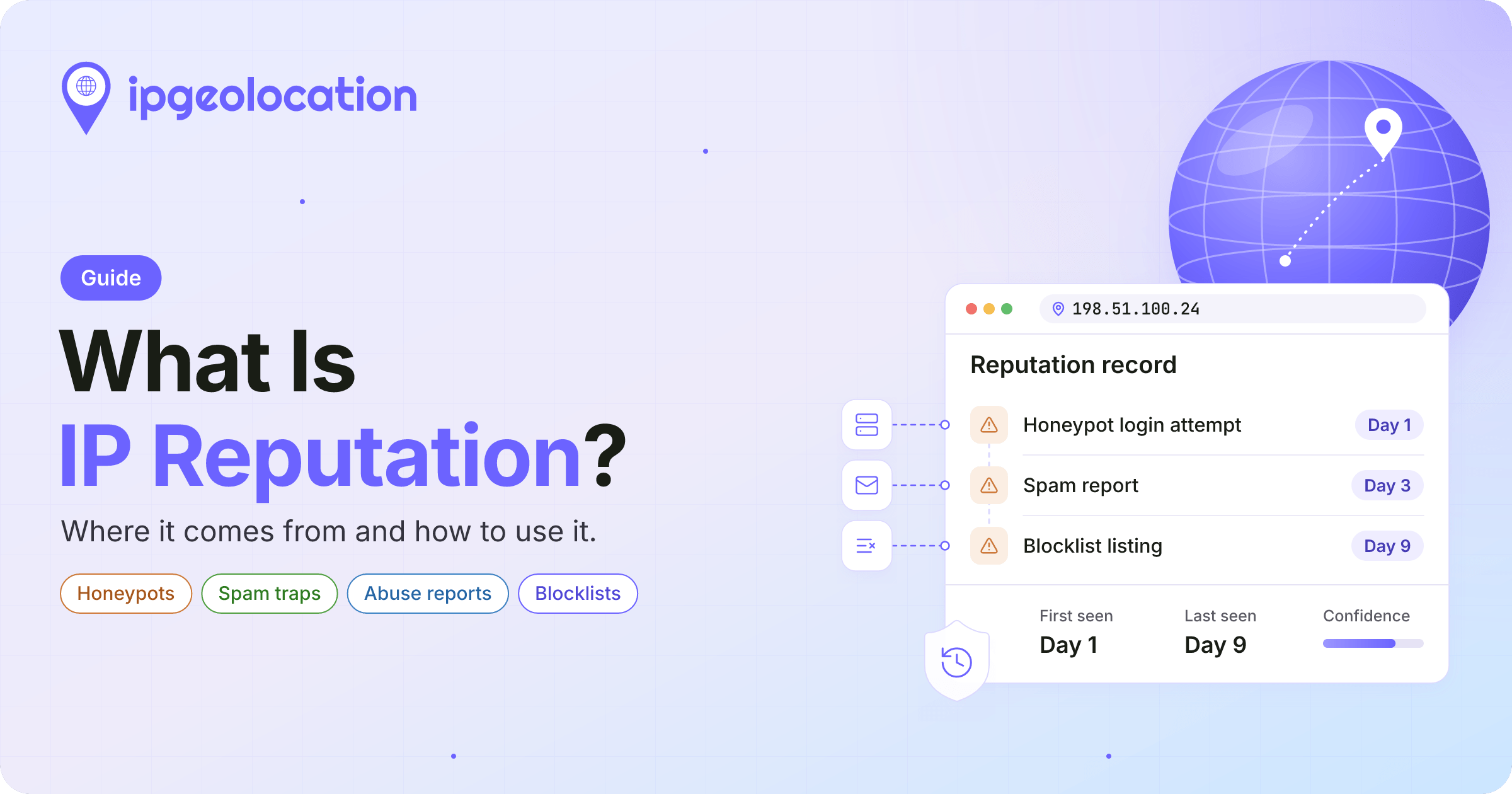
IP reputation is an IP address's record of bad behavior, such as spam, scanning, or attacks, usually expressed as a score or a blocklist category. Security tools use it to decide how cautiously to treat traffic from an address, and mail providers use it to decide whether to accept an address's email.
That record is written by whoever was watching: decoy servers, mail systems, abuse desks, and the operators of shared blocklists. It describes what an address did, not who is using it now, and every entry in it has a date, whether or not you're shown one. IP reputation is part of the threat layer of IP intelligence, next to the signals that describe what an address is, such as a VPN exit or a company gateway.
TL;DR
IP reputation is built from what observers record about an address: hits on decoy servers and spam traps, abuse reports, patterns that large networks see, and listings on shared blocklists. It describes past behavior, so how recent the evidence is matters as much as what it says.
- Blocklist guidance treats listings as temporary: RFC 6471 says they should expire unless the reason for listing still exists.
- In a 2020 study of 151 public IPv4 blocklists, about 53% listed at least one dynamically assigned address, so a listed address can belong to someone new by the time you see it.
- OWASP advises against IP blocking as the sole or primary defense and says blocks should be temporary, which makes reputation one input rather than a switch.
What an IP reputation record contains
Say your login service logs a burst of failed attempts from 79.127.147.49, and a reputation lookup says the address is a known attacker. Before you block it, it helps to know what that answer is made of, because a reputation record, whoever publishes it, is built from the same few things:
- What was seen: the kind of behavior, such as spam, port scanning, password guessing, or exploit attempts.
- Who saw it: a honeypot, a mail provider, a person filing a report, or a shared list that collected it from others.
- When: the first and last time the behavior was observed, if the source records it.
- How sure: a confidence value, or the number of independent sources that agree.
- Scope: one address, a block of neighboring addresses such as a /24, or a whole network.
Here is how those parts look in a real IP address reputation lookup: the security data IPGeolocation.io returned for 79.127.147.49 on November 3, 2026, trimmed to the fields this guide uses:
{
  "ip": "79.127.147.49",
  "security": {
    "threat_score": 90,
    "is_known_attacker": true,
    "is_bot": true,
    "bot_type": "scanner",
    "bot_confidence_score": 95,
    "bot_last_seen": "2026-10-31",
    "is_known_good_bot": false,
    "is_spam": false,
    "is_vpn": true,
    "vpn_provider_names": ["Proton VPN"],
    "vpn_confidence_score": 99,
    "vpn_last_seen": "2026-10-26",
    "is_anonymous": true,
    "is_cloud_provider": true,
    "cloud_provider_name": "Datacamp Limited"
  }
}
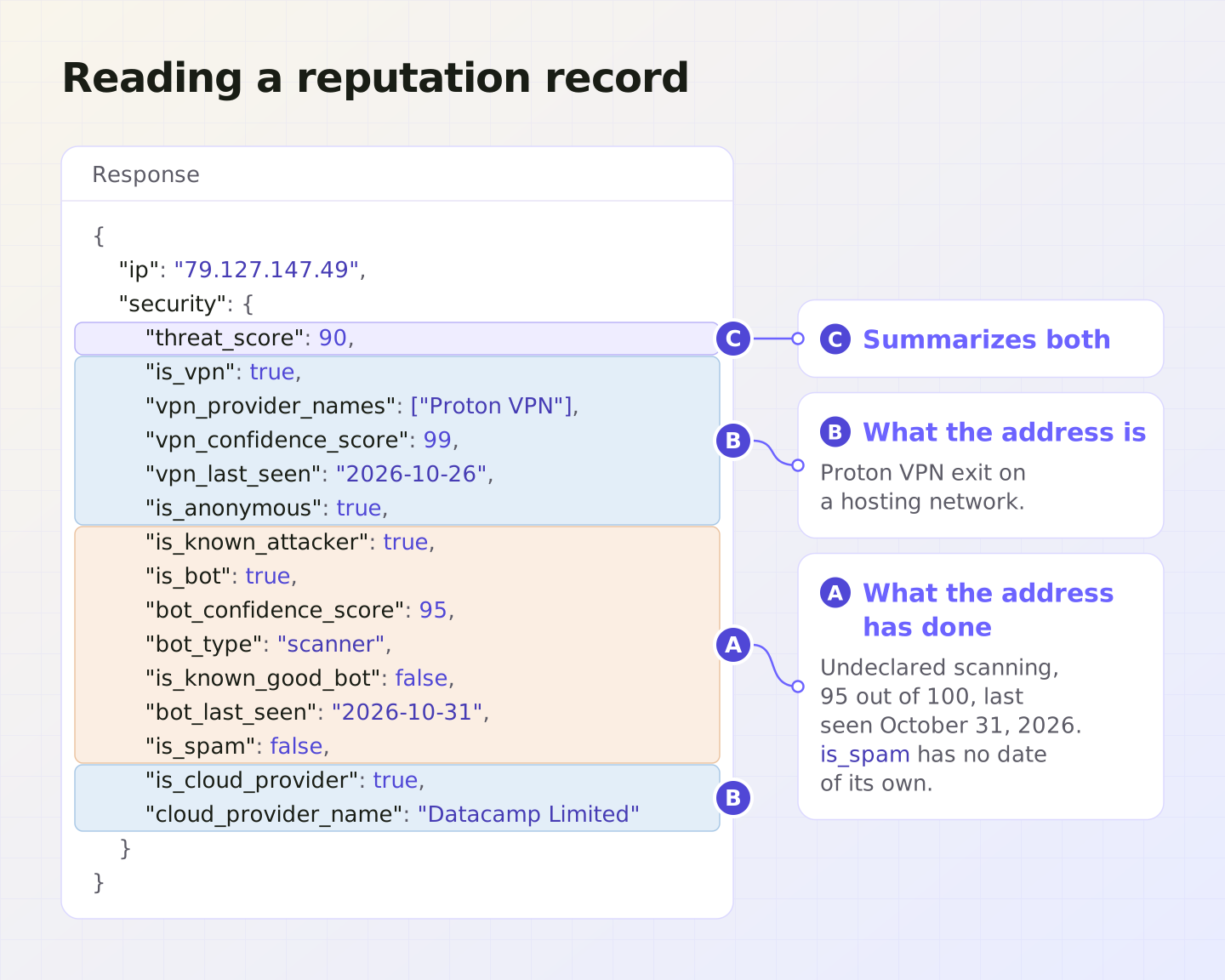
Read the fields against the five parts. What was seen: automated scanning with no declared operator (bot_type is scanner and is_known_good_bot is false), recorded as attack history with is_known_attacker. How sure: 95 out of 100 that the address shows this bot activity. Scope: this one address.
That's how attack evidence is dated in IPGeolocation.io's data: the bot fields describe the activity behind an attack record and carry its strength and date, and the attack types brute_force, credential_stuffing, exploit, and worm always come with is_known_attacker set, as the IP Security API field reference documents. The spam flag works differently: is_spam has no confidence score or date of its own, and for this address it's false.
The rest of the response describes what the address is, not what it did. Our current build classifies it as a Proton VPN exit, with a confidence of 99 and last observed on Proton VPN on October 26, 2026, on a cloud or hosting provider's network run by Datacamp Limited. The threat_score of 90 sums up both kinds of signal.
Where IP reputation data comes from
No single observer sees more than a sliver of the internet, so reputation data is stitched together from several kinds of watchers. A study of 157 public blocklists collected in 2016 found that the average list covered only 3.03% of the /24 networks that held any listed address. Providers combine sources for that reason.
The watchers fall into six groups:
- decoys that nobody legitimate should touch;
- people and systems that report what they received;
- large networks that see the same address across many customers;
- operators that publish lists of their own addresses;
- shared blocklists and threat feeds that collect from the other sources.
- real-time connection observations that identify VPN and proxy use.
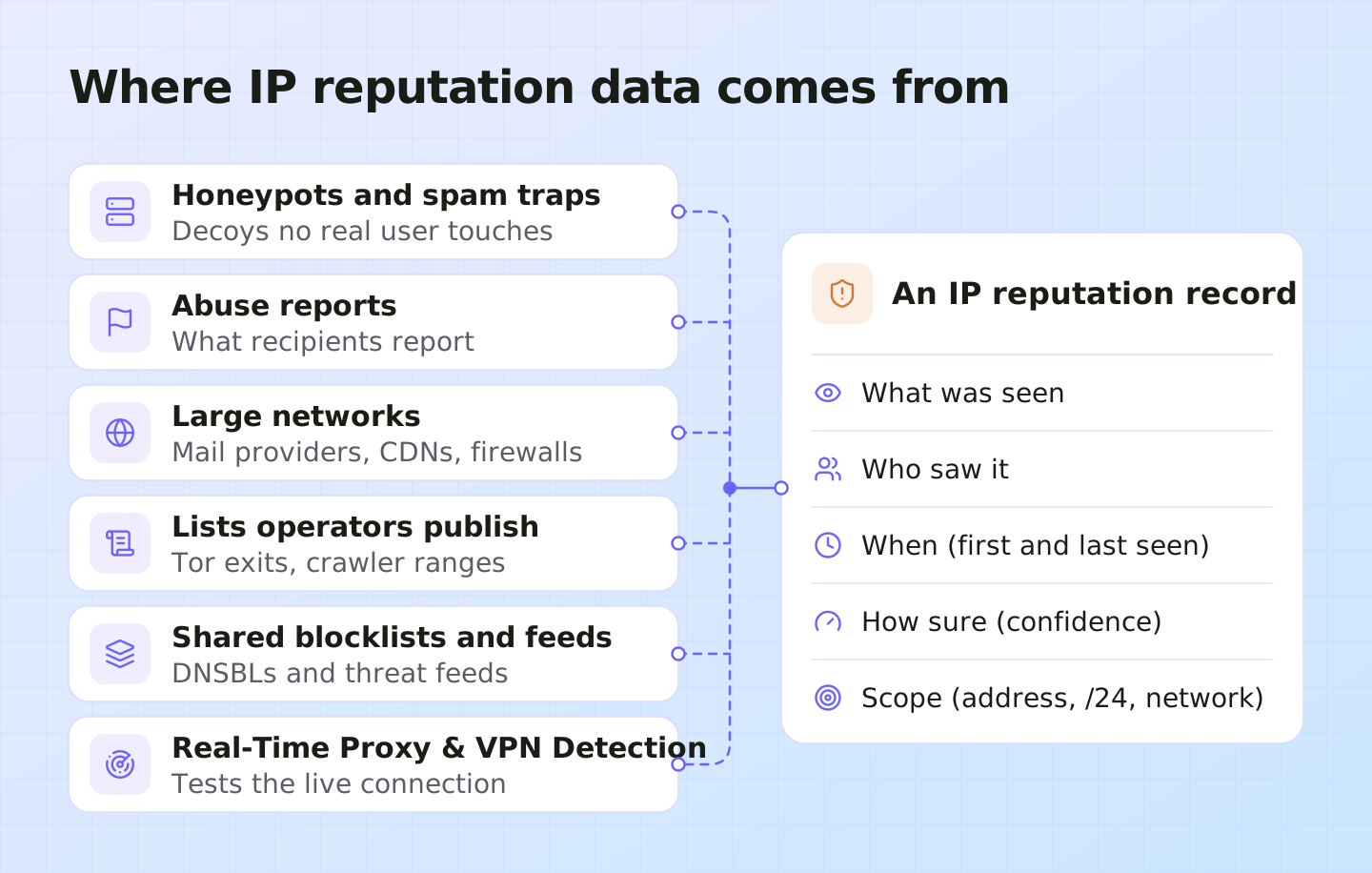
1. Honeypots and spam traps
A honeypot is a server that exists only to be attacked. It offers a login prompt or a vulnerable-looking service, and since no real user has a reason to connect, every address that tries a password or an exploit on it is suspect. A spam trap does the same for email: an address that never signed up for anything, so whatever lands in it is unsolicited.
The evidence is direct, which is why it weighs heavily. At IPGeolocation.io, we run our own honeypots, and by May 21, 2026, they had captured more than 200,000 unique attacker IPs in brute-force SSH attempts, credential stuffing, vulnerability scans, and other automated attacks; our write-up on how we collect detection evidence shows redacted samples from those logs. The captures are the main source of our known-attacker flag, and honeypot captures of mail abuse and messages sent to trap addresses feed the spam flag alongside curated feeds. The limit is reach: a honeypot only sees attacks aimed at it, so an attacker who never touches one stays invisible to it.
2. Abuse reports and complaints
Every "report spam" click, every ticket to a network's abuse desk, and every entry in a community report database is an observation by someone who received unwanted traffic. Reports come in large volumes and cover services a decoy can't imitate, such as a real store's checkout or a real person's inbox.
They're also the noisiest source. A report can be mistaken, made in bad faith, or filed against a shared address that one user abused. Careful providers count a report as one vote and wait for others to agree before an address is listed.
3. Traffic seen by large networks
Mail providers, CDNs, and cloud firewalls each handle traffic for many sites or inboxes at once. When one address tries passwords on thousands of unrelated logins in an hour, or sends the same message to a huge number of mailboxes, the pattern is obvious from where they sit and invisible to any one site.
Most of this data stays inside those platforms. It shapes their own spam filtering and bot rules, and you meet it as a rejected message or a challenge page rather than a lookup.
4. Lists operators publish about themselves
Some operators publish their own addresses: the Tor network lists its exit relays, search engines publish the ranges their crawlers use, and privacy relay services publish their outgoing address ranges. These lists are reliable because the operator wrote them, but they say what an address is, not what it did. A Tor exit or a crawler range belongs in a different column of your decision than a record of attacks; our guide to what each IP threat signal means covers those signals one by one.
5. Shared blocklists, DNSBLs, and threat feeds
Shared blocklists collect addresses from many of these sources and publish them for others to use. The oldest form is the DNS-based blocklist, or DNSBL: a mail server checking an address reverses its numbers, adds the list's domain name, and looks the result up in DNS, and if the lookup returns an address, the IP is listed. Threat feeds do the same job in bulk, as files or API calls exchanged between security teams.
Each list makes its own choices about what earns a listing, whether it lists one address or a whole range, and when an entry comes off. Two lists can disagree about the same address and both be following their rules.
6. Real-time VPN and proxy observations
At IPGeolocation.io, we also gather first-hand observations through our Real-Time Proxy & VPN Detection tool, deployed on partner websites around the world. As traffic arrives, a lightweight browser script triggers live network tests that examine routing paths and connection signals rather than relying on an existing IP listing. The results include separate VPN and proxy scores and a confidence value, helping us identify new VPN exits and rotating residential proxies that have no recorded history yet.
We feed these observations into our IP intelligence and record when an address was observed using a VPN or proxy connection, so the evidence has a timestamp rather than just a flag. The live check also carries its own session timestamp, keeping the observation tied to a particular connection. These observations add context alongside attack and spam history, not proof of abuse: they describe how an address was used to connect, not whether the person behind it did anything wrong.
How is an IP reputation score calculated?
An IP reputation score is calculated by weighing the evidence on an address: how serious the behavior was, how recently it was seen, how many independent sources agree, and whether it involved one address or a whole range. Each provider weighs those inputs its own way and publishes its own scale, so a 70 from one provider says nothing about a 70 from another. Some scales also run in opposite directions, with a high number meaning risky on one and safe on another.
IPGeolocation.io's threat_score runs from 0, an address with no risk signal in our data, to 100, and higher means more risk. It covers more than reputation in the strict sense: it combines attack and spam history with what the address is, including VPN, proxy, Tor, and relay use, bot activity, and cloud hosting. Our documentation maps it to four bands: 1 to 19, allow with standard controls; 20 to 44, combine with other signals before acting; 45 to 79, add friction such as a one-time code; and 80 to 100, block, hard-challenge, or send to review. The 90 for 79.127.147.49 falls in the top band, which the documentation says usually means several risk signals at once. The bands are a starting policy, and different actions deserve different cutoffs; setting threat score cutoffs for each action walks through login, signup, checkout, and payouts.
How long a bad IP reputation lasts
A bad IP reputation should last only as long as the evidence behind it, and the best-practice guidance for blocklist operators says so. RFC 6471, a 2012 overview of DNS blocklist practice from the Internet Research Task Force's Anti-Spam Research Group, says listings should be temporary and expire on their own unless the reason for listing still exists. Its authors add that some automated lists grow less accurate as the last detection date gets older.
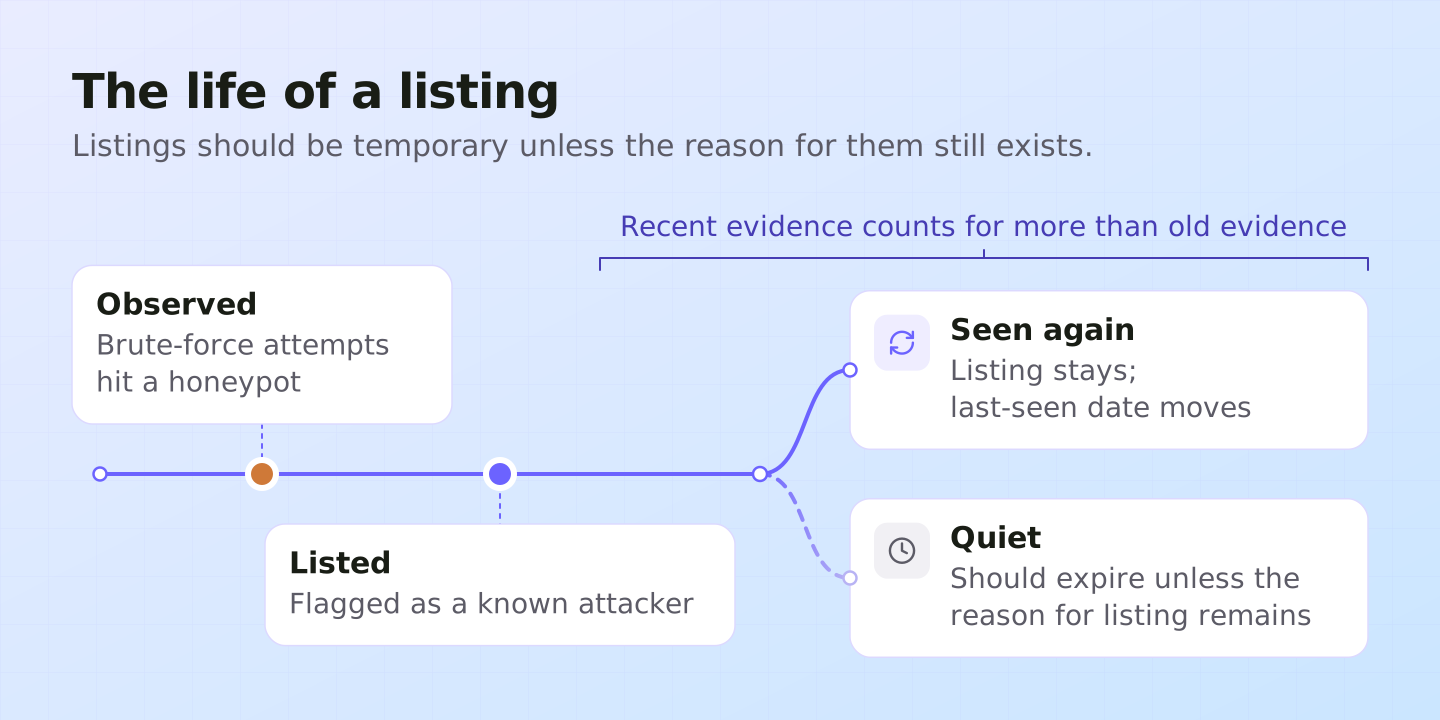
In practice, the average listing is short. A 2020 study that tracked 151 public IPv4 blocklists over two periods in 2019 and 2020 found that listed addresses were removed within nine days on average, NATed addresses within ten, and dynamically assigned addresses within three.
Short doesn't mean safe to forget. The 2016 study of 157 lists found that 29.3% of listed addresses offended again after being removed, and about 91% of those repeat offenses came within 30 days. Repeat abuse clusters in the weeks right after a listing ends, which is why recent evidence deserves the most weight.
Prefer data that dates its evidence. Our own data is published to the API in one full daily build, as our update schedule explains, and each build reclassifies or removes addresses that are no longer tied to threats. That keeps every flag current with our latest classification, and where the bot fields carry a bot_last_seen date, it tells you when the activity behind an attack record was last observed.
Why IP reputation gets it wrong
IP reputation describes an address, and an address isn't a person. Every provider's data shares these four limits, because they come from how the internet hands out and shares addresses. Each one calls for a different field or a different check.
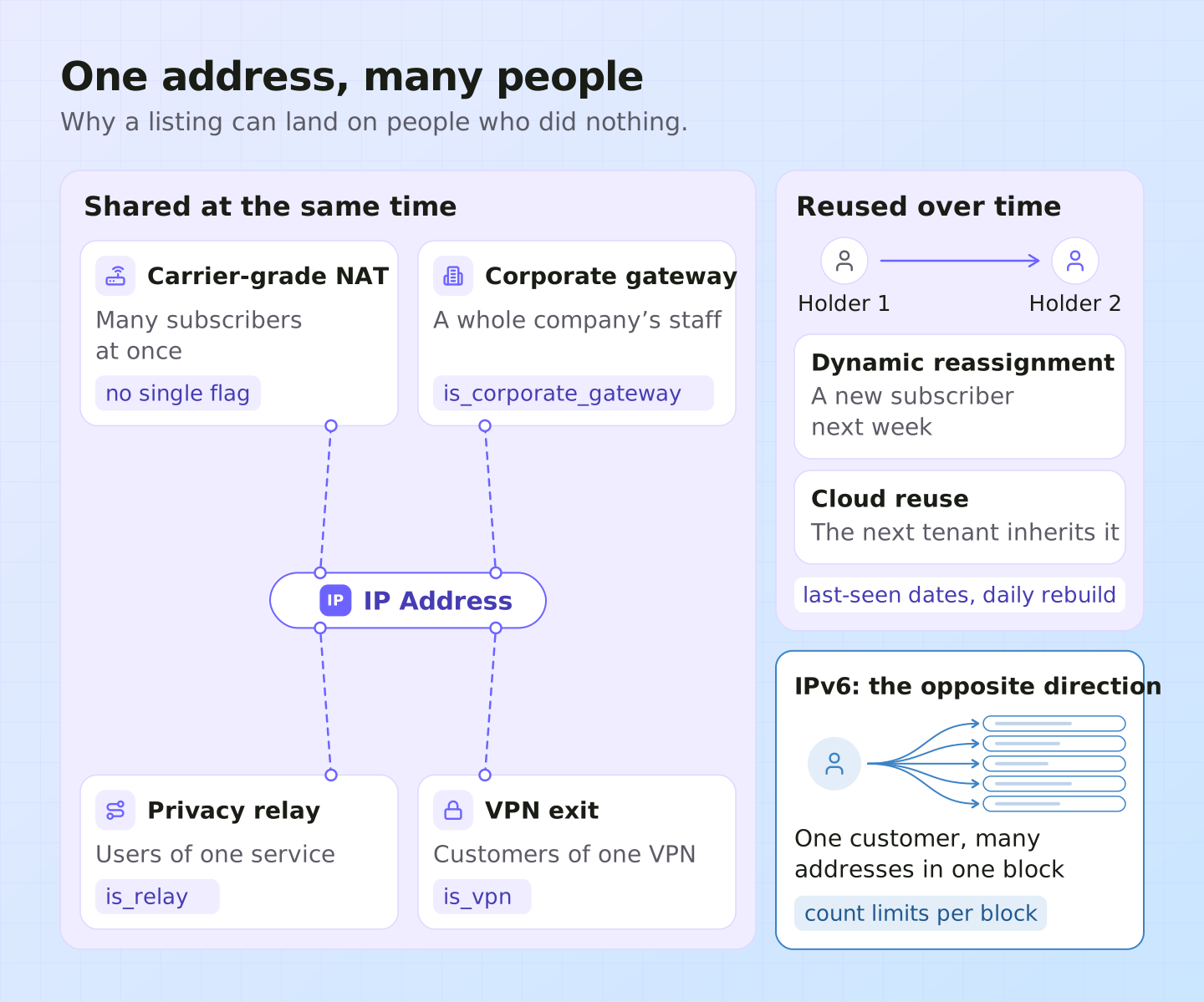
1. 1. Many people behind one address
Mobile carriers and some home internet providers put large numbers of subscribers behind one public address with carrier-grade NAT. Companies send their whole workforce through a few security gateway addresses, and privacy relays put many users of one service behind each exit. VPN exits are shared the same way: 79.127.147.49 is a Proton VPN exit, so the scanning on its record may have come from one of many people using that server. When one person behind a shared address attacks something, the record lands on everyone, and a block lands on everyone too.
A shared address can also look clean while carrying a whole company. 87.58.66.106 scored 5 in IPGeolocation.io's data, with is_corporate_gateway set and the provider named as Zscaler: the outgoing address of a company's security gateway, where one block would lock out the organization behind it. Our data flags these with is_corporate_gateway and is_relay, so for those addresses you can apply limits per account instead of per address.
2. 2. Addresses that change hands
Internet providers reassign dynamic addresses to new subscribers, cloud platforms hand a released address to the next customer, and address blocks are sold and leased. The record often stays behind with the address. In the 2020 blocklist study, about 60% of the 151 lists included at least one NATed address and about 53% at least one dynamic address: listings that can block people who did nothing.
Recency is the defense. Our VPN, proxy, and bot detections carry a last-seen date when one is available, and note that an address released by a VPN provider can carry its old classification for up to 24 hours, until the next daily build.
3. 3. Clean addresses carrying bad traffic
The opposite failure is quieter. Residential proxy networks route traffic through real household connections, so the address an attacker uses can have no history at all, and a VPN server that went live this morning hasn't been observed by anyone yet. Reputation, which looks backward, can't catch either.
For household addresses, the is_residential_proxy flag marks those associated with proxy networks, and how residential proxy detection works explains the method. For exits too new for any record, Real-Time Proxy & VPN Detection tests the visitor's live connection in the browser instead of looking the address up.
4. 4. IPv6
With IPv6, a provider usually gives each customer a whole block of addresses rather than one, so a single device can move to a fresh, recordless address inside its block. Our view: treat a per-address IPv6 record as one clue, and count rate limits per customer block rather than per address.
How to use IP reputation data
Use IP reputation as one input to a decision, sized to what a wrong call would cost on that page.
- Score the right address. Behind a CDN, load balancer, or reverse proxy, the address that connects to your app belongs to that service. Read the visitor's real IP address from a header your own infrastructure sets, or you'll be looking up your own servers.
- Check what the address is before what it did. A corporate gateway, a privacy relay, or a declared crawler changes the answer; see what each IP threat signal means. 66.249.66.1 came back from IPGeolocation.io's data with
is_bottrue, but alsois_known_good_bottrue, abot_typeofsearch_engine, and Google as the operator, with a threat score of 15. Blocking every bot flag would have blocked Google's search crawler. - Match the response to the action. OWASP's credential stuffing guidance says IP blocking shouldn't be the sole or primary defense and recommends a graduated response that raises or lowers the bar using factors such as whether the address is residential or hosting. A record of attacks should add a check at login and payout; it shouldn't stop someone from reading a help article. Our post on threat score cutoffs for each action sets them page by page.
- Prefer a check over a block, and make blocks temporary. A one-time code or a CAPTCHA turns a wrong call into a short delay for a real person. The same OWASP guidance says IP blocks should be temporary and lifted as the abuse stops, which matches how list operators are asked to expire their listings.
- Weigh how recent and how strong the evidence is. A detection seen this week with high confidence deserves more than one seen months ago with low confidence. In our data, read
bot_last_seenandbot_confidence_scorenext tois_known_attacker. Where a flag has no date at all, as withis_spamor an attack flag with no bot activity behind it, you know the address is classified that way today but not when it last misbehaved, so give it less weight on its own than a fresh, dated detection. - Report confirmed abuse. A block protects your site; a report to the network's registered abuse contact gives the team that runs the address the evidence to stop it. Send the address, timestamps in UTC, and the relevant log lines.
Back to the login from the start. The record on 79.127.147.49 says scanning, not password guessing, so it doesn't prove this address is behind your failed logins; it says the address was used for automated probing three days before our lookup and is a VPN exit that many people share. While the burst is under way, a tight rate limit or a short block on the address is reasonable, set to lift once the attempts stop. After that, we'd send its logins to a hard challenge or review and let it keep reading public pages, rather than ban it for good. If you confirm an attack, for example many accounts tried with leaked passwords, report it to the network's registered abuse contact. In almost every other case we'd rather add a check than block.
When the bad reputation is your own IP
If your mail is bouncing or your server is being challenged, the reputation in question is your own address's, judged by mailbox providers, the services your servers connect to, and blocklist operators rather than by you. The same mechanics apply in reverse: complaints, bounces, and spam-trap hits pile up against your sending address, and if you send from an address shared with other senders, their behavior counts against you too.
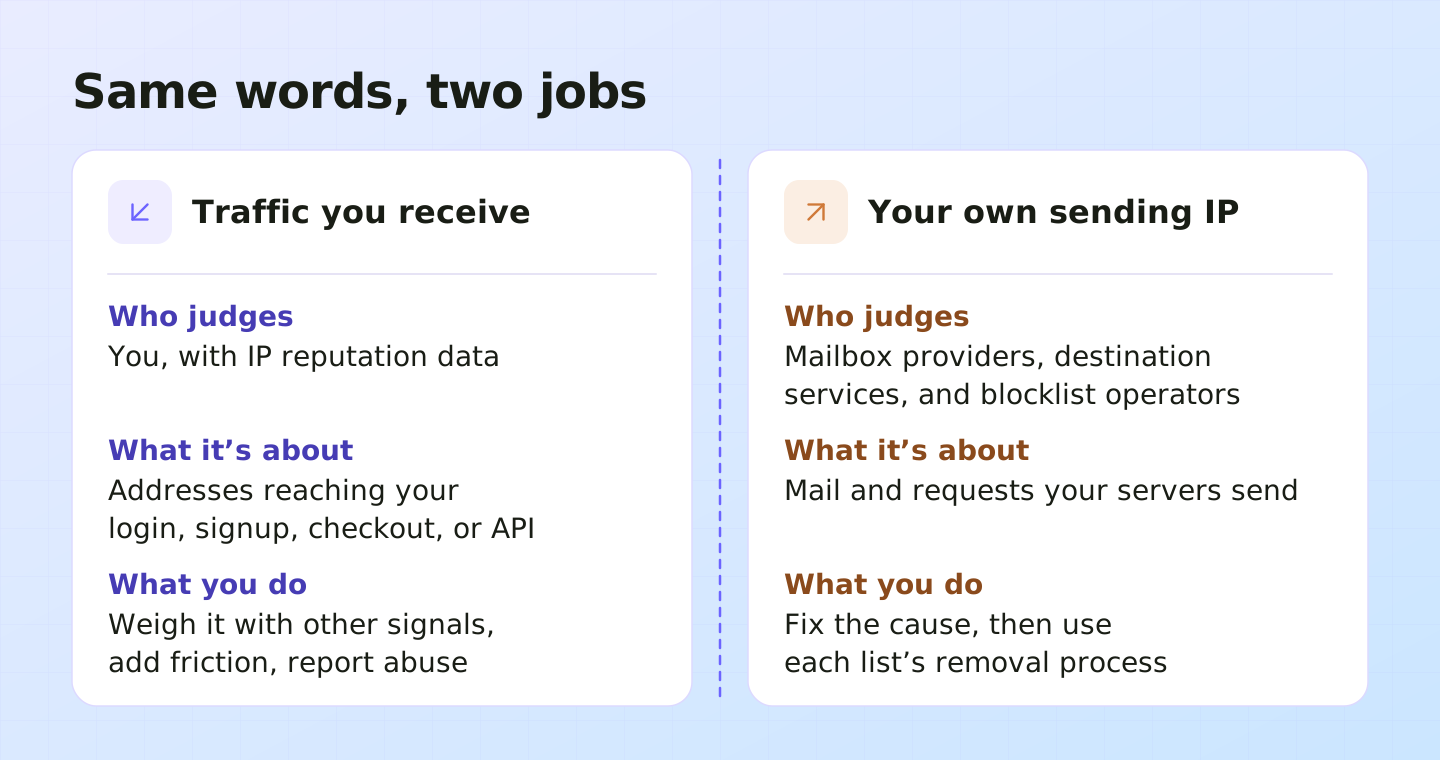
Fix the cause before you ask to be removed. Look for a compromised machine, an open relay, or a mailing list that includes people who never signed up. Then check which lists name your address and use each list's removal process. RFC 6471 asks list operators to publish their criteria for adding and removing entries and to offer a removal request, and listings are meant to expire once the abuse stops. Mailbox providers also rate the sending domain, so moving to a clean IP doesn't reset a domain's poor sending history.
IP reputation data from IPGeolocation.io
IPGeolocation.io's IP Security API returns an address's reputation and context in one call: VPN, proxy, residential proxy, Tor, and relay detection with provider names; bot classification by type and operator; known-attacker and spam flags; cloud hosting and corporate gateway context; and a threat score from 0 to 100 that sums them up.
Much of the evidence is first-hand: we run our own honeypots and enumerate VPN and proxy networks by connecting through them, then add curated threat feeds, proprietary blocklists, and behavioral analysis. Every VPN, proxy, and bot detection, including the scanning and attack activity behind many known-attacker flags, comes with the detail behind it, making it one of the most detailed security responses a single API call returns: a confidence score, a last-seen date when one is available, and the provider or operator name where we know it. The API serves the results from one full daily build.
Security data also comes with the rest of an address's profile. One request to the IP Geolocation API can return geolocation, security, ASN, company, abuse contact, time zone, and user agent data, so the location, the network type, and the risk signals arrive together. The security bulk endpoint checks up to 50,000 addresses per request, and the IP Security Database delivers the same detection data as CSV or MMDB files, updated daily, for lookups on your own servers. For exits too new for any record, Real-Time Proxy & VPN Detection tests the live connection, and adding security data to that call returns the address's record in the same round trip.
Check any address in the lookup box on the IP Security API page, or compare plans on the pricing page.
Frequently Asked Questions
A good IP reputation score depends on the provider's scale, because scales differ in range and direction. On IPGeolocation.io's 0 to 100 threat_score, lower is better: 0 means our data holds no risk signal for the address, and 1 to 19 is the band documented for allowing traffic with standard controls.
Look the address up in an IP reputation source and read the flags, not just the score. The lookup box on IPGeolocation.io's IP Security API page and our free IP lookup pages show the threat score and flags; in code, the /v3/security endpoint returns them.
Yes, for single lookups in a browser: the lookup box on IPGeolocation.io's IP Security API page and our IP lookup pages show the threat score and flags at no cost. In the API, security data needs a paid plan. The Free plan's 1,000 credits a day cover core geolocation, paid plans start at $19 a month for 150,000 credits, and a security lookup costs 2 credits; the pricing page compares plans.
Your IP address usually has a bad reputation because someone using it, now or before you, sent spam or attacked other systems. Shared addresses behind carrier-grade NAT, company gateways, and VPNs carry every user's record, reassigned addresses can keep the previous holder's listings, and a compromised device on your network can earn a new one.
Improve your IP reputation by fixing the cause first, then asking each list that names your address for removal. Clean up compromised machines, close open relays, and stop mailing people who didn't sign up. Listings are meant to be temporary: RFC 6471 says they should expire on their own unless the reason for listing still exists.