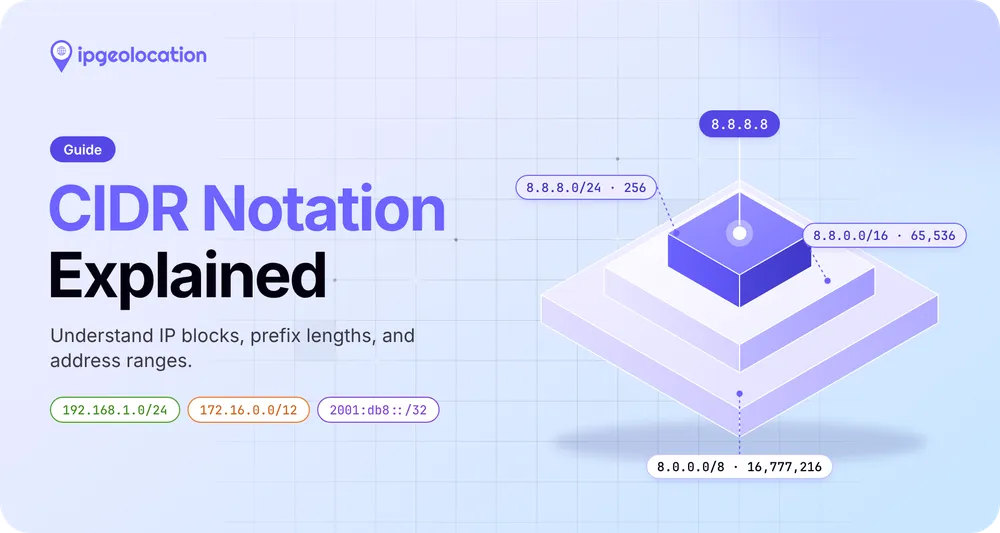



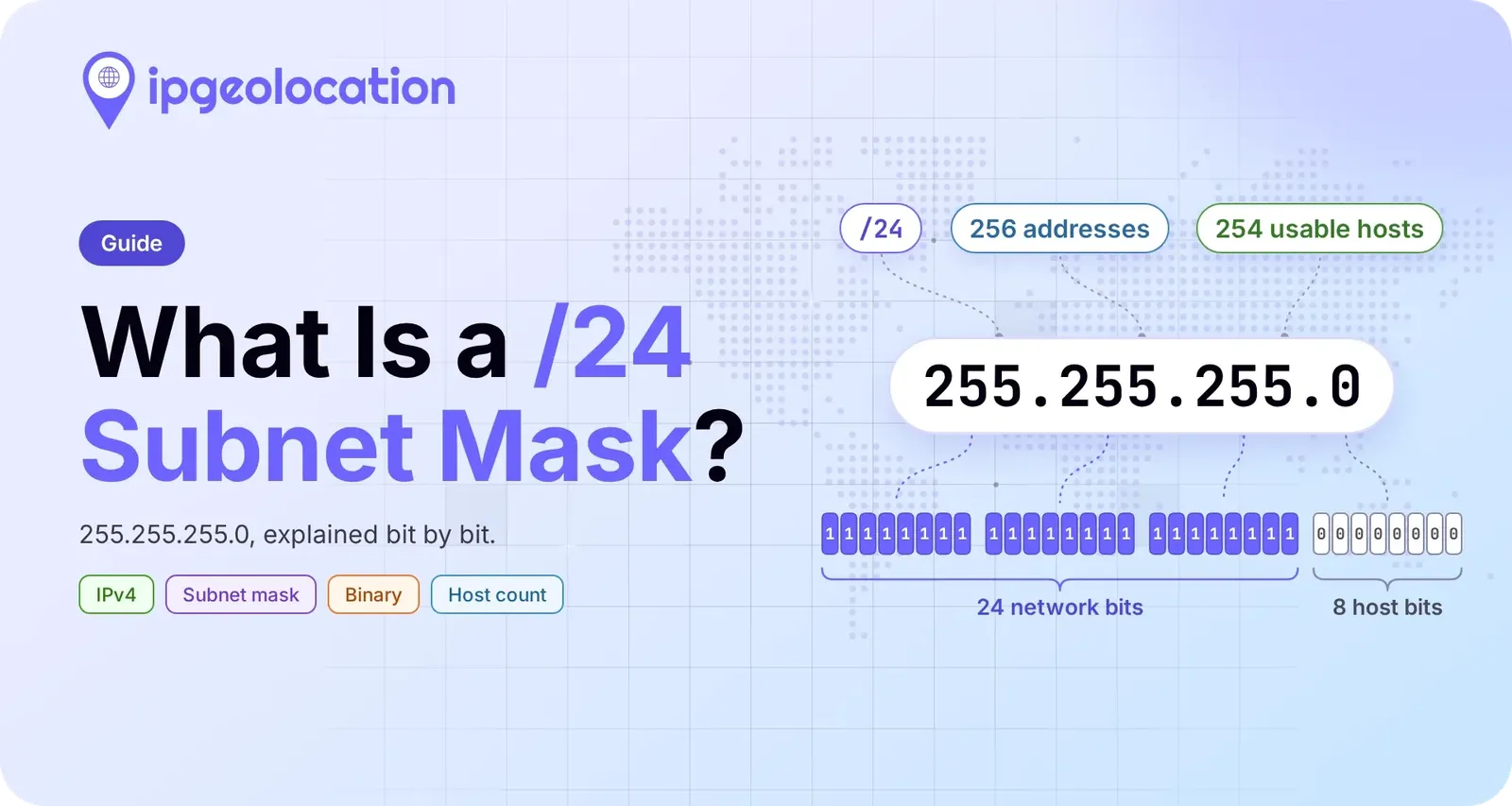
A /24 subnet mask is 255.255.255.0: the first 24 bits of an IPv4 address name the network and the last 8 identify a device on that network, so a /24 subnet holds 256 addresses, 254 of them usable on a typical LAN. For a laptop at 192.168.1.10, the network is 192.168.1.0, devices use .1 to .254, and .255 is the broadcast address.
You'll meet it in a router's LAN settings, in ipconfig output, in a cloud subnet, or at the end of a firewall rule. The same size matters outside your network too: on the public internet, a /24 is the smallest block most networks will accept as its own route, a separate entry in their routing tables. For how subnet masks work in general, start with our guide to what a subnet mask is; this one stays on the /24.
TL;DR
A /24 subnet mask, 255.255.255.0, tells a device which addresses share its network: when the first 24 bits of a destination match its own, it sends the packet directly, and when they don't, it sends the packet through a gateway.
- The mask is 24 one-bits followed by 8 zero-bits; counting the ones gives the /24, and its inverse, 0.0.0.255, is the wildcard form that router access lists use.
- Under Amazon's usual rules for cloud subnets, a /24 leaves 251 addresses for your resources, not 254.
- A /24 splits into 2 /25s, 4 /26s, or 8 /27s, and a network that needs more than 254 addresses needs a /23 (510 usable) or larger.
ipconfigon Windows, the TCP/IP details in macOS's Network settings, andip -4 addron Linux all show the mask.
What 255.255.255.0 looks like in binary
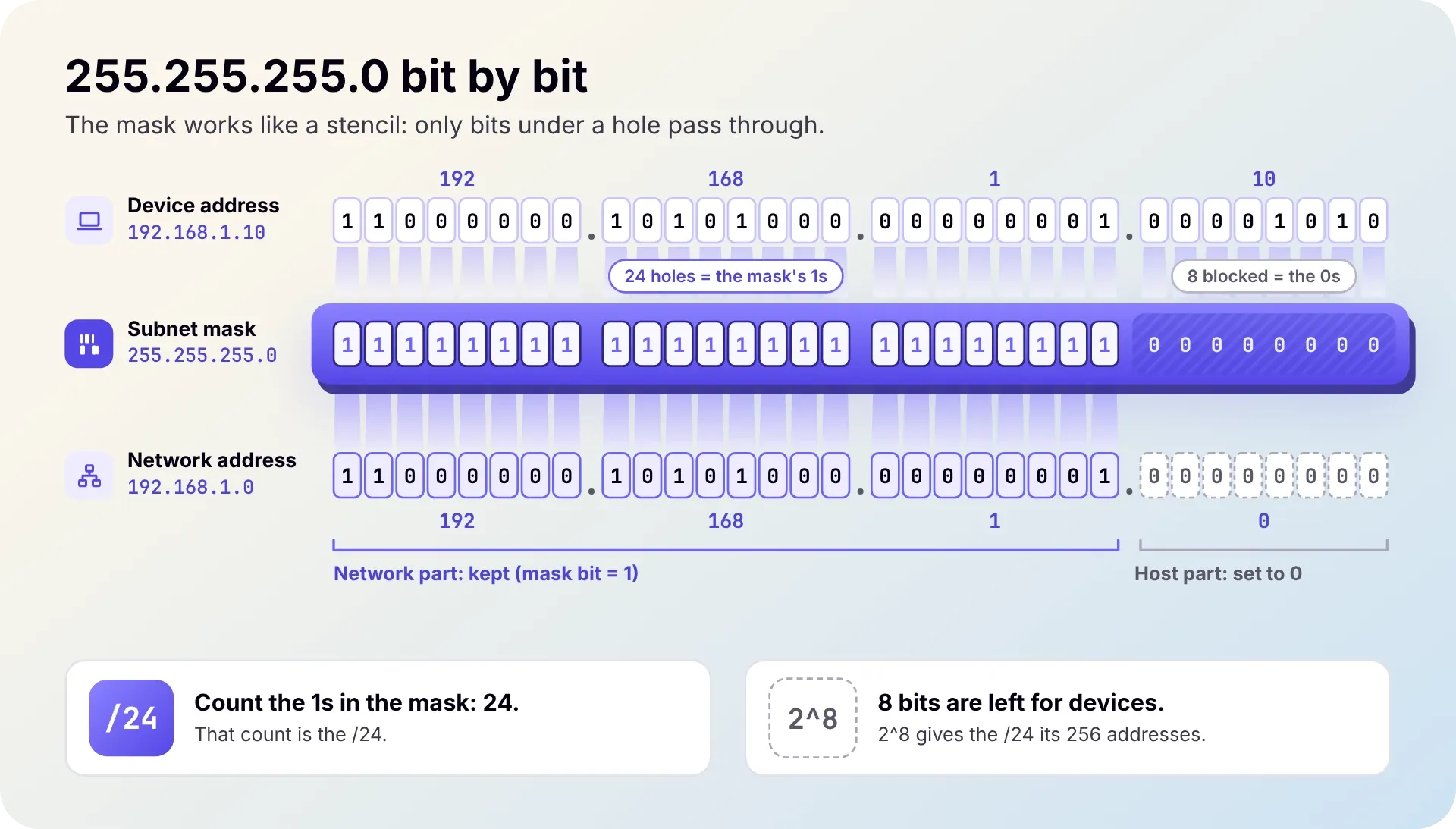
Each 255 is eight 1-bits and the final 0 is eight 0-bits, so 255.255.255.0 is 11111111, 24 ones followed by 8 zeros, and "/24" is the count of those ones. Line the mask up under an address, and the split shows itself:
mask      255.255.255.0   11111111.11111111.11111111.00000000
address   192.168.1.10    11000000.10101000.00000001.00001010
network   192.168.1.0     11000000.10101000.00000001.00000000
Where the mask has a 1, the device keeps the address bit; where it has a 0, it clears it. What remains, 192.168.1.0, is the network the address belongs to, so every address that starts with 192.168.1 shares it, and the last number picks the device. The 8 bits the mask leaves free are the host bits, and 2^8 is where the 256 comes from. If the four-number format of an IPv4 address is new to you, start with what an IP address is and how it works.
The 1s always come first, and that's why a slash and one number can stand in for the whole mask. RFC 1812, the requirements document for IPv4 routers, says "The length of the prefix equals the number of ones in the subnet mask" and treats a valid mask as a run of ones followed by a run of zeros. A mask with a gap in its 1s, such as 255.255.0.255, isn't valid under today's standards, and most tools reject it; the Python example under "How to find your subnet mask" shows one doing so.
What a /24 subnet mask tells your device
A device uses its subnet mask to decide whether another address is on its own network. The requirements standard for internet hosts, RFC 1122, spells out the test: if the destination's bits, masked, match the device's own bits masked the same way, the packet goes straight to the destination; if they don't, it goes through a gateway.
Take a laptop at 192.168.1.10/24 on one local network, with the router at 192.168.1.1 as its default gateway. A print job for 192.168.1.50 passes the test because both addresses start with 192.168.1, so the laptop delivers it directly on the local network. A request to a server at 192.168.2.20 fails the test at the third number, so the laptop hands that packet to its default gateway and the router forwards it. (If the laptop had its own route for 192.168.2.0/24 pointing at a different router, it would send the packet there instead.)
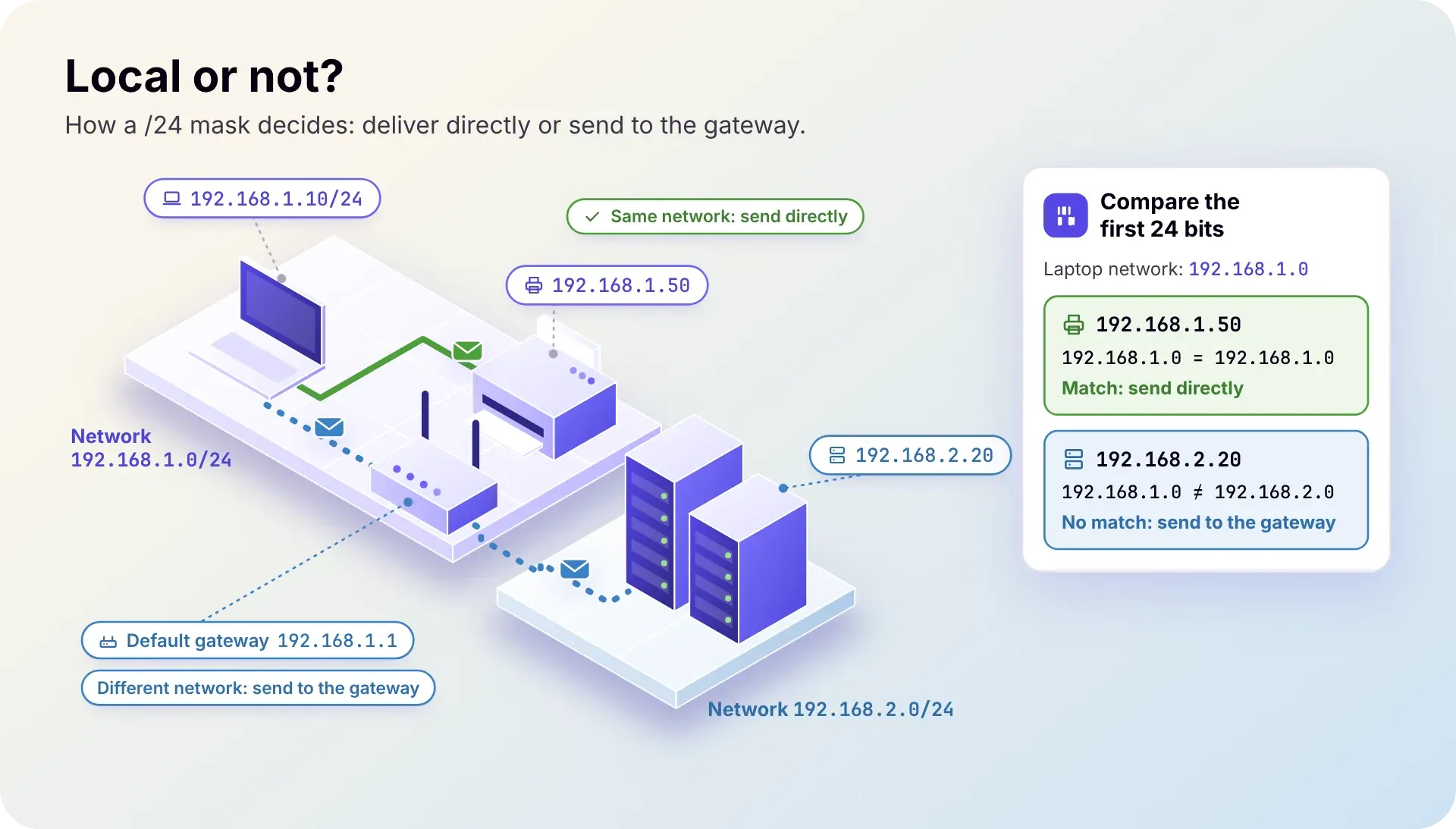
The mask doesn't decide who may talk to whom: devices on different subnets reach each other through routers all the time, and the mask only tells a device whether a packet needs a router to get there.
1. What happens when the mask is wrong
Devices that share a subnet need the same prefix length, and the trouble starts when one doesn't. Picture a different office that has split its 192.168.1.0/24 into four smaller subnets of 64 addresses each (/26s, mask 255.255.255.192), each on its own VLAN, with its printers on 192.168.1.64/26. One laptop at 192.168.1.10 still carries the old subnet mask 255.255.255.0. It now believes the printer at 192.168.1.70 is on its own network and tries to reach it directly, when the packet should go through the router. Its traffic to the internet still leaves through the gateway, so websites load while the printer stays out of reach, unless the router answers on the printer's behalf (a feature called proxy ARP).
Microsoft's guide to TCP/IP addressing and subnetting describes the same pattern: with the wrong mask, communication "will fail to some nearby networks but not to distant ones". The fix is to give every device the mask the network actually uses. Where the router hands out addresses by DHCP, set the mask there so each device receives it; a device with a manually typed address needs the change on the device itself.
How many IP addresses are in a /24?
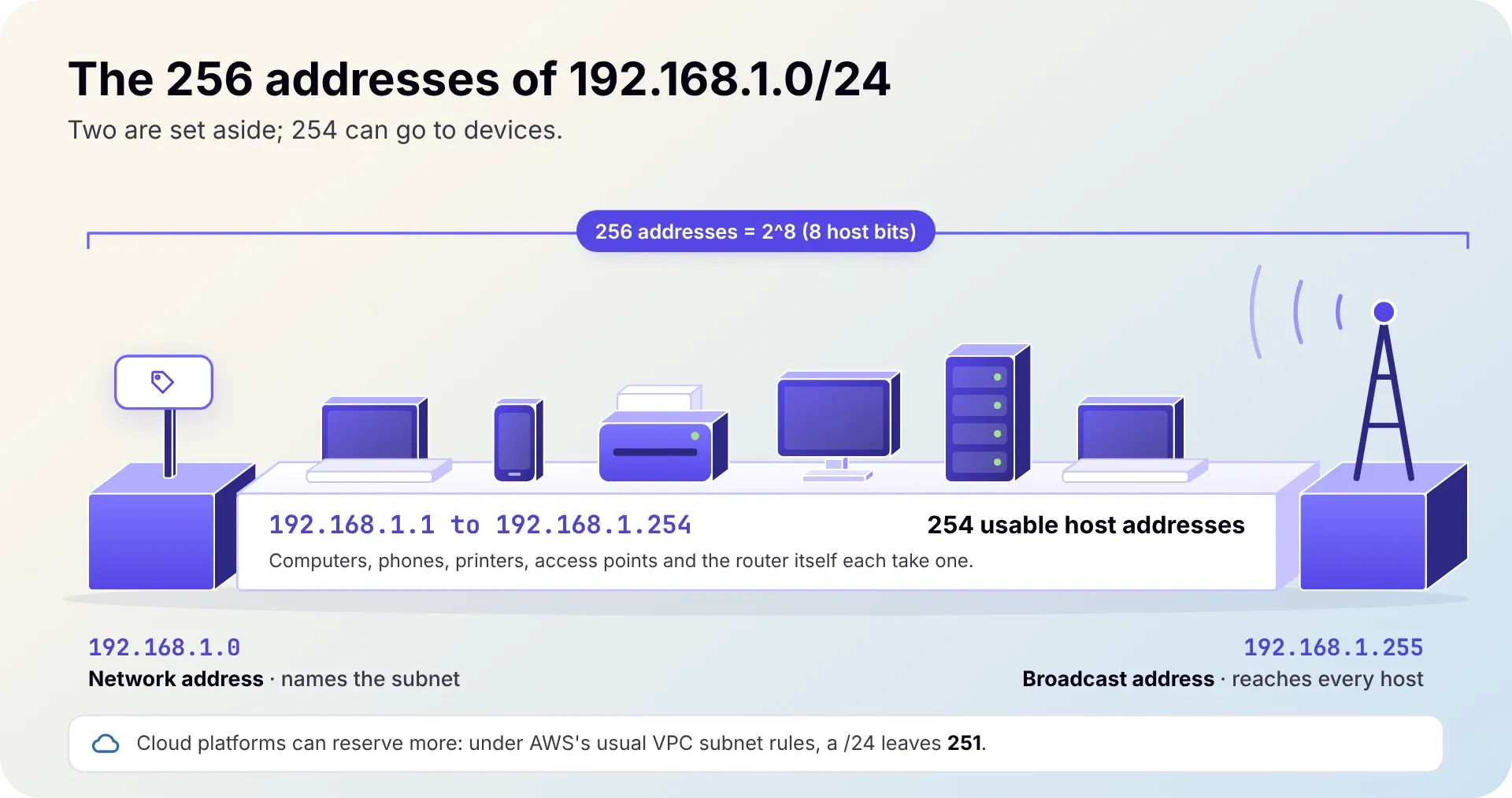
A /24 holds 2^8 = 256 IPv4 addresses, and 254 of them can be assigned to devices on an ordinary network. For 192.168.1.0/24:
| Address | Role |
|---|---|
| 192.168.1.0 | Network address: names the subnet |
| 192.168.1.1 to 192.168.1.254 | Usable host addresses (254) |
| 192.168.1.255 | Broadcast address: reaches every host on the subnet |
The two reserved addresses come from the host bits. All zeros names the network itself, and all ones is the directed broadcast address in RFC 1122, which reaches every device on the subnet at once. Our guide to unicast, broadcast, and other delivery methods explains what broadcast traffic is for.
Cloud platforms can set aside more. Under Amazon's usual rules for subnets in a VPC (a virtual private cloud), the first four addresses and the last one aren't available for your resources, so a 10.0.0.0/24 subnet leaves 251. AWS doesn't support broadcast in a VPC but reserves the last address anyway, and addresses you bring to AWS yourself (BYOIP) follow different rules.
How to find your subnet mask
Your subnet mask sits next to your IP address in your network settings, and each system has its own place to show it:
- Windows: run
ipconfig. Used without parameters, it lists each adapter's addresses, subnet mask, and default gateway. - macOS: choose Apple menu > System Settings, click Network, choose your network service, click Details, then click TCP/IP. Apple's guide to TCP/IP settings on Mac lists the subnet mask with the IPv4 address and router address.
- Linux: run
ip -4 addr. Linux prints the mask as a prefix length after the address; on our test machine the line readinet 172..16 .10 .3/ 24 scope global enp0s1 - A router: open its LAN settings, where its own address and mask are set.
If the mask reads 255.255.255.0 or the prefix reads /24, you're on a /24.
1. Reading the mask in Python
Python's standard library does the same arithmetic. This function prints the network, mask, wildcard, and usable range for an IPv4 address and mask, and reports a bad mask instead of crashing:
from ipaddress import IPv4Interface


def describe(interface_text: str) -> None:
    """Print the IPv4 subnet that an address and its mask belong to."""
    try:
        # Accepts "address/prefix" or "address/mask"; rejects masks whose 1s aren't contiguous.
        iface = IPv4Interface(interface_text)
    except ValueError as err:
        print(f"Not a valid address and mask: {err}")
        return

    net = iface.network
    print(f"Network:      {net}")
    print(f"Subnet mask:  {net.netmask}")
    print(f"Wildcard:     {net.hostmask}")
    print(f"Addresses:    {net.num_addresses}")

    if net.prefixlen <= 30:
        # Ordinary subnet: the first address names the network, the last is the broadcast address.
        first, last = net.network_address + 1, net.broadcast_address - 1
        print(f"Usable hosts: {first} to {last} ({net.num_addresses - 2})")
        print(f"Broadcast:    {net.broadcast_address}")
    else:
        # /31 point-to-point links (RFC 3021) and /32 single hosts use every address.
        print(f"Usable hosts: {net.network_address} to {net.broadcast_address} ({net.num_addresses})")


describe("192.168.1.10/255.255.255.0")
describe("192.168.1.10/255.255.0.255")
Running it with Python 3.14 prints:
Network:      192.168.1.0/24
Subnet mask:  255.255.255.0
Wildcard:     0.0.0.255
Addresses:    256
Usable hosts: 192.168.1.1 to 192.168.1.254 (254)
Broadcast:    192.168.1.255
Not a valid address and mask: '255.255.0.255' is not a valid netmask
The first call turns an address and a dotted mask into its /24; hostmask is the wildcard form of the mask. The second call fails on purpose: 255.255.0.255 has a gap in its 1s, so Python's ipaddress module refuses it, in line with RFC 1812's rule that the 1s come first. The module also accepts the wildcard form, so "192.168.1.10/0.0.0.255" reads as the same /24. To test whether an address sits inside a block, parse both with this module rather than comparing strings; the guide to CIDR notation has that code.
Splitting a /24 into smaller subnets
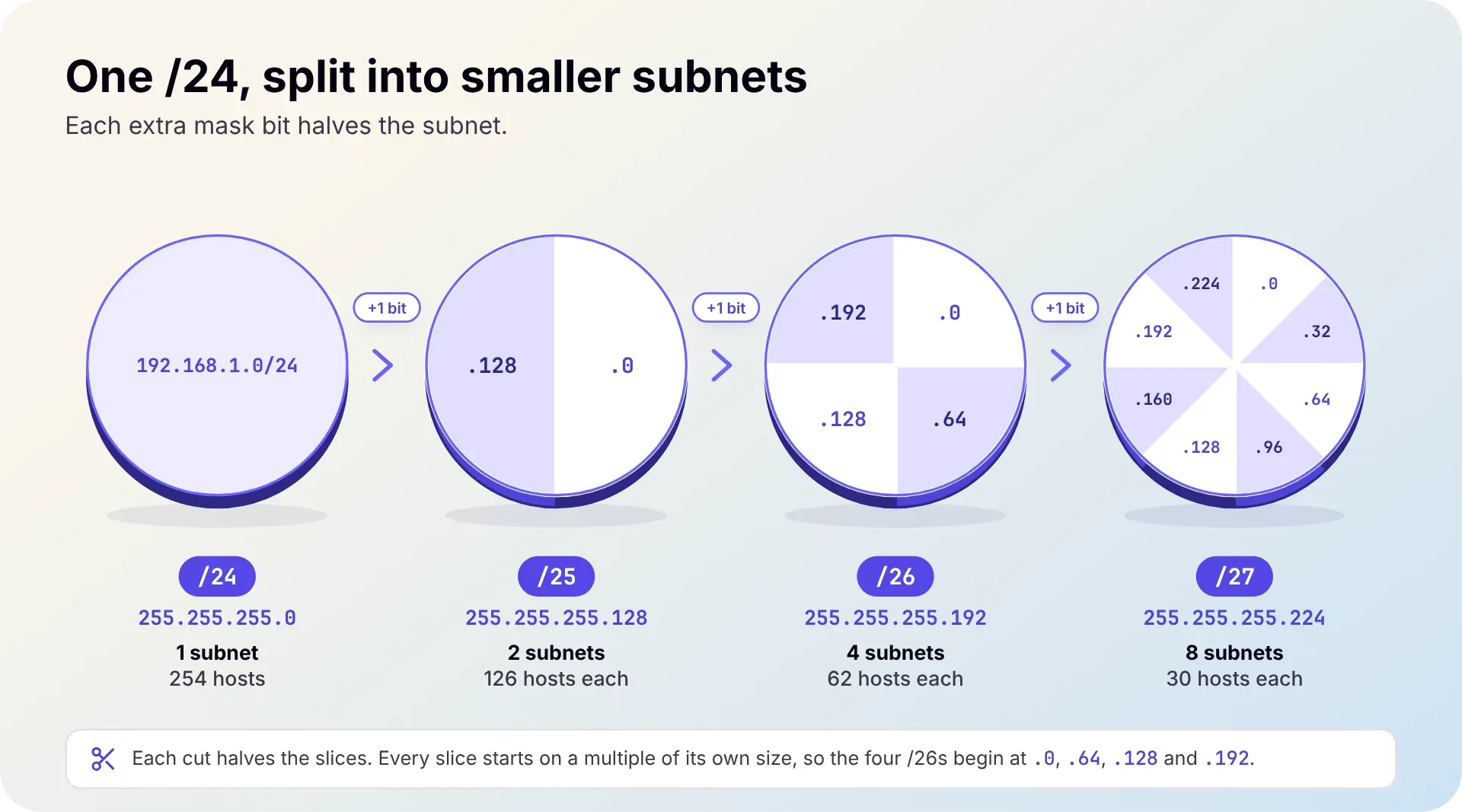
Each extra mask bit halves the subnet, so a /24 splits into 2 /25s, 4 /26s, or 8 /27s. This table covers the sizes on either side of a /24:
| Prefix | Subnet Mask | Addresses | Usable Hosts | Relation To A /24 |
|---|---|---|---|---|
| /22 | 255.255.252.0 | 1,024 | 1,022 | Holds 4 /24s |
| /23 | 255.255.254.0 | 512 | 510 | Holds 2 /24s |
| /24 | 255.255.255.0 | 256 | 254 | One /24 |
| /25 | 255.255.255.128 | 128 | 126 | 2 fit in a /24 |
| /26 | 255.255.255.192 | 64 | 62 | 4 fit in a /24 |
| /27 | 255.255.255.224 | 32 | 30 | 8 fit in a /24 |
| /28 | 255.255.255.240 | 16 | 14 | 16 fit in a /24 |
| /29 | 255.255.255.248 | 8 | 6 | 32 fit in a /24 |
| /30 | 255.255.255.252 | 4 | 2 | 64 fit in a /24 |
Read across any row: one more bit in the mask means half the addresses, so a /26 holds 64 and leaves 62 for devices. Each smaller subnet also starts on a multiple of its own size, which is why the four /26s inside 192.168.1.0/24 begin at .0, .64, .128, and .192.
Joining /24s works only for pairs that line up. Two neighboring /24s can be written as one /23 when the first one's third number is even: 192.168.0.0/24 and 192.168.1.0/24 combine into 192.168.0.0/23, while 192.168.1.0/24 and 192.168.2.0/24 don't, because no /23 holds both. Writing a pair as one /23 in a route or a firewall rule doesn't merge the two networks, either: two configured /24s keep 254 usable addresses each, and only a network configured as a /23 gets 510. Inside such a /23 (192.168.0.0/23), only 192.168.0.0 and 192.168.1.255 are reserved, so 192.168.0.255 and 192.168.1.0 are ordinary host addresses there. To turn any start-to-end range into the fewest CIDR blocks, use the IP range to CIDR tool.
The CIDR chart lists every length from /0 to /32, and for any specific block, IPGeolocation.io's IPv4 subnet calculator returns the mask, range, broadcast address, and host counts.
When a /24 is the right size
A /24 fits a network when every address it needs (computers, phones, printers, access points, and the router itself) plus the growth you expect sits comfortably inside 254. Treat that as an address budget, not a device count: a network of 250 devices has four addresses to spare, which isn't room to grow.
Go bigger when the budget doesn't fit: a /23 offers 510 usable addresses and a /22 offers 1,022. Go smaller when a segment is small and fixed: 20 cameras fit a /27 with 30 usable addresses. A link between two routers needs only two addresses, and RFC 3021 lets a /31 use both of its addresses as hosts on such a link, where a /30 spends four addresses on the same two devices. In a cloud, the platform's own limits come first, such as AWS's /28 to /16 range for VPC subnets.
A /24 on the internet
On the public internet, a /24 is the smallest IPv4 block most networks accept as a separate route: in 2015, RFC 7454 noted, citing RIPE community documentation, that IPv4 prefixes longer than /24 "are generally neither announced nor accepted in the Internet", and added that "These values may change in the future." The limit comes from routing policy rather than from IPv4 itself: smaller subnets work fine inside a network, and from outside they're reached through the larger block their network announces.
ARIN, one of the five regional internet registries, works at the same scale: its Number Resource Policy Manual sets the minimum assignment for end-user organizations at a /24. Our guide to who owns an IP address explains what those registry records do and don't tell you.
The prefixes in our lookups come in many sizes, and a private address from a home network has none, as three lookups we ran on October 27, 2026 show:
- 8.8.8.8 (Google Public DNS):
network.routeis 8.8.8.0/24, on the autonomous system AS15169, Google LLC. Our range page for 8.8.8.0/24 shows that block announced through one BGP prefix and classifies all 256 addresses as anycast. - 165.227.0.0 (the first address of a DigitalOcean range):
network.routeis 165.227.0.0/20, on AS14061, DigitalOcean, LLC. That's 4,096 addresses in one route. - 192.168.1.10: the lookup returns HTTP 423 with the message that it "is a bogon IP address". RFC 1918 sets 192.168.0.0/16 aside for private networks, so a home /24 carved from it has no public route and no public location; our guide to private and other bogon addresses lists the rest.
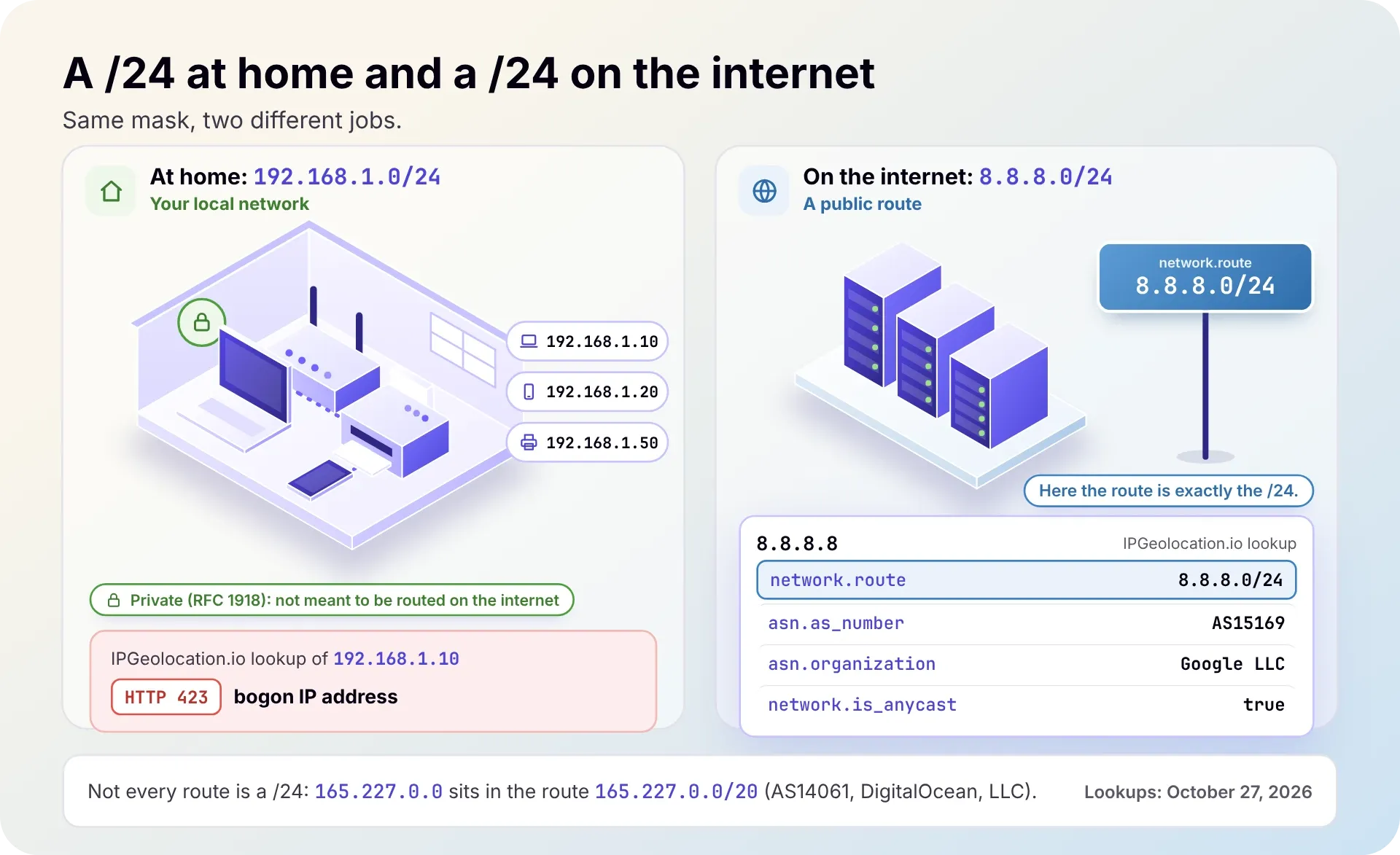
A public /24 isn't a place. People often assume a block belongs to one city or country, but a route defines an IP range, not a geographical boundary. Look up the address you care about rather than the block around it. Our post on how IP geolocation data is built explains why a block's registry record won't tell you which city its addresses serve.
Common /24 subnet mask mistakes
- Reading /24 as 24 addresses. The 24 counts fixed bits; the subnet holds 2^8 = 256 addresses.
- Typing 255.255.255.0 into an IP lookup. It's a mask, not a device's address. As an address, it falls in 240.0.0.0/4, which IANA's special-purpose registry lists as reserved, so there's no network behind it to look up; bogon vs martian addresses covers the other reserved ranges.
- Treating "Class C" as a rule. CIDR replaced classes in 1993 (RFC 1519), and RFC 4632, the current specification, keeps "Class C" only as a legacy label for the size.
- Writing a host address where a network belongs. A field that expects a network wants 192.168.1.0/24, not 192.168.1.10/24, and many tools reject the second one (Python's
ip_network()reports that it "has host bits set", whileip_interface()accepts it as an address on that network).
Frequently Asked Questions
Yes. 255.255.255.0 is 24 one-bits followed by 8 zero-bits, and /24 is the count of those one-bits, so both describe the same mask. CIDR notation puts the network in front, as in 192.168.1.0/24.
A /24 contains 256 IPv4 addresses, 254 of them usable by devices on an ordinary network (251 under AWS's usual VPC subnet rules).
Not under current rules. A /24 is the size of the old Class C network, but CIDR replaced the class system in 1993, and RFC 4632, the current specification, keeps "Class C" only as a legacy label, so a /24 can come from any part of the unicast IPv4 address space.
The wildcard mask for a /24 is 0.0.0.255, the bit-for-bit inverse of 255.255.255.0. Cisco's access lists use it this way: 0.0.0.255 means the first three numbers must match and the last can vary.
192.168.1.0 is the network address: the first address of the block, which names the whole /24. The block runs from 192.168.1.0 to 192.168.1.255, and devices use 192.168.1.1 to 192.168.1.254.
A /24 holds 2 /25s, 4 /26s, 8 /27s, 16 /28s, 32 /29s, or 64 /30s. Each extra mask bit doubles the count and halves the size, so a /26 has 64 addresses, 62 of them usable.
A /16 holds 256 /24s, because the 8 bits between /16 and /24 give 2^8 combinations. The whole IPv4 space holds 16,777,216 /24s (2^24).
For internet routing, it's the /48: RFC 7454 notes that IPv6 prefixes longer than /48 are generally neither announced nor accepted, just as IPv4 prefixes longer than /24 are. For any IPv6 block, the IPv6 subnet calculator shows its range.
There's no single default for every network, but 255.255.255.0 (/24) is the most common mask on local networks. Under the old class system, it was the default for Class C addresses, those with a first number from 192 to 223. The mask your own network uses is in your device's network settings.
Run ipconfig on Windows, open System Settings > Network > your service > Details > TCP/IP on a Mac, or run ip -4 addr on Linux, which shows the mask as a prefix length such as /24.
/24 blocks in IPGeolocation.io data
IPGeolocation.io breaks the IPv4 space down to /24 blocks on its free range pages. Each public /24 shows its announced BGP prefixes, autonomous systems, countries, and reachability, so you can check what's inside a block before you write a rule around it, and the IPv4 subnet calculator does the mask arithmetic for any block from your own network.
For code, the IP Geolocation API returns the network prefix that contains an address, when our data has one, as network.route, documented in the network object reference. That's the network layer of IP intelligence. The route field needs a paid plan; the pricing page compares the plans.