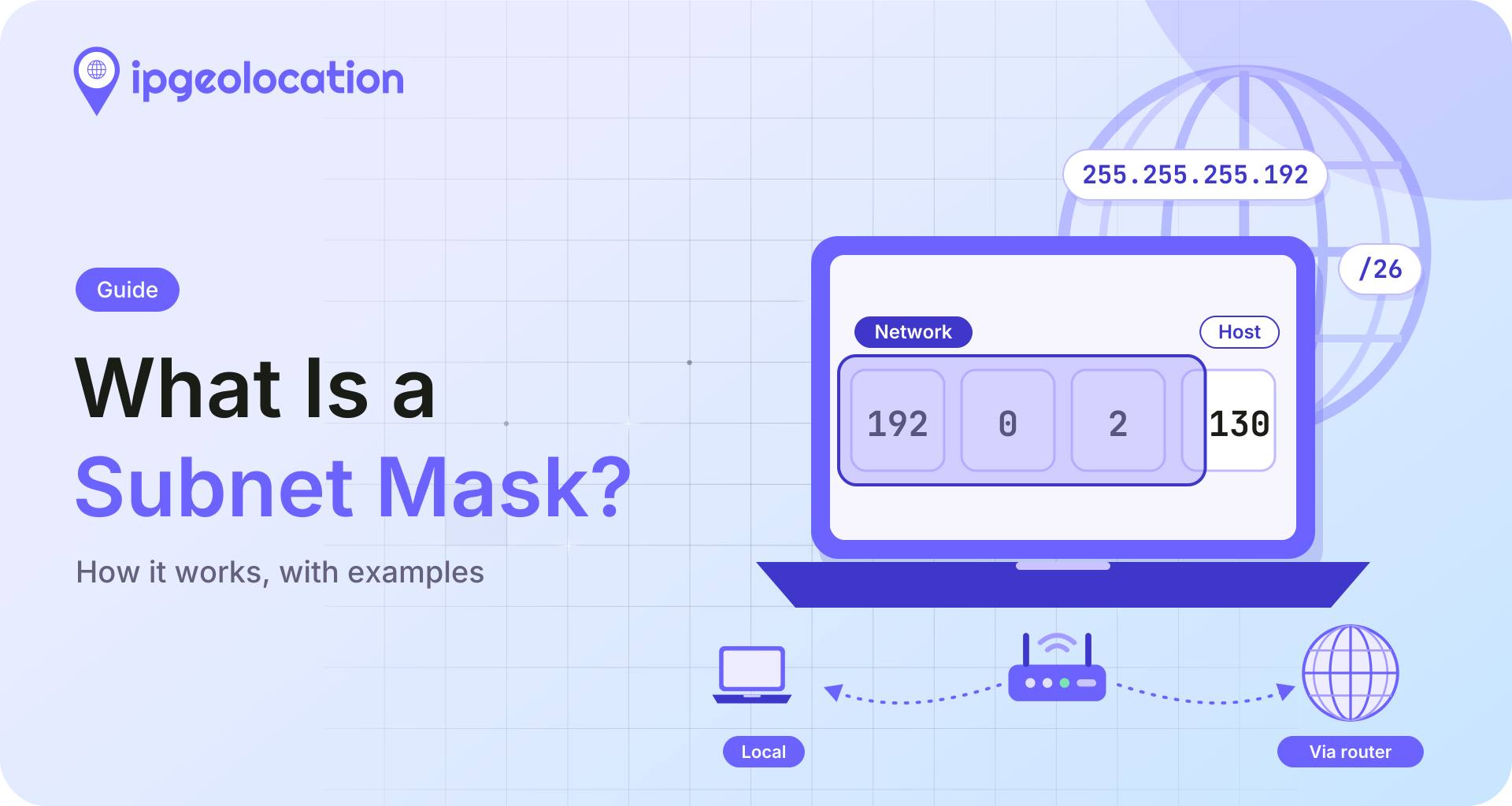
A subnet mask is a 32-bit number that splits an IPv4 address into a network part and a host part. Its 1 bits mark the network and its 0 bits mark the device, and a computer uses it to decide whether another address is on its own network or has to go through a router. The most familiar mask, 255.255.255.0, is also written /24.
You'll meet the same idea in three places: your device's network settings, the subnet plans and firewall rules that divide a network, and internet routing data, where an IP lookup can return a block like 107.161.144.0/23. The arithmetic is identical in all three. If IPv4 addresses themselves are new to you, start with how IP addresses work.
TL;DR
A subnet mask is valid only as a run of 1 bits followed by 0 bits, which is why it can also be written as a count of those 1s: 255.255.255.0 is /24, 255.255.255.192 is /26, and IPv4 has exactly 33 valid masks.
- A /24 holds 256 addresses, and 254 of them can go to devices. In general, usable hosts are
2^(32-n)-2for a /n prefix, except a /31 (two addresses, both usable on point-to-point links) and a /32 (one address). - To see your own mask, run
ipconfigon Windows orip address showon Linux, or open your network service's TCP/IP details in System Settings on a Mac. - IPv6 has no dotted masks, only prefix lengths, and /64 is the standard subnet size.
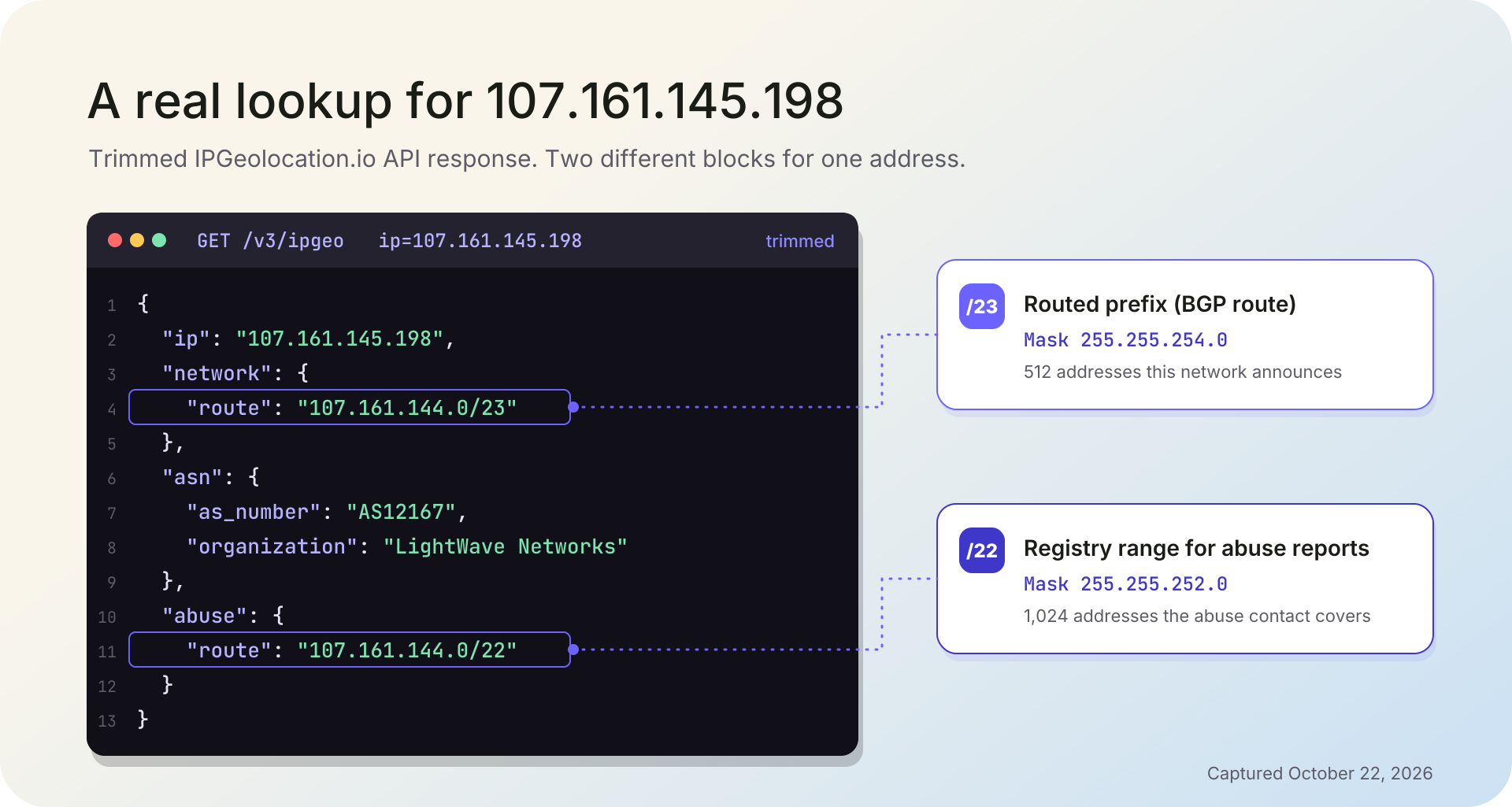
- The prefix on an IP lookup, such as 107.161.144.0/23, describes a routed block of addresses, not the mask configured on anyone's network.
How a Subnet Mask Works
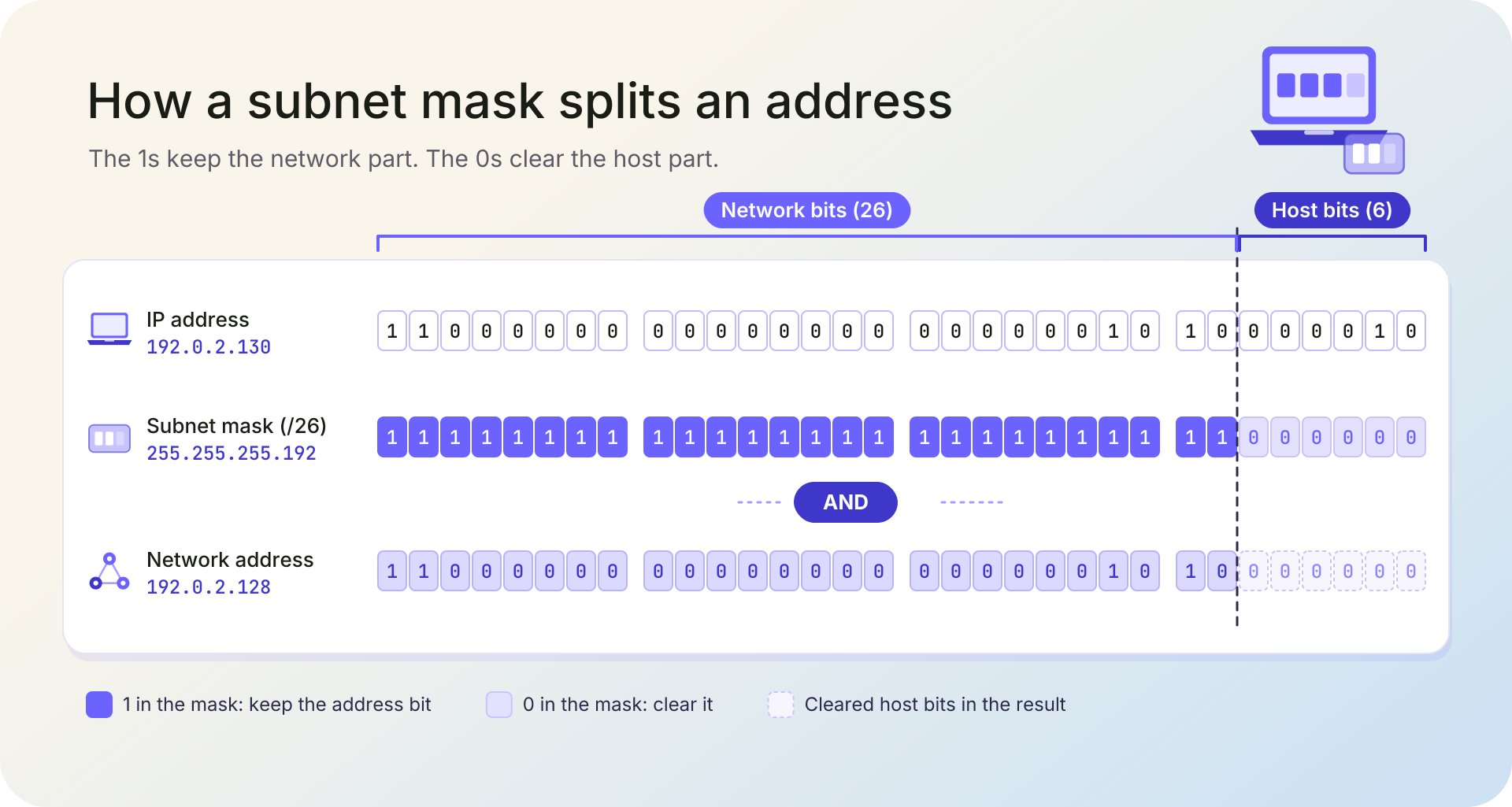
A device uses its subnet mask in a bitwise AND: it compares the mask with an address one bit at a time, keeps each address bit where the mask has a 1, and clears it to 0 where the mask has a 0. What's left is the network address. To decide where a packet goes, the device runs four steps:
- Write its own address and the mask in binary.
- AND them to get its own network address.
- AND the destination address with the same mask.
- Compare the two results. If they match, the destination is on the same network and the packet goes straight to it. If they differ, the packet goes to a router: usually the default gateway, the router that connects this network to the others, unless the device's routing table lists a more specific route.
The host requirements standard, RFC 1122, says a host deciding whether a destination is on a connected network "MUST" use this algorithm, with the address mask selecting the network bits of each address.
Here's the AND for a computer at 192.0.2.130 with the mask 255.255.255.192:
IP address    192.0.2.130       11000000.00000000.00000010.10000010
Subnet mask   255.255.255.192   11111111.11111111.11111111.11000000
AND result    192.0.2.128       11000000.00000000.00000010.10000000
The first 26 bits of the mask are 1s, so the first 26 bits of the address survive unchanged. The last 6 are 0s, so the host bits are cleared, and 192.0.2.130 turns out to live on the 192.0.2.128 network.
Now send two packets from that computer. For 192.0.2.150, the AND gives 192.0.2.128 again, a match, so the packet is delivered directly. For 192.0.2.70, the AND gives 192.0.2.64, a different network, so the packet goes to the gateway at 192.0.2.129.
1. What Happens When the Mask Is Wrong
A wrong mask rarely breaks everything, which is what makes it hard to spot. Picture a network split into two /26 subnets, 192.0.2.64/26 and 192.0.2.128/26, each with its own router port.
A computer at 192.0.2.70 should carry the mask 255.255.255.192. Give it 255.255.255.0 by mistake, and its AND for 192.0.2.130 returns 192.0.2.0, the same as its own result. It now treats 192.0.2.130 as local and tries to reach it directly instead of through the router, but that host sits on the other segment, so the connection usually fails. (A router doing proxy ARP can paper over the mistake, which makes it even harder to find.)
Meanwhile, the same computer reaches 198.51.100.25 without trouble, because that address fails the comparison either way and goes to the gateway. So the symptom is a computer that reaches distant networks but not some nearby ones, and that pattern points at the mask.
How to Read a Subnet Mask
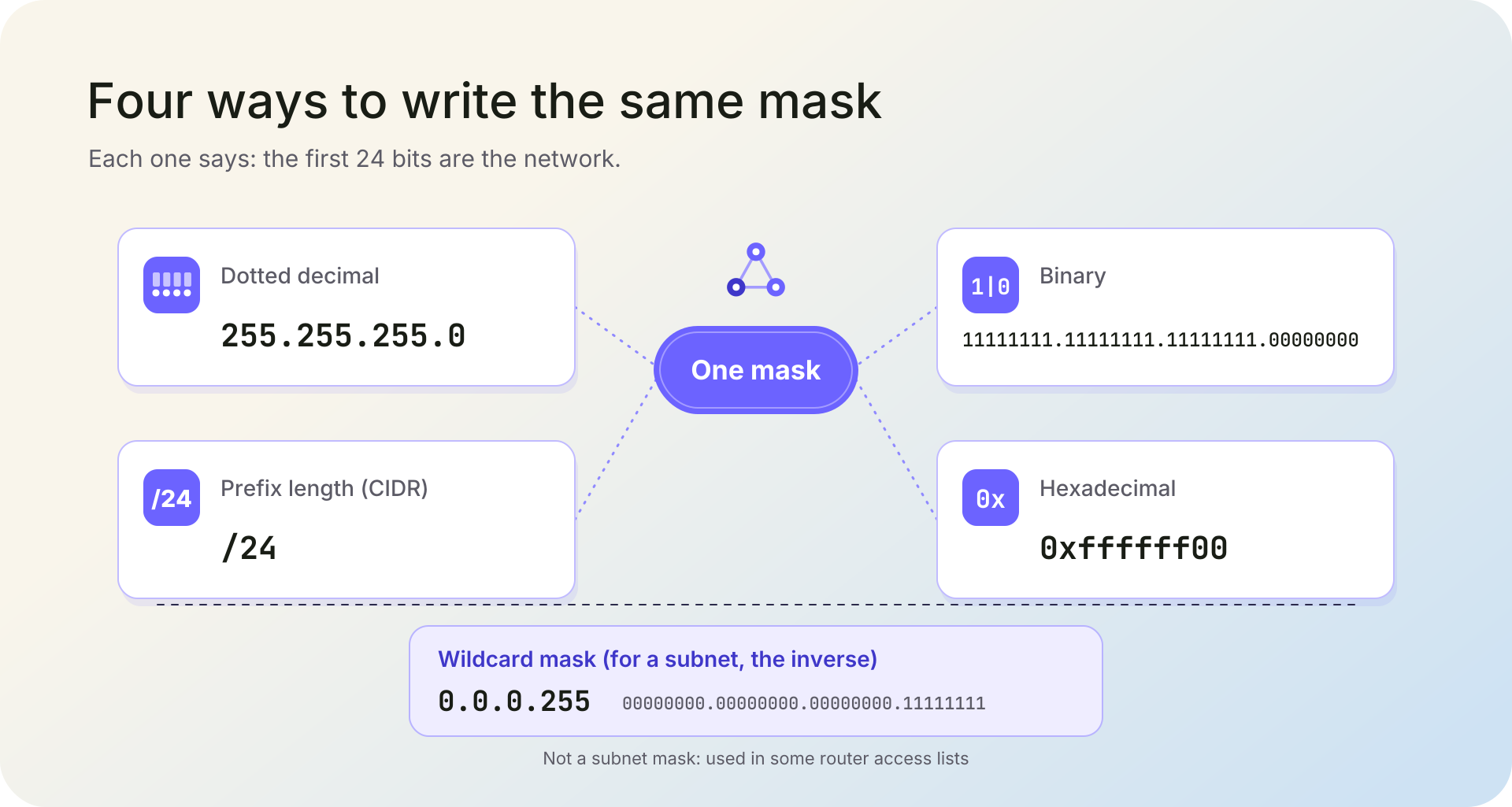
The same subnet mask can be written four ways, and different tools pick different ones:
| Form | 255.255.255.0 Written That Way | Where You'll Usually See It |
|---|---|---|
| Dotted decimal | 255.255.255.0 | Windows ipconfig output, macOS network settings, router admin pages |
| Prefix length (CIDR) | /24 | Linux ip address output, cloud network settings, firewall rules, IP data |
| Binary | 11111111.11111111.11111111.00000000 | Explanations like this one, and exams |
| Hexadecimal | 0xffffff00 | Some low-level tools and code |
The prefix length is the count of 1 bits. RFC 4632, the document that describes classless addressing, writes a prefix as an address followed by a slash and a number from 0 to 32 that gives the number of significant bits, so /16 means 255.255.0.0 and /24 means 255.255.255.0. When you document a network or write a rule, use the prefix length: it's shorter, and you can't mistype an octet.
1. Why Every Valid Mask Is a Run of 1s
RFC 4632 is blunt about it: "the mask must be left contiguous." That wasn't always the rule. RFC 950, the 1985 Internet Standard for subnetting, said the subnet bits "need not be adjacent in the address" (while recommending that they be), and one of its own examples uses the mask 255.255.255.88. Classless routing dropped that freedom.
The result is that IPv4 has exactly 33 valid masks, from /0 (0.0.0.0) to /32 (255.255.255.255). Each octet of a valid mask is one of nine values: 0, 128, 192, 224, 240, 248, 252, 254, or 255. Anything with a 0 bit between two 1 bits, such as 255.255.0.255 or 255.0.255.0, is a typo, not a mask.
2. Default Masks From the Old Address Classes
Before 1993, the first bits of an address fixed the size of its network, and each class came with a default mask. Class A addresses (first octet 1 to 126) used 255.0.0.0, Class B (128 to 191) used 255.255.0.0, and Class C (192 to 223) used 255.255.255.0. CIDR replaced that system in 1993, as our guide to how IP addresses work explains, and RFC 4632 describes how its prefixes work.
So when someone asks for "the default subnet mask", the real answer is that it depends on the network. A device's mask comes from its configuration, not from the first octet of its address, and "Class C" survives mostly as a nickname for a /24.
Subnet Mask vs. Subnet, Default Gateway, CIDR, and Wildcard Mask
These five terms get mixed up because they describe one network from different angles. Here they are side by side for the same network:
| Term | What It Is | Example |
|---|---|---|
| Subnet mask | The 32-bit pattern that marks the network part of an address | 255.255.255.192 |
| Subnet | The block of addresses the mask defines | 192.0.2.128/26, which runs from 192.0.2.128 to 192.0.2.191 |
| Default gateway | The router a device sends traffic to when the destination isn't on its subnet | 192.0.2.129 |
| CIDR prefix length | The same mask written as a count of 1 bits | /26 |
| Wildcard mask | A matching pattern used in some router access lists; for a subnet it's the mask with every bit flipped | 0.0.0.63 |
Network Address, Broadcast Address, and Usable Hosts
The mask also fixes three things about every subnet: its first address, its last address, and how many devices fit between them. Set all the host bits to 0 and you get the network address, which names the subnet itself. Set them all to 1 and you get the broadcast address, which reaches every device on the subnet at once (how broadcast and anycast delivery work covers the delivery side). Neither goes to a device, so the usable hosts are everything in between.
Take 192.0.2.130/26 again. The /26 leaves 6 host bits:
- Network address: 192.0.2.128
- Broadcast address: 192.0.2.191
- Usable hosts: 192.0.2.129 to 192.0.2.190, which is 62 addresses
The general formula for a /n prefix is 2^(32-n)-2 usable hosts. It has two exceptions. A /31 has two addresses and no room for a network or broadcast address, and RFC 3021 allows "31-bit subnet masks in a very limited way": on point-to-point links, where both addresses go to the two ends. A /32 is a single address.
To size a subnet, run the formula the other way. Fifty devices need 6 host bits (64 addresses, 62 usable), so the prefix is 32 minus 6, a /26. Our IPv4 subnet calculator works out the network, broadcast, and usable range for any address and prefix.
Subnet Mask Cheat Sheet: Every IPv4 Mask From /0 to /32
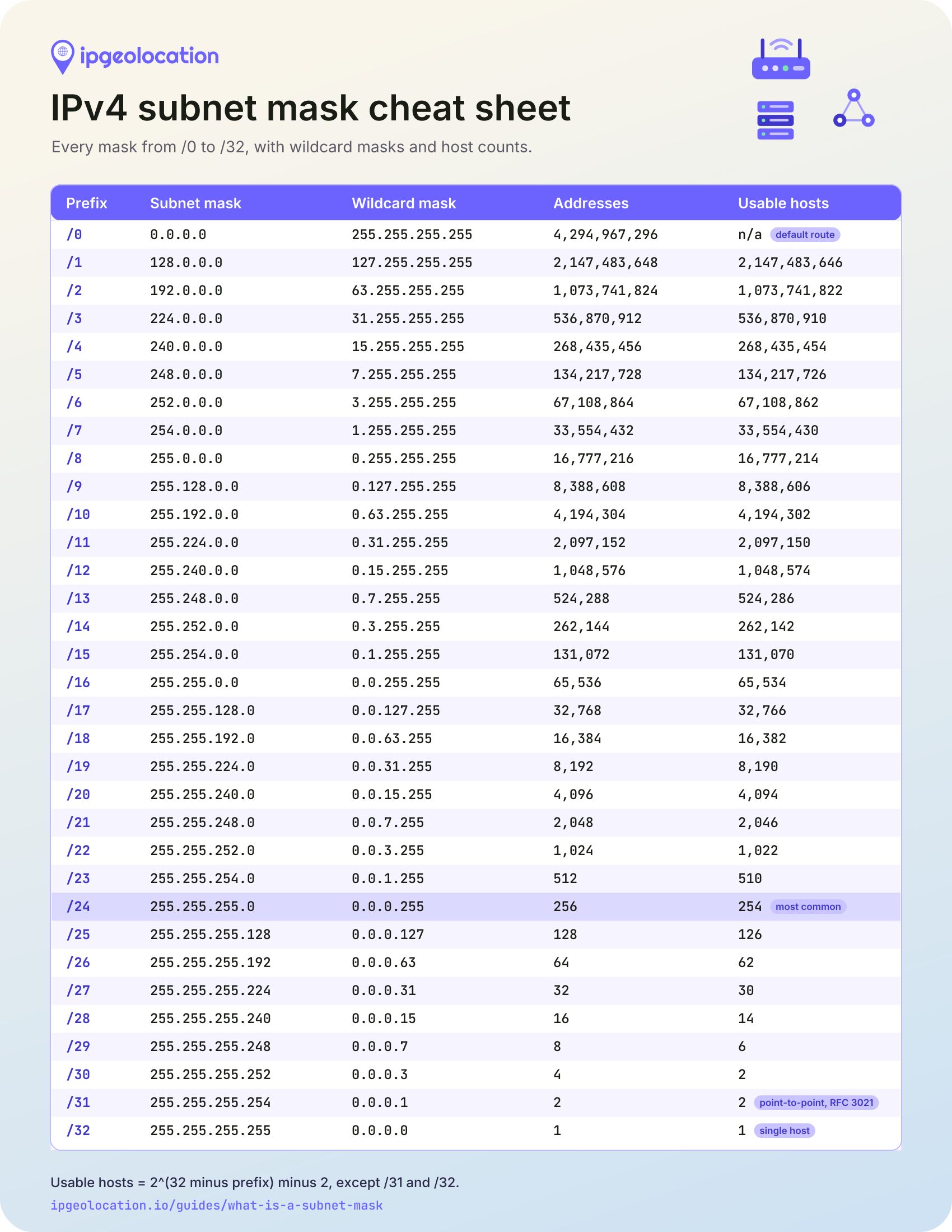
Each row of this table gives a prefix length, its subnet mask, its wildcard mask, the total addresses in a block of that size, and how many of them devices can use.
| Prefix | Subnet Mask | Wildcard Mask | Total Addresses | Usable Hosts |
|---|---|---|---|---|
| /0 | 0.0.0.0 | 255.255.255.255 | 4,294,967,296 | n/a (0.0.0.0/0 is the default route) |
| /1 | 128.0.0.0 | 127.255.255.255 | 2,147,483,648 | 2,147,483,646 |
| /2 | 192.0.0.0 | 63.255.255.255 | 1,073,741,824 | 1,073,741,822 |
| /3 | 224.0.0.0 | 31.255.255.255 | 536,870,912 | 536,870,910 |
| /4 | 240.0.0.0 | 15.255.255.255 | 268,435,456 | 268,435,454 |
| /5 | 248.0.0.0 | 7.255.255.255 | 134,217,728 | 134,217,726 |
| /6 | 252.0.0.0 | 3.255.255.255 | 67,108,864 | 67,108,862 |
| /7 | 254.0.0.0 | 1.255.255.255 | 33,554,432 | 33,554,430 |
| /8 | 255.0.0.0 | 0.255.255.255 | 16,777,216 | 16,777,214 |
| /9 | 255.128.0.0 | 0.127.255.255 | 8,388,608 | 8,388,606 |
| /10 | 255.192.0.0 | 0.63.255.255 | 4,194,304 | 4,194,302 |
| /11 | 255.224.0.0 | 0.31.255.255 | 2,097,152 | 2,097,150 |
| /12 | 255.240.0.0 | 0.15.255.255 | 1,048,576 | 1,048,574 |
| /13 | 255.248.0.0 | 0.7.255.255 | 524,288 | 524,286 |
| /14 | 255.252.0.0 | 0.3.255.255 | 262,144 | 262,142 |
| /15 | 255.254.0.0 | 0.1.255.255 | 131,072 | 131,070 |
| /16 | 255.255.0.0 | 0.0.255.255 | 65,536 | 65,534 |
| /17 | 255.255.128.0 | 0.0.127.255 | 32,768 | 32,766 |
| /18 | 255.255.192.0 | 0.0.63.255 | 16,384 | 16,382 |
| /19 | 255.255.224.0 | 0.0.31.255 | 8,192 | 8,190 |
| /20 | 255.255.240.0 | 0.0.15.255 | 4,096 | 4,094 |
| /21 | 255.255.248.0 | 0.0.7.255 | 2,048 | 2,046 |
| /22 | 255.255.252.0 | 0.0.3.255 | 1,024 | 1,022 |
| /23 | 255.255.254.0 | 0.0.1.255 | 512 | 510 |
| /24 | 255.255.255.0 | 0.0.0.255 | 256 | 254 |
| /25 | 255.255.255.128 | 0.0.0.127 | 128 | 126 |
| /26 | 255.255.255.192 | 0.0.0.63 | 64 | 62 |
| /27 | 255.255.255.224 | 0.0.0.31 | 32 | 30 |
| /28 | 255.255.255.240 | 0.0.0.15 | 16 | 14 |
| /29 | 255.255.255.248 | 0.0.0.7 | 8 | 6 |
| /30 | 255.255.255.252 | 0.0.0.3 | 4 | 2 |
| /31 | 255.255.255.254 | 0.0.0.1 | 2 | 2 (point-to-point links, RFC 3021) |
| /32 | 255.255.255.255 | 0.0.0.0 | 1 | 1 (a single host) |
Read a row from left to right: a /27 is 255.255.255.224, holds 32 addresses, and leaves 30 for devices. When you start from a range that isn't a single block, you can convert an IP range to CIDR blocks to get the fewest prefixes that cover it.
Subnet Mask Examples
1. A Home Network on 192.168.1.0/24
Say your laptop shows the address 192.168.1.20, the subnet mask 255.255.255.0, and a default gateway of 192.168.1.1, which is your router. The mask makes 192.168.1.0/24 your local network: a printer at 192.168.1.50 is reached directly, and everything else goes to the router.
The 192.168.1.0/24 block sits inside 192.168.0.0/16, one of the three ranges RFC 1918 reserves for private networks, so nothing outside your home ever sees these addresses or this mask. Your router swaps them for its own public address on the way out. These are among the private and reserved address ranges that never appear on the public internet, which is why a lookup of 192.168.1.20 with the IPGeolocation.io API returns HTTP 423, the status our docs reserve for bogon and private-network addresses.
2. Splitting a /24 Into Four /26 Subnets
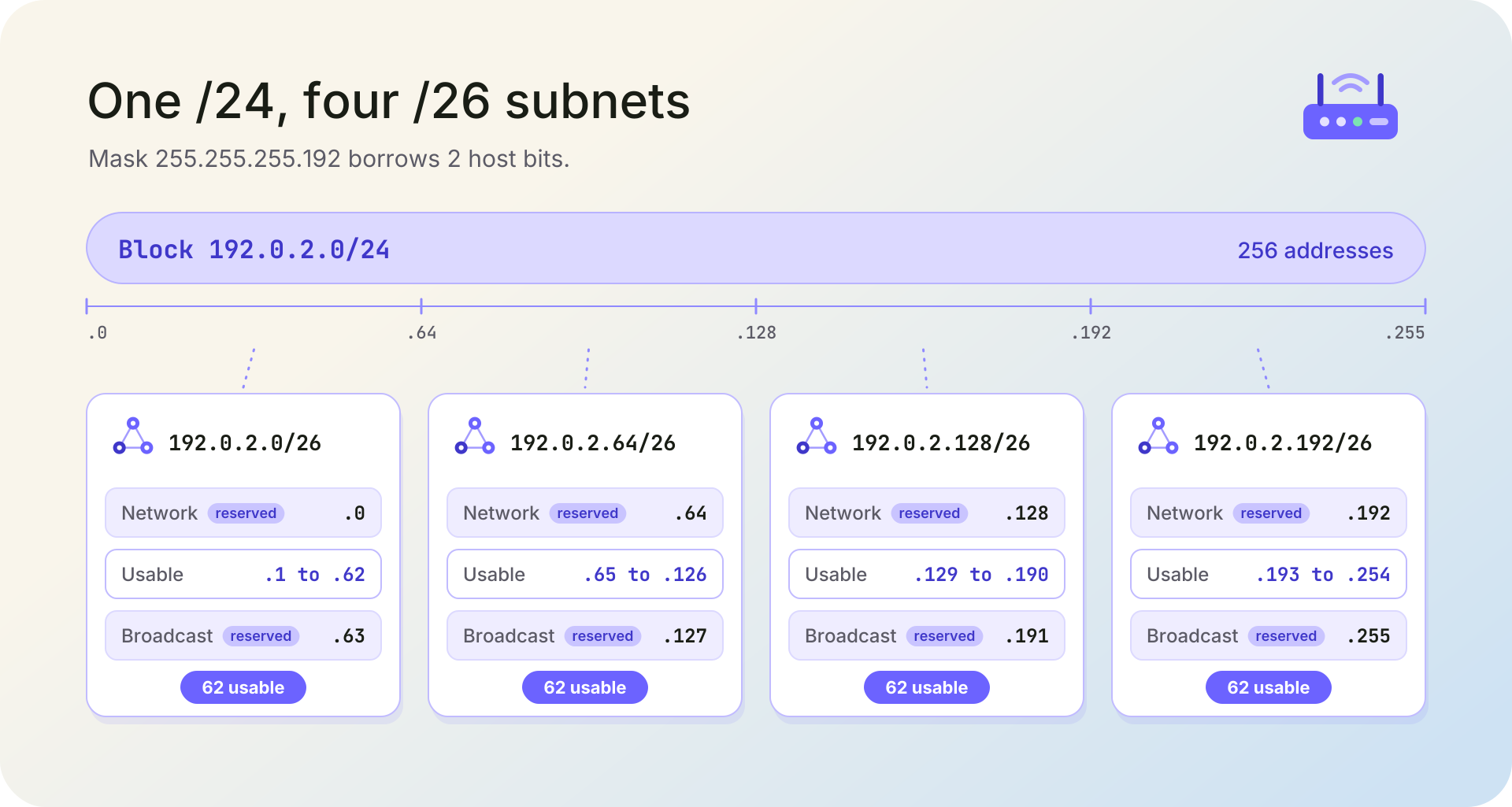
Now suppose you have 192.0.2.0/24 and need four separate networks of up to 50 devices each. Borrow 2 bits from the host part: the mask grows from /24 to /26 (255.255.255.192), and the /24 splits into four blocks of 64 addresses.
| Subnet | Network Address | Usable Hosts | Broadcast Address |
|---|---|---|---|
| 192.0.2.0/26 | 192.0.2.0 | 192.0.2.1 to 192.0.2.62 | 192.0.2.63 |
| 192.0.2.64/26 | 192.0.2.64 | 192.0.2.65 to 192.0.2.126 | 192.0.2.127 |
| 192.0.2.128/26 | 192.0.2.128 | 192.0.2.129 to 192.0.2.190 | 192.0.2.191 |
| 192.0.2.192/26 | 192.0.2.192 | 192.0.2.193 to 192.0.2.254 | 192.0.2.255 |
Each subnet has 62 usable addresses, 248 in total, against 254 for the undivided /24: every subnet sets aside its own network and broadcast address. Plans that mix sizes, a /26 for one team and a /28 for a printer network, say, use what's called variable-length subnet masking (VLSM).
3. A /30 or a /31 on a Link Between Two Routers
A link between two routers needs exactly two addresses. The traditional choice is a /30, such as 198.51.100.0/30: four addresses, two of them usable. RFC 3021 also allows a /31 on point-to-point links, so 198.51.100.0/31 gives both of its addresses to the two routers and saves two addresses per link. We'd use a /31 where both routers support it and keep the /30 everywhere else. IPv6 links can use a /127 the same way.
How to Find Your Subnet Mask
On most networks, a DHCP server (often the router) hands each device its mask along with its address and default gateway, so you rarely type it yourself. Your device still stores it in its network settings, and each operating system can show it:
- Windows: open Command Prompt and run
ipconfig. Microsoft's documentation says that, without parameters, ipconfig displays the IPv4 and IPv6 addresses, subnet mask, and default gateway for every adapter. - macOS: choose Apple menu > System Settings, then click Network in the sidebar (you may need to scroll). Click the network service you use, click Details, then click TCP/IP, as Apple's guide to TCP/IP settings describes. IPv4 shows a subnet mask; IPv6 shows a prefix length instead.
- Linux: run
ip address show. The ip-address manual page explains that each address can be "followed by a slash and a decimal number which encodes the network prefix length", so 192.168.1.20/24 means a mask of 255.255.255.0.
A "what is my IP" page answers a different question. You can check your public IP address and its data with us, but your subnet mask stays on your device and your router. It's never sent in packets, so no website can see it.
Subnet Masks in IPv6
IPv6 doesn't use dotted subnet masks at all. It writes the same idea only as a prefix length: RFC 4291 defines it as the number of "leftmost contiguous bits of the address" that make up the prefix, as in 2001:db8:abcd::/48.
For most unicast addresses, RFC 4291 requires the interface identifier, the IPv6 version of the host part, to be 64 bits long. That's why /64 is the standard subnet size. The sizes you'll meet most often:
- /48: the typical assignment to a customer site, with room for 65,536 /64 subnets
- /56: the typical assignment to a small site, with room for 256 /64 subnets
- /64: one subnet
- /127: a point-to-point link, the IPv6 counterpart of a /31
The /48 is also the most common announced IPv6 prefix. As of October 2026, 45% of the announced IPv6 prefixes in IPGeolocation.io's ASN dataset are /48s; we counted announced prefixes by length in the dataset's run for the week of October 21, 2026. For any IPv6 block, our IPv6 subnet calculator lists the range it covers.
What Prefix Lengths Tell You in IP Data
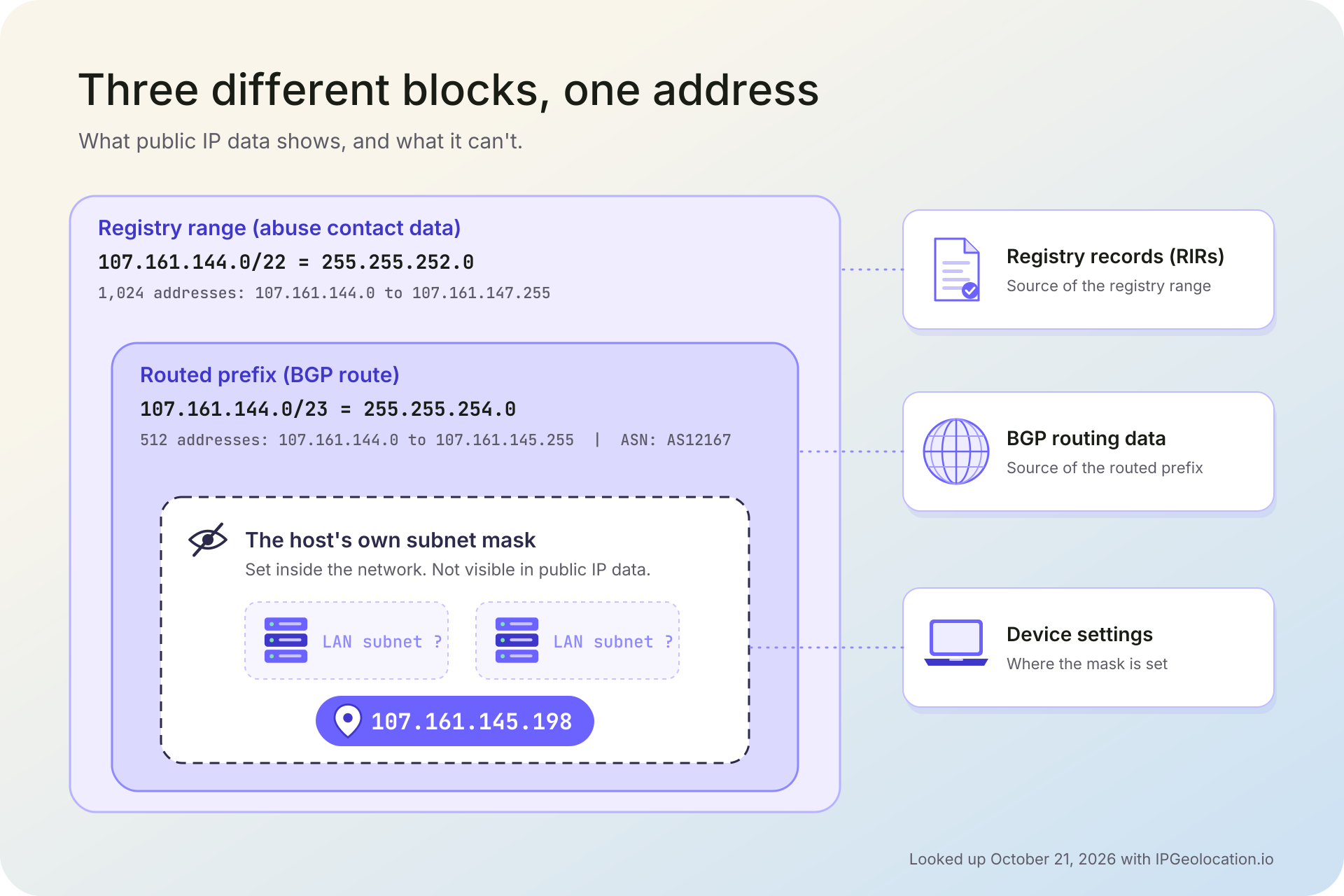
In IP data, a prefix length describes a block of addresses that a network announces or a registry records, and you read it with the same arithmetic as a subnet mask. A /23 is 255.255.254.0, a block of 512 addresses. What the prefix can't tell you is the mask on any computer inside that block.
Two different records produce these blocks. The network layer of IP intelligence includes the BGP route, the announced prefix that contains an address. Networks use BGP to tell each other which blocks they can deliver traffic to, and each block is announced by an autonomous system. Separately, regional internet registries record who holds each block and who handles abuse reports for it. The registered range and the announced route don't have to match.
We looked up three addresses with IPGeolocation.io on October 21, 2026:
| Address Looked Up | Routed Prefix (Network.route) | Same Block As A Mask | Registry Range (Abuse.route) | ASN |
|---|---|---|---|---|
| 8.8.8.8 (Google Public DNS) | 8.8.8.0/24 | 255.255.255.0, 256 addresses | 8.8.8.0/24 | AS15169, Google LLC |
| 107.161.145.198 (LightWave Networks, a hosting company) | 107.161.144.0/23 | 255.255.254.0, 512 addresses | 107.161.144.0/22, 1,024 addresses | AS12167, LightWave Networks |
| 165.227.0.0 (DigitalOcean; the first address of its block) | 165.227.0.0/20 | 255.255.240.0, 4,096 addresses | 165.227.0.0/16, 65,536 addresses | AS14061, DigitalOcean, LLC |
For 8.8.8.8, Google's announced route and its registered abuse range are the same /24. For the two hosting addresses they differ: LightWave Networks announces 107.161.144.0/23 while its registered abuse range is the wider 107.161.144.0/22, and DigitalOcean's /20 route sits inside a registered /16. None of these blocks is the subnet mask on a server in those networks. Each operator divides its space into internal subnets, and routing data shows only what the operator chooses to announce. The mask on each machine stays on the machine.
The /24 in the first row is the most common size by far. More than 60% of the announced IPv4 routes in IPGeolocation.io's ASN dataset are /24s, as of October 2026; the count comes from the same weekly run as the IPv6 figure, grouped by prefix length. So a /24 is the block you'll meet most often in IP lookups, and you can see real ones in our IPv4 range browser, which drills down from /8 to /16 to /24.
Prefixes also shape how you write rules and how long you can trust them:
- Prefixes are the unit for network rules. Announced routes are what allowlists, blocklists, and route filters work with. A prefix can hold many unrelated devices, though, so we'd act on a single address first and widen a rule to the prefix only when the activity clearly spans it.
- Prefixes change. Networks withdraw, split, and re-announce routes. Our ASN dataset is rebuilt every day and drops prefixes that leave the routing table, so re-check a stored prefix rather than treating it as permanent.
One IPGeolocation.io lookup returns the routed prefix in the network.route field alongside the ASN, and adding abuse contact data returns the registry range in abuse.route.
See the Prefix Behind Any IP With IPGeolocation.io
IPGeolocation.io gives you the richest single-request view of where an address sits on the internet. One call to the IP Geolocation API can return geolocation, security data (VPN, proxy, residential proxy, and Tor detection with a 0 to 100 threat score), the ASN, the company behind the address, abuse contact data with the CIDR block it covers, the time zone, and parsed user agent details, along with the network object that holds the routed prefix. Each of those comes as structured JSON fields you can filter on, so a prefix, an ASN, and a risk flag can all feed the same rule.
When you need every block a network announces, the ASN API returns them for any AS number or IP address, IPv4 and IPv6, with the network's peers, upstreams, downstreams, and WHOIS record. That dataset is rebuilt every day from global BGP routing feeds and the five regional internet registries. When security or abuse contact data is all you need, the IP Security API and the IP Abuse Contact API return each on its own, and the IP to ASN database ships the prefix-to-ASN mapping as a daily-updated MMDB or CSV file for lookups at scale with no network round trip.
The subnet calculators used in this guide are free and run in your browser. The free API plan's 1,000 daily credits cover location, basic ASN, and time zone data; routing info, company, security, and abuse contact data come with the paid plans, which you can compare on the API pricing page.
Frequently Asked Questions
Yes. 255.255.255.0 and /24 are the same subnet mask written two ways: 24 network bits followed by 8 host bits. A /24 holds 256 addresses, and 254 of them can be assigned to devices once the network and broadcast addresses are set aside.
Yes. 255.255.0.0 is the /16 mask: 16 network bits and 16 host bits. A /16 holds 65,536 addresses, of which 65,534 can go to devices. It was the default mask for the old Class B networks.
The subnet mask for 192.168.1.1/24 is 255.255.255.0. The /24 means the first 24 bits are the network part, so the address belongs to the 192.168.1.0 network, whose usable addresses run from 192.168.1.1 to 192.168.1.254.
A /24 has 254 usable hosts. It contains 256 addresses, and the first and last (192.168.1.0 and 192.168.1.255 in 192.168.1.0/24) are the network and broadcast addresses. It's also the most common routed size: as of October 2026, more than 60% of announced IPv4 routes in IPGeolocation.io's ASN dataset are /24s.
Not from the address alone. The mask is set on each device or handed out by its router, and it never travels in packets. On your own computer, ipconfig (Windows) or ip address show (Linux) shows it. For a public IP, a lookup can show the routed prefix it belongs to, but not the mask of the network behind it.
Modern networks have no single default: each network's configuration sets the mask. The old address classes each had a default: 255.0.0.0 (/8) for Class A, 255.255.0.0 (/16) for Class B, and 255.255.255.0 (/24) for Class C. CIDR replaced that system in 1993.
No. IPv6 uses prefix lengths only, written after a slash, such as 2001:db8:abcd::/48. A /64 is the standard subnet size, because RFC 4291 requires 64-bit interface identifiers for most unicast addresses.
A wildcard mask is a matching pattern some routers use in access lists, where a 0 bit means "must match" and a 1 bit means "ignore". For a whole subnet, the wildcard is the subnet mask with every bit flipped, so 255.255.255.0 becomes 0.0.0.255. Unlike subnet masks, wildcards don't have to be contiguous.