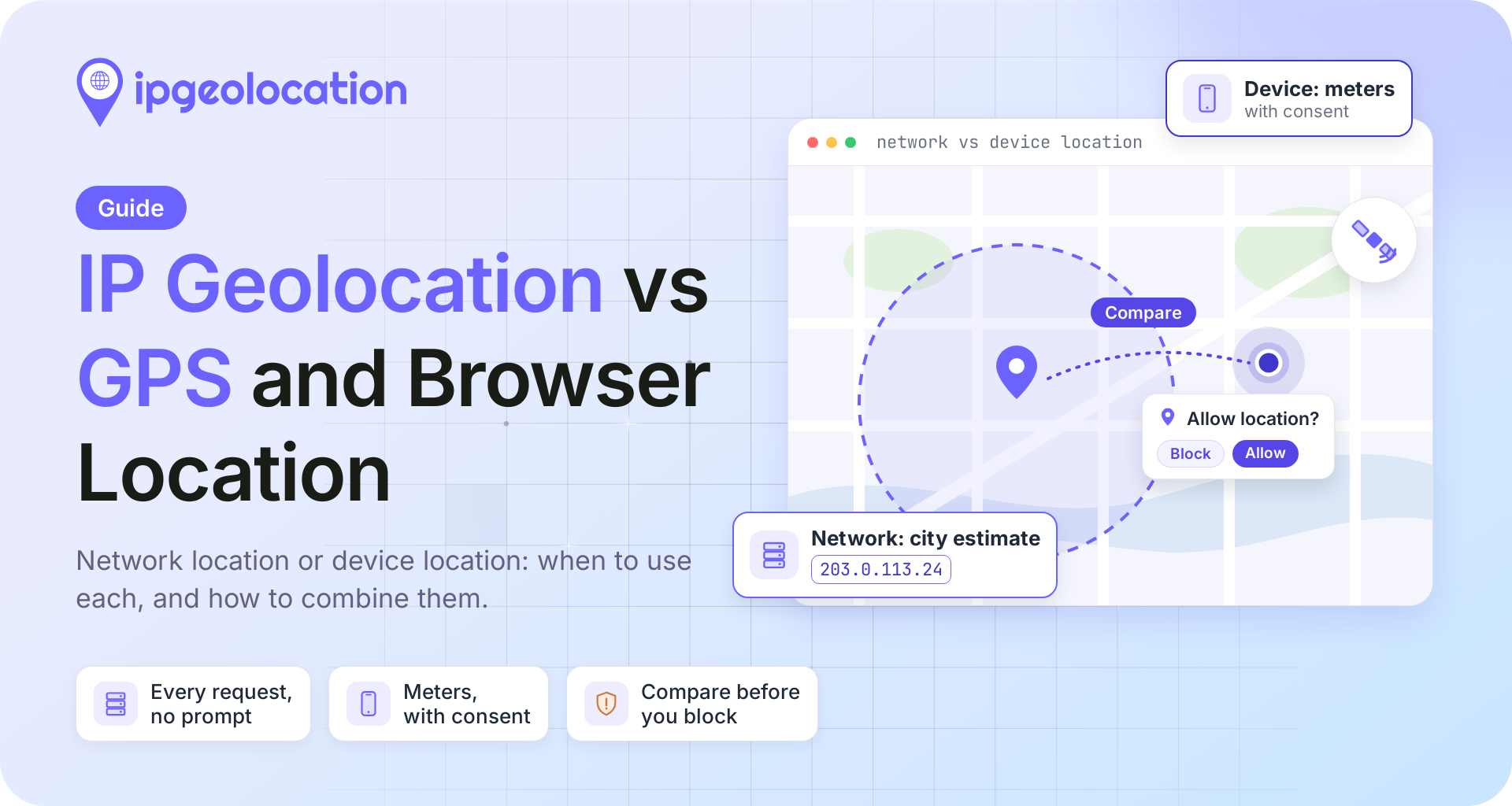
IP geolocation vs GPS is a choice between two different answers. IP geolocation estimates where a visitor's network connects to the internet, and it does that on every request without asking anyone. GPS, which a website can only reach through the browser's Geolocation API, reports where the device itself is, and only after the person agrees to share it.
For most web features, start with IP geolocation and ask for device location only when a feature needs a position measured in meters, such as a store finder. When you have both and the decision matters, compare them instead of trusting either one on its own.
TL;DR
IP geolocation vs GPS, side by side: IP geolocation is a server-side lookup that returns a visitor's country, region, city, and approximate coordinates on every request, including requests from bots and API clients. The browser's Geolocation API returns the device's own coordinates, but only on secure pages such as HTTPS and only after the person allows it.
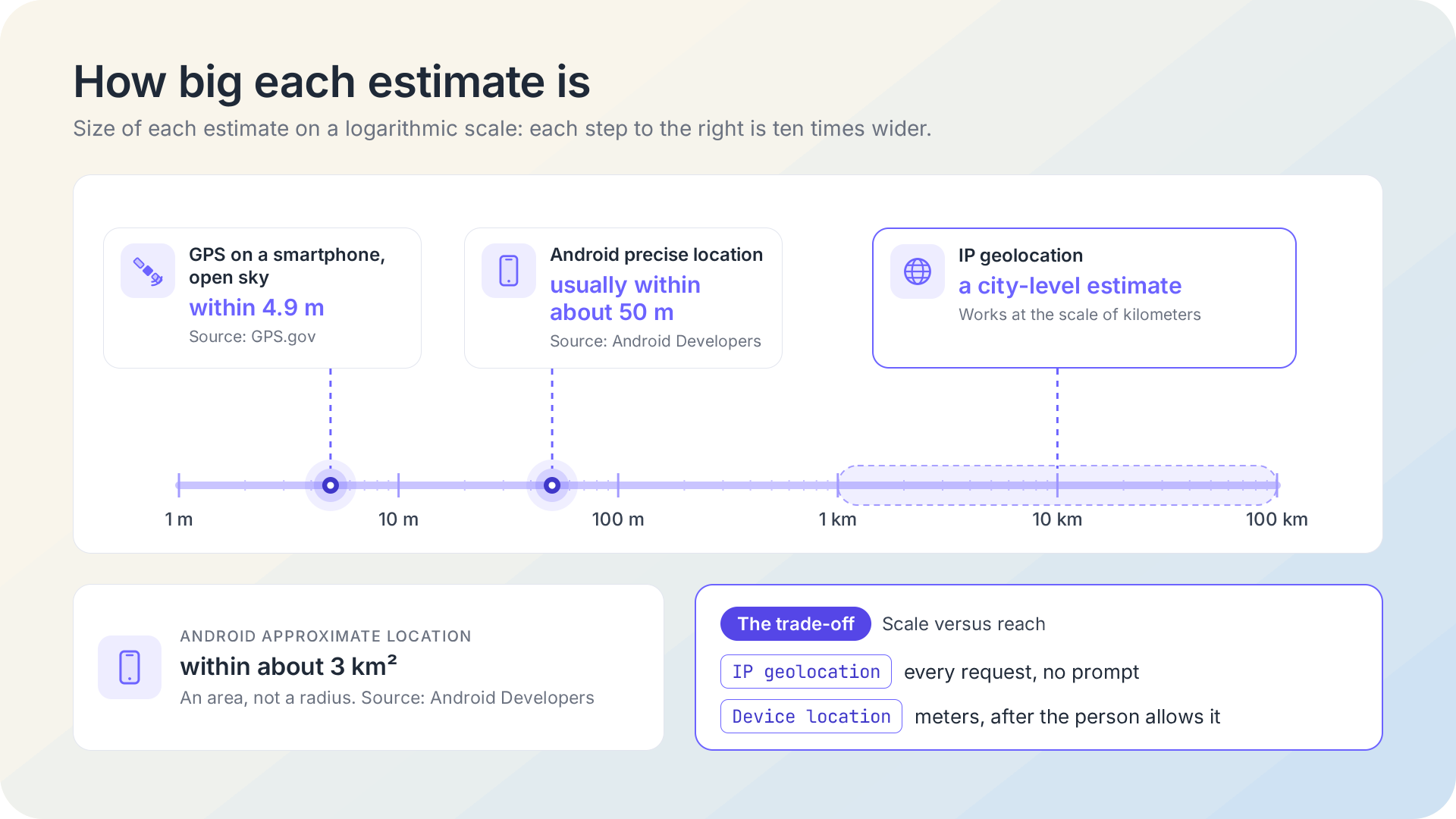
- GPS-enabled smartphones are typically accurate to within 4.9 m under open sky (GPS.gov); IP geolocation estimates the city a network connects from.
- Browser location isn't always GPS. The browser may answer from Wi-Fi, cell towers, or the IP address itself, so read the
accuracyvalue it returns. - Each signal can be moved: a VPN changes the IP location, and a browser's developer tools can override device coordinates.
Network Location vs Device Location
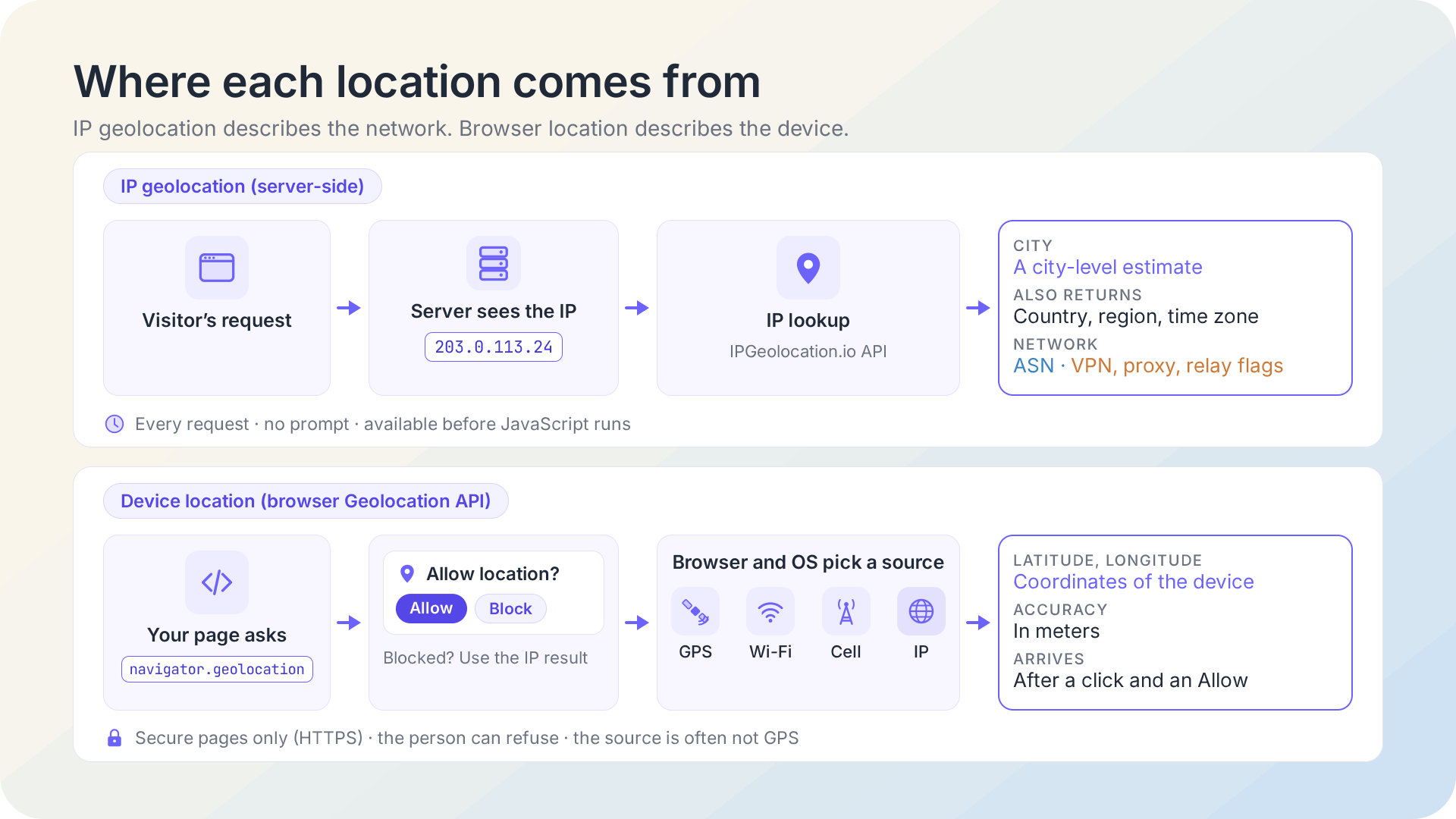
IP geolocation and GPS answer different questions: one locates the network a request comes from, the other locates the device that sent it. We find it useful to sort every location signal into those two groups, with GPS as one of several ways a device finds itself.
| IP Geolocation | Browser Geolocation API | GPS (Device Hardware) | |
|---|---|---|---|
| What it locates | Where the visitor's network meets the internet: a home router, a carrier gateway, a VPN server | The device, from whichever source the browser and operating system choose | The device's antenna, from satellite signals |
| Where you get it | Your server or edge, from the request's IP address | JavaScript running in the page | Inside the phone; a web page reaches it only through the browser API |
| When it's available | On the first request, before any JavaScript runs | After the page loads and the person clicks Allow | When location is on; best with a clear view of the sky |
| Permission | None | Required, in a secure context only | Set in the device's location settings |
| Typical precision | An estimate of the city | Meters to kilometers, depending on the source | Within 4.9 m on smartphones under open sky |
| What moves it | VPNs, proxies, privacy relays, carrier and corporate gateways | Location settings, approximate-location grants, developer tools | Buildings, trees, and indoor use |
| Works for bots and API clients | Yes | No | No |
When developers compare browser geolocation with IP geolocation, timing and consent usually settle it: when do you need the answer, and can you ask for it? IP geolocation can run before the first byte of HTML goes out, for every visitor, including the ones who would never click Allow. The Geolocation API gives you the device's position, often far more precisely, but only for people who agree, and only after they do.
Browser Location Isn't Always GPS
The browser's Geolocation API returns the device's location from whatever source is available, and that source often isn't GPS. The W3C Geolocation specification names GPS alongside location inferred from network signals: the IP address, Wi-Fi and Bluetooth MAC addresses, and cell IDs. It also says plainly that the API gives no guarantee it returns the device's actual location.
What that means in practice depends on the device. A phone outdoors with location services on can hand the browser a satellite fix. Most laptops have no GPS receiver, so their answer comes from nearby Wi-Fi networks or the network connection, and on a desktop that answer can be no sharper than an IP lookup.
You can't force GPS from a web page either. The enableHighAccuracy option is a hint: the specification lets the browser ignore it, and when it's off, the browser may skip power-hungry sources such as GPS.
The operating system adds one more layer. Android lets people grant an app only approximate location, which Android's documentation describes as accurate to within about 3 square kilometers (an area roughly 2 km across), against precise location that is usually within about 50 m. Apple's Core Location has an equivalent setting, where a person authorizes an app with reduced accuracy. A browser is itself an app, so if someone gave it approximate location only, that's all your page can receive.
Every position the browser returns comes with coords.accuracy, a radius in meters. Read it before you use the coordinates: 20 m points to GPS or a strong Wi-Fi fix, while 3,000 m usually means an approximate-location grant or an estimate from the network.
How Accurate Is IP Geolocation Compared With GPS?
GPS is far more precise than IP geolocation: GPS.gov says GPS-enabled smartphones are typically accurate to within a 4.9 m (16 ft) radius under open sky, while IP geolocation estimates the city a network connects from. GPS gets worse near buildings, bridges, and trees, and indoors, which is exactly where many people use websites.
IP geolocation works at a different scale, and the reason is the same for every provider. An IP address belongs to a network, not to a device, and the location that network presents to the internet is where its traffic comes out: a home broadband connection, a mobile carrier's gateway, an office, or a VPN server. Country and region are usually where IP data does its best work; the city is an estimate. How IP geolocation works explains why, level by level, and how we build and verify our location data shows the method behind ours.
The two scales suit different jobs. A city-level answer that arrives on every request, with no prompt, is what a currency default or a country rule needs; a position in meters is what a store finder needs, and only the device can give it.
When to Use IP Geolocation
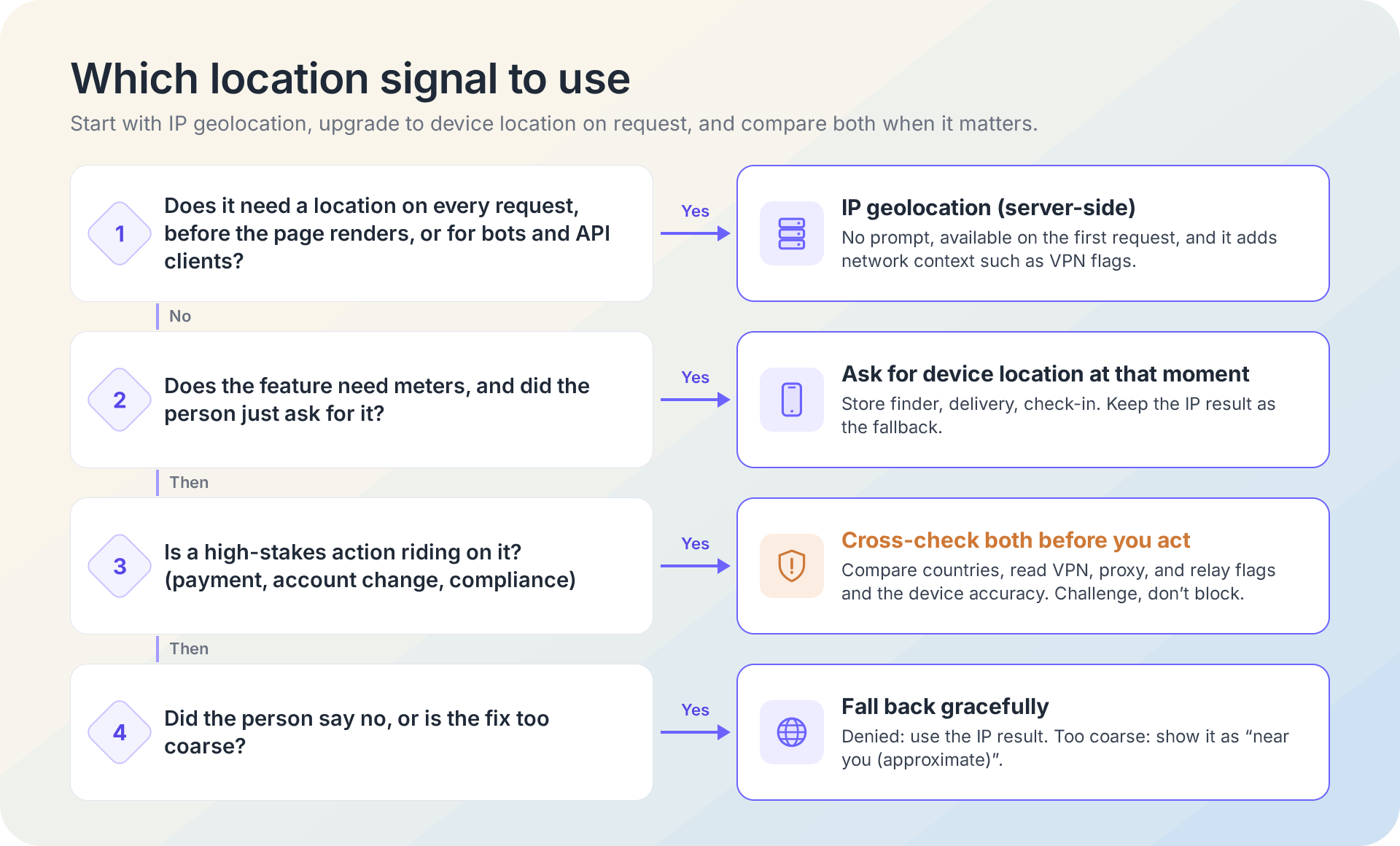
Use IP geolocation whenever you need a location on every request, before the page renders, or without asking anyone. That covers most of what websites do with location:
- choosing a default currency, as in showing prices in the visitor's currency, and a starting language that you weigh against the browser's
Accept-Languageheader, because one country can speak several languages and travelers bring their own; - country rules for content and compliance, such as blocking or allowing visitors by country or redirecting visitors to a localized site;
- analytics and log enrichment, where nobody is there to ask;
- fraud and risk scoring at signup, login, and checkout.
Some traffic never offers a device location at all. Crawlers, scripts, and API clients don't run your JavaScript, and a person who blocks the prompt has told you no. IP geolocation still answers for all of them.
It also answers a question device location can't: what kind of network is this? A login from a city that looks normal reads differently once you know the address belongs to a hosting provider and is a known VPN exit. Location is only one of the layers of IP data; one IPGeolocation.io lookup returns the location together with the network's ASN, and it can add VPN, proxy, and relay flags in the same response.
Our default: anything that has to happen before a person clicks something runs on IP geolocation, and device location is an upgrade the person opts into.
When to Ask for Device Location
Ask for device location when a feature needs a position measured in meters and the person has just asked for that feature. Store finders, delivery and pickup, "near me" search, and field check-ins all qualify. A language or currency default doesn't.
How you ask matters as much as whether you ask:
- Ask at the moment of need. Tie the request to a button such as "Use my location", never to page load. People grant a request they understand.
- Serve the page securely. The specification makes the API fail with
PERMISSION_DENIEDin a non-secure context. HTTPS pages qualify, and so doeslocalhostwhile you develop, which MDN lists as a secure context. - Check the permission state first. The Permissions API reports
granted,denied, orpromptforgeolocation, so you can skip asking someone who already said no. - Plan for no. Keep the IP result as the fallback, so the feature still works without a precise position. Some places need it more than others: MDN notes the Geolocation API may be unavailable in China, because the Wi-Fi location it often relies on comes from Google.
- Mind iframes. Location is allowed in same-origin frames by default. A third-party frame needs
allow="geolocation"on the iframe, and if your page sends aPermissions-Policyheader for geolocation, that header has to include the frame's origin, as MDN's page on the Geolocation API shows. - Stop when you're done. For continuous tracking, such as following a delivery,
watchPosition()sends updates as the device moves; clear the watch as soon as the feature no longer needs it.
Device location is also more sensitive data. The W3C specification requires express permission before any location is shared, and California's privacy law defines precise geolocation as data derived from a device that locates a consumer within a circle with a radius of 1,850 feet, and lists it as sensitive personal information. Keep coordinates only as long as the feature needs them. This isn't legal advice; check your obligations with counsel.
Use Both: IP by Default, Device Location on Request
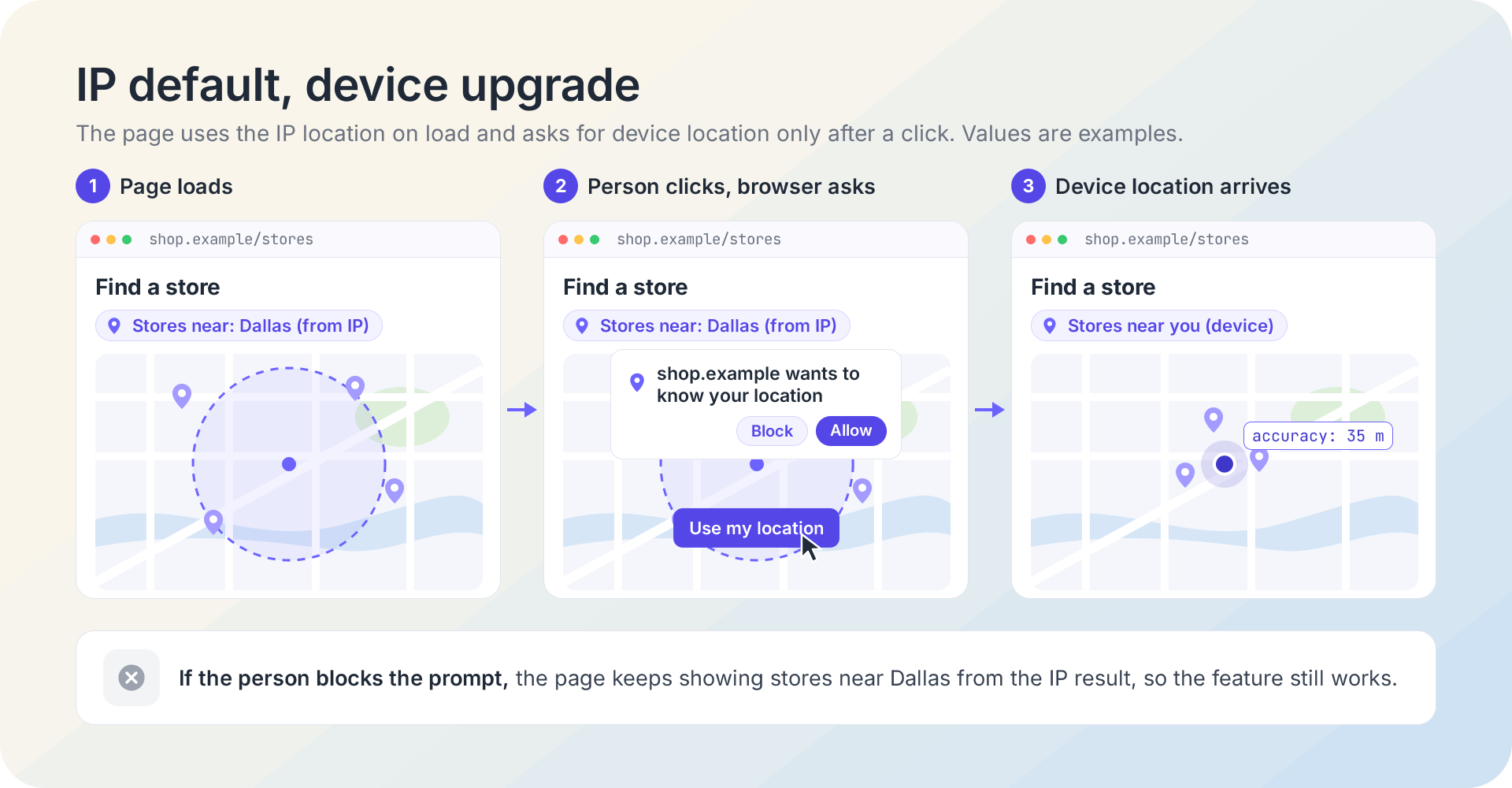
The pattern most applications need is IP location on every request, upgraded to device location when someone asks for something nearby. Your server looks up the visitor's IP; the page asks the browser only when a person clicks, and falls back to the IP answer whenever the device can't or won't help.
Before you start, check that you have:
- Node.js 18 or later (for the built-in
fetch) and Express (the code below was checked with Express 5); - an IPGeolocation.io API key, stored in an environment variable named
IPGEOLOCATION_API_KEY; - a page served over HTTPS in production (
localhostworks while you develop).
1. Step 1: Look Up the Visitor's IP on Your Server
This Express endpoint reads the visitor's address, asks the IPGeolocation.io API for a few location fields, and returns a small JSON object your page can use.
javascript
// server.mjs: Node.js 18 or later, Express (checked with Express 5)
import express from 'express';

const API_KEY = process.env.IPGEOLOCATION_API_KEY;
if (!API_KEY) {
  throw new Error('Set the IPGEOLOCATION_API_KEY environment variable first.');
}

const app = express();

// Trust exactly one proxy hop (your load balancer, say) so req.ip is the visitor's
// address, not the proxy's. Match this to your real setup.
app.set('trust proxy', 1);

// Location and time zone fields, all on the free plan.
const FIELDS = [
  'location.city',
  'location.state_prov',
  'location.country_code2',
  'location.latitude',
  'location.longitude',
  'time_zone.name',
].join(',');

app.get('/api/ip-location', async (req, res) => {
  // Local testing only: with ALLOW_IP_OVERRIDE=1, ?ip= picks a public address,
  // because a local request arrives from a loopback address that has no location.
  // Leave it unset in production so nobody can spend your credits on other IPs.
  const override = process.env.ALLOW_IP_OVERRIDE === '1' ? req.query.ip : undefined;
  const ip = typeof override === 'string' && override ? override : req.ip;

  const url = new URL('https://api.ipgeolocation.io/v3/ipgeo');
  url.searchParams.set('apiKey', API_KEY);
  url.searchParams.set('ip', ip);
  url.searchParams.set('fields', FIELDS);

  try {
    const apiRes = await fetch(url, { signal: AbortSignal.timeout(3000) });
    const body = await apiRes.json().catch(() => ({}));

    if (!apiRes.ok) {
      // 423 means a private, reserved, or loopback address: nothing to locate.
      console.warn(`IP lookup failed (${apiRes.status}): ${body.message ?? 'no message'}`);
      return res.status(502).json({ source: 'none' });
    }

    const loc = body.location ?? {};
    res.json({
      source: 'ip',
      city: loc.city || null,
      region: loc.state_prov || null,
      countryCode: loc.country_code2 || null,
      latitude: loc.latitude ? Number(loc.latitude) : null,
      longitude: loc.longitude ? Number(loc.longitude) : null,
      timeZone: body.time_zone?.name ?? null,
    });
  } catch (err) {
    // A timeout or network error: the page keeps working without a location.
    console.error('IP lookup error:', err.name, err.message);
    res.status(502).json({ source: 'none' });
  }
});

app.use(express.static('public'));
app.listen(3000, () => console.log('Listening on port 3000'));
The trust proxy setting decides which address req.ip holds; set it to match your proxies, or you'll geolocate your own load balancer. Getting the visitor's real IP behind a proxy covers that setup in detail. The fields parameter keeps the response small, and the three-second timeout keeps a slow lookup from holding up your page.
Start the server with ALLOW_IP_OVERRIDE=1 IPGEOLOCATION_API_KEY=your_key node server.mjs and request curl "localhost:3000/api/ip-location?ip=2.56.188.34". You should see:
json
{"source":"ip","city":"Dallas","region":"Texas","countryCode":"US","latitude":32.77822,"longitude":-96.79512,"timeZone":"America/Chicago"}The likely failure is testing without ?ip=. Your request then comes from a loopback address, the API answers with HTTP 423 because a private or loopback address has nothing to locate, and the endpoint returns {"source":"none"}. In production, real visitors arrive with public addresses.
This endpoint serves the browser in step 2. To use the location before the page renders, call the same lookup from middleware on the first request and pass the result to your template, and cache it per session so a visitor's repeat requests don't each spend a credit. If you'd rather call the API from the browser, keep your API key out of the browser with a request origin, and see IP geolocation in JavaScript for more ways to call it.
2. Step 2: Ask the Browser Only When Someone Clicks
This script runs in the page. It starts the IP lookup at once, asks for device location only if the page is secure and the person hasn't already said no, and returns the device fix or, failing that, the IP result.
javascript
// public/location.js: IP location by default, device location when the user asks for it.
let ipLocationPromise = null;

function getIpLocation() {
  // One lookup per page view: repeat clicks reuse it instead of spending credits.
  ipLocationPromise ??= fetch('/api/ip-location')
    .then((res) => {
      if (!res.ok) throw new Error(`IP location unavailable (${res.status})`);
      return res.json();
    })
    .catch((err) => {
      console.warn(err.message);
      ipLocationPromise = null; // allow a retry on the next click
      return null;
    });
  return ipLocationPromise;
}

function getDevicePosition(options) {
  return new Promise((resolve, reject) => {
    navigator.geolocation.getCurrentPosition(resolve, reject, options);
  });
}

async function geolocationPermission() {
  try {
    const status = await navigator.permissions.query({ name: 'geolocation' });
    return status.state; // 'granted', 'denied', or 'prompt'
  } catch {
    return 'unknown'; // no Permissions API, or it doesn't know 'geolocation'
  }
}

// Call this from a click handler, never on page load.
async function locateForNearMe({ preciseWithinMeters = 500 } = {}) {
  // Start the IP lookup at once; it's the answer whenever device location isn't.
  const ipLocation = getIpLocation();

  if (!window.isSecureContext || !('geolocation' in navigator)) return ipLocation;
  if ((await geolocationPermission()) === 'denied') return ipLocation; // don't prompt again

  try {
    const position = await getDevicePosition({
      enableHighAccuracy: false, // a store finder needs a few hundred meters, not GPS-grade
      timeout: 10000,            // the default is to wait with no time limit
      maximumAge: 300000,        // accept a fix up to 5 minutes old
    });
    const { latitude, longitude, accuracy } = position.coords;
    return {
      source: 'device',
      latitude,
      longitude,
      accuracyMeters: Math.round(accuracy),
      precise: accuracy <= preciseWithinMeters, // false: likely an approximate grant or an IP-based fix
    };
  } catch (err) {
    // err.code: 1 = PERMISSION_DENIED, 2 = POSITION_UNAVAILABLE, 3 = TIMEOUT
    console.info(`Device location not used (code ${err.code}): ${err.message}`);
    return ipLocation;
  }
}

document.querySelector('#near-me')?.addEventListener('click', async () => {
  const location = await locateForNearMe();
  console.log(location);
});
Three options carry the decisions. enableHighAccuracy: false tells the browser it may skip GPS, which saves battery and is enough for a store finder. timeout matters because the specification's default is to wait with no limit. maximumAge lets the browser reuse a recent fix instead of measuring again. The precise flag tells your interface how to word the result: a fix wider than your threshold probably came from an approximate-location grant or an IP-based estimate, so show it as "near you (approximate)" rather than as the person's exact spot. The two results have different shapes, so branch on source: the IP result carries a city and country, and the device result carries coordinates and an accuracy.
Add a button with id="near-me", load the script, and click it. If you allow the prompt, the console shows an object with source: "device", your coordinates, and accuracyMeters. If you block it, you see Device location not used (code 1), then the IP result: on a deployed page that's the object from step 1, and on localhost it's null, because a loopback address has no IP location. When both fail, show your default list. The likely surprise is a page without a secure context: the script skips the prompt and returns the IP result, so no permission dialog ever appears.
If the feature also needs a local time, the IPGeolocation.io Time Zone API accepts lat and long as well as an IP address, so you can turn the coordinates a person shares into their time zone. Call it from your server, as in step 1, so the key stays private.
When IP and Device Location Disagree
A gap between the IP location and the device location is common and usually innocent, so read it before you act on it. The usual causes:
- A VPN, proxy, or privacy relay. The IP location becomes the location of the server the traffic leaves from. VPNs are common: 42% of U.S. adults use one for personal or work purposes, according to Security.org's 2026 survey of 1,008 adults. Some privacy relays keep people in their general region, which iCloud Private Relay and Cloudflare WARP compared explains.
- Carrier and corporate gateways. A mobile network or a company network can send traffic out through a gateway in another city.
- Travel. A device fix follows the person; a home network's location doesn't.
- A device location that was set by hand. The Chrome DevTools Sensors panel overrides geolocation with a preset city or custom coordinates in a few clicks, and the specification gives no guarantee that the API returns the device's actual location.
- An old fix. A large
maximumAgecan hand you a position from before the person moved.
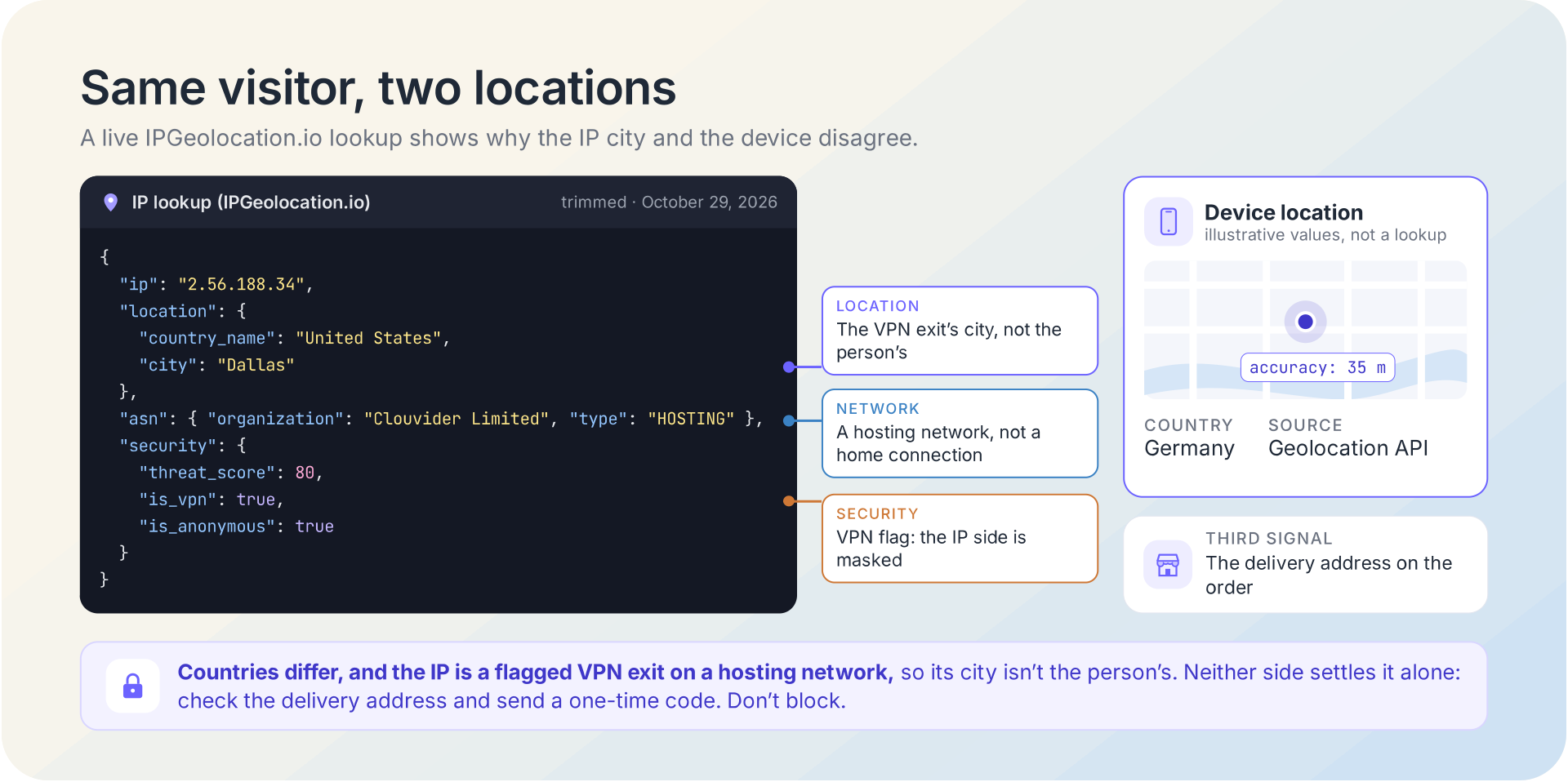
Read the gap in a set order. Compare countries first: a different city in the same region is often within the normal spread of an IP estimate, while a different country is worth a closer look. Next, ask the IP side why it might have moved. VPN, proxy, and relay flags, a hosting network, or a corporate gateway explain most mismatches, and how VPN detection works and the risk signals behind an IP address cover those signals. Then look at the device side: its accuracy, its age, and whether a high-value action is riding on it.
Here is how that plays out. Say an order on a delivery site arrives from 2.56.188.34 while the browser shares a fix about 35 m wide in Germany (an example, not a real session). Our lookup on October 29, 2026 placed that IP in Dallas, Texas, on Clouvider Limited, a hosting network, with is_vpn: true and a threat score of 80. Dallas is where the VPN tunnel ends, not where the shopper is, so the IP city tells you little about the person. The device fix could be real or overridden, so it doesn't settle the question either, and the delivery address on the order is a third signal worth comparing. Neither side justifies a block. A one-time code sent to the account's email or the order's phone number lets a real customer carry on and asks whoever is behind the session to prove they control it.
Sometimes you can't ask for location at all, but you still want to know where a VPN user really is. IPGeolocation.io's Real-Time VPN and Proxy Detection runs live tests of the network connection in the browser and returns visitor_actual_location, the country those tests find the visitor in behind a VPN or proxy, with its own confidence score and no location prompt.
IP Geolocation Data From IPGeolocation.io
IPGeolocation.io handles the default half of this pattern: a location for every request, with no prompt and no JavaScript. One call to the IP Geolocation API returns the continent, country, state or region, district, city, zip code, and coordinates for any IPv4 or IPv6 address, along with the country's calling code, languages, and currency, and the time zone with its current local time and daylight saving dates. That is everything a currency default, a language choice, or a country rule needs before the page renders, in one of the richest location responses you can get from a single request. Our location data is built from multiple independent signals, including active measurements, that are cross-checked and refreshed continuously.
When a feature needs more than a place, the same request can add the rest of the address's profile. The abuse contact names who handles reports for that network, with an email address, a phone number, and the range it covers. The ASN gives the network's number, organization, and type, such as ISP or hosting. Network data adds the connection type, the BGP route, and whether the address is anycast, and the user agent module parses the visitor's browser, device, and operating system. Security data rounds it out with VPN, proxy, Tor, and relay flags and a threat score, read as risk signals rather than a verdict, which is what explained the Dallas mismatch above. Each module is optional, so a request carries only what the feature uses.
For offline or high-volume work, the same location data ships as a downloadable IP geolocation database in CSV and MMDB, and the bulk endpoint accepts up to 50,000 IP addresses per request, all on a global edge with a 99.99% uptime SLA.
The free plan includes 1,000 API credits a day with no credit card and covers core location, country metadata, currency, basic ASN, and time zone data. Abuse contact, full ASN details, network, user agent, and security data, along with Real-Time VPN and Proxy Detection, are on paid plans, which start at $19 a month. Compare the plans on the pricing page.
Frequently Asked Questions
Not quite: GPS is one kind of geolocation. Geolocation is any method of estimating where something is. The W3C Geolocation specification lists GPS alongside location inferred from the IP address, Wi-Fi and Bluetooth MAC addresses, and cell IDs, so a browser's "location" may come from any of these, and IP geolocation uses none of the device's sensors at all.
Only your IP address, in most cases. A VPN sends your traffic out through a server elsewhere, so IP geolocation shows that server's location, while your device's GPS still reports where you are. The exception is a browser that falls back to an IP-based estimate because it has no GPS or Wi-Fi fix, which a VPN can shift too.
A website can estimate it, but not precisely. Every site you visit sees the IP address your connection arrives from, so it can estimate the city your network connects from without asking, as IPGeolocation.io's What Is My IP page shows for your own connection. Your device's precise location needs your permission through the browser's prompt.
No. GPS-enabled smartphones are typically accurate to within 4.9 m under open sky, according to GPS.gov, while IP geolocation estimates the city a network connects from and works at the scale of kilometers. IP geolocation is the better fit when you need a location on every request with no prompt; GPS is the better fit when a feature needs meters.
Usually because the browser didn't use GPS. On a laptop, or indoors, the browser often estimates location from Wi-Fi networks or the IP address, and a phone may be set to share only an approximate location, which Android's documentation puts at about 3 square kilometers. Check the accuracy value: a small number points to GPS or a good Wi-Fi fix, while values in the thousands of meters point to an approximate grant or an IP-based estimate.
No. The W3C Geolocation specification makes the Geolocation API fail with a PERMISSION_DENIED error in a non-secure context, so production pages need HTTPS. Browsers treat localhost as a secure context, so the API works while you develop locally.
No. An IP address points to the network a device uses, not to the device, so IP geolocation gives a city-level estimate rather than a street address or a GPS position. A VPN, a mobile carrier's gateway, or a company network can also place that estimate in a different city or country from the person.