



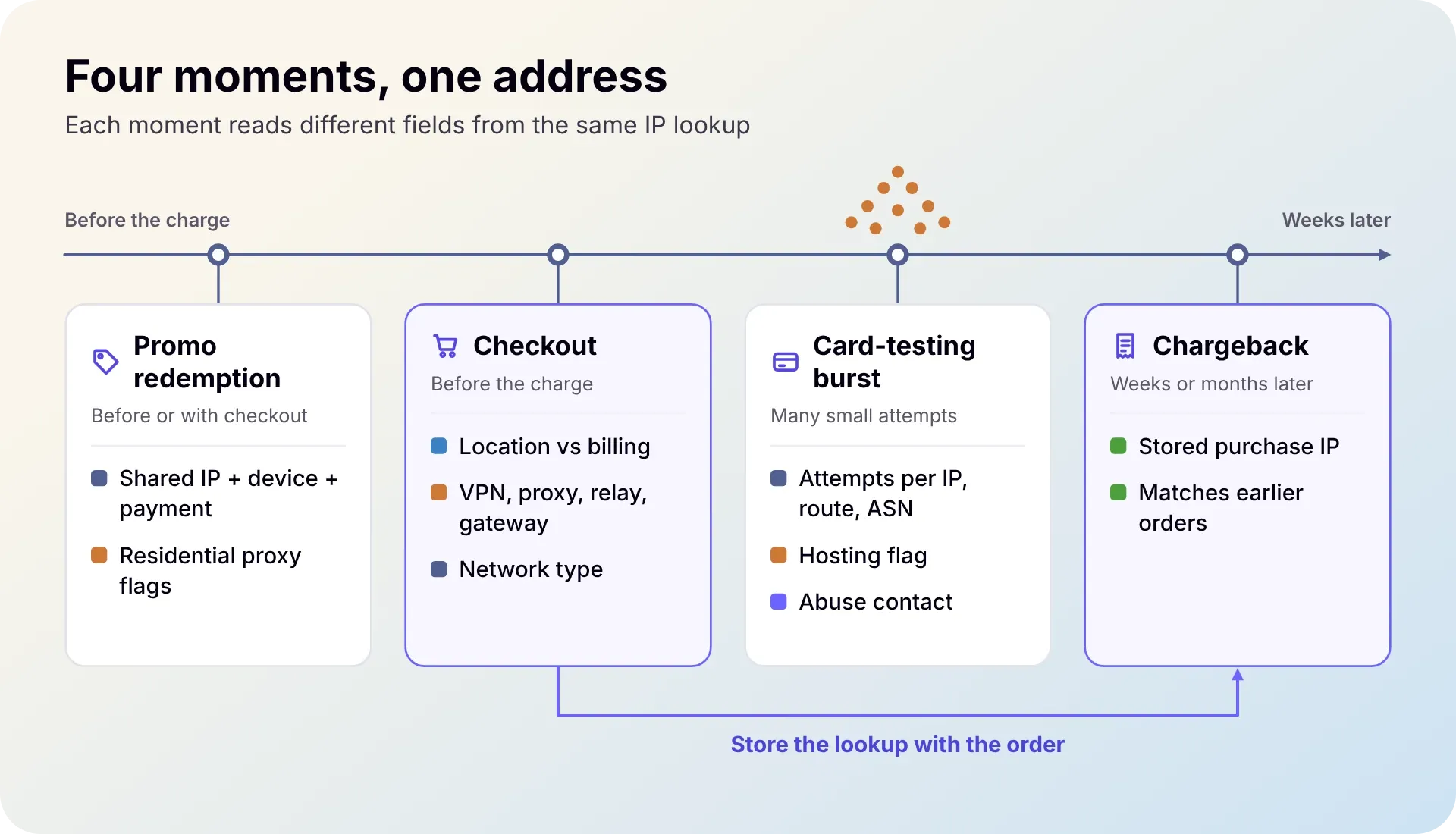
IP intelligence supports payment fraud prevention at four moments: when your checkout scores an order, when card testing hits your payment form, when a buyer disputes a charge, and when someone redeems a promo code. At each one, the buyer's IP address tells you where the connection comes from, whether it runs through a VPN, proxy, or privacy relay, which network carries it, and what that network has done before. It can't tell you who is buying.
So read the IP as a risk signal at checkout and as supporting evidence in a dispute, next to the AVS, CVV, and 3-D Secure checks your processor already runs. An order 700 miles from its billing address isn't suspicious for the distance; it is when the same lookup shows a proxy pool or a rented server.
TL;DR
IP intelligence for payment fraud prevention means reading the buyer's IP address as a risk signal, never as an identity. It adds context to checkout checks, groups the attempts in a card-testing attack, counts as one matching element in Visa and Mastercard dispute rules, and links accounts that abuse a promotion.
- Privacy relays keep the user's approximate region, and company gateways show the gateway's location, so neither belongs in a VPN rule.
- For card testing, limit attempts per IP, card, and account, and use the announced route and ASN to spot attacks that rotate addresses.
- For eligible Visa 10.4 fraud disputes, a stored, unhashed purchase IP can count as evidence when it matches two earlier orders on the same card, placed 120 to 365 days before and not reported as fraud, and one more element such as the delivery address or account ID also matches; it supports the case without proving who the buyer is.
- Residential proxy exits churn fast: in our research, 43.5% of 43.8 million IPv4 exit addresses were offered on only one day, so recent sightings carry the most weight.
What IP data can and can't tell a payment fraud check
IP data describes the connection, not the person behind it. IP geolocation for fraud detection covers only the first row of the table that follows; IP intelligence adds the rest of what is attached to an address: the risk signals it shows, the network that carries it, the organization it's assigned to, and who handles abuse reports for it.
| Data Type | What It Shows | What It Can't Prove On Its Own | Pair It With |
|---|---|---|---|
| Geolocation (country, region, city) | Where the network endpoint behind the address is estimated to be | That the buyer is there, or that the billing address is false | Billing and shipping address, the account's past orders |
| Security signals (VPN, proxy, residential proxy, Tor, privacy relay, company gateway, attack history, threat score) | Whether the connection is anonymized or shared, and what the address has been seen doing | That this buyer is the one who misbehaved | Device, account age, order value |
| ASN and announced route | Which network carries the address, and the block of addresses it belongs to | Anything about the customer; one large ISP route holds many unrelated people | Attempt counts per route during an attack |
| Company | The organization the address is assigned to, and its type (ISP, hosting, business) | That the buyer works there | The ASN organization, which can differ |
| Abuse contact | Where to report an attacking range | Anything about your buyer | Your logs and timestamps of the attack |
| Time zone | The zone at the estimated location | The buyer's own time zone | The browser's time zone and language |
| User-Agent header (sent with the request, not derived from the IP) | The browser, operating system, and device the visitor's software declares, or a bot signature | That a normal-looking browser belongs to a person | How the session behaves on the page |
Most checkout decisions use two or three rows: location, the security signals, and the network type; the rest matter during an attack or a dispute. A threat score is a single number that summarizes the risk signals on an address, such as VPN or proxy use, bot activity, and attack history, and the flags behind it matter more than the number (how to read each risk signal). The autonomous system that announces an address and the company it's assigned to can differ when a block is leased or reassigned.
In IPGeolocation.io's API, one request can return all seven rows (/v3/ipgeo with include=security,abuse,user_agent), and most checkout rules need only include=security. User-Agent details come from the request header, not from the IP address: when you look up from your server, forward the visitor's User-Agent header, or the response describes your own HTTP client.
Capture the buyer's real IP, and keep what you saw
Your server has to read the right address and record what the lookup said when the order was decided. Get the first wrong and every order scores the wrong address; skip the second and the gap shows when a dispute arrives.
Behind a CDN or load balancer, your application sees your own proxy's address. The visitor's arrives in the X-Forwarded-For header, which any client can forge, so trust it only when the request comes from a proxy you run, and read it from right to left, taking the first address that isn't one of your own proxies (reading the visitor's real IP behind a CDN or load balancer covers each platform).
Then look the address up on the server at the decision point (checkout, payment authorization, or a promo redemption; a lookup on every page view adds cost without adding signal) and store a small record with the order: the address, the time, the fields your rule read, and the decision. The data behind each lookup is rebuilt every 24 hours and addresses change hands, while a dispute can arrive months later and Visa's evidence rule reaches back up to 365 days. Without the record, you can't show what the address looked like when you approved the payment.
This Python does both, plus the fallback for when the lookup fails. It needs Python 3.10 or later, the requests package, a paid IPGeolocation.io API key in IPGEOLOCATION_API_KEY (security data isn't on the free plan), and your own proxy ranges in TRUSTED_PROXIES.
import ipaddress
import logging
import os
from datetime import datetime, timezone

import requests

API_URL = "https://api.ipgeolocation.io/v3/ipgeo"
API_KEY = os.environ["IPGEOLOCATION_API_KEY"]  # read from the environment, never from code

# Your own load balancers and CDN egress ranges, comma-separated CIDRs.
# Only these may tell you the visitor's address in X-Forwarded-For.
TRUSTED_PROXIES = [
    ipaddress.ip_network(cidr.strip())
    for cidr in os.environ.get("TRUSTED_PROXIES", "").split(",")
    if cidr.strip()
]

# include=security adds the security module (3 credits per lookup in total);
# FIELDS trims the response to the flags the rule reads, plus the location
# and network you'll want when you review the order or answer a dispute.
FIELDS = "location.country_code2,location.city,asn.as_number,asn.type,network.route,security"
FLAGS = (
    "is_known_attacker", "is_residential_proxy", "is_proxy", "is_vpn", "is_tor",
    "is_relay", "is_corporate_gateway", "is_cloud_provider",
)

log = logging.getLogger("checkout_ip_risk")


def _trusted(ip: str) -> bool:
    try:
        address = ipaddress.ip_address(ip)
    except ValueError:
        return False
    address = getattr(address, "ipv4_mapped", None) or address  # ::ffff:10.0.0.6 -> 10.0.0.6
    return any(address in network for network in TRUSTED_PROXIES)


def client_ip(remote_addr: str, x_forwarded_for: str | None) -> str:
    """The visitor's IP: read X-Forwarded-For only when our own proxy sent it."""
    if not x_forwarded_for or not _trusted(remote_addr):
        return remote_addr
    # Walk right to left: each proxy appends the address it received the request from.
    for hop in reversed([h.strip() for h in x_forwarded_for.split(",") if h.strip()]):
        try:
            address = ipaddress.ip_address(hop)
        except ValueError:
            break  # a malformed entry means the rest of the header can't be trusted
        if not _trusted(hop):
            return str(getattr(address, "ipv4_mapped", None) or address)  # store ::ffff:203.0.113.9 as 203.0.113.9
    log.warning("No usable client address in X-Forwarded-For; using the proxy address")
    return remote_addr


def ip_snapshot(ip: str, order_id: str) -> dict:
    """Look up the buyer's IP and return the minimal record to store with the order."""
    snapshot = {
        "order_id": order_id,
        "ip": ip,  # unhashed: Visa's 10.4 evidence rule doesn't accept a hashed IP
        "looked_up_at": datetime.now(timezone.utc).isoformat(timespec="seconds"),
        "ip_data_available": False,
    }
    try:
        response = requests.get(
            API_URL,
            params={"apiKey": API_KEY, "ip": ip, "include": "security", "fields": FIELDS},
            timeout=2,  # seconds without a response before giving up; not a cap on the whole download
        )
        response.raise_for_status()
        data = response.json()
    except requests.HTTPError as error:
        # Log the status only: the request URL carries the API key.
        log.warning("IP lookup for order %s returned HTTP %s", order_id, error.response.status_code)
        return snapshot
    except (requests.RequestException, ValueError) as error:
        log.warning("IP lookup for order %s failed: %s", order_id, type(error).__name__)
        return snapshot

    security = data.get("security") if isinstance(data, dict) else None
    if not isinstance(security, dict) or "threat_score" not in security:
        # An HTTP 200 without a usable security object is not a clean result.
        log.warning("IP lookup for order %s returned no security data", order_id)
        return snapshot

    location = data.get("location") or {}
    asn = data.get("asn") or {}
    snapshot.update({
        "ip_data_available": True,
        "country": location.get("country_code2"),
        "city": location.get("city"),
        "asn": asn.get("as_number"),
        "asn_type": asn.get("type"),
        "route": (data.get("network") or {}).get("route"),
        "threat_score": security.get("threat_score"),
        "flags": [flag for flag in FLAGS if security.get(flag)],
    })
    return snapshot


def ip_action(snapshot: dict, *, first_order: bool, high_value: bool) -> str:
    """Flag-first next step from the IP view alone; it never declines an order.
    Your order-value and customer-history rules still run after it."""
    if not snapshot["ip_data_available"]:
        # Fallback: no IP view, so no IP-based approval either. Your processor's AVS,
        # CVV, and 3-D Secure checks still run; risky orders get the extra step.
        return "step_up" if first_order or high_value else "processor_checks"
    flags = set(snapshot["flags"])
    if flags & {"is_known_attacker", "is_residential_proxy", "is_tor"}:
        return "step_up"  # 3-D Secure or manual review, depending on your flow
    if flags & {"is_relay", "is_corporate_gateway"}:
        return "processor_checks"  # shared egress: judge the order, not the address
    if "is_cloud_provider" in flags and first_order:
        return "step_up"  # shoppers rarely check out from a server they rent
    return "processor_checks"


def checkout_record(ip: str, order_id: str, *, first_order: bool, high_value: bool,
                    rule_version: str = "ip-checkout-v1") -> dict:
    """The record to store with the order: the IP view, the step it led to, and the rule."""
    record = ip_snapshot(ip, order_id)
    record["decision"] = ip_action(record, first_order=first_order, high_value=high_value)
    record["rule_inputs"] = {"first_order": first_order, "high_value": high_value}
    record["rule_version"] = rule_version  # ties a later dispute back to the rule that ran
    return record
ip_action is a flag-first example, not a score-band policy: it returns only the IP-based step, and your rules for order value and customer history still run after it. checkout_record stores that step with the IP view, the rule's inputs, and the rule version, so the decision can be reproduced later. For guest checkout, count an order as a first order when no earlier paid order shares its card or email. For a first order from 145.223.7.7, the stored record looks like this:
{
  "order_id": "order-1001",
  "ip": "145.223.7.7",
  "looked_up_at": "2026-11-17T10:30:23+00:00",
  "ip_data_available": true,
  "country": "US",
  "city": "Omaha",
  "asn": "AS209854",
  "asn_type": "HOSTING",
  "route": "145.223.7.0/24",
  "threat_score": 90,
  "flags": ["is_known_attacker", "is_residential_proxy", "is_proxy", "is_vpn", "is_cloud_provider"],
  "decision": "step_up",
  "rule_inputs": {"first_order": true, "high_value": false},
  "rule_version": "ip-checkout-v1"
}
When the lookup fails, times out, or returns no usable security object, the order is neither blocked nor approved on IP grounds: your processor's checks run, and first or high-value orders get the extra step. Failing fully open would let card testing through during an outage; failing closed would turn a timeout into lost sales. If every record shows ip_data_available as false, read the log: HTTP 401 is an authorization problem (check the key, the plan, and that the account is active and verified), HTTP 402 means the paid subscription has lapsed, HTTP 429 means you've hit your credit limit (the free plan's daily credits, or on a paid plan, your overage cap, or your plan's credits if overage is turned off), and HTTP 423 means a private or reserved address, usually a proxy setting that hands your app an internal one. A missing IPGEOLOCATION_API_KEY stops the code at startup.
1. Keeping the record lawful and small
An IP address can be personal data. The GDPR lists "internet protocol addresses" among the online identifiers that can identify people (Recital 30), and Recital 47 says that processing "strictly necessary for the purposes of preventing fraud" constitutes a legitimate interest. The European Data Protection Board's guidelines on legitimate interest, adopted November 10, 2026, add that this isn't automatic: the processing must be necessary and pass a balancing test, and a generic "combating fraud" line in a privacy notice isn't enough, so be specific about the fraud you're preventing.
For the snapshot, that means:
- Store only what you need: the fields your rule read, the inputs it was given, and the location and network you'll want for a review or a dispute. The full response isn't needed.
- Base the retention period on your processor's evidence requirements, your dispute windows, and your privacy obligations, then delete the record. An order can be an earlier transaction in a dispute up to 365 days later, so evidence may need to outlast that window; the 365 days is Visa's evidence window, not a legal retention rule.
- Encrypt the record at rest and limit who can read it.
- Don't replace the only copy of an IP you keep as evidence with a one-way hash: Visa wants the address "in clear text, not hashed", so protect it with encryption and access control instead.
None of this is legal advice, and rules outside the EU differ, so bring your privacy lead in before you change what you keep or for how long.
Checkout: scoring an order before you charge the card
At checkout, IP data adds context to the payment checks you already run; it rarely decides an order alone. What changes the decision is how the location, the anonymizer flags, and the network line up with the order in front of you.
1. A location mismatch is a question, not a verdict
Back to the order 700 miles from its billing address. The buyer could be traveling, and phone networks often route traffic through a gateway in another city. Apple's iCloud Private Relay "preserves the region the user is in", Apple says, which is where the buyer is today, not where their card bills. A company that routes staff through a security gateway shows the gateway's location for every employee.
Payment platforms treat the distance as one input among many: Stripe's fraud rules expose the distance between the IP address and the billing address as an attribute to combine with others. We'd never decline on distance alone. Let it add weight when it lines up with an anonymizer flag, an account created minutes before the order, or a first order far above your average.
2. Four addresses, four decisions
These four lookups use sample addresses from our documentation and Apple's published relay list, looked up with the IPGeolocation.io API on November 17, 2026. They illustrate how the flags change a decision; no merchant order sits behind them. Proxy fields change daily, so a later lookup, or the sample in our documentation, can show different counts. All four sit on networks typed as hosting, which is why the decision comes from the security flags rather than the network type.
| Address | Location | Network (ASN Type) | What Decides It | Suggested Handling |
|---|---|---|---|---|
| 145.223.7.7 | Omaha, US | AS209854, hosting | Residential proxy and VPN; 10 proxy providers listed; attack history; threat score 90 | Step up (3-D Secure or review) |
| 172.225.7.160 | Boston, US | AS36183, hosting | Privacy relay ("Apple Relay"); no known-attacker, spam, or proxy flag; threat score 50 | Normal checks; use the region as context |
| 87.58.66.106 | Dubai, UAE | AS62044, hosting | Company gateway (Zscaler); not anonymous; threat score 5 | Normal checks; expect the location mismatch |
| 2.56.188.34 | Dallas, US | AS62240, hosting | VPN on a hosting range; attack history; threat score 80 | Step up (3-D Secure or review); decline if other signals agree |
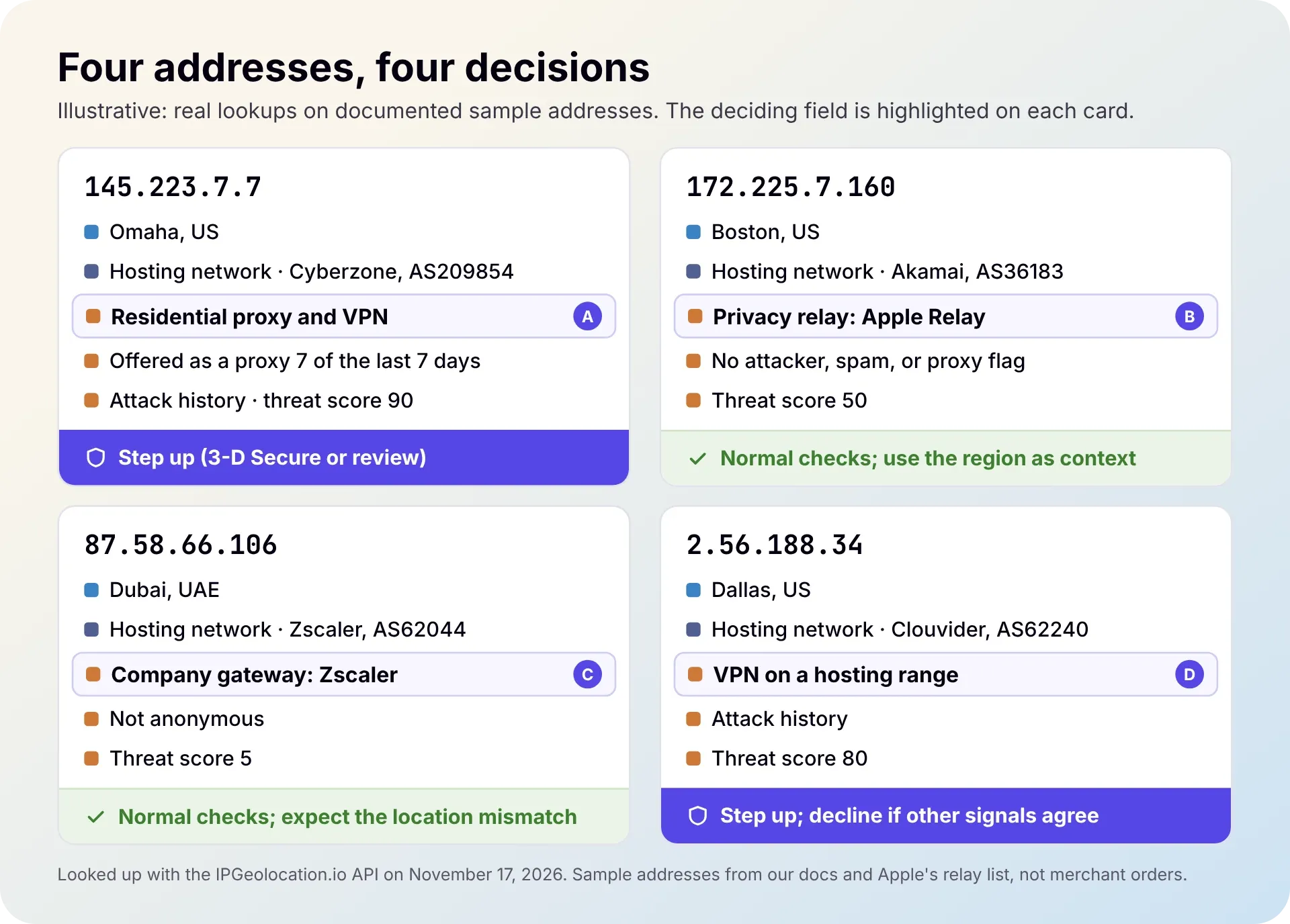
The Omaha address is the clearest case. Residential proxy networks use it as an exit even though it sits on a hosting network (about 1 in 118 residential proxy exits do), our data saw it on offer on every one of the last 7 days, and it's assigned to a business, Brander Group, while Cyberzone's network announces it. That is the profile of a rented proxy exit, not a home connection.
Apple's published egress list also places 172.225.7.160 in Boston. Its score of 50 reflects anonymization, and the relay flag says why. Apple notes that one relay address "may be shared among more than one Private Relay user in the same area", so treat it like a phone carrier's shared address: judge the order on the account, the device, and the payment, and use the region as context, not a billing match.
A buyer whose company routes staff traffic through a security gateway such as Zscaler shows the gateway's location, not their own: our data places 87.58.66.106 in Dubai and marks it as a corporate gateway with is_anonymous false. Whether the order is for the business or for the employee, expect the mismatch and don't count it against the order.
Dallas looks ordinary until you read the network and security data: a hosting range announced by Clouvider, with a VPN flag and attack history. Shoppers rarely pay from a server they rent, so step the order up, and decline it if the card or the account also looks wrong.
3. Match the action to the signal
A checkout rule has more than two outcomes: allow, step up, review, or decline. IP data mostly decides whether an order goes straight through or gets the extra step of 3-D Secure or a review. Stepping up usually means 3-D Secure, and the authentication request carries the browser's IP address to the issuer, so the card issuer runs its own risk check on the same connection.
An anonymity rule that treats every privacy relay address as a VPN would turn away ordinary iPhone and Mac customers, and a rule that steps up every score of 45 or more sends them all to 3-D Secure. Don't add friction only because an address is a relay or a company gateway, but don't let that exemption hide real risk: ip_action checks attack history, residential proxy, and Tor flags before it exempts relays and gateways, and your payment-anomaly and attempt-rate rules should keep running on those orders too. See threat score cutoffs for each action and false declines caused by VPN, relay, and gateway flags.
Card testing: catching the attack before it reaches your processor
Card testing is an attack in which someone runs stolen card numbers through a payment form, usually in small amounts, to find out which cards still work. OWASP calls it carding: "Multiple payment authorisation attempts to verify the validity of bulk stolen payment card data." The merchant is left with the processor fees, the declines, and any chargebacks.
Visa's guidance on enumeration for merchants lists what to watch: velocity on the IP address, the device, and the email; many accounts created from one IP; a time zone and browser language that don't fit the IP's location; and amounts that are "often less than $10 USD." IP data feeds several of those checks:
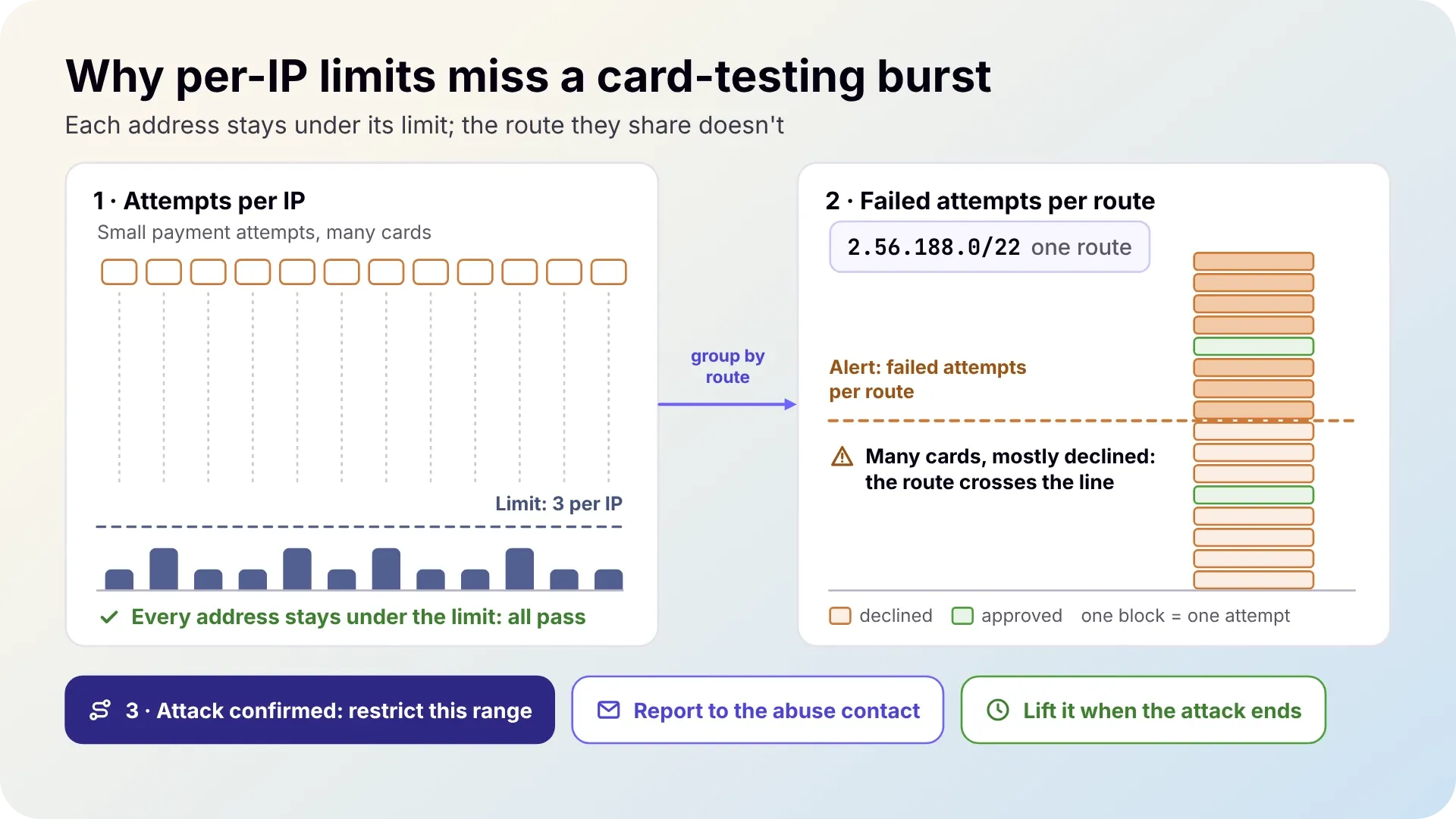
- Limit attempts per IP address, per card, and per account. For IPv6, also count by /64 prefix, with a calibrated limit: several legitimate devices can share one, and in our proxy-exit research 70.5% of the 7.71 million /64 blocks were active on only one day, so prefixes won't catch every rotation. Stripe suggests limiting how many customers one IP can create in a day and adding a CAPTCHA after the first payment attempt from an address, and warns that filters "based on a single heuristic such as IP addresses are usually not sufficient" on their own.
- Count failed attempts per announced route and per network. An announced route is the block of addresses a network advertises to the rest of the internet, written like 2.56.188.0/22. An attacker rotating through one range stays under your per-IP limit while the route's count climbs. When a route shows an attack pattern (many cards, mostly declined), restrict it, and lift the restriction when the attack ends.
- Tighten hosting ranges sooner, once relays and gateways are set aside. Privacy relays and company gateways sit on hosting networks too, as Akamai and Zscaler do in the lookups, so exclude those flags before a hosting rule applies.
- Check for residential proxies. Residential proxy networks often route through ordinary home and phone connections, which defeats per-IP limits. Our data flags those exits with
is_residential_proxy, and a live session check can catch addresses that no list has seen yet.
Keep counting by route, but don't turn route-level limits into a standing rule. Route-wide or ASN-wide limits applied by default hit everyone on the network: a large ISP or mobile carrier route carries thousands of real customers, and a single carrier-grade NAT address can be shared by many of them at once. Run any network-level limit in shadow mode against your own traffic before you enforce it.
After an attack, report it. The abuse contact for 2.56.188.34 identifies Clouvider's network operations team, and 2.56.188.0/22 is the announced route that contains the address, not proof that every address in it took part. Send the attacking IPs, timestamps, and request evidence so the network operator can investigate; a report doesn't stop the attack in progress.
On WooCommerce, our FraudShield plugin flags risky orders after they're created; it isn't a pre-payment card-testing blocker, so pair it with your payment gateway's own attempt limits.
Chargebacks: what IP data adds to dispute evidence
In a dispute, the purchase IP is supporting evidence that the disputed order matches earlier ones the cardholder didn't dispute. It matters most against friendly fraud, which Visa calls first-party misuse: "when a cardholder disputes a legitimate purchase that they intended with their issuer" (Visa).
1. What Visa Compelling Evidence 3.0 asks for
The industry calls Visa's evidence rule for condition 10.4, fraud in card-absent sales, Compelling Evidence 3.0. Under the Visa Core Rules (edition of October 24, 2026, Table 11-29), a 10.4 dispute processed from that date is invalid when the merchant shows all of these:
- The dispute falls under Visa condition 10.4 (other fraud in a card-absent environment); other chargeback reasons follow other rules.
- The same card, or a credential tied to it such as a token, was used in two earlier transactions, at one or more merchants, and the issuer didn't report either as fraud.
- Both were processed more than 120 days before the dispute and no more than 365 days before its processing date.
- A detailed description of what was bought is provided for all three (or, for some authenticated e-commerce orders, a purchase order number).
- The device ID or fingerprint, or the IP address, plus at least one more element are the same in the earlier transactions and the disputed one. The second element can be the customer's account or login ID, the full delivery address, or whichever of the device and the IP address wasn't used first.
- The IP address is "the Cardholder's public IP address", "in clear text, not hashed", in IPv4 or IPv6 format.
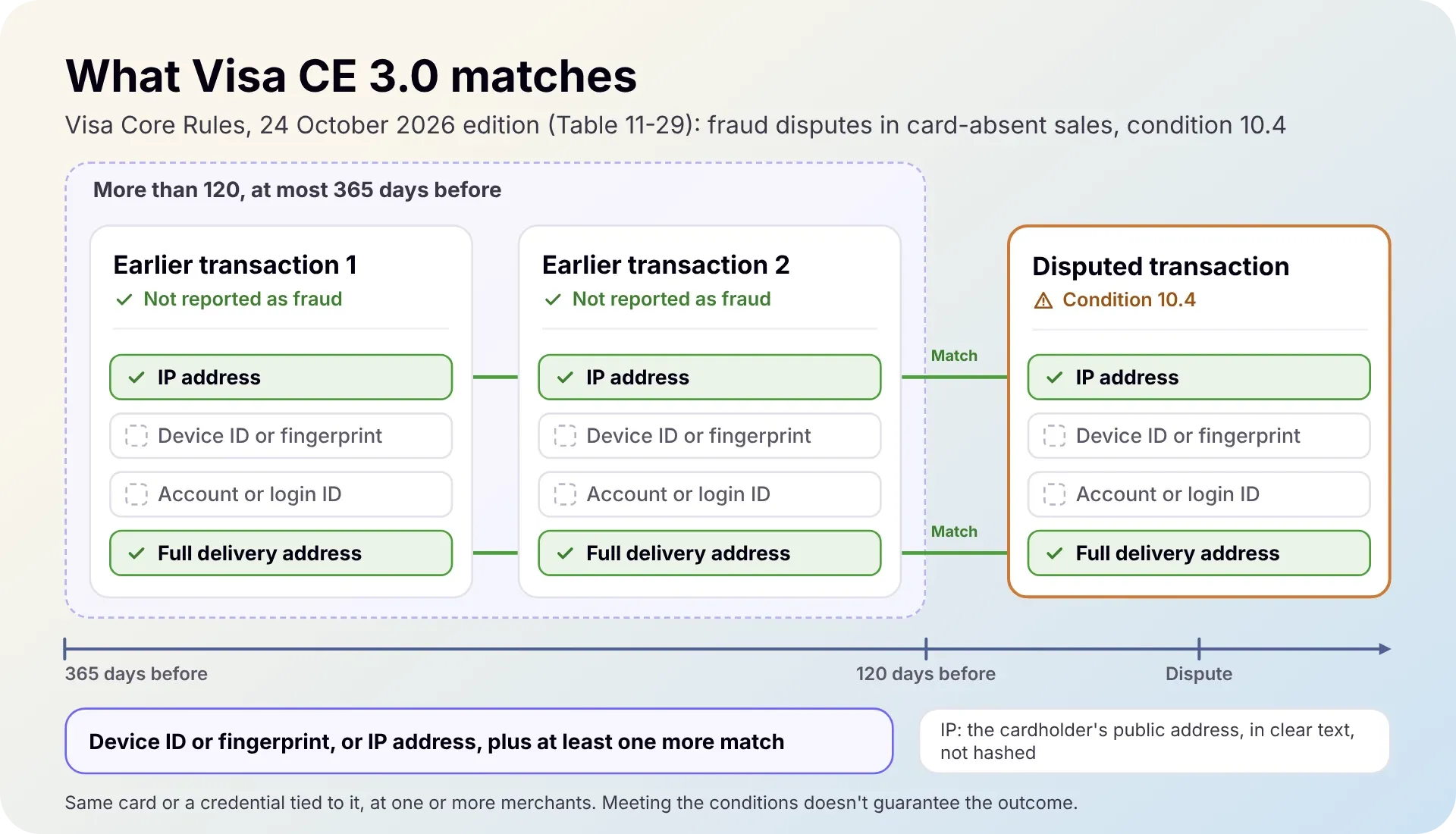
A matching IP address contributes to the evidence; it doesn't establish who the customer is. Meeting the conditions doesn't guarantee the outcome either: Stripe's guide to how it supports Compelling Evidence 3.0 says it "does not guarantee an auto-win."
The rules vary by region and dispute stage, so check the current edition with your acquirer. Two details matter for IP data: the 120-day minimum doesn't apply to Original Credit Transactions, and device ID and fingerprint count as one element. Earlier transactions may come from other merchants since October 2026, but you only see your own orders, so that evidence would come through your acquirer or processor, if they offer it.
For digital goods, Visa's general compelling-evidence list also accepts the IP address alongside the device ID and the purchaser's name and email, and Stripe's dispute evidence guidance asks for "an IP address or system log" showing the customer used what they bought.
2. Mastercard's First-Party Trust program
Mastercard's version uses three groups of data, shared at the time of the transaction or of the dispute, and the IP is one way to meet one of them. To qualify for liability protection under First-Party Trust, a merchant sends one device factor (IP address, device ID, or fingerprint), one delivery factor (shipping address, email, or telephone number), and a third element: an additional identity factor, such as an account login ID, phone number, device location, device name, or billing address, or an unused device or delivery element.
3. What IP evidence can't do
A match is weaker on shared addresses (carrier NAT, a company gateway, a privacy relay), and it can't separate a cardholder from a fraudster using a residential proxy near the victim. That is why both networks pair the IP with a device, an account, or a delivery address, and why the IP record belongs next to the device, account, and delivery data your order system already keeps.
Promo, coupon, and referral abuse: linking accounts without punishing shared addresses
Promo abuse is claiming an offer more often than its terms allow, usually through many accounts: repeated sign-up bonuses, self-referrals, single-use codes used dozens of times. In the Merchant Risk Council's 2026 Global eCommerce Payments and Fraud Report, 25% of merchants reported coupon and discount abuse, down from 32% a year earlier.
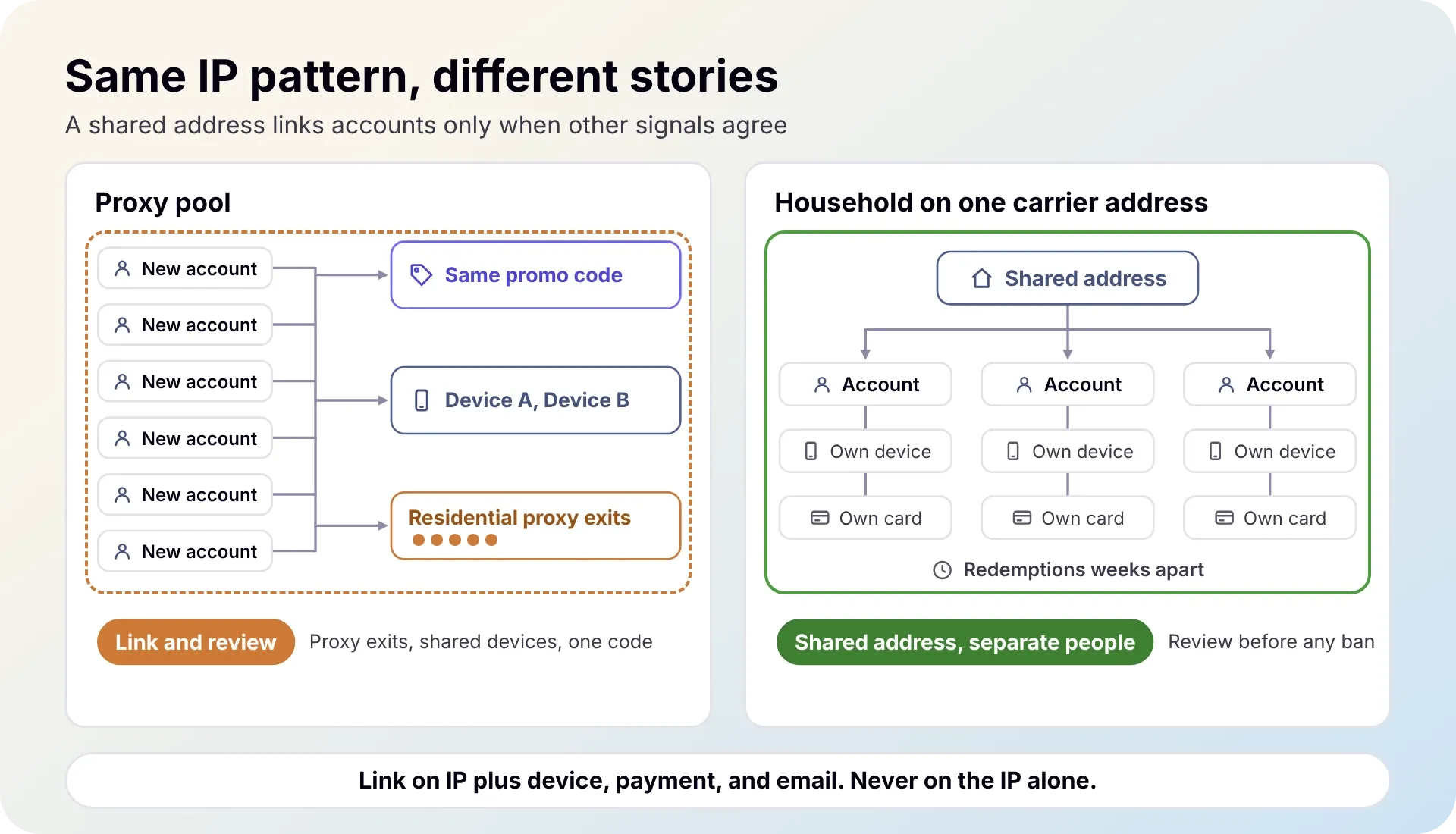
The IP address helps you see which accounts belong together. Watch for many new accounts redeeming one code from one address or route within hours, redemptions from rented servers (relays and gateways aside), and proxy history: proxy_days_seen_7d and proxy_provider_count_30d show how recently and how widely an address was sold as a proxy exit. For IPv6, compare /64 prefixes too. Residential proxies look like ordinary customers in a location check.
Time matters as much as the flag. Of 43.8 million IPv4 addresses that 57 residential and mobile proxy providers offered as exits between September 11 and November 8, 2026, 43.5% were offered on only one day in that window, our research on residential proxy exits found. "One day" means observed on one calendar day in the window, not used once. The same data shows the other side: addresses seen on 8 days or more were 16.3% of addresses but 62.3% of all daily sightings, so a long-lived core accounts for most address-day sightings. If you keep your own list of flagged addresses, weigh entries by when they were last seen and let old ones fade rather than deleting them.
We'd use the IP as one link among the device, the payment card, and the email, and cap rewards per linked group rather than per address. A ban on every account at a busy address hits households, offices, campuses, carrier NAT, relays, and company gateways, while someone running fifty accounts through a proxy pool rotates past it. Three accounts on one home address look like a ring until you see three cards, three devices, and redemptions weeks apart, so review a cluster before you ban it. For addresses with no history, IPGeolocation.io's Real-Time Proxy & VPN Detection checks the live session from the browser and can catch fresh residential proxy addresses; it usually answers in 1 to 5 seconds, so start it when the page loads and read it at redemption.
Measuring whether your IP rules help
An IP rule earns its place only if it cuts fraud losses more than it costs good customers. Run a new rule in shadow mode first, logging what it would have done while orders go through as normal, and compare its verdicts with what happened.
Read the numbers together: approval rate for good customers, confirmed fraud rate, challenge completion, review overturns, and dispute outcomes that arrive weeks later, matched to the stored record and rule version. A high 3-D Secure completion rate can mean honest buyers were challenged needlessly or that fraud got through, and chargebacks on approved orders show what a rule let through, not what a blocking rule prevented.
A backtest with the bulk endpoint scores old orders with today's data, so treat it as a rough check; the records you store going forward are the better evidence.
IPGeolocation.io data for payment fraud prevention
IPGeolocation.io covers geolocation, security, ASN, company, abuse contact, time zone, and user agent data, so every IP check described here runs on one provider's data. Security data means flags for VPN, proxy, residential proxy, Tor, and privacy relay exits, company gateways, bots, and attack history, with a threat score from 0 to 100; where available, VPN, proxy, and bot detections add provider or operator names, confidence scores, and last-seen dates. It comes from connecting through VPN and proxy networks to record their exits, from honeypots and curated threat feeds, and from analysis that finds residential proxy traffic on ordinary ISP addresses, published in one full build every day.
One call to the IP Geolocation API with include=security returns location, network, company, and security data together; the IP Security API returns the risk signals alone, and Real-Time Proxy & VPN Detection scores the live session. The bulk endpoints take up to 50,000 addresses per request for backtests and audits, and the Security Pro databases bring the security, residential proxy, and hosting data in-house as CSV or MMDB files. When an address attacks you, the IP Abuse Contact API names the team to report it to. Security data is on paid plans; compare plans on the pricing page.
Frequently Asked Questions
Not on its own. Travelers, phone networks, Apple's privacy relay, and company gateways all put the IP somewhere other than the billing address. Treat the distance as one input, and let it count only when it lines up with another signal, such as a VPN or proxy flag, a brand-new account, or an unusually large first order.
Restrict a range while it's attacking you, not by default. Attackers change addresses cheaply, and households, phone networks, and relays share them, so permanent blocks hit real customers. Contain an active attack by address and announced route, report it to the network's abuse contact, then lift the restriction.
Not by default. Many VPN users are ordinary customers, and privacy relays and company gateways aren't VPNs at all. Step up orders where a VPN flag combines with other risk, such as attack history, or a hosting network on a first order, and send the rest through your normal payment checks.
Yes, as supporting evidence. For eligible Visa 10.4 disputes under the rules in force from October 24, 2026, a matching IP address can count toward Compelling Evidence 3.0 when two earlier transactions on the same card, 120 to 365 days old and not reported as fraud, also match on one more element. It doesn't establish the buyer's identity or guarantee the outcome; follow your processor's current evidence requirements.
Limit payment attempts per IP address, card, and account, add a CAPTCHA after the first attempt from an address, and count failed attempts per announced route to spot attacks that rotate addresses. Visa notes that card-testing transactions are often under $10, so a run of small declines is a signal.
Look for many new accounts redeeming the same code from one IP address or network range within a short window, especially from proxy exits, rented servers, or addresses with no history. Confirm the link with the device, payment card, or email before acting, because households and offices share one IP address legitimately.
No. The free Developer plan gives you 1,000 credits a day for life, with no credit card. Paid plans add more data, such as accuracy radius, company, network, and security data. Starter is $19 a month for 150,000 credits, and a lookup that adds security data costs 3 credits. To check paid data such as security data before buying, ask our support team or live chat for a free trial of a paid plan.
Where to start
Start by capturing the customer's IP and the risk signals used for each checkout decision. Apply calibrated velocity limits per IP, card, and account. Use ASN and announced-route information to detect coordinated attacks, and restrict wider network ranges only when observed behavior justifies it. Keep privacy relay and company gateway flags out of your VPN rules.
Then take the next step that fits how you'll use it:
- Building checkout rules. Read the IP Geolocation API documentation on
include=security, which the code above uses, and run your first rule in shadow mode. - Checking the data before you buy. To check paid data such as security data before buying, ask our support team or live chat for a free trial of a paid plan.
- Scoring high volumes in-house. The Security Pro databases bring the security, residential proxy, and hosting data into your own systems as CSV or MMDB files.