

IP geolocation in PHP turns a visitor's IP address into location, timezone, currency, and network data you can use for localization, fraud checks, access control, and analytics. PHP has no built-in, current way to get the location from an IP address, so you call a geolocation API and read the JSON it returns.
This tutorial uses the IPGeolocation API and its official PHP SDK. You will install the library with Composer, run your first lookup, read the real visitor's IP in both vanilla PHP and Laravel, then add VPN, abuse, and bulk lookups when you need them.
TL;DR
- Get IP geolocation: install
ipgeolocation/ipgeolocation-php-sdkwith Composer (PHP 8.1+), create anIpGeolocationClientwith your API key, calllookupIpGeolocation(['ip' => '8.8.8.8'])(or omit the IP for the caller's own address), and read thelocation,time_zone,currency, andasnobjects off$response->data. - Visitor IP: in a web app, resolve the real client IP from
X-Forwarded-For(vanilla PHP) or$request->ip()with trusted proxies (Laravel). - Free vs paid: the core lookup is free; VPN/proxy detection, abuse contact, and bulk are paid.
- No SDK: call
/v3/ipgeowith cURL andjson_decode. - IPv6: works the same as IPv4, on every plan.
What you need
- PHP 8.1 or newer with Composer.
- A free IPGeolocation.io API key (next section).
- For the framework examples, a Laravel app. The vanilla PHP examples run anywhere, including shared hosting.
Get your free API key
Create an account and copy a key from your dashboard. The free tier is 1,000 lookups a day with no credit card and covers the core of this tutorial: location, country metadata, currency, basic ASN, and time zone. Paid plans raise the limits and add more data, including the optional security, abuse contact, and bulk lookups shown later in this guide. You can compare tiers on the pricing page.
Keep the key in an environment variable, never in your source. The examples read it from IPGEOLOCATION_API_KEY.
Install the PHP SDK
Install the official IPGeolocation.io PHP library:
composer require ipgeolocation/ipgeolocation-php-sdk
First IP lookup
Then run a single lookup. The client is built on Guzzle and returns typed objects, so you get IDE autocompletion on the response:
<?php

require __DIR__ . '/vendor/autoload.php';

use Ipgeolocation\Sdk\IpGeolocationClient;

$client = new IpGeolocationClient([
    'api_key' => getenv('IPGEOLOCATION_API_KEY'),
]);

try {
    $response = $client->lookupIpGeolocation(['ip' => '8.8.8.8']);

    $data = $response->data;
    echo $data->ip . PHP_EOL;                              // 8.8.8.8
    echo ($data->location?->country_name ?? '') . PHP_EOL; // United States
    echo ($data->location?->city ?? '') . PHP_EOL;         // Mountain View
    echo ($data->time_zone?->name ?? '') . PHP_EOL;        // America/Los_Angeles
} finally {
    $client->close();
}
Two things worth knowing. The ?-> null-safe operator matters because optional objects can be absent depending on your plan and request, and reading a property off null would otherwise fatal. And the client holds an open Guzzle connection, so call close() in a finally block. You can pass a plain array, as above, or a typed LookupIpGeolocationRequest if you want validation before the request is sent.
The short SDK snippets below are fragments: they assume an open $client and the use imports from this section, the code that goes between creating the client and $client->close() above. Run each inside that try block, or give the snippet its own client the way the production and Laravel examples do. The cURL example stands alone.
1. Look up the caller's IP
Leave out ip and the API geolocates the IP making the request. That is your server's own egress IP, handy for testing or a quick check, not the website visitor's IP. For the visitor, see the next section.
$response = $client->lookupIpGeolocation();
echo $response->data->ip . PHP_EOL;
Get the real visitor IP in PHP
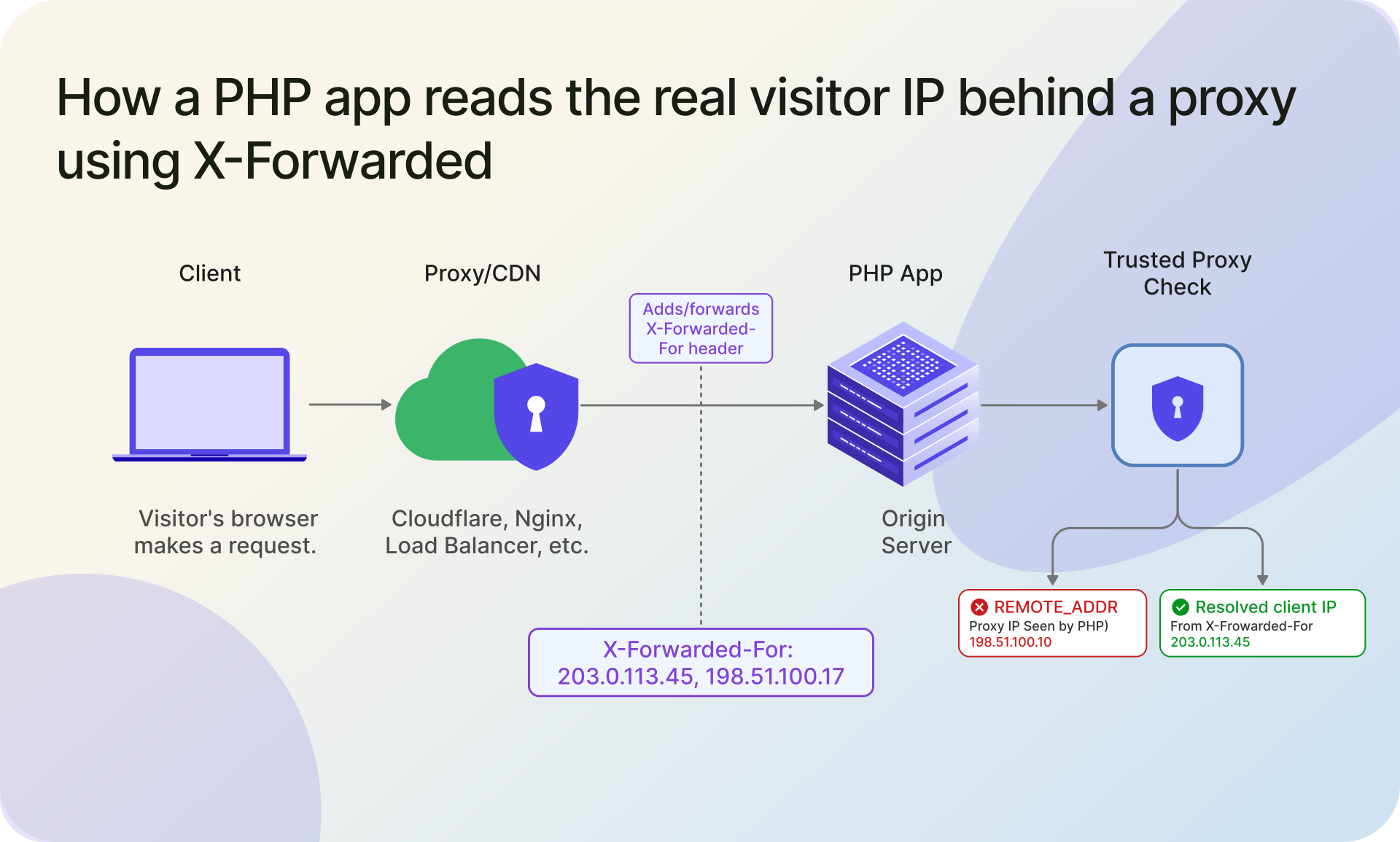
In a real app you want the visitor's IP, and that is where most tutorials get it wrong. $_SERVER['REMOTE_ADDR'] holds the IP of whatever connected to your server. Behind a load balancer or CDN that is the proxy, not the user. The real client IP is in the X-Forwarded-For header, which is a comma-separated list (client, then each proxy).
X-Forwarded-For is also trivial to spoof on a direct request, so the helper below only reads it when the direct connection is a proxy you list as trusted, and validates every value. Everything else falls back to REMOTE_ADDR.
<?php

require __DIR__ . '/vendor/autoload.php';

use Ipgeolocation\Sdk\IpGeolocationClient;

/**
 * Resolve the visitor IP (simplified, exact-match example). X-Forwarded-For is
 * only read when the direct connection (REMOTE_ADDR) is a proxy you trust,
 * because the header can be spoofed on a direct request. Pass your load balancer
 * or CDN IPs as trusted; for CDN ranges, match CIDRs or use framework middleware.
 *
 * @param string[] $trustedProxies
 */
function visitorIp(array $trustedProxies = []): ?string
{
    $remoteAddr = $_SERVER['REMOTE_ADDR'] ?? null;

    if (
        $remoteAddr !== null
        && in_array($remoteAddr, $trustedProxies, true)
        && !empty($_SERVER['HTTP_X_FORWARDED_FOR'])
    ) {
        // X-Forwarded-For is "client, proxy1, proxy2". Walk right to left, skip
        // your own proxies, and take the first real public address.
        $chain = array_map('trim', explode(',', $_SERVER['HTTP_X_FORWARDED_FOR']));
        foreach (array_reverse($chain) as $candidate) {
            if (in_array($candidate, $trustedProxies, true)) {
                continue;
            }
            if (filter_var($candidate, FILTER_VALIDATE_IP, FILTER_FLAG_NO_PRIV_RANGE | FILTER_FLAG_NO_RES_RANGE)) {
                return $candidate;
            }
        }
    }

    // No trusted proxy in front: the only address you can trust is the peer.
    return ($remoteAddr !== null && filter_var($remoteAddr, FILTER_VALIDATE_IP)) ? $remoteAddr : null;
}

// Empty list trusts only REMOTE_ADDR. Add your load balancer or CDN IPs to read X-Forwarded-For.
$ip = visitorIp(['10.0.0.1']);
if ($ip !== null) {
    $client = new IpGeolocationClient(['api_key' => getenv('IPGEOLOCATION_API_KEY')]);
    try {
        $response = $client->lookupIpGeolocation(['ip' => $ip]);
        echo ($response->data->location?->country_name ?? 'Unknown') . PHP_EOL;
    } finally {
        $client->close();
    }
}
For CDN or load-balancer ranges (Cloudflare, AWS, and similar), match against their published IP ranges (CIDR) or use your framework's trusted-proxy middleware instead of hard-coding single IPs. For which entry to trust and how to set this up behind Nginx, Cloudflare, and other proxies, see our guide to getting the real client IP behind a proxy.
Laravel example
Laravel already solves the proxy problem if you configure it. Set your load balancer in the TrustProxies middleware (in bootstrap/app.php on Laravel 11, or app/Http/Middleware/TrustProxies.php on older versions). Then $request->ip() returns the resolved client IP and you do not parse headers yourself:
use Illuminate\Http\Request;
use Ipgeolocation\Sdk\IpGeolocationClient;

Route::get('/where', function (Request $request) {
    $client = new IpGeolocationClient([
        'api_key' => getenv('IPGEOLOCATION_API_KEY'),
    ]);

    try {
        $response = $client->lookupIpGeolocation(['ip' => $request->ip()]);

        return [
            'country'  => $response->data->location?->country_name,
            'city'     => $response->data->location?->city,
            'currency' => $response->data->currency?->code,
        ];
    } finally {
        $client->close();
    }
});
In production you would bind the client once in a service provider rather than newing it per request, but this keeps the example self-contained.
Read the API response
A default GeoIP lookup returns more than most apps use. The PHP geolocation API hands this data back as typed objects; this trimmed example shows what the free plan returns:
{
  "ip": "8.8.8.8",
  "location": {
    "country_name": "United States",
    "state_prov": "California",
    "city": "Mountain View",
    "zipcode": "94043-1351",
    "latitude": "37.42240",
    "longitude": "-122.08421"
  },
  "country_metadata": { "calling_code": "+1", "tld": ".us", "languages": ["en-US", "es-US", "haw", "fr"] },
  "currency": { "code": "USD", "name": "US Dollar", "symbol": "$" },
  "asn": { "as_number": "AS15169", "organization": "Google LLC", "country": "US" },
  "time_zone": { "name": "America/Los_Angeles" }
}
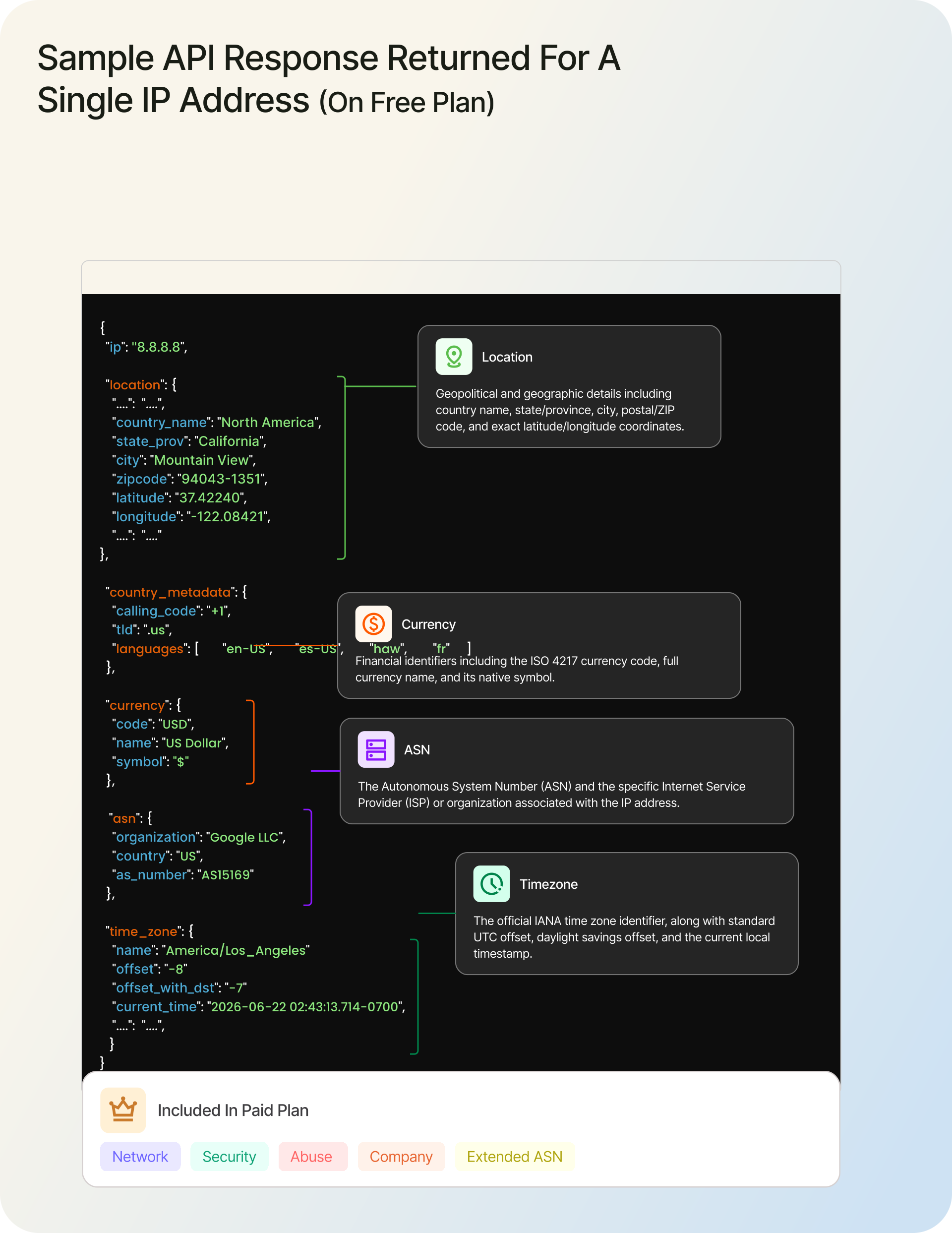
In the SDK these are typed objects on $response->data, so $response->data->currency?->code gives USD. The asn object identifies the network the IP belongs to; if you want the background on what an ASN is, see our guide on how an ASN differs from an ISP.
On a paid plan, the same lookup returns more: full asn detail plus company and network objects, with security and abuse available through include. The SDK docs cover what each plan returns.
If you only need a field or two, ask for them and the response stays small:
$response = $client->lookupIpGeolocation([
    'ip'     => '8.8.8.8',
    'fields' => ['location.country_name', 'location.city', 'time_zone.name'],
]);

echo $response->data->location?->country_name . PHP_EOL;
fields is one of several request options (alongside excludes, lang, output, and custom headers); the full list and the response metadata schema live in the SDK docs under request options and response metadata. Both IPv4 and IPv6 work on every plan.
IP geolocation in PHP without the SDK (raw cURL)
If you only need one lookup in a script you will run once, raw cURL is honestly fine. Reach for the SDK when this code has to keep working in production. This version sets timeouts, checks the status code, and guards json_decode:
<?php

$apiKey = getenv('IPGEOLOCATION_API_KEY');

// Note: the key travels in the query string, so don't log the full URL.
$url = 'https://api.ipgeolocation.io/v3/ipgeo?' . http_build_query([
    'ip'     => '8.8.8.8',
    'apiKey' => $apiKey,
    'fields' => 'location.country_name,location.city,time_zone.name',
]);

$ch = curl_init($url);
curl_setopt_array($ch, [
    CURLOPT_RETURNTRANSFER => true,
    CURLOPT_CONNECTTIMEOUT => 5,
    CURLOPT_TIMEOUT        => 10,
]);

$body = curl_exec($ch);

if ($body === false) {
    $error = curl_error($ch);
    throw new RuntimeException("IP geolocation request failed: {$error}");
}

$status = curl_getinfo($ch, CURLINFO_RESPONSE_CODE);
// PHP 8 frees the handle when $ch goes out of scope, so curl_close() is not needed.

if ($status !== 200) {
    throw new RuntimeException("IP geolocation API returned HTTP {$status}");
}

$data = json_decode($body, true);

if (!is_array($data)) {
    throw new RuntimeException('Could not parse the IP geolocation response.');
}

echo ($data['location']['country_name'] ?? 'Unknown') . PHP_EOL;
echo ($data['location']['city'] ?? 'Unknown') . PHP_EOL;
echo ($data['time_zone']['name'] ?? 'Unknown') . PHP_EOL;
Handle errors in production
The SDK throws typed exceptions, which makes it easy to treat a bad key differently from a rate limit or a timeout. It does not retry for you, so add a small backoff around transient failures and fail fast on the ones a retry will not fix:
<?php

require __DIR__ . '/vendor/autoload.php';

use Ipgeolocation\Sdk\IpGeolocationClient;
use Ipgeolocation\Sdk\RateLimitException;
use Ipgeolocation\Sdk\ServerErrorException;
use Ipgeolocation\Sdk\RequestTimeoutException;
use Ipgeolocation\Sdk\TransportException;
use Ipgeolocation\Sdk\UnauthorizedException;
use Ipgeolocation\Sdk\ApiException;

$client = new IpGeolocationClient([
    'api_key'         => getenv('IPGEOLOCATION_API_KEY'),
    'connect_timeout' => 5,
    'read_timeout'    => 10,
]);

function lookupWithRetry(IpGeolocationClient $client, array $request, int $maxAttempts = 3): ?object
{
    for ($attempt = 1; ; $attempt++) {
        try {
            return $client->lookupIpGeolocation($request);
        } catch (RateLimitException | ServerErrorException | RequestTimeoutException | TransportException $e) {
            if ($attempt >= $maxAttempts) {
                error_log("IP geolocation failed after {$attempt} attempts: " . $e->getMessage());
                return null;
            }
            usleep((2 ** $attempt) * 250000); // 0.5s, then 1s
        } catch (UnauthorizedException $e) {
            error_log('IP geolocation auth failed, check IPGEOLOCATION_API_KEY: ' . $e->getMessage());
            return null; // a retry will not fix a bad key
        } catch (ApiException $e) {
            error_log('IP geolocation API error ' . ($e->status_code ?? '') . ': ' . $e->getMessage());
            return null;
        }
    }
}

try {
    $response = lookupWithRetry($client, ['ip' => '8.8.8.8']);
    if ($response !== null) {
        echo ($response->data->location?->country_name ?? 'Unknown') . PHP_EOL;
    }
} finally {
    $client->close();
}
Set connect_timeout and read_timeout together so a slow network never hangs a request worker.
Common mistakes to avoid
A few things trip up most PHP geolocation code once it hits production:
- Trusting
X-Forwarded-Forblindly. Read it only behind a proxy you control, with CIDR matching or your framework's trusted-proxy middleware for CDN ranges; otherwise the header is spoofable. - Geolocating
REMOTE_ADDRbehind a CDN. That returns the CDN's location, not the visitor's. Resolve the real client IP first. - Hard-coding the API key. Keep it in an environment variable, never in source or client-side code.
- Sending private or reserved IPs. Validate the address first; a private IP has no public location.
- Fetching the whole response every time. Use
fieldsto keep a PHP IP lookup lean when you only need the country or city, and cache results per IP to save credits and latency. - Treating IP geolocation as exact. It is approximate, especially on mobile and VPN traffic, so do not make it your only fraud or access-control signal.
Optional paid modules: security, abuse, bulk
The same client reaches the rest of the API when you need it. These are paid features, so each one links to its full reference instead of repeating it here:
- VPN, proxy, and Tor detection: add
include => ['security']for asecurityobject withthreat_score,is_vpn,is_proxy, andis_tor(2 credits per lookup). See the IP Security API. - Network abuse contact: add
include => ['abuse']for the reporting contact behind an IP range (1 credit). See the Abuse Contact API. - Bulk lookups: call
bulkLookupIpGeolocation(['ips' => [...]])to handle up to 50,000 IPs in one request. See the SDK bulk reference.
FAQ
Install the official SDK with composer require ipgeolocation/ipgeolocation-php-sdk, create an IpGeolocationClient with your API key, call lookupIpGeolocation(['ip' => '8.8.8.8']), and read location, time_zone, currency, and asn off $response->data. The free tier allows 1,000 lookups a day.
Use $request->ip() after configuring the TrustProxies middleware with your load balancer or CDN. Laravel then reads X-Forwarded-For only from infrastructure you trust and returns the resolved client IP, instead of the proxy address you would get from REMOTE_ADDR.
Yes. The free tier gives 1,000 lookups a day with no credit card and returns location, country metadata, currency, basic ASN, and time zone for any IPv4 or IPv6 address. VPN/proxy detection, abuse contact, and bulk lookups are paid.
Request only what you need with fields => ['location.country_name'] (or the country code via location.country_code2) and read $response->data->location->country_name. Filtering fields keeps the payload small and is the cleanest way to answer "get country from IP" in PHP.
Yes. Pass an IPv6 address as ip exactly as you would an IPv4 one. Both are supported on every plan, including the free tier, and the response shape is identical.
The SDK gives typed responses, request validation, and named exceptions you can branch on, which is what you want in production. Raw cURL works with zero dependencies and is fine for a quick test or a constrained environment. Use the SDK when the code has to keep running.
Where to go next
Bind the client in a service provider, cache results per IP to save credits, and add include modules as your needs grow. From here:
- The PHP SDK reference for every method, option, and response field.
- Getting Started with the IP Geolocation API for the account and first-call basics.
- Pricing when you are ready to move past the free tier.
- How to Get IP Geolocation in Python for the same workflow in Python.