

IP geolocation in Python turns any IP address into real-world context: country, city, timezone, currency, and the network that owns it. Developers use it for fraud checks, localization, analytics, and access control.
This tutorial shows you how to get IP geolocation in Python with the IPGeolocation API and its official Python library: install it, make your first lookup, read the response, and geolocate the real visitor hitting your app in Flask and FastAPI. An async client is shown too, with bulk and VPN/proxy detection as optional paid add-ons.
The core lookups run on a free API key: 1,000 lookups a day, no credit card. Security and bulk are paid add-ons, signposted where they appear. For the background on how IP geolocation works, see the what is IP geolocation guide. Here, we write code.
TL;DR
- Get IP geolocation in Python: install
ipgeolocationio, create a client with your API key, calllookup_ip_geolocation()with an IPv4 or IPv6 address (or omit it for the caller's own IP), and read thelocation,time_zone,currency, andasnobjects from the response. - Sync, async, or no SDK: the official library ships sync and async clients with typed responses; or call
https://api.ipgeolocation.io/v3/ipgeodirectly withrequests. - Visitor IP: behind a proxy or CDN, geolocate the real client IP through your framework's trusted-proxy handling, not your server's address.
- Optional paid add-ons:
include=["security"]for VPN, proxy, and Tor detection, and the bulk endpoint for up to 50,000 IPs per request. - Free vs paid: the free plan gives 1,000 lookups per day with no credit card; paid plans add the optional modules.
What you need
Python 3.8 or newer and a free API key. Follow along with the official library (recommended) or call the REST API directly with the requests module if you'd rather skip the SDK. Both call the same API and return the same data.
Get your free API key
Create a free IPGeolocation.io account and copy your API key from the dashboard. No card required. The getting started guide covers signup step by step.
The free tier covers core geolocation: location, country metadata, currency, ASN, and timezone. Security and bulk lookups are paid; see pricing for the current plans. Keep the key in an environment variable so it never ends up in your source or git history:
export IPGEOLOCATION_API_KEY="your_api_key_here"
Your first lookup with the official library
The official IPGeolocation.io Python library gives you typed requests and responses, so your editor autocompletes fields instead of guessing at dictionary keys. Install it:
pip install ipgeolocationio
The package installs as ipgeolocationio and imports as ipgeolocation. Here's a complete lookup, key read from the environment, the call wrapped so a hiccup never takes down your request:
import os
from ipgeolocation import (
    IpGeolocationClient,
    IpGeolocationClientConfig,
    LookupIpGeolocationRequest,
    IpGeolocationException,
)

config = IpGeolocationClientConfig(api_key=os.environ["IPGEOLOCATION_API_KEY"])

try:
    with IpGeolocationClient(config) as client:
        response = client.lookup_ip_geolocation(
            LookupIpGeolocationRequest(ip="8.8.8.8")
        )

    location = response.data.location
    if location is not None:
        print(location.country_name, location.city)   # United States Mountain View
    if response.data.time_zone is not None:
        print(response.data.time_zone.name)            # America/Los_Angeles
except IpGeolocationException as exc:
    print(f"IP geolocation lookup failed: {exc}")
LookupIpGeolocationRequest takes any IPv4 or IPv6 address, the response comes back typed, and optional sections are None until you request them, which is why each access is guarded.
The shorter SDK snippets below reuse the same config, client pattern, and imports where relevant; the requests, Flask, and FastAPI examples set up their own.
To geolocate the machine making the request, its own public IP, leave the ip out entirely:
with IpGeolocationClient(config) as client:
    response = client.lookup_ip_geolocation(LookupIpGeolocationRequest())

print(response.data.ip)  # your public IP
Building on FastAPI, aiohttp, or another async stack? The library ships an AsyncIpGeolocationClient with the same methods as coroutines:
import asyncio
import os
from ipgeolocation import (
    AsyncIpGeolocationClient,
    IpGeolocationClientConfig,
    LookupIpGeolocationRequest,
    IpGeolocationException,
)


async def geolocate(ip: str):
    config = IpGeolocationClientConfig(api_key=os.environ["IPGEOLOCATION_API_KEY"])
    try:
        async with AsyncIpGeolocationClient(config) as client:
            response = await client.lookup_ip_geolocation(
                LookupIpGeolocationRequest(ip=ip)
            )
        return response.data
    except IpGeolocationException as exc:
        print(f"Lookup failed: {exc}")
        return None


result = asyncio.run(geolocate("1.1.1.1"))
Prefer no SDK? Use requests
If you'd rather not add the library, call the REST endpoint directly. You get plain dictionaries back, so reach into them with .get() and give the request a timeout:
import os
from typing import Optional

import requests

API_KEY = os.environ["IPGEOLOCATION_API_KEY"]
ENDPOINT = "https://api.ipgeolocation.io/v3/ipgeo"


def geolocate(ip: str) -> Optional[dict]:
    try:
        resp = requests.get(
            ENDPOINT, params={"apiKey": API_KEY, "ip": ip}, timeout=5
        )
        resp.raise_for_status()
    except requests.exceptions.RequestException as exc:
        print(f"IP geolocation request failed: {exc}")
        return None
    return resp.json()


data = geolocate("8.8.8.8")
if data:
    location = data.get("location", {})
    print(location.get("country_name"), location.get("city"))
The timeout keeps a slow call from hanging your worker, and raise_for_status() turns a 401 or 429 into a real exception instead of letting you parse an error body as if it were location data.
What IP geolocation in Python returns
A default response includes more fields than shown here. This trimmed example shows the sections most apps read first:
{
  "ip": "8.8.8.8",
  "location": {
    "country_name": "United States",
    "state_prov": "California",
    "city": "Mountain View",
    "zipcode": "94043-1351",
    "latitude": "37.42240",
    "longitude": "-122.08421"
  },
  "country_metadata": { "calling_code": "+1", "tld": ".us", "languages": ["en-US", "es-US", "haw", "fr"] },
  "currency": { "code": "USD", "name": "US Dollar", "symbol": "$" },
  "asn": { "as_number": "AS15169", "organization": "Google LLC" },
  "time_zone": { "name": "America/Los_Angeles" }
}
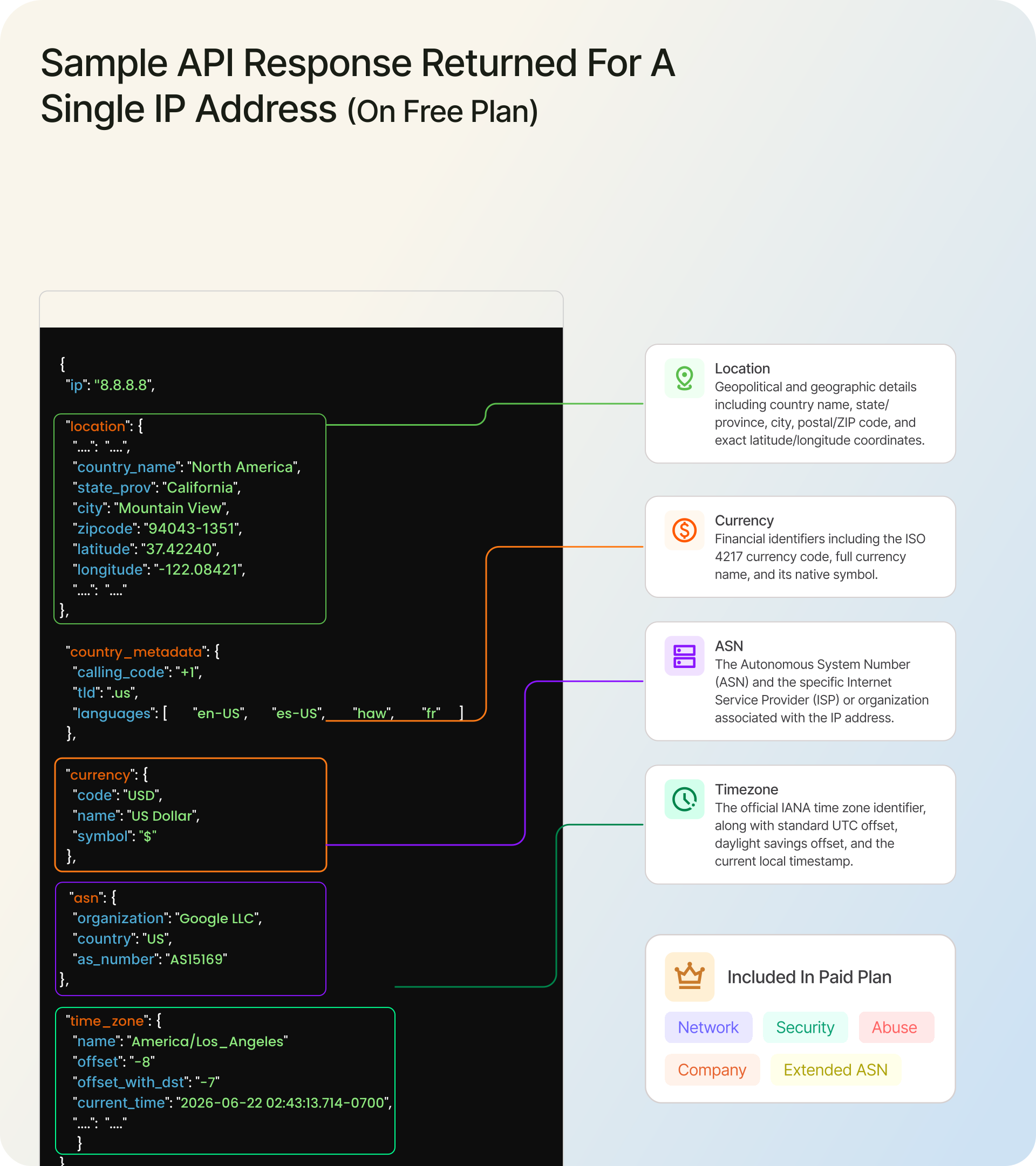
On the free plan you get location, country_metadata, currency, basic asn, and time_zone. Paid plans add network, company, full asn detail, and the optional modules below. For the exact split by plan, see plan capabilities and default response sections in the SDK docs. Both IPv4 and IPv6 work.
If you only need a field or two, ask for them with fields=["location.country_name"] and the response stays small. That is one of several request options the SDK supports for advanced usage, alongside lang, excludes, custom headers, and output format:
with IpGeolocationClient(config) as client:
    response = client.lookup_ip_geolocation(
        LookupIpGeolocationRequest(
            ip="8.8.8.8",
            fields=["location.country_name", "location.city", "time_zone.name"],
        )
    )

print(response.data.location.country_name)
Geolocate your real visitors
Looking up 8.8.8.8 is the easy part. The real job is geolocating the person hitting your app, and behind a load balancer, Nginx, or a CDN, their IP is usually carried in X-Forwarded-For. Use trusted-proxy handling to resolve the client IP from that header, then look it up.
There's a security catch: a client can spoof X-Forwarded-For, so never read it blindly. In Python the clean fix is to let your framework resolve the client IP from the proxies you trust, rather than parsing the header by hand.
The address you can trust is the first one from the right that is not one of your proxies, never the leftmost value a client can fake. For which entry to trust and how to set this up behind Nginx, Cloudflare, and other proxies, see our guide to getting the real client IP behind a proxy.
1. Flask
import os
import requests
from flask import Flask, request
from werkzeug.middleware.proxy_fix import ProxyFix

app = Flask(__name__)
# Trust exactly the proxies in front of your app (here, one load balancer or CDN)
# so request.remote_addr is the real client IP, not a spoofable header.
app.wsgi_app = ProxyFix(app.wsgi_app, x_for=1)

API_KEY = os.environ["IPGEOLOCATION_API_KEY"]
ENDPOINT = "https://api.ipgeolocation.io/v3/ipgeo"


@app.route("/")
def home():
    ip = request.remote_addr or ""
    try:
        resp = requests.get(
            ENDPOINT, params={"apiKey": API_KEY, "ip": ip}, timeout=5
        )
        resp.raise_for_status()
        loc = resp.json().get("location", {})
        return {"ip": ip, "country": loc.get("country_name"), "city": loc.get("city")}
    except requests.exceptions.RequestException as exc:
        app.logger.warning("Geolocation failed for %s: %s", ip, exc)
        return {"ip": ip, "country": None, "city": None}
2. FastAPI
import os
import requests
from fastapi import FastAPI, Request

app = FastAPI()
API_KEY = os.environ["IPGEOLOCATION_API_KEY"]
ENDPOINT = "https://api.ipgeolocation.io/v3/ipgeo"


# Run uvicorn with --forwarded-allow-ips set to your proxy IPs so request.client.host
# reflects the real client from X-Forwarded-For, only for proxies you trust.
@app.get("/")
def home(request: Request):
    ip = request.client.host if request.client else ""
    try:
        resp = requests.get(
            ENDPOINT, params={"apiKey": API_KEY, "ip": ip}, timeout=5
        )
        resp.raise_for_status()
        loc = resp.json().get("location", {})
        return {"ip": ip, "country": loc.get("country_name"), "city": loc.get("city")}
    except requests.exceptions.RequestException as exc:
        return {"ip": ip, "country": None, "city": None, "error": str(exc)}
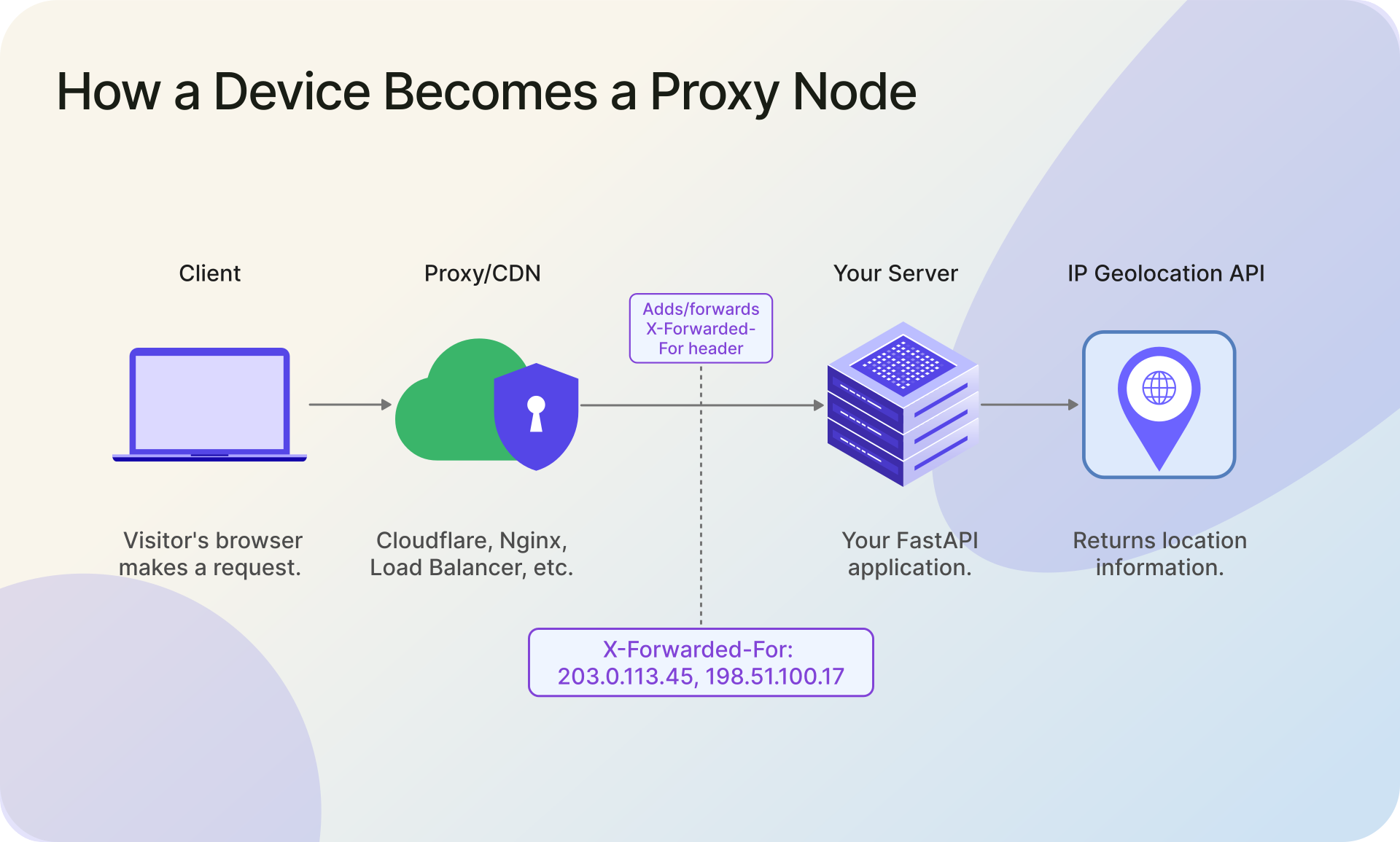
On Django, configure trusted proxies and read the resolved client IP rather than parsing the header yourself, then pass that IP to the same lookup. For CDN ranges (Cloudflare, AWS), trust the published CIDR ranges, not a single hard-coded IP. And skip the temptation to call the API with no ip to "get the user's location," because that geolocates your server, not your visitor.
Handle errors in production
The library does not retry for you. Timeouts, rate limits, and server errors raise exceptions and stop, which is the right default and means you decide what to retry. Back off on the transient ones (429, 5xx, timeouts) and give up on the permanent ones (a bad key, an invalid IP):
import os
import time
from ipgeolocation import (
    IpGeolocationClient,
    IpGeolocationClientConfig,
    LookupIpGeolocationRequest,
    RateLimitException,
    ServerErrorException,
    RequestTimeoutException,
    IpGeolocationException,
)

config = IpGeolocationClientConfig(
    api_key=os.environ["IPGEOLOCATION_API_KEY"],
    connect_timeout=5,
    read_timeout=5,
)


def lookup_with_retry(ip: str, attempts: int = 3):
    delay = 1.0
    for attempt in range(1, attempts + 1):
        try:
            with IpGeolocationClient(config) as client:
                return client.lookup_ip_geolocation(
                    LookupIpGeolocationRequest(ip=ip)
                )
        except (RateLimitException, ServerErrorException, RequestTimeoutException):
            if attempt == attempts:
                raise  # out of retries, let the caller handle it
            time.sleep(delay)
            delay *= 2  # 1s, 2s, 4s
        except IpGeolocationException as exc:
            print(f"Lookup failed permanently: {exc}")  # retrying will not help
            return None
Before you ship anything that exposes the key in a browser or serverless function, read how to secure your API key before production.
Quick reference
| Task | How |
|---|---|
| Look up one IP | lookup_ip_geolocation(LookupIpGeolocationRequest(ip="8.8.8.8")) |
| Look up the caller's own IP | omit the ip parameter |
| Look up a real visitor | use trusted-proxy handling to resolve the client IP, then look it up |
| Look up many IPs (paid) | bulk_lookup_ip_geolocation(...) |
| Flag VPN, proxy, or Tor (paid) | add include=["security"] |
| Skip the SDK | call GET /v3/ipgeo with requests |
Common mistakes to avoid:
- Never expose your API key in browser JavaScript. Keep it server-side in an environment variable.
- Do not omit
ipwhen you want a visitor's location; an emptyipgeolocates your server. - Do not trust
X-Forwarded-Forunless your own proxy sets it; let your framework resolve it from trusted proxies. - Cache results per IP to save credits, and request only the
fieldsyou need to reduce payload and latency. - Treat IP geolocation as approximate; do not make it your only fraud or access-control signal.
Examples tested with ipgeolocationio 2.0.0 on Python 3.8+.
Optional paid modules: security, abuse, bulk
The same client reaches the rest of the API when you need it. These are paid features, so each one links to its full reference:
- VPN, proxy, and Tor detection: add
include=["security"]for asecurityobject withthreat_score,is_vpn,is_proxy, andis_tor. See the IP Security API. - Network abuse contact: add
include=["abuse"]for the reporting contact behind an IP range. See the Abuse Contact API. - Bulk lookups:
bulk_lookup_ip_geolocation()against/v3/ipgeo-bulkhandles up to 50,000 IPs in one request, returning a success or error per IP. For log enrichment, see the IP enrichment guide.
Frequently asked questions
Install the official library with pip install ipgeolocationio, or call https://api.ipgeolocation.io/v3/ipgeo with requests. Pass your API key and the target IP, then read the location object for the country, city, and coordinates of that IP. The free tier allows 1,000 lookups per day.
When your app runs behind a proxy or CDN, use trusted-proxy handling to resolve the visitor's IP from X-Forwarded-For, and fall back to the remote address otherwise. Pass that IP to the API. Do not omit the IP, because an empty value geolocates your server instead of the visitor.
Yes. The free tier gives 1,000 lookups per day with no credit card and returns location, timezone, currency, and basic ASN data. VPN and proxy detection, company data, and bulk lookup require a paid plan.
Use the bulk endpoint https://api.ipgeolocation.io/v3/ipgeo-bulk, a single POST that accepts up to 50,000 IPs. The library's bulk_lookup_ip_geolocation returns a success or error result per IP, in input order, so one bad address never fails the whole batch. Bulk lookup is a paid feature.
Yes. Alongside the sync IpGeolocationClient (built on requests), the SDK ships AsyncIpGeolocationClient (built on httpx) with the same methods as coroutines. Use it with async with in FastAPI, aiohttp, or any async app, and share the same config object across both clients.
Yes. Every lookup accepts both IPv4 and IPv6 addresses, on the free and paid plans. Pass the address as the ip value exactly as you would an IPv4 address, and the response shape is identical.
Where to go next
Grab a free API key, drop the first snippet into your project, and swap 8.8.8.8 for your visitor's IP once it runs. Add the retry wrapper before you ship, and turn on include=["security"] when you need to screen traffic.
For every method, option, and response field, see the full Python SDK reference.