

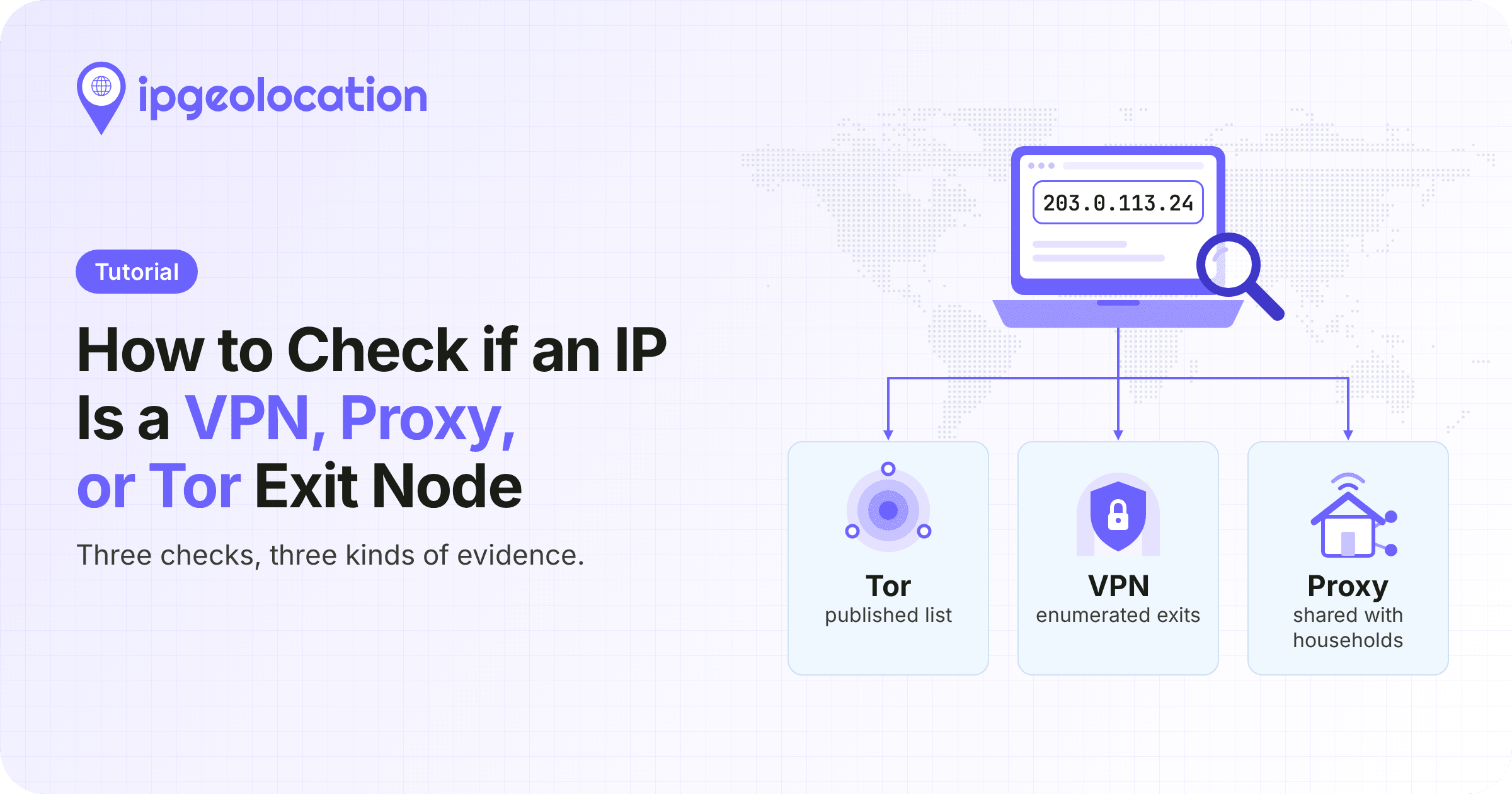
To check if an IP address is a VPN, proxy, or Tor exit node, you can use an IP security lookup or check the Tor Project's published exit list. These sources help identify known VPN and proxy addresses and confirm whether an address appears in Tor's exit-node data.
Not every IP address that hides a user's location is a threat, though. Services such as iCloud Private Relay and corporate gateways also route traffic through shared addresses. If you're checking a single IP, a browser lookup is a good place to start. If you need to check addresses automatically in your application, you can use an API.
TL;DR
Checking whether an IP is a VPN, proxy, or Tor exit takes one lookup: IPGeolocation.io's /v3/security endpoint returns is_vpn, is_proxy, is_residential_proxy, is_tor, and is_relay for any IPv4 or IPv6 address, with provider names, confidence scores, and last-seen dates where available.
- For one address, use the lookup box on the IP Security API page or the address's
/browse/ippage. - The Tor Project's DNS exit list answers
127.0.0.2for a listed exit. - Check the visitor's real IP, not the one from your CDN or load balancer.
- Don't block relay or corporate gateway addresses on the flag alone; many ordinary users share them.
Check one IP in your browser
You can check one IP without code:
- Enter it in the lookup box on the IP Security API page to see its threat score and detection flags, including VPN, proxy, residential proxy, Tor, and bot.
- Or open
ipgeolocation.io/browse/ip/followed by the address for twelve checks, Tor among them, with provider names when a check is positive. - To see how your own connection looks from outside, live check your own IP with your VPN on and off.
- To learn whether an address was a Tor relay on a past date, such as the day of an incident, enter the IP and date in the Tor Project's ExoneraTor.
First, make sure you're checking the visitor's IP
Behind a CDN, load balancer, or reverse proxy, the address on the connection is the proxy's, not the visitor's, and a VPN check on it describes your own infrastructure. Use a forwarded client address only when it comes from a proxy you trust, and the connection's own address otherwise. Reading the visitor's real IP behind a proxy or CDN covers Nginx, Cloudflare, and other setups.
Check VPN, proxy, and Tor in one API call
To detect whether a user is on a VPN or proxy inside your app, send their IP to the IP Security API, which answers all three questions in one request. You need an API key on a plan with security data, stored in IPGEOLOCATION_API_KEY, and curl or Python 3.9 or later with requests. The fields parameter keeps the response to the flags and their evidence:
curl -s -G "https://api.ipgeolocation.io/v3/security" \
  -d "apiKey=${IPGEOLOCATION_API_KEY}" \
  -d "ip=155.94.186.115" \
  -d "fields=security.threat_score,security.is_anonymous,security.is_vpn,security.vpn_provider_names,security.vpn_confidence_score,security.vpn_last_seen,security.is_proxy,security.proxy_provider_names,security.proxy_confidence_score,security.proxy_last_seen,security.is_residential_proxy,security.is_tor,security.is_relay,security.relay_provider_name,security.is_corporate_gateway,security.corporate_gateway_provider_name"
On October 21, 2026, IPGeolocation.io's API connector returned (trimmed):
{
  "ip": "155.94.186.115",
  "security": {
    "threat_score": 50,
    "is_tor": false,
    "is_proxy": false,
    "is_residential_proxy": false,
    "is_vpn": true,
    "vpn_provider_names": ["Windscribe VPN"],
    "vpn_confidence_score": 70,
    "vpn_last_seen": "2026-10-19",
    "is_relay": false,
    "is_anonymous": true,
    "is_corporate_gateway": false
  }
}
It's a Windscribe VPN exit, last seen two days earlier.
In an application, wrap the call so errors can't crash the request and a missing field never reads as clean:
import logging
import os
from typing import Any, Dict, Optional

import requests

log = logging.getLogger(__name__)

API_URL = "https://api.ipgeolocation.io/v3/security"
FLAGS = (
    "is_anonymous",
    "is_vpn",
    "is_proxy",
    "is_residential_proxy",
    "is_tor",
    "is_relay",
    "is_corporate_gateway",
)
DETAILS = (
    "threat_score",
    "vpn_provider_names",
    "vpn_confidence_score",
    "vpn_last_seen",
    "proxy_provider_names",
    "proxy_confidence_score",
    "proxy_last_seen",
    "relay_provider_name",
    "corporate_gateway_provider_name",
)
FIELDS = ",".join("security." + name for name in FLAGS + DETAILS)


def check_ip(ip: str) -> Optional[Dict[str, Any]]:
    """Return the security fields for one IP, or None if the lookup is unavailable.

    A flag that is missing or isn't a boolean comes back as None (unknown), never False.
    """
    api_key = os.environ.get("IPGEOLOCATION_API_KEY")  # never hardcode the key
    if not api_key:
        # A missing key is a deployment bug, so fail loudly instead of returning None.
        raise RuntimeError("Set IPGEOLOCATION_API_KEY first.")

    try:
        resp = requests.get(
            API_URL,
            params={"apiKey": api_key, "ip": ip, "fields": FIELDS},
            timeout=5,
        )
    except requests.RequestException as exc:
        # Log the type only: the message can include the URL, which includes the key.
        log.warning("Security lookup for %s failed: %s", ip, type(exc).__name__)
        return None

    if resp.status_code != 200:
        # 401: bad key, or a free-plan, database-only, or paused subscription key.
        # 423: private or bogon IP. 429: usage or surcharge limit reached.
        log.warning("Security lookup for %s returned HTTP %s", ip, resp.status_code)
        return None

    try:
        body = resp.json()
    except ValueError:
        log.warning("Security lookup for %s returned a non-JSON body", ip)
        return None
    security = body.get("security") if isinstance(body, dict) else None
    if not isinstance(security, dict):
        log.warning("Security lookup for %s had no security object", ip)
        return None

    result: Dict[str, Any] = {"ip": ip}
    for name in FLAGS:
        value = security.get(name)
        result[name] = value if isinstance(value, bool) else None
    for name in DETAILS:
        value = security.get(name)
        result[name] = None if value == "" else value  # "" means no name or date
    # Tells the caller whether every flag came back, so a partial answer isn't read as clean.
    result["complete"] = all(result[name] is not None for name in FLAGS)
    return result


if __name__ == "__main__":
    logging.basicConfig(level=logging.INFO)
    result = check_ip("155.94.186.115")
    if result is None:
        print("Lookup unavailable: apply your fallback policy.")
    else:
        print(
            f"VPN: {result['is_vpn']}, providers: {result['vpn_provider_names']}, "
            f"last seen: {result['vpn_last_seen']}, complete: {result['complete']}"
        )
With the October 21 response, the script prints:
VPN: True, providers: ['Windscribe VPN'], last seen: 2026-10-19, complete: True
A missing key raises an error, because it's a deployment bug. A failed lookup returns None, meaning "no answer", not "clean"; an omitted flag stays None and sets complete to False. An empty provider list means a known exit with no named provider.
Handling "no answer" is its own decision: fail open (proceed, fine for reading content), fail closed (refuse until a check succeeds), manual review (accept but hold for a person), or fall back to another source, such as a cache, a local database, or the Tor DNS list.
For logs and batch jobs, /v3/security-bulk takes up to 50,000 addresses per request.
curl -s -X POST "https://api.ipgeolocation.io/v3/security-bulk?apiKey=${IPGEOLOCATION_API_KEY}&fields=security.is_vpn,security.is_proxy,security.is_residential_proxy,security.is_tor,security.is_relay" \
  -H "Content-Type: application/json" \
  -d '{"ips": ["155.94.186.115", "185.220.100.240", "87.58.66.106"]}'
Only valid addresses are billed. Private, bogon, and malformed entries return just a message, with no ip, so join results to inputs by position (the IP Security API page says order is kept) and check each ip before storing it. Offline? The same data ships as the IP Security Database.
Verify a Tor exit with the Tor Project's own data
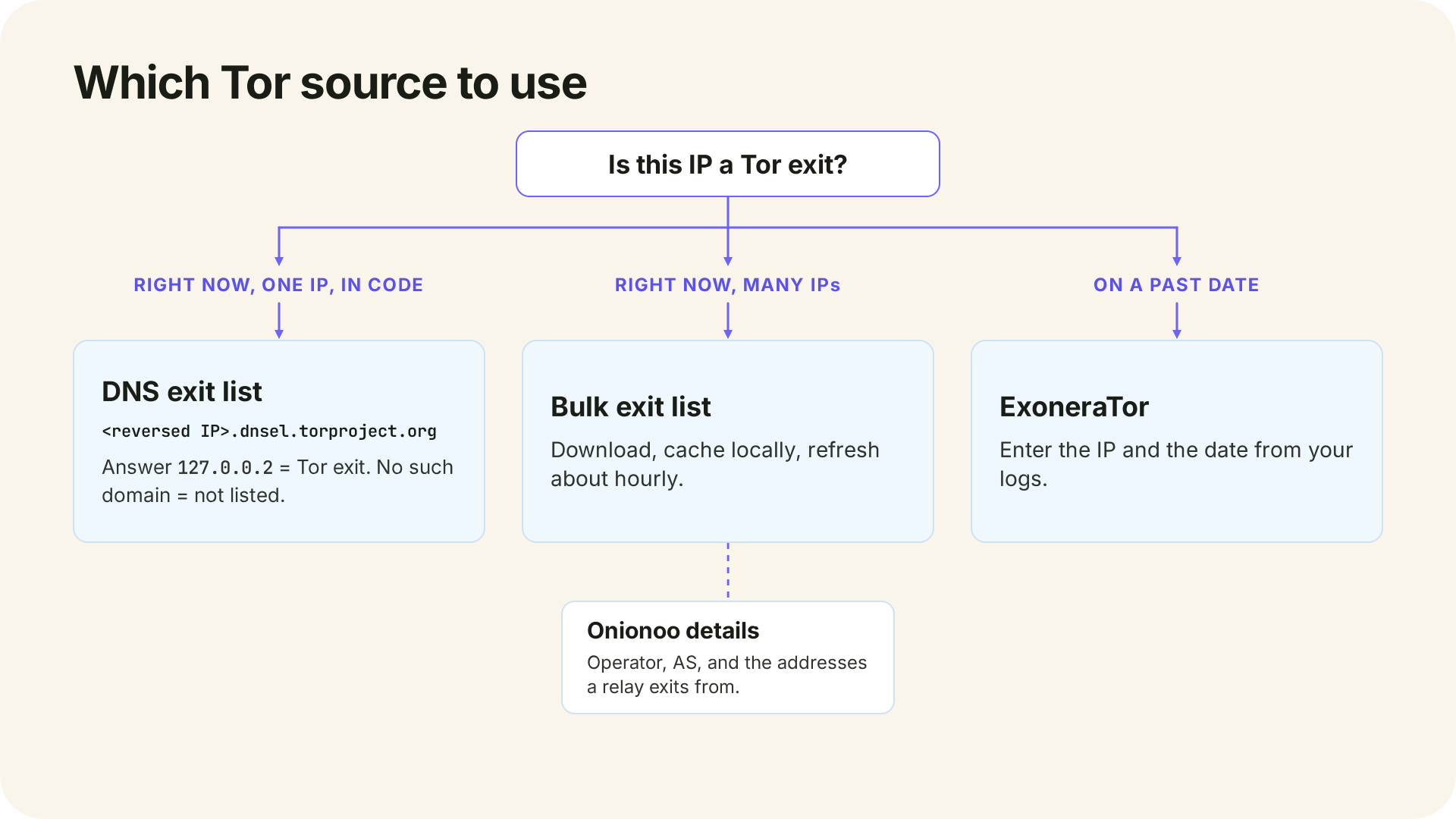
You can verify a Tor match yourself, because the Tor network publishes its exits. A Tor exit node is the last relay in a Tor circuit, the address a website sees when someone uses Tor. Four Tor Project sources answer slightly different questions:
- The bulk exit list at check.torproject.org/torbulkexitlist, one address per line. The Tor Project says it's updated at most once every 40 minutes and that fetching it hourly is reasonable, so cache it and check against your copy.
- The DNS exit list. Reverse an IPv4 address's four numbers and query
<reversed IP>.dnsel.torproject.org. A listed exit answers127.0.0.2, an unknown one NXDOMAIN, and a TXT query returns each relay's fingerprint. A timeout or server error is neither answer. - Onionoo, the relay database behind Tor Metrics. Its
exit_addressesfield lists the IPv4 addresses a relay exited from in the past 24 hours, plus the operator's AS and contact. - ExoneraTor, for a past date. It stores a relay's exit address as well as the address it registers with, so the IP in your logs still matches.
Here's 185.220.100.240, an exit run by the German association F3 Netze e.V., checked against the DNS list on October 21, 2026:
dig +short 240.100.220.185.dnsel.torproject.org
dig +short 240.100.220.185.dnsel.torproject.org TXT
127.0.0.2
"3C89C80E2699FB6358BBB64FDC9547AFCB5C03F7"
"8E38B11E849336D62AB6264FBAE9B03C70F07863"
Two fingerprints mean two relays share the address, and Onionoo lists both, named F3Netze, on ports 9000 and 9100. It was in that day's bulk list too, and our API returned is_tor: true.
The same check in Python, with only the standard library:
import ipaddress
import socket
from typing import Optional


def is_tor_exit(ip: str) -> Optional[bool]:
    """Ask the Tor Project's DNS exit list: True, False, or None if unknown."""
    addr = ipaddress.ip_address(ip)
    if addr.version != 4:
        return None  # this function builds the IPv4 query only; None means "not checked"
    query = ".".join(reversed(str(addr).split("."))) + ".dnsel.torproject.org"
    try:
        answer = socket.gethostbyname(query)
    except socket.gaierror as exc:
        if exc.errno == socket.EAI_NONAME:
            return False  # NXDOMAIN: not a listed exit at query time
        return None  # resolver trouble means "unknown", not "clean"
    return True if answer == "127.0.0.2" else None  # any other answer is unexpected


print(is_tor_exit("185.220.100.240"))  # True on October 21, 2026
print(is_tor_exit("155.94.186.115"))   # False on October 21, 2026
The sources describe different moments, so they can disagree without either being wrong: a DNS answer is current, a bulk copy is as old as its download, an API flag is as fresh as the provider's last refresh, and ExoneraTor answers for the date you give it. Trust the most recent observation for the present and ExoneraTor for an incident. On October 21, 2026, two bulk-list downloads held 1,208 and 1,221 addresses, all IPv4, and Onionoo's exit_addresses are IPv4 too, though relays can listen on IPv6; an IPv6 address that matches no list is unchecked, not cleared.
Why VPN, proxy, and Tor answers carry different weight
A Tor flag, a VPN flag, and a residential proxy flag come back in the same response, but they rest on different kinds of evidence, and a practical way to weigh them is by how public that evidence is.
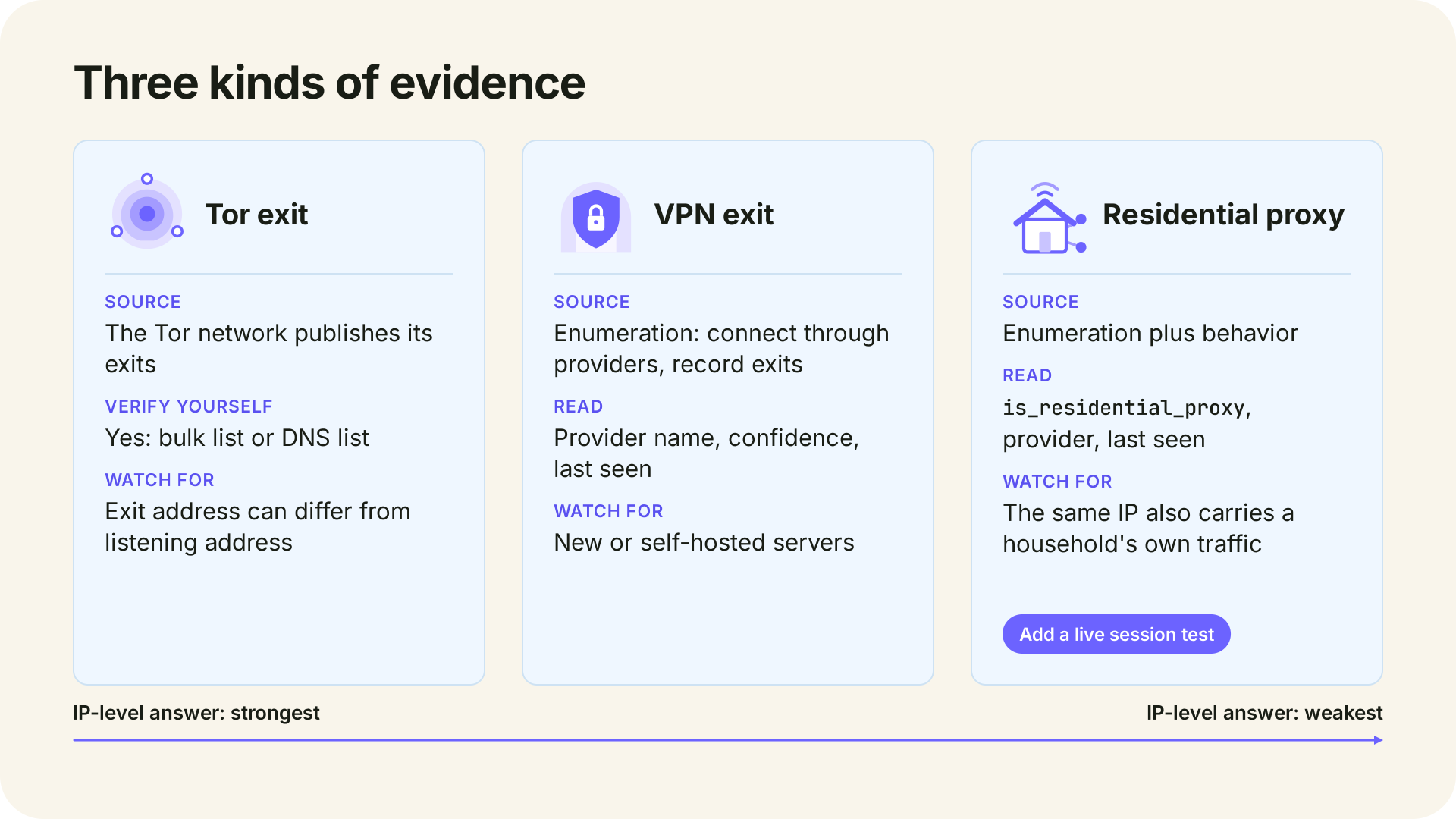
Tor exits are published. A match is close to a fact about the address as of the list's last update, but an exit carries traffic from everyone using it, so it says nothing about who sent this request.
VPN exits are found by enumeration. Most commercial VPNs don't publish their exits, so detection data comes from connecting through each provider and recording the exits it uses, which is why a VPN flag can carry a provider name, a confidence score, and a last-seen date. An exit seen this week is stronger evidence than one seen months ago, and a new or self-hosted server may not be listed yet. How VPN detection works covers the methods.
Residential proxies share addresses with households. A dataset can say an address belongs to a residential proxy network, but it can't tell whether this request came through the proxy or from the household itself. That's why residential proxies are hard to detect, and it's where an IP-level answer is weakest. Real-time VPN and proxy detection adds a second signal by testing the live browser session, though no method catches every residential proxy.
How to read the result
Read the type flags first, then the fields that show how strong and how fresh the evidence is:
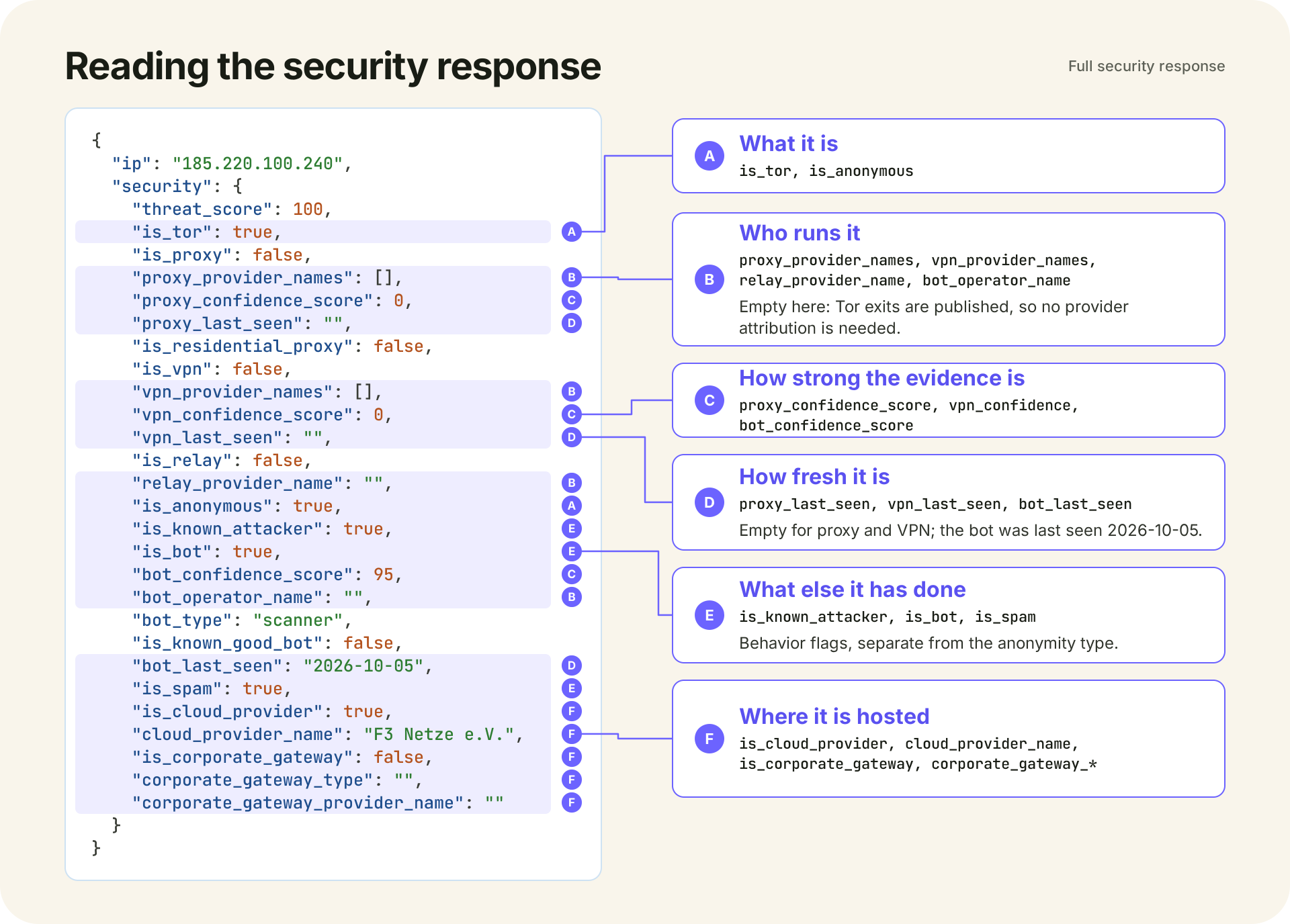
| Field | What it means | Read next |
|---|---|---|
is_anonymous |
True if a VPN, proxy, Tor, or relay was detected; corporate gateways don't set it | One of those four flags set it |
is_vpn |
The address is linked to a VPN network | vpn_provider_names (can be empty), vpn_confidence_score (0 to 100), vpn_last_seen |
is_proxy |
The address is linked to a proxy network | proxy_provider_names, proxy_confidence_score, proxy_last_seen |
is_residential_proxy |
The address is linked to a residential proxy network | The proxy fields, and a live session test if the action matters |
is_tor |
The address is a known Tor exit node | The Tor Project's DNS list, for a current second source |
is_relay |
The address is linked to a relay network such as iCloud Private Relay | relay_provider_name |
is_corporate_gateway |
The address is egress for a secure web gateway, SSE, or SASE service | corporate_gateway_provider_name, corporate_gateway_type |
is_cloud_provider |
The address belongs to a cloud provider | cloud_provider_name; a hint about the network, not a verdict |
threat_score |
A composite score from 0 to 100; higher means higher risk | The flags behind it |
Confidence scores read 0 when their flag is false, and provider names and last-seen dates appear only when known.
Two lookups from October 21, 2026 show why the type matters more than the number. The Windscribe exit scored 50: a named commercial VPN, seen two days earlier, on HostPapa hosting. The Tor exit at 185.220.100.240 scored 100 and also carries is_known_attacker, is_spam, and is_bot with bot_type: "scanner". Those flags describe the address, not its current user; many people share an exit, so abuse from some of them attaches to it.
The threat score folds honeypot and blocklist hits, VPN and proxy enumeration, and attacker, bot, spam, and hosting signals into one number. It isn't a probability of fraud, and it blends what the flags keep apart: anonymity and the address's own abuse record. The IP Security API page's starting bands run from "allow with standard controls" at 1 to 19 to "block, hard challenge, or route to manual review" at 80 to 100, for you to tune. Whether to act on this request also depends on the action and the account.
Flags that look like anonymizers but usually aren't
Some addresses hide the person behind them for ordinary reasons, and the response separates them if you read the right fields.
On October 21, 2026, 172.225.7.142, an iCloud Private Relay address from Apple's published egress list, returned is_relay: true, relay_provider_name: "Apple Relay", and a threat score of 50, with is_vpn and is_proxy both false. By score alone, it looks like the Windscribe exit; the relay flag tells them apart. Apple says a relay address may be shared among more than one Private Relay user and suggests treating these addresses like large carrier-grade NAT or enterprise addresses. The comparison shows how Private Relay and WARP show up in detection data.
Corporate secure web gateways such as Zscaler send a whole workforce's browsing through a few addresses. The same day, 87.58.66.106 returned is_corporate_gateway: true, corporate_gateway_provider_name: "Zscaler", is_anonymous: false, and a threat score of 5; the IP Security API page says the gateway flag doesn't increase the threat score. A check that only asked "is this a cloud address?" would have flagged it.
Mobile carriers and carrier-grade NAT place many customers behind one address, so flagging a single customer can affect everyone sharing it. Consider the request's other signals before adding friction. Hosting addresses can change hands, and the last-seen fields indicate how old the evidence is.
What to do when an IP checks positive
Decide by the type of match and the action at stake, and weigh the flag with the account's history, request velocity, device signals, and payment risk. Our starting recommendations:
- VPN: challenge rather than block, since many people use one for privacy or on public Wi-Fi. Ask for MFA, an email code, or a CAPTCHA at signup and login, and save hard blocks for actions a VPN user has no ordinary reason to take, such as a region-locked purchase.
- Datacenter or commercial proxy (
is_proxy: true,is_residential_proxy: false): the strongest of these signals at signup and checkout, where scrapers and card-testing scripts use them and ordinary customers rarely do. Hold for review or block. - Residential proxy: don't block on the flag alone, because the household behind it may be your customer. Pair it with a live session test or behavioral signals first.
- Tor: treat the address as shared and high-abuse, not as proof about the person. Restrict payments, password resets, and account changes; allow reading, and consider offering an onion service, as the Tor Project suggests.
- Relay or corporate gateway: treat the address as shared and never as a user identity. If you loosen per-IP rate limits for it, keep per-account and per-device limits in place.
Check VPNs, proxies, and Tor with IPGeolocation.io
IPGeolocation.io's IP Security API detects VPNs, proxies, residential proxies, Tor exits, and privacy relays, names the provider where known, and adds confidence scores and last-seen dates to its VPN and proxy detections. It's the most complete anonymity answer in a single call that we know of: it separates relays and corporate gateways from real anonymizers and adds attacker, bot, and spam signals, so a Zscaler office, an iPhone on Private Relay, and a scraping proxy can each get their own rule. How we detect VPNs, proxies, and Tor explains each detection method.
Security is one part of the IP Geolocation API, which returns geolocation, security, ASN, company, abuse contact, time zone, and user agent data; include=security on /v3/ipgeo adds the security object to a full lookup. It also ships as the IP Security Database and Residential Proxy Database for offline use, alongside a real-time script for the live session. See pricing for what each plan includes.
Frequently asked questions
Usually, yes. An IP security dataset, such as IPGeolocation.io's, flags known VPN exit nodes and may include the provider and last-seen date. A negative result means the IP isn't known to be a VPN; new or self-hosted servers may not appear until they've been observed.
Usually because the address is shared or recycled. Your carrier may put many customers behind one address, your employer may route traffic through a secure web gateway, or the address may have previously served as a proxy or VPN. Last-seen dates and the gateway and relay flags separate these cases from an active proxy.
The Tor Project publishes it at check.torproject.org/torbulkexitlist, a plain text file updated at most once every 40 minutes. For one address in real time, query dnsel.torproject.org, which answers 127.0.0.2 for a listed exit.
A Tor exit node is the last relay in a Tor connection: it passes traffic on to the website, which sees the exit's IP address instead of the user's.
Not reliably from the IP alone, because a residential address also carries the household's own traffic. A live session test, such as IPGeolocation.io's real-time VPN and proxy detection, adds a signal from the connection itself, which is why residential proxies are hard to detect.
For occasional checks, yes: the lookup box on IPGeolocation.io's IP Security API page, the /browse/ip/ pages, and the Tor Project's lists are free. In code, the IP Security API is on paid plans, starting at $19 a month for 150,000 credits on the Starter plan; each security lookup uses 2 credits; see pricing and the credits each lookup uses.
Where to go next
Try the address you were concerned about in the lookup box on the IP Security API page. Then add `check_ip` to the action where a fake account or stolen card would cost you the most. For production use, get an API key and compare the pricing plans.