

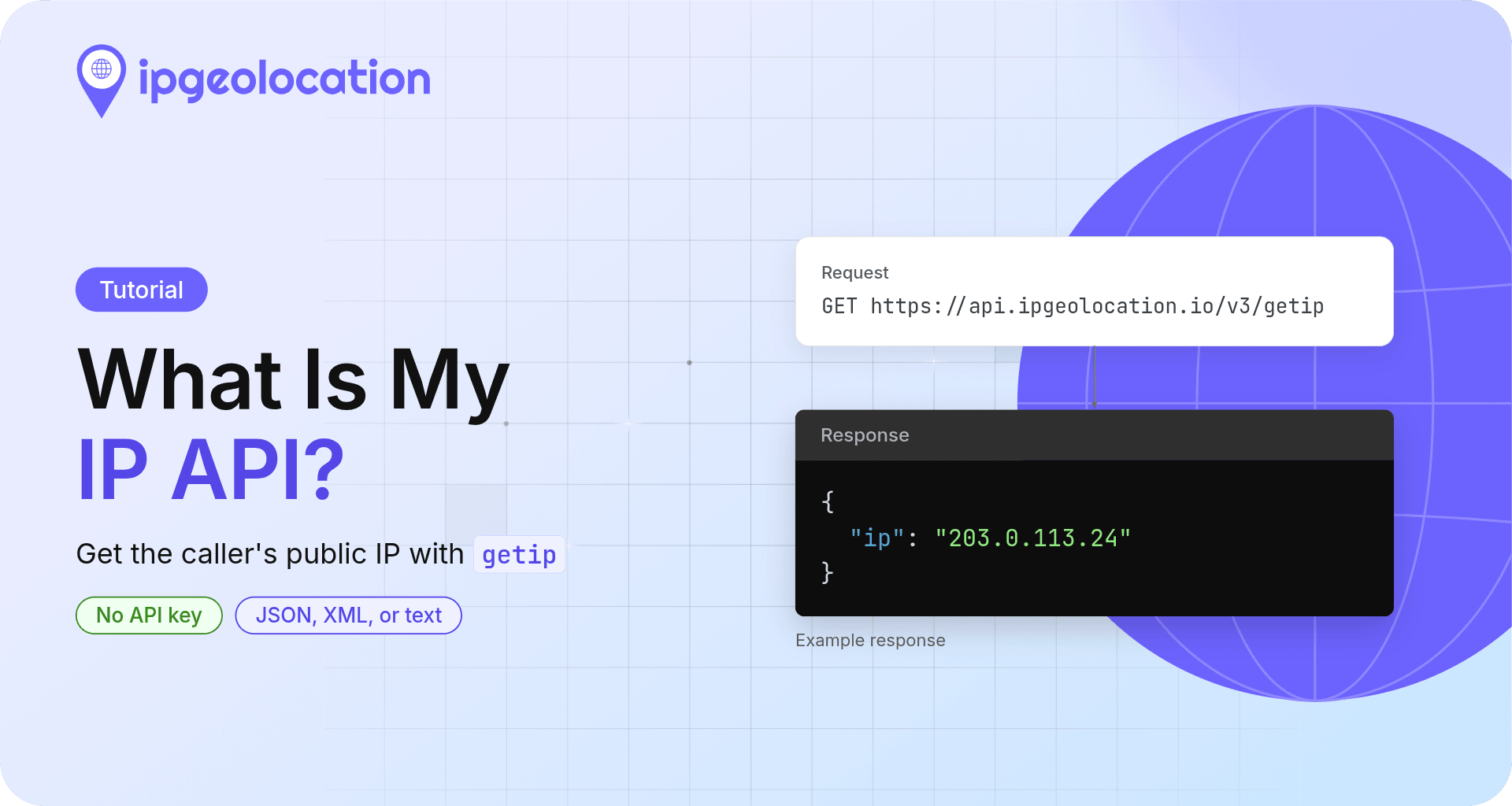
A "what is my IP" API returns the public IP address of whoever calls it. IPGeolocation.io's getip endpoint does this with one GET request, no API key, and no account:
curl https://api.ipgeolocation.io/v3/getip
{"ip":"203.0.113.24"}
Your own address replaces the example 203.0.113.24.
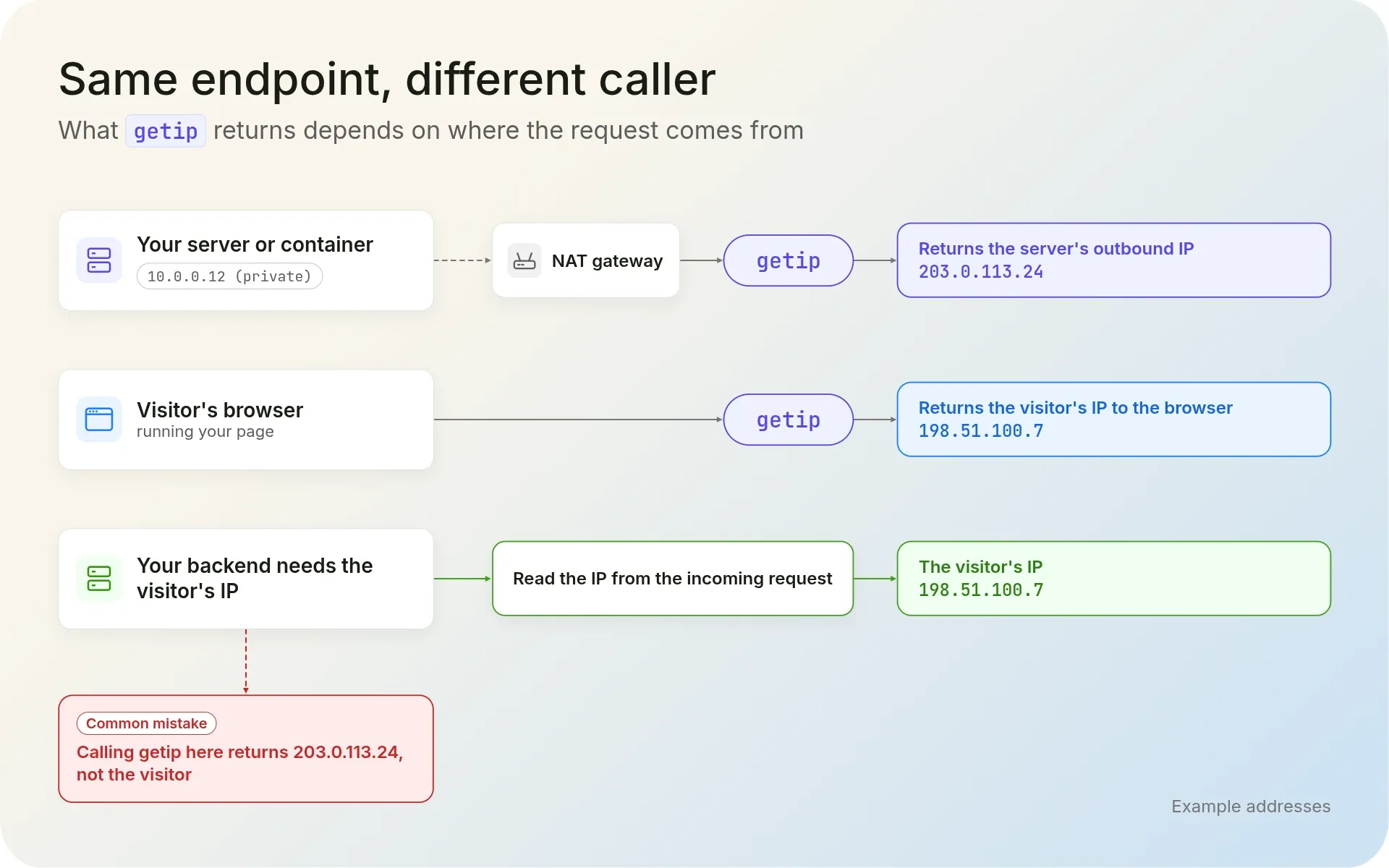
Who calls decides the answer. Run that request on a server and getip returns the server's outbound IP. Call it from a visitor's browser and it returns the visitor's IP.
TL;DR
To use IPGeolocation.io's getip as your "what is my IP" API, send one GET to https://api.ipgeolocation.io/v3/getip from the machine whose address you need and read the ip field.
output=textreturns the bare address for scripts;output=xmlreturns XML.- Browser code on any website can call it.
- A backend that needs a visitor's IP reads it from the incoming request instead.
- For data about the caller's IP, such as its location and ASN, call
/v3/ipgeowithout anipparameter.
Get your public IP with curl
One curl command gets your public IP from any terminal. Plain text suits scripts best:
curl -sS --fail --max-time 10 "https://api.ipgeolocation.io/v3/getip?output=text"
203.0.113.24
The text reply has no trailing newline, so your prompt may land on the same line; ip=$(curl ...) captures it cleanly.
The output parameter picks the format:
| Request | Content type | Body |
|---|---|---|
/v3/getip |
application/json |
{"ip":"203.0.113.24"} |
/v3/getip?output=xml |
application/xml |
<LinkedHashMap><ip>203.0.113.24</ip></LinkedHashMap> |
/v3/getip?output=text |
text/plain |
203.0.113.24 |
The Get IP endpoint reference in the IPGeolocation.io API docs covers the Accept header too. getip uses no credits, has no rate limit, and runs under the API's 99.99% uptime SLA; as of October 2026, it handles more than 500 million requests a month, counted from our API logs.
-sS hides the progress meter but keeps errors, --fail turns an HTTP error status into a non-zero exit code instead of printing the error body, and --max-time stops a stalled request. Very short timeouts are a common production pitfall; 10 seconds allows for a slow network.
With JSON, jq pulls out the field:
curl -sS --fail --max-time 10 https://api.ipgeolocation.io/v3/getip | jq -r .ip
In PowerShell, Invoke-RestMethod parses the JSON for you:
(Invoke-RestMethod -Uri "https://api.ipgeolocation.io/v3/getip" -TimeoutSec 10).ip
Both print only the address.
Caller IP vs. visitor IP: what getip returns
getip returns the public IP of whatever machine sends the request, so the same URL gives different answers depending on where your code runs:
| Where the request comes from | What getip returns |
|---|---|
| Your laptop on a home or office network | Your network's public IP, shared by every device behind the router |
| A server or container behind a NAT gateway | The gateway's public IP |
| A CI runner or serverless function | The platform's outbound IP for that run, which can change between runs |
| A visitor's browser, running your page | The visitor's public IP, returned to the visitor's browser |
| Any of these through a VPN or proxy | The VPN or proxy exit IP |
Two mistakes are common. Developers expect getip to match the private address in their network settings, such as 192.168.1.20 (public and private IP addresses explains the difference). And backends expect it to return the end user's IP, but a server that calls getip while handling a visitor's request gets its own address back; how to get a visitor's real IP address in your backend shows the right way. Any what-is-my-IP service behaves this way, because it answers with the address the request arrives from.
One exception is how we handle proxies on our end at IPGeolocation.io: getip also reads the X-Forwarded-For and CF-Connecting-IP headers. When a proxy adds one, such as a corporate proxy that inspects HTTPS traffic, getip reports the original client instead of the proxy, which can be a private address. Any client can set those headers too, so treat a getip result as information about the caller, never as proof of identity.
Get your public IP in code
Each server-side example gets your public IP address with a 10-second timeout, checks that the reply is a real IP, and prints it or exits with an error.
1. Python
Everything it imports (ipaddress, json, and urllib) ships with Python 3, so there's nothing to install. Save this as get_public_ip.py:
import http.client
import ipaddress
import json
import urllib.request

GETIP_URL = "https://api.ipgeolocation.io/v3/getip"


def get_public_ip(timeout: float = 10.0) -> str:
    """Return the public IP of the machine running this code."""
    try:
        with urllib.request.urlopen(GETIP_URL, timeout=timeout) as response:
            payload = json.load(response)
    except (OSError, ValueError, http.client.HTTPException) as exc:  # network, timeout, bad reply
        raise RuntimeError(f"getip request failed: {exc}") from exc

    ip = payload.get("ip") if isinstance(payload, dict) else None
    try:
        # Check the value before the rest of your code relies on it
        return str(ipaddress.ip_address(str(ip)))
    except ValueError as exc:
        raise RuntimeError(f"getip returned an unexpected value: {ip!r}") from exc


if __name__ == "__main__":
    try:
        print(get_public_ip())
    except RuntimeError as err:
        raise SystemExit(f"Could not get the public IP: {err}")
python3 get_public_ip.py prints one address, such as 203.0.113.24. If the network stalls, you'll see Could not get the public IP: getip request failed: <urlopen error timed out> after 10 seconds instead.
2. Node.js
Node.js 18 and later have fetch built-in. Save this as get-public-ip.mjs; the .mjs extension allows top-level await:
import { isIP } from "node:net";

const GETIP_URL = "https://api.ipgeolocation.io/v3/getip";

async function getPublicIp() {
  // Give up after 10 seconds so a stalled network can't hang the script
  const response = await fetch(GETIP_URL, { signal: AbortSignal.timeout(10000) });
  if (!response.ok) {
    throw new Error(`getip returned HTTP ${response.status}`);
  }
  const data = await response.json();
  const ip = data?.ip;
  if (!isIP(ip ?? "")) {
    throw new Error(`getip returned an unexpected value: ${ip}`);
  }
  return ip;
}

try {
  console.log(await getPublicIp());
} catch (err) {
  console.error("Could not get the public IP:", err.message);
  process.exitCode = 1;
}
node get-public-ip.mjs prints the address. If you see fetch is not defined, your Node.js version is older than 18.
3. JavaScript in the browser
Web pages on any site can call getip, so a page can show visitors their own public IP with no API key. That suits static and cached pages, where no server code sees the visitor's request:
<p>Your public IP: <span id="visitor-ip">checking...</span></p>
<script>
  // Runs in the visitor's browser, so getip returns the visitor's IP
  (async () => {
    const el = document.getElementById("visitor-ip");
    try {
      const response = await fetch("https://api.ipgeolocation.io/v3/getip", {
        signal: AbortSignal.timeout(10000),
      });
      if (!response.ok) throw new Error(`HTTP ${response.status}`);
      const data = await response.json();
      el.textContent = data?.ip ?? "unavailable";
    } catch (err) {
      el.textContent = "unavailable";
      console.warn("getip failed:", err);
    }
  })();
</script>
The span shows the visitor's address, or "unavailable" if the call fails. getip suits this client-side job because there's no key to leak; if you send the value to your backend, keep it out of security decisions. For location data in the browser, see IP geolocation in JavaScript.
4. Go
Go 1.18 added net/netip, which parses and validates the address in one call. Save this as main.go:
package main

import (
	"encoding/json"
	"fmt"
	"net/http"
	"net/netip"
	"os"
	"time"
)

const getipURL = "https://api.ipgeolocation.io/v3/getip"

func getPublicIP() (netip.Addr, error) {
	client := &http.Client{Timeout: 10 * time.Second}
	resp, err := client.Get(getipURL)
	if err != nil {
		return netip.Addr{}, fmt.Errorf("request failed: %w", err)
	}
	defer resp.Body.Close()

	if resp.StatusCode != http.StatusOK {
		return netip.Addr{}, fmt.Errorf("unexpected status: %s", resp.Status)
	}

	var body struct {
		IP string `json:"ip"`
	}
	if err := json.NewDecoder(resp.Body).Decode(&body); err != nil {
		return netip.Addr{}, fmt.Errorf("decoding response: %w", err)
	}

	addr, err := netip.ParseAddr(body.IP)
	if err != nil {
		return netip.Addr{}, fmt.Errorf("getip returned an unexpected value: %q", body.IP)
	}
	return addr, nil
}

func main() {
	ip, err := getPublicIP()
	if err != nil {
		fmt.Fprintln(os.Stderr, "Could not get the public IP:", err)
		os.Exit(1)
	}
	fmt.Println(ip)
}
go run main.go prints the address. An HTTP error prints Could not get the public IP: unexpected status: ... and exits with status 1.
5. PHP
This uses PHP's curl extension (php -m | grep curl confirms it's installed). Save it as get-public-ip.php:
<?php

function getPublicIp(int $timeoutSeconds = 10): string
{
    $ch = curl_init('https://api.ipgeolocation.io/v3/getip');
    curl_setopt_array($ch, [
        CURLOPT_RETURNTRANSFER => true,
        CURLOPT_TIMEOUT        => $timeoutSeconds,
        CURLOPT_FAILONERROR    => true, // treat HTTP 4xx and 5xx as errors
    ]);
    $body = curl_exec($ch);

    if ($body === false) {
        throw new RuntimeException('getip request failed: ' . curl_error($ch));
    }

    $data = json_decode($body, true);
    $ip = is_array($data) ? ($data['ip'] ?? null) : null;

    if (!is_string($ip) || filter_var($ip, FILTER_VALIDATE_IP) === false) {
        throw new RuntimeException('getip returned an unexpected value');
    }
    return $ip;
}

try {
    echo getPublicIp(), PHP_EOL;
} catch (RuntimeException $e) {
    fwrite(STDERR, 'Could not get the public IP: ' . $e->getMessage() . PHP_EOL);
    exit(1);
}
php get-public-ip.php prints the address. An HTTP error prints Could not get the public IP: getip request failed: ... and exits with status 1.
Three jobs for getip
1. Find your server's outbound IP for an allowlist
When a partner asks which IP your requests come from, run the plain-text curl command on the machine that sends them (a server, container, or CI step), not your laptop.
Check more than once: NAT gateways without a fixed IP, CI runners, and serverless platforms can switch addresses, which breaks an allowlist built from one sample. For production, the IPGeolocation.io team recommends static outbound IPs where your platform offers them, with getip to confirm which one your traffic uses.
2. Detect when your public IP changes
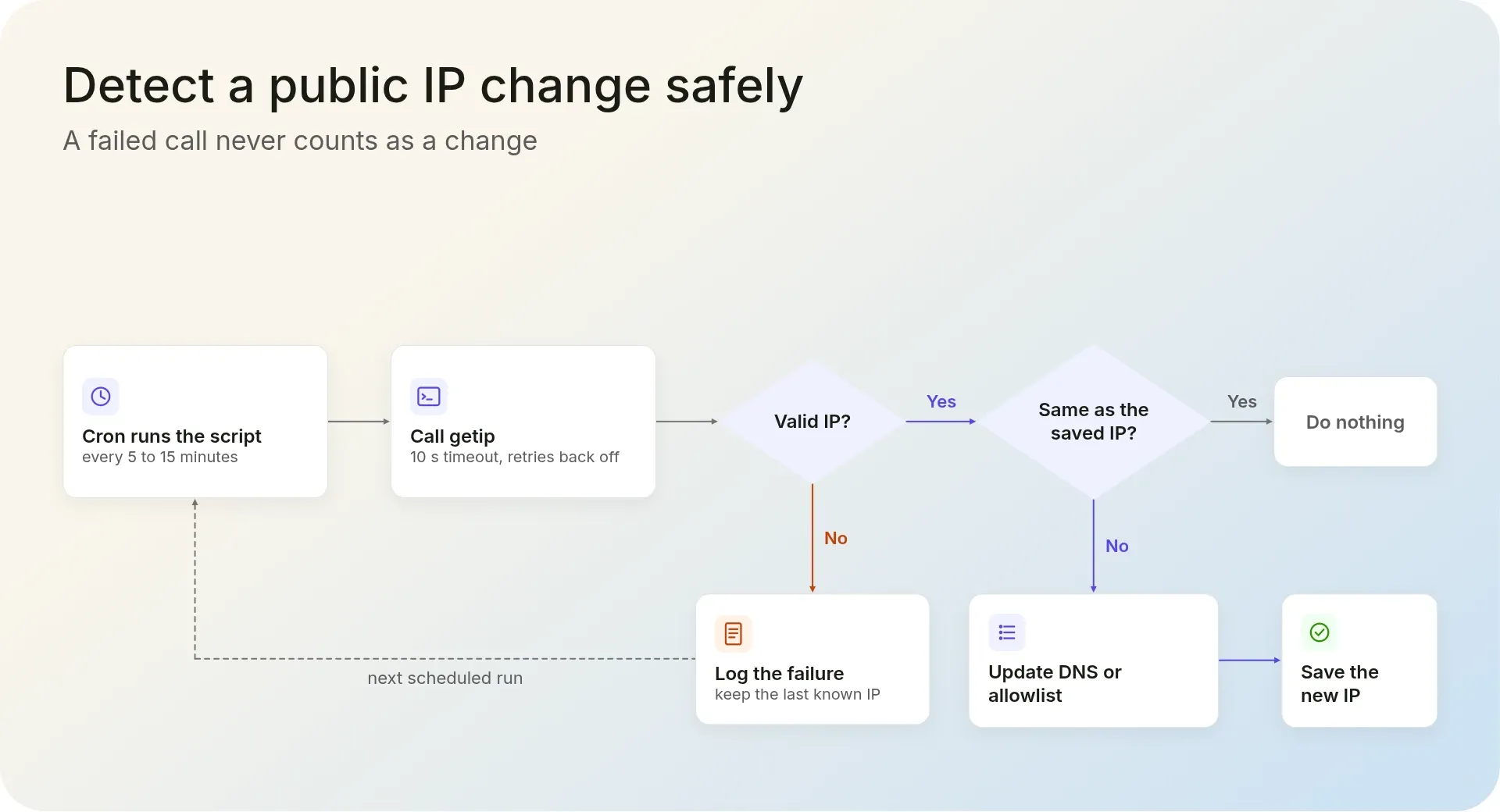
For dynamic DNS or a home lab, this script acts only when getip's answer differs from the last saved value:
#!/usr/bin/env bash
# Run from cron, for example every 10 minutes: */10 * * * * bash /path/to/check-ip.sh
set -euo pipefail

STATE_FILE="${HOME}/.last_public_ip"

# --retry waits longer between attempts after a timeout or a temporary HTTP error
if ! new_ip=$(curl -sS --fail --max-time 10 --retry 3 \
    "https://api.ipgeolocation.io/v3/getip?output=text"); then
  echo "getip failed; keeping the last known IP" >&2
  exit 1
fi

# Accept only a dotted-quad value, never an error page
if [[ ! "$new_ip" =~ ^([0-9]{1,3}\.){3}[0-9]{1,3}$ ]]; then
  echo "unexpected response from getip" >&2
  exit 1
fi

old_ip=$(cat "$STATE_FILE" 2>/dev/null || true)
if [[ "$new_ip" != "$old_ip" ]]; then
  echo "Public IP changed from ${old_ip:-unknown} to $new_ip"
  # Update your DNS record or allowlist here, then save the new value
  printf '%s' "$new_ip" > "$STATE_FILE"
fi
We suggest polling every 5 to 15 minutes, depending on how fast you need to react. A failed call never counts as a change: curl retries with growing waits, the script keeps the last known IP, and its non-zero exit lets your monitoring alert you. The first run printsPublic IP changed from unknown to 203.0.113.24; later runs stay quiet until the address moves.
3. Check that a proxy or VPN is working
Call getip directly, then through the proxy, and compare. --proxy-user Passes the proxy login; reading it from environment variables keeps the password out of your shell history:
# Your address without the proxy
curl -sS --fail --max-time 10 "https://api.ipgeolocation.io/v3/getip?output=text"; echo

# The same request through the proxy
curl -sS --fail --max-time 10 \
  --proxy proxy.example.com:8080 \
  --proxy-user "$PROXY_USER:$PROXY_PASS" \
  "https://api.ipgeolocation.io/v3/getip?output=text"; echo
Without a scheme, curl treats the proxy address as an HTTP proxy. For a SOCKS5 proxy, use --proxy socks5h://proxy.example.com:1080 with the same --proxy-user option; the h lets the proxy resolve the hostname. A wrong password makes curl stop with an error instead of printing an address. For a VPN, run the first command before and after connecting.
An unchanged address usually means the proxy exits through your own public IP, for example because it runs on your network. A new address shows the request went through, though not where that exit is located. The IP Geolocation API answers that, and its security data flags VPN, proxy, and Tor exits with a threat score.
From your IP to what it reveals
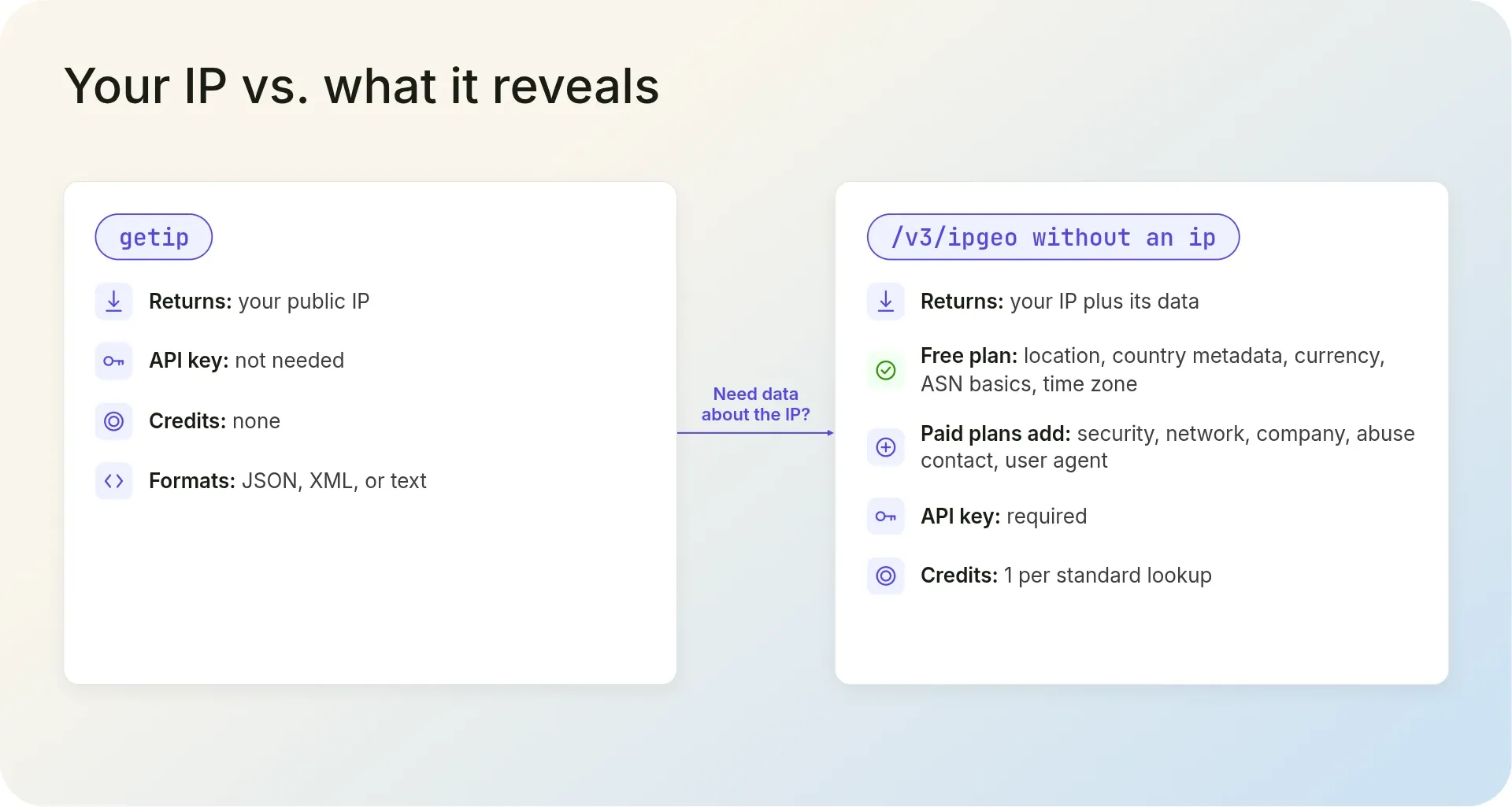
When you need more than the address, IPGeolocation.io's IP Geolocation API returns what it reveals. Call /v3/ipgeo without an ip parameter, with your API key in IPGEO_API_KEY, and it looks up the caller's IP:
curl -sS --fail --max-time 10 "https://api.ipgeolocation.io/v3/ipgeo?apiKey=$IPGEO_API_KEY"
The response starts with the same ip field, followed by objects such as location, asn, and time_zone. A missing or wrong key returns HTTP 401.
The same endpoint can return geolocation, security, network and ASN, company, abuse contact, time zone, and user agent data, so one call can show where an address is, what risk signals it carries, and who runs its network. Locations are built from multiple independent signals, including active measurements, that are cross-checked and refreshed continuously.
A standard lookup costs 1 credit, and security data adds 2. The free plan's 1,000 credits a day cover location, country metadata, currency, ASN basics, and time zone; security, network, company, abuse contact, and user agent data in this response are on paid plans, as the pricing page shows.
Our recommendation: use getip when you need only the address, and call /v3/ipgeo directly when you need data about it. Keep the API key on your server (how to secure your API key before production); on paid plans, Request Origin lets browser code call /v3/ipgeo without exposing it.
Frequently asked questions
Yes. IPGeolocation.io's getip endpoint needs no API key or account, uses no credits, and has no rate limit. It runs under the API's 99.99% uptime SLA.
Because your server made the request. IPGeolocation.io's getip returns the public IP of whatever machine calls it, so a backend call gets the backend's outbound IP unless the request carries a forwarding header. Read a visitor's IP from the incoming request instead.
Run curl -sS --fail --max-time 10 "https://api.ipgeolocation.io/v3/getip?output=text". With output=text, IPGeolocation.io's getip returns only your public IP address, ready for a shell variable. Leave the parameter out for JSON, or use output=xml for XML.
Yes. IPGeolocation.io's getip answers fetch() calls from web pages on any site without an API key, and in the browser it returns the visitor's public IP. Use it for display or personalization, not security decisions.
No. IPGeolocation.io's getip returns only the IP address. For its location, ASN, and time zone, call the /v3/ipgeo endpoint without an ip parameter; it looks up the caller for 1 credit per standard lookup.
Next steps
Get a free IPGeolocation.io API key (1,000 credits a day, no credit card) and run the caller lookup on /v3/ipgeo, or start with Getting Started with the IP Geolocation API.